wheel CADILLAC ATS 2017 1.G Owner's Manual
[x] Cancel search | Manufacturer: CADILLAC, Model Year: 2017, Model line: ATS, Model: CADILLAC ATS 2017 1.GPages: 335, PDF Size: 3.73 MB
Page 126 of 335

Cadillac ATS/ATS-V Owner Manual (GMNA-Localizing-MidEast-10287885) -
2017 - crc - 6/16/16
INSTRUMENTS AND CONTROLS 125
The HUD information can be
displayed in various languages. The
speedometer reading and other
numerical values can be displayed in
either English or metric units.
The language selection is changed
through the radio and the units of
measurement is changed through the
Driver Information Center (DIC). See
Vehicle Personalization0137 and
“Settings ”under Instrument
Cluster 0107.
HUD Display on the Vehicle
Windshield
The HUD may display some of the
following vehicle information and
vehicle messages or alerts: .
Speed
. Tachometer
. Audio
. Phone
. Navigation
. Collision Alert
. Cruise Control
. Lane Departure
. Low Fuel
. Shift Lights (ATS-V only)
Some vehicle messages or alerts
displayed in the HUD may be cleared
by using the steering wheel controls.
See Vehicle Messages 0127.
The HUD control is to the left of the
steering wheel. To adjust the HUD image:
1. Adjust the driver seat to a comfortable position.
2. Start the engine.
3. Use the following settings to adjust the HUD.
$:Press down or lift up to center
the HUD image. The HUD image can
only be adjusted up and down, not
side to side.
!: Press to select the display
view. Release when the desired display
is shown on the HUD.
D: Lift up and hold to brighten the
display. Press down and hold to dim
the display. Hold down to turn the
display off.
The HUD image will automatically
dim and brighten to compensate for
outside lighting. The HUD brightness
control can also be adjusted as
needed.
The HUD image can temporarily light
up depending on the angle and
position of the sunlight on the HUD
display. This is normal.
Page 127 of 335
Cadillac ATS/ATS-V Owner Manual (GMNA-Localizing-MidEast-10287885) -
2017 - crc - 6/16/16
126 INSTRUMENTS AND CONTROLS
Polarized sunglasses could make the
HUD image harder to see.
Head-Up Display (HUD) Rotation
Option
This feature allows for adjusting the
angle of the HUD image.
Press SEL on the steering wheel
controls while Head-up Display
Rotation is highlighted to enter Adjust
Mode. Press
yorzto adjust the
angle of the HUD display. Press
Sor
Tto highlight OK, then press SEL to
save the setting. CANCEL can also be
selected to cancel the setting. The
vehicle must be in P (Park). See
Instrument Cluster 0107.
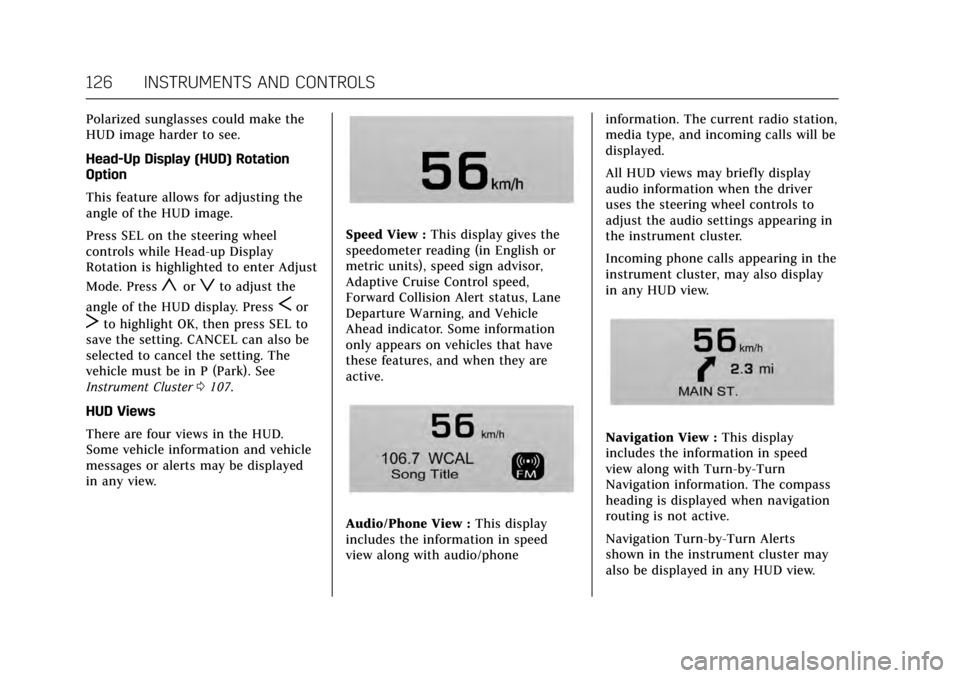
HUD Views
There are four views in the HUD.
Some vehicle information and vehicle
messages or alerts may be displayed
in any view.
Speed View : This display gives the
speedometer reading (in English or
metric units), speed sign advisor,
Adaptive Cruise Control speed,
Forward Collision Alert status, Lane
Departure Warning, and Vehicle
Ahead indicator. Some information
only appears on vehicles that have
these features, and when they are
active.
Audio/Phone View : This display
includes the information in speed
view along with audio/phone information. The current radio station,
media type, and incoming calls will be
displayed.
All HUD views may briefly display
audio information when the driver
uses the steering wheel controls to
adjust the audio settings appearing in
the instrument cluster.
Incoming phone calls appearing in the
instrument cluster, may also display
in any HUD view.
Navigation View :
This display
includes the information in speed
view along with Turn-by-Turn
Navigation information. The compass
heading is displayed when navigation
routing is not active.
Navigation Turn-by-Turn Alerts
shown in the instrument cluster may
also be displayed in any HUD view.
Page 135 of 335
Cadillac ATS/ATS-V Owner Manual (GMNA-Localizing-MidEast-10287885) -
2017 - crc - 6/16/16
134 INSTRUMENTS AND CONTROLS
SIDE DETECTION SYSTEM
UNAVAILABLE
This message indicates that Side Blind
Zone Alert (SBZA), Lane Change Alert
(LCA), and Rear Cross Traffic Alert
(RCTA) are disabled either because the
sensor is blocked and cannot detect
vehicles in the blind zone, or the
vehicle is passing through an open
area, such as the desert, where there
is insufficient data for operation. This
message may also activate during
heavy rain or due to road spray. The
vehicle does not need service. For
cleaning, see "Washing the Vehicle"
underExterior Care 0298.
TAKE STEERING
If LKA does not detect active driver
steering, an alert and chime may be
provided. Move the steering wheel to
dismiss. See Lane Keep Assist
(LKA) 0224.
Ride Control System
Messages
SERVICE STABILITRAK
This message displays if there is a
problem with the StabiliTrak system.
See Traction Control/Electronic Stability
Control 0198.
SERVICE SUSPENSION SYSTEM
This message displays when there is a
problem with the Magnetic Ride
Control™ system. See Driver Mode
Control 0199. Have the vehicle
serviced by your dealer.
SERVICE TRACTION CONTROL
This message displays when there is a
problem with the Traction Control
System (TCS). See Traction Control/
Electronic Stability Control 0198.
TRACTION CONTROL OFF
This message may display when the
Traction Control System (TCS) has
been turned off. See Traction Control/
Electronic Stability Control 0198.
TRACTION CONTROL ON
This message may display when the
Traction Control System (TCS) has
been turned on. See Traction Control/
Electronic Stability Control 0198.
Airbag System Messages
SERVICE AIRBAG
This message displays if there is a
problem with the airbag system. See
your dealer for service.
Safety Belt Messages
AUTOMATIC SEATBELT
TIGHTENING UNAVAILABLE
This message displays when the
Automatic Safety Belt Tightening
System, if equipped, becomes
unavailable. This could be caused by a
temporary condition. If the message
continues to display, see your dealer.
Page 136 of 335
Cadillac ATS/ATS-V Owner Manual (GMNA-Localizing-MidEast-10287885) -
2017 - crc - 6/16/16
INSTRUMENTS AND CONTROLS 135
SERVICE AUTOMATIC SEATBELT
TIGHTENING SYSTEM
If this message displays, take the
vehicle to your dealer to repair the
Automatic Safety Belt Tightening
System, if equipped.
Security Messages
THEFT ATTEMPTED
This message displays if the vehicle
detects a tamper condition.
Service Vehicle Messages
SERVICE AC SYSTEM
This message displays if there is a
problem with the air conditioning
system. Take the vehicle to your
dealer for service.
SERVICE POWER STEERING
This message displays and a chime
may sound when there may be a
problem with the power steering
system. If this message displays and a
reduction in steering performance or
loss of power steering assistance is
noticed, see your dealer.
SERVICE STEERING
COLUMN LOCK
This message displays if there is a
problem with the steering column
lock. Take the vehicle to your dealer
for service.
SERVICE VEHICLE SOON
This message displays if there is a
problem with the vehicle. Take the
vehicle to your dealer for service.
Starting the Vehicle
Messages
PRESS BRAKE TO START
This message is displayed when
attempting to start the vehicle
without first pressing the brake pedal.
SERVICE KEYLESS START
SYSTEM
This message is displayed if there is a
problem with the pushbutton start
system. Take the vehicle to your
dealer for service.
TURN STEERING WHEEL START
VEHICLE AGAIN
This message may display when you
try to start the vehicle, but the
column remains locked. Try turning
the steering wheel while starting the
vehicle to unlock the steering column.
If the vehicle still does not start, turn
the steering wheel the other way, and
try starting the vehicle again.
Tire Messages
SERVICE TIRE MONITOR SYSTEM
This message displays if there is a
problem with the Tire Pressure
Monitor System (TPMS). SeeTire
Pressure Monitor Operation 0275.
TIRE LEARNING ACTIVE
This message displays when the
system is learning new tires. See Tire
Pressure Monitor Operation 0275.
TIRE PRESSURE LOW ADD AIR
TO TIRE
This message displays when the
pressure in one or more of the tires
is low.
Page 139 of 335

Cadillac ATS/ATS-V Owner Manual (GMNA-Localizing-MidEast-10287885) -
2017 - crc - 6/16/16
138 INSTRUMENTS AND CONTROLS
Press and the following may display:
.Engine Sound Management
. Steering
. Suspension
Engine Sound Management
This allows the Engine Sound
Management setting to be changed.
Select Auto (Mode Selector), Tour,
Sport, or Track.
Steering
This allows the Steering setting to be
changed.
Select Auto (Mode Selector), Tour,
Sport, or Track.
Suspension
This allows the Suspension setting to
be changed.
Select Auto (Mode Selector), Tour,
Sport, or Track.
Language (Language)
Select Language, then select from the
available language(s). Select the language. The selected
language will display on the system,
and voice recognition (if equipped)
will reflect the selected language.
Valet Mode
(If Equipped)
This will lock the infotainment system
and steering wheel controls. It may
also limit access to vehicle storage
locations (if equipped).
To enable valet mode:
1. Enter a four-digit code on the keypad.
2. Select Enter to go to the confirmation screen.
3. Re-enter the four-digit code.
Press LOCK or UNLOCK to lock or
unlock the system. Press Back to go
back to the previous menu.
The four-digit code can be texted to a
paired phone if forgotten.
Radio
Press to display the Radio Menu and
the following may display:
. Manage Favorites
. Number of Favorites Pages .
Audible Touch Feedback
. Auto Volume
. Bose AudioPilot
. Maximum Startup Volume
. Audio Cue Volume
Manage Favorites
This allows favorites to be edited.
Select a displayed Favorite to select
that favorite to edit. Select Rename to
rename the favorite or Delete to
delete it.
Number of Favorites Pages
Select to set the number of favorites
to display.
Select the desired number or select
Auto and the infotainment system will
automatically adjust the number of
favorites shown.
Audible Touch Feedback
This allows Audible Touch Feedback
to be turned on or off.
Select Off or On.
Page 141 of 335
Cadillac ATS/ATS-V Owner Manual (GMNA-Localizing-MidEast-10287885) -
2017 - crc - 6/16/16
140 INSTRUMENTS AND CONTROLS
Collision/Detection Systems
Select the Collision/Detection Systems
menu and the following may display
(if equipped):
.Alert Type
. Auto Collision Preparation
. Go Notifier
. Lane Change Alert
Alert Type
This feature will set crash alerts to
beeps or seat vibrations. This setting
affects all crash alerts including
Forward Collision, Lane Departure
Warning, Adaptive Cruise Control,
Parking Assist, and Backing Warning
alerts.
Select Beeps or Safety Alert Seat.
Auto Collision Preparation
This feature will turn on or off the
Forward Collision Alert (FCA) and
Forward Automatic Braking (FAB).
The Off setting disables all FCA and
FAB functions. With the Alert and
Brake setting, both FCA and FAB are available. The Alert setting disables
FAB. See
Forward Automatic Braking
(FAB) 0221.
Select Off, Alert and Brake, or Alert.
Go Notifier
This feature will give a reminder that
Adaptive Cruise Control provides
when it has brought the vehicle to a
complete stop behind another
stopping vehicle, and then that vehicle
drives on.
Select Off or On.
Lane Change Alert
This allows the Lane Change Alert
feature to be turned on or off. See
Lane Change Alert (LCA) 0222.
Select Off or On.
Comfort and Convenience
Select the Comfort and Convenience
menu and the following may display:
. Auto Memory Recall
. Reverse Tilt Mirror
. Auto Mirror Folding
. Easy Exit Options .
Chime Volume
. Personalization by Driver
. Rain Sense Wipers
Auto Memory Recall
This feature automatically recalls the
current driver’s previously stored 1 or
2 button positions when the ignition
is changed from off to ON/RUN or
ACC/ACCESSORY. See Memory
Seats 056.
Select Off or On.
Reverse Tilt Mirror
When on, both the driver and
passenger, driver, or passenger mirrors
will tilt downward when the vehicle is
shifted to R (Reverse) to improve
visibility of the ground near the rear
wheels. They will return to their
previous driving position when the
vehicle is shifted out of R (Reverse),
remains in R (Reverse) for about
30 seconds, or the ignition is turned
to OFF.
Select Off, On - Driver and Passenger,
On - Driver, or On - Passenger.
Page 150 of 335
Cadillac ATS/ATS-V Owner Manual (GMNA-Localizing-MidEast-10287885) -
2017 - crc - 6/16/16
LIGHTING 149
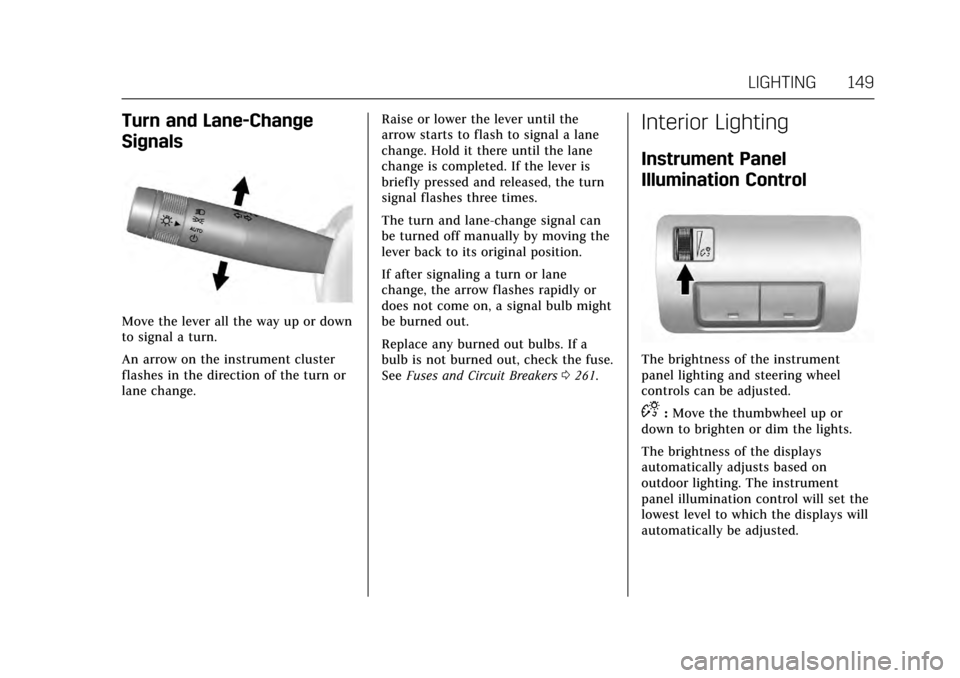
Turn and Lane-Change
Signals
Move the lever all the way up or down
to signal a turn.
An arrow on the instrument cluster
flashes in the direction of the turn or
lane change.Raise or lower the lever until the
arrow starts to flash to signal a lane
change. Hold it there until the lane
change is completed. If the lever is
briefly pressed and released, the turn
signal flashes three times.
The turn and lane-change signal can
be turned off manually by moving the
lever back to its original position.
If after signaling a turn or lane
change, the arrow flashes rapidly or
does not come on, a signal bulb might
be burned out.
Replace any burned out bulbs. If a
bulb is not burned out, check the fuse.
See
Fuses and Circuit Breakers 0261.
Interior Lighting
Instrument Panel
Illumination Control
The brightness of the instrument
panel lighting and steering wheel
controls can be adjusted.
D:Move the thumbwheel up or
down to brighten or dim the lights.
The brightness of the displays
automatically adjusts based on
outdoor lighting. The instrument
panel illumination control will set the
lowest level to which the displays will
automatically be adjusted.
Page 169 of 335

Cadillac ATS/ATS-V Owner Manual (GMNA-Localizing-MidEast-10287885) -
2017 - crc - 6/16/16
168 CLIMATE CONTROLS
Sensor
The solar sensor monitors the
solar heat.
The climate control system uses the
sensor information to adjust the
temperature, fan speed, recirculation,
and air delivery mode for best
comfort.
If the sensor is covered, the automatic
climate control system may not work
properly.
Air Vents
Adjustable air vents are in the center
and on the side of the instrument
panel.
Use the thumbwheels (1) near the air
vents to open or close off the airflow.
Move the slats (2) to change the
direction of the airflow.
Additional air vents are beneath the
windshield and the driver side and
passenger side door windows. These
are fixed and cannot be adjusted.
Operation Tips
.Clear away any ice, snow, or leaves
from air inlets at the base of the
windshield that could block the
flow of air into the vehicle.
. Keep the path under the front
seats clear of objects to help
circulate the air inside the vehicle
more effectively.
Page 172 of 335
Cadillac ATS/ATS-V Owner Manual (GMNA-Localizing-MidEast-10287885) -
2017 - crc - 6/16/16
DRIVING AND OPERATING 171
Driving Information
Distracted Driving
Distraction comes in many forms and
can take your focus from the task of
driving. Exercise good judgment and
do not let other activities divert your
attention away from the road. Many
local governments have enacted laws
regarding driver distraction. Become
familiar with the local laws in
your area.
To avoid distracted driving, keep your
eyes on the road, keep your hands on
the steering wheel, and focus your
attention on driving.
.Do not use a phone in demanding
driving situations. Use a
hands-free method to place or
receive necessary phone calls.
. Watch the road. Do not read, take
notes, or look up information on
phones or other electronic devices.
. Designate a front seat passenger
to handle potential distractions. .
Become familiar with vehicle
features before driving, such as
programming favorite radio
stations and adjusting climate
control and seat settings. Program
all trip information into any
navigation device prior to driving.
. Wait until the vehicle is parked to
retrieve items that have fallen to
the floor.
. Stop or park the vehicle to tend to
children.
. Keep pets in an appropriate carrier
or restraint.
. Avoid stressful conversations
while driving, whether with a
passenger or on a cell phone.
{Warning
Taking your eyes off the road too
long or too often could cause a
crash resulting in injury or death.
Focus your attention on driving. Refer to the infotainment manual for
more information on using that
system, including pairing and using a
cell phone
Defensive Driving
Defensive driving means
“always
expect the unexpected.” The first step
in driving defensively is to wear the
safety belt. See Safety Belts061.
. Assume that other road users
(pedestrians, bicyclists, and other
drivers) are going to be careless
and make mistakes. Anticipate
what they might do and be ready.
. Allow enough following distance
between you and the driver in
front of you.
. Focus on the task of driving.
Control of a Vehicle
Braking, steering, and accelerating are
important factors in helping to control
a vehicle while driving.
Page 173 of 335
Cadillac ATS/ATS-V Owner Manual (GMNA-Localizing-MidEast-10287885) -
2017 - crc - 6/16/16
172 DRIVING AND OPERATING
Braking
Braking action involves perception
time and reaction time. Deciding to
push the brake pedal is perception
time. Actually doing it is
reaction time.
Average driver reaction time is about
three-quarters of a second. In that
time, a vehicle moving at 100 km/h
(60 mph) travels 20 m (66 ft), which
could be a lot of distance in an
emergency.
Helpful braking tips to keep in mind
include:
.Keep enough distance between
you and the vehicle in front
of you.
. Avoid needless heavy braking.
. Keep pace with traffic.
If the engine ever stops while the
vehicle is being driven, brake normally
but do not pump the brakes. Doing so
could make the pedal harder to push
down. If the engine stops, there will
be some power brake assist but it will
be used when the brake is applied. Once the power assist is used up, it
can take longer to stop and the brake
pedal will be harder to push.
Steering
Variable Effort Steering
Some vehicles have a steering system
that varies the amount of effort
required to steer the vehicle in
relation to the speed of the vehicle.
The amount of steering effort required
is less at slower speeds to make the
vehicle more maneuverable and easier
to park. At faster speeds, the steering
effort increases to provide a sport-like
feel to the steering. This provides
maximum control and stability.
Electric Power Steering
The vehicle has electric power
steering. It does not have power
steering fluid. Regular maintenance is
not required.
If power steering assist is lost due to a
system malfunction, the vehicle can
be steered, but may require increased
effort. See your dealer if there is a
problem.If the steering wheel is turned until it
reaches the end of its travel and is
held against that position for an
extended period of time, power
steering assist may be reduced.
If steering assist is used for an
extended period of time, power assist
may be reduced.
Normal use of the power steering
assist should return when the system
cools down.
See specific vehicle steering messages
under
Vehicle Messages 0127.
See your dealer if there is a problem.
Curve Tips
. Take curves at a reasonable speed.
. Reduce speed before entering a
curve.
. Maintain a reasonable steady
speed through the curve.
. Wait until the vehicle is out of the
curve before accelerating gently
into the straightaway.