automatic transmission CADILLAC ATS COUPE 2015 1.G Owners Manual
[x] Cancel search | Manufacturer: CADILLAC, Model Year: 2015, Model line: ATS COUPE, Model: CADILLAC ATS COUPE 2015 1.GPages: 443, PDF Size: 5.79 MB
Page 2 of 443

Black plate (1,1)Cadillac ATS Owner Manual (GMNA-Localizing-U.S./Canada/Mexico-
7707477) - 2015 - crc - 9/15/14
2015 Cadillac ATS Owner ManualM
In Brief. . . . . . . . . . . . . . . . . . . . . . . . 1-1
Instrument Panel . . . . . . . . . . . . . . 1-2
Initial Drive Information . . . . . . . . 1-4
Vehicle Features . . . . . . . . . . . . . 1-15
Performance and Maintenance . . . . . . . . . . . . . . . . 1-21
Keys, Doors, and Windows . . . . . . . . . . . . . . . . . . . . 2-1
Keys and Locks . . . . . . . . . . . . . . . 2-1
Doors . . . . . . . . . . . . . . . . . . . . . . . . 2-14
Vehicle Security . . . . . . . . . . . . . . 2-17
Exterior Mirrors . . . . . . . . . . . . . . . 2-20
Interior Mirrors . . . . . . . . . . . . . . . . 2-21
Windows . . . . . . . . . . . . . . . . . . . . . 2-22
Roof . . . . . . . . . . . . . . . . . . . . . . . . . . 2-24
Seats and Restraints . . . . . . . . . 3-1
Head Restraints . . . . . . . . . . . . . . . 3-2
Front Seats . . . . . . . . . . . . . . . . . . . . 3-3
Rear Seats . . . . . . . . . . . . . . . . . . . 3-10
Safety Belts . . . . . . . . . . . . . . . . . . 3-12
Airbag System . . . . . . . . . . . . . . . . 3-21
Child Restraints . . . . . . . . . . . . . . 3-34 Storage
. . . . . . . . . . . . . . . . . . . . . . . 4-1
Storage Compartments . . . . . . . . 4-1
Additional Storage Features . . . 4-2
Instruments and Controls . . . . 5-1
Controls . . . . . . . . . . . . . . . . . . . . . . . 5-2
Warning Lights, Gauges, and
Indicators . . . . . . . . . . . . . . . . . . . . 5-9
Information Displays . . . . . . . . . . 5-25
Vehicle Messages . . . . . . . . . . . . 5-32
Vehicle Personalization . . . . . . . 5-44
Universal Remote System . . . . 5-52
Lighting . . . . . . . . . . . . . . . . . . . . . . . 6-1
Exterior Lighting . . . . . . . . . . . . . . . 6-1
Interior Lighting . . . . . . . . . . . . . . . . 6-6
Lighting Features . . . . . . . . . . . . . . 6-8
Infotainment System . . . . . . . . . 7-1
Introduction . . . . . . . . . . . . . . . . . . . . 7-1
Radio . . . . . . . . . . . . . . . . . . . . . . . . . . 7-8
Audio Players . . . . . . . . . . . . . . . . 7-12
OnStar System . . . . . . . . . . . . . . . 7-19
Phone . . . . . . . . . . . . . . . . . . . . . . . . 7-20
Settings . . . . . . . . . . . . . . . . . . . . . . 7-31 Trademarks and License
Agreements . . . . . . . . . . . . . . . . . 7-33
Climate Controls . . . . . . . . . . . . . 8-1
Climate Control Systems . . . . . . 8-1
Air Vents . . . . . . . . . . . . . . . . . . . . . . . 8-9
Maintenance . . . . . . . . . . . . . . . . . 8-10
Driving and Operating . . . . . . . . 9-1
Driving Information . . . . . . . . . . . . . 9-2
Starting and Operating . . . . . . . 9-15
Engine Exhaust . . . . . . . . . . . . . . 9-23
Automatic Transmission . . . . . . 9-24
Manual Transmission . . . . . . . . . 9-28
Drive Systems . . . . . . . . . . . . . . . . 9-29
Brakes . . . . . . . . . . . . . . . . . . . . . . . 9-29
Ride Control Systems . . . . . . . . 9-34
Cruise Control . . . . . . . . . . . . . . . . 9-38
Driver Assistance Systems . . . 9-49
Fuel . . . . . . . . . . . . . . . . . . . . . . . . . . 9-62
Trailer Towing . . . . . . . . . . . . . . . . 9-68
Conversions and Add-Ons . . . 9-73
Page 8 of 443
Black plate (1,1)Cadillac ATS Owner Manual (GMNA-Localizing-U.S./Canada/Mexico-
7707477) - 2015 - crc - 9/15/14
In Brief 1-1
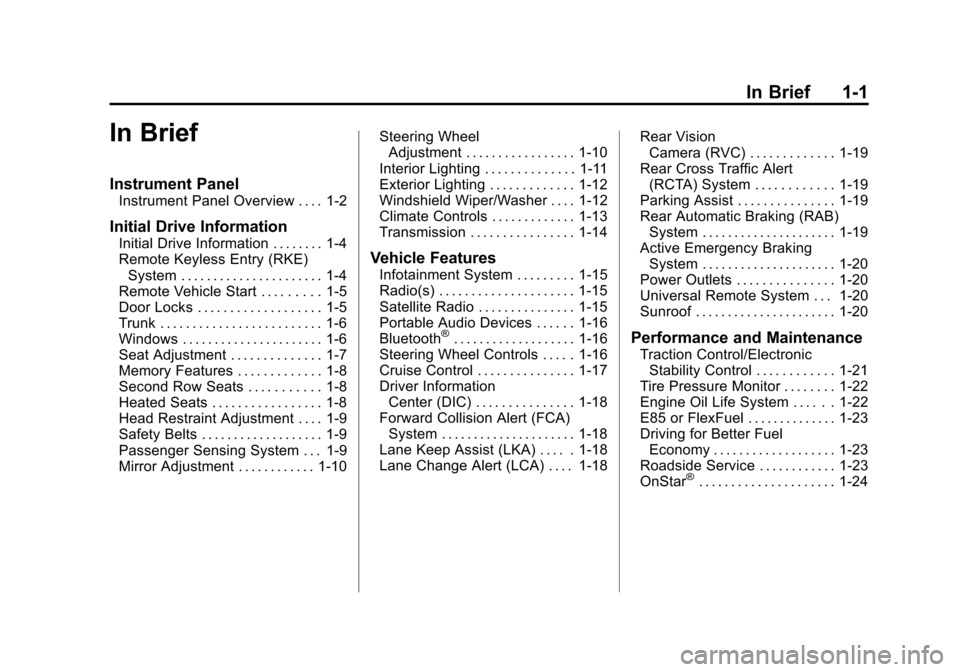
In Brief
Instrument Panel
Instrument Panel Overview . . . . 1-2
Initial Drive Information
Initial Drive Information . . . . . . . . 1-4
Remote Keyless Entry (RKE)System . . . . . . . . . . . . . . . . . . . . . . 1-4
Remote Vehicle Start . . . . . . . . . 1-5
Door Locks . . . . . . . . . . . . . . . . . . . 1-5
Trunk . . . . . . . . . . . . . . . . . . . . . . . . . 1-6
Windows . . . . . . . . . . . . . . . . . . . . . . 1-6
Seat Adjustment . . . . . . . . . . . . . . 1-7
Memory Features . . . . . . . . . . . . . 1-8
Second Row Seats . . . . . . . . . . . 1-8
Heated Seats . . . . . . . . . . . . . . . . . 1-8
Head Restraint Adjustment . . . . 1-9
Safety Belts . . . . . . . . . . . . . . . . . . . 1-9
Passenger Sensing System . . . 1-9
Mirror Adjustment . . . . . . . . . . . . 1-10 Steering Wheel
Adjustment . . . . . . . . . . . . . . . . . 1-10
Interior Lighting . . . . . . . . . . . . . . 1-11
Exterior Lighting . . . . . . . . . . . . . 1-12
Windshield Wiper/Washer . . . . 1-12
Climate Controls . . . . . . . . . . . . . 1-13
Transmission . . . . . . . . . . . . . . . . 1-14Vehicle Features
Infotainment System . . . . . . . . . 1-15
Radio(s) . . . . . . . . . . . . . . . . . . . . . 1-15
Satellite Radio . . . . . . . . . . . . . . . 1-15
Portable Audio Devices . . . . . . 1-16
Bluetooth
®. . . . . . . . . . . . . . . . . . . 1-16
Steering Wheel Controls . . . . . 1-16
Cruise Control . . . . . . . . . . . . . . . 1-17
Driver Information Center (DIC) . . . . . . . . . . . . . . . 1-18
Forward Collision Alert (FCA) System . . . . . . . . . . . . . . . . . . . . . 1-18
Lane Keep Assist (LKA) . . . . . 1-18
Lane Change Alert (LCA) . . . . 1-18 Rear Vision
Camera (RVC) . . . . . . . . . . . . . 1-19
Rear Cross Traffic Alert (RCTA) System . . . . . . . . . . . . 1-19
Parking Assist . . . . . . . . . . . . . . . 1-19
Rear Automatic Braking (RAB)
System . . . . . . . . . . . . . . . . . . . . . 1-19
Active Emergency Braking System . . . . . . . . . . . . . . . . . . . . . 1-20
Power Outlets . . . . . . . . . . . . . . . 1-20
Universal Remote System . . . 1-20
Sunroof . . . . . . . . . . . . . . . . . . . . . . 1-20Performance and Maintenance
Traction Control/Electronic Stability Control . . . . . . . . . . . . 1-21
Tire Pressure Monitor . . . . . . . . 1-22
Engine Oil Life System . . . . . . 1-22
E85 or FlexFuel . . . . . . . . . . . . . . 1-23
Driving for Better Fuel
Economy . . . . . . . . . . . . . . . . . . . 1-23
Roadside Service . . . . . . . . . . . . 1-23
OnStar
®. . . . . . . . . . . . . . . . . . . . . 1-24
Page 10 of 443

Black plate (3,1)Cadillac ATS Owner Manual (GMNA-Localizing-U.S./Canada/Mexico-
7707477) - 2015 - crc - 9/15/14
In Brief 1-3
1.Air Vents on page 8-9.
2. Exterior Lamp Controls on
page 6-1.
Turn Signal Lever. See Turn and
Lane-Change Signals on
page 6-6.
3. Cruise Control on page 9-38.
Adaptive Cruise Control on
page 9-41 (If Equipped).
Forward Collision Alert (FCA)
System on page 9-54 (If
Equipped).
Heated Steering Wheel on
page 5-3.
Steering Wheel Controls on
page 5-3.
4. Instrument Cluster on page 5-10.
Driver Information Center (DIC)
Display. See Driver Information
Center (DIC) on page 5-25.
5. Steering Wheel Controls on
page 5-3 (If Equipped). 6.
Windshield Wiper/Washer on
page 5-4.
7. Infotainment on page 7-1.
8. Light Sensor. See Automatic
Headlamp System on page 6-4.
9. Dual Automatic Climate Control
System (Base) on page 8-1 or
Dual Automatic Climate Control
System (Uplevel) on page 8-5.
10. Instrument Panel Illumination
Control on page 6-6.
11. Hood Release (Out of View). SeeHood on page 10-4.
12. Data Link Connector (DLC) (Out of View). See Malfunction
Indicator Lamp on page 5-16.
13. Parking Assist Button. See Driver Assistance Systems on
page 9-49.
Lane Keep Assist (LKA) on
page 9-60 (If Equipped).
14. Tap Shift Controls (If Equipped). See Manual Mode
on page 9-26. 15. Electric Parking Brake (If
Equipped, Automatic
Transmission). See Parking
Brake (Electric) on page 9-30
or Parking Brake (Manual) on
page 9-32.
16. Head-Up Display (HUD) on
page 5-28 (If Equipped).
17. Steering Wheel Adjustment on
page 5-2.
18. Horn on page 5-4.
19. ENGINE START/STOP Button. SeeIgnition Positions on
page 9-16.
20. Heated Front Seats on
page 3-9 (If Equipped).
21. Storage Bin. See Instrument
Panel Storage on page 4-1.
22. Shift Lever. See Automatic
Transmission on page 9-24 or
Manual Transmission on
page 9-28 (If Equipped).
Page 19 of 443
Black plate (12,1)Cadillac ATS Owner Manual (GMNA-Localizing-U.S./Canada/Mexico-
7707477) - 2015 - crc - 9/15/14
1-12 In Brief
Pressmornto turn the lamps on
or off.
Sedan
The rear reading lamps are over the
rear passenger doors.
Press the lamp lens to turn the rear
passenger reading lamps on or off.
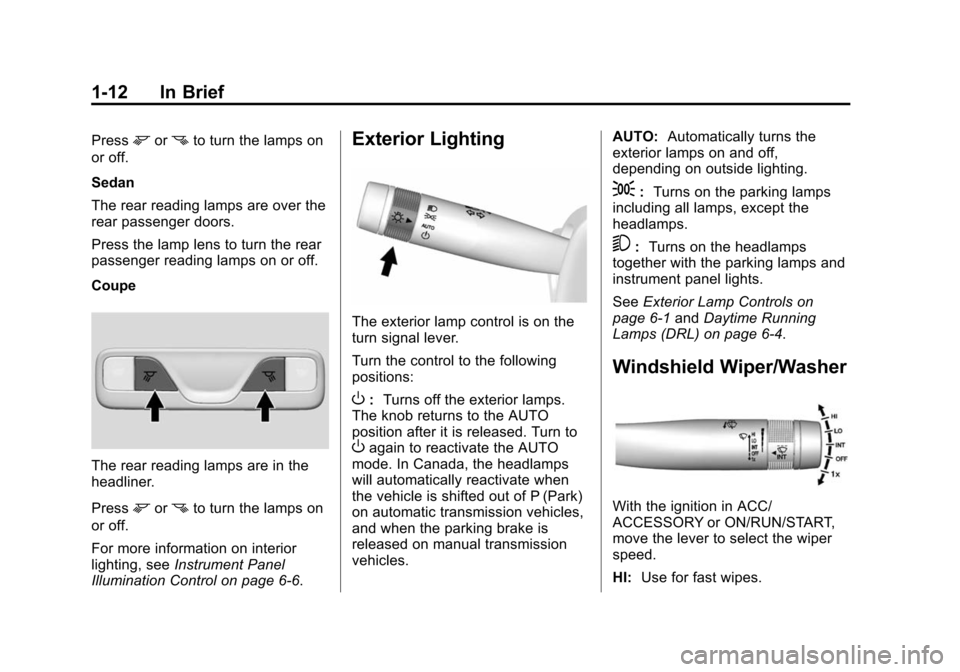
Coupe
The rear reading lamps are in the
headliner.
Press
mornto turn the lamps on
or off.
For more information on interior
lighting, see Instrument Panel
Illumination Control on page 6-6.
Exterior Lighting
The exterior lamp control is on the
turn signal lever.
Turn the control to the following
positions:
O: Turns off the exterior lamps.
The knob returns to the AUTO
position after it is released. Turn to
Oagain to reactivate the AUTO
mode. In Canada, the headlamps
will automatically reactivate when
the vehicle is shifted out of P (Park)
on automatic transmission vehicles,
and when the parking brake is
released on manual transmission
vehicles. AUTO:
Automatically turns the
exterior lamps on and off,
depending on outside lighting.
;: Turns on the parking lamps
including all lamps, except the
headlamps.
5: Turns on the headlamps
together with the parking lamps and
instrument panel lights.
See Exterior Lamp Controls on
page 6-1 andDaytime Running
Lamps (DRL) on page 6-4.
Windshield Wiper/Washer
With the ignition in ACC/
ACCESSORY or ON/RUN/START,
move the lever to select the wiper
speed.
HI: Use for fast wipes.
Page 21 of 443
Black plate (14,1)Cadillac ATS Owner Manual (GMNA-Localizing-U.S./Canada/Mexico-
7707477) - 2015 - crc - 9/15/14
1-14 In Brief
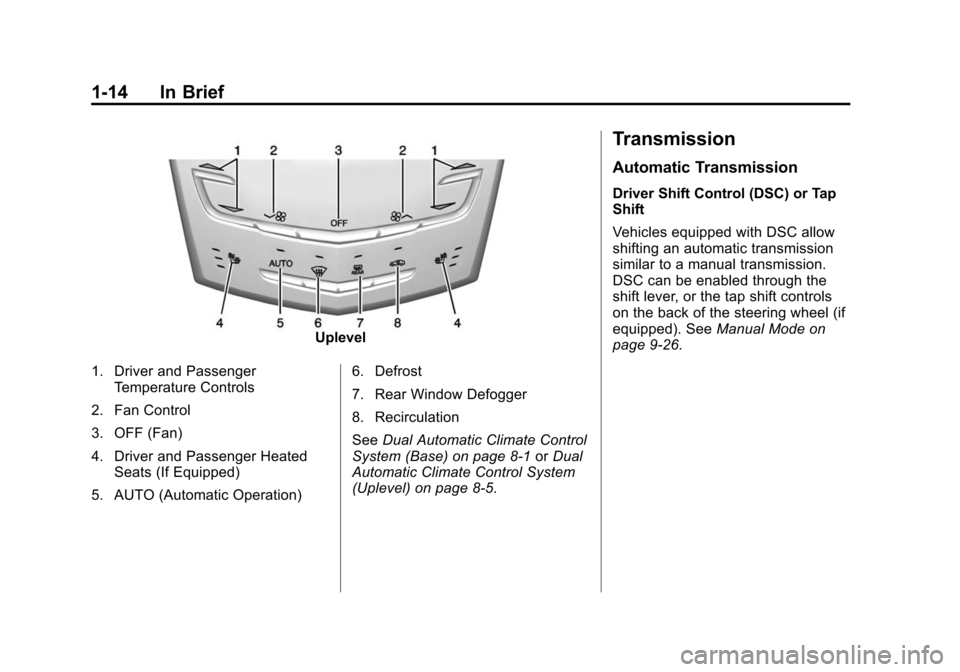
Uplevel
1. Driver and Passenger Temperature Controls
2. Fan Control
3. OFF (Fan)
4. Driver and Passenger Heated Seats (If Equipped)
5. AUTO (Automatic Operation) 6. Defrost
7. Rear Window Defogger
8. Recirculation
See
Dual Automatic Climate Control
System (Base) on page 8-1 orDual
Automatic Climate Control System
(Uplevel) on page 8-5.
Transmission
Automatic Transmission
Driver Shift Control (DSC) or Tap
Shift
Vehicles equipped with DSC allow
shifting an automatic transmission
similar to a manual transmission.
DSC can be enabled through the
shift lever, or the tap shift controls
on the back of the steering wheel (if
equipped). See Manual Mode on
page 9-26.
Page 44 of 443
Black plate (13,1)Cadillac ATS Owner Manual (GMNA-Localizing-U.S./Canada/Mexico-
7707477) - 2015 - crc - 9/15/14
Keys, Doors, and Windows 2-13
Delayed locking can only be turned
on when the Unlocked Door Anti
Lockout feature has been turned off.
When
Qis pressed on the power
door lock switch with the door open,
a chime will sound three times
indicating that delayed locking is
active.
The doors will then lock
automatically five seconds after all
doors are closed. If a door is
reopened before five seconds have
elapsed, the five-second timer will
reset once all the doors are closed
again.
Press
Qon the door lock switch
again, or press
Qon the RKE
transmitter, to override this feature
and lock the doors immediately.
Delayed locking can be
programmed through the Driver
Information Center (DIC). See
Vehicle Personalization on
page 5-44.
Automatic Door Locks
The vehicle is programmed so that
when the doors are closed, the
ignition is on, and the shift lever is
moved out of P (Park) for automatic
transmissions, or the vehicle speed
is above 13 km/h (8 mph) for
manual transmissions, the doors
will lock.
To unlock the doors:
.Press an unlock switch on
a door.
.For vehicles with an automatic
transmission, shift the
transmission into P (Park).
.For vehicles with a manual
transmission, turn the vehicle off.
The power door locks can be
programmed through the Driver
Information Center (DIC). See
Vehicle Personalization on
page 5-44.
Lockout Protection
If the vehicle is in ACC/
ACCESSORY or ON/RUN/START
with the Remote Keyless
Entry (RKE) transmitter in the
vehicle and the power door lock
switch is pressed with the driver
door open, all the doors will lock
and only the driver door will unlock.
If the vehicle is off with the RKE
transmitter in the vehicle and the
power door lock switch is pressed
with the driver door open, all the
doors will lock and only the driver
door will unlock after closing all of
the doors.
This feature can be manually
overridden with the driver door open
by pressing and holding
Qon the
power door lock switch.
Unlocked Door Anti Lock Out
When this feature is on and door
locking is requested with the driver
door open, all doors will lock and
only the driver door will unlock. The
driver door must be closed before
Page 64 of 443
Black plate (7,1)Cadillac ATS Owner Manual (GMNA-Localizing-U.S./Canada/Mexico-
7707477) - 2015 - crc - 9/15/14
Seats and Restraints 3-7
2. Press and release SET. A beepwill sound.
3. Immediately press and hold “1”
until two beeps sound.
4. Repeat Steps 1–3 for a second driver using “2.”
To store positions to the
B(Exit)
button and Easy Exit features:
1. Adjust the driver seat and outside mirrors to the desired
positions for getting out of the
vehicle.
2. Press and release SET. A beep will sound.
3. Immediately press and hold
B
until two beeps sound.
Manually Recalling Memory
Positions
If the vehicle is off or not in P (Park),
or parking brake not set if manual
transmission, press and hold "1,"
"2," or
B(Exit) to manually recall
the previously stored memory positions. Releasing "1,”
"2," or
B
before the stored positions are
reached stops the recall.
If the vehicle is onand in P (Park),
or parking brake set if manual
transmission, press and release “1,”
“2,” or
Bto manually recall the
previously stored memory positions.
Placing the ignition in OFF/LOCK
before the stored positions are
reached stops the recall.
Automatically Recalling Memory
Positions (Auto Memory Recall)
The Auto (Automatic) Memory
Recall feature automatically recalls
the current driver ’s previously stored
“1” or“2” position when entering the
vehicle. Depending upon the Auto Memory
Recall feature enabled in the vehicle
personalization menu, memory
“1”
or “2” positions are recalled in the
following ways:
To activate the recall when the
ignition is off, and “On - Driver Door
Open” is selected in the vehicle
personalization menu:
.On vehicles with RKE, pressK
on the RKE transmitter and open
the door.
.On vehicles with Keyless
Access, press the lock/unlock
button on the outside driver door
handle and open the driver door.
The RKE transmitter must be
present for the recall to activate.
.If the driver door is already
open, press
Kon the RKE
transmitter to activate the recall.
Page 65 of 443
Black plate (8,1)Cadillac ATS Owner Manual (GMNA-Localizing-U.S./Canada/Mexico-
7707477) - 2015 - crc - 9/15/14
3-8 Seats and Restraints
To activate the recall at ignition ON,
the transmission must be in
P (Park), or parking brake set if
manual transmission, and“On - At
Ignition On” is selected in the
vehicle personalization menu:
.Place the ignition in ON/RUN/
START.
See Vehicle Personalization on
page 5-44.
To stop recall movement, press one
of the memory, power mirror,
or power seat controls. If On - At
Ignition On is selected in the vehicle
personalization menu, placing the
ignition in OFF also stops the recall.
RKE transmitters are not labeled
with a number. If your memory seat
position is stored to “1”or“2” but
this position is not automatically
recalling, then change the stored
position or switch RKE transmitters
with the other driver. Easy Exit Recall
If programmed on in the vehicle
personalization menu, the Easy Exit
feature automatically moves the
driver seat and outside mirrors to
the memory positions stored to theB(Exit) button. See
“Storing
Memory Positions” listed previously.
See also Vehicle Personalization on
page 5-44.
Easy Exit recall automatically
activates when one of the following
occurs:
.The vehicle is turned off and the
driver door is opened within a
short time.
.The vehicle is turned off with the
driver door open. Obstructions
If something has blocked the driver
seat while recalling a memory
position, the recall may stop.
Remove the obstruction. Then do
one of the following:
.If manually recalling the position,
press and hold the appropriate
manual control for the memory
item that is not recalling for
two seconds, then try recalling
again by pressing the
appropriate memory button.
.If automatically recalling the
position, press and hold the
appropriate manual control for
the memory item that is not
recalling for two seconds, then
try recalling again by opening
the driver door and pressing
K
on the RKE transmitter.
.If recalling the exit position,
press and hold the appropriate
manual control for the exit
feature not recalling for
two seconds. Then try recalling
the exit position again.
Page 118 of 443
Black plate (5,1)Cadillac ATS Owner Manual (GMNA-Localizing-U.S./Canada/Mexico-
7707477) - 2015 - crc - 9/15/14
Instruments and Controls 5-5
Rainsense™
For vehicles with Rainsense, a
sensor near the top center of the
windshield detects the amount of
water on the windshield and
controls the frequency of the
windshield wiper.
Keep this area of the windshield
clear of debris to allow for best
system performance.
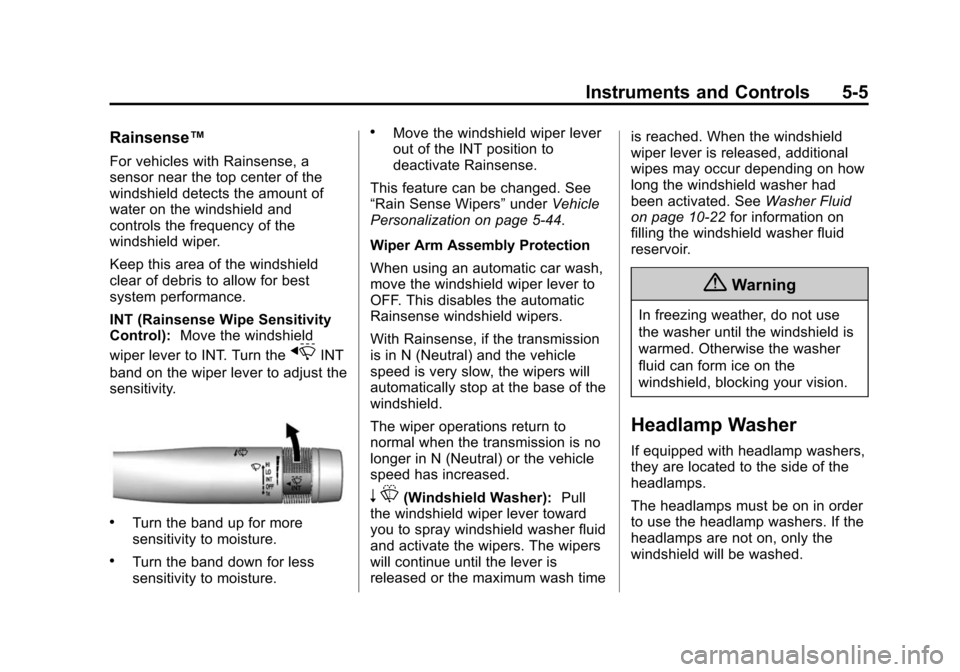
INT (Rainsense Wipe Sensitivity
Control):Move the windshield
wiper lever to INT. Turn the
xINT
band on the wiper lever to adjust the
sensitivity.
.Turn the band up for more
sensitivity to moisture.
.Turn the band down for less
sensitivity to moisture.
.Move the windshield wiper lever
out of the INT position to
deactivate Rainsense.
This feature can be changed. See
“Rain Sense Wipers” underVehicle
Personalization on page 5-44.
Wiper Arm Assembly Protection
When using an automatic car wash,
move the windshield wiper lever to
OFF. This disables the automatic
Rainsense windshield wipers.
With Rainsense, if the transmission
is in N (Neutral) and the vehicle
speed is very slow, the wipers will
automatically stop at the base of the
windshield.
The wiper operations return to
normal when the transmission is no
longer in N (Neutral) or the vehicle
speed has increased.
n L(Windshield Washer): Pull
the windshield wiper lever toward
you to spray windshield washer fluid
and activate the wipers. The wipers
will continue until the lever is
released or the maximum wash time is reached. When the windshield
wiper lever is released, additional
wipes may occur depending on how
long the windshield washer had
been activated. See
Washer Fluid
on page 10-22 for information on
filling the windshield washer fluid
reservoir.
{Warning
In freezing weather, do not use
the washer until the windshield is
warmed. Otherwise the washer
fluid can form ice on the
windshield, blocking your vision.
Headlamp Washer
If equipped with headlamp washers,
they are located to the side of the
headlamps.
The headlamps must be on in order
to use the headlamp washers. If the
headlamps are not on, only the
windshield will be washed.
Page 162 of 443
Black plate (49,1)Cadillac ATS Owner Manual (GMNA-Localizing-U.S./Canada/Mexico-
7707477) - 2015 - crc - 9/15/14
Instruments and Controls 5-49
.Delayed Door Lock
Unlocked Door Anti-Lockout
When on, this feature will keep the
driver door from locking when the
door is open. If Off is selected, the
Delayed Door Lock menu will be
available.
Select Off or On.
Auto Door Unlock
This allows selection of which of the
doors will automatically unlock when
the vehicle is shifted into P (Park)
with an automatic transmission or
when the vehicle is turned off with a
manual transmission.
Select Off, All Doors, or Driver Door.
Delayed Door Lock
When on, this feature will delay the
locking of the doors. To override the
delay, press the power door lock
switch on the door.
Select Off or On. Remote Lock, Unlock, Start
Select and the following may
display:
.Remote Unlock Light Feedback
.Remote Lock Feedback
.Remote Door Unlock
.Remote Start Auto Heat Seats
.Passive Door Unlock
.Passive Door Lock
.Remote Left in Vehicle Alert
Remote Unlock Light Feedback
When on, the exterior lamps will
flash when unlocking the vehicle
with the RKE transmitter.
Select Off or Flash Lights.
Remote Lock Feedback
This allows selection of what type of
feedback is given when locking the
vehicle with the RKE transmitter.
Select Off, Lights and Horn, Lights
Only, or Horn Only. Remote Door Unlock
This allows selection of which doors
will unlock when pressing
Kon the
RKE transmitter.
Select All Doors or Driver Door.
Remote Start Auto Heat Seats
If equipped and turned on, this
feature will turn the heated seats on
when using remote start on
cold days.
Select Off or On.
Passive Door Unlock
This allows the selection of what
doors will unlock when using the
button on the driver door to unlock
the vehicle.
Select All Doors or Driver Door.
Passive Door Lock
This feature can be turned on or off,
or can be used to select feedback
when using the button on the driver
door to lock the vehicle. See
Remote Keyless Entry (RKE)
System Operation on page 2-2.