fuel cap CADILLAC CT4 2020 User Guide
[x] Cancel search | Manufacturer: CADILLAC, Model Year: 2020, Model line: CT4, Model: CADILLAC CT4 2020Pages: 356, PDF Size: 4.61 MB
Page 296 of 356

Cadillac CT4 Owner Manual (GMNA-Localizing-U.S./Canada-13183937) -
2020 - crc - 4/28/20
VEHICLE CARE 295
.Do not use cleaners that are not
intended for automotive use.
. Use a nonabrasive wax on the
vehicle after washing to protect
and extend the molding finish.
Cleaning Exterior Lamps/Lenses,
Emblems, Decals, and Stripes
Use only lukewarm or cold water, a
soft cloth, and a car washing soap to
clean exterior lamps, lenses, emblems,
decals, and stripes. Follow instructions
under "Washing the Vehicle"
previously in this section.
Lamp covers are made of plastic, and
some have a UV protective coating. Do
not clean or wipe them when dry.
Do not use any of the following on
lamp covers:
.Abrasive or caustic agents.
. Washer fluids and other cleaning
agents in higher concentrations
than suggested by the
manufacturer.
. Solvents, alcohols, fuels, or other
harsh cleaners.
. Ice scrapers or other hard items. .
Aftermarket appearance caps or
covers while the lamps are
illuminated, due to excessive heat
generated.
Caution
Failure to clean lamps properly can
cause damage to the lamp cover
that would not be covered by the
vehicle warranty.
Caution
Using wax on low gloss black finish
stripes can increase the gloss level
and create a non-uniform finish.
Clean low gloss stripes with soap
and water only.
Air Intakes
Clear debris from the air intakes,
between the hood and windshield,
when washing the vehicle. Shutter System
The vehicle may have a shutter
system designed to help increase fuel
economy. Keep the shutter system
clean for proper operation.
Windshield and Wiper Blades
Clean the outside of the windshield
with glass cleaner.
Clean rubber blades using a lint-free
cloth or paper towel soaked with
windshield washer fluid or a mild
detergent. Wash the windshield
thoroughly when cleaning the blades.
Page 319 of 356
Cadillac CT4 Owner Manual (GMNA-Localizing-U.S./Canada-13183937) -
2020 - crc - 4/28/20
318 TECHNICAL DATA
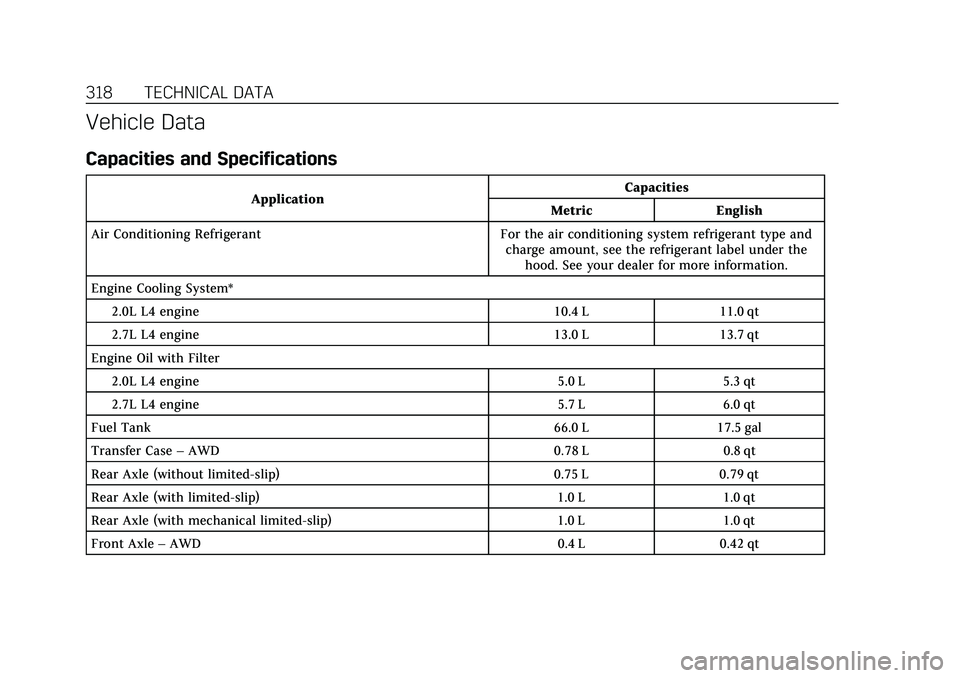
Vehicle Data
Capacities and Specifications
ApplicationCapacities
Metric English
Air Conditioning Refrigerant For the air conditioning system refrigerant type and charge amount, see the refrigerant label under thehood. See your dealer for more information.
Engine Cooling System* 2.0L L4 engine 10.4 L 11.0 qt
2.7L L4 engine 13.0 L 13.7 qt
Engine Oil with Filter 2.0L L4 engine 5.0 L 5.3 qt
2.7L L4 engine 5.7 L 6.0 qt
Fuel Tank 66.0 L 17.5 gal
Transfer Case –AWD 0.78 L 0.8 qt
Rear Axle (without limited-slip) 0.75 L 0.79 qt
Rear Axle (with limited-slip) 1.0 L 1.0 qt
Rear Axle (with mechanical limited-slip) 1.0 L 1.0 qt
Front Axle –AWD 0.4 L 0.42 qt
Page 344 of 356

Cadillac CT4 Owner Manual (GMNA-Localizing-U.S./Canada-13183937) -
2020 - crc - 4/28/20
CONNECTED SERVICES 343
using the myCadillac mobile app,
or by contacting an OnStar Advisor.
On some vehicles, Wi-Fi can also be
managed from the Wi-Fi
Hotspot menu.
MyCadillac Mobile App (If Available)
Download the myCadillac mobile app
to compatible Apple and Android
smartphones. Cadillac users can
access the following services from a
smartphone:
.Remotely start/stop the vehicle,
if factory-equipped.
. Lock/unlock doors, if equipped
with automatic locks.
. Activate the horn and lamps.
. Check the vehicle’s fuel level, oil
life, or tire pressure,
if factory-equipped with the Tire
Pressure Monitor System.
. Send destinations to the vehicle.
. Locate the vehicle on a map (U.S.
market only). .
Turn the vehicle's Wi-Fi hotspot
on/off, manage settings, and
monitor data consumption,
if equipped.
. Locate a dealer and schedule
service.
. Request Roadside Service.
. Set a parking reminder with pin
drop, take a photo, make a note,
and set a timer.
. Connect with Cadillac on social
media.
Features are subject to change. For
myCadillac mobile app information
and compatibility, see my.cadillac.com.
An active OnStar or connected service
plan may be required. A compatible
device, factory-installed remote start,
and power locks are required. Data
rates apply. See www.onstar.com for
details and system limitations.
Remote Services
Contact an OnStar Advisor to unlock
the doors or sound the horn and flash
the lamps.
Marketplace
OnStar Advisors can provide offers
from restaurants and retailers on your
route, help locate hotels, or book a
room. These services vary by market.
Diagnostics
By monitoring and reporting on the
vehicle’s key systems, OnStar
Advanced Diagnostics, if equipped,
provides a way to keep up on
maintenance. Capabilities vary by
model. See www.onstar.com for details
and system limitations. Features are
subject to change. For updates on
feature capabilities, see
my.cadillac.com. Message and data
rates may apply.