air conditioning CADILLAC CT4 2021 Owner's Manual
[x] Cancel search | Manufacturer: CADILLAC, Model Year: 2021, Model line: CT4, Model: CADILLAC CT4 2021Pages: 434, PDF Size: 8.3 MB
Page 3 of 434
Cadillac CT4 Owner Manual (GMNA-Localizing-U.S./Canada-14584335) -
2021 - CRC - 11/23/20
2 INTRODUCTION
Using this Manual
To quickly locate information about
the vehicle, use the Index in the back
of the manual. It is an alphabetical
list of what is in the manual and the
page number where it can be found.
Danger, Warning, and
Caution
Warning messages found on vehicle
labels and in this manual describe
hazards and what to do to avoid or
reduce them.
{Danger
Danger indicates a hazard with a
high level of risk which will result
in serious injury or death.
{Warning
Warning indicates a hazard that
could result in injury or death.
Caution
Caution indicates a hazard that
could result in property or vehicle
damage.
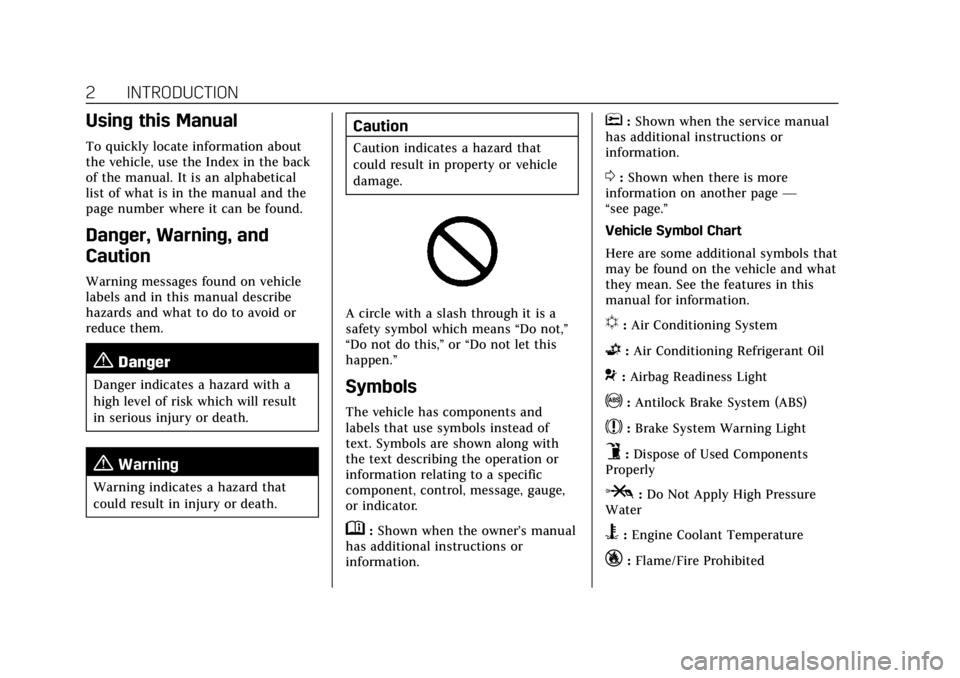
A circle with a slash through it is a
safety symbol which means“Do not,”
“Do not do this,” or“Do not let this
happen.”
Symbols
The vehicle has components and
labels that use symbols instead of
text. Symbols are shown along with
the text describing the operation or
information relating to a specific
component, control, message, gauge,
or indicator.
M: Shown when the owner’s manual
has additional instructions or
information.
*: Shown when the service manual
has additional instructions or
information.
0: Shown when there is more
information on another page —
“see page.”
Vehicle Symbol Chart
Here are some additional symbols that
may be found on the vehicle and what
they mean. See the features in this
manual for information.
u: Air Conditioning System
G:Air Conditioning Refrigerant Oil
9:Airbag Readiness Light
!:Antilock Brake System (ABS)
$:Brake System Warning Light
9:Dispose of Used Components
Properly
P: Do Not Apply High Pressure
Water
B: Engine Coolant Temperature
_:Flame/Fire Prohibited
Page 197 of 434
Cadillac CT4 Owner Manual (GMNA-Localizing-U.S./Canada-14584335) -
2021 - CRC - 11/23/20
196 CLIMATE CONTROLS
Climate Controls
Climate Control Systems
Dual Automatic Climate ControlSystem . . . . . . . . . . . . . . . . . . . . . . . . . . 196
Air Vents
Air Vents . . . . . . . . . . . . . . . . . . . . . . . . . . 200
Maintenance
Passenger Compartment AirFilter . . . . . . . . . . . . . . . . . . . . . . . . . . . . . 201
Service . . . . . . . . . . . . . . . . . . . . . . . . . . . . 201
Climate Control Systems
Dual Automatic Climate Control System
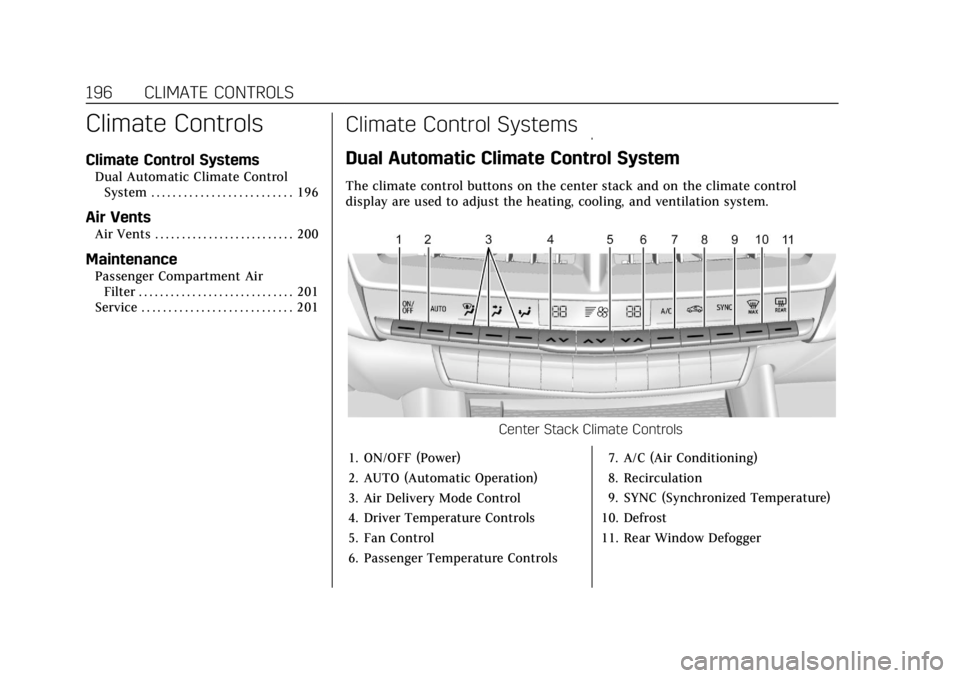
The climate control buttons on the center stack and on the climate control
display are used to adjust the heating, cooling, and ventilation system. Center
Stack Climate Controls
1. ON/OFF (Power)
2. AUTO (Automatic Operation)
3. Air Delivery Mode Control
4. Driver Temperature Controls
5. Fan Control
6. Passenger Temperature Controls7. A/C (Air Conditioning)
8. Recirculation
9. SYNC (Synchronized Temperature)
10. Defrost
11. Rear Window Defogger
Page 198 of 434

Cadillac CT4 Owner Manual (GMNA-Localizing-U.S./Canada-14584335) -
2021 - CRC - 11/23/20
CLIMATE CONTROLS 197
Climate Control Display
1. Driver and Passenger TemperatureDisplays
2. Fan Control
3. Driver and Passenger Temperature Controls
4. Sync (Synchronized Temperature)
5. Recirculation
6. Air Delivery Mode Control
7. Auto (Automatic Operation)
8. A/C (Air Conditioning)
9. On/Off (Power) The fan speed, air delivery mode, air
conditioning, driver and passenger
temperatures, recirculation, and Sync
settings can be controlled by touching
CLIMATE icon on the infotainment
Home Page or the climate button in
the application tray. A selection can
then be made on the front climate
control page displayed. See the
infotainment manual.
Climate Control Status Display
The climate control status display
appears briefly when the center stack
climate controls are adjusted.
Climate Control Influence on
Fuel Economy
The climate control system depends
on other vehicle systems for heat and
power input. Certain climate control
settings can lead to higher fuel usage.
The following climate control settings
use more fuel:
.MAX air conditioning mode
.Defrost mode
.Extreme temperature settings, such
as 15° C (60° F) or 32° C (90° F)
.High fan speed settings
To help reduce fuel usage:
.Use the full automatic control as
described under “Automatic
Operation.”
.Select a temperature setting that is
higher in hot weather and lower in
cold weather.
.Turn off the air conditioning when
it is not needed.
.Only use defrost to clear the
windows.
Page 199 of 434
Cadillac CT4 Owner Manual (GMNA-Localizing-U.S./Canada-14584335) -
2021 - CRC - 11/23/20
198 CLIMATE CONTROLS
Automatic Operation
The system automatically controls the
following four functions to heat or
cool the vehicle to the desired
temperature:
.Fan Speed
.Air Delivery Mode
.Air Conditioning
.Recirculation
When the AUTO indicator light is lit,
all four functions are operating
automatically. Each function can be
manually set and the selected setting
will be shown. This cancels full
automatic operation and the AUTO
indicator light turns off. Functions
that are not manually set will
continue to be automatically
controlled, although the AUTO
indicator light will not be lit.
To place the system in
automatic mode: 1. Press AUTO.
2. Set the driver and passenger temperature. To find your comfort setting, start
with 22 °C (72 °F) and allow the
system time to stabilize. Then
adjust the temperature as needed
for best comfort.
To improve fuel efficiency and to cool
the vehicle faster, recirculation may be
automatically selected in warm
weather.
The recirculation light will not come
on when automatically controlled.
Press
@to manually select
recirculation; press it again to select
outside air.
Do not cover the solar sensor on the
top of the instrument panel near the
windshield. This sensor regulates air
temperature based on sun load. See
“Sensors ”later in this section.
Manual Operation
On/Off : Press to turn the climate
control system on or off. When the
system is off, outside air will be
prevented from entering the vehicle.
When the system is on or a button is
pressed, the climate control system
will turn on and deliver airf low per
the current setting.
9: Press button up or down to
increase or decrease the fan speed.
Press AUTO to return to automatic
operation.
Driver and Passenger Temperature
Control : The temperature can be
adjusted separately for the driver and
passenger.
Press button up or down to increase
or decrease the driver or passenger
temperature setting.
The driver side or passenger side
temperature display shows the
temperature setting increasing or
decreasing.
SYNC : Press to link the passenger
and rear climate temperature settings,
if equipped, to the driver setting. The
SYNC indicator light will turn on.
When the passenger or rear climate
temperature settings are adjusted, the
SYNC indicator light is off.
Air Delivery Mode Control : Press
Y,
[, orzto change the direction of
the airf low. An indicator light comes
Page 200 of 434
Cadillac CT4 Owner Manual (GMNA-Localizing-U.S./Canada-14584335) -
2021 - CRC - 11/23/20
CLIMATE CONTROLS 199
on in the selected mode button.
Multiple buttons can be selected
simultaneously.
Changing the mode cancels the
automatic operation and the system
goes into manual mode. Press AUTO
to return to automatic operation.
z:This mode clears the windows of
fog or moisture. Air is directed to the
windshield and side window vents.
The system automatically forces
outside air into the vehicle and the air
conditioning compressor will run,
unless the outside temperature is
close to freezing.
Y: Air is directed to the instrument
panel outlets.
[: Air is directed to the floor
outlets, with some to the windshield,
side window outlets, outboard panel
outlets, and second row floor outlets.
0: Press to clear the windshield of
fog or frost more quickly. Air is
directed to the windshield and the
side window outlets. The air conditioning compressor also comes
on, unless the outside temperature is
below freezing.
Do not drive the vehicle until all
windows are clear.
See
Air Vents 0200.
A/C : Press to turn the air
conditioning system on or off. An
indicator light comes on to show that
the air conditioning is enabled. If the
fan is turned off, the air conditioner
will not run. The A/C light will stay on
even if the outside temperatures are
below freezing.
@: Press to turn on recirculation.
An indicator light comes on. Air is
recirculated to quickly cool the inside
of the vehicle. It can also be used to
help reduce outside air and odors that
enter the vehicle. The air conditioning
compressor also comes on when this
mode is activated.
Rear Window Defogger
The rear window defogger uses a
warming grid to remove fog from the
rear window.
K: Press to turn the rear window
defogger on or off. An indicator light
on the button comes on to show that
the rear window defogger is on.
The rear window defogger only works
when the ignition is on. The defogger
turns off if the ignition is turned to
off or ACC/ACCESSORY.
Caution
Using a razor blade or sharp object
to clear the inside rear window can
damage the rear window defogger.
Repairs would not be covered by
the vehicle warranty. Do not clear
the inside rear window with sharp
objects.
Heated Mirror : If equipped with
heated outside mirrors, the mirrors
heat to help clear fog or frost from the
surface of the mirror when the rear
window defog button is pressed. See
Heated Mirrors 025.
Remote Start Climate Control
Operation : If equipped with remote
start, the climate control system may
run when the vehicle is started
remotely. The rear defog may come on
Page 202 of 434
Cadillac CT4 Owner Manual (GMNA-Localizing-U.S./Canada-14584335) -
2021 - CRC - 11/23/20
CLIMATE CONTROLS 201
Move the slider knobs to change the
direction of or to close off the airf low.
Operation Tips
.Clear away any ice, snow, or leaves
from air inlets at the base of the
windshield that could block the
flow of air into the vehicle.
.Clear snow off the hood to improve
visibility and help decrease moisture
drawn into the vehicle.
.Keep the path under the front seats
clear of objects to help circulate the
air inside of the vehicle more
effectively.
.Use of non-GM approved hood
deflectors can adversely affect the
performance of the system. Check
with your dealer before adding
equipment to the outside of the
vehicle.
.Do not attach any devices to the air
vent slats. This restricts airf low and
may cause damage to the air vents.
Maintenance
Passenger Compartment
Air Filter
The filter reduces dust, pollen, and
other airborne irritants from outside
air that is pulled into the vehicle. The
filter should be replaced as part of
routine scheduled maintenance. See
Maintenance Schedule0380.
See your dealer regarding replacement
of the filter.
Service
All vehicles have a label underhood
that identifies the refrigerant used in
the vehicle. The refrigerant system
should only be serviced by trained and
certified technicians. The air
conditioning evaporator should never
be repaired or replaced by one from a
salvage vehicle. It should only be
replaced by a new evaporator to
ensure proper and safe operation. During service, all refrigerants should
be reclaimed with proper equipment.
Venting refrigerants directly to the
atmosphere is harmful to the
environment and may also create
unsafe conditions based on inhalation,
combustion, frostbite, or other
health-based concerns.
The air conditioning system requires
periodic maintenance. See
Maintenance Schedule
0380.
Page 321 of 434

Cadillac CT4 Owner Manual (GMNA-Localizing-U.S./Canada-14584335) -
2021 - CRC - 11/23/20
320 VEHICLE CARE
{Warning
Steam and scalding liquids from a
hot cooling system are under
pressure. Turning the pressure cap,
even a little, can cause them to
come out at high speed and you
could be burned. Never turn the cap
when the cooling system, including
the pressure cap, is hot. Wait for
the cooling system and pressure
cap to cool.
Caution
Failure to follow the specific
coolant fill procedure could cause
the engine to overheat and could
cause system damage. If coolant is
not visible in the surge tank,
contact your dealer.If no problem is found, check to see if
coolant is visible in the coolant surge
tank. If coolant is visible but the
coolant level is not at or above the
indicated mark, add a 50/50 mixture
of clean, drinkable water and
DEX-COOL coolant at the coolant
surge tank, but be sure the cooling
system, including the coolant surge
tank pressure cap, is cool before you
do it.
2.0L L4 Engine
Automatic Coolant Service Fill
Instructions
The vehicle is equipped with a service
feature that assists with filling and
removing air from the cooling system
after service of components or when
coolant is added after being to low. To use this feature:
1. With a cold system, add coolant to
the indicated line on the
surge tank.
2. Replace the pressure cap on the surge tank.
3. Activate the service feature: 3.1. Connect the vehicle to a battery charger.
3.2. Turn the ignition to Service Mode. See Ignition Positions
0 219.
3.3. Turn off the air conditioning.
3.4. Set the parking brake.
Page 322 of 434

Cadillac CT4 Owner Manual (GMNA-Localizing-U.S./Canada-14584335) -
2021 - CRC - 11/23/20
VEHICLE CARE 321
3.5. At the same time, press theaccelerator and the brake
pedal for two seconds, then
release.
3.6. At the end of the cycle, check the coolant level in the surge
tank and add coolant if it is
below the indicated line. Turn
the ignition off, allow the
Electronic Control Module
(ECM) to go to sleep, about
two minutes, and repeat
Steps 3.2 –3.6.
Listen for pump activation and
movement of the control valves while
watching the level of the coolant in
the surge tank. If the tank empties,
turn the ignition off, carefully remove
the pressure cap, refill to the indicated
line, replace the pressure cap, and
repeat steps 3.2 –3.6.
The fill and air removal process will
run for approximately 15 minutes.Caution
If the pressure cap is not tightly
installed, coolant loss and engine
damage may occur. Be sure the cap
is properly and tightly secured.
2.7L L4 Engine
Automatic Coolant Service Fill
Instructions
The vehicle is equipped with a service
feature that assists with filling and
removing air from the cooling system
after service of components or when
coolant is added after being to low.
To use this feature: 1. With a cold system unscrew the cooling system air bleeder cap.
If coolant can be seen through the
bleeder move to Step 3.
2. Add coolant through the surge tank until it is visible through the air
bleeder.
3. Replace the cooling system air bleeder cap.
4. Add coolant to the indicated line on the surge tank. 5. Replace the pressure cap on the
surge tank.
6. Activate the service feature: 6.1. Connect the vehicle to a battery charger.
6.2. Turn the ignition to Service Mode. See Ignition Positions
0 219.
6.3. Turn off the air conditioning.
6.4. Set the parking brake.
6.5. At the same time, press the accelerator and the brake
pedal for two seconds, then
release.
6.6. At the end of the cycle, check the coolant level in the surge
tank and add coolant if it is
below the indicated line. Turn
the ignition off, carefully
remove the pressure cap, refill
to the indicated line, replace
the pressure cap, and repeat
steps 6.2 –6.6.
Listen for pump activation and
movement of the control valves while
watching the level of the coolant in
the surge tank. If the tank empties,
turn the ignition off, carefully remove
Page 323 of 434
Cadillac CT4 Owner Manual (GMNA-Localizing-U.S./Canada-14584335) -
2021 - CRC - 11/23/20
322 VEHICLE CARE
the pressure cap, refill to the indicated
line, replace the pressure cap, and
repeat steps 6.2–6.6.
The fill and air removal process will
run for approximately 15 minutes.
Caution
If the pressure cap is not tightly
installed, coolant loss and engine
damage may occur. Be sure the cap
is properly and tightly secured.
Engine Overheating
The vehicle has an indicator to warn
of the engine overheating.
If the decision is made not to lift the
hood when this warning appears, get
service help right away. See Roadside
Service 0403.
If the decision is made to lift the
hood, make sure the vehicle is parked
on a level surface.
Then check to see if the engine
cooling fan is running. If the engine is
overheating, the fan should be running. If it is not, do not continue
to run the engine. Have the vehicle
serviced.
Caution
Do not run the engine if there is a
leak in the engine cooling system.
This can cause a loss of all coolant
and can damage the system and
vehicle. Have any leaks fixed
right away.
If Steam Is Coming from the
Engine Compartment
{Warning
Steam and scalding liquids from a
hot cooling system are under
pressure. Turning the pressure cap,
even a little, can cause them to
come out at high speed and you
could be burned. Never turn the cap
when the cooling system, including
the pressure cap, is hot. Wait for
the cooling system and pressure
cap to cool.
If No Steam Is Coming from the
Engine Compartment
If an engine overheat warning is
displayed but no steam can be seen or
heard, the problem may not be too
serious. Sometimes the engine can get
a little too hot when the vehicle:
.Climbs a long hill on a hot day.
.Stops after high-speed driving.
.Idles for long periods in traffic.
If the overheat warning is displayed
with no sign of steam: 1. Turn the air conditioning off.
2. Turn the heater on to the highest temperature and to the highest fan
speed. Open the windows as
necessary.
3. When it is safe to do so, pull off the road, shift to P (Park) or
N (Neutral) and let the engine idle.
If the overheat warning no longer
displays, the vehicle can be driven.
Continue to drive the vehicle slowly
for about 10 minutes. Keep a safe
vehicle distance from the vehicle in
front. If the warning does not come
Page 345 of 434
Cadillac CT4 Owner Manual (GMNA-Localizing-U.S./Canada-14584335) -
2021 - CRC - 11/23/20
344 VEHICLE CARE
to carry. The speed rating is the
maximum speed a tire is certified
to carry a load.
Tire Terminology and
Definitions
Air Pressure:The amount of air
inside the tire pressing outward
on each square inch of the tire.
Air pressure is expressed in kPa
(kilopascal) or psi (pounds per
square inch).
Accessory Weight
:The combined
weight of optional accessories.
Some examples of optional
accessories are automatic
transmission, power windows,
power seats, and air conditioning.
Aspect Ratio
:The relationship of
a tire's height to its width.
Belt
:A rubber coated layer of
cords between the plies and the
tread. Cords may be made from
steel or other reinforcing
materials. Bead
:The tire bead contains steel
wires wrapped by steel cords that
hold the tire onto the rim.
Bias Ply Tire
:A pneumatic tire in
which the plies are laid at
alternate angles less than
90 degrees to the centerline of the
tread.
Cold Tire Pressure
:The amount
of air pressure in a tire, measured
in kPa (kilopascal) or psi (pounds
per square inch) before a tire has
built up heat from driving. See
Tire Pressure 0346.
Curb Weight
:The weight of a
motor vehicle with standard and
optional equipment including the
maximum capacity of fuel, oil, and
coolant, but without passengers
and cargo.
DOT Markings
:A code molded
into the sidewall of a tire
signifying that the tire is in
compliance with the U.S.
Department of Transportation
(DOT) Motor Vehicle Safety Standards. The DOT code includes
the Tire Identification Number
(TIN), an alphanumeric designator
which can also identify the tire
manufacturer, production plant,
brand, and date of production.
GVWR
:Gross Vehicle Weight
Rating. See Vehicle Load Limits
0 214.
GAWR FRT
:Gross Axle Weight
Rating for the front axle. See
Vehicle Load Limits 0214.
GAWR RR
:Gross Axle Weight
Rating for the rear axle. See
Vehicle Load Limits 0214.
Intended Outboard Sidewall
:
The side of an asymmetrical tire
that must always face outward
when mounted on a vehicle.
Kilopascal (kPa)
:The metric unit
for air pressure.
Light Truck (LT-Metric) Tire
:A
tire used on light duty trucks and
some multipurpose passenger
vehicles.