oil CADILLAC CT4 2022 User Guide
[x] Cancel search | Manufacturer: CADILLAC, Model Year: 2022, Model line: CT4, Model: CADILLAC CT4 2022Pages: 464, PDF Size: 7.82 MB
Page 115 of 464
Cadillac CT4 Owner Manual (GMNA-Localizing-U.S./Canada-15283641) -
2022 - CRC - 10/12/21
114 INSTRUMENTS AND CONTROLS
Average Speed displays the average
speed of the vehicle in kilometers per
hour (km/h) or miles per hour (mph).
This average is calculated based on
the various vehicle speeds recorded
since the last reset of this value. The
average speed can be reset by pressing
and holding the thumbwheel while
this display is active.
Average Fuel Economy displays the
approximate average liters per
100 kilometers (L/100 km) or miles
per gallon (mpg). This number is
calculated based on the number of L/
100 km (mpg) recorded since the last
time this menu item was reset. This
number reflects only the current,
approximate average fuel economy
and changes as driving conditions
change. The Average Fuel Economy
can be reset by pressing and holding
the thumbwheel while this display is
active.
Fuel Economy :Displays the average
fuel economy, the best fuel economy
over the selected distance, and a bar
graph showing instantaneous fuel economy. Pressing the thumbwheel
opens a menu to change the selected
distance or reset the current values.
Trip Timer/Fuel Used :
This display
can be used as a timer. To start/stop
the timer, press the thumbwheel while
this display is active and then select
the start/stop the timer. The display
shows the amount of time that has
passed since the timer was last reset.
To reset the timer to zero, press the
thumbwheel to access the menu while
this display is active.
Fuel Used displays the approximate
liters (L) or gallons (gal) of fuel that
have been used since last reset. The
fuel used can be reset by pressing the
thumbwheel and selecting Reset Fuel
Used in the menu.
Current Drive Cycle : Displays
information in relation to the current
drive cycle including Distance
Traveled, Average Fuel Economy, and
the Total Time. They will reset after
the drive cycle is completed.
Driver Assistance : If equipped,
displays the status of all active safety
systems. Oil Life :
Displays an estimate of the
remaining useful oil life.
If REMAINING OIL LIFE 99% is
displayed, that means 99% of the
current oil life remains.
When the remaining oil life is low, the
CHANGE ENGINE OIL SOON message
appears on the display. The oil should
be changed as soon as possible. See
Engine Oil 0331. In addition to the
engine oil life system monitoring the
oil life, additional maintenance is
recommended. See Maintenance
Schedule 0408.
The Oil Life display must be reset
after each oil change. It will not reset
itself. Do not reset the Oil Life display
accidentally at any time other than
when the oil has just been changed.
It cannot be reset accurately until the
next oil change. See Engine Oil Life
System 0333.
Air Filter Life : If equipped, shows an
estimate of the engine air filter’s
remaining useful life and the state of
the system. Engine Air Filter Life 95%
means 95% of the current air filter life
remains. Messages are displayed based
on the engine air filter life and the
Page 116 of 464
Cadillac CT4 Owner Manual (GMNA-Localizing-U.S./Canada-15283641) -
2022 - CRC - 10/12/21
INSTRUMENTS AND CONTROLS 115
state of the system. When the
REPLACE AT NEXT OIL CHANGE
message displays, the engine air filter
should be replaced at the time of the
next oil change. When the REPLACE
NOW message displays, the engine air
filter should be replaced as soon as
possible.
Engine Hours :Displays the total
number of hours the engine has run.
The display also shows the engine idle
hours.
Lifetime Revs : The display shows
total engine revolutions divided by
10,000.
Brake Pad Life : If equipped, this
displays an estimate of the remaining
life of the front and rear brake pads.
Messages are displayed based on
brake pad wear and the state of the
system. Reset the Brake Pad Life
display after replacing the brake pads.
See Brake Pad Life System (If Equipped)
0 346.Head-Up Display (HUD)
{Warning
If the HUD image is too bright or
too high in your field of view, it
may take you more time to see
things you need to see when it is
dark outside. Be sure to keep the
HUD image dim and placed low in
your field of view.
If equipped with HUD, some
information concerning the operation
of the vehicle is projected onto the
windshield. The information is
projected through the HUD lens on
the driver side of the instrument
panel and focused out toward the
front of the vehicle.
Caution
If you try to use the HUD image as
a parking aid, you may misjudge
the distance and damage your
vehicle. Do not use the HUD image
as a parking aid. The HUD information can be
displayed in various languages. The
speedometer reading and other
numerical values can be displayed in
either English or metric units.
The language selection is changed
through the radio and the units of
measurement is changed through the
instrument cluster. See
Settings0182
and “Options” underInstrument Cluster
(Base Level) 089 or
Instrument Cluster (Uplevel) 091.
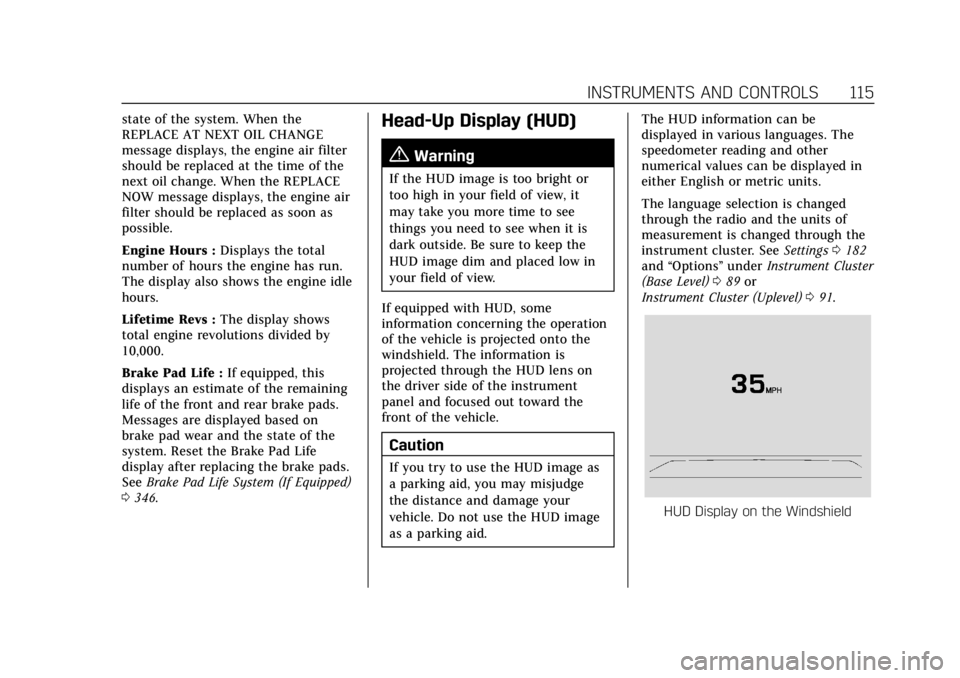
HUD Display on the Windshield
Page 215 of 464

Cadillac CT4 Owner Manual (GMNA-Localizing-U.S./Canada-15283641) -
2022 - CRC - 10/12/21
214 DRIVING AND OPERATING
{Warning
Prior to each track event and again
before returning to public roads,
tighten the wheel nuts with a
torque wrench to the proper torque
specification. Wheel nuts that are
improperly or incorrectly tightened
can cause the wheels to become
loose or come off, resulting in a
crash. SeeCapacities and
Specifications 0424 for wheel nut
torque specifications.
Caution
Low oil levels can damage the
engine. If using the vehicle for
competitive driving, the engine may
use more oil than it would with
normal use. Check the oil level
often during competitive driving.
Competitive Driving Mode can be
selected. See Driver Mode Control
0 258.
Seat Belts
Lap-Shoulder Belt
If equipped, the driver seat belt has an
Automatic Locking Retractor (ALR).
This feature is useful in performance
driving scenarios where the driver
wants to be held in the seat more
tightly to take advantage of the
aggressive bolstering of the seat.
1. Move the seat 8-10 cm (3-4 in) rearward from the normal driving
position.
2. Pull the driver shoulder belt out as far as it will go, until it stops, to set
the lock. While holding the
shoulder belt in this position,
buckle the belt.
When the shoulder belt is released,
the retractor will make a ratchet
sound when it retracts. When the
retractor lock is set, the belt can be
tightened but not pulled out of the
retractor.
3. Adjust the belt, and then move the seat forward 8-10 cm (3-4 in) to
the desired driving position. This will secure the belt. The belt fit
should be tight, but not
uncomfortable.
To unlatch the belt, press the
button on the buckle. The belt
should return to its stowed
position.
Axle Fluid
Axles must have 2 400 km (1,500 mi)
before being used in track driving.
The rear axle fluid temperatures may
be higher than when driving in severe
conditions. Drain and refill with new
fluid after the first racing or
competitive driving event, and then
after every 24 hours of racing or
competitive driving. See your dealer
for the correct fluid.
Caution
During a first time track or racing
event, high axle temperatures can
occur. Damage could be caused to
the axle and would not be covered
by the vehicle warranty. Do not
(Continued)
Page 216 of 464
Cadillac CT4 Owner Manual (GMNA-Localizing-U.S./Canada-15283641) -
2022 - CRC - 10/12/21
DRIVING AND OPERATING 215
Caution (Continued)
drive as long or as fast the first
time the vehicle is driven on the
track or raced.
.The axle lubricant should be
replaced with new lubricant.
.On vehicles without a differential
cooler, additional cooling capacity is
required for continuous competitive
driving. The V-Series Blackwing has
a differential cooler, so no
additional cooling capacity is
necessary.
Engine OilCaution
If the vehicle is used for track
events and competitive driving, the
engine may use more oil than it
would with normal use. Low oil
levels can damage the engine.
Check the oil level often and
maintain the proper level. See
Engine Oil 0331. Check the oil level often during track
events and competitive driving, and
keep the oil level at or near the upper
mark. See
“Checking the Engine Oil" in
Engine Oil 0331.
Fuel
Use premium unleaded gasoline with
a posted octane rating of 93 at a track
event. Unleaded gasoline with a
posted octane rating of 91 may be
used, but performance will be
degraded. See Prohibited Fuels 0312.
Automatic or Manual
Transmission Fluid
Have the transmission fluid set to the
track specific oil level prior to track
usage. Transmission fluid should be
changed after every 15 hours of track
usage. Any transmission level set or
change should be performed at the
dealer.
Brakes
Battery Disconnect
Disconnect the battery before
servicing the hydraulic brake system.
It is critical to disconnect the battery before bleeding the system, replacing
the pads, or any other work. The
battery must be disconnected to
prevent the brake master cylinder
from pressurizing the hydraulic
system during its automated self
diagnostic tests that may occur when
a door is opened or the remote key is
present.
{Warning
To avoid personal injury and/or
vehicle damage, always disconnect
the battery before performing
service work on the hydraulic brake
system. Bleeding the brake system
with the battery connected can lead
to excessive pressurization of the
system during automatic diagnostic
tests or diagnosis of a leak or air in
the braking system. A Diagnostic
Trouble Code (DTC) may set and
vehicle speed may be limited.
Page 217 of 464

Cadillac CT4 Owner Manual (GMNA-Localizing-U.S./Canada-15283641) -
2022 - CRC - 10/12/21
216 DRIVING AND OPERATING
Brake Cooling (V-Series Blackwing)
Prior to any track event, high speed
driving event, or competitive driving,
complete the following:1. Ensure all the brake cooling parts are correctly secured and installed.
2. Inspect and replace any deflectors that have damage.
3. Inspect for blockage in the front brake cooling duct prior to every
event.
If improved brake cooling is desired,
install the ball joint protector front
shields, remove both upper and lower
rear rotor shields, and install the rear
lower control arm cooling deflectors,
per the instructions included with the
brake cooling kit. These parts are for
track use only. After track events
reinstall original front and rear rotor
shields, and remove rear lower control
arm cooling deflectors.
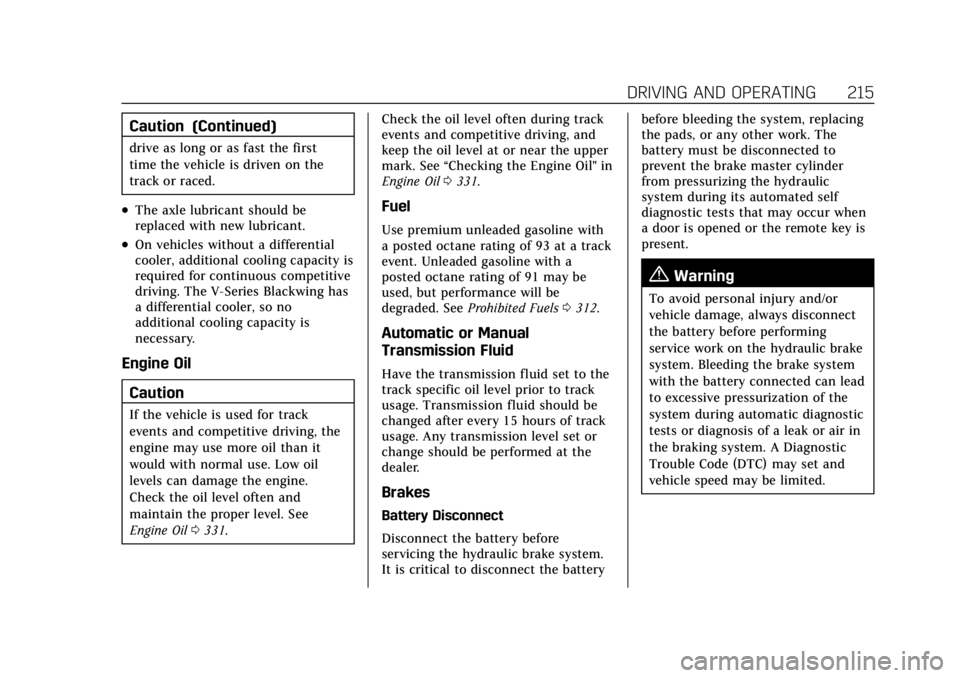
Right Side Front Shown, Left Side Front Similar
1. Front Lower Control Arm Deflector
2. Front Brake Cooling Duct Brake Pad Wear Sensors
If equipped, the brake pad wear
sensors need to be removed from the
brake calipers prior to any track or
racing event. The original sensors can
be reinstalled if significant brake pad
wear is not observed. Refer to
Brake
Pad Life System (If Equipped) 0346.
If the sensors are not reinstalled after
the track event, install brake pad wear
sensor plugs. See your dealer.
The V-Series Blackwing is equipped
with brake pad wear sensors which are
track capable and should not be
disabled for track and racing.
A message will display in the Driver
Information Center (DIC) when the
brake pads show excessive wear.
Brake Fluid
Replace existing brake fluid with a
qualified DOT 4 high performance
brake fluid from a sealed container.
Brake fluid with a dry boiling point
>310 °C (590 °F) is qualified. If high
performance brake fluid is used,
replace it with GM approved brake
fluid before driving on public roads.
If high performance brake fluid is in
the vehicle and the age of the brake
Page 218 of 464

Cadillac CT4 Owner Manual (GMNA-Localizing-U.S./Canada-15283641) -
2022 - CRC - 10/12/21
DRIVING AND OPERATING 217
fluid is over a month old or unknown,
replace the brake fluid before track
events and competitive driving. Do
not use silicone or DOT 5 brake fluids.
Disconnect the battery before bleeding
the system, replacing the pads, or any
other work. The battery must be
disconnected to prevent the brake
master cylinder from pressurizing the
hydraulic system during its automated
self diagnostic tests that may occur
when a door is opened or the remote
key is present.
Check the fluid level before each
competitive driving event.
Brake System Flushing & Bleeding
The J55 brake system requires specific
processes for bleeding and fluid
flushing. These can be found in the
service manual.
Properly bleeding the brake system is
required for proper operation of the
hydraulic brake system.
Brake Leak Detection
The hydraulic braking system has
advanced diagnostic capability to help
detect hydraulic leaks, trapped air,and other performance issues. These
diagnostics are active when the
hydraulic system is powered. In order
to avoid inadvertently setting a leak
Diagnostic Trouble Code (DTC),
disconnect the battery before
servicing the brake system.
If the vehicle sets a DTC related to a
brake system leak, the Brake System
Warning Light will come on and
vehicle speed may be limited to
100 kph (62 mph). Any time a leak
DTC is set, the vehicle should be
inspected carefully for evidence of a
leak and should be repaired
immediately. See your dealer.
Brake Fade Warning Assist
The Brake Fade Warning Assist
system monitors the performance of
the brake system. If the system
detects brake fade, or if the brake
fluid is near the boiling point, the
driver will be alerted.
The Brake Fade Warning Assist
system is designed for use with the
factory-installed brake pads or GM
approved replacement pads. If the
brake pads on the vehicle need to be
replaced, use GM approved brakepads. If this is not done, the brake
fade warning system may not function
properly.
Stage 1 :
The DIC displays a “Reduce
Braking to Avoid Overheating”
message, a chime sounds and brake
pedal effort and travel is increased.
When the message displays, the driver
should back up braking points and
reduce brake usage in order to reduce
brake temperature. This will allow for
continued lapping with no speed
limitations.
Stage 2 : The DIC displays a Brakes
Overheated Service Now message, a
chime sounds, and brake pedal effort
and travel is further increased. This
code indicates that the brake fluid
temperature is excessive and is about
to boil. The system limits vehicle
speed to 100 km/h (62 mph). The
driver should immediately start a cool
down lap if on the track. If this
message displays, the vehicle needs to
be serviced. The brake system needs
to cool down, and the brake fluid
must be immediately flushed with
DOT 4 for street use, or to a qualified
Page 219 of 464

Cadillac CT4 Owner Manual (GMNA-Localizing-U.S./Canada-15283641) -
2022 - CRC - 10/12/21
218 DRIVING AND OPERATING
DOT 4 race fluid for track use. Boiled
brake fluid is compromised and must
be replaced.
Brake Burnishing
For vehicles equipped with front
Brembo brake systems:
Performance/racing brake pads are
required prior to racing or closed track
driving. Vehicles with option code JE2
have performance brake pads. This
procedure should not be performed on
other models as damage may result.
New brake pads must be burnished
before racing or other competitive
driving.
Caution
Performing the brake burnish
procedure on a base brake system
can result in brake damage.
Caution
The new vehicle break-in period
should be completed before
performing the brake burnish(Continued)
Caution (Continued)
procedure, otherwise damage may
occur to the powertrain/engine. See
New Vehicle Break-In0231.
Caution
Brake fade will occur during this
track burnish procedure and can
cause brake pedal travel and force
to increase. This could extend
stopping distance until the brakes
are fully burnished.
When this procedure is performed as
instructed, it will not damage the
brakes. The brake pads will smoke and
produce an odor. The braking force
and pedal travel may increase. After
the procedure, the brake pads may
appear white at the rotor contact.
Perform this procedure only on dry
pavement, in a safe manner, and in
compliance with all local and state
ordinances/laws regarding motor
vehicle operation. Street High Performance Brake
Burnishing Procedure
This section is for the V-Series
Blackwing with J57 carbon ceramic
brake rotors only.
This procedure should only be run on
a track or other non-public area, and
only on dry pavement.
Caution
Brake fade will occur during this
track burnish procedure and can
cause brake pedal travel and force
to increase. This could extend
stopping distance until the brakes
are fully burnished.
1. From a stop, accelerate as rapidly as possible without activating
traction control to a speed of
100 km/h (60 mph).
2. Using the G-Force Gauge in the HUD display, use enough pedal
force to completely stop the vehicle
in four to five seconds. (~0.7g Decel
level to stop the vehicle in a
straight line). If ABS activates,
braking is too hard.
Page 232 of 464
Cadillac CT4 Owner Manual (GMNA-Localizing-U.S./Canada-15283641) -
2022 - CRC - 10/12/21
DRIVING AND OPERATING 231
{Warning
Things inside the vehicle can
strike and injure people in a
sudden stop or turn, or in a
crash.
.Put things in the cargo area
of the vehicle. In the cargo
area, put them as far forward
as possible. Try to spread the
weight evenly.
.Never stack heavier things,
like suitcases, inside the
vehicle so that some of them
are above the tops of the
seats.
.Do not leave an unsecured
child restraint in the vehicle.
.Secure loose items in the
vehicle.
.Do not leave a seat folded
down unless needed.
Starting and Operating
New Vehicle Break-In
Caution
Follow these recommended
guidelines during the first
2 414 km (1,500 mi) of driving this
vehicle. Parts have a break-in period
and performance will be better in
the long run.
.Avoid full throttle starts and
abrupt stops.
.Do not exceed 4000 engine rpm.
.Avoid driving at any one
constant speed, fast or slow.
.Do not drive above
129 km/h (80 mph).
.Avoid downshifting to brake or
slow the vehicle when the engine
speed will exceed 4000 rpm.
.Do not let the engine labor.
Never lug the engine in high gear
at low speeds. With a manual
transmission, shift to the next (Continued)
Caution (Continued)
lower gear. This rule applies at all
times, not just during the
break-in period.
.Do not participate in racing
events, sport driving schools,
or similar activities during this
break-in period.
.Check engine oil with every
refueling and add if necessary.
Oil and fuel consumption may be
higher than normal during the
first 2 414 km (1,500 mi).
.To break in new tires, drive at
moderate speeds and avoid hard
cornering for the first
322 km (200 mi). New tires do
not have maximum traction and
may tend to slip.
.New brake linings also need a
break-in period. Avoid making
hard stops during the first
322 km (200 mi). This is
recommended every time brake
linings are replaced.(Continued)
Page 233 of 464

Cadillac CT4 Owner Manual (GMNA-Localizing-U.S./Canada-15283641) -
2022 - CRC - 10/12/21
232 DRIVING AND OPERATING
Caution (Continued)
.Should the vehicle be used for
racing or competitive driving
(after break-in), the rear axle
lubricant must be replaced
beforehand.
See Track Events and Competitive
Driving (V-Series and V-Series
Blackwing) 0213.
On new vehicles, the various
mechanical and electrical systems
experience a “break-in”period during
the first 6,400 km (4,000 miles) of
routine driving. As the vehicle is
driven, the mechanical systems adjust
to provide optimal fuel economy and
transmission shift performance.
Electrical systems will adapt and
calibrate during the break-in period.
A one-time occurrence of clicks and
similar vehicle noises is normal during
this process.
Normal driving charges the vehicle’s
battery to achieve the best operation
of the vehicle, including fuel economy.
Composite Materials
This vehicle may be equipped with
parts containing carbon fiber,
sheet-molding compound, or other
composite materials. Dealer-installed
accessories may also contain
composite materials.
{Warning
Exposed edges of parts containing
carbon fiber and other composite
materials can be sharp. Contact
with these parts could result in
injury. Use caution to avoid
contacting these parts, including
when washing the vehicle. If the
parts are damaged, replace the
parts promptly with replacements
from your dealer.
{Warning
Rocker extensions may break under
pressure, resulting in property
damage or injury. Do not stand on
the rocker extension or use it as
a step.
{Warning
Rear end spoilers may break under
pressure, resulting in property
damage or injury. Do not push the
vehicle by the spoiler or use the
spoiler as a handle.
Ignition Positions
The vehicle has an electronic keyless
ignition with pushbutton start.
The Remote Key must be in the
vehicle for the system to operate.
If the pushbutton start is not working,
the vehicle may be near a strong radio
Page 236 of 464

Cadillac CT4 Owner Manual (GMNA-Localizing-U.S./Canada-15283641) -
2022 - CRC - 10/12/21
DRIVING AND OPERATING 235
clutch pedal down to the floor,
press the brake pedal, then press
ENGINE START/STOP.
If the remote key is not in the
vehicle, if there is interference, or if
the remote key battery is low, a
Driver Information Center (DIC)
message will display. SeeRemote
Keyless Entry (RKE) System
Operation 07.
Caution
Cranking the engine for long
periods of time, by pressing
ENGINE START/STOP immediately
after cranking has ended, can
overheat and damage the cranking
motor, and drain the battery. Wait
at least 15 seconds between each
try, to let the cranking motor
cool down.
2. If the engine does not start after five to 10 seconds, especially in
very cold weather (below −18 °C or
0 °F), it could be flooded with too
much gasoline. Try pushing the
accelerator pedal all the way to the
floor and hold it there, then press ENGINE START/STOP for up to a
maximum of 15 seconds. Wait at
least 15 seconds between each try,
to allow the cranking motor to cool
down. When the engine starts, let
go of the button and the
accelerator. If the vehicle starts
briefly but then stops again, do the
same thing. This clears the extra
gasoline from the engine. Do not
race the engine immediately after
starting it. Operate the engine and
transmission gently until the oil
warms up and lubricates all
moving parts.
Stopping the Engine
If the vehicle has an automatic
transmission, move the shift lever to
P (Park) and press and hold ENGINE
START/STOP on the instrument panel,
until the engine shuts off. If the shift
lever is not in P (Park), the engine
shuts off and the ignition goes to
ACC/ACCESSORY. The DIC displays
SHIFT TO PARK. Once the shift lever
is moved to P (Park), the vehicle
turns off.
If the vehicle has a manual
transmission, before getting out of the
vehicle, shift to 1 (First) or R (Reverse)
and apply the parking brake. Then
turn off the ignition off by pressing
ENGINE START/STOP and release the
clutch pedal when the engine has
stopped.
If the remote key is not detected
inside the vehicle when it is turned off
the DIC displays a message.
Stop/Start System
If equipped, the Stop/Start system will
shut off the engine to help conserve
fuel. It has components designed for
the increased number of starts.
{Warning
The automatic engine Stop/Start
feature causes the engine to shut
off while the vehicle is still on. Do
not exit the vehicle before shifting
to P (Park). The vehicle may restart
and move unexpectedly. Always
shift to P (Park), and then turn the
ignition off before exiting the
vehicle.