lane assist CADILLAC CT4 2022 Owners Manual
[x] Cancel search | Manufacturer: CADILLAC, Model Year: 2022, Model line: CT4, Model: CADILLAC CT4 2022Pages: 464, PDF Size: 7.82 MB
Page 4 of 464
Cadillac CT4 Owner Manual (GMNA-Localizing-U.S./Canada-15283641) -
2022 - CRC - 10/12/21
INTRODUCTION 3
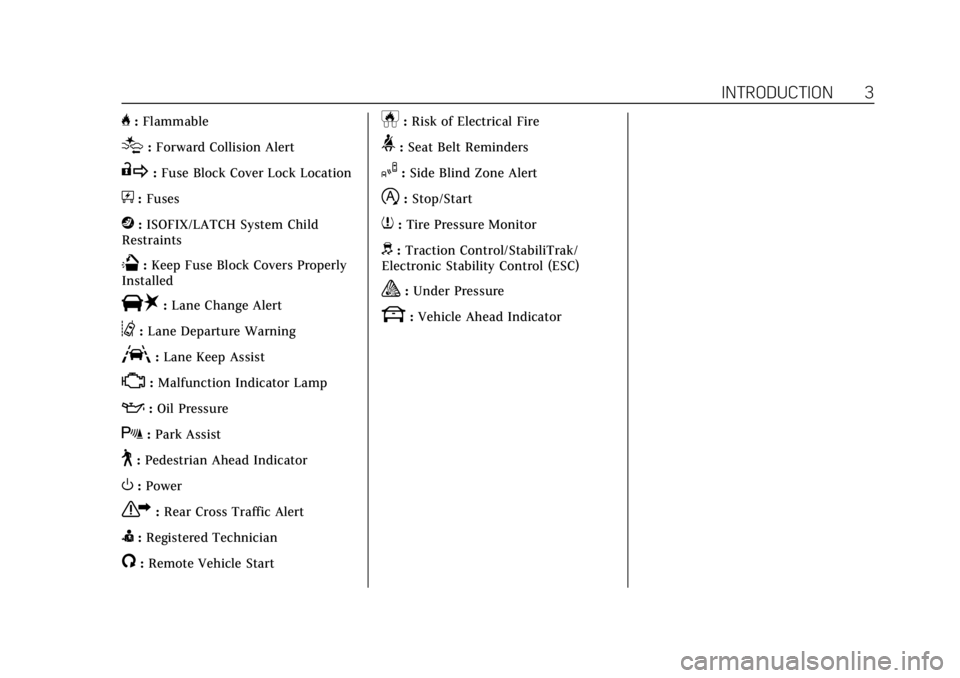
H:Flammable
[:Forward Collision Alert
R:Fuse Block Cover Lock Location
+:Fuses
j:ISOFIX/LATCH System Child
Restraints
Q: Keep Fuse Block Covers Properly
Installed
|: Lane Change Alert
@:Lane Departure Warning
A:Lane Keep Assist
*: Malfunction Indicator Lamp
::Oil Pressure
X:Park Assist
~:Pedestrian Ahead Indicator
O:Power
7:Rear Cross Traffic Alert
I:Registered Technician
/:Remote Vehicle Start
h:Risk of Electrical Fire
>:Seat Belt Reminders
I:Side Blind Zone Alert
h:Stop/Start
7:Tire Pressure Monitor
d:Traction Control/StabiliTrak/
Electronic Stability Control (ESC)
a: Under Pressure
k: Vehicle Ahead Indicator
Page 6 of 464

Cadillac CT4 Owner Manual (GMNA-Localizing-U.S./Canada-15283641) -
2022 - CRC - 10/12/21
INTRODUCTION 5
1.Air Vents 0207.
2. Exterior Lamp Controls 0128.
Turn Signal Lever. See Turn and
Lane-Change Signals 0131.
3. Tap Shift Controls (If Equipped). See Manual Mode (Electronic Shifter)
0 249 or
Manual Mode (Mechanical Shifter)
0 248.
4. Cruise Control 0266.
Adaptive Cruise Control (Advanced)
0 269 (If Equipped).
Forward Collision Alert (FCA) System
0 301 (If Equipped).
Heated Steering Wheel 083 (If
Equipped).
5. Instrument Cluster (Base Level) 089
or
Instrument Cluster (Uplevel) 091.
Driver Information Center (DIC)
Display. See Driver Information
Center (DIC) (Base Level) 0109 or
Driver Information Center (DIC)
(Uplevel) 0112.
6. Steering Wheel Controls 0139 (If
Equipped).
7. Windshield Wiper/Washer 083. 8. Infotainment. See
Overview0137.
9. Light Sensor. See Automatic
Headlamp System 0130.
10. Hazard Warning Flashers 0131.
11. Dual Automatic Climate Control
System 0202.
12. Heated and Ventilated Front Seats
037 (If Equipped).
13. Lane Keep Assist (LKA) 0309 (If
Equipped).
14. Traction Control/Electronic Stability
Control 0257.
Stop/Start Disable Switch. See Stop/
Start System 0235.
Automatic Vehicle Hold (AVH) 0256.
MODE Button or
«/ªButton
(V-Series Only). See Driver Mode
Control 0258.
15. Wireless Charging Pad (If Equipped) (Out of View). See
Wireless Charging 086.
16. Park Assist Button. See Assistance
Systems for Parking or Backing
0 295. 17. Shift Lever. See
Automatic
Transmission (Mechanical Shifter)
0 242 or
Automatic Transmission (Electronic
Shifter) 0244.
See Manual Transmission 0250.
18. ENGINE START/STOP Button. See Ignition Positions 0232.
19. Horn 083.
20. Steering Wheel Adjustment 083.
21. Head-Up Display (HUD) 0115 (If
Equipped).
22. Hood Release (Out of View). See Hood 0324.
23. Instrument Panel Illumination
Control 0132.
24. Data Link Connector (DLC) (Out of View). See Malfunction Indicator
Lamp (Check Engine Light) 099.
25. Electric Parking Brake 0254 (If
Equipped).
Page 83 of 464
Cadillac CT4 Owner Manual (GMNA-Localizing-U.S./Canada-15283641) -
2022 - CRC - 10/12/21
82 INSTRUMENTS AND CONTROLS
Instruments and
Controls
Controls
Steering Wheel Adjustment . . . . . . . 83
Steering Wheel Controls . . . . . . . . . . 83
Heated Steering Wheel . . . . . . . . . . . . 83
Horn . . . . . . . . . . . . . . . . . . . . . . . . . . . . . . . . 83
Windshield Wiper/Washer . . . . . . . . 83
Compass . . . . . . . . . . . . . . . . . . . . . . . . . . . . 85
Clock . . . . . . . . . . . . . . . . . . . . . . . . . . . . . . . 85
Power Outlets . . . . . . . . . . . . . . . . . . . . . . 86
Wireless Charging . . . . . . . . . . . . . . . . . 86
Warning Lights, Gauges, and
Indicators
Warning Lights, Gauges, andIndicators . . . . . . . . . . . . . . . . . . . . . . . . . 89
Instrument Cluster (Base Level) . . . . . . . . . . . . . . . . . . . . . . . . . . . . . 89
Instrument Cluster (Uplevel) . . . . . 91
Speedometer . . . . . . . . . . . . . . . . . . . . . . . 95
Odometer . . . . . . . . . . . . . . . . . . . . . . . . . . . 95
Trip Odometer . . . . . . . . . . . . . . . . . . . . . 95
Tachometer . . . . . . . . . . . . . . . . . . . . . . . . 95
Fuel Gauge . . . . . . . . . . . . . . . . . . . . . . . . . 96
Engine Coolant Temperature
Gauge (Base Level) . . . . . . . . . . . . . . . 96 Engine Coolant Temperature
Gauge (Uplevel) . . . . . . . . . . . . . . . . . . 97
Seat Belt Reminders . . . . . . . . . . . . . . . 97
Airbag Readiness Light . . . . . . . . . . . . 98
Passenger Airbag Status Indicator . . . . . . . . . . . . . . . . . . . . . . . . . . 98
Charging System Light . . . . . . . . . . . . 99
Malfunction Indicator Lamp (Check Engine Light) . . . . . . . . . . . . 99
Brake System Warning Light . . . . 101
Electric Parking Brake Light . . . . . 102
Service Electric Parking Brake Light . . . . . . . . . . . . . . . . . . . . . . . . . . . . . 102
Antilock Brake System (ABS) Warning Light . . . . . . . . . . . . . . . . . . 102
Performance Shifting Light . . . . . . 103
Automatic Vehicle Hold (AVH) Light . . . . . . . . . . . . . . . . . . . . . . . . . . . . . 103
Lane Keep Assist (LKA) Light . . . 103
Automatic Emergency Braking (AEB) Disabled Light . . . . . . . . . . . 104
Vehicle Ahead Indicator . . . . . . . . . 104
Pedestrian Ahead Indicator . . . . . . 104
Traction Off Light . . . . . . . . . . . . . . . . 104
StabiliTrak OFF Light . . . . . . . . . . . . 105
Traction Control System (TCS)/ StabiliTrak Light . . . . . . . . . . . . . . . . 105
Engine Coolant Temperature Warning Light . . . . . . . . . . . . . . . . . . 105
Driver Mode Control Light . . . . . . . 106 Tire Pressure Light . . . . . . . . . . . . . . . 107
Engine Oil Pressure Light . . . . . . . . 107
Low Fuel Warning Light . . . . . . . . . 108
Security Light . . . . . . . . . . . . . . . . . . . . . 108
High-Beam On Light . . . . . . . . . . . . . 108
Lamps On Reminder . . . . . . . . . . . . . 108
Cruise Control Light . . . . . . . . . . . . . . 109
Door Ajar Light . . . . . . . . . . . . . . . . . . . 109
Information Displays
Driver Information Center (DIC)
(Base Level) . . . . . . . . . . . . . . . . . . . . . 109
Driver Information Center (DIC) (Uplevel) . . . . . . . . . . . . . . . . . . . . . . . . . 112
Head-Up Display (HUD) . . . . . . . . . 115
Vehicle Messages
Vehicle Messages . . . . . . . . . . . . . . . . . 119
Engine Power Messages . . . . . . . . . . 119
Vehicle Speed Messages . . . . . . . . . 120
Vehicle Personalization
Vehicle Personalization . . . . . . . . . . 120
Universal Remote System
Universal Remote System . . . . . . . . 125
Universal Remote System Programming . . . . . . . . . . . . . . . . . . . 125
Universal Remote System Operation . . . . . . . . . . . . . . . . . . . . . . . . 127
Page 104 of 464
Cadillac CT4 Owner Manual (GMNA-Localizing-U.S./Canada-15283641) -
2022 - CRC - 10/12/21
INSTRUMENTS AND CONTROLS 103
If both the ABS warning light and the
brake system warning light are on,
ABS is not functioning and there is a
problem with the regular brakes. See
your dealer for service.
SeeBrake System Warning Light 0101.
Performance Shifting Light
If equipped, this light may display
green when Sport Mode is activated
and certain driving conditions are
met. Sport Mode detects when the
vehicle is being driven in a
competitive manner, and adjusts the
shifting of the gears accordingly. See
Driver Mode Control 0258.
Automatic Vehicle Hold
(AVH) Light
This light comes on when AVH is
turned on. See Automatic Vehicle Hold
(AVH) 0256.
Lane Keep Assist (LKA)
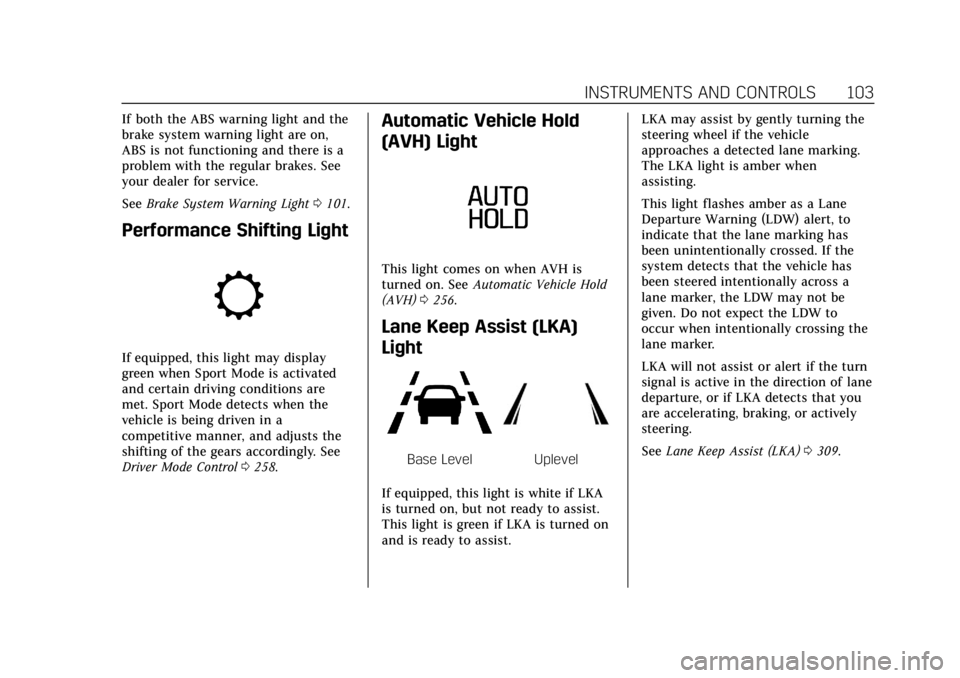
Light
Base LevelUplevel
If equipped, this light is white if LKA
is turned on, but not ready to assist.
This light is green if LKA is turned on
and is ready to assist. LKA may assist by gently turning the
steering wheel if the vehicle
approaches a detected lane marking.
The LKA light is amber when
assisting.
This light flashes amber as a Lane
Departure Warning (LDW) alert, to
indicate that the lane marking has
been unintentionally crossed. If the
system detects that the vehicle has
been steered intentionally across a
lane marker, the LDW may not be
given. Do not expect the LDW to
occur when intentionally crossing the
lane marker.
LKA will not assist or alert if the turn
signal is active in the direction of lane
departure, or if LKA detects that you
are accelerating, braking, or actively
steering.
See
Lane Keep Assist (LKA) 0309.
Page 113 of 464
Cadillac CT4 Owner Manual (GMNA-Localizing-U.S./Canada-15283641) -
2022 - CRC - 10/12/21
112 INSTRUMENTS AND CONTROLS
Follow Distance/Gap Setting :When
Adaptive Cruise Control (ACC) is not
engaged, the current follow time to
the vehicle ahead is displayed as a
time value on this page. When ACC
has been engaged, the display
switches to the gap setting page. This
page shows the current gap setting
along with the vehicle ahead telltale.
Driver Assistance : If equipped,
shows information for Lane Keep
Assist (LKA) and Forward Collision
Alert (FCA).
Battery Voltage : Shows the current
battery voltage.
Coolant Temperature : Shows the
engine coolant temperature in either
degrees Celsius (°C) or degrees
Fahrenheit (°F).
Oil Temperature : Shows the engine
oil temperature in either degrees
Celsius (°C) or degrees Fahrenheit (°F).
Engine Hours (Hourmeter) : Shows
the total number of hours the engine
has run. The display also shows the
engine idle hours. Engine Boost :
Displays engine
manifold pressure relative to ambient
air pressure. It will display boost
pressure generated by the
turbocharging system.
Transmission Fluid Temperature :
Shows the temperature of the
automatic transmission fluid in either
degrees Celsius (°C) or degrees
Fahrenheit (°F).
Info Page Options : Scroll to choose
which info pages appear on the DIC.
Press the thumbwheel to select or
deselect.
Blank Page : Allows for no
information to be displayed in the
cluster info display areas.
Driver Information Center
(DIC) (Uplevel)
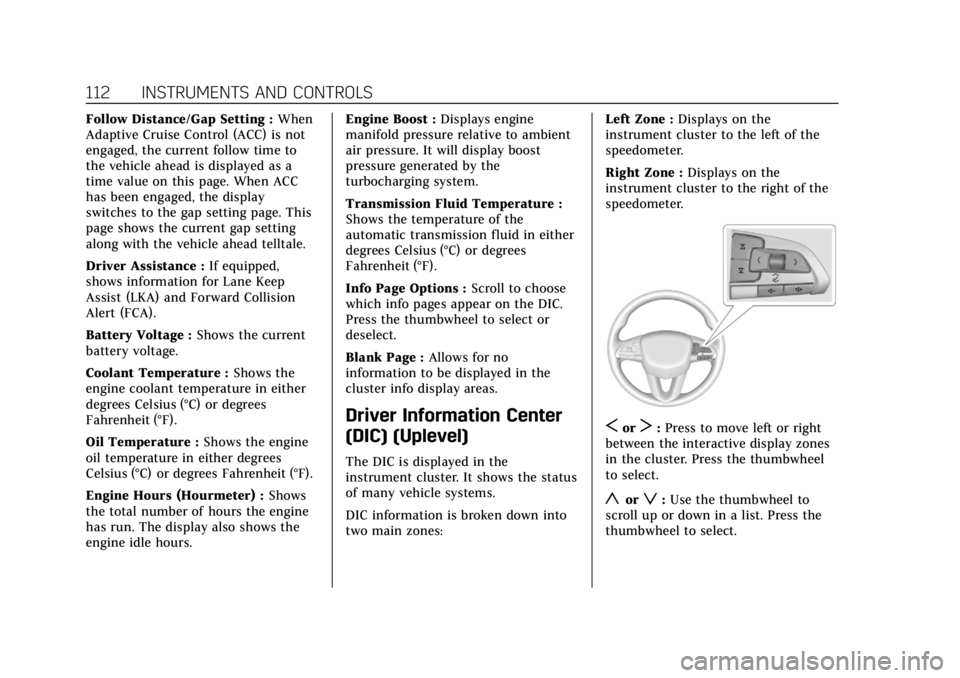
The DIC is displayed in the
instrument cluster. It shows the status
of many vehicle systems.
DIC information is broken down into
two main zones: Left Zone :
Displays on the
instrument cluster to the left of the
speedometer.
Right Zone : Displays on the
instrument cluster to the right of the
speedometer.
SorT: Press to move left or right
between the interactive display zones
in the cluster. Press the thumbwheel
to select.
yorz: Use the thumbwheel to
scroll up or down in a list. Press the
thumbwheel to select.
Page 118 of 464
Cadillac CT4 Owner Manual (GMNA-Localizing-U.S./Canada-15283641) -
2022 - CRC - 10/12/21
INSTRUMENTS AND CONTROLS 117
Metric
English
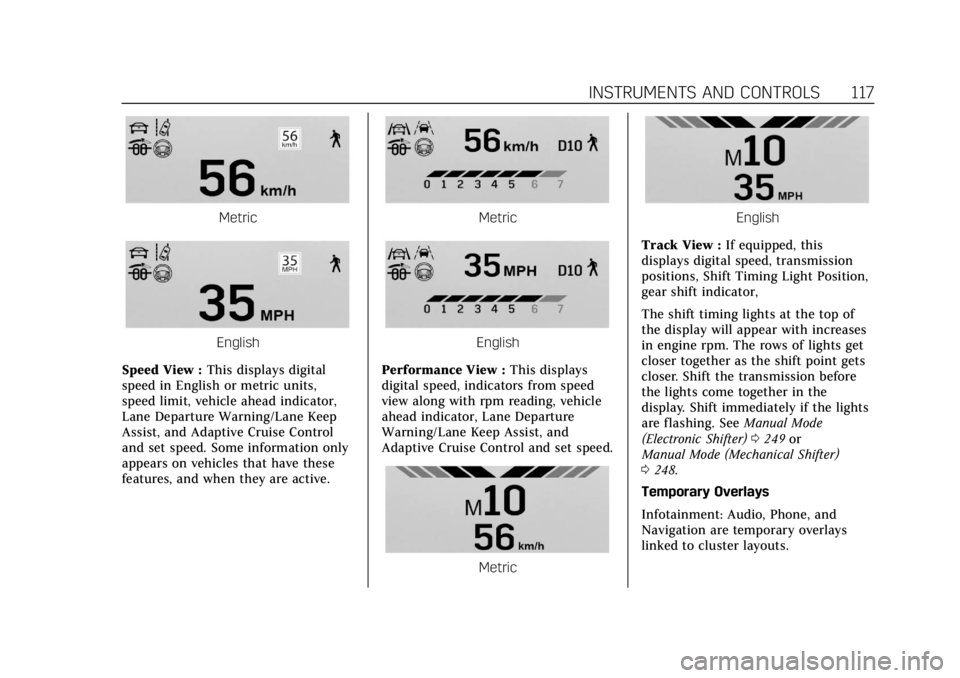
Speed View : This displays digital
speed in English or metric units,
speed limit, vehicle ahead indicator,
Lane Departure Warning/Lane Keep
Assist, and Adaptive Cruise Control
and set speed. Some information only
appears on vehicles that have these
features, and when they are active.
Metric
English
Performance View : This displays
digital speed, indicators from speed
view along with rpm reading, vehicle
ahead indicator, Lane Departure
Warning/Lane Keep Assist, and
Adaptive Cruise Control and set speed.
Metric
English
Track View : If equipped, this
displays digital speed, transmission
positions, Shift Timing Light Position,
gear shift indicator,
The shift timing lights at the top of
the display will appear with increases
in engine rpm. The rows of lights get
closer together as the shift point gets
closer. Shift the transmission before
the lights come together in the
display. Shift immediately if the lights
are flashing. See Manual Mode
(Electronic Shifter) 0249 or
Manual Mode (Mechanical Shifter)
0 248.
Temporary Overlays
Infotainment: Audio, Phone, and
Navigation are temporary overlays
linked to cluster layouts.
Page 210 of 464

Cadillac CT4 Owner Manual (GMNA-Localizing-U.S./Canada-15283641) -
2022 - CRC - 10/12/21
DRIVING AND OPERATING 209
Driver Assistance Systems
Driver Assistance Systems . . . . . . . 293
Assistance Systems for Parkingor Backing . . . . . . . . . . . . . . . . . . . . . . . 295
Rear Vision Camera (RVC) . . . . . . . 295
Surround Vision System . . . . . . . . . 296
Park Assist . . . . . . . . . . . . . . . . . . . . . . . . 297
Reverse Automatic Braking (RAB) . . . . . . . . . . . . . . . . . . . 299
Rear Cross Traffic Alert (RCTA) System . . . . . . . . . . . . . . . . . . . . . . . . . . 300
Assistance Systems for Driving . . . . . . . . . . . . . . . . . . . . . . . . . . 301
Forward Collision Alert (FCA) System . . . . . . . . . . . . . . . . . . . . . . . . . . 301
Automatic Emergency Braking (AEB) . . . . . . . . . . . . . . . . . . . 303
Front Pedestrian Braking (FPB) System . . . . . . . . . . . . . . . . . . . . . . . . . . 305
Side Blind Zone Alert (SBZA) . . . . 307
Lane Change Alert (LCA) . . . . . . . . 307
Lane Keep Assist (LKA) . . . . . . . . . . 309
Fuel
Top Tier Fuel . . . . . . . . . . . . . . . . . . . . . 311
Recommended Fuel (LSY 2.0L L4 Turbo Engine) . . . . . . . . . . . . . . . . . . . 311
Recommended Fuel (L3B 2.7L L4 Turbo and LF4 3.6L V6 Twin
Turbo Engines) . . . . . . . . . . . . . . . . . 311 Prohibited Fuels . . . . . . . . . . . . . . . . . . 312
Fuels in Foreign Countries . . . . . . . 312
Fuel Additives . . . . . . . . . . . . . . . . . . . . 312
Filling the Tank . . . . . . . . . . . . . . . . . . 312
Filling a Portable Fuel
Container . . . . . . . . . . . . . . . . . . . . . . . . 314
Trailer Towing
General Towing Information . . . . 314
Driving Characteristics andTowing Tips . . . . . . . . . . . . . . . . . . . . . 315
Trailer Towing (LSY 2.0L L4 Engine) . . . . . . . . . . . . . . . . . . . . . . . . . . 318
Towing Equipment . . . . . . . . . . . . . . . 320
Conversions and Add-Ons
Add-On Electrical Equipment . . . 321
Driving Information
Driving for Better Fuel
Economy
Driving habits can affect fuel mileage.
Here are some driving tips to get the
best fuel economy possible:
.Set the climate controls to the
desired temperature after the engine
is started, or turn them off when
not required.
.Avoid fast starts and accelerate
smoothly.
.Brake gradually and avoid abrupt
stops.
.Avoid idling the engine for long
periods of time.
.When road and weather conditions
are appropriate, use cruise control.
.Always follow posted speed limits or
drive more slowly when conditions
require.
.Keep vehicle tires properly inflated.
.Combine several trips into a
single trip.
Page 212 of 464

Cadillac CT4 Owner Manual (GMNA-Localizing-U.S./Canada-15283641) -
2022 - CRC - 10/12/21
DRIVING AND OPERATING 211
Warning (Continued)
serious—or even fatal —collision
if you drive after drinking or taking
drugs.
Do not drive while under the
influence of alcohol or drugs,
or ride with a driver who has been
drinking or is impaired by drugs.
Find alternate transportation home;
or if you are with a group, designate
a driver who will remain sober.
Control of a Vehicle
Braking, steering, and accelerating are
important factors in helping to control
a vehicle while driving.
Braking
Braking action involves perception
time and reaction time. Deciding to
push the brake pedal is perception
time. Actually doing it is
reaction time.
Average driver reaction time is about
three-quarters of a second. In that
time, a vehicle moving at 100 km/h (60 mph) travels 20 m (66 ft), which
could be a lot of distance in an
emergency.
Helpful braking tips to keep in mind
include:
.Keep enough distance between you
and the vehicle in front of you.
.Avoid needless heavy braking.
.Keep pace with traffic.
If the engine ever stops or a brake
fault occurs, the brakes may lose
power assist. More effort will be
required to stop the vehicle and it can
take longer to stop.
Steering
Caution
To avoid damage to the steering
system, do not drive over curbs,
parking barriers, or similar objects
at speeds greater than 3 km/h
(1 mph). Use care when driving over
other objects such as lane dividers
and speed bumps. Damage caused
by misuse of the vehicle is not
covered by the vehicle warranty.
Electric Power Steering
The vehicle has electric power
steering. It does not have power
steering fluid. Regular maintenance is
not required.
If power steering assist is lost due to a
system malfunction, the vehicle can
be steered, but may require increased
effort.
If the steering assist is used for an
extended period of time while the
vehicle is not moving, power assist
may be reduced.
Page 214 of 464

Cadillac CT4 Owner Manual (GMNA-Localizing-U.S./Canada-15283641) -
2022 - CRC - 10/12/21
DRIVING AND OPERATING 213
If the vehicle starts to slide, follow
these suggestions:
.Ease your foot off the accelerator
pedal and steer the way you want
the vehicle to go. The vehicle may
straighten out. Be ready for a
second skid if it occurs.
.Slow down and adjust your driving
according to weather conditions.
Stopping distance can be longer and
vehicle control can be affected when
traction is reduced by water, snow,
ice, gravel, or other material on the
road. Learn to recognize warning
clues—such as enough water, ice,
or packed snow on the road to
make a mirrored surface —and
slow down when you have any
doubt.
.Try to avoid sudden steering,
acceleration, or braking, including
reducing vehicle speed by shifting
to a lower gear. Any sudden changes
could cause the tires to slide.
Remember: Antilock brakes help avoid
only the braking skid.
Track Events and
Competitive Driving
(V-Series and V-Series
Blackwing)
Before any track event, there are three
features that should be turned off:
.Automatic Emergency Braking
(AEB). See Automatic Emergency
Braking (AEB) 0303.
.Lane Keep Assist. See Lane Keep
Assist (LKA) 0309.
.Adaptive Cruise Control. See
Adaptive Cruise Control (Advanced)
0269.
{Danger
High-performance features are
intended for use only on closed
tracks by experienced and qualified
drivers and should not be used on
public roads. High-speed driving,
aggressive cornering, hard braking,
and other high-performance driving
can be dangerous. Improper driver
inputs for the conditions may result
(CONTINUED)
Danger (Continued)
in loss of control of the vehicle,
which could injure or kill you or
others. Always drive safely.
Track events and competitive driving
may affect the vehicle warranty. See
the warranty manual before using the
vehicle for competitive driving.
{Warning
Some of the adjustments and
procedures specified in this section
may require specialized skill,
training, and equipment. Failure to
perform these procedures properly
could cause malfunction,
potentially resulting in death,
personal injury, or damage to the
vehicle or property. Do not attempt
to perform these adjustments or
procedures unless properly
qualified.
Page 227 of 464

Cadillac CT4 Owner Manual (GMNA-Localizing-U.S./Canada-15283641) -
2022 - CRC - 10/12/21
226 DRIVING AND OPERATING
{Warning
Coasting downhill in N (Neutral) or
with the ignition off is dangerous.
This can cause overheating of the
brakes and loss of steering assist.
Always have the engine running
and the vehicle in gear.
.Drive at speeds that keep the
vehicle in its own lane. Do not
swing wide or cross the center line.
.Be alert on top of hills; something
could be in your lane (e.g., stalled
car, crash).
.Pay attention to special road signs
(e.g., falling rocks area, winding
roads, long grades, passing or
no-passing zones) and take
appropriate action.
Winter Driving
Driving on Snow or IceCaution
To avoid damage to the wheels and
brake components, always clear
snow and ice from inside the
wheels and underneath the vehicle
before driving.
Snow or ice between the tires and the
road creates less traction or grip, so
drive carefully. Wet ice can occur at
about 0 °C (32 °F) when freezing rain
begins to fall. Avoid driving on wet ice
or in freezing rain until roads can be
treated.
For slippery road driving:
.Accelerate gently. Accelerating too
quickly causes the wheels to spin
and makes the surface under the
tires slick.
.Turn on Traction Control. See
Traction Control/Electronic Stability
Control 0257.
.Antilock Brake System (ABS)
improves vehicle stability during
hard stops, but the brakes should be
applied sooner than when on dry
pavement. See Antilock Brake System
(ABS) 0253.
See Driver Mode Control 0258.
.Allow greater following distance and
watch for slippery spots. Icy patches
can occur on otherwise clear roads
in shaded areas. The surface of a
curve or an overpass can remain icy
when the surrounding roads are
clear. Avoid sudden steering
maneuvers and braking while
on ice.
.Turn off cruise control.
Blizzard Conditions
Stop the vehicle in a safe place and
signal for help. Stay with the vehicle
unless there is help nearby. If possible,
use Roadside Service. See Roadside
Service 0432. To get help and keep
everyone in the vehicle safe:
.Turn on the hazard warning
flashers.
.Tie a red cloth to an outside mirror.