seats CADILLAC CT4 2022 Repair Manual
[x] Cancel search | Manufacturer: CADILLAC, Model Year: 2022, Model line: CT4, Model: CADILLAC CT4 2022Pages: 464, PDF Size: 7.82 MB
Page 125 of 464

Cadillac CT4 Owner Manual (GMNA-Localizing-U.S./Canada-15283641) -
2022 - CRC - 10/12/21
124 INSTRUMENTS AND CONTROLS
Remote Door Unlock
This setting specifies whether all
doors, or just the driver door, unlock
when pressing
Kon the remote key.
Touch All Doors or Driver Door.
Remote Start Auto Cool Seats
This setting automatically turns on
the ventilated seats when using the
remote start function on warm days.
See Heated and Ventilated Front Seats
0 37 and
Remote Vehicle Start 013.
Touch Off or On.
Remote Start Auto Heat Seats
This setting automatically turns on
the heated seats when using the
remote start function on cold days.
See Heated and Ventilated Front Seats
0 37 and
Remote Vehicle Start 013.
If equipped with Auto Heated Steering
Wheel, this feature will turn on when
the Remote Start Auto Heated Seats
turn on.
Touch Off or On. Remote Window Operation
If equipped, this feature enables
remote operation of the windows with
the remote key. See
Remote Keyless
Entry (RKE) System Operation 07.
Touch Off or On.
Passive Door Unlock
This setting specifies which doors
unlock when using the button on the
driver door handle to unlock the
vehicle.
Touch All Doors or Driver Door Only.
Passive Door Lock
This setting specifies if the vehicle will
automatically lock, or lock and
provide an alert after all the doors are
closed, and you walk away from the
vehicle with the remote key. See
Remote Keyless Entry (RKE) System
Operation 07.
Touch Off, On with Horn Chirp, or On. Remote Left in Vehicle Alert
This feature sounds an alert when the
remote key is left in the vehicle. This
menu also enables Remote No Longer
in Vehicle Alert.
Touch Off or On.
Remote Removed from Vehicle
Alert
This feature beeps the horn three
times when exiting a running vehicle
with the remote key.
Touch Off or On.
Seating Position
Touch and the following may display:
.Seat Entry Memory
.Seat Exit Memory
Seat Entry Memory
This feature automatically recalls the
previously stored 1 or 2 button
positions when the ignition is changed
from off to on or ACC/ACCESSORY.
See Memory Seats 034.
Touch Off or On.
Page 126 of 464
Cadillac CT4 Owner Manual (GMNA-Localizing-U.S./Canada-15283641) -
2022 - CRC - 10/12/21
INSTRUMENTS AND CONTROLS 125
Seat Exit Memory
This feature automatically recalls the
previously stored exit button positions
when the ignition is changed from on
or ACC/ACCESSORY to off if the driver
door is open or opened. SeeMemory
Seats 034.
Touch Off or On.
Teen Driver
See “Teen Driver” underSettings 0182.
Valet Mode
This will lock the infotainment system
and steering wheel controls. It may
also limit access to vehicle storage
locations, if equipped.
To enable valet mode:
1. Enter a four-digit code on the keypad.
2. Touch Enter to go to the confirmation screen.
3. Re-enter the four-digit code.
Touch Lock or Unlock to lock or
unlock the system. Touch Back to go
back to the previous menu.
Universal Remote
System
See Radio Frequency Statement 0438.
Universal Remote System
Programming
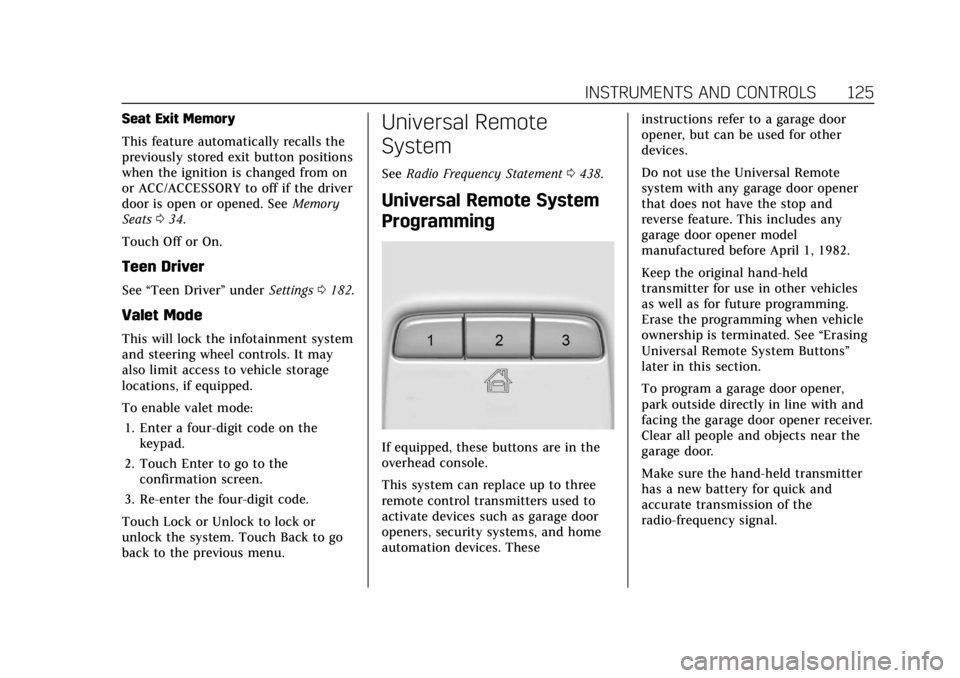
If equipped, these buttons are in the
overhead console.
This system can replace up to three
remote control transmitters used to
activate devices such as garage door
openers, security systems, and home
automation devices. These instructions refer to a garage door
opener, but can be used for other
devices.
Do not use the Universal Remote
system with any garage door opener
that does not have the stop and
reverse feature. This includes any
garage door opener model
manufactured before April 1, 1982.
Keep the original hand-held
transmitter for use in other vehicles
as well as for future programming.
Erase the programming when vehicle
ownership is terminated. See
“Erasing
Universal Remote System Buttons”
later in this section.
To program a garage door opener,
park outside directly in line with and
facing the garage door opener receiver.
Clear all people and objects near the
garage door.
Make sure the hand-held transmitter
has a new battery for quick and
accurate transmission of the
radio-frequency signal.
Page 135 of 464

Cadillac CT4 Owner Manual (GMNA-Localizing-U.S./Canada-15283641) -
2022 - CRC - 10/12/21
134 LIGHTING
If the vehicle has remained parked for
an extended period of time with no
remote key use or keyless access
operation, approach detection will be
disabled. To reactivate, press any
button on the remote key or open and
close all vehicle doors to re-enable the
entry lighting feature on approach.
Exit Lighting
Some exterior lamps and interior
lamps turn on when the driver door is
opened after the ignition is turned off.
The interior lights turn on when the
ignition is turned off.
The exterior and interior lamps
remain on for a set amount of time,
then automatically turn off.
The exterior lamps turn off
immediately by turning the exterior
lamp control off.
This feature can be changed. See
Vehicle Personalization0120.
Battery Load Management
The vehicle has Electric Power
Management (EPM), which estimates
the battery's temperature and state of
charge. It then adjusts the voltage for
best performance and extended life of
the battery.
When the battery's state of charge is
low, the voltage is raised slightly to
quickly bring the charge back up.
When the state of charge is high, the
voltage is lowered slightly to prevent
overcharging. If the vehicle has a
voltmeter gauge or a voltage display
on the Driver Information Center
(DIC), you may see the voltage move
up or down. This is normal. If there is
a problem, an alert will be displayed.
The battery can be discharged at idle
if the electrical loads are very high.
This is true for all vehicles. This is
because the generator (alternator)
may not be spinning fast enough at
idle to produce all the power that is
needed for very high electrical loads. A high electrical load occurs when
several of the following are on, such
as: headlamps, high beams, fog lamps,
rear window defogger, climate control
fan at high speed, heated seats, engine
cooling fans, and loads plugged into
accessory power outlets.
EPM works to prevent excessive
discharge of the battery. It does this
by balancing the generator's output
and the vehicle's electrical needs.
It can increase engine idle speed to
generate more power, whenever
needed. It can temporarily reduce the
power demands of some accessories.
Normally, these actions occur in steps
or levels, without being noticeable. In
rare cases at the highest levels of
corrective action, this action may be
noticeable to the driver. If so, a DIC
message might be displayed. If a
battery message is displayed, it is
recommended that the driver reduce
the electrical loads as much as
possible. See
Driver Information Center
(DIC) (Base Level) 0109 or
Driver Information Center (DIC)
(Uplevel) 0112.
Page 188 of 464

Cadillac CT4 Owner Manual (GMNA-Localizing-U.S./Canada-15283641) -
2022 - CRC - 10/12/21
INFOTAINMENT SYSTEM 187
.Bose AudioPilot Noise
Compensation Technology (If
Equipped): This feature adjusts the
volume based on the noise in the
vehicle and the speed.
Touch Off or On.
.Manage Favorites: Touch to display
a list of Audio, Mobile Devices, and
Navigation favorites.
Favorites can be moved, renamed,
or deleted.
To move, touch and hold the
favorite, and then drag up or down
to rearrange the position.
.Set Number of Audio Favorites:
Touch to select how many favorites
pages can be viewed from the audio
application. The Auto setting will
automatically adjust this number
based on the number of favorites
you have saved. Touch Auto, 5, 10,
15, 20, 25, 30, 35, or 40.
.RDS: This allows the Radio Data
System (RDS) to be turned on or off.
Touch the controls on the
infotainment display to disable or
enable.
.HD Radio: This allows HD Radio
reception to be turned on or off.
Touch the controls on the
infotainment display to disable or
enable.
.Explicit Content Filter: This setting
allows access to explicit content
SiriusXM channels.
Touch Off or On.
.Manage Phones: Select to connect
to a different phone source,
disconnect a phone, or delete a
phone.
.Reset Music Index: This allows the
music index to be reset if you are
having difficulty accessing all of the
media content on your device.
Touch Yes or No.
Climate
Touch and the following may display:
.Auto Fan Speed: This setting
specifies the amount of airflow
when the climate control fan setting
is Auto Fan.
Touch Low, Medium, or High.
.Air Quality Sensor: This setting
switches the system into
Recirculation Mode based on the
quality of the outside air.
Touch Off, Low Sensitivity, or High
Sensitivity.
.Auto Cooled Seats: This setting
automatically turns on and
regulates the ventilated seats when
the cabin temperature is warm.
Touch the controls on the
infotainment display to disable or
enable.
.Auto Heated Seats: This setting
automatically turns on and
regulates the heated seats when the
cabin temperature is cool. The auto
heated seats can be turned off by
using the heated seat controls on
the center stack.
Touch the controls on the
infotainment display to disable or
enable.
.Auto Defog: This setting
automatically turns the front
defogger on when the vehicle engine
is started.
Page 207 of 464

Cadillac CT4 Owner Manual (GMNA-Localizing-U.S./Canada-15283641) -
2022 - CRC - 10/12/21
206 CLIMATE CONTROLS
during remote start based on cold
ambient conditions. The rear defog
indicator light does not come on
during a remote start.
If equipped, the heated seats will turn
on if it is cold outside or the
ventilated seats will turn on if it is hot
outside. The heated and ventilated
seat indicator lights may not come on
during a remote start. If equipped, the
heated steering wheel will come on in
a remote start if it is cold outside. The
heated steering wheel indicator light
may not come on.
Ionizer :If equipped with an ionizer,
this feature helps to clean the air
inside the vehicle and remove
contaminants such as pollen, odors,
and dust. If the climate control
system is on and the ionizer is
enabled, the ionizer status indicator
will be lit on the climate control
display. To turn the ionizer on or off,
see Climate and Air Quality under
Vehicle Personalization 0120.Sensors
The solar sensor, located in the
defrost grille in the middle of the
instrument panel, monitors the solar
heat. Do not cover the solar sensor or
the system will not work properly.
There is also an exterior temperature
sensor behind the front grille. This
sensor reads the outside air
temperature and helps maintain the
temperature inside the vehicle. Any
cover on the front of the vehicle,
could cause a false reading in the
displayed temperature. The climate control system uses the
information from these sensors to
maintain comfort settings by
adjusting the outlet temperature, fan
speed, and air delivery mode. The
system may also supply cooler air to
the side of the vehicle facing the sun.
The recirculation mode will also be
used as needed to maintain cool
outlet temperatures.
Afterblow Feature
If equipped, under certain conditions,
the fan may stay on or may turn on
and off several times after you turn
off and lock the vehicle. This is
normal.
Page 208 of 464
Cadillac CT4 Owner Manual (GMNA-Localizing-U.S./Canada-15283641) -
2022 - CRC - 10/12/21
CLIMATE CONTROLS 207
Air Vents
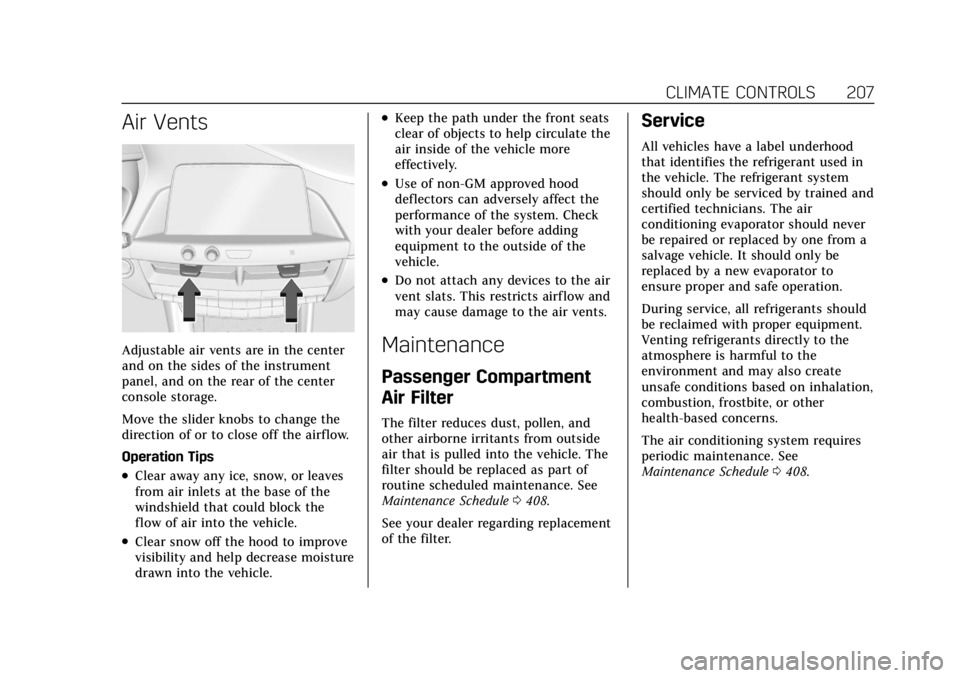
Adjustable air vents are in the center
and on the sides of the instrument
panel, and on the rear of the center
console storage.
Move the slider knobs to change the
direction of or to close off the airf low.
Operation Tips
.Clear away any ice, snow, or leaves
from air inlets at the base of the
windshield that could block the
flow of air into the vehicle.
.Clear snow off the hood to improve
visibility and help decrease moisture
drawn into the vehicle.
.Keep the path under the front seats
clear of objects to help circulate the
air inside of the vehicle more
effectively.
.Use of non-GM approved hood
deflectors can adversely affect the
performance of the system. Check
with your dealer before adding
equipment to the outside of the
vehicle.
.Do not attach any devices to the air
vent slats. This restricts airf low and
may cause damage to the air vents.
Maintenance
Passenger Compartment
Air Filter
The filter reduces dust, pollen, and
other airborne irritants from outside
air that is pulled into the vehicle. The
filter should be replaced as part of
routine scheduled maintenance. See
Maintenance Schedule0408.
See your dealer regarding replacement
of the filter.
Service
All vehicles have a label underhood
that identifies the refrigerant used in
the vehicle. The refrigerant system
should only be serviced by trained and
certified technicians. The air
conditioning evaporator should never
be repaired or replaced by one from a
salvage vehicle. It should only be
replaced by a new evaporator to
ensure proper and safe operation.
During service, all refrigerants should
be reclaimed with proper equipment.
Venting refrigerants directly to the
atmosphere is harmful to the
environment and may also create
unsafe conditions based on inhalation,
combustion, frostbite, or other
health-based concerns.
The air conditioning system requires
periodic maintenance. See
Maintenance Schedule 0408.
Page 232 of 464
Cadillac CT4 Owner Manual (GMNA-Localizing-U.S./Canada-15283641) -
2022 - CRC - 10/12/21
DRIVING AND OPERATING 231
{Warning
Things inside the vehicle can
strike and injure people in a
sudden stop or turn, or in a
crash.
.Put things in the cargo area
of the vehicle. In the cargo
area, put them as far forward
as possible. Try to spread the
weight evenly.
.Never stack heavier things,
like suitcases, inside the
vehicle so that some of them
are above the tops of the
seats.
.Do not leave an unsecured
child restraint in the vehicle.
.Secure loose items in the
vehicle.
.Do not leave a seat folded
down unless needed.
Starting and Operating
New Vehicle Break-In
Caution
Follow these recommended
guidelines during the first
2 414 km (1,500 mi) of driving this
vehicle. Parts have a break-in period
and performance will be better in
the long run.
.Avoid full throttle starts and
abrupt stops.
.Do not exceed 4000 engine rpm.
.Avoid driving at any one
constant speed, fast or slow.
.Do not drive above
129 km/h (80 mph).
.Avoid downshifting to brake or
slow the vehicle when the engine
speed will exceed 4000 rpm.
.Do not let the engine labor.
Never lug the engine in high gear
at low speeds. With a manual
transmission, shift to the next (Continued)
Caution (Continued)
lower gear. This rule applies at all
times, not just during the
break-in period.
.Do not participate in racing
events, sport driving schools,
or similar activities during this
break-in period.
.Check engine oil with every
refueling and add if necessary.
Oil and fuel consumption may be
higher than normal during the
first 2 414 km (1,500 mi).
.To break in new tires, drive at
moderate speeds and avoid hard
cornering for the first
322 km (200 mi). New tires do
not have maximum traction and
may tend to slip.
.New brake linings also need a
break-in period. Avoid making
hard stops during the first
322 km (200 mi). This is
recommended every time brake
linings are replaced.(Continued)
Page 369 of 464

Cadillac CT4 Owner Manual (GMNA-Localizing-U.S./Canada-15283641) -
2022 - CRC - 10/12/21
368 VEHICLE CARE
to carry. The speed rating is the
maximum speed a tire is certified
to carry a load.
Tire Terminology and
Definitions
Air Pressure:The amount of air
inside the tire pressing outward
on each square inch of the tire.
Air pressure is expressed in kPa
(kilopascal) or psi (pounds per
square inch).
Accessory Weight
:The combined
weight of optional accessories.
Some examples of optional
accessories are automatic
transmission, power windows,
power seats, and air conditioning.
Aspect Ratio
:The relationship of
a tire's height to its width.
Belt
:A rubber coated layer of
cords between the plies and the
tread. Cords may be made from
steel or other reinforcing
materials. Bead
:The tire bead contains steel
wires wrapped by steel cords that
hold the tire onto the rim.
Bias Ply Tire
:A pneumatic tire in
which the plies are laid at
alternate angles less than
90 degrees to the centerline of the
tread.
Cold Tire Pressure
:The amount
of air pressure in a tire, measured
in kPa (kilopascal) or psi (pounds
per square inch) before a tire has
built up heat from driving. See
Tire Pressure 0370.
Curb Weight
:The weight of a
motor vehicle with standard and
optional equipment including the
maximum capacity of fuel, oil, and
coolant, but without passengers
and cargo.
DOT Markings
:A code molded
into the sidewall of a tire
signifying that the tire is in
compliance with the U.S.
Department of Transportation
(DOT) Motor Vehicle Safety Standards. The DOT code includes
the Tire Identification Number
(TIN), an alphanumeric designator
which can also identify the tire
manufacturer, production plant,
brand, and date of production.
GVWR
:Gross Vehicle Weight
Rating. See Vehicle Load Limits
0 228.
GAWR FRT
:Gross Axle Weight
Rating for the front axle. See
Vehicle Load Limits 0228.
GAWR RR
:Gross Axle Weight
Rating for the rear axle. See
Vehicle Load Limits 0228.
Intended Outboard Sidewall
:
The side of an asymmetrical tire
that must always face outward
when mounted on a vehicle.
Kilopascal (kPa)
:The metric unit
for air pressure.
Light Truck (LT-Metric) Tire
:A
tire used on light duty trucks and
some multipurpose passenger
vehicles.
Page 379 of 464

Cadillac CT4 Owner Manual (GMNA-Localizing-U.S./Canada-15283641) -
2022 - CRC - 10/12/21
378 VEHICLE CARE
Lightly coat the inner diameter of
the wheel hub opening with wheel
bearing grease after a wheel
change or tire rotation to prevent
corrosion or rust build-up.
{Warning
Do not apply grease to the
wheel mounting surface, wheel
conical seats, or the wheel nuts
or bolts. Grease applied to these
areas could cause a wheel to
become loose or come off,
resulting in a crash.
When It Is Time for New
Tires
Factors, such as maintenance,
temperatures, driving speeds, vehicle
loading, and road conditions affect the
wear rate of the tires.
Treadwear indicators are one way to
tell when it is time for new tires.
Treadwear indicators appear when the
tires have only 1.6 mm (1/16 in) or
less of tread remaining. See Tire
Inspection 0376 and
Tire Rotation 0376 for additional
information.
The rubber in tires ages over time.
This also applies to the spare tire,
if the vehicle has one, even if it is
never used. Multiple factors including
temperatures, loading conditions, and
inflation pressure maintenance affect
how fast aging takes place. GM
recommends that tires, including the
spare if equipped, be replaced after six years, regardless of tread wear. To
identify the age of a tire, use the tire
manufacture date, which is the last
four digits of the DOT Tire
Identification Number (TIN) molded
into one side of the tire sidewall. The
last four digits of the TIN indicate the
tire manufactured date. The first two
digits represent the week and the last
two digits, the year. For example, the
third week of the year 2020 would
have a 4-digit DOT date of 0320. Week
01 is the first full week (Sunday
through Saturday) of each year.
Vehicle Storage
Tires age when stored normally
mounted on a parked vehicle. Park a
vehicle that will be stored for at least
a month in a cool, dry, clean area
away from direct sunlight to slow
aging. This area should be free of
grease, gasoline, or other substances
that can deteriorate rubber.
Parking for an extended period can
cause flat spots on the tires that may
result in vibrations while driving.
When storing a vehicle for at least a
Page 405 of 464

Cadillac CT4 Owner Manual (GMNA-Localizing-U.S./Canada-15283641) -
2022 - CRC - 10/12/21
404 VEHICLE CARE
2. Remove excess moisture by gentlywringing until water does not drip
from the cleaning cloth.
3. Start on the outside edge of the soil and gently rub toward the
center. Fold the cleaning cloth to a
clean area frequently to prevent
forcing the soil into the fabric.
4. Continue gently rubbing the soiled area until there is no longer any
color transfer from the soil to the
cleaning cloth.
5. If the soil is not completely removed, use a mild soap solution
followed only by plain water.
If the soil is not completely removed,
it may be necessary to use a
commercial upholstery cleaner or spot
lifter. Test a small hidden area for
colorfastness before using a
commercial upholstery cleaner or spot
lifter. If ring formation occurs, clean
the entire fabric or carpet.
After cleaning, use a paper towel to
blot excess moisture.Cleaning High Gloss Surfaces
and Vehicle Information and
Radio Displays
Use a microfiber cloth on high gloss
surfaces or vehicle displays. First, use
a soft bristle brush to remove dirt that
can scratch the surface. Then gently
clean by rubbing with a microfiber
cloth. Never use window cleaners or
solvents. Periodically hand wash the
microfiber cloth separately, using mild
soap. Do not use bleach or fabric
softener. Rinse thoroughly and air dry
before next use.
Caution
Do not attach a device with a
suction cup to the display. This may
cause damage and would not be
covered by the vehicle warranty.
Instrument Panel, Leather, Vinyl,
Other Plastic Surfaces, Low
Gloss Paint Surfaces, and
Natural Open Pore Wood
Surfaces
Use a soft bristle brush to remove
dust from knobs and crevices on the
instrument cluster. Use a soft
microfiber cloth dampened with water
to remove dust and loose dirt. For a
more thorough cleaning, use a soft
microfiber cloth dampened with a
mild soap and water solution.
Caution
Soaking or saturating leather,
especially perforated leather, as well
as other interior surfaces, may
cause permanent damage. Wipe
excess moisture from these surfaces
after cleaning and allow them to
dry naturally. Never use heat,
steam, or spot removers. Do not use
liquids that contain alcohol or
solvents on leather seats. Do not
use cleaners that contain silicone or
wax-based products. Cleaners (Continued)