change wheel CADILLAC CT4 2023 User Guide
[x] Cancel search | Manufacturer: CADILLAC, Model Year: 2023, Model line: CT4, Model: CADILLAC CT4 2023Pages: 524, PDF Size: 6.98 MB
Page 138 of 524
Cadillac CT4 Owner Manual (GMNA-Localizing-U.S./Canada-16500442) -
2023 - CRC - 5/4/22
Instruments and Controls 137
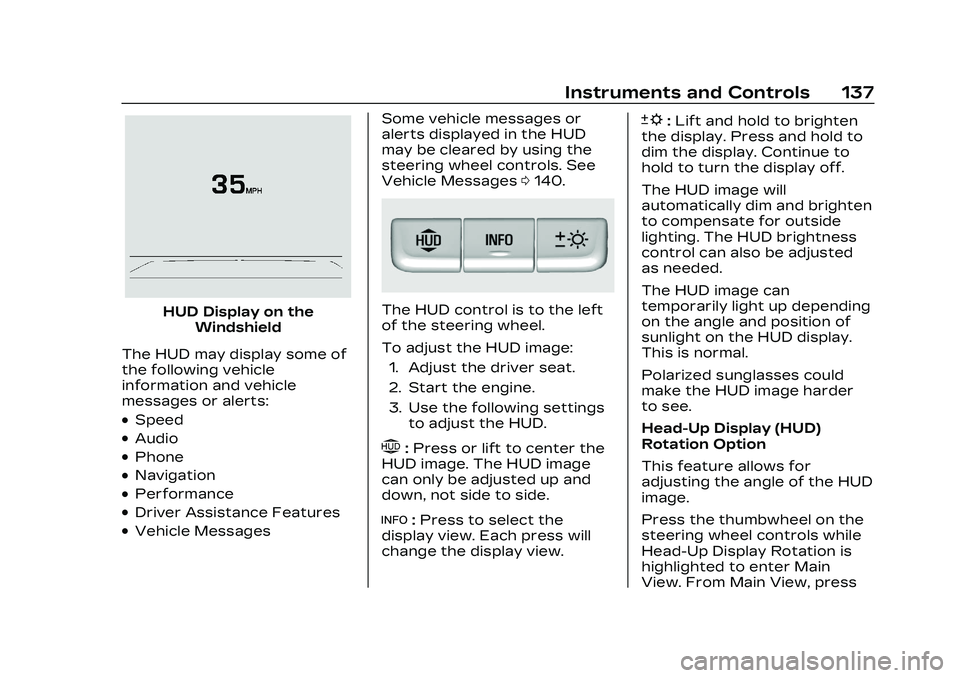
HUD Display on theWindshield
The HUD may display some of
the following vehicle
information and vehicle
messages or alerts:
.Speed
.Audio
.Phone
.Navigation
.Performance
.Driver Assistance Features
.Vehicle Messages Some vehicle messages or
alerts displayed in the HUD
may be cleared by using the
steering wheel controls. See
Vehicle Messages
0140.
The HUD control is to the left
of the steering wheel.
To adjust the HUD image:
1. Adjust the driver seat.
2. Start the engine.
3. Use the following settings to adjust the HUD.
$:Press or lift to center the
HUD image. The HUD image
can only be adjusted up and
down, not side to side.
!: Press to select the
display view. Each press will
change the display view.
D: Lift and hold to brighten
the display. Press and hold to
dim the display. Continue to
hold to turn the display off.
The HUD image will
automatically dim and brighten
to compensate for outside
lighting. The HUD brightness
control can also be adjusted
as needed.
The HUD image can
temporarily light up depending
on the angle and position of
sunlight on the HUD display.
This is normal.
Polarized sunglasses could
make the HUD image harder
to see.
Head-Up Display (HUD)
Rotation Option
This feature allows for
adjusting the angle of the HUD
image.
Press the thumbwheel on the
steering wheel controls while
Head-Up Display Rotation is
highlighted to enter Main
View. From Main View, press
Page 150 of 524

Cadillac CT4 Owner Manual (GMNA-Localizing-U.S./Canada-16500442) -
2023 - CRC - 5/4/22
Lighting 149
The transition time for the
lamps coming on varies based
on wiper speed. When the
wipers are not operating,
these lamps turn off. Move the
exterior lamp control to
Oor
;to disable this feature.
Hazard Warning
Flashers
|:Press this button to make
the front and rear turn signal
lamps flash on and off.
Release the button for at least
one second and press again to
turn the flashers off. The hazard warning flashers
turn on automatically if the
airbags deploy.
Turn and
Lane-Change Signals
Move the lever all the way up
or down to signal a turn.
An arrow on the instrument
cluster flashes in the direction
of the turn or lane change.
Raise or lower the lever until
the arrow starts to flash to
signal a lane change. Hold it
there until the lane change is
completed. If the lever is
briefly pressed and released,
the turn signal flashes three
times.
The turn and lane-change
signal can be turned off
manually by moving the lever
back to its original position.
If after signaling a turn or lane
change, the arrow flashes
rapidly or does not come on, a
signal function may be
inoperative. This vehicle may
be equipped with LED lighting.
For replacement of any LED
lighting, contact your dealer.
Cornering Lamps
If equipped with cornering
lamps, they automatically
come on when all of the
following occur:
.The low-beam headlamps
are on.
.The turn signals are
activated or the steering
wheel is at a turning angle.
.The vehicle speed is below
40 km/h (25 mph).
Page 170 of 524
Cadillac CT4 Owner Manual (GMNA-Localizing-U.S./Canada-16500442) -
2023 - CRC - 5/4/22
Infotainment System 169
File System and Naming
File systems supported by the
USB may include:
.FAT32
.NTFS
.HFS+
The songs, artists, albums, and
genres are taken from the
file’s song information and are
only displayed if present. The
radio displays the file name as
the track name if the song
information is not available.
Storing and Recalling
Media Favorites
To store media favorites,
touch Browse to display a list
of media types.
Touch one of the following
Browse options to save a
favorite:
Playlists : Touch
Hnext to
any playlist to store the
playlist as a favorite. Touch a
saved favorite to recall a
favorite playlist. The first song
in the playlist begins to play. Artists :
Touch
Hnext to any
artist to store the artist as a
favorite. Touch a saved
favorite to recall a favorite
artist. The first song in the
artist list begins to play.
Songs : Touch
Hnext to any
song to store the song as a
favorite. Touch a saved
favorite to recall a
favorite song.
Albums : Touch
Hnext to any
album to store the album as a
favorite. Touch a saved
favorite to recall a favorite
album. The first song in the
album list begins to play.
Genres : Touch
Hnext to any
genre to store the genre as a
favorite. Touch a saved
favorite to recall a favorite
genre. The first song of the
genre begins to play.
Podcasts : Touch
Hnext to
any podcast to store the
podcast as a favorite. Touch a saved favorite to recall a
favorite podcast. The podcast
begins to play.
Audiobooks :
Touch
Hnext
to any audiobook to store the
audiobook as a favorite. Touch
a saved favorite to recall a
favorite audiobook. The first
chapter in the audiobook
begins to play.
Media Playback and Mute
USB playback will be paused if
the system is muted. If the
steering wheel mute control is
pressed again, playback will
resume.
If the source is changed while
in mute, playback resumes and
audio will unmute.
Bluetooth Audio
Music may be played from a
paired Bluetooth device. See
Bluetooth (Overview) 0198 or
Bluetooth (Pairing and Using a
Phone) 0199 for help pairing a
device.
Page 188 of 524
Cadillac CT4 Owner Manual (GMNA-Localizing-U.S./Canada-16500442) -
2023 - CRC - 5/4/22
Infotainment System 187
or the session is terminated,
the voice recognition dialog
stops.
An example of this type of
manual intervention is
touching an entry of a
displayed number list instead
of speaking the number
associated with the entry
desired.
Canceling Voice
Recognition
.Touch or say“Cancel”or
“Exit” to terminate the voice
recognition session and
show the display where
voice recognition was
initiated.
.Pression the steering
wheel controls to terminate
the voice recognition
session and show the display
where voice recognition was
initiated.
Natural Language Commands
Most languages do not
support natural language
commands in sentence form. For those languages, use
direct commands like the
examples shown on the
display.
Helpful Hints for Speaking
Commands
Voice recognition can
understand commands that
are naturally stated in
sentence form or direct
commands that state the
application and the task.
For best results:
.Listen for the prompt before
saying a command or reply.
.Speak the command
naturally, not too fast, not
too slow.
.Use direct commands
without a lot of extra words.
For example,
“Call
work,” “Play” followed by the
artist or song name,
or “Tune” followed by the
radio station number.
.Navigation destinations can
be made in a single
command using keywords. A few examples are:
“I want
directions to an address,” “I
need to find a place of
interest or (POI),” or“Find
contact.”
The system responds by
requesting more details. For
other POIs, say the name of
a category like
“Restaurants,” “Shopping
Malls,” or“Hospitals.”
.Navigating to a destination
outside of the current
country takes more than one
command. The first
command is to tell the
system where the navigation
will take place, such as an
Address, Intersection, POI,
or Contact. If Address or
Intersection is selected, the
second command is to say,
“Change Country.” Once the
system responds, say the
country before saying the
rest of the address and/or
intersection.
Page 205 of 524
Cadillac CT4 Owner Manual (GMNA-Localizing-U.S./Canada-16500442) -
2023 - CRC - 5/4/22
204 Infotainment System
.Touch Ignore on the
infotainment display.
Call Waiting
Call waiting must be
supported on the Bluetooth
cell phone and enabled by the
wireless service carrier
to work.
Accepting a Call
Press
gto answer, then touch
Switch on the infotainment
display.
Declining a Call
Press
ito decline, then
touch Ignore on the
infotainment display
Switching Between Calls (Call
Waiting Calls Only)
To switch between calls, touch
Phone on the Home Page to
display Call View. While in Call
View, touch the call
information of the call on hold
to change calls.
Three-Way Calling
Three-way calling must be
supported on the Bluetooth
cell phone and enabled by the
wireless service carrier
to work.
To start a three-way call while
in a current call:
1. In the Call View, touch Add Call to add another call.
2. Initiate the second call by selecting from Recents,
Contacts, or Keypad.
3. When the second call is active, touch the merge
icon to conference the
three-way call together.
Ending a Call
.Pression the steering
wheel controls.
.Touch#on the infotainment
display, next to a call, to end
only that call.
Dual Tone
Multi-Frequency (DTMF)
Tones
The in-vehicle Bluetooth
system can send numbers
during a call. This is used when
calling a menu-driven phone
system. Use the Keypad to
enter the number.
Apple CarPlay and
Android Auto
If equipped, Android Auto
and/or Apple CarPlay
capability may be available
through a compatible
smartphone. If available, the
Android Auto and Apple
CarPlay icons will change from
gray to color on the Home
Page of the infotainment
display.
Page 287 of 524

Cadillac CT4 Owner Manual (GMNA-Localizing-U.S./Canada-16500442) -
2023 - CRC - 5/10/22
286 Driving and Operating
.When ARM is deactivated,
the gear number is white.
.If no gear number is
displayed while the shift
lever is in gear, service is
required. All rev matching
will be disabled and the
malfunction indicator lamp
will be on. See Malfunction
Indicator Lamp (Check
Engine Light)0118. The
clutch and manual
transmission will continue to
operate normally.
ARM will also:
.Be active above 28 km/h
(18 mph).
.Match engine speed up to
6100 rpm.
.Not operate when the
accelerator pedal is applied.
.Be disabled when the
coolant temperature is
below 0 °C (32 °F).
Drive Systems
All-Wheel Drive
Vehicles with this feature
always send engine power
to all four wheels. It is fully
automatic, and adjusts itself as
needed for road conditions.
Brakes
Electric Brake Boost
Vehicles equipped with
electric brake boost have
hydraulic brake circuits that
are electronically controlled
when the brake pedal is
applied during normal
operation. The system
performs routine tests and
turns off within a few minutes
after the vehicle is turned off.
Noise may be heard during
this time. If the brake pedal is pressed during the tests or
when the electric brake boost
system is off, a noticeable
change in pedal force and
travel may be felt. This is
normal.
Antilock Brake
System (ABS)
The Antilock Brake System
(ABS) helps prevent a braking
skid and maintain steering
while braking hard.
If there is a problem with ABS,
this warning light stays on.
See Antilock Brake System
(ABS) Warning Light
0121.
Page 295 of 524

Cadillac CT4 Owner Manual (GMNA-Localizing-U.S./Canada-16500442) -
2023 - CRC - 5/10/22
294 Driving and Operating
If equipped, activate PTM by
pressing up on the PTM
switch on the steering wheel.
A PTM menu will appear in the
Driver Information Center
(DIC). Press up or down on the
PTM switch to scroll through
the options and make a
selection. To exit PTM, select
INACTIVE in the PTM menu.
Mode Description
Tour Mode
Use for normal city and
highway driving to provide a
smooth, soft ride. This mode
provides a balance between
comfort and handling. This is
the standard mode. See
“Mode Selection Attributes”
later in this section. When
Tour Mode is selected, no
indicator will display.Sport Mode
Use this mode where road
conditions or personal
preference demand a more
controlled response. When
this mode is selected, the
vehicle immediately
downshifts. The vehicle also
monitors driving behaviors and
automatically enables
Performance Shift Features
when spirited driving is
detected. These features
maintain lower transmission
gears to increase available
engine braking and improve
acceleration response. The
vehicle will exit this feature
and return to normal operation
after a short period when
spirited driving is no longer
detected. The steering
changes to provide more
precise control. If the vehicle
has Magnetic Ride Control, the
suspension changes to
provide better cornering
performance.See
“Mode Selection
Attributes” later in this
section.
Snow/Ice Mode
Use this mode for slippery
surfaces to help control wheel
speed. This mode can
compromise the acceleration
on dry asphalt.
This feature is not intended
for use when the vehicle is
stuck in sand, mud, or gravel.
If the vehicle is stuck, see If
the Vehicle Is Stuck 0255.
See “Mode Selection
Attributes” later in this
section.
Track Mode (V-Series Only)
When in Track Mode, the
automatic transmission and
steering function similar to
Sport Mode. The accelerator
pedal is adjusted to give
maximum control during the
highest level of spirited
driving. The Magnetic Ride
Control is set to the optimum
level for vehicle
Page 298 of 524

Cadillac CT4 Owner Manual (GMNA-Localizing-U.S./Canada-16500442) -
2023 - CRC - 5/10/22
Driving and Operating 297
shifts are also firmer to
increase the quickness of
shifting.
Engine Sound
Adjusts the volume of engine
noise.
The sound level changes when
the variable exhaust
valves open.
Steering (Assist Effort)
Adjusts from a lighter steering
feel in Tour Mode to reduced
assist in Sport and Track
Mode for more steering feel.
Magnetic Ride Control (If
Equipped)
Adjusts the shock dampening
firmness from a comfort in
Tour Mode to an optimized
responsiveness tune in Sport
and Track.
Stability Control
.Competitive Mode allows
less computer control to
permit some slide and driftand is selected with the
TCS/StabiliTrak button
–
only available in Sport Mode.
.StabiliTrak/Electronic
Stability Control (ESC) can
be turned off by pressing
and holding the TCS/
StabiliTrak button for
five seconds.
Brake Feel
Adjusts brake pedal sensitivity
by selecting how quick or slow
the brakes respond to input.
Drive Mode Customization
The following settings can be
changed using the Drive Mode
Customization Menu. See
Settings > Vehicle > Drive
Mode Customization in the
center display to customize
My Mode or V-Mode.
Steering
Steering adjusts the effort
required to turn the steering
wheel. The steering wheel
offers better feedback in the Tour setting, but requires
more effort in the Sport and
Track settings.
–Tour, Sport, Track
Suspension
Suspension adjusts the
firmness of the suspension in
the vehicle. Suspension
adjusts the stiffness of the
shocks and/or springs. The
ride is more comfortable at
lower settings and is stiffer at
higher settings for better
control.
–Tour, Sport, Track
Brake Feel
Brake Feel adjusts the brake
pedal response. Settings
range from a slower response
for more comfortable driving
to the quickest response for
quicker deceleration. Brake
pedal travel decreases and
caliper pressure increases in
the Sport and Track settings.
–Tour, Sport, Track
Page 299 of 524

Cadillac CT4 Owner Manual (GMNA-Localizing-U.S./Canada-16500442) -
2023 - CRC - 5/10/22
298 Driving and Operating
Engine/Shift
Engine/Shift adjusts the
throttle response, gear
shifting and engine
performance. Throttle
response increases in the
Sport, Track, and Snow/Ice
settings, and gear shifting is
more aggressive.
–Snow/Ice, Tour, Sport, Track
Engine Sound
Engine sound adjusts the
volume of engine noise. The
settings range from quietest
to loudest volume from
Stealth through Track.
–Stealth, Tour, Sport, Track
PTM (If Equipped)
PTM controls vehicle
performance systems for
professional handling on race
tracks. Traction Control and
Stability Control are reduced
when moving through each of
the settings. Changing PTM
settings may also
automatically change theother subsystem settings.
While driving on a track, turn
off all active safety features.
While driving on a track, turn
off applicable driver
assistance features. For more
information, see Assistance
Systems for Driving
0342. For
more information on PTM, see
Competitive Driving Mode
0 298.
–Off, Wet, Dry, Sport, Race 1,
Race 2
Competitive
Driving Mode
To select this optional
handling mode, place the
vehicle in Sport Mode and
press
gtwo times and the
Driver Information Center
(DIC) will display
COMPETITIVE MODE ON.
While in the Competitive
Driving Mode, the traction off
light
iand StabiliTrak/ESC
OFF light
gwill come on in the
instrument cluster. Traction
Control System (TCS) does not limit wheel spin, the
Electronic Limited-Slip
Differential (eLSD) allows
increased vehicle agility, and
more effort is required to turn
the steering wheel. See
“Limited-Slip Differential
(V–Series Only)”
later in this
section. Adjust your driving
accordingly.
Press
gagain, or turn the
vehicle to accessory mode and
restart the vehicle, to turn
TCS back on. The traction off
light
iand StabiliTrak/ESC
OFF light
gwill go out.
Caution
When traction control is
turned off, or Competitive
Driving Mode is active, it is
possible to lose traction.
Performance Traction
Management (PTM)
If equipped, PTM can be
activated through V-Mode
customization or by pressing
Page 302 of 524

Cadillac CT4 Owner Manual (GMNA-Localizing-U.S./Canada-16500442) -
2023 - CRC - 5/10/22
Driving and Operating 301
Launch Control will initially
limit engine speed as you
rapidly apply the accelerator
pedal to wide open throttle.
Allow the engine rpm to
stabilize. A smooth, quick
release of the brake pedal,
while maintaining the fully
pressed accelerator pedal, will
manage wheel slip.
After the vehicle is launched,
the system continues in
Competitive Driving Mode
or PTM.
Competitive Driving Mode,
PTM, and Launch Control are
systems designed for a closed
course race track and not
intended for public roads. The
systems are not intended to
compensate for lack of driver
experience or familiarity with
the race track.Limited-Slip
Differential
If equipped, the Electronic
Limited-Slip Differential (eLSD)
is automatically activated.
eLSD actively monitors vehicle
sensors and driver inputs to
determine the amount of
change for the conditions.
With eLSD, the vehicle has:
.Enhanced high-speed
control.
.Improved traction through
corners, allowing more
acceleration.
.More precise steering.
.Increased vehicle agility.
.Integration with StabiliTrak/
Electronic Stability
Control (ESC).
For vehicles with eLSD, driven
under severe conditions, the
rear axle fluid should be
changed. See Competitive
Driving Mode 0298 and
Maintenance Schedule 0469.
Cruise Control
{
Warning
Cruise control can be
dangerous where you
cannot drive safely at a
steady speed. Do not use
cruise control on winding
roads or in heavy traffic.
Cruise control can be
dangerous on slippery roads.
On such roads, fast changes
in tire traction can cause
excessive wheel slip, and
you could lose control. Do
not use cruise control on
slippery roads.
With cruise control, a speed of
about 40 km/h (25 mph) or
more can be maintained
without keeping your foot on
the accelerator. Cruise control
does not work at speeds
below about 40 km/h (25 mph).
If equipped with a manual
transmission, the cruise
control will remain active when