ad blue CADILLAC CT4 2023 Owner's Manual
[x] Cancel search | Manufacturer: CADILLAC, Model Year: 2023, Model line: CT4, Model: CADILLAC CT4 2023Pages: 524, PDF Size: 6.98 MB
Page 314 of 524
Cadillac CT4 Owner Manual (GMNA-Localizing-U.S./Canada-16500442) -
2023 - CRC - 5/10/22
Driving and Operating 313
attention is on the road ahead,
ACC resumes automatically.
See“Attention to the Road”
under Super Cruise 0316.
If necessary, press RES+ or
the accelerator pedal to
resume ACC. If stopped for
more than two minutes or if
the driver door is opened and
the driver seat belt is
unbuckled, the ACC
automatically applies the
Electric Parking Brake (EPB)
to hold the vehicle. The EPB
status light will turn on. See
Electric Parking Brake 0287.
To release the EPB, press the
accelerator pedal.
A DIC warning message may
display indicating to shift to
P (Park) before exiting the
vehicle.
{Warning
If ACC has stopped the
vehicle, and if ACC is
disengaged, turned off,
or canceled, the vehicle will
(Continued)
Warning (Continued)
no longer be held at a stop.
The vehicle can move. When
ACC is holding the vehicle at
a stop, always be prepared
to manually apply the
brakes.
{Warning
Leaving the vehicle without
placing it in P (Park) can be
dangerous. Do not leave the
vehicle while it is being held
at a stop by ACC. Always
place the vehicle in P (Park)
and turn off the ignition
before leaving the vehicle.
ACC Override
If using the accelerator pedal
while ACC is active, the ACC
indicator turns blue on the
instrument cluster and in the
HUD (if equipped) to indicate
that automatic braking will not
occur. ACC will resume operation when the
accelerator pedal is not being
pressed.
{Warning
The ACC will not
automatically apply the
brakes if your foot is resting
on the accelerator pedal.
You could crash into a
vehicle ahead of you.
Curves in the Road
{Warning
On curves, ACC may not
detect a vehicle ahead in
your lane. You could be
startled if the vehicle
accelerates up to the set
speed, especially when
following a vehicle exiting or
entering exit ramps. You
could lose control of the
vehicle or crash. Do not use
ACC while driving on an (Continued)
Page 321 of 524
 -
2023 - CRC - 5/10/22
320 Driving and Operating
To engage:
.PressJto turn on ACC.
Make sure the white
\
indicator displays in the
inst")
Cadillac CT4 Owner Manual (GMNA-Localizing-U.S./Canada-16500442) -
2023 - CRC - 5/10/22
320 Driving and Operating
To engage:
.PressJto turn on ACC.
Make sure the white
\
indicator displays in the
instrument cluster. See
Adaptive Cruise Control
(Advanced) 0304. When
Super Cruise is available, the
white
^will display in the
instrument cluster.
.Press].
ACC will set the speed to
the current vehicle speed or
resume to the higher
previously stored ACC set
speed. When engaged and not
steering the vehicle, the
steering wheel light bar
flashes blue, and
^will be
blue. The driver is in control of
steering and Super Cruise is
not steering the vehicle.
When the vehicle is positioned
in the center of the lane, the
steering wheel light bar and
^
display will turn green,
indicating Super Cruise is
steering the vehicle.
When Super Cruise controls
the steering, traffic and other
conditions and laws permit,
and it is safe to do so, your
hands can be taken off the
steering wheel.
Always pay attention to the
road and the operation of the
vehicle. Always monitor and be
attentive of surrounding
traffic, including vehicles that
may cross the road in front of
your vehicle. Super Cruise steering can be
overridden with manual
steering at any time. When
Super Cruise is engaged,
always be prepared to take
immediate action
—including
steering, accelerating, and
braking quickly, if necessary.
When Super Cruise is
engaged, the Forward
Collision System will alert and
brake.
Steering Manually and
Changing Lanes
The vehicle can always be
manually steered, even with
Super Cruise engaged; for
example, when manually
changing lanes.
When the steering wheel is
moved manually, the steering
wheel light bar flashes blue
and
^on the instrument
cluster turns blue to indicate
Super Cruise is not steering
the vehicle.
Page 330 of 524
Cadillac CT4 Owner Manual (GMNA-Localizing-U.S./Canada-16500442) -
2023 - CRC - 5/10/22
Driving and Operating 329
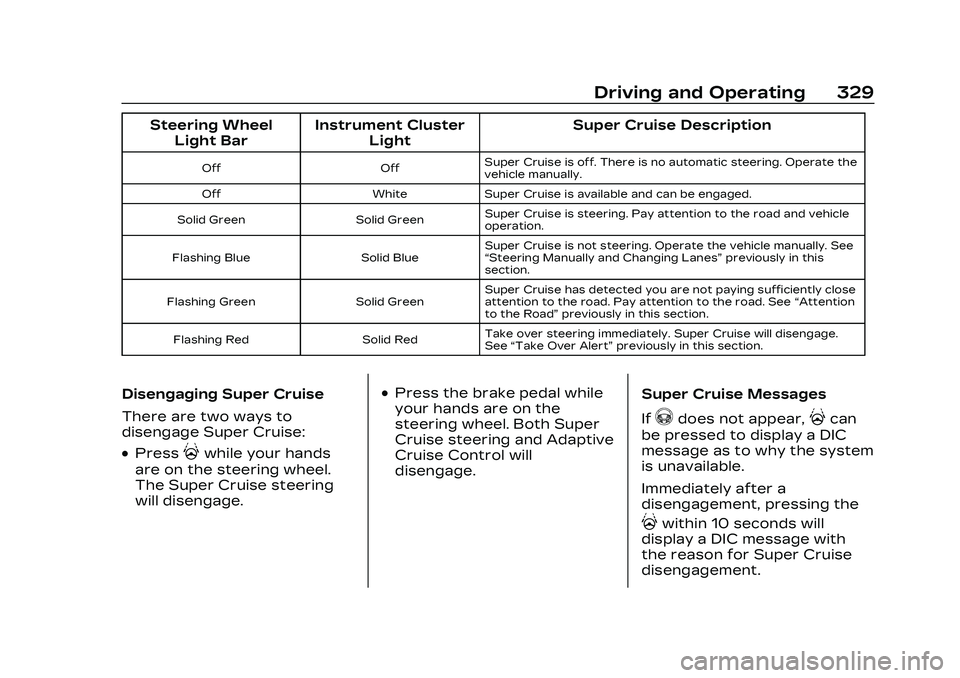
Steering WheelLight Bar Instrument Cluster
Light Super Cruise Description
Off
OffSuper Cruise is off. There is no automatic steering. Operate the
vehicle manually.
Off WhiteSuper Cruise is available and can be engaged.
Solid Green Solid GreenSuper Cruise is steering. Pay attention to the road and vehicle
operation.
Flashing Blue Solid BlueSuper Cruise is not steering. Operate the vehicle manually. See
“Steering Manually and Changing Lanes”
previously in this
section.
Flashing Green Solid GreenSuper Cruise has detected you are not paying sufficiently close
attention to the road. Pay attention to the road. See
“Attention
to the Road” previously in this section.
Flashing Red Solid RedTake over steering immediately. Super Cruise will disengage.
See
“Take Over Alert” previously in this section.
Disengaging Super Cruise
There are two ways to
disengage Super Cruise:
.Press]while your hands
are on the steering wheel.
The Super Cruise steering
will disengage.
.Press the brake pedal while
your hands are on the
steering wheel. Both Super
Cruise steering and Adaptive
Cruise Control will
disengage. Super Cruise Messages
If
^does not appear,]can
be pressed to display a DIC
message as to why the system
is unavailable.
Immediately after a
disengagement, pressing the
]within 10 seconds will
display a DIC message with
the reason for Super Cruise
disengagement.
Page 331 of 524

Cadillac CT4 Owner Manual (GMNA-Localizing-U.S./Canada-16500442) -
2023 - CRC - 5/10/22
330 Driving and Operating
Super Cruise Message Summary
Subscription Required Press OnStar Button.The owner’s required Connected Services subscription
may have ended.
.Press the Blue OnStar button in your vehicle to speak
with an OnStar representative, who can help determine
the issue and what actions to take
Unavailable Turn on Adaptive Cruise Control Adaptive Cruise Control must be on before Super Cruise can be enabled.
.Set speed is not required before enabling Super Cruise.
.Adaptive Cruise Control is not required to be engaged
before enabling Super Cruise.
Unavailable Lane Ending Super Cruise is disabled because the driving lane is ending.
Unavailable No Road Information
.There is no map information available for that portion of
the road. Recent road reconstruction may turn off Super
Cruise for that section of road until new map information
is available.
.The vehicle is not on the correct type of road.
A controlled access freeway or compatible divided
highway is required for Super Cruise.
.There are lanes entering or exiting on both the left and
right side of the road.
.The vehicle is approaching an interchange or intersection.
The message will appear for 10 seconds or less.
Page 498 of 524

Cadillac CT4 Owner Manual (GMNA-Localizing-U.S./Canada-16500442) -
2023 - CRC - 5/5/22
Customer Information 497
electronic access, detecting
possible malicious activity in
related networks, and
responding to suspected
cybersecurity incidents in a
timely, coordinated and
effective manner. Security
incidents could impact your
safety or compromise your
private data. To minimize
security risks, please do not
connect your vehicle
electronic systems to
unauthorized devices or
connect your vehicle to any
unknown or untrusted
networks (such as Bluetooth,
WIFI or similar technology). In
the event you suspect any
security incident impacting
your data or the safe
operation of your vehicle,
please stop operating your
vehicle and contact your
dealer.Event Data Recorders
This vehicle is equipped with
an Event Data Recorder (EDR).
The main purpose of an EDR is
to record, in certain crash or
near crash-like situations, such
as an air bag deployment or
hitting a road obstacle, data
that will assist in
understanding how a vehicle’s
systems performed. The EDR
is designed to record data
related to vehicle dynamics
and safety systems for a short
period of time, typically
30 seconds or less. The EDR in
this vehicle is designed to
record such data as:
.How various systems in your
vehicle were operating;
.Whether or not the driver
and passenger safety belts
were buckled/fastened;
.How far (if at all) the driver
was depressing the
accelerator and/or brake
pedal; and,
.How fast the vehicle was
traveling.These data can help provide a
better understanding of the
circumstances in which
crashes and injuries occur.
Note
EDR data are recorded by
your vehicle only if a non-trivial
crash situation occurs; no data
are recorded by the EDR
under normal driving
conditions and no personal
data (e.g., name, gender, age,
and crash location) are
recorded. However, other
parties, such as law
enforcement, could combine
the EDR data with the type of
personally identifying data
routinely acquired during a
crash investigation.
To read data recorded by an
EDR, special equipment is
required, and access to the
vehicle or the EDR is needed.
In addition to the vehicle
manufacturer, other parties,
such as law enforcement, that
have the special equipment,
Page 500 of 524

Cadillac CT4 Owner Manual (GMNA-Localizing-U.S./Canada-16500442) -
2023 - CRC - 5/4/22
OnStar 499
OnStar
OnStar Overview
OnStar Overview . . . . . . . . . . 499
OnStar Services
Emergency . . . . . . . . . . . . . . . . . . 500
Security . . . . . . . . . . . . . . . . . . . . . . . 501
OnStar Additional
Information
OnStar AdditionalInformation . . . . . . . . . . . . . . . . . 501
OnStar Overview
=Voice Command Button
QBlue OnStar Button
>Red Emergency Button
This vehicle may be equipped
with a comprehensive,
in-vehicle system that can
connect to an OnStar Advisor
for Emergency, Security,
Navigation, Connections, and
Diagnostics Services. OnStar
services may require a paid
service plan and data plan.
OnStar requires the vehicle
battery and electrical system,
cellular service, and GPS
satellite signals to be available
and operating. OnStar acts as
a link to existing emergency
service providers. OnStar may
collect information about you and your vehicle, including
location information. See
OnStar User Terms, Privacy
Statement, and Software
Terms for more details
including system limitations at
www.onstar.com (U.S.) or
www.onstar.ca (Canada).
The OnStar system status
light is next to the OnStar
buttons. If the status light is:.Solid Green: System is ready.
.Flashing Green: On a call.
.Red: Indicates a problem.
.Off: System is off. PressQ
twice to speak with an
OnStar Advisor.
Press
Qor call
1-888-4ONSTAR
(1-888-466-7827) to speak to
an Advisor.
Functionality of the Voice
Command button may vary by
vehicle and region.
Page 511 of 524

Cadillac CT4 Owner Manual (GMNA-Localizing-U.S./Canada-16500442) -
2023 - CRC - 5/10/22
510 INDEX
AlertLane Change . . . . . . . . . . . . . . . 349
Rear Cross Traffic . . . . . . . . . 341
Side Blind
Zone (SBZA) . . . . . . . . . . . . . . . 349
All-Season Tires . . . . . . . . . . . . . . 414
All-Wheel Drive . . . . . . . . 286, 400
AM-FM Radio . . . . . . . . . . . . . . . . . . 162
Antenna Multi-band . . . . . . . . . . . . . . . . . . . . 166
Antilock Brake
System (ABS) . . . . . . . . . . . . . . . 286
Warning Light . . . . . . . . . . . . . . . . 121
Appearance Care Exterior . . . . . . . . . . . . . . . . . . . . . . . 455
Interior . . . . . . . . . . . . . . . . . . . . . . . . . 461
Apple CarPlay and Android Auto . . . . . . . . . . . . . . . . 204
Assistance Program, Roadside . . . . . . . . . . . . . . . . . . . . . 487
Assistance Systems
Driving . . . . . . . . . . . . . . . . . . . . . . . . 342
Parking and Backing . . . . . . 335
Audio Bluetooth . . . . . . . . . . . . . . . . . . . . . 169
Automatic Dimming Mirrors . . . . . . . . . . . . . 30
Door Locks . . . . . . . . . . . . . . . . . . . . . 21 Automatic (cont'd)
Emergency
Braking (AEB) . . . . . . . . . . . . . 345
Emergency Braking (AEB) Disabled Light . . . . . 123
Headlamp System . . . . . . . . . . 148
Transmission . . . . . . . . . 272, 275
Transmission Fluid . . . . . . . . 382
Vehicle Hold Light . . . . . . . . . . 122
Automatic Transmission Manual Mode . . . . . . . . . 280, 281
Automatic Vehicle
Hold (AVH) . . . . . . . . . . . . . . . . . . . 289
Avoiding Untrusted Media Devices . . . . . . . . . . . . . . . 166
B
BatteryExterior LightingBattery Saver . . . . . . . . . . . . . . 153
Load Management . . . . . . . . . 152
Power Protection . . . . . . . . . . 153
Battery - North America . . . . . . . . . . . . . . . . .399, 447
Blade Replacement, Wiper . . . . . . . . . . . . . . . . . . . . . . . . . . . 401
Bluetooth Audio . . . . . . . . . . . . . . . . . . . . . . . . . . . 169 Bluetooth (cont'd)
Overview . . . . . . . . . . . . . . . . 198, 199
Brake Fluid . . . . . . . . . . . . . . . . . . . . . . . . . . . 398
Pad Life System . . . . . . . . . . . 396
System Warning Light . . . . 120
Brake Pad Life System . . . . 396
Brakes . . . . . . . . . . . . . . . . . . . . . . . . . . 393
Antilock . . . . . . . . . . . . . . . . . . . . . . . 286
Brake Assist . . . . . . . . . . . . . . . . 289
Electric Brake Boost . . . . . 286
Electric Parking Brake . . . . 287
Braking . . . . . . . . . . . . . . . . . . . . . . . . . 235 AutomaticEmergency (AEB) . . . . . . . . 345
Reverse Automatic . . . . . . . 340
Braking System FrontPedestrian (FPB) . . . . . . . . . 346
Break-In, New Vehicle . . . . . . 259
Buckle To Drive . . . . . . . . . . . . . . . . 50
Bulb Replacement . . . . . . . . . . . 403 Front Turn SignalLamps . . . . . . . . . . . . . . . . . . . . . . . 404
Halogen Bulbs . . . . . . . . . . . . . . 403
Headlamp Aiming . . . . . . . . . . 403
Page 519 of 524

Cadillac CT4 Owner Manual (GMNA-Localizing-U.S./Canada-16500442) -
2023 - CRC - 5/10/22
518 INDEX
PhoneApple CarPlay and
Android Auto . . . . . . . . . . . . . . 204
Bluetooth . . . . . . . . . . . . . . . 198, 199
Port USB . . . . . . . . . . . . . . . . . . . . . . . . . . . . . 166
Positioning
Vehicle . . . . . . . . . . . . . . . . . . . . . . . . . 183
Power Door Locks . . . . . . . . . . . . . . . . . . . . 20
Mirrors . . . . . . . . . . . . . . . . . . . . . . . . . . 28
Outlets . . . . . . . . . . . . . . . . . . . . . . . . 101
Protection, Battery . . . . . . . . 153
RetainedAccessory (RAP) . . . . . . . . . . 267
Seat Adjustment . . . . . . . . . . . . . 38
Windows . . . . . . . . . . . . . . . . . . . . . . . . 31
Pregnancy, Using Seat Belts . . . . . . . . . . . . . . . . . . . . . . . . . . . . . 57
Privacy Vehicle Data
Recording . . . . . . . . . . . . . . . . . . 496
Problems with Route Guidance . . . . . . . . . . . . . . . . . . . . . . 184
Program
CourtesyTransportation . . . . . . . . . . . 490
Prohibited Fuels . . . . . . . . . . . . . 355 Proposition 65 Warning
California . . . . . . . . . . . . . . . . . . . . . . . . . . 1
Proposition 65 Warning, California . . . 447
Publication Ordering Information . . . . . . . . . . . . . . . . . . 494
R
Radiator . . . . . . . . . . . . . . . . . . . . . . . . 386
RadioAM-FM Radio . . . . . . . . . . . . . . . . 162
Data System (RDS) . . . . . . . . . 164
Frequency Statement . . . . 494
Reception . . . . . . . . . . . . . . . . . . . . . 165
Satellite . . . . . . . . . . . . . . . . . . . . . . . 165
Reading Lamps . . . . . . . . . . . . . . . 150
Rear Cross Traffic Alert(RCTA) System . . . . . . . . . . . . 341
Seats . . . . . . . . . . . . . . . . . . . . . . . . . . . . 47
Vision Camera (RVC) . . . . . 335
Rearview Mirrors . . . . . . . . . . . . . . . 31 Automatic Dimming . . . . . . . . . . 31
Reclining Seatbacks . . . . . . . . . . 39
Recognition Voice . . . . . . . . . . . . . . . . . . . . . . . . . . . 185
Recommended Fuel . . . . . . . . . . . . . . . . . . . . . 354, 355 Recommended Fluids
and Lubricants . . . . . . . . . . . . . 474
Records Maintenance . . . . . . . . . . . . . . . . . 477
Recreational Vehicle Towing . . . . . . . . . . . . . . . . . . . . . . . . 454
Reimbursement
Program, GM Mobility . . . . 487
Remote Key . . . . . . . . . . . . . . . . . . . . . . . . . . . . . . . . . 9
Key Operation . . . . . . . . . . . . . . . . . . 9
Vehicle Start . . . . . . . . . . . . . . . . . . . 16
Replacement Parts Airbags . . . . . . . . . . . . . . . . . . . . . . . . . 72
Maintenance . . . . . . . . . . . . . . . . 475
Replacing
Airbag System . . . . . . . . . . . . . . . 72
LATCH System PartsAfter a Crash . . . . . . . . . . . . . . . 87
Seat Belt System Parts after a Crash . . . . . . . . . . . . . . . . 58
Reporting Safety Defects Canadian Government . . . 495
General Motors . . . . . . . . . . . . 496
U.S. Government . . . . . . . . . . 495
Restraints Where to Put . . . . . . . . . . . . . . . . . 79