air condition CADILLAC CT4 2023 Owner's Manual
[x] Cancel search | Manufacturer: CADILLAC, Model Year: 2023, Model line: CT4, Model: CADILLAC CT4 2023Pages: 524, PDF Size: 6.98 MB
Page 232 of 524

Cadillac CT4 Owner Manual (GMNA-Localizing-U.S./Canada-16500442) -
2023 - CRC - 5/4/22
Climate Controls 231
Operation Tips
.Clear away any ice, snow,
or leaves from air inlets at
the base of the windshield
that could block the flow of
air into the vehicle.
.Clear snow off the hood to
improve visibility and help
decrease moisture drawn
into the vehicle.
.Keep the path under the
front seats clear of objects
to help circulate the air
inside of the vehicle more
effectively.
.Use of non-GM approved
hood deflectors can
adversely affect the
performance of the system.
Check with your dealer
before adding equipment to
the outside of the vehicle.
.Do not attach any devices to
the air vent slats. This
restricts airflow and may
cause damage to the air
vents.
Maintenance
Passenger
Compartment Air
Filter
The filter reduces dust, pollen,
and other airborne irritants
from outside air that is pulled
into the vehicle. The filter
should be replaced as part of
routine scheduled
maintenance. See
Maintenance Schedule0469.
See your dealer regarding
replacement of the filter.
Service
All vehicles have a label
underhood that identifies the
refrigerant used in the vehicle.
The refrigerant system should
only be serviced by trained
and certified technicians. The
air conditioning evaporator
should never be repaired or
replaced by one from a
salvage vehicle. It should only be replaced by a new
evaporator to ensure proper
and safe operation.
During service, all refrigerants
should be reclaimed with
proper equipment. Venting
refrigerants directly to the
atmosphere is harmful to the
environment and may also
create unsafe conditions
based on inhalation,
combustion, frostbite, or other
health-based concerns.
The air conditioning system
requires periodic maintenance.
See Maintenance Schedule
0
469.
Page 255 of 524

Cadillac CT4 Owner Manual (GMNA-Localizing-U.S./Canada-16500442) -
2023 - CRC - 5/10/22
254 Driving and Operating
are clear. Avoid sudden
steering maneuvers and
braking while on ice.
.Turn off cruise control.
.Select All-Wheel Drive (AWD)
Mode for vehicles equipped
with AWD. Select Snow/Ice
Mode for FWD only vehicles.
See Driver Mode Control
0292 and
All-Wheel Drive 0286.
Cold Weather Mode
In very low temperatures, a
cold weather message may
display on the Driver
Information Center (DIC). The
engine speed, transmission
shift patterns, and cabin fan
speed may operate differently
to enable the vehicle to warm
up quicker. You can manually
override the cabin fan speed in
cold weather mode.
Blizzard Conditions
Stop the vehicle in a safe
place and signal for help. Stay
with the vehicle unless there is
help nearby. If possible, use Roadside Assistance. See
Roadside Assistance Program
0
487. To get help and keep
everyone in the vehicle safe:
.Turn on the hazard warning
flashers.
.Tie a red cloth to an outside
mirror.
{Warning
Snow can trap engine
exhaust under the vehicle.
This may cause exhaust
gases to get inside. Engine
exhaust contains carbon
monoxide (CO), which cannot
be seen or smelled. It can
cause unconsciousness and
even death.
If the vehicle is stuck
in snow:
.Clear snow from the base
of the vehicle, especially
any blocking the
exhaust pipe.
(Continued)
Warning (Continued)
.Open a window about
5 cm (2 in) on the vehicle
side that is away from the
wind, to bring in fresh air.
.Fully open the air outlets
on or under the
instrument panel.
.Adjust the climate control
system to circulate the air
inside the vehicle and set
the fan speed to the
highest setting. See
“Climate Control Systems.”
For more information about
CO, see Engine Exhaust
0 271.
To save fuel, run the engine
for short periods to warm the
vehicle and then shut the
engine off and partially close
the window. Moving about to
keep warm also helps.
If it takes time for help to
arrive, when running the
engine, push the accelerator
pedal slightly so the engine
Page 275 of 524

Cadillac CT4 Owner Manual (GMNA-Localizing-U.S./Canada-16500442) -
2023 - CRC - 5/10/22
274 Driving and Operating
Caution
A transmission hot message
may display if the automatic
transmission fluid is too hot.
Driving under this condition
can damage the vehicle.
Stop and idle the engine to
cool the automatic
transmission fluid. This
message clears when the
transmission fluid has cooled
sufficiently.
D : This position is for normal
driving. If more power is
needed for passing, press the
accelerator pedal down.
Downshifting the transmission
in slippery road conditions
could result in skidding. See
“Skidding” under Loss of
Control 0237. M :
This mode can be entered
by moving the shift lever from
D (Drive) to M (Manual Mode).
M (Manual Mode) allows the
driver to select gears
appropriate for current driving
conditions. M (Manual Mode)
can be exited by returning the
shift lever to D (Drive). See
Manual Mode (Electronic
Shifter) 0281 or
Manual Mode (Mechanical
Shifter) 0280.
Caution
Spinning the tires or holding
the vehicle in one place on a
hill using only the
accelerator pedal may
damage the transmission.
The repair will not be
covered by the vehicle
warranty. If the vehicle is
stuck, do not spin the tires.
When stopping on a hill, use
the brakes to hold the
vehicle in place. While in Sport or Track Mode,
the vehicle monitors driving
behavior, and automatically
enables Performance Shift
Features when spirited driving
is detected. These features
maintain lower transmission
gears to increase available
engine braking and improve
acceleration response. The
vehicle will exit these features
and return to Sport or Track
Mode normal operation after a
short period when no spirited
driving is detected. See Driver
Mode Control
0292.
Engine speeds may be
increased while driving at
highway speeds while the
engine is still warming up.
Page 281 of 524
Cadillac CT4 Owner Manual (GMNA-Localizing-U.S./Canada-16500442) -
2023 - CRC - 5/10/22
280 Driving and Operating
Downshifting the transmission
in slippery road conditions
could result in skidding. See
“Skidding”under Loss of
Control 0237.
Caution
Spinning the tires or holding
the vehicle in one place on a
hill using only the
accelerator pedal may
damage the transmission.
The repair will not be
covered by the vehicle
warranty. If the vehicle is
stuck, do not spin the tires.
When stopping on a hill, use
the brakes to hold the
vehicle in place.
Manual Mode
(Mechanical Shifter)
Tap Shift
Caution
Driving with the engine at a
high rpm without upshifting
while using Tap Shift, could
damage the vehicle. Always
upshift when necessary
while using Tap Shift.
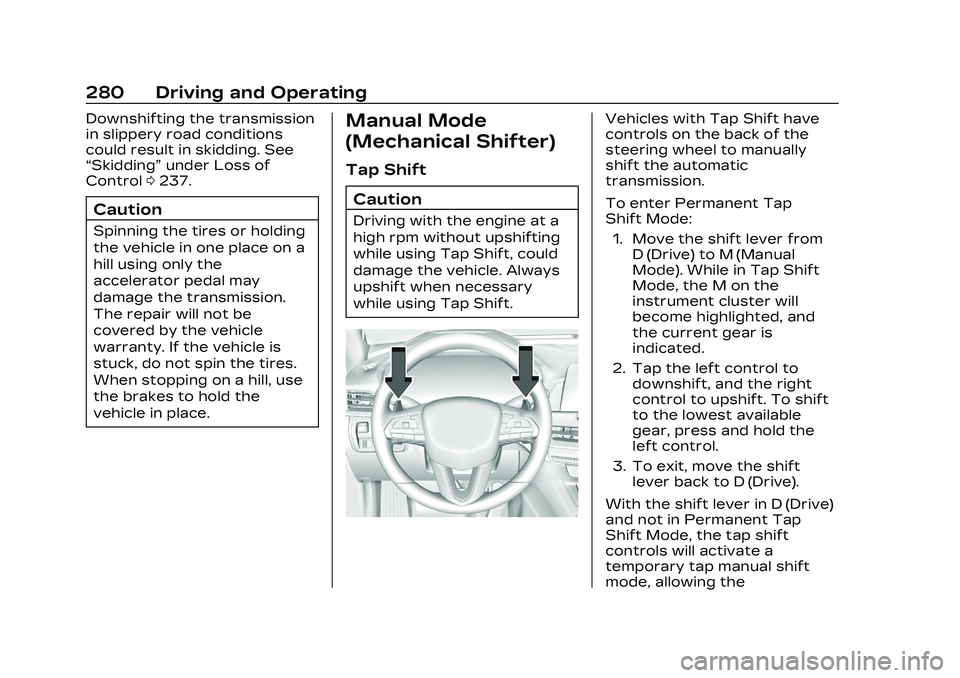
Vehicles with Tap Shift have
controls on the back of the
steering wheel to manually
shift the automatic
transmission.
To enter Permanent Tap
Shift Mode: 1. Move the shift lever from D (Drive) to M (Manual
Mode). While in Tap Shift
Mode, the M on the
instrument cluster will
become highlighted, and
the current gear is
indicated.
2. Tap the left control to downshift, and the right
control to upshift. To shift
to the lowest available
gear, press and hold the
left control.
3. To exit, move the shift lever back to D (Drive).
With the shift lever in D (Drive)
and not in Permanent Tap
Shift Mode, the tap shift
controls will activate a
temporary tap manual shift
mode, allowing the
Page 325 of 524

Cadillac CT4 Owner Manual (GMNA-Localizing-U.S./Canada-16500442) -
2023 - CRC - 5/10/22
324 Driving and Operating
Warning (Continued)
the road conditions. You
may need to respond to
traffic events by steering,
braking, or accelerating. See
Defensive Driving0235.
Super Cruise also cannot
determine whether you are
awake, asleep, impaired,
or properly focused on safe
driving. The vehicle could
crash into other vehicles,
drive out of the lane, or drive
off the road. Complete
attention is always required
while driving, even while
using Super Cruise. Be
prepared to take over
steering or apply the brakes
at any time.
{Warning
To prevent serious injury or
death, be alert and pay
special attention when
passing highway exits,
entrances, and crossings
with Super Cruise, and be
ready to take control of the
vehicle when necessary.
Changes in lane markings
around exits and entrances
can momentarily cause
Super Cruise to not detect
the correct lane. If this
occurs, Super Cruise may
attempt steering inputs to
bring the vehicle back into
the correct lane and, in rare
circumstances, could
over-correct and cause the
vehicle to momentarily cross
into a lane next to your
vehicle unless you manually
steer to maintain your lane
position. The Driver Attention System
(DAS) on the steering column
continually monitors driver
head and eye position to
estimate driver attention to
the road. The camera does not
record or share pictures,
audio, or video.
Sunglasses, hats, or other
types of clothing that change
the shape of the head may
interfere with camera
performance. To improve
camera performance, raise or
lower the steering wheel,
or change the seat position.
Pay close attention to the
road ahead to avoid these
three increasing alerts:
Page 335 of 524

Cadillac CT4 Owner Manual (GMNA-Localizing-U.S./Canada-16500442) -
2023 - CRC - 5/10/22
334 Driving and Operating
Warning (Continued)
.Work under poor visibility
or bad weather conditions.
.Work if the detection
sensor is not cleaned or is
covered by ice, snow, mud,
or dirt.
.Work if the detection
sensor is covered up, such
as with a sticker, magnet,
or metal plate.
.Work if the detection
sensor viewing zone is
interrupted by an installed
accessory, such as a bike
rack, or hitch mounted
cargo carrier.
.Work if the area
surrounding the detection
sensor is damaged or not
properly repaired.
Complete attention is
always required while
driving, and you should be
ready to take action and (Continued)
Warning (Continued)
apply the brakes and/or
steer the vehicle to avoid
crashes.
Audible or Safety Alert Seat
Some driver assistance
features alert the driver of
obstacles by beeping. To view
available settings for this
feature, touch the Settings
icon on the infotainment home
page. Select “Vehicle”to
display the list of available
options and select “Comfort
and Convenience”.
If equipped with the Safety
Alert Seat, the driver seat
cushion may provide a
vibrating pulse alert instead of
beeping. To view available
settings for this feature, touch
the Settings icon on the
infotainment home page.
Select “Vehicle” to display the
list of available options and
select “Collision/Detection
Systems”. Cleaning
Depending on vehicle options,
keep these areas of the
vehicle clean to ensure the
best driver assistance feature
performance. Driver
Information Center (DIC)
messages may display when
the systems are unavailable or
blocked.
Page 340 of 524

Cadillac CT4 Owner Manual (GMNA-Localizing-U.S./Canada-16500442) -
2023 - CRC - 5/10/22
Driving and Operating 339
How the System Works
The instrument cluster may
have a Park Assist display with
bars that show“distance to
object,” driving direction, and
object location information for
the Park Assist system. As the
object gets closer, more bars
light up and the bars change
color from yellow to amber
to red.
Beeps sound to warn the
driver of certain objects that
are detected around the
vehicle. The frequency of
beeps increases as the vehicle
gets closer to the object.
When the object is very close
to the vehicle, the beeps are
continuous. Beeps for the
front are higher pitched than
beeps for the rear. If equipped
with Safety Alert seat, both
sides of the seat will pulse
alongside the beeps. When the System Does Not
Seem to Work Properly
The following messages may
be displayed on the DIC:
SERVICE PARKING ASSIST :
If this message occurs, check
the following conditions:
.The sensors are not clean.
Keep the vehicle's rear
bumper free of mud, dirt,
snow, ice, and slush. For
cleaning instructions, see
Exterior Care
0455.
.The Park Assist sensors are
covered by frost or ice.
Frost or ice can form around
and behind the sensors and
may not always be seen; this
can occur after washing the
vehicle in cold weather. The
message may not clear until
the frost or ice has melted.
If the above conditions do not
exist, take the vehicle to your
dealer to repair the system. PARK ASSIST OFF :
If the PA
system does not activate due
to a temporary condition, the
appropriate message displays
on the DIC. PA OFF message
is displayed when disabled by
the driver. Front/Rear PA OFF
message is displayed when an
attached object is detected in
the front or rear respectively.
PA Temporarily Unavailable
message is displayed for
system failures. This can occur
under the following conditions:.The driver has disabled the
system.
.An object was hanging out
of the trunk during the last
drive cycle. Once the object
is removed, RPA will return
to normal operation.
.The bumper is damaged.
Take the vehicle to your
dealer to repair the system.
.Other conditions, such as
vibrations from a
jackhammer or the
compression of air brakes on
Page 344 of 524

Cadillac CT4 Owner Manual (GMNA-Localizing-U.S./Canada-16500442) -
2023 - CRC - 5/10/22
Driving and Operating 343
feature, touch the Settings
icon on the infotainment home
page. Select“Vehicle”to
display the list of available
options and select “Collision/
Detection Systems”.
Detecting the Vehicle
Ahead
FCA warnings will not occur
unless the FCA system
detects a vehicle ahead. When
a vehicle is detected, the
vehicle ahead indicator will
display green. Vehicles may
not be detected on curves,
highway exit ramps, or hills,
due to poor visibility; or if a
vehicle ahead is partially
blocked by pedestrians or
other objects. FCA will not
detect another vehicle ahead
until it is completely in the
driving lane.
{Warning
FCA does not provide a
warning to help avoid a
crash, unless it detects a
vehicle. FCA may not detect
a vehicle ahead if the FCA
sensor is blocked by dirt,
snow, or ice, or if the
windshield is damaged.
It may also not detect a
vehicle on winding or hilly
roads, or in conditions that
can limit visibility such as
fog, rain, or snow, or if the
headlamps or windshield are
not cleaned or in proper
condition. Keep the
windshield, headlamps, and
FCA sensors clean and in
good repair. Collision Alert
With Head-Up Display
Without Head-Up Display
When your vehicle approaches
another detected vehicle too
rapidly, the red FCA display
will flash on the windshield.
Also, eight rapid high-pitched
beeps will sound from the
front, or both sides of the
Safety Alert Seat will pulse
five times. When this Collision
Alert occurs, the brake system
may prepare for driver braking
to occur more rapidly which
can cause a brief, mild
Page 348 of 524

Cadillac CT4 Owner Manual (GMNA-Localizing-U.S./Canada-16500442) -
2023 - CRC - 5/10/22
Driving and Operating 347
crashes with nearby
pedestrians when driving in a
forward gear. FPB displays an
amber indicator,
~, when a
nearby pedestrian is detected
ahead. When approaching a
detected pedestrian too
quickly, FPB provides a red
flashing alert on the
windshield and rapidly beeps
or pulses the driver seat. FPB
can provide a boost to braking
or automatically brake the
vehicle. This system includes
Intelligent Brake Assist (IBA),
and the Automatic Emergency
Braking (AEB) System may
also respond to pedestrians.
See Automatic Emergency
Braking (AEB) 0345.
The FPB system can detect
and alert to pedestrians in a
forward gear at speeds
between 8 km/h (5 mph) and
80 km/h (50 mph). During
daytime driving, the system
detects pedestrians up to a
distance of approximately 40 m (131 ft). During nighttime
driving, system performance is
very limited.
{Warning
FPB does not provide an
alert or automatically brake
the vehicle, unless it detects
a pedestrian. FPB may not
detect pedestrians, including
children:
.When the pedestrian is
not directly ahead, fully
visible, or standing upright,
or when part of a group.
.Due to poor visibility,
including nighttime
conditions, fog, rain,
or snow.
.If the FPB sensor is
blocked by dirt, snow,
or ice.
.If the headlamps or
windshield are not cleaned
or in proper condition.
(Continued)
Warning (Continued)
Be ready to take action and
apply the brakes. For more
information, see Defensive
Driving0235. Keep the
windshield, headlamps, and
FPB sensor clean and in
good repair.
FPB can be set to Off, Alert,
or Alert & Brake through
vehicle personalization. To
view available settings for this
feature, touch the Settings
icon on the infotainment home
page. Select “Vehicle”to
display the list of available
options and select “Collision/
Detection Systems”.
Detecting the Pedestrian
Ahead
Page 353 of 524

Cadillac CT4 Owner Manual (GMNA-Localizing-U.S./Canada-16500442) -
2023 - CRC - 5/10/22
352 Driving and Operating
be overridden by turning the
steering wheel. If the system
detects you are steering
intentionally across a lane
marker, the LDW will not be
given. Do not expect the LDW
to occur when you are
intentionally crossing a lane
marker.
{Warning
The LKA system does not
continuously steer the
vehicle. It may not keep the
vehicle in the lane or give a
Lane Departure Warning
(LDW) alert, even if a lane
marking is detected.
The LKA and LDW systems
may not:
.Provide an alert or enough
steering assist to avoid a
lane departure or crash.
.Detect lane markings
under poor weather or
visibility conditions. This
can occur if the windshield(Continued)
Warning (Continued)
or headlamps are blocked
by dirt, snow, or ice; if they
are not in proper
condition; or if the sun
shines directly into the
camera.
.Detect road edges.
.Detect lanes on winding or
hilly roads.
If LKA only detects lane
markings on one side of the
road, it will only assist or
provide an LDW alert when
approaching the lane on the
side where it has detected a
lane marking. Even with LKA
and LDW, you must steer
the vehicle. Always keep
your attention on the road
and maintain proper vehicle
position within the lane,
or vehicle damage, injury,
or death could occur. Always
keep the windshield,
headlamps, and camera (Continued)
Warning (Continued)
sensors clean and in good
repair. Do not use LKA in
bad weather conditions or
on roads with unclear lane
markings, such as
construction zones.
{Warning
Using LKA on slippery roads
could cause loss of control
of the vehicle and a crash.
Turn the system off.
{Warning
LKA will not alert the driver
if a towed trailer crosses
into an adjacent lane of
travel. Serious injury or
property damage may occur
if the trailer moves into
another lane. Always
monitor the trailer position(Continued)