brakes CADILLAC CT4 2023 Owner's Manual
[x] Cancel search | Manufacturer: CADILLAC, Model Year: 2023, Model line: CT4, Model: CADILLAC CT4 2023Pages: 524, PDF Size: 6.98 MB
Page 281 of 524
Cadillac CT4 Owner Manual (GMNA-Localizing-U.S./Canada-16500442) -
2023 - CRC - 5/10/22
280 Driving and Operating
Downshifting the transmission
in slippery road conditions
could result in skidding. See
“Skidding”under Loss of
Control 0237.
Caution
Spinning the tires or holding
the vehicle in one place on a
hill using only the
accelerator pedal may
damage the transmission.
The repair will not be
covered by the vehicle
warranty. If the vehicle is
stuck, do not spin the tires.
When stopping on a hill, use
the brakes to hold the
vehicle in place.
Manual Mode
(Mechanical Shifter)
Tap Shift
Caution
Driving with the engine at a
high rpm without upshifting
while using Tap Shift, could
damage the vehicle. Always
upshift when necessary
while using Tap Shift.
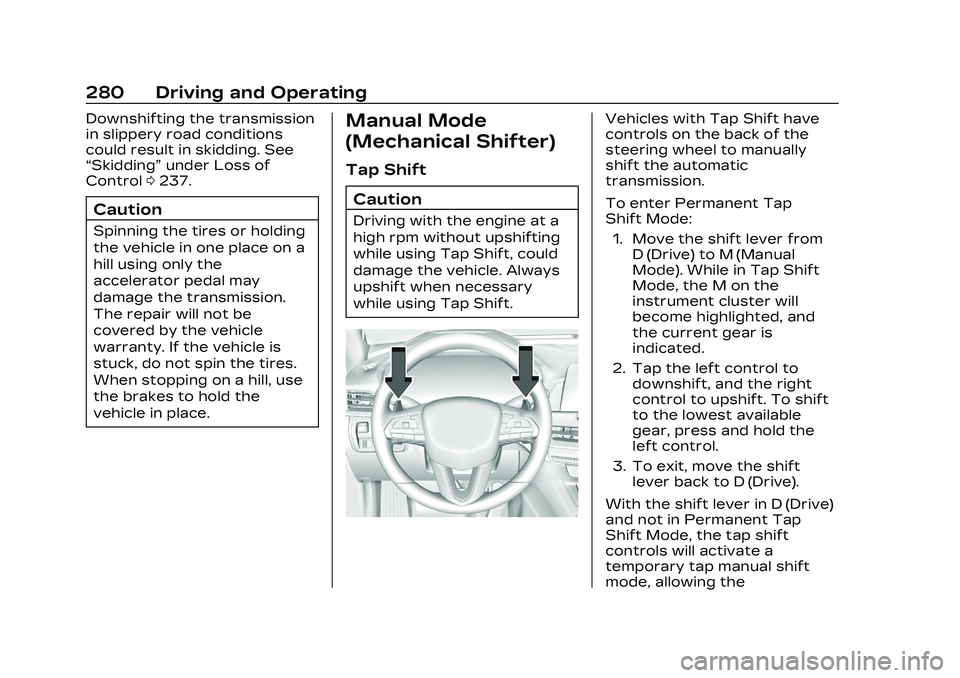
Vehicles with Tap Shift have
controls on the back of the
steering wheel to manually
shift the automatic
transmission.
To enter Permanent Tap
Shift Mode: 1. Move the shift lever from D (Drive) to M (Manual
Mode). While in Tap Shift
Mode, the M on the
instrument cluster will
become highlighted, and
the current gear is
indicated.
2. Tap the left control to downshift, and the right
control to upshift. To shift
to the lowest available
gear, press and hold the
left control.
3. To exit, move the shift lever back to D (Drive).
With the shift lever in D (Drive)
and not in Permanent Tap
Shift Mode, the tap shift
controls will activate a
temporary tap manual shift
mode, allowing the
Page 287 of 524

Cadillac CT4 Owner Manual (GMNA-Localizing-U.S./Canada-16500442) -
2023 - CRC - 5/10/22
286 Driving and Operating
.When ARM is deactivated,
the gear number is white.
.If no gear number is
displayed while the shift
lever is in gear, service is
required. All rev matching
will be disabled and the
malfunction indicator lamp
will be on. See Malfunction
Indicator Lamp (Check
Engine Light)0118. The
clutch and manual
transmission will continue to
operate normally.
ARM will also:
.Be active above 28 km/h
(18 mph).
.Match engine speed up to
6100 rpm.
.Not operate when the
accelerator pedal is applied.
.Be disabled when the
coolant temperature is
below 0 °C (32 °F).
Drive Systems
All-Wheel Drive
Vehicles with this feature
always send engine power
to all four wheels. It is fully
automatic, and adjusts itself as
needed for road conditions.
Brakes
Electric Brake Boost
Vehicles equipped with
electric brake boost have
hydraulic brake circuits that
are electronically controlled
when the brake pedal is
applied during normal
operation. The system
performs routine tests and
turns off within a few minutes
after the vehicle is turned off.
Noise may be heard during
this time. If the brake pedal is pressed during the tests or
when the electric brake boost
system is off, a noticeable
change in pedal force and
travel may be felt. This is
normal.
Antilock Brake
System (ABS)
The Antilock Brake System
(ABS) helps prevent a braking
skid and maintain steering
while braking hard.
If there is a problem with ABS,
this warning light stays on.
See Antilock Brake System
(ABS) Warning Light
0121.
Page 288 of 524

Cadillac CT4 Owner Manual (GMNA-Localizing-U.S./Canada-16500442) -
2023 - CRC - 5/10/22
Driving and Operating 287
ABS does not change the time
needed to get a foot on the
brake pedal and does not
always decrease stopping
distance. If you get too close
to the vehicle ahead, there will
not be enough time to apply
the brakes if that vehicle
suddenly slows or stops.
Always leave enough room
ahead to stop, even with ABS.
Using ABS
Do not pump the brakes. Just
hold the brake pedal down
firmly. Hearing and feeling ABS
operate is normal.
Braking in Emergencies
ABS allows steering and
braking at the same time. In
many emergencies, steering
can help even more than
braking.
Electric Parking Brake
The Electric Parking Brake
(EPB) can always be applied,
even if the vehicle is off. In
case of insufficient electrical
power, the EPB cannot be
applied or released. To
prevent draining the battery,
avoid unnecessary repeated
cycles of the EPB.The system has a red parking
brake status light and an
amber service parking brake
warning light. See Electric
Parking Brake Light
0121 and
Service Electric Parking Brake
Light 0121. There are also
parking brake-related Driver
Information Center (DIC)
messages.
Before leaving the vehicle,
check the red parking brake
status light to ensure that the
parking brake is applied.EPB Apply
To apply the EPB:
1. Be sure the vehicle is at a complete stop.
2. Press the EPB switch momentarily.
The red parking brake status
light will flash and then stay on
once the EPB is fully applied.
If the red parking brake status
light flashes continuously, then
the EPB is only partially
applied or there is a problem
with the EPB. A DIC message
Page 290 of 524
Cadillac CT4 Owner Manual (GMNA-Localizing-U.S./Canada-16500442) -
2023 - CRC - 5/10/22
Driving and Operating 289
taking off on a hill. When no
roll back is desired, an applied
EPB will allow both feet to be
used for the clutch and
accelerator pedals in
preparation for starting the
vehicle moving in the intended
direction. In this case, there is
no need to press the switch to
release the EPB.
Brake Assist
Brake Assist detects rapid
brake pedal applications due
to emergency braking
situations and provides
additional braking to activate
the Antilock Brake System
(ABS) if the brake pedal is not
pushed hard enough to
activate ABS normally. Minor
noise, brake pedal pulsation,
and/or pedal movement during
this time may occur. Continue
to apply the brake pedal as
the driving situation dictates.
Brake Assist disengages when
the brake pedal is released.
Hill Start Assist (HSA)
{Warning
Do not rely on the HSA
feature. HSA does not
replace the need to pay
attention and drive safely.
You may not hear or feel
alerts or warnings provided
by this system. Failure to
use proper care when
driving may result in injury,
death, or vehicle damage.
See Defensive Driving0235.
When the vehicle is stopped
on a grade, Hill Start Assist
(HSA) temporarily prevents
the vehicle from rolling in an
unintended direction during
the transition from brake
pedal release to accelerator
pedal apply. The brakes
release when the accelerator
pedal is applied or
automatically release after a
few seconds. The brakes may also release under other
conditions. Do not rely on HSA
to hold the vehicle.
HSA is available when the
vehicle is facing uphill in a
forward gear, or when facing
downhill in R (Reverse). The
vehicle must come to a
complete stop on a grade for
HSA to activate.
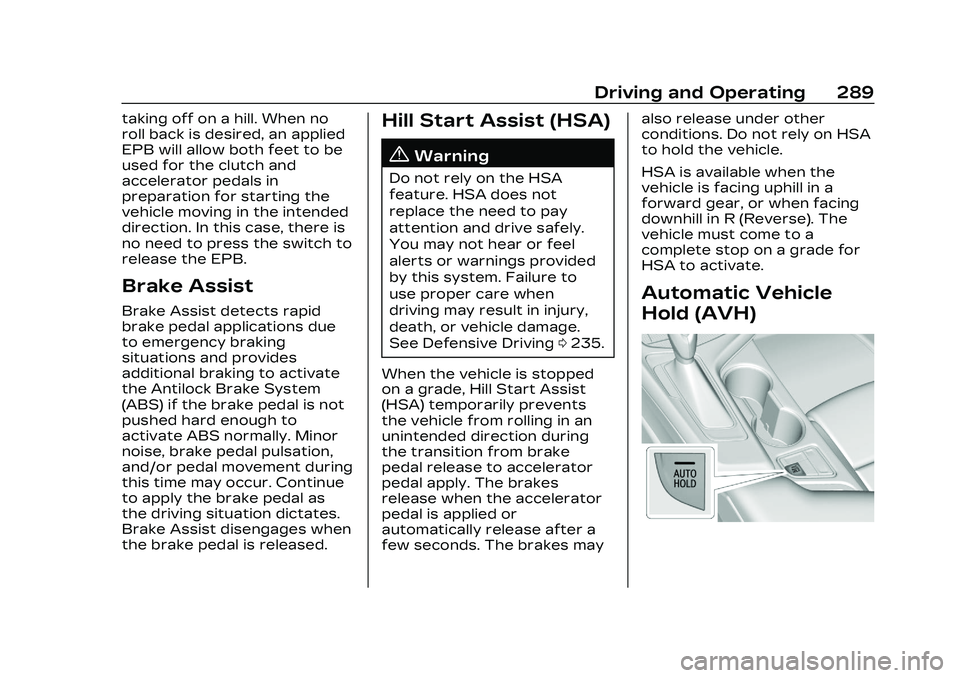
Automatic Vehicle
Hold (AVH)
Page 291 of 524

Cadillac CT4 Owner Manual (GMNA-Localizing-U.S./Canada-16500442) -
2023 - CRC - 5/10/22
290 Driving and Operating
{Warning
Do not rely on this feature.
It does not replace the need
to pay attention and drive
safely. You may not hear or
feel alerts or warnings
provided by this system.
Failure to use proper care
when driving may result in
injury, death, or vehicle
damage.
When Automatic Vehicle Hold
(AVH) is turned on and the
vehicle is braked to a stop,
AVH prevents the vehicle from
moving during the transition
from brake pedal release to
accelerator pedal apply. The
brakes release when the
accelerator pedal is applied.
The brakes may also release
under other conditions. Do not
rely on AVH to hold the
vehicle.
If the accelerator pedal is not
applied within a few minutes,
the Electric Parking Brake will apply. The parking brake will
also apply if the driver door is
opened or the driver seat belt
is unfastened while AVH is
holding the vehicle.
AVH can be turned on by
pressing AUTO HOLD. The
indicator light on the switch
will come on. The AVH light on
the instrument panel will come
on while AVH is actively
holding the vehicle. See
Automatic Vehicle Hold (AVH)
Light
0122.
Ride Control
Systems
Traction Control/
Electronic Stability
Control
The vehicle has a Traction
Control System (TCS) and
StabiliTrak/Electronic Stability
Control (ESC). These systems
help limit wheel slip and assist the driver in maintaining
control, especially on slippery
road conditions.
TCS activates if it senses that
any of the drive wheels are
spinning or beginning to lose
traction. When this happens,
the system brakes the
spinning wheel(s) and/or
reduces engine power to limit
wheel spin.
StabiliTrak/ESC activates
when the computer senses a
difference between the
intended path and the
direction the vehicle is actually
traveling. StabiliTrak/ESC
selectively applies braking
pressure at any one of the
vehicle's brakes to help steer
the vehicle in the intended
direction.
If cruise control is being used
and TCS or StabiliTrak/ESC
begins to limit wheel spin,
cruise control will disengage.
Cruise control may be turned
back on when road conditions
allow.
Page 298 of 524

Cadillac CT4 Owner Manual (GMNA-Localizing-U.S./Canada-16500442) -
2023 - CRC - 5/10/22
Driving and Operating 297
shifts are also firmer to
increase the quickness of
shifting.
Engine Sound
Adjusts the volume of engine
noise.
The sound level changes when
the variable exhaust
valves open.
Steering (Assist Effort)
Adjusts from a lighter steering
feel in Tour Mode to reduced
assist in Sport and Track
Mode for more steering feel.
Magnetic Ride Control (If
Equipped)
Adjusts the shock dampening
firmness from a comfort in
Tour Mode to an optimized
responsiveness tune in Sport
and Track.
Stability Control
.Competitive Mode allows
less computer control to
permit some slide and driftand is selected with the
TCS/StabiliTrak button
–
only available in Sport Mode.
.StabiliTrak/Electronic
Stability Control (ESC) can
be turned off by pressing
and holding the TCS/
StabiliTrak button for
five seconds.
Brake Feel
Adjusts brake pedal sensitivity
by selecting how quick or slow
the brakes respond to input.
Drive Mode Customization
The following settings can be
changed using the Drive Mode
Customization Menu. See
Settings > Vehicle > Drive
Mode Customization in the
center display to customize
My Mode or V-Mode.
Steering
Steering adjusts the effort
required to turn the steering
wheel. The steering wheel
offers better feedback in the Tour setting, but requires
more effort in the Sport and
Track settings.
–Tour, Sport, Track
Suspension
Suspension adjusts the
firmness of the suspension in
the vehicle. Suspension
adjusts the stiffness of the
shocks and/or springs. The
ride is more comfortable at
lower settings and is stiffer at
higher settings for better
control.
–Tour, Sport, Track
Brake Feel
Brake Feel adjusts the brake
pedal response. Settings
range from a slower response
for more comfortable driving
to the quickest response for
quicker deceleration. Brake
pedal travel decreases and
caliper pressure increases in
the Sport and Track settings.
–Tour, Sport, Track
Page 303 of 524
Cadillac CT4 Owner Manual (GMNA-Localizing-U.S./Canada-16500442) -
2023 - CRC - 5/10/22
302 Driving and Operating
the gears are shifted. The
cruise is disengaged if the
clutch is pressed for several
seconds.
If the Traction Control/
StabiliTrak/Electronic Stability
Control (ESC) system begins
to limit wheel spin while using
cruise control, the cruise
control automatically
disengages. See Traction
Control/Electronic Stability
Control0290. If a collision
alert occurs when cruise
control is activated, cruise
control is disengaged. See
Forward Collision Alert (FCA)
System 0342. When road
conditions allow cruise control
to be safely used, it can be
turned back on.
Cruise control will disengage if
either TCS or StabiliTrak/ESC
is turned off.
If the brakes are applied,
cruise control disengages.
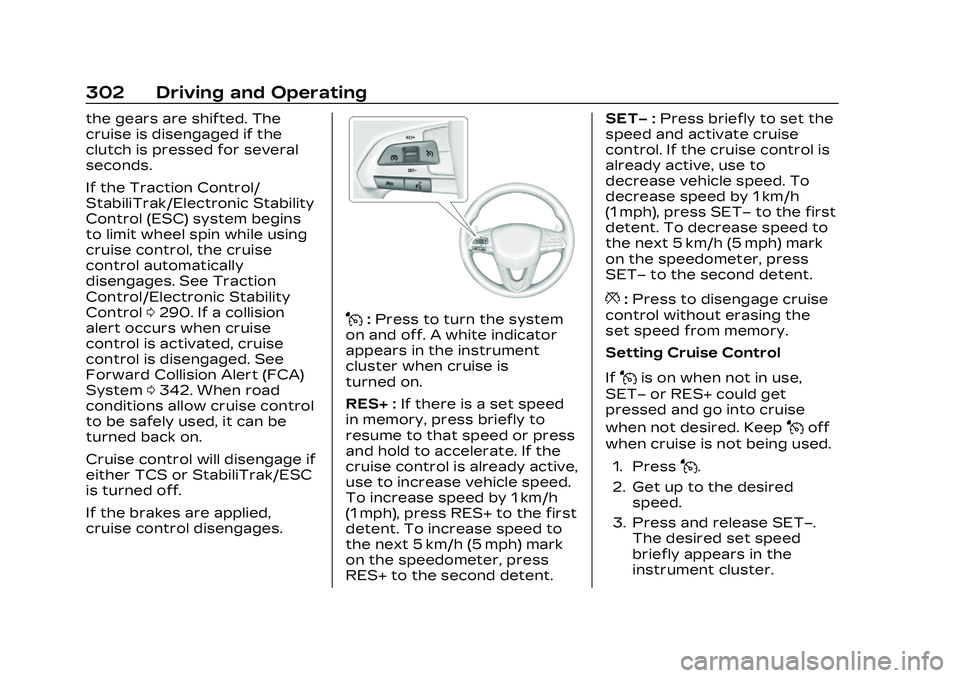
J: Press to turn the system
on and off. A white indicator
appears in the instrument
cluster when cruise is
turned on.
RES+ : If there is a set speed
in memory, press briefly to
resume to that speed or press
and hold to accelerate. If the
cruise control is already active,
use to increase vehicle speed.
To increase speed by 1 km/h
(1 mph), press RES+ to the first
detent. To increase speed to
the next 5 km/h (5 mph) mark
on the speedometer, press
RES+ to the second detent. SET−
:Press briefly to set the
speed and activate cruise
control. If the cruise control is
already active, use to
decrease vehicle speed. To
decrease speed by 1 km/h
(1 mph), press SET− to the first
detent. To decrease speed to
the next 5 km/h (5 mph) mark
on the speedometer, press
SET− to the second detent.
*:Press to disengage cruise
control without erasing the
set speed from memory.
Setting Cruise Control
If
Jis on when not in use,
SET− or RES+ could get
pressed and go into cruise
when not desired. Keep
Joff
when cruise is not being used.
1. Press
J.
2. Get up to the desired speed.
3. Press and release SET−. The desired set speed
briefly appears in the
instrument cluster.
Page 304 of 524

Cadillac CT4 Owner Manual (GMNA-Localizing-U.S./Canada-16500442) -
2023 - CRC - 5/10/22
Driving and Operating 303
4. Remove your foot from theaccelerator.
When the cruise control has
been set to the desired speed,
a green cruise control
indicator appears on the
instrument cluster and a
cruise set speed message
appears on the Head-Up
Display (HUD), if equipped.
Resuming a Set Speed
If the cruise control is set at a
desired speed and then the
brakes are applied or
*is
pressed, the cruise control is
disengaged without erasing
the set speed from memory.
Once the vehicle speed
reaches about 40 km/h
(25 mph) or more, press RES+
briefly. The vehicle returns to
the previous set speed. Increasing Speed While Using
Cruise Control
If the cruise control system is
already activated:
.Press and hold RES+ until
the desired speed is
reached, then release it.
.To increase vehicle speed in
small increments, briefly
press RES+ to the first
detent. For each press, the
vehicle goes about 1 km/h
(1 mph) faster.
.To increase vehicle speed in
larger increments, briefly
press RES+ to the second
detent. For each press, the
vehicle speed increases to
the next 5 km/h (5 mph) mark
on the speedometer.
The speedometer reading can
be displayed in either English
or metric units. See
Instrument Cluster (Base
Level) 0106 or
Instrument Cluster (Uplevel)
0 108. The increment value
used depends on the units
displayed. Reducing Speed While Using
Cruise Control
If the cruise control system is
already activated:
.Press and hold SET−
until
the desired lower speed is
reached, then release it.
.To decrease the vehicle
speed in small increments,
briefly press SET− to the
first detent. For each press,
the vehicle goes about
1 km/h (1 mph) slower.
.To decrease the vehicle
speed in larger increments,
briefly press SET− to the
second detent. For each
press, the vehicle speed
decreases to the next
5 km/h (5 mph) mark on the
speedometer.
The cruise control system may
automatically brake to slow
the vehicle down.
Page 306 of 524

Cadillac CT4 Owner Manual (GMNA-Localizing-U.S./Canada-16500442) -
2023 - CRC - 5/10/22
Driving and Operating 305
the selected following gap. To
disengage ACC, apply the
brake. If the Traction Control
System (TCS) or StabiliTrak/
Electronic Stability Control
(ESC) system activates while
ACC is engaged, ACC may
automatically disengage. See
Traction Control/Electronic
Stability Control0290. When
road conditions allow ACC to
be safely used, ACC can be
turned back on. ACC will not
engage if the TCS or
StabiliTrak/ESC electronic
stability control system is
disabled.
ACC can reduce the need for
you to frequently brake and
accelerate, especially when
used on expressways,
freeways, and interstate
highways. When used on other
roads, you may need to take
over the control of braking or
acceleration more often.{Warning
ACC has limited braking
ability and may not have
time to slow the vehicle
down enough to avoid a
collision with another vehicle
you are following. This can
occur when vehicles
suddenly slow or stop
ahead, or enter your lane.
Also see “Alerting the
Driver” in this section.
Complete attention is
always required while driving
and you should be ready to
take action and apply the
brakes. See Defensive
Driving 0235.
{Warning
ACC will not detect or brake
for children, pedestrians,
animals, or other objects.
Do not use ACC when:
.On winding and hilly roads
or when the sensors are
blocked by snow, ice,
or dirt. The system may
not detect a vehicle
ahead. Keep the entire
front of the vehicle clean.
.Visibility is low, such as in
fog, rain, or snow
conditions. ACC
performance is limited
under these conditions.
.On slippery roads where
fast changes in tire
traction can cause
excessive wheel slip.
.When towing a trailer.
Page 308 of 524

Cadillac CT4 Owner Manual (GMNA-Localizing-U.S./Canada-16500442) -
2023 - CRC - 5/10/22
Driving and Operating 307
When ACC is engaged, a
green
oindicator will be lit on
the instrument cluster. When
the regular cruise control is
engaged, a green
Jindicator
will be lit on the instrument
cluster and the following gap
will not display.
When the vehicle is turned on,
the cruise control mode will be
set to the last mode used
before the vehicle was
turned off.
{Warning
Always check the cruise
control indicator on the
instrument cluster to
determine which mode
cruise control is in before
using the feature. If ACC is
not active, the vehicle will
not automatically brake for
other vehicles, which could
cause a crash if the brakes
are not applied manually.
You and others could be
seriously injured or killed. Setting Adaptive Cruise
Control
If
ois on when not in use,
SET-/RES+ could be pressed
by mistake and activate ACC
when not desired. Keep
ooff
when cruise is not being used.
Select the set speed desired
for ACC. This is the vehicle
speed when no vehicle is
detected in its path.
While the vehicle is moving,
ACC will not set at a speed
below a minimum speed,
although it can be resumed.
If equipped with Super Cruise,
this minimum speed is 5 km/h
(3 mph), otherwise, it is
25 km/h (15 mph). The minimum
allowable set speed is 25 km/h
(15 mph).
To set ACC while moving:
1. Press
J.
2. Get up to the desired speed.
3. Press and release SET−. 4. Remove your foot from the
accelerator.
After ACC is set, it may
immediately apply the brakes if
a vehicle ahead is detected
closer than the selected
following gap.
ACC can also be set while the
vehicle is stopped if ACC is on
and the brake pedal is applied.
The ACC indicator displays on
the instrument cluster and
Head-Up Display (HUD),
if equipped. When ACC is
turned on, the indicator will be
lit white. When ACC is
engaged, the indicator will turn
green.
Be mindful of speed limits,
surrounding traffic speeds,
and weather conditions when
selecting the set speed.
Resuming a Set Speed
If ACC is set at a desired
speed and then the brakes are
applied, ACC is disengaged
without erasing the set speed
from memory.