transmission CADILLAC CT4 2023 Workshop Manual
[x] Cancel search | Manufacturer: CADILLAC, Model Year: 2023, Model line: CT4, Model: CADILLAC CT4 2023Pages: 524, PDF Size: 6.98 MB
Page 284 of 524

Cadillac CT4 Owner Manual (GMNA-Localizing-U.S./Canada-16500442) -
2023 - CRC - 5/10/22
Driving and Operating 283
Manual
Transmission
If equipped, this is the shift
pattern for the manual
transmission.
Caution
Shifting the vehicle initially
into any gear other than
1 (First) or R (Reverse) can
damage the clutch. Shift the
manual transmission in the
proper sequence, and time
the gear shifting with the(Continued)
Caution (Continued)
accelerator to avoid revving
the engine and damaging
the clutch.
Caution
The message MANUAL
TRANSMISSION—
RELEASE CLUTCH PEDAL
displays and a chime sounds
if the manual transmission
clutch pedal is partially
applied for an extended
period of time while the
vehicle is being driven.
Driving with the clutch pedal
applied can reduce the life
of the clutch and/or damage
it. Fully release the clutch
pedal after each gear
change.
Caution
The message REDUCED
PERFORMANCE —REDUCE
CLUTCH USE displays and
engine torque is
momentarily limited if
excessive manual
transmission clutch slip is
detected while the clutch
pedal is fully released. This
could be caused by a hot
clutch. Apply less pressure
on the accelerator pedal
when accelerating from a
stop. Also, fully release the
accelerator pedal during
gear changes. This will allow
the clutch to cool and should
prevent further clutch slip
while the clutch pedal is fully
released. If this message
displays repeatedly, see
your dealer. Repeated clutch
slip could cause permanent
damage.
Page 285 of 524

Cadillac CT4 Owner Manual (GMNA-Localizing-U.S./Canada-16500442) -
2023 - CRC - 5/10/22
284 Driving and Operating
Caution
The message
TRANSMISSION IS HOT—
SLOW DOWN displays and a
chime sounds if the manual
transmission fluid is hot and
vehicle speed is high. Driving
with the manual
transmission fluid
temperature high can
damage the vehicle. Drive at
a slower speed to cool the
manual transmission fluid.
This message clears when
the vehicle has slowed
sufficiently or if the manual
transmission fluid has cooled
sufficiently.
1 (First) : Press the clutch
pedal and shift into 1 (First).
Slowly let up on the clutch
pedal while pressing on the
accelerator pedal. After a complete stop, if it is
hard to shift into 1 (First), let
up on the clutch pedal, then
press it back down and shift
into 1 (First).
2 (Second) :
Press the clutch
pedal and let up on the
accelerator pedal, then shift
into 2 (Second). Then, slowly
let up on the clutch pedal
while accelerating.
3 (Third), 4 (Fourth), 5 (Fifth),
and 6 (Sixth) : Shift into
3 (Third), 4 (Fourth), 5 (Fifth),
and 6 (Sixth) the same as
2 (Second).
To stop, let up on the
accelerator pedal and press
the brake pedal. Just before
the vehicle stops, press the
clutch pedal and the brake
pedal, and shift to Neutral.
Neutral : Use this position
when you start or idle the
engine. The shift lever is in
Neutral when it is centered in
the shift pattern, not in
any gear. R (Reverse) :
To back up,
press down the clutch pedal,
completely stop the vehicle,
and shift into R (Reverse). Let
up on the clutch pedal slowly
while pressing the accelerator
pedal.
{Warning
If you skip a gear when
downshifting, you could lose
control of the vehicle. You
could injure yourself or
others. Do not shift down
more than one gear at a
time when downshifting.
Caution
Shifting to R (Reverse) while
the vehicle is moving
forward could damage the
transmission. The repairs
would not be covered by the
vehicle warranty. Shift to
R (Reverse) only after the
vehicle is stopped.
Page 286 of 524

Cadillac CT4 Owner Manual (GMNA-Localizing-U.S./Canada-16500442) -
2023 - CRC - 5/10/22
Driving and Operating 285
Caution
Do not rest your hand on
the shift lever while driving.
The pressure could cause
premature wear in the
transmission. The repairs
would not be covered by the
vehicle warranty.
Caution
When downshifting, if more
than one gear is skipped,
or the engine is racing when
the clutch pedal is released,
the engine, clutch, driveshaft
or transmission could be
damaged.
No Lift-Shift
The vehicle can be shifted up
a gear when the accelerator
pedal is pressed to the floor
without being released. This
allows for less power
interruption and will improve
acceleration times. This
feature is available in all drivermodes and is only active when
the engine speed is
greater than:
Gears 1, 2 and 3 - above
3000 rpm
Gears 4 and 5 - above
2000 rpm
Active Rev Match
Vehicles equipped with a
manual transmission have
Active Rev Match (ARM). ARM
aids in smoother shifting by
matching the engine speed to
the next selected gear. By
monitoring shift lever and
clutch operation, ARM adjusts
engine speed to match a
calibrated value based on gear
selection. On upshifts and
downshifts, engine speed will
be increased and decreased to
match vehicle road speed and
transmission gear position.
ARM is maintained while the
clutch pedal is pressed, but
will deactivate if the shift lever
is left in the Neutral position.
The system is activated and
deactivated by pressing the
ARM switch on the center
console. The system must be
activated with each new
ignition cycle. If ARM is
deactivated, the system will
still perform rev matching for
upshifts.
A gear indicator in the
instrument cluster displays the
current gear selected. ARM is
also shown in the
Performance View of the HUD:
.When ARM is activated, the
gear number is amber.
Page 287 of 524

Cadillac CT4 Owner Manual (GMNA-Localizing-U.S./Canada-16500442) -
2023 - CRC - 5/10/22
286 Driving and Operating
.When ARM is deactivated,
the gear number is white.
.If no gear number is
displayed while the shift
lever is in gear, service is
required. All rev matching
will be disabled and the
malfunction indicator lamp
will be on. See Malfunction
Indicator Lamp (Check
Engine Light)0118. The
clutch and manual
transmission will continue to
operate normally.
ARM will also:
.Be active above 28 km/h
(18 mph).
.Match engine speed up to
6100 rpm.
.Not operate when the
accelerator pedal is applied.
.Be disabled when the
coolant temperature is
below 0 °C (32 °F).
Drive Systems
All-Wheel Drive
Vehicles with this feature
always send engine power
to all four wheels. It is fully
automatic, and adjusts itself as
needed for road conditions.
Brakes
Electric Brake Boost
Vehicles equipped with
electric brake boost have
hydraulic brake circuits that
are electronically controlled
when the brake pedal is
applied during normal
operation. The system
performs routine tests and
turns off within a few minutes
after the vehicle is turned off.
Noise may be heard during
this time. If the brake pedal is pressed during the tests or
when the electric brake boost
system is off, a noticeable
change in pedal force and
travel may be felt. This is
normal.
Antilock Brake
System (ABS)
The Antilock Brake System
(ABS) helps prevent a braking
skid and maintain steering
while braking hard.
If there is a problem with ABS,
this warning light stays on.
See Antilock Brake System
(ABS) Warning Light
0121.
Page 289 of 524

Cadillac CT4 Owner Manual (GMNA-Localizing-U.S./Canada-16500442) -
2023 - CRC - 5/10/22
288 Driving and Operating
will display. Release the EPB
and try to apply it again. If the
light does not come on,
or keeps flashing, have the
vehicle serviced. Do not drive
the vehicle if the red parking
brake status light is flashing.
See your dealer.
If the amber service parking
brake warning light is on,
press the EPB switch.
Continue to hold the switch
until the red parking brake
status light remains on. If the
amber service parking brake
warning light is on, see your
dealer.
If the EPB is applied while the
vehicle is moving, the vehicle
will decelerate as long as the
switch is pressed. If the switch
is pressed until the vehicle
comes to a stop, the EPB will
remain applied.
The vehicle may automatically
apply the EPB in some
situations when the vehicle is
not moving. This is normal, and
is done to periodically checkthe correct operation of the
EPB system, or at the request
of other safety functions that
utilize the EPB.
If the EPB fails to apply, block
the rear wheels to prevent
vehicle movement.
EPB Release
To release the EPB:
1. Turn the ignition on or to accessory mode.
2. Apply and hold the brake pedal.
3. Press the EPB switch momentarily.
The EPB is released when the
red parking brake status light
is off.
If the amber service parking
brake warning light is on,
release the EPB by pressing
and holding the EPB switch.
Continue to hold the switch
until the red parking brake
status light is off. If either light
stays on after release is
attempted, see your dealer.
Caution
Driving with the parking
brake on can overheat the
brake system and cause
premature wear or damage
to brake system parts. Make
sure that the parking brake
is fully released and the
brake warning light is off
before driving.
If you are towing a trailer and
parking on a hill, see Driving
Characteristics and Towing
Tips 0358.
Automatic EPB Release
The EPB will automatically
release if the vehicle is
running, placed into gear, and
an attempt is made to drive
away. Avoid rapid acceleration
when the EPB is applied, to
preserve parking brake
lining life.
The EPB can also be used to
prevent roll back for vehicles
with a manual transmission
Page 293 of 524

Cadillac CT4 Owner Manual (GMNA-Localizing-U.S./Canada-16500442) -
2023 - CRC - 5/10/22
292 Driving and Operating
To turn TCS on again, press
and release
g. The traction off
light
idisplayed in the
instrument cluster will turn off.
If TCS is limiting wheel spin
when
gis pressed, the system
will not turn off until the
wheels stop spinning.
To turn off both TCS and
StabiliTrak/ESC, press and
hold
guntil the traction off
light
iand StabiliTrak/ESC
OFF light
gcome on and stay
on in the instrument cluster.
A DIC message may display.
To turn TCS and StabiliTrak/
ESC on again, press and
release
g. The traction off
light
iand StabiliTrak/ESC
OFF light
gin the instrument
cluster turn off.
Adding accessories can affect
the vehicle's performance. See
Accessories and Modifications
0 370.
Driver Mode Control
Driver Mode Control (DMC)
allows the driver to adjust the
overall driving experience to
better suit driver preference
by adjusting vehicle systems
to fit specific driving needs.
Drive mode availability and
affected vehicle systems are
dependent on vehicle trim
level, region, and optional
features.
If the vehicle is in Tour Mode
or My Mode, it will stay in that
mode through future ignition
cycles. If the vehicle is in any
other mode, it will return to
Tour Mode when the vehicle is
restarted. When a mode is
selected, an indicator will
come on in the instrument
cluster and stay on.
Mode Activation
Driver Mode Control Switch
for Automatic Transmission
Page 294 of 524
Cadillac CT4 Owner Manual (GMNA-Localizing-U.S./Canada-16500442) -
2023 - CRC - 5/10/22
Driving and Operating 293
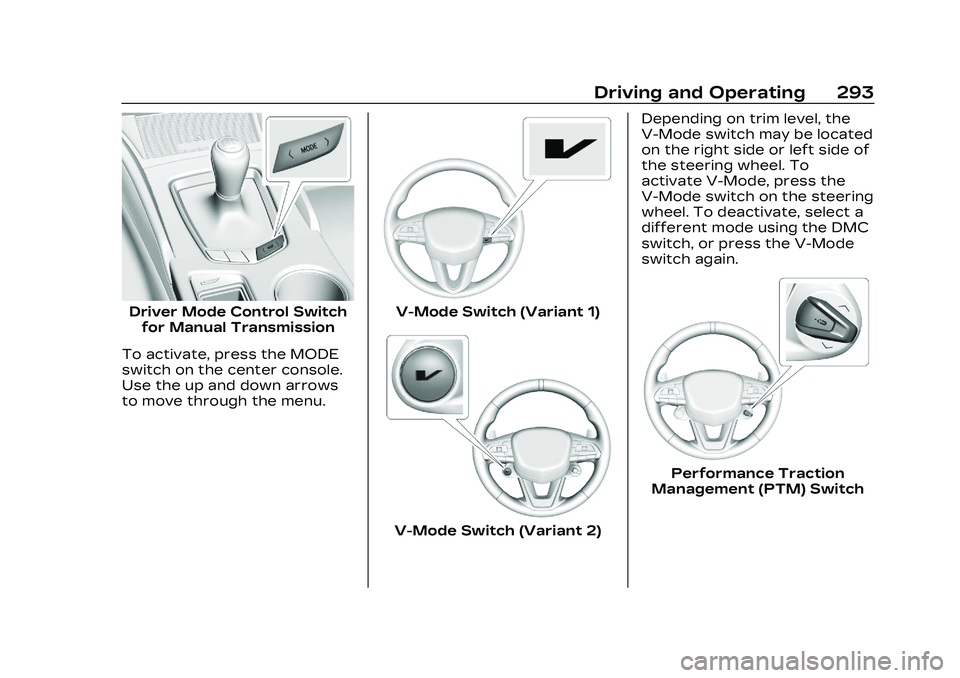
Driver Mode Control Switchfor Manual Transmission
To activate, press the MODE
switch on the center console.
Use the up and down arrows
to move through the menu.V-Mode Switch (Variant 1)
V-Mode Switch (Variant 2) Depending on trim level, the
V-Mode switch may be located
on the right side or left side of
the steering wheel. To
activate V-Mode, press the
V-Mode switch on the steering
wheel. To deactivate, select a
different mode using the DMC
switch, or press the V-Mode
switch again.
Performance Traction
Management (PTM) Switch
Page 295 of 524

Cadillac CT4 Owner Manual (GMNA-Localizing-U.S./Canada-16500442) -
2023 - CRC - 5/10/22
294 Driving and Operating
If equipped, activate PTM by
pressing up on the PTM
switch on the steering wheel.
A PTM menu will appear in the
Driver Information Center
(DIC). Press up or down on the
PTM switch to scroll through
the options and make a
selection. To exit PTM, select
INACTIVE in the PTM menu.
Mode Description
Tour Mode
Use for normal city and
highway driving to provide a
smooth, soft ride. This mode
provides a balance between
comfort and handling. This is
the standard mode. See
“Mode Selection Attributes”
later in this section. When
Tour Mode is selected, no
indicator will display.Sport Mode
Use this mode where road
conditions or personal
preference demand a more
controlled response. When
this mode is selected, the
vehicle immediately
downshifts. The vehicle also
monitors driving behaviors and
automatically enables
Performance Shift Features
when spirited driving is
detected. These features
maintain lower transmission
gears to increase available
engine braking and improve
acceleration response. The
vehicle will exit this feature
and return to normal operation
after a short period when
spirited driving is no longer
detected. The steering
changes to provide more
precise control. If the vehicle
has Magnetic Ride Control, the
suspension changes to
provide better cornering
performance.See
“Mode Selection
Attributes” later in this
section.
Snow/Ice Mode
Use this mode for slippery
surfaces to help control wheel
speed. This mode can
compromise the acceleration
on dry asphalt.
This feature is not intended
for use when the vehicle is
stuck in sand, mud, or gravel.
If the vehicle is stuck, see If
the Vehicle Is Stuck 0255.
See “Mode Selection
Attributes” later in this
section.
Track Mode (V-Series Only)
When in Track Mode, the
automatic transmission and
steering function similar to
Sport Mode. The accelerator
pedal is adjusted to give
maximum control during the
highest level of spirited
driving. The Magnetic Ride
Control is set to the optimum
level for vehicle
Page 297 of 524

Cadillac CT4 Owner Manual (GMNA-Localizing-U.S./Canada-16500442) -
2023 - CRC - 5/10/22
296 Driving and Operating
Mode Selection Attributes
MODESTOUR
Default SPORT
TRACK SNOW/ICE
Engine/Shift TourTourTrackSnow/Ice
Throttle Progression TourTourTrackSnow/Ice
Transmission Shift Mode TourSport Track Tour
Engine Sound TourSport Track Tour
Steering TourSport Track Tour
Suspension (if equipped with Magnetic Ride
Control) Tour
Sport Track Tour
Traction and Stability Control TourTourTrack Tour
Competitive Driving Mode (if equipped) Not Available Available Not Available Not Available
Performance Traction Mode (if equipped) Not Available Not Available Available Not Available
Brake Feel TourSport Track Tour
Throttle Progression
Adjusts throttle sensitivity by
selecting how quick or slow
the throttle reacts to input.
.Snow/Ice–The accelerator
pedal reduces engine torque
at small pedal inputs. This
allows better wheel control
on slippery surfaces.
.Track –The accelerator
pedal adjusts to give
maximum control during the
highest level of spirited
driving.
Transmission Shift Mode
Sport or Track –Dynamic
Performance Mode (DPM)
allows the transmission to
hold the current gear after a quick release of a heavily
applied accelerator pedal. This
provides greater engine
braking and enhanced vehicle
control without using the
paddles. DPM recognizes
aggressive cornering, heavy
braking, and high acceleration
to select and hold lower gears
when not using paddles. The
Page 301 of 524

Cadillac CT4 Owner Manual (GMNA-Localizing-U.S./Canada-16500442) -
2023 - CRC - 5/10/22
300 Driving and Operating
SPORT
.For use by drivers who are
familiar with the track.
.Dry conditions only.
.Requires more driving skill
than DRY.
.StabiliTrak/ESC is on and
more engine power is
available than in DRY.
RACE 1
.For use by drivers who are
familiar with the track.
.Dry conditions only.
.Requires more driving skill
than modes DRY or SPORT.
.StabiliTrak/ESC is off and
available engine power is the
same as SPORT.
RACE 2
.For use by experienced
drivers who are familiar with
the track.
.Dry conditions only.
.Requires more driving skill
than in other modes.
.StabiliTrak/ESC is off and
engine power is available for
maximum cornering speed.
In any PTM Mode, Launch
Control is available. Use PTM
Race 2 for the most
consistent performance
during drag strip use. See
“Custom Launch Control” in
Track Events and Competitive
Driving (V-Series and V-Series
Blackwing) 0238.
Launch Control
If equipped, Launch Control is
available within Competitive
Driving Mode and PTM to
allow high levels of vehicle
acceleration in a straight line.
Launch Control is a form of
traction control that manages
tire spin while launching the
vehicle. This feature is
intended for use during closed
course race events where
consistent zero to
60 and quarter mile times are
desirable. Launch Control is only
available when the following
criteria are met:
.Competitive Driving Mode is
selected or any of the PTM
modes are selected. The
traction off light comes on in
the instrument cluster and
the appropriate DIC
message displays.
.The vehicle is not moving.
.The steering wheel is
pointing straight.
Automatic Transmissions
.The brake pedal is firmly
pressed to the floor,
equivalent to a panic brake
event.
.The accelerator pedal is
rapidly applied to wide open
throttle. If the vehicle rolls
due to wide open throttle,
release the throttle, press
the brake pedal more firmly,
and reapply the accelerator
to wide open throttle.