clutch CADILLAC CT4 2023 Owners Manual
[x] Cancel search | Manufacturer: CADILLAC, Model Year: 2023, Model line: CT4, Model: CADILLAC CT4 2023Pages: 524, PDF Size: 6.98 MB
Page 250 of 524

Cadillac CT4 Owner Manual (GMNA-Localizing-U.S./Canada-16500442) -
2023 - CRC - 5/10/22
Driving and Operating 249
1. Using the DriverInformation Center (DIC)
buttons on the right side
of the steering wheel,
navigate to the Launch
Control menu. See Driver
Information Center (DIC)
(Base Level) 0129 or
Driver Information Center
(DIC) (Uplevel) 0132.
2. Press SEL to select Custom.3. Scroll down toLaunch RPM.
4. Adjust the desired RPM: 1200–2400 for automatic
transmissions and 2400–
4000 RPM for manual
transmissions.
Manual Transmission 5. Set Slip Target to custom
desired setting.
.Manual Trans: Apply full
throttle to activate
Launch Control and
quickly release the
clutch pedal to launch
the vehicle.
Automatic Transmission
.Auto Trans: Firmly press
and hold the brake pedal
to activate Launch
Control.
Page 264 of 524

Cadillac CT4 Owner Manual (GMNA-Localizing-U.S./Canada-16500442) -
2023 - CRC - 5/10/22
Driving and Operating 263
begins, release the button.
Engine cranking will continue
until the engine starts. See
Starting the Engine0263. The
ignition will then remain on.
Service Mode
This power mode is available
for service and diagnostics,
and to verify the proper
operation of the malfunction
indicator lamp as may be
required for emission
inspection purposes. With the
vehicle off, and the brake
pedal not applied, pressing
and holding ENGINE
START/STOP for more than
five seconds will place the
vehicle in Service Mode. The
instruments and audio
systems will operate as they
do in ON/RUN, but the vehicle
will not be able to be driven.
The engine will not start in
Service Mode. Press the
button again to turn the
vehicle off.Starting the Engine
Place the transmission in the
proper gear
Caution
If you add electrical parts or
accessories, you could
change the way the engine
operates. Any resulting
damage would not be
covered by the vehicle
warranty. See Add-On
Electrical Equipment 0366.
Automatic Transmission
Move the shift lever to
P (Park) or N (Neutral). To
restart the vehicle when it is
already moving, use
N (Neutral) only.
Caution
Do not try to shift to P (Park)
if the vehicle is moving.
If you do, you could damage (Continued)
Caution (Continued)
the transmission. Shift to
P (Park) only when the
vehicle is stopped.
Manual Transmission
The shift lever should be in
Neutral and the parking brake
engaged. Hold the clutch pedal
down to the floor, press the
brake pedal, and start the
engine.
Starting the Vehicle 1. For vehicles with an automatic transmission,
press the brake pedal, then
press ENGINE START/
STOP on the instrument
panel. For a manual
transmission, place the
shift lever in Neutral with
the parking brake engaged.
Hold the clutch pedal down
to the floor, press the
brake pedal, then press
ENGINE START/STOP.
Page 265 of 524

Cadillac CT4 Owner Manual (GMNA-Localizing-U.S./Canada-16500442) -
2023 - CRC - 5/10/22
264 Driving and Operating
If the remote key is not in
the vehicle, if there is
interference, or if the
remote key battery is low,
a Driver Information
Center (DIC) message will
display. See Remote Key
Operation09.
Caution
Cranking the engine for long
periods of time, by pressing
ENGINE START/STOP
immediately after cranking
has ended, can overheat and
damage the cranking motor,
and drain the battery. Wait
at least 15 seconds between
each try, to let the cranking
motor cool down.
2. If the engine does not start after five to 10 seconds,
especially in very cold
weather (below −18 °C or
0 °F), it could be flooded
with too much gasoline.
Try pushing the
accelerator pedal all the
way to the floor and hold it there, then press ENGINE
START/STOP for up to a
maximum of 15 seconds.
Wait at least 15 seconds
between each try, to allow
the cranking motor to cool
down. When the engine
starts, let go of the button
and the accelerator. If the
vehicle starts briefly but
then stops again, do the
same thing. This clears the
extra gasoline from the
engine. Do not race the
engine immediately after
starting it. Operate the
engine and transmission
gently until the oil warms
up and lubricates all
moving parts.
Stopping the Engine
If the vehicle has an automatic
transmission, move the shift
lever to P (Park) and press and
hold ENGINE START/STOP on
the instrument panel, until the
engine shuts off. If the shift
lever is not in P (Park), the
engine shuts off and the
ignition goes to accessory
mode. The DIC displays SHIFT
TO PARK. Once the shift lever
is moved to P (Park), the
vehicle turns off.
If the vehicle has a manual
transmission, before getting
out of the vehicle, shift to
1 (First) or R (Reverse) and
apply the parking brake. Then
turn off the ignition off by
pressing ENGINE START/
STOP and release the clutch
pedal when the engine has
stopped.
If the remote key is not
detected inside the vehicle
when it is turned off the DIC
displays a message.
Stop/Start System
If equipped, the Stop/Start
system will shut off the engine
to help conserve fuel. It has
components designed for the
increased number of starts.
Page 284 of 524

Cadillac CT4 Owner Manual (GMNA-Localizing-U.S./Canada-16500442) -
2023 - CRC - 5/10/22
Driving and Operating 283
Manual
Transmission
If equipped, this is the shift
pattern for the manual
transmission.
Caution
Shifting the vehicle initially
into any gear other than
1 (First) or R (Reverse) can
damage the clutch. Shift the
manual transmission in the
proper sequence, and time
the gear shifting with the(Continued)
Caution (Continued)
accelerator to avoid revving
the engine and damaging
the clutch.
Caution
The message MANUAL
TRANSMISSION—
RELEASE CLUTCH PEDAL
displays and a chime sounds
if the manual transmission
clutch pedal is partially
applied for an extended
period of time while the
vehicle is being driven.
Driving with the clutch pedal
applied can reduce the life
of the clutch and/or damage
it. Fully release the clutch
pedal after each gear
change.
Caution
The message REDUCED
PERFORMANCE —REDUCE
CLUTCH USE displays and
engine torque is
momentarily limited if
excessive manual
transmission clutch slip is
detected while the clutch
pedal is fully released. This
could be caused by a hot
clutch. Apply less pressure
on the accelerator pedal
when accelerating from a
stop. Also, fully release the
accelerator pedal during
gear changes. This will allow
the clutch to cool and should
prevent further clutch slip
while the clutch pedal is fully
released. If this message
displays repeatedly, see
your dealer. Repeated clutch
slip could cause permanent
damage.
Page 285 of 524

Cadillac CT4 Owner Manual (GMNA-Localizing-U.S./Canada-16500442) -
2023 - CRC - 5/10/22
284 Driving and Operating
Caution
The message
TRANSMISSION IS HOT—
SLOW DOWN displays and a
chime sounds if the manual
transmission fluid is hot and
vehicle speed is high. Driving
with the manual
transmission fluid
temperature high can
damage the vehicle. Drive at
a slower speed to cool the
manual transmission fluid.
This message clears when
the vehicle has slowed
sufficiently or if the manual
transmission fluid has cooled
sufficiently.
1 (First) : Press the clutch
pedal and shift into 1 (First).
Slowly let up on the clutch
pedal while pressing on the
accelerator pedal. After a complete stop, if it is
hard to shift into 1 (First), let
up on the clutch pedal, then
press it back down and shift
into 1 (First).
2 (Second) :
Press the clutch
pedal and let up on the
accelerator pedal, then shift
into 2 (Second). Then, slowly
let up on the clutch pedal
while accelerating.
3 (Third), 4 (Fourth), 5 (Fifth),
and 6 (Sixth) : Shift into
3 (Third), 4 (Fourth), 5 (Fifth),
and 6 (Sixth) the same as
2 (Second).
To stop, let up on the
accelerator pedal and press
the brake pedal. Just before
the vehicle stops, press the
clutch pedal and the brake
pedal, and shift to Neutral.
Neutral : Use this position
when you start or idle the
engine. The shift lever is in
Neutral when it is centered in
the shift pattern, not in
any gear. R (Reverse) :
To back up,
press down the clutch pedal,
completely stop the vehicle,
and shift into R (Reverse). Let
up on the clutch pedal slowly
while pressing the accelerator
pedal.
{Warning
If you skip a gear when
downshifting, you could lose
control of the vehicle. You
could injure yourself or
others. Do not shift down
more than one gear at a
time when downshifting.
Caution
Shifting to R (Reverse) while
the vehicle is moving
forward could damage the
transmission. The repairs
would not be covered by the
vehicle warranty. Shift to
R (Reverse) only after the
vehicle is stopped.
Page 286 of 524

Cadillac CT4 Owner Manual (GMNA-Localizing-U.S./Canada-16500442) -
2023 - CRC - 5/10/22
Driving and Operating 285
Caution
Do not rest your hand on
the shift lever while driving.
The pressure could cause
premature wear in the
transmission. The repairs
would not be covered by the
vehicle warranty.
Caution
When downshifting, if more
than one gear is skipped,
or the engine is racing when
the clutch pedal is released,
the engine, clutch, driveshaft
or transmission could be
damaged.
No Lift-Shift
The vehicle can be shifted up
a gear when the accelerator
pedal is pressed to the floor
without being released. This
allows for less power
interruption and will improve
acceleration times. This
feature is available in all drivermodes and is only active when
the engine speed is
greater than:
Gears 1, 2 and 3 - above
3000 rpm
Gears 4 and 5 - above
2000 rpm
Active Rev Match
Vehicles equipped with a
manual transmission have
Active Rev Match (ARM). ARM
aids in smoother shifting by
matching the engine speed to
the next selected gear. By
monitoring shift lever and
clutch operation, ARM adjusts
engine speed to match a
calibrated value based on gear
selection. On upshifts and
downshifts, engine speed will
be increased and decreased to
match vehicle road speed and
transmission gear position.
ARM is maintained while the
clutch pedal is pressed, but
will deactivate if the shift lever
is left in the Neutral position.
The system is activated and
deactivated by pressing the
ARM switch on the center
console. The system must be
activated with each new
ignition cycle. If ARM is
deactivated, the system will
still perform rev matching for
upshifts.
A gear indicator in the
instrument cluster displays the
current gear selected. ARM is
also shown in the
Performance View of the HUD:
.When ARM is activated, the
gear number is amber.
Page 287 of 524

Cadillac CT4 Owner Manual (GMNA-Localizing-U.S./Canada-16500442) -
2023 - CRC - 5/10/22
286 Driving and Operating
.When ARM is deactivated,
the gear number is white.
.If no gear number is
displayed while the shift
lever is in gear, service is
required. All rev matching
will be disabled and the
malfunction indicator lamp
will be on. See Malfunction
Indicator Lamp (Check
Engine Light)0118. The
clutch and manual
transmission will continue to
operate normally.
ARM will also:
.Be active above 28 km/h
(18 mph).
.Match engine speed up to
6100 rpm.
.Not operate when the
accelerator pedal is applied.
.Be disabled when the
coolant temperature is
below 0 °C (32 °F).
Drive Systems
All-Wheel Drive
Vehicles with this feature
always send engine power
to all four wheels. It is fully
automatic, and adjusts itself as
needed for road conditions.
Brakes
Electric Brake Boost
Vehicles equipped with
electric brake boost have
hydraulic brake circuits that
are electronically controlled
when the brake pedal is
applied during normal
operation. The system
performs routine tests and
turns off within a few minutes
after the vehicle is turned off.
Noise may be heard during
this time. If the brake pedal is pressed during the tests or
when the electric brake boost
system is off, a noticeable
change in pedal force and
travel may be felt. This is
normal.
Antilock Brake
System (ABS)
The Antilock Brake System
(ABS) helps prevent a braking
skid and maintain steering
while braking hard.
If there is a problem with ABS,
this warning light stays on.
See Antilock Brake System
(ABS) Warning Light
0121.
Page 290 of 524
Cadillac CT4 Owner Manual (GMNA-Localizing-U.S./Canada-16500442) -
2023 - CRC - 5/10/22
Driving and Operating 289
taking off on a hill. When no
roll back is desired, an applied
EPB will allow both feet to be
used for the clutch and
accelerator pedals in
preparation for starting the
vehicle moving in the intended
direction. In this case, there is
no need to press the switch to
release the EPB.
Brake Assist
Brake Assist detects rapid
brake pedal applications due
to emergency braking
situations and provides
additional braking to activate
the Antilock Brake System
(ABS) if the brake pedal is not
pushed hard enough to
activate ABS normally. Minor
noise, brake pedal pulsation,
and/or pedal movement during
this time may occur. Continue
to apply the brake pedal as
the driving situation dictates.
Brake Assist disengages when
the brake pedal is released.
Hill Start Assist (HSA)
{Warning
Do not rely on the HSA
feature. HSA does not
replace the need to pay
attention and drive safely.
You may not hear or feel
alerts or warnings provided
by this system. Failure to
use proper care when
driving may result in injury,
death, or vehicle damage.
See Defensive Driving0235.
When the vehicle is stopped
on a grade, Hill Start Assist
(HSA) temporarily prevents
the vehicle from rolling in an
unintended direction during
the transition from brake
pedal release to accelerator
pedal apply. The brakes
release when the accelerator
pedal is applied or
automatically release after a
few seconds. The brakes may also release under other
conditions. Do not rely on HSA
to hold the vehicle.
HSA is available when the
vehicle is facing uphill in a
forward gear, or when facing
downhill in R (Reverse). The
vehicle must come to a
complete stop on a grade for
HSA to activate.
Automatic Vehicle
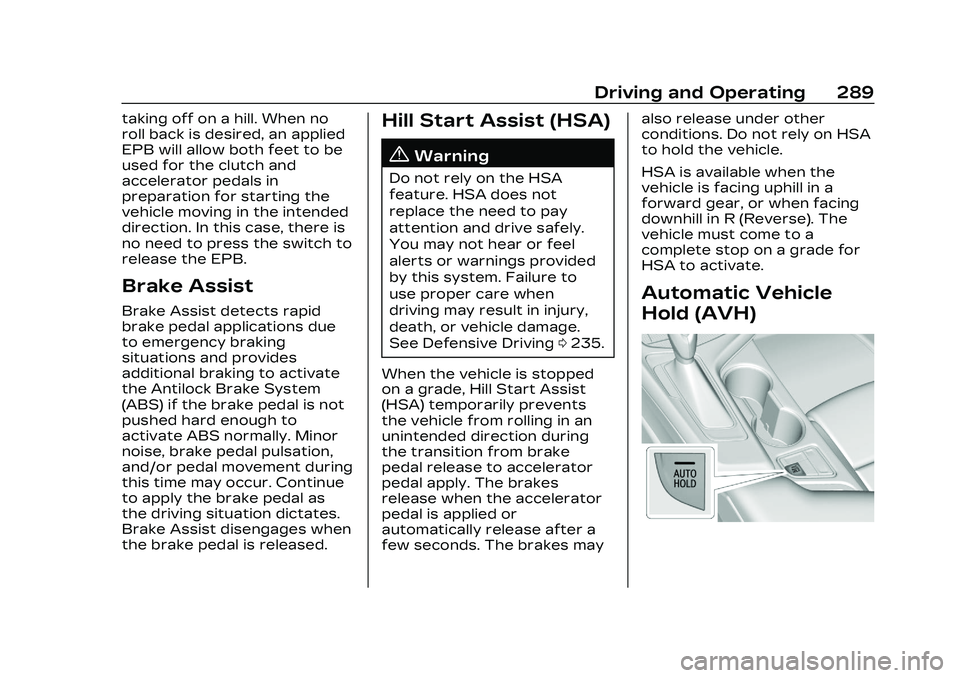
Hold (AVH)
Page 303 of 524
Cadillac CT4 Owner Manual (GMNA-Localizing-U.S./Canada-16500442) -
2023 - CRC - 5/10/22
302 Driving and Operating
the gears are shifted. The
cruise is disengaged if the
clutch is pressed for several
seconds.
If the Traction Control/
StabiliTrak/Electronic Stability
Control (ESC) system begins
to limit wheel spin while using
cruise control, the cruise
control automatically
disengages. See Traction
Control/Electronic Stability
Control0290. If a collision
alert occurs when cruise
control is activated, cruise
control is disengaged. See
Forward Collision Alert (FCA)
System 0342. When road
conditions allow cruise control
to be safely used, it can be
turned back on.
Cruise control will disengage if
either TCS or StabiliTrak/ESC
is turned off.
If the brakes are applied,
cruise control disengages.
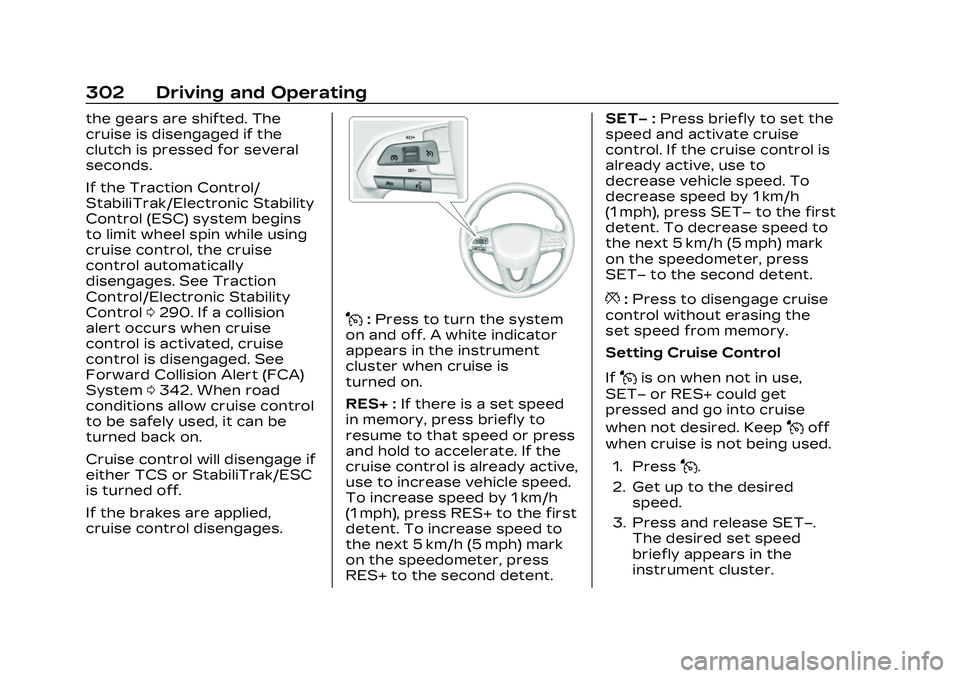
J: Press to turn the system
on and off. A white indicator
appears in the instrument
cluster when cruise is
turned on.
RES+ : If there is a set speed
in memory, press briefly to
resume to that speed or press
and hold to accelerate. If the
cruise control is already active,
use to increase vehicle speed.
To increase speed by 1 km/h
(1 mph), press RES+ to the first
detent. To increase speed to
the next 5 km/h (5 mph) mark
on the speedometer, press
RES+ to the second detent. SET−
:Press briefly to set the
speed and activate cruise
control. If the cruise control is
already active, use to
decrease vehicle speed. To
decrease speed by 1 km/h
(1 mph), press SET− to the first
detent. To decrease speed to
the next 5 km/h (5 mph) mark
on the speedometer, press
SET− to the second detent.
*:Press to disengage cruise
control without erasing the
set speed from memory.
Setting Cruise Control
If
Jis on when not in use,
SET− or RES+ could get
pressed and go into cruise
when not desired. Keep
Joff
when cruise is not being used.
1. Press
J.
2. Get up to the desired speed.
3. Press and release SET−. The desired set speed
briefly appears in the
instrument cluster.
Page 305 of 524

Cadillac CT4 Owner Manual (GMNA-Localizing-U.S./Canada-16500442) -
2023 - CRC - 5/10/22
304 Driving and Operating
The speedometer reading can
be displayed in either English
or metric units. See
Instrument Cluster (Base
Level)0106 or
Instrument Cluster (Uplevel)
0 108. The increment value
used depends on the units
displayed.
Passing Another Vehicle
While Using Cruise Control
Use the accelerator pedal to
increase the vehicle speed.
When you take your foot off
the pedal, the vehicle will slow
down to the previous set
cruise speed.
While pressing the accelerator
pedal or shortly following the
release to override cruise,
briefly applying SET− will
result in cruise set to the
current vehicle speed.
Using Cruise Control on Hills
How well the cruise control will
work on hills depends upon
the vehicle speed, load, and
the steepness of the hills. When going up steep hills, you
might have to step on the
accelerator pedal to maintain
your speed. When going
downhill, the cruise control
system may automatically
brake to slow the vehicle
down. Also, you may have to
brake or shift to a lower gear
to keep your speed down.
If the brake pedal is applied,
cruise control disengages.
Ending Cruise Control
There are five ways to end
cruise control:
.Step lightly on the brake
pedal.
.Press*.
.Shift the transmission to
N (Neutral).
.Press the clutch pedal for
several seconds or shift to
Neutral (manual
transmissions).
.PressJ.
Erasing Speed Memory
The cruise control set speed is
erased from memory if
Jis
pressed or if the ignition is
turned off.
Adaptive Cruise
Control (Advanced)
If equipped, Adaptive Cruise
Control (ACC) allows the
cruise control set speed and
following gap to be selected.
Read this entire section
before using this system. The
following gap is the following
time between your vehicle and
a vehicle detected directly
ahead in your path, moving in
the same direction. If no
vehicle is detected in your
path, ACC works like regular
cruise control. ACC uses
camera and radar sensors.
See Radio Frequency
Statement 0494.
If a vehicle is detected in your
path, ACC can speed up the
vehicle or apply limited,
moderate braking to maintain