air condition CADILLAC CT5 2022 Owner's Manual
[x] Cancel search | Manufacturer: CADILLAC, Model Year: 2022, Model line: CT5, Model: CADILLAC CT5 2022Pages: 466, PDF Size: 7.21 MB
Page 214 of 466

Cadillac CT5 Owner Manual (GMNA-Localizing-U.S./Canada-15268585) -
2022 - CRC - 10/11/21
CLIMATE CONTROLS 213
seat indicator lights may not come on
during a remote start. If equipped, the
heated steering wheel will come on in
a remote start if it is cold outside. The
heated steering wheel indicator light
may not come on.
Sensors
The solar sensor, located in the
defrost grille in the middle of the
instrument panel, monitors the solar
heat. Do not cover the solar sensor or
the system will not work properly.
There is also an exterior temperature
sensor behind the front grille. This
sensor reads the outside air
temperature and helps maintain thetemperature inside the vehicle. Any
cover on the front of the vehicle could
cause a false reading in the displayed
temperature.
The climate control system uses the
information from these sensors to
maintain comfort settings by
adjusting the outlet temperature, fan
speed, and air delivery mode. The
system may also supply cooler air to
the side of the vehicle facing the sun.
The recirculation mode will also be
used as needed to maintain cool
outlet temperatures.
Afterblow Feature
If equipped, under certain conditions,
the fan may stay on or may turn on
and off several times after you turn
off and lock the vehicle. This is
normal.
Air Vents
Adjustable air vents are in the center
and on the sides of the instrument
panel, and on the rear of the center
console storage.
Move the slider knobs to change the
direction of or to close off the airf low.Operation Tips
.Clear away any ice, snow, or leaves
from air inlets at the base of the
windshield that could block the
flow of air into the vehicle.
.Clear snow off the hood to improve
visibility and help decrease moisture
drawn into the vehicle.
.Keep the path under the front seats
clear of objects to help circulate the
air inside of the vehicle more
effectively.
.Use of non-GM approved hood
deflectors can adversely affect the
performance of the system. Check
with your dealer before adding
equipment to the outside of the
vehicle.
.Do not attach any devices to the air
vent slats. This restricts airf low and
may cause damage to the air vents.
Page 215 of 466

Cadillac CT5 Owner Manual (GMNA-Localizing-U.S./Canada-15268585) -
2022 - CRC - 10/11/21
214 CLIMATE CONTROLS
Maintenance
Passenger Compartment
Air Filter
The filter reduces dust, pollen, and
other airborne irritants from outside
air that is pulled into the vehicle. The
filter should be replaced as part of
routine scheduled maintenance. See
Maintenance Schedule0410.
See your dealer regarding replacement
of the filter.
Service
All vehicles have a label underhood
that identifies the refrigerant used in
the vehicle. The refrigerant system
should only be serviced by trained and
certified technicians. The air
conditioning evaporator should never
be repaired or replaced by one from a
salvage vehicle. It should only be
replaced by a new evaporator to
ensure proper and safe operation.
During service, all refrigerants should
be reclaimed with proper equipment.
Venting refrigerants directly to the
atmosphere is harmful to the environment and may also create
unsafe conditions based on inhalation,
combustion, frostbite, or other
health-based concerns.
The air conditioning system requires
periodic maintenance. See
Maintenance Schedule
0410.
Page 231 of 466

Cadillac CT5 Owner Manual (GMNA-Localizing-U.S./Canada-15268585) -
2022 - CRC - 10/11/21
230 DRIVING AND OPERATING
4. There are 15 seconds to completethe burnout and exit.
5. To release the brakes and roll out,
press
*and SEL at the same time.
If the burnout is not completed in
15 seconds, torque will be reduced to
idle, the parking brake will be applied,
Line Lock releases, and Custom
Launch Control will be disabled. Ensure the parking brake is
disengaged to re-enter Launch
Control.
Driving on Wet Roads
Rain and wet roads can reduce vehicle
traction and affect your ability to stop
and accelerate. Always drive slower in
these types of driving conditions and
avoid driving through large puddles
and deep-standing or flowing water.
{Warning
Wet brakes can cause crashes. They
might not work as well in a quick
stop and could cause pulling to one
side. You could lose control of the
vehicle.
After driving through a large puddle
of water or a car/vehicle wash,
lightly apply the brake pedal until
the brakes work normally.
Flowing or rushing water creates
strong forces. Driving through
flowing water could cause the
vehicle to be carried away. If this
happens, you and other vehicle
(Continued)
Warning (Continued)
occupants could drown. Do not
ignore police warnings and be very
cautious about trying to drive
through flowing water.
Caution
Driving through deep puddles or
standing water can cause water to
come in through the engine air
intake and damage the engine.
If deep puddles or standing water
cannot be avoided, proceed with
caution and do not exceed 8 km/h
(5 mph). Do not drive through
water that may come close to or
cover the vehicle’s underbody.
Hydroplaning
Hydroplaning is dangerous. Water can
build up under the vehicle's tires so
they actually ride on the water. This
can happen if the road is wet enough
and you are going fast enough. When
the vehicle is hydroplaning, it has
little or no contact with the road.
Page 233 of 466

Cadillac CT5 Owner Manual (GMNA-Localizing-U.S./Canada-15268585) -
2022 - CRC - 10/11/21
232 DRIVING AND OPERATING
.Turn on Traction Control. See
Traction Control/Electronic Stability
Control0258.
.Antilock Brake System (ABS)
improves vehicle stability during
hard stops, but the brakes should be
applied sooner than when on dry
pavement. See Antilock Brake System
(ABS) 0255.
See Driver Mode Control 0259.
.Allow greater following distance and
watch for slippery spots. Icy patches
can occur on otherwise clear roads
in shaded areas. The surface of a
curve or an overpass can remain icy
when the surrounding roads are
clear. Avoid sudden steering
maneuvers and braking while
on ice.
.Turn off cruise control.
Blizzard Conditions
Stop the vehicle in a safe place and
signal for help. Stay with the vehicle
unless there is help nearby. If possible,
use Roadside Service. See Roadside
Service 0435. To get help and keep
everyone in the vehicle safe:
.Turn on the hazard warning
flashers.
.Tie a red cloth to an outside mirror.
{Warning
Snow can trap engine exhaust
under the vehicle. This may cause
exhaust gases to get inside. Engine
exhaust contains carbon monoxide
(CO), which cannot be seen or
smelled. It can cause
unconsciousness and even death.
If the vehicle is stuck in snow:
.Clear snow from the base of the
vehicle, especially any blocking
the exhaust pipe.
.Open a window about 5 cm (2 in)
on the vehicle side that is away
from the wind, to bring in
fresh air.
.Fully open the air outlets on or
under the instrument panel.
(Continued)
Warning (Continued)
.Adjust the climate control
system to circulate the air inside
the vehicle and set the fan speed
to the highest setting. See
“Climate Control Systems.”
For more information about CO, see
Engine Exhaust 0245.
To save fuel, run the engine for short
periods to warm the vehicle and then
shut the engine off and partially close
the window. Moving about to keep
warm also helps.
If it takes time for help to arrive,
when running the engine, push the
accelerator pedal slightly so the
engine runs faster than the idle speed.
This keeps the battery charged to
restart the vehicle and to signal for
help with the headlamps. Do this as
little as possible, to save fuel.
If the Vehicle Is Stuck
Slowly and cautiously spin the wheels
to free the vehicle when stuck in sand,
mud, ice, or snow.
Page 251 of 466

Cadillac CT5 Owner Manual (GMNA-Localizing-U.S./Canada-15268585) -
2022 - CRC - 10/11/21
250 DRIVING AND OPERATING
2. From the center position, move theshift lever back.
.If the vehicle is in P (Park), press
the shift lock release button
while pulling the shift
lever back.
.D will illuminate in red.
.After releasing the shift lever, it
will return to the center
position.
To shift out of D (Drive): 1. Bring the vehicle to a complete stop.
2. Shift to the desired gear.
3. After releasing the shift lever, it will return to the center position.
Downshifting the transmission in
slippery road conditions could result
in skidding. See “Skidding”underLoss
of Control 0220.
Caution
Spinning the tires or holding the
vehicle in one place on a hill using
only the accelerator pedal may
damage the transmission. The
(Continued)
Caution (Continued)
repair will not be covered by the
vehicle warranty. If the vehicle is
stuck, do not spin the tires. When
stopping on a hill, use the brakes to
hold the vehicle in place.
If equipped with the 2.0L L4 engine,
engine speeds may be increased while
driving at highway speeds while the
engine is still warming up.
Manual Mode
Tap Shift Caution
Driving with the engine at a high
rpm without upshifting while using
Tap Shift, could damage the vehicle.
Always upshift when necessary
while using Tap Shift.
If equipped, vehicles with Tap Shift
have controls on the back of the
steering wheel to manually shift the
automatic transmission.
Permanent Tap Shift Mode
To enter Permanent Tap Shift Mode:1. With the vehicle in D (Drive), pull back on the shift lever to activate
M (Manual Mode). The M in the
shift pattern will illuminate in red,
and the D will switch to white.
While in Permanent Tap Shift
Mode, the M on the instrument
cluster will be highlighted and the
current gear shown.
Page 287 of 466

Cadillac CT5 Owner Manual (GMNA-Localizing-U.S./Canada-15268585) -
2022 - CRC - 10/11/21
286 DRIVING AND OPERATING
Attention to the Road
{Warning
Super Cruise is a driver assistance
system and cannot accurately
detect or predict all situations.
Super Cruise is not a crash
avoidance system. To prevent
serious injury or death, you must
supervise the driving task and
monitor the road conditions. You
may need to respond to traffic
events by steering, braking,
or accelerating. SeeDefensive
Driving 0217. Super Cruise also
cannot determine whether you are
awake, asleep, impaired, or properly
focused on safe driving. The vehicle
could crash into other vehicles,
drive out of the lane, or drive off
the road. Complete attention is
always required while driving, even
while using Super Cruise. Be
prepared to take over steering or
apply the brakes at any time.
{Warning
To prevent serious injury or death,
be alert and pay special attention
when passing highway exits,
entrances, and crossings with Super
Cruise, and be ready to take control
of the vehicle when necessary.
Changes in lane markings around
exits and entrances can
momentarily cause Super Cruise to
not detect the correct lane. If this
occurs, Super Cruise may attempt
steering inputs to bring the vehicle
back into the correct lane and, in
rare circumstances, could
over-correct and cause the vehicle
to momentarily cross into a lane
next to your vehicle unless you
manually steer to maintain your
lane position. The Driver Attention System (DAS) on
the steering column continually
monitors driver head and eye position
to estimate driver attention to the
road. The camera does not record or
share pictures, audio, or video.
Sunglasses, hats, or other types of
clothing that change the shape of the
head may interfere with camera
performance. To improve camera
performance, raise or lower the
steering wheel, or change the seat
position.
Pay close attention to the road ahead
to avoid these three increasing alerts:
Page 296 of 466

Cadillac CT5 Owner Manual (GMNA-Localizing-U.S./Canada-15268585) -
2022 - CRC - 10/11/21
DRIVING AND OPERATING 295
Warning (Continued)
when driving may result in injury,
death, or vehicle damage. See
Defensive Driving0217.
Under many conditions, these
systems will not:
.Detect children, pedestrians,
bicyclists, or animals.
.Detect vehicles or objects outside
the area monitored by the
system.
.Work at all driving speeds.
.Warn you or provide you with
enough time to avoid a crash.
.Work under poor visibility or bad
weather conditions.
.Work if the detection sensor is
not cleaned or is covered by ice,
snow, mud, or dirt.
.Work if the detection sensor is
covered up, such as with a
sticker, magnet, or metal plate.
.Work if the area surrounding the
detection sensor is damaged or
not properly repaired. (Continued)
Warning (Continued)
Complete attention is always
required while driving, and you
should be ready to take action and
apply the brakes and/or steer the
vehicle to avoid crashes.
Audible or Safety Alert Seat
Some driver assistance features alert
the driver of obstacles by beeping. To
change the volume of the warning
chime, see “Comfort and Convenience ”
under Vehicle Personalization 0126.
If equipped with the Safety Alert Seat,
the driver seat cushion may provide a
vibrating pulse alert instead of
beeping. To change this, see
“Collision/Detection Systems” under
Vehicle Personalization 0126.
Cleaning
Depending on vehicle options, keep
these areas of the vehicle clean to
ensure the best driver assistance
feature performance. Driver
Information Center (DIC) messages
may display when the systems are
unavailable or blocked.
.Front and rear bumpers and the
area below the bumpers
.Front grille and headlamps
.Front camera lens in the front grille
or near the front emblem
Page 300 of 466
Cadillac CT5 Owner Manual (GMNA-Localizing-U.S./Canada-15268585) -
2022 - CRC - 10/11/21
DRIVING AND OPERATING 299
Warning (Continued)
around the vehicle and check all
mirrors before moving forward or
backing.
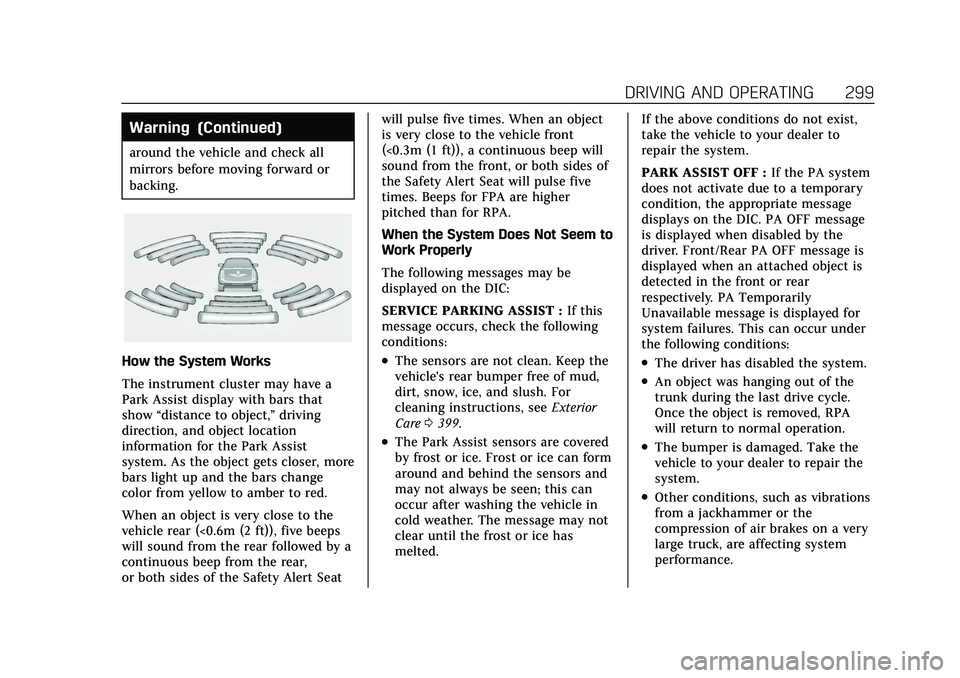
How the System Works
The instrument cluster may have a
Park Assist display with bars that
show“distance to object,” driving
direction, and object location
information for the Park Assist
system. As the object gets closer, more
bars light up and the bars change
color from yellow to amber to red.
When an object is very close to the
vehicle rear (<0.6m (2 ft)), five beeps
will sound from the rear followed by a
continuous beep from the rear,
or both sides of the Safety Alert Seat will pulse five times. When an object
is very close to the vehicle front
(<0.3m (1 ft)), a continuous beep will
sound from the front, or both sides of
the Safety Alert Seat will pulse five
times. Beeps for FPA are higher
pitched than for RPA.
When the System Does Not Seem to
Work Properly
The following messages may be
displayed on the DIC:
SERVICE PARKING ASSIST :
If this
message occurs, check the following
conditions:.The sensors are not clean. Keep the
vehicle's rear bumper free of mud,
dirt, snow, ice, and slush. For
cleaning instructions, see Exterior
Care 0399.
.The Park Assist sensors are covered
by frost or ice. Frost or ice can form
around and behind the sensors and
may not always be seen; this can
occur after washing the vehicle in
cold weather. The message may not
clear until the frost or ice has
melted. If the above conditions do not exist,
take the vehicle to your dealer to
repair the system.
PARK ASSIST OFF :
If the PA system
does not activate due to a temporary
condition, the appropriate message
displays on the DIC. PA OFF message
is displayed when disabled by the
driver. Front/Rear PA OFF message is
displayed when an attached object is
detected in the front or rear
respectively. PA Temporarily
Unavailable message is displayed for
system failures. This can occur under
the following conditions:
.The driver has disabled the system.
.An object was hanging out of the
trunk during the last drive cycle.
Once the object is removed, RPA
will return to normal operation.
.The bumper is damaged. Take the
vehicle to your dealer to repair the
system.
.Other conditions, such as vibrations
from a jackhammer or the
compression of air brakes on a very
large truck, are affecting system
performance.
Page 304 of 466

Cadillac CT5 Owner Manual (GMNA-Localizing-U.S./Canada-15268585) -
2022 - CRC - 10/11/21
DRIVING AND OPERATING 303
Warning (Continued)
check the RVC and check the area
around the vehicle to make sure it
is safe to proceed.
Rear Pedestrian Alert
Under certain conditions, this feature
can provide alerts for a pedestrian
within the system’s range directly
behind the vehicle. This feature only
works in R (Reverse) below 12 km/h
(8 mph), and detects pedestrians up to
8 m (26 ft) away during daytime
driving. During nighttime driving,
feature performance is very limited.
Rear Pedestrian Alert Indicator
When a pedestrian is detected within
the system’s range directly behind the
vehicle, this symbol flashes amber on
the infotainment display, along with
two beeps from the rear, or if equipped, two pulses from both sides
of the driver seat. When a pedestrian
is detected close to the vehicle, the
symbol flashes red on the
infotainment display, along with seven
beeps from the rear, or if equipped,
seven pulses from both sides of the
driver seat.
{Warning
Rear Pedestrian Alert does not
automatically brake the vehicle.
It also does not provide an alert
unless it detects a pedestrian, and it
may not detect all pedestrians if:
.The pedestrian is not directly
behind the vehicle, fully visible
to the Rear Vision Camera (RVC),
or standing upright.
.The pedestrian is part of a group.
.The pedestrian is a child.
.Visibility is poor, including
nighttime conditions, fog, rain,
or snow.
.The RVC is blocked by dirt, snow,
or ice.
(Continued)
Warning (Continued)
.The RVC, taillamps, or back-up
lamps are not cleaned or in
proper working condition.
.The vehicle is not in R (Reverse).
To help avoid death or injury,
always check for pedestrians
around the vehicle before backing
up. Be ready to take action and
apply the brakes. See Defensive
Driving 0217. Keep the RVC,
taillamps, and back-up lamps clean
and in good repair.
Rear Pedestrian Alert can be set to Off
or Alert. See “Rear Pedestrian
Detection ”in “Collision/Detection
Systems” underVehicle Personalization
0 126. If equipped, alerts can be set to
beeps or seat pulses. See “Alert Type”
in “Collision/Detection Systems” under
Vehicle Personalization 0126.
Page 306 of 466

Cadillac CT5 Owner Manual (GMNA-Localizing-U.S./Canada-15268585) -
2022 - CRC - 10/11/21
DRIVING AND OPERATING 305
Detecting the Vehicle Ahead
FCA warnings will not occur unless
the FCA system detects a vehicle
ahead. When a vehicle is detected, the
vehicle ahead indicator will display
green. Vehicles may not be detected
on curves, highway exit ramps,
or hills, due to poor visibility; or if a
vehicle ahead is partially blocked by
pedestrians or other objects. FCA will
not detect another vehicle ahead until
it is completely in the driving lane.
{Warning
FCA does not provide a warning to
help avoid a crash, unless it detects
a vehicle. FCA may not detect a
vehicle ahead if the FCA sensor is
blocked by dirt, snow, or ice, or if
the windshield is damaged. It may
also not detect a vehicle on winding(Continued)
Warning (Continued)
or hilly roads, or in conditions that
can limit visibility such as fog, rain,
or snow, or if the headlamps or
windshield are not cleaned or in
proper condition. Keep the
windshield, headlamps, and FCA
sensors clean and in good repair.
Collision Alert
With Head-Up Display
Without Head-Up Display When your vehicle approaches
another detected vehicle too rapidly,
the red FCA display will flash on the
windshield. Also, eight rapid
high-pitched beeps will sound from
the front, or both sides of the Safety
Alert Seat will pulse five times. When
this Collision Alert occurs, the brake
system may prepare for driver braking
to occur more rapidly which can cause
a brief, mild deceleration. Continue to
apply the brake pedal as needed.
Tailgating Alert
The vehicle ahead indicator will
display amber when you are following
a vehicle ahead too closely.