instrument cluster CADILLAC CT5 2022 Service Manual
[x] Cancel search | Manufacturer: CADILLAC, Model Year: 2022, Model line: CT5, Model: CADILLAC CT5 2022Pages: 466, PDF Size: 7.21 MB
Page 274 of 466

Cadillac CT5 Owner Manual (GMNA-Localizing-U.S./Canada-15268585) -
2022 - CRC - 10/11/21
DRIVING AND OPERATING 273
Select the set speed desired for ACC.
This is the vehicle speed when no
vehicle is detected in its path.
While the vehicle is moving, ACC will
not set at a speed below a minimum
speed, although it can be resumed.
If equipped with Super Cruise, this
minimum speed is 5 km/h (3 mph),
otherwise, it is 25 km/h (15 mph). The
minimum allowable set speed is
25 km/h (15 mph).
To set ACC while moving:1. Press
J.
2. Get up to the desired speed.
3. Press and release SET−.
4. Remove your foot from the accelerator.
After ACC is set, it may immediately
apply the brakes if a vehicle ahead is
detected closer than the selected
following gap.
ACC can also be set while the vehicle
is stopped if ACC is on and the brake
pedal is applied. The ACC indicator displays on the
instrument cluster and Head-Up
Display (HUD), if equipped. When ACC
is turned on, the indicator will be lit
white. When ACC is engaged, the
indicator will turn green.
Be mindful of speed limits,
surrounding traffic speeds, and
weather conditions when selecting the
set speed.
Resuming a Set Speed
If ACC is set at a desired speed and
then the brakes are applied, ACC is
disengaged without erasing the set
speed from memory.
To begin using ACC again, press RES+
up briefly while moving more than
5 kph (3 mph). The vehicle returns to
the previous set speed.
If the vehicle is stopped with the
brake pedal applied, press RES+ and
release the brake pedal. ACC will hold
the vehicle until RES+ or the
accelerator pedal is pressed.
A green ACC indicator and the set
speed display on the instrument
cluster. The vehicle ahead indicator
may be flashing if a vehicle ahead waspresent and moved. See
“Approaching
and Following a Vehicle ”later in this
section.
Once ACC has resumed, if there is no
vehicle ahead, if the vehicle ahead is
beyond the selected following gap,
or if the vehicle has exited a sharp
curve, then the vehicle speed will
increase to the set speed.
Increasing Speed While ACC Is at a
Set Speed
If ACC is already activated, do one of
the following:
.Use the accelerator to get to the
higher speed. Press SET– . Release
the control and the accelerator
pedal. The vehicle will now cruise at
the higher speed.
When the accelerator pedal is
pressed, ACC will not brake because
it is overridden. The ACC indicator
will turn blue on the instrument
panel and heads up display,
if equipped
.Press and hold RES+ until the
desired set speed is displayed, then
release it.
Page 275 of 466

Cadillac CT5 Owner Manual (GMNA-Localizing-U.S./Canada-15268585) -
2022 - CRC - 10/11/21
274 DRIVING AND OPERATING
.To increase speed in smaller
increments, press RES+ to the first
detent. For each press, the vehicle
goes 1 km/h (1 mph) faster.
.To increase speed in larger
increments, press RES+ to the
second detent. For each press, the
vehicle speed increases to the next
5 km/h (5 mph) mark on the
speedometer.
The set speed can also be increased
while the vehicle is stopped.
.If stopped with the brake applied,
press RES+ until the desired set
speed is displayed.
.If ACC is holding the vehicle at a
stop and there is another vehicle
directly ahead, pressing RES+ will
increase the set speed.
.Pressing RES+ when there is no
longer a vehicle ahead or the vehicle
ahead is pulling away and the brake
is not applied will cause the ACC to
resume.
When it is determined there is no
vehicle ahead or the vehicle ahead is
beyond the selected following gap,
then the vehicle speed will increase to
the set speed. The speedometer reading can be
displayed in either English or metric
units. See
Instrument Cluster (Base
Level) 096 or
Instrument Cluster (Uplevel) 098. The
increment value used depends on the
units displayed.
Reducing Speed While ACC Is at a
Set Speed
If ACC is already activated, do one of
the following:
.Use the brake to get to the desired
lower speed. Release the brake and
press SET−. The vehicle will now
cruise at the lower speed.
.Press and hold SET− until the
desired lower speed is displayed,
then release it.
.To decrease speed in smaller
increments, press SET− to the first
detent. For each press, the vehicle
goes about 1 km/h (1 mph) slower.
.To decrease speed in larger
increments, press or hold SET− to
the second detent. For each press,
the vehicle speed decreases to the
next 5 km/h (5 mph) mark on the
speedometer. The set speed can also be decreased
while the vehicle is stopped.
.To decrease speed while the vehicle
is stopped, press SET−
until the
desired set speed is displayed.
Selecting the Follow Distance Gap
When a slower moving vehicle is
detected ahead within the selected
following gap, ACC will adjust the
vehicle's speed and attempt to
maintain the follow distance gap
selected.
Press
[on the steering wheel to
adjust the following gap. Each press
cycles the gap button through three
settings: Far, Medium, or Near.
When pressed, the current gap setting
displays briefly on the instrument
cluster and the HUD (if equipped).
Subsequent presses cycle the gap
button through three settings: Far,
Medium, or Near. The gap setting will
be maintained until it is changed.
Since each gap setting corresponds to
a following time (Far, Medium,
or Near), the following distance will
vary based on vehicle speed. The
faster the vehicle speed, the further
Page 276 of 466

Cadillac CT5 Owner Manual (GMNA-Localizing-U.S./Canada-15268585) -
2022 - CRC - 10/11/21
DRIVING AND OPERATING 275
back your vehicle will follow a vehicle
detected ahead. Consider traffic and
weather conditions when selecting the
following gap. The range of selectable
gaps may not be appropriate for all
drivers and driving conditions.
Changing the gap setting
automatically changes the alert timing
sensitivity (Far, Medium, or Near) for
the Forward Collision Alert (FCA)
feature. SeeForward Collision Alert
(FCA) System 0304.
Courtesy Gap (If Equipped with
Super Cruise)
Press and Hold
[on the steering
wheel when vehicle is moving to
temporarily increase the gap with the
vehicle ahead to allow for merging
traffic.
Press and Hold
[when stopped to
cancel ACC from resuming
automatically (if the stop is brief) and
remain stationary. This can be used to
allow traffic to merge between you
and the vehicle ahead. Press RES+ or the accelerator pedal to
resume ACC. Following distance gap
will return to the original selection
after hold.
Alerting the Driver
If ACC is engaged, driver action may
be required when ACC cannot apply
sufficient braking because of
approaching a vehicle too rapidly.
When this condition occurs, the
collision alert symbol will flash on the
windshield. Either eight beeps will
sound from the front, or both sides of
the Safety Alert Seat will pulse five
times. See
“Collision/Detection
Systems” underVehicle Personalization
0 126.
See Defensive Driving 0217. Approaching and Following a
Vehicle
The vehicle ahead indicator is in the
instrument cluster and HUD display,
if equipped.
The vehicle ahead indicator only
displays when a vehicle is detected in
your vehicle’s path moving in the
same direction.
If this symbol is not displaying, ACC
will not respond to or brake to
vehicles ahead.
ACC automatically slows the vehicle
down and adjusts vehicle speed to
follow a detected vehicle ahead at the
selected follow gap. The vehicle speed
increases or decreases to follow a
detected vehicle in front of your
vehicle when that vehicle is traveling
slower than your vehicle set speed.
It may apply limited braking,
if necessary. When braking is active,
Page 278 of 466

Cadillac CT5 Owner Manual (GMNA-Localizing-U.S./Canada-15268585) -
2022 - CRC - 10/11/21
DRIVING AND OPERATING 277
Notification to Resume ACC
ACC will maintain a follow gap behind
a detected vehicle and slow your
vehicle to a stop behind that vehicle.
If the stopped vehicle ahead has
driven away and ACC has not
resumed, the vehicle ahead indicator
will flash as a reminder to check
traffic ahead before proceeding. In
addition, the left and right sides of the
Safety Alert Seat will pulse three
times, or three beeps will sound. See
“Alert Type”and “Adaptive Cruise Go
Notifier” in“Collision/Detection
Systems” underVehicle Personalization
0 126.
When the vehicle ahead drives away,
ACC resumes automatically if the stop
was brief. If necessary, press RES+ or
the accelerator pedal to resume ACC.
If stopped for more than two minutes
or if the driver door is opened and the
driver seat belt is unbuckled, the ACC
automatically applies the Electric
Parking Brake (EPB) to hold the
vehicle. The EPB status light will turn
on. See Electric Parking Brake 0255.
To release the EPB, press the
accelerator pedal. A DIC warning message may display
indicating to shift to P (Park) before
exiting the vehicle.
{Warning
If ACC has stopped the vehicle, and
if ACC is disengaged, turned off,
or canceled, the vehicle will no
longer be held at a stop. The vehicle
can move. When ACC is holding the
vehicle at a stop, always be
prepared to manually apply the
brakes.
{Warning
Leaving the vehicle without placing
it in P (Park) can be dangerous. Do
not leave the vehicle while it is
being held at a stop by ACC. Always
place the vehicle in P (Park) and
turn off the ignition before leaving
the vehicle.
ACC Override
If using the accelerator pedal while
ACC is active, the ACC indicator turns
blue on the instrument cluster and in the HUD (if equipped) to indicate that
automatic braking will not occur. ACC
will resume operation when the
accelerator pedal is not being pressed.
{Warning
The ACC will not automatically
apply the brakes if your foot is
resting on the accelerator pedal.
You could crash into a vehicle
ahead of you.
Curves in the Road
{Warning
On curves, ACC may not detect a
vehicle ahead in your lane. You
could be startled if the vehicle
accelerates up to the set speed,
especially when following a vehicle
exiting or entering exit ramps. You
could lose control of the vehicle or
crash. Do not use ACC while driving
on an entrance or exit ramp. Always
be ready to use the brakes if
necessary.
Page 284 of 466

Cadillac CT5 Owner Manual (GMNA-Localizing-U.S./Canada-15268585) -
2022 - CRC - 10/11/21
DRIVING AND OPERATING 283
Warning (Continued)
.Only remove your hands from
the steering wheel if the steering
wheel light bar,
^, and\are
green. Super Cruise may not
begin steering immediately, even
when Super Cruise is available
and
]has been pressed.
To engage:
.PressJto turn on ACC. Make sure
the white
\indicator displays in
the instrument cluster. See Adaptive
Cruise Control (Advanced) 0270. When Super Cruise is available, the
white
^will display in the
instrument cluster.
.Press].
ACC will set the speed to the
current vehicle speed or resume to
the higher previously stored ACC set
speed.
When engaged and not steering the
vehicle, the steering wheel light bar
flashes blue, and
^will be blue. The
driver is in control of steering and
Super Cruise is not steering the
vehicle.
When the vehicle is positioned in the
center of the lane, the steering wheel
light bar and
^display will turn
green, indicating Super Cruise is
steering the vehicle.
When Super Cruise controls the
steering, traffic and other conditions
and laws permit, and it is safe to do
so, your hands can be taken off the
steering wheel.
Always pay attention to the road and
the operation of the vehicle. Always
monitor and be attentive of surrounding traffic, including vehicles
that may cross the road in front of
your vehicle.
Super Cruise steering can be
overridden with manual steering at
any time. When Super Cruise is
engaged, always be prepared to take
immediate action
—including
steering, accelerating, and braking
quickly, if necessary.
When Super Cruise is engaged, the
Forward Collision System will alert
and brake.
Steering Manually and Changing
Lanes
The vehicle can always be manually
steered, even with Super Cruise
engaged; for example, when manually
changing lanes.
When the steering wheel is moved
manually, the steering wheel light bar
flashes blue and
^on the
instrument cluster turns blue to
indicate Super Cruise is not steering
the vehicle.
Page 286 of 466

Cadillac CT5 Owner Manual (GMNA-Localizing-U.S./Canada-15268585) -
2022 - CRC - 10/11/21
DRIVING AND OPERATING 285
Warning (Continued)
using the Super Cruise Lane Change
feature. Only request a lane change
when traffic conditions are safe for
a lane change, and always be ready
to manually steer the vehicle. See
“Steering Manually and Changing
Lanes”listed previously in this
section.
Take Over Alert
{Warning
Super Cruise will not maintain the
vehicle’s speed while the steering
wheel light bar is flashing red.
If the steering wheel light bar
flashes red, immediately resume
manual steering to prevent serious
injury or death. If you do not
resume manual steering, the vehicle
will begin to slow in the same lane
and eventually come to a complete
stop on the road. To begin steering manually, hold the
steering wheel firmly (with both
hands) using the highlighted regions
as shown in the picture below.
Any time the steering wheel light bar
flashes red, resume manual steering
immediately. The instrument cluster
light
^, will also turn red and a
message will display in the Driver
Information Center (DIC). In addition,
beeps will sound, or the Safety Alert
Seat will vibrate. See “Collision/
Detection Systems” underVehicle
Personalization 0126. After you begin
steering manually, Super Cruise will
disengage. The red flashing steering wheel light
bar could occur under any of the
following conditions:
.Lane markings are poor, or visibility
is limited.
.The Driver Attention System (DAS)
does not detect that the driver's
head and eyes are directed toward
the road.
.ACC is canceled.
.The vehicle is on a tight curve,
or the lanes are too wide, or the
vehicle goes into a curve too fast.
.The compatible road ends.
.The vehicle is approaching an
intersection controlled by a traffic
light, stop sign, or other traffic
control device.
.A Super Cruise system fault occurs.
.Super Cruise is unable to complete
the lane change maneuver.
Page 290 of 466

Cadillac CT5 Owner Manual (GMNA-Localizing-U.S./Canada-15268585) -
2022 - CRC - 10/11/21
DRIVING AND OPERATING 289
Other Vehicles Entering Your Lane
Super Cruise may not detect a vehicle
that enters your lane, or may not
brake fast enough to avoid a crash.
You must manually brake and steer
the vehicle.Intersections; Vehicles Crossing the
Road Ahead
Super Cruise will not brake the vehicle
when approaching an intersection that
is controlled by a traffic light or stop
sign. Super Cruise will not detect
vehicles crossing the road ahead,
including at intersections, and will not
automatically steer or brake to
prevent a collision. You must
manually brake and steer the vehicle.
Towing a Trailer
Do not use Super Cruise when towing
a trailer. For towing capability, see
General Towing Information
0319.
Super Cruise on Hills
Do not use Super Cruise while driving
on steep hills. Super Cruise Indicator Light
SummaryThe steering wheel light bar and
instrument cluster light provide the
following important information about
Super Cruise operation:
Page 291 of 466

Cadillac CT5 Owner Manual (GMNA-Localizing-U.S./Canada-15268585) -
2022 - CRC - 10/11/21
290 DRIVING AND OPERATING
Steering WheelLight Bar Instrument Cluster Light Super Cruise Description
Off Off Super Cruise is off. There is no automatic steering. Operate
the vehicle manually.
Off White Super Cruise is available and can be engaged.
Solid Green Solid Green Super Cruise is steering. Pay attention to the road and
vehicle operation.
Flashing Blue Solid Blue Super Cruise is not steering. Operate the vehicle manually.
See
“Steering Manually and Changing Lanes” previously in
this section.
Flashing Green Solid Green Super Cruise has detected you are not paying sufficiently
close attention to the road. Pay attention to the road. See
“Attention to the Road”
previously in this section.
Flashing Red Solid Red Take over steering immediately. Super Cruise will disengage.
See
“Take Over Alert ”previously in this section.
Disengaging Super Cruise
There are two ways to disengage
Super Cruise:
.Press]while your hands are on
the steering wheel. The Super Cruise
steering will disengage.
.Press the brake pedal while your
hands are on the steering wheel.
Both Super Cruise steering and
Adaptive Cruise Control will
disengage. Super Cruise Messages
If
^does not appear,]can be
pressed to display a DIC message as to
why the system is unavailable.
Immediately after a disengagement,
pressing the
]within 10 seconds will
display a DIC message with the reason
for Super Cruise disengagement.
Page 300 of 466
Cadillac CT5 Owner Manual (GMNA-Localizing-U.S./Canada-15268585) -
2022 - CRC - 10/11/21
DRIVING AND OPERATING 299
Warning (Continued)
around the vehicle and check all
mirrors before moving forward or
backing.
How the System Works
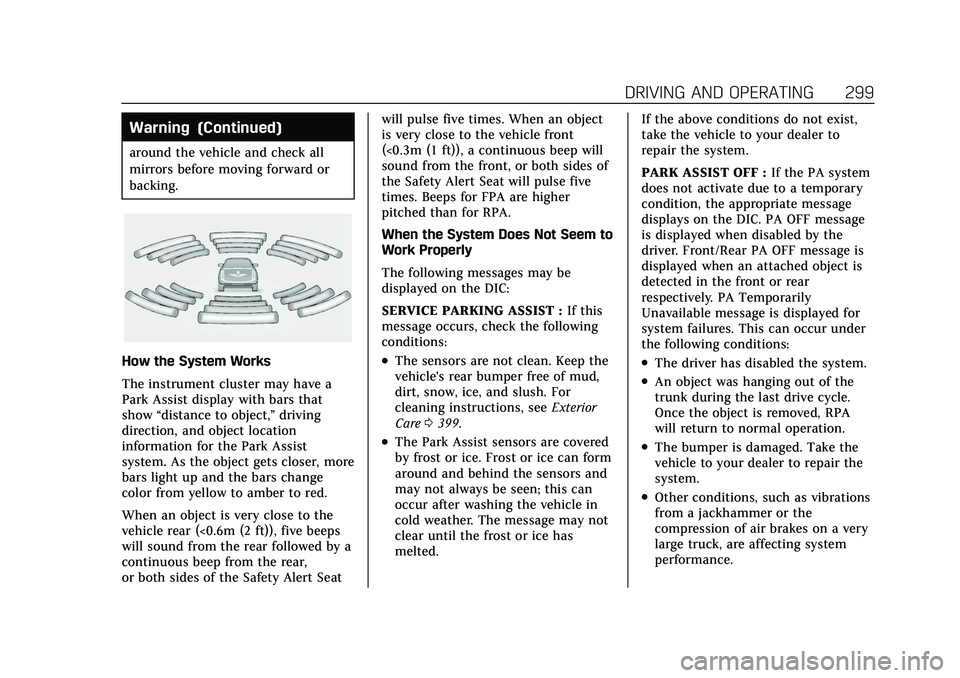
The instrument cluster may have a
Park Assist display with bars that
show“distance to object,” driving
direction, and object location
information for the Park Assist
system. As the object gets closer, more
bars light up and the bars change
color from yellow to amber to red.
When an object is very close to the
vehicle rear (<0.6m (2 ft)), five beeps
will sound from the rear followed by a
continuous beep from the rear,
or both sides of the Safety Alert Seat will pulse five times. When an object
is very close to the vehicle front
(<0.3m (1 ft)), a continuous beep will
sound from the front, or both sides of
the Safety Alert Seat will pulse five
times. Beeps for FPA are higher
pitched than for RPA.
When the System Does Not Seem to
Work Properly
The following messages may be
displayed on the DIC:
SERVICE PARKING ASSIST :
If this
message occurs, check the following
conditions:.The sensors are not clean. Keep the
vehicle's rear bumper free of mud,
dirt, snow, ice, and slush. For
cleaning instructions, see Exterior
Care 0399.
.The Park Assist sensors are covered
by frost or ice. Frost or ice can form
around and behind the sensors and
may not always be seen; this can
occur after washing the vehicle in
cold weather. The message may not
clear until the frost or ice has
melted. If the above conditions do not exist,
take the vehicle to your dealer to
repair the system.
PARK ASSIST OFF :
If the PA system
does not activate due to a temporary
condition, the appropriate message
displays on the DIC. PA OFF message
is displayed when disabled by the
driver. Front/Rear PA OFF message is
displayed when an attached object is
detected in the front or rear
respectively. PA Temporarily
Unavailable message is displayed for
system failures. This can occur under
the following conditions:
.The driver has disabled the system.
.An object was hanging out of the
trunk during the last drive cycle.
Once the object is removed, RPA
will return to normal operation.
.The bumper is damaged. Take the
vehicle to your dealer to repair the
system.
.Other conditions, such as vibrations
from a jackhammer or the
compression of air brakes on a very
large truck, are affecting system
performance.
Page 326 of 466

Cadillac CT5 Owner Manual (GMNA-Localizing-U.S./Canada-15268585) -
2022 - CRC - 10/11/21
DRIVING AND OPERATING 325
Ask your dealer for trailering
information or assistance.
Towing Equipment
Hitches
Always use the correct hitch
equipment for your vehicle.
Crosswinds, large trucks going by, and
rough roads can affect the trailer and
the hitch.
Never attach rental hitches or other
bumper-type hitches. Only use
frame-mounted hitches that do not
attach to the bumper.
Always seal any holes in your vehicle
if the trailer hitch removed. If not
sealed, dirt, water, and carbon
monoxide (CO) from the exhaust may
enter your vehicle. SeeEngine Exhaust
0 245.
Consider using mechanical sway
controls with any trailer. Ask a
trailering professional about sway
controls or refer to the trailer
manufacturer's recommendations and
instructions.
Tires
.Do not tow a trailer while using a
compact spare tire on the vehicle.
.Tires must be properly inflated to
support loads while towing a trailer.
See Tires 0367 for instructions on
proper tire inflation.
Safety Chains
Always attach chains between the
vehicle and the trailer, and attach the
chains to the holes on the trailer hitch
platform. Instructions about safety
chains may be provided by the hitch
manufacturer or by the trailer
manufacturer.
Cross the safety chains under the
tongue of the trailer to help prevent
the tongue from contacting the road if
it becomes separated from the hitch.
Always leave just enough slack so the
combination can turn. Never allow
safety chains to drag on the ground.
Trailer Brakes
Loaded trailers over 450 kg (1,000 lb)
must be equipped with brake systems
and with brakes for each axle. Trailer
braking equipment conforming to Canadian Standards Association (CSA)
requirement CAN3-D313, or its
equivalent, is recommended.
State or local regulations may require
trailers to have their own braking
system if the loaded weight of the
trailer exceeds certain minimums that
can vary from state to state. Read and
follow the instructions for the trailer
brakes so they are installed, adjusted,
and maintained properly. Never
attempt to tap into your vehicle's
hydraulic brake system. If you do,
both the vehicle anti-lock brakes and
the trailer brakes may not function,
which could result in a crash.
Turn Signals When Towing a
Trailer
When properly connected, the trailer
turn signals will illuminate to indicate
the vehicle is turning, changing lanes,
or stopping. When towing a trailer,
the arrows on the instrument cluster
will illuminate even if the trailer is not
properly connected or the bulbs are
burned out.