On star CADILLAC CT5 2022 Owners Manual
[x] Cancel search | Manufacturer: CADILLAC, Model Year: 2022, Model line: CT5, Model: CADILLAC CT5 2022Pages: 466, PDF Size: 7.21 MB
Page 2 of 466
Cadillac CT5 Owner Manual (GMNA-Localizing-U.S./Canada-15268585) -
2022 - CRC - 10/11/21
Contents
Introduction . . . . . . . . . . . . . . . . . . . . . . . . . . 1
Keys, Doors, and Windows . . . . . . . . . . 6
Seats and Restraints . . . . . . . . . . . . . . . 35
Storage . . . . . . . . . . . . . . . . . . . . . . . . . . . . . . 85
Instruments and Controls . . . . . . . . . . 88
Lighting . . . . . . . . . . . . . . . . . . . . . . . . . . . . 135
Infotainment System . . . . . . . . . . . . . 143
Climate Controls . . . . . . . . . . . . . . . . . . 209
Driving and Operating . . . . . . . . . . . . 215
Vehicle Care . . . . . . . . . . . . . . . . . . . . . . . 327
Service and Maintenance . . . . . . . . . 409
Technical Data . . . . . . . . . . . . . . . . . . . . 424
Customer Information . . . . . . . . . . . . 431
Reporting Safety Defects . . . . . . . . . 441
OnStar . . . . . . . . . . . . . . . . . . . . . . . . . . . . . . 444
Connected Services . . . . . . . . . . . . . . . 450
Index . . . . . . . . . . . . . . . . . . . . . . . . 453
Introduction
The names, logos, emblems, slogans,
vehicle model names, and vehicle
body designs appearing in this manual
including, but not limited to, GM, the
GM logo, CADILLAC, the CADILLAC
Emblem, and CT5, are trademarks
and/or service marks of General
Motors LLC, its subsidiaries, affiliates,
or licensors.
For vehicles first sold in Canada,
substitute the name“General Motors
of Canada Company ”for Cadillac
Motor Car Division wherever it
appears in this manual.
This manual describes features that
may or may not be on the vehicle
because of optional equipment that
was not purchased on the vehicle, model variants, country specifications,
features/applications that may not be
available in your region, or changes
subsequent to the printing of this
owner’s manual, including changes in
standard or optional content.
Refer to the purchase documentation
relating to your specific vehicle to
confirm the features.
Keep this manual in the vehicle for
quick reference.
Canadian Vehicle Owners
A French language manual can be
obtained from your dealer, at
www.helminc.com, or from:
Propriétaires Canadiens
On peut obtenir un exemplaire de ce
guide en français auprès du
concessionnaire ou à l'adresse
suivante:
Litho in U.S.A.
Part No. 84728180 B Second Printing©2021 General Motors LLC. All Rights Reserved.
Page 4 of 466
Cadillac CT5 Owner Manual (GMNA-Localizing-U.S./Canada-15268585) -
2022 - CRC - 10/11/21
INTRODUCTION 3
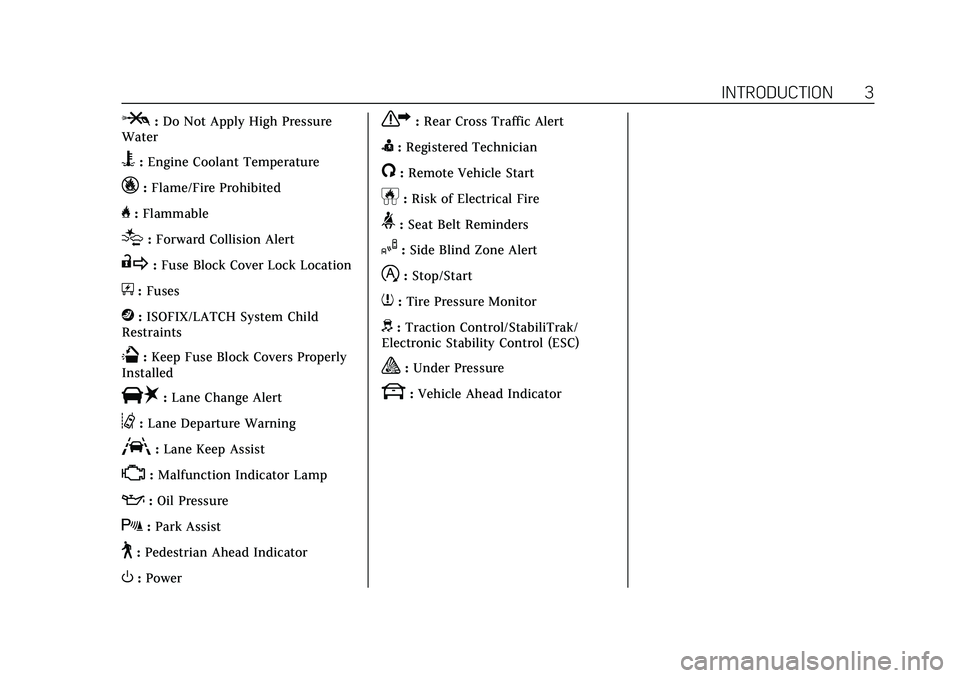
P:Do Not Apply High Pressure
Water
B: Engine Coolant Temperature
_:Flame/Fire Prohibited
H: Flammable
[:Forward Collision Alert
R:Fuse Block Cover Lock Location
+:Fuses
j:ISOFIX/LATCH System Child
Restraints
Q: Keep Fuse Block Covers Properly
Installed
|: Lane Change Alert
@:Lane Departure Warning
A:Lane Keep Assist
*: Malfunction Indicator Lamp
::Oil Pressure
X:Park Assist
~:Pedestrian Ahead Indicator
O:Power
7:Rear Cross Traffic Alert
I:Registered Technician
/:Remote Vehicle Start
h:Risk of Electrical Fire
>:Seat Belt Reminders
I:Side Blind Zone Alert
h:Stop/Start
7:Tire Pressure Monitor
d:Traction Control/StabiliTrak/
Electronic Stability Control (ESC)
a: Under Pressure
k: Vehicle Ahead Indicator
Page 6 of 466
Cadillac CT5 Owner Manual (GMNA-Localizing-U.S./Canada-15268585) -
2022 - CRC - 10/11/21
INTRODUCTION 5
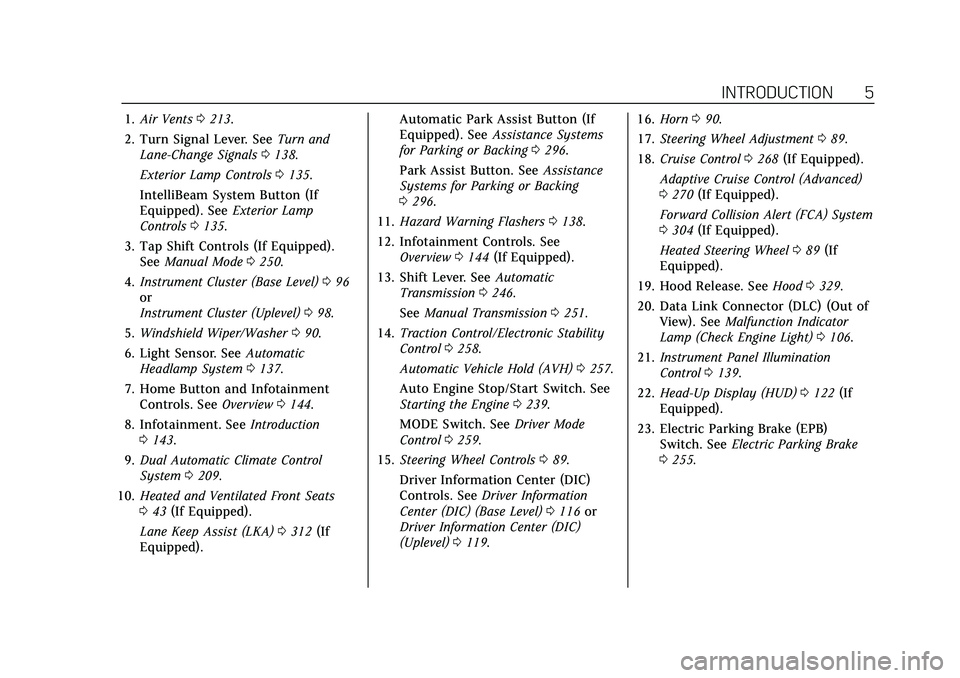
1.Air Vents 0213.
2. Turn Signal Lever. See Turn and
Lane-Change Signals 0138.
Exterior Lamp Controls 0135.
IntelliBeam System Button (If
Equipped). See Exterior Lamp
Controls 0135.
3. Tap Shift Controls (If Equipped). See Manual Mode 0250.
4. Instrument Cluster (Base Level) 096
or
Instrument Cluster (Uplevel) 098.
5. Windshield Wiper/Washer 090.
6. Light Sensor. See Automatic
Headlamp System 0137.
7. Home Button and Infotainment Controls. See Overview0144.
8. Infotainment. See Introduction
0 143.
9. Dual Automatic Climate Control
System 0209.
10. Heated and Ventilated Front Seats
043 (If Equipped).
Lane Keep Assist (LKA) 0312 (If
Equipped). Automatic Park Assist Button (If
Equipped). See
Assistance Systems
for Parking or Backing 0296.
Park Assist Button. See Assistance
Systems for Parking or Backing
0 296.
11. Hazard Warning Flashers 0138.
12. Infotainment Controls. See Overview 0144 (If Equipped).
13. Shift Lever. See Automatic
Transmission 0246.
See Manual Transmission 0251.
14. Traction Control/Electronic Stability
Control 0258.
Automatic Vehicle Hold (AVH) 0257.
Auto Engine Stop/Start Switch. See
Starting the Engine 0239.
MODE Switch. See Driver Mode
Control 0259.
15. Steering Wheel Controls 089.
Driver Information Center (DIC)
Controls. See Driver Information
Center (DIC) (Base Level) 0116 or
Driver Information Center (DIC)
(Uplevel) 0119. 16.
Horn 090.
17. Steering Wheel Adjustment 089.
18. Cruise Control 0268 (If Equipped).
Adaptive Cruise Control (Advanced)
0 270 (If Equipped).
Forward Collision Alert (FCA) System
0 304 (If Equipped).
Heated Steering Wheel 089 (If
Equipped).
19. Hood Release. See Hood0329.
20. Data Link Connector (DLC) (Out of View). See Malfunction Indicator
Lamp (Check Engine Light) 0106.
21. Instrument Panel Illumination
Control 0139.
22. Head-Up Display (HUD) 0122 (If
Equipped).
23. Electric Parking Brake (EPB) Switch. See Electric Parking Brake
0 255.
Page 7 of 466
Cadillac CT5 Owner Manual (GMNA-Localizing-U.S./Canada-15268585) -
2022 - CRC - 10/11/21
6 KEYS, DOORS, AND WINDOWS
Keys, Doors, and
Windows
Keys and Locks
Keys . . . . . . . . . . . . . . . . . . . . . . . . . . . . . . . . . . 6
Remote Keyless Entry (RKE)System . . . . . . . . . . . . . . . . . . . . . . . . . . . . . 7
Remote Keyless Entry (RKE) System Operation . . . . . . . . . . . . . . . . . 7
Remote Vehicle Start . . . . . . . . . . . . . . 13
Door Locks . . . . . . . . . . . . . . . . . . . . . . . . . 14
Power Door Locks . . . . . . . . . . . . . . . . . 16
Delayed Locking . . . . . . . . . . . . . . . . . . . 16
Automatic Door Locks . . . . . . . . . . . . 17
Lockout Protection . . . . . . . . . . . . . . . . 17
Safety Locks . . . . . . . . . . . . . . . . . . . . . . . . 17
Doors
Trunk . . . . . . . . . . . . . . . . . . . . . . . . . . . . . . . 18
Vehicle Security
Vehicle Security . . . . . . . . . . . . . . . . . . . . 22
Vehicle Alarm System . . . . . . . . . . . . . 22
Steering Column Lock . . . . . . . . . . . . . 24
Immobilizer . . . . . . . . . . . . . . . . . . . . . . . . 25
Immobilizer Operation . . . . . . . . . . . . 25
Exterior Mirrors
Convex Mirrors . . . . . . . . . . . . . . . . . . . . 26
Power Mirrors . . . . . . . . . . . . . . . . . . . . . . 26 Folding Mirrors . . . . . . . . . . . . . . . . . . . . 26
Heated Mirrors . . . . . . . . . . . . . . . . . . . . . 28
Automatic Dimming Mirror . . . . . . . 28
Reverse Tilt Mirrors . . . . . . . . . . . . . . . 28
Interior Mirrors
Interior Rearview Mirrors . . . . . . . . . 28
Manual Rearview Mirror . . . . . . . . . . 28
Automatic Dimming Rearview
Mirror . . . . . . . . . . . . . . . . . . . . . . . . . . . . . 28
Rear Camera Mirror . . . . . . . . . . . . . . . 28
Windows
Windows . . . . . . . . . . . . . . . . . . . . . . . . . . . 30
Power Windows . . . . . . . . . . . . . . . . . . . . 31
Sun Visors . . . . . . . . . . . . . . . . . . . . . . . . . . 32
Roof
Sunroof . . . . . . . . . . . . . . . . . . . . . . . . . . . . . 32
Keys and Locks
Keys
{Warning
Leaving children in a vehicle with a
remote key is dangerous and
children or others could be
seriously injured or killed. They
could operate the power windows
or other controls or make the
vehicle move. The windows will
function with the remote key in the
vehicle, and children or others
could be caught in the path of a
closing window. Do not leave
children in a vehicle with a
remote key.
Page 8 of 466
Cadillac CT5 Owner Manual (GMNA-Localizing-U.S./Canada-15268585) -
2022 - CRC - 10/11/21
KEYS, DOORS, AND WINDOWS 7
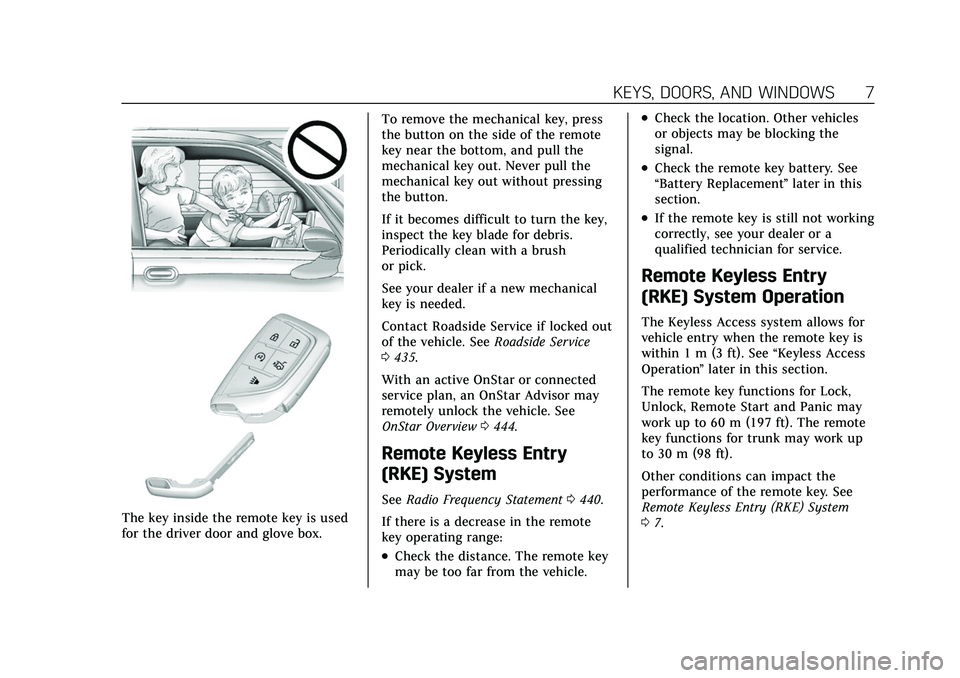
The key inside the remote key is used
for the driver door and glove box.To remove the mechanical key, press
the button on the side of the remote
key near the bottom, and pull the
mechanical key out. Never pull the
mechanical key out without pressing
the button.
If it becomes difficult to turn the key,
inspect the key blade for debris.
Periodically clean with a brush
or pick.
See your dealer if a new mechanical
key is needed.
Contact Roadside Service if locked out
of the vehicle. See
Roadside Service
0 435.
With an active OnStar or connected
service plan, an OnStar Advisor may
remotely unlock the vehicle. See
OnStar Overview 0444.
Remote Keyless Entry
(RKE) System
See Radio Frequency Statement 0440.
If there is a decrease in the remote
key operating range:
.Check the distance. The remote key
may be too far from the vehicle.
.Check the location. Other vehicles
or objects may be blocking the
signal.
.Check the remote key battery. See
“Battery Replacement ”later in this
section.
.If the remote key is still not working
correctly, see your dealer or a
qualified technician for service.
Remote Keyless Entry
(RKE) System Operation
The Keyless Access system allows for
vehicle entry when the remote key is
within 1 m (3 ft). See “Keyless Access
Operation ”later in this section.
The remote key functions for Lock,
Unlock, Remote Start and Panic may
work up to 60 m (197 ft). The remote
key functions for trunk may work up
to 30 m (98 ft).
Other conditions can impact the
performance of the remote key. See
Remote Keyless Entry (RKE) System
0 7.
Page 9 of 466
Cadillac CT5 Owner Manual (GMNA-Localizing-U.S./Canada-15268585) -
2022 - CRC - 10/11/21
8 KEYS, DOORS, AND WINDOWS
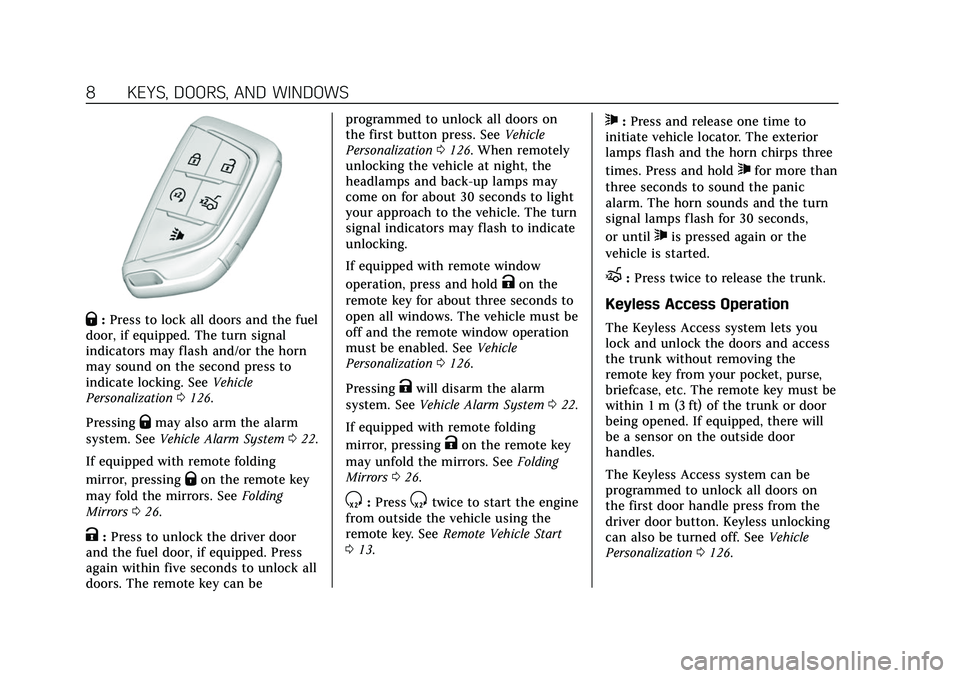
Q:Press to lock all doors and the fuel
door, if equipped. The turn signal
indicators may flash and/or the horn
may sound on the second press to
indicate locking. See Vehicle
Personalization 0126.
Pressing
Qmay also arm the alarm
system. See Vehicle Alarm System 022.
If equipped with remote folding
mirror, pressing
Qon the remote key
may fold the mirrors. See Folding
Mirrors 026.
K:Press to unlock the driver door
and the fuel door, if equipped. Press
again within five seconds to unlock all
doors. The remote key can be programmed to unlock all doors on
the first button press. See
Vehicle
Personalization 0126. When remotely
unlocking the vehicle at night, the
headlamps and back-up lamps may
come on for about 30 seconds to light
your approach to the vehicle. The turn
signal indicators may flash to indicate
unlocking.
If equipped with remote window
operation, press and hold
Kon the
remote key for about three seconds to
open all windows. The vehicle must be
off and the remote window operation
must be enabled. See Vehicle
Personalization 0126.
Pressing
Kwill disarm the alarm
system. See Vehicle Alarm System 022.
If equipped with remote folding
mirror, pressing
Kon the remote key
may unfold the mirrors. See Folding
Mirrors 026.
S:PressStwice to start the engine
from outside the vehicle using the
remote key. See Remote Vehicle Start
0 13.
7:Press and release one time to
initiate vehicle locator. The exterior
lamps flash and the horn chirps three
times. Press and hold
7for more than
three seconds to sound the panic
alarm. The horn sounds and the turn
signal lamps flash for 30 seconds,
or until
7is pressed again or the
vehicle is started.
X: Press twice to release the trunk.
Keyless Access Operation
The Keyless Access system lets you
lock and unlock the doors and access
the trunk without removing the
remote key from your pocket, purse,
briefcase, etc. The remote key must be
within 1 m (3 ft) of the trunk or door
being opened. If equipped, there will
be a sensor on the outside door
handles.
The Keyless Access system can be
programmed to unlock all doors on
the first door handle press from the
driver door button. Keyless unlocking
can also be turned off. See Vehicle
Personalization 0126.
Page 10 of 466
Cadillac CT5 Owner Manual (GMNA-Localizing-U.S./Canada-15268585) -
2022 - CRC - 10/11/21
KEYS, DOORS, AND WINDOWS 9
If equipped with memory seats,
remote keys 1 and 2 are linked to
seating positions of memory 1 or 2.
SeeMemory Seats 040.
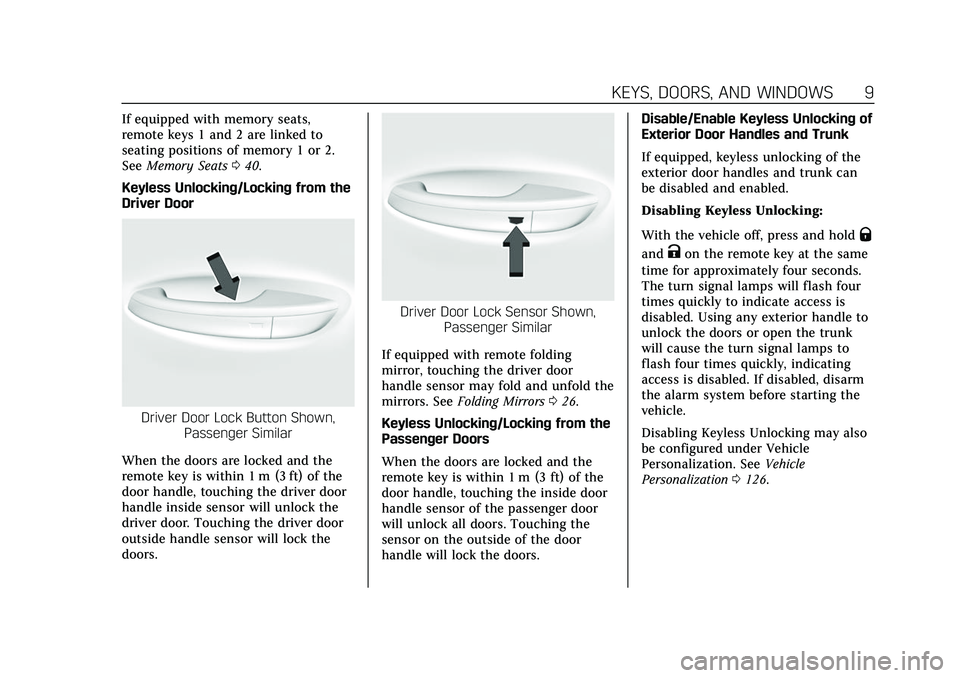
Keyless Unlocking/Locking from the
Driver Door
Driver Door Lock Button Shown, Passenger Similar
When the doors are locked and the
remote key is within 1 m (3 ft) of the
door handle, touching the driver door
handle inside sensor will unlock the
driver door. Touching the driver door
outside handle sensor will lock the
doors.
Driver Door Lock Sensor Shown, Passenger Similar
If equipped with remote folding
mirror, touching the driver door
handle sensor may fold and unfold the
mirrors. See Folding Mirrors 026.
Keyless Unlocking/Locking from the
Passenger Doors
When the doors are locked and the
remote key is within 1 m (3 ft) of the
door handle, touching the inside door
handle sensor of the passenger door
will unlock all doors. Touching the
sensor on the outside of the door
handle will lock the doors. Disable/Enable Keyless Unlocking of
Exterior Door Handles and Trunk
If equipped, keyless unlocking of the
exterior door handles and trunk can
be disabled and enabled.
Disabling Keyless Unlocking:
With the vehicle off, press and hold
Q
andKon the remote key at the same
time for approximately four seconds.
The turn signal lamps will flash four
times quickly to indicate access is
disabled. Using any exterior handle to
unlock the doors or open the trunk
will cause the turn signal lamps to
flash four times quickly, indicating
access is disabled. If disabled, disarm
the alarm system before starting the
vehicle.
Disabling Keyless Unlocking may also
be configured under Vehicle
Personalization. See Vehicle
Personalization 0126.
Page 12 of 466
Cadillac CT5 Owner Manual (GMNA-Localizing-U.S./Canada-15268585) -
2022 - CRC - 10/11/21
KEYS, DOORS, AND WINDOWS 11
your dealer. The vehicle can be
reprogrammed so that lost or stolen
remote keys no longer work. Each
vehicle can have up to eight remote
keys matched to it.
Starting the Vehicle with a Low
Remote Key Battery
For improved vehicle security, the
remote key is equipped with a motion
sensor. When starting the vehicle,
if the remote key has been idle for a
while, the DIC may display KEY IN
SLEEP MODE, MOVE KEY, THEN
START. Move the remote key slightly
and try starting the vehicle. When
starting the vehicle, if the remote key
battery is depleted or there is signal
interference, the DIC may display NO
KEY FOUND, REPLACE BATTERY IN
KEY or NO REMOTE KEY WAS
DETECTED PLACE KEY IN KEY
POCKET THEN START YOUR
VEHICLE, follow the steps shown
below:
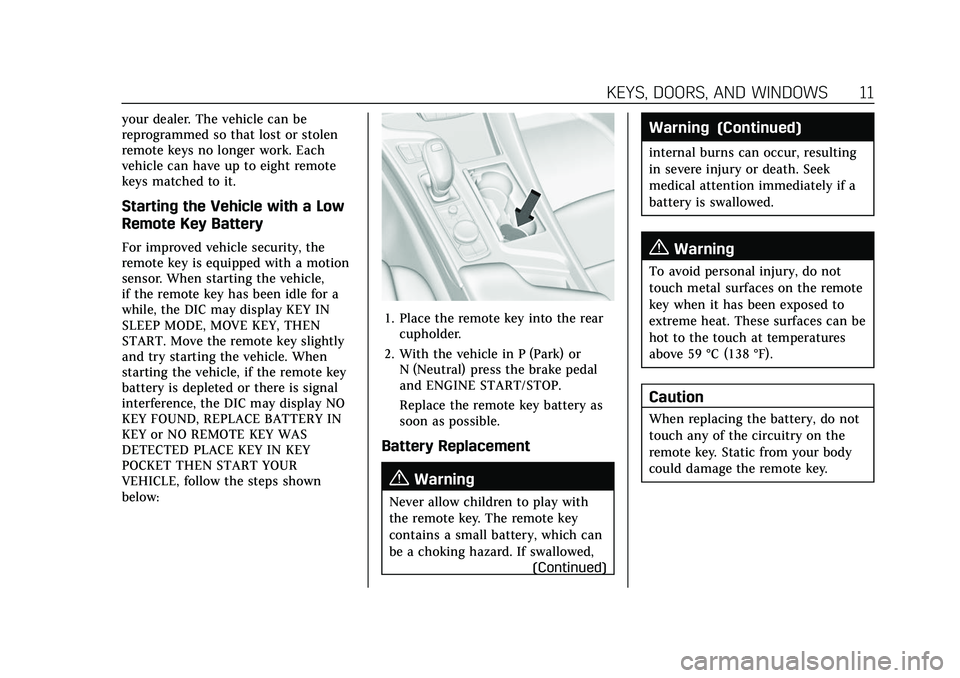
1. Place the remote key into the rearcupholder.
2. With the vehicle in P (Park) or N (Neutral) press the brake pedal
and ENGINE START/STOP.
Replace the remote key battery as
soon as possible.
Battery Replacement
{Warning
Never allow children to play with
the remote key. The remote key
contains a small battery, which can
be a choking hazard. If swallowed,
(Continued)
Warning (Continued)
internal burns can occur, resulting
in severe injury or death. Seek
medical attention immediately if a
battery is swallowed.
{Warning
To avoid personal injury, do not
touch metal surfaces on the remote
key when it has been exposed to
extreme heat. These surfaces can be
hot to the touch at temperatures
above 59 °C (138 °F).
Caution
When replacing the battery, do not
touch any of the circuitry on the
remote key. Static from your body
could damage the remote key.
Page 14 of 466
Cadillac CT5 Owner Manual (GMNA-Localizing-U.S./Canada-15268585) -
2022 - CRC - 10/11/21
KEYS, DOORS, AND WINDOWS 13
6. Remove the old battery. Do not usea metal object.
7. Insert the new battery, negative side facing down. Replace with a
CR2450 or equivalent battery.
8. Replace the seal, pushing it into the groove around the battery
compartment.
9. Replace the battery cover by snapping it back into the
remote key.
10. Reinsert the mechanical key.
Remote Vehicle Start
This feature allows the engine to be
started from outside the vehicle. It is
not available on vehicles with a
manual transmission.
S: This button on the remote key is
for remote start.
The climate control system will use
the previous settings during a remote
start. The rear window defogger may
come on during remote start based on
cold ambient conditions. The rear
defog indicator light does not come on
during remote start. If equipped, the heated and ventilated
front seats may also come on when
the vehicle personalization setting is
enabled. See
Heated and Ventilated
Front Seats 043.
If equipped with a remote start heated
steering wheel, it may come on during
a remote start. See Heated Steering
Wheel 089.
Laws in some local communities may
restrict the use of remote starters. For
example, some laws may require a
person using remote start to have the
vehicle in view. Check local
regulations for any requirements.
If your vehicle is low on fuel, do not
use the remote start feature. The
vehicle may run out of fuel.
The remote key range may be shorter
while the vehicle is running.
Other conditions can affect the
performance of the remote key. See
Remote Keyless Entry (RKE) System
0 7.
You are allowed multiple starts
totaling 30 minutes of engine run
time. The maximum run time of a
single start is 15 minutes, and it will shut off automatically. You could do
three 10 minute starts, if you
manually shut off after 10 minutes.
The last 10 minute start would shut
off automatically as your total
30 minutes will have been used.
Starting the Engine Using Remote
Start
1. Press
Stwice on the remote key.
The turn signal lamps will flash.
The lamps flash to confirm the
request to remote start the vehicle
has been received. During the
remote start, the parking lamps
will remain on as long as the
engine is running.
2. The engine will shut off after 15 minutes or after the remainder
of the 30 minute total running
time is used, unless you stop the
remote start before engine running
has completed or the vehicle is
turned on.
3. Press the brake pedal and turn the ignition on to drive the vehicle.
Additional Engine Run Time
Remote start can be used for up to
30 minutes of total engine run time.
Page 15 of 466
Cadillac CT5 Owner Manual (GMNA-Localizing-U.S./Canada-15268585) -
2022 - CRC - 10/11/21
14 KEYS, DOORS, AND WINDOWS
After two remote starts of 15 minutes,
or multiple shorter time starts
totaling 30 minutes have been used,
the vehicle must be started and then
turned off before the remote start can
be used again.
Canceling a Remote Start
To cancel a remote start, do any of
the following:
.PressSonce. The parking lamps
will turn off.
.Turn on the hazard warning
flashers.
.Turn the vehicle on and then
back off.
Conditions in Which Remote Start
Will Not Work
The remote start will not operate if
any of the following occur:
.The ignition is in any mode other
than off.
.A remote key is in the vehicle.
.The hood is not closed.
.The hazard warning flashers are on.
.There is an emission control system
malfunction.
.The engine coolant temperature is
too high.
.The oil pressure is low.
.The 30 minutes of engine run time
have been used.
.The vehicle is not in P (Park).
Door Locks
{Warning
Unlocked doors can be dangerous.
.Passengers, especially children,
can easily open the doors and
fall out of a moving vehicle. The
doors can be unlocked and
opened while the vehicle is
moving. The chance of being
thrown out of the vehicle in a
crash is increased if the doors are
not locked. So, all passengers
should wear seat belts properly
and the doors should be locked
whenever the vehicle is driven.
.Young children who get into
unlocked vehicles may be unable
to get out. A child can be
overcome by extreme heat and
can suffer permanent injuries or (Continued)
Warning (Continued)
even death from heat stroke.
Always lock the vehicle whenever
leaving it.
.Outsiders can easily enter
through an unlocked door when
you slow down or stop the
vehicle. Locking the doors can
help prevent this from
happening.
Always take your remote key with you
when exiting the vehicle to prevent
being locked out. To lock or unlock
the doors from outside the vehicle:
.PressQorKon the remote key.
See Remote Keyless Entry (RKE)
System Operation 07.
.Use the mechanical key in the
driver door. The key lock cylinder is
covered with a cap.
See “Driver Door Key Lock Cylinder
Access (In Case of Dead Battery)”
later in this section.