garage CADILLAC CT5 2022 Owners Manual
[x] Cancel search | Manufacturer: CADILLAC, Model Year: 2022, Model line: CT5, Model: CADILLAC CT5 2022Pages: 466, PDF Size: 7.21 MB
Page 133 of 466
Cadillac CT5 Owner Manual (GMNA-Localizing-U.S./Canada-15268585) -
2022 - CRC - 10/11/21
132 INSTRUMENTS AND CONTROLS
2. Touch Enter to go to theconfirmation screen.
3. Re-enter the four-digit code.
Touch Lock or Unlock to lock or
unlock the system. Touch Back to go
back to the previous menu.
Universal Remote
System
See Radio Frequency Statement 0440.
Universal Remote System
Programming
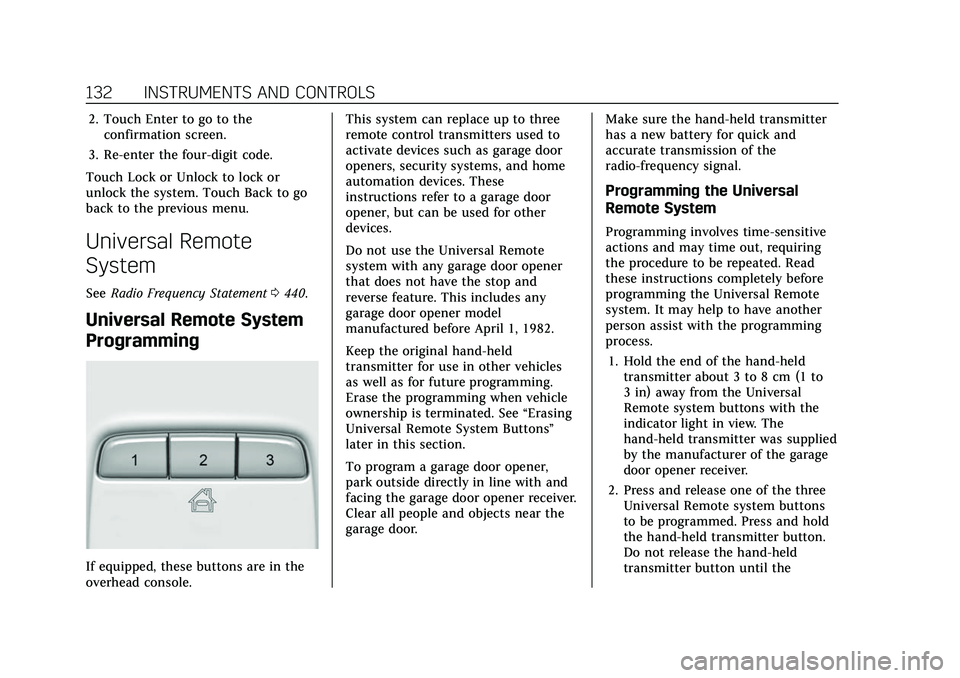
If equipped, these buttons are in the
overhead console. This system can replace up to three
remote control transmitters used to
activate devices such as garage door
openers, security systems, and home
automation devices. These
instructions refer to a garage door
opener, but can be used for other
devices.
Do not use the Universal Remote
system with any garage door opener
that does not have the stop and
reverse feature. This includes any
garage door opener model
manufactured before April 1, 1982.
Keep the original hand-held
transmitter for use in other vehicles
as well as for future programming.
Erase the programming when vehicle
ownership is terminated. See
“Erasing
Universal Remote System Buttons”
later in this section.
To program a garage door opener,
park outside directly in line with and
facing the garage door opener receiver.
Clear all people and objects near the
garage door. Make sure the hand-held transmitter
has a new battery for quick and
accurate transmission of the
radio-frequency signal.
Programming the Universal
Remote System
Programming involves time-sensitive
actions and may time out, requiring
the procedure to be repeated. Read
these instructions completely before
programming the Universal Remote
system. It may help to have another
person assist with the programming
process.
1. Hold the end of the hand-held transmitter about 3 to 8 cm (1 to
3 in) away from the Universal
Remote system buttons with the
indicator light in view. The
hand-held transmitter was supplied
by the manufacturer of the garage
door opener receiver.
2. Press and release one of the three Universal Remote system buttons
to be programmed. Press and hold
the hand-held transmitter button.
Do not release the hand-held
transmitter button until the
Page 134 of 466

Cadillac CT5 Owner Manual (GMNA-Localizing-U.S./Canada-15268585) -
2022 - CRC - 10/11/21
INSTRUMENTS AND CONTROLS 133
indicator light changes from a slow
to a rapid flash or continuous light.
Then release the hand-held
transmitter button.
Some garage door openers may
require substitution of Step 2 with
the procedure under“Radio Signals
for Some Gate Operators ”later in
this section.
3. Press and hold the newly programmed Universal Remote
system button for five seconds
while watching the indicator light
and garage door activation.
.If the indicator light stays on
continuously or the garage door
moves when the button is
pressed, then programming is
complete. There is no need to
complete Steps 4–6.
.If the indicator light does not
come on or the garage door does
not move, a second button press
may be required. For a second
time, press and hold the newly
programmed button for
five seconds. If the indicator
light stays on continuously or
the garage door moves when the button is pressed, then
programming is complete. There
is no need to complete
Steps 4–6.
.If the garage door does not
move, continue with
programming Steps 4–6.
Learn or Smart Button
4. After completing Steps 1–3, locate the Learn or Smart button inside
garage on the garage door opener
receiver. The name and color of the
button may vary by manufacturer.
5. Press and release the Learn or Smart button. Step 6 must be
completed within 30 seconds of
pressing this button.
6. Return to the vehicle and firmly press and hold the trained
Universal Remote system button for two seconds and release. Repeat
the
“press/hold/release ”sequence
up to three times to complete the
training process.
The Universal Remote system should
now activate the garage door. Repeat
the process for programming the
remaining two buttons.
For questions or programming help,
see www.homelink.com/gm or call
1-800-355-3515. For calls placed
outside the U.S., Canada, or Puerto
Rico, international rates will apply and
may differ based on landline or mobile
phone.Radio Signals for Some Gate
Operators
Some gate operators and
radio-frequency laws require
transmitter signals to time out or quit
after several seconds of transmission.
This may not be long enough for the
Universal Remote system to pick up
the signal during programming.
If the programming did not work,
replace Step 2 under “Programming
the Universal Remote System ”with
the following:
Page 138 of 466

Cadillac CT5 Owner Manual (GMNA-Localizing-U.S./Canada-15268585) -
2022 - CRC - 10/11/21
LIGHTING 137
Exterior Lamps Off
Reminder
A warning chime sounds if the driver
door is opened while the ignition is off
and the exterior lamps are on.
Headlamp High/Low-Beam
Changer
3:Push the turn signal lever away
from you and release, to turn the high
beams on. To return to low beams,
push the lever again or pull it toward
you and release.
This indicator light turns on in the
instrument cluster when the
high-beam headlamps are on.
Flash-to-Pass
To flash the high beams, pull the turn
signal lever toward you, and release.
Daytime Running
Lamps (DRL)
DRL can make it easier for others to
see the front of your vehicle during
the day. Fully functional DRL are
required on all vehicles first sold in
Canada.
If equipped, the DRL will come on
when all of the following conditions
are met:
.The ignition is on.
.The exterior lamp control is
in AUTO.
.The light sensor determines it is
daytime.
The DRL turn off when the headlamps
are turned to
Oor the ignition is off.
For vehicles first sold in Canada, the
DRL can only be turned off when the
vehicle is parked.
Automatic Headlamp
System
When the exterior lamp control is set
to AUTO and it is dark enough
outside, the headlamps come on
automatically.
If equipped, the light sensor is on top
of the instrument panel or on the
windshield near the rearview mirror.
Do not cover the sensor, otherwise the
headlamps will come on when they
are not needed.
The system may also turn on the
headlamps when driving through a
parking garage or tunnel.
Page 139 of 466

Cadillac CT5 Owner Manual (GMNA-Localizing-U.S./Canada-15268585) -
2022 - CRC - 10/11/21
138 LIGHTING
If the vehicle is started in a dark
garage, the automatic headlamp
system comes on immediately. If it is
light outside when the vehicle leaves
the garage, there is a slight delay
before the automatic headlamp
system turns off the headlamps.
During that delay, the instrument
cluster may not be as bright as usual.
Make sure the instrument panel
brightness control is in the full bright
position. SeeInstrument Panel
Illumination Control 0139.
When it is bright enough outside, the
headlamps will turn off.
The automatic headlamp system turns
off when the exterior lamp control is
turned to
Oor the ignition is off. For
vehicles sold in Canada, this control
only works when the transmission is
in P (Park).
Lights On with Wipers
If the windshield wipers are activated
in daylight with the engine on, and
the exterior lamp control is in AUTO,
the headlamps, parking lamps, and
other exterior lamps come on. The
transition time for the lamps coming on varies based on wiper speed. When
the wipers are not operating, these
lamps turn off. Move the exterior
lamp control to
Oor;to disable
this feature.
Hazard Warning Flashers
|: Press this button to make the
front and rear turn signal lamps flash
on and off. Release the button for at
least one second and press again to
turn the flashers off.
The hazard warning flashers turn on
automatically if the airbags deploy.
Turn and Lane-Change
Signals
Move the lever all the way up or down
to signal a turn.
An arrow on the instrument cluster
flashes in the direction of the turn or
lane change.
Raise or lower the lever until the
arrow starts to flash to signal a lane
change. Hold it there until the lane
change is completed. If the lever is
briefly pressed and released, the turn
signal flashes three times.
The turn and lane-change signal can
be turned off manually by moving the
lever back to its original position.
Page 155 of 466
Cadillac CT5 Owner Manual (GMNA-Localizing-U.S./Canada-15268585) -
2022 - CRC - 10/11/21
154 INFOTAINMENT SYSTEM
SiriusXM Satellite Radio Service
If equipped, SiriusXM Satellite Radio
Service provides digital radio
reception. Tall buildings or hills can
interfere with satellite radio signals,
causing the sound to fade in and out.
In addition, traveling or standing
under heavy foliage, bridges, garages,
or tunnels may cause loss of the
SiriusXM signal for a period of time.
Some cellular services may interfere
with SXM reception causing loss of
signal.
Mobile Device Usage
Mobile device usage, such as making
or receiving calls, charging, or just
having the mobile device on may
cause static interference in the radio.
Unplug the mobile device or turn it
off if this happens.
Multi-Band Antenna
The roof antenna may be used for
radio, navigation, and OnStar,
depending on the equipped options.
Keep clear of obstructions for clearreception. If the vehicle has a sunroof,
and it is open, reception can also be
affected.
Audio Players
Avoiding Untrusted Media
Devices
When using media devices such as SD
cards, USB devices, and mobile
devices, consider the source.
Untrusted media devices could
contain files that affect system
operation or performance. Avoid use if
the content or origin cannot be
trusted.
USB Port
Audio stored on a USB device may be
listened to.
The vehicle may be equipped with two
USB ports in the center console under
the armrest. These ports are for data
and charging. There may also be two
USB ports for charging only at the rear
of the center console.
Caution
To avoid vehicle damage, unplug all
accessories and disconnect all
accessory cables from the vehicle
when not in use. Accessory cables
left plugged into the vehicle,
unconnected to a device, could be
damaged or cause an electrical
short if the unconnected end comes
in contact with liquids or another
power source such as the accessory
power outlet.
Playing from a USB
A USB mass storage device can be
connected to the USB port.
Audio extensions supported by the
USB may include:
.MP3
.AAC
.OGG
.3GP
Gracenote
When plugging in a USB device,
Gracenote service builds voice tags for
music. Voice tags allow artists, albums
Page 171 of 466
Cadillac CT5 Owner Manual (GMNA-Localizing-U.S./Canada-15268585) -
2022 - CRC - 10/11/21
170 INFOTAINMENT SYSTEM
For more information if the GPS is not
functioning properly, seeProblems
with Route Guidance 0170 and
If the System Needs Service 0171.
Vehicle Positioning
At times, the position of the vehicle
on the map could be inaccurate due to
one or more of the following reasons:
.The road system has changed.
.The vehicle is driving on slippery
road surfaces such as sand, gravel,
or snow.
.The vehicle is traveling on winding
roads or long, straight roads.
.The vehicle is approaching a tall
building or a large vehicle.
.The surface streets run parallel to a
freeway.
.The vehicle has been transferred by
a vehicle carrier or a ferry.
.The current position calibration is
set incorrectly.
.The vehicle is traveling at high
speed.
.The vehicle changes directions more
than once, or the vehicle is turning
on a turn table in a parking lot.
.The vehicle is entering and/or
exiting a parking lot, garage, or a lot
with a roof.
.The GPS signal is not received.
.A roof carrier is installed on the
vehicle.
.Tire chains are installed on the
vehicle.
.The tires are replaced or worn.
.The tire pressure for the tires is
incorrect.
.This is the first navigation use after
the map data is updated.
.The 12-volt battery has been
disconnected for several days.
.The vehicle is driving in heavy
traffic where driving is at low
speeds, and the vehicle is stopped
and started repeatedly.
Problems with Route
Guidance
Inappropriate route guidance can
occur under one or more of the
following conditions:
.The turn was not made on the road
indicated.
.Route guidance might not be
available when using automatic
rerouting for the next right or
left turn.
.The route might not be changed
when using automatic rerouting.
.There is no route guidance when
turning at an intersection.
.Plural names of places might be
announced occasionally.
.It could take a long time to operate
automatic rerouting during
high-speed driving.
.Automatic rerouting might display a
route returning to the set waypoint
if heading for a destination without
passing through a set waypoint.
.The route prohibits the entry of a
vehicle due to a regulation by time
or season or any other regulation
which may be given.
.Some routes might not be searched.
.The route to the destination might
not be shown if there are new roads,
if roads have recently changed, or if
certain roads are not listed in the
map data. See Maps0161.
Page 246 of 466

Cadillac CT5 Owner Manual (GMNA-Localizing-U.S./Canada-15268585) -
2022 - CRC - 10/11/21
DRIVING AND OPERATING 245
If the vehicle has an Active Fuel
Management indicator, see Driver
Information Center (DIC) for more
information on using this display.
Extended Parking
It is best not to park with the vehicle
running. If the vehicle is left running,
be sure it will not move and there is
adequate ventilation.
SeeShifting Into Park 0243 and
Engine Exhaust 0245.
If the vehicle is left parked and
running with the remote key outside
the vehicle, it will continue to run for
up to 15 minutes.
If the vehicle is left parked and
running with the remote key inside
the vehicle, it will continue to run for
up to 30 minutes.
The vehicle could turn off sooner if it
is parked on a hill, due to lack of
available fuel.
Automatic Transmission
The timer will reset if the vehicle is
taken out of P (Park) while it is
running. Manual Transmission
The timer will reset if vehicle speed
exceeds 4 km/h (2.5 mph).
Engine Exhaust
{
Warning
Engine exhaust contains carbon
monoxide (CO), which cannot be
seen or smelled. Exposure to CO
can cause unconsciousness and
even death.
Exhaust may enter the vehicle if:
.The vehicle idles in areas with
poor ventilation (parking garages,
tunnels, deep snow that may
block underbody airf low or tail
pipes).
.The exhaust smells or sounds
strange or different.
.The exhaust system leaks due to
corrosion or damage. (Continued)
Warning (Continued)
.The vehicle exhaust system has
been modified, damaged,
or improperly repaired.
.There are holes or openings in
the vehicle body from damage or
aftermarket modifications that
are not completely sealed.
If unusual fumes are detected or if
it is suspected that exhaust is
coming into the vehicle:
.Drive it only with the windows
completely down.
.Have the vehicle repaired
immediately.
Never park the vehicle with the
engine running in an enclosed area
such as a garage or a building that
has no fresh air ventilation.
Page 364 of 466

Cadillac CT5 Owner Manual (GMNA-Localizing-U.S./Canada-15268585) -
2022 - CRC - 10/11/21
VEHICLE CARE 363
FusesUsage
1 –
2 Heating, Ventilation, and Air Conditioning
Blower
3 –
4 – Fuses
Usage
5 Theft Deterrent/ Universal Garage
Door Opener/
Overhead Console/
Rain Sensor
6 –
7 Air Quality Ionizer
8 Heated Steering Wheel Fuses
Usage
9 –
10 Electronic Steering Column Lock 1
11 –
12 –
13 –
14 –
15 –
16 –
17 –
18 Display/Infotainment/ USB/Multi-function
Control Module
19 Sensing and Diagnostic Module/
Automatic Occupant
Sensing/Data Link
Connection/Wireless
Charging Module/
Virtual Key Module
20 Power Steering Column Module/
Electronic Steering
Column Lock 2
Page 401 of 466

Cadillac CT5 Owner Manual (GMNA-Localizing-U.S./Canada-15268585) -
2022 - CRC - 10/11/21
400 VEHICLE CARE
Hand Wash
Rinse the vehicle well, before and after
washing, to remove all cleaning agents
completely. If they are allowed to dry
on the surface, they could stain.
Dry the finish with a soft, clean
chamois or an all-cotton towel to
avoid surface scratches and water
spotting.
Cleaning Underhood Components
Caution
Do not power wash any component
under the hood that has this
e
symbol.
This could cause damage to the
vehicle that would not be covered
by the vehicle warranty.
Avoid using solvents or abrasive
cleaners that may harm underhood
components. GM recommends using
only water to clean underhood
components.
If using a pressure washer, ensure the
following criteria is met:
.Water pressure must be kept below
14 000 KPa (2,000 PSI).
.Water temperature must be below
80 °C (180 °F).
.A spray nozzle with a 40 degree
wide angle spray pattern or wider
must be used, and must be kept at
least 30 cm (1 ft) away from all
surfaces.
Finish Care
Application of aftermarket clearcoat
sealant/wax materials is not
recommended. If painted surfaces are
damaged, see your dealer to have the
damage assessed and repaired.
Materials such as calcium chloride
and other salts, ice melting agents,
road oil and tar, tree sap, bird
droppings, chemicals from industrial
chimneys, etc., can damage the vehicle
finish if they remain on painted
surfaces. Wash the vehicle as soon as
possible. If necessary, use
non-abrasive cleaners that are marked
safe for painted surfaces to remove
foreign matter. Occasional hand waxing or mild
polishing should be done to remove
residue from the paint finish. See your
dealer for approved cleaning products.
Caution
Do not apply waxes or polishes to
uncoated plastic, vinyl, rubber,
decals, simulated wood, or matte
paint as damage can occur.
Caution
Machine compounding or
aggressive polishing on a basecoat/
clearcoat paint finish may damage
it. Use only non-abrasive waxes and
polishes that are made for a
basecoat/clearcoat paint finish on
the vehicle.
To keep the paint finish looking new,
keep the vehicle garaged or covered
whenever possible.
Page 448 of 466
Cadillac CT5 Owner Manual (GMNA-Localizing-U.S./Canada-15268585) -
2022 - CRC - 10/11/21
ONSTAR 447
Services for People with
Disabilities
Advisors provide services to help with
physical disabilities and medical
conditions.
Press
Qto help:
.Locate a gas station with an
attendant to pump gas.
.Find a hotel, restaurant, etc., that
meets accessibility needs.
.Provide directions to the closest
hospital or pharmacy in urgent
situations.
TTY Users
OnStar has the ability to communicate
to deaf, hard-of-hearing,
or speech-impaired customers while in
the vehicle. The available
dealer-installed TTY system can
provide in-vehicle access to all OnStar
services, except Virtual Advisor and
OnStar Turn-by-Turn Navigation.
If equipped, TTY mode can be turned
on or off by touching Settings, then
Apps, and then Phone. When TTYmode is on, phone calls can be made
or received with OnStar using the
infotainment display.
OnStar Personal Identification
Number (PIN)
A PIN is needed to access some
OnStar services. The PIN will need to
be changed the first time when
speaking with an Advisor. To change
the OnStar PIN, contact an OnStar
Advisor by pressing
Qor calling
1-888-4ONSTAR.
Warranty
OnStar equipment may be warranted
as part of the vehicle warranty.
Languages
The vehicle can be programmed to
respond in multiple languages. Press
Qand ask for an Advisor. Advisors
are available in English, Spanish, and
French. Available languages may vary
by country.
Potential Issues
OnStar cannot perform Remote Door
Unlock or Stolen Vehicle Assistance
after the vehicle has been off
continuously for an extended period
of time without an ignition cycle. To
find out the duration of time that
applies for the vehicle, contact an
OnStar Advisor by pressing
Qor
calling 1-888-4ONSTAR. If the vehicle
has not been started for an extended
period of time, OnStar can contact
Roadside Service or a locksmith to
help gain access to the vehicle.
Global Positioning System (GPS)
.Obstruction of the GPS can occur in
a large city with tall buildings; in
parking garages; around airports; in
tunnels and underpasses; or in an
area with very dense trees. If GPS
signals are not available, the OnStar
system should still operate to call
OnStar. However, OnStar could have
difficulty identifying the exact
location.
.In emergency situations, OnStar can
use the last stored GPS location to
send to emergency responders.