lane CADILLAC CT5 2023 User Guide
[x] Cancel search | Manufacturer: CADILLAC, Model Year: 2023, Model line: CT5, Model: CADILLAC CT5 2023Pages: 526, PDF Size: 6.85 MB
Page 153 of 526

Cadillac CT5 Owner Manual (GMNA-Localizing-U.S./Canada-16500419) -
2023 - CRC - 5/6/22
152 Lighting
Lighting
Exterior Lighting
Exterior LampControls . . . . . . . . . . . . . . . . . . . . . 152
Exterior Lamps Off Reminder . . . . . . . . . . . . . . . . . . . 154
Headlamp High/ Low-Beam Changer . . . . . 154
Flash-to-Pass . . . . . . . . . . . . . . . 154
Daytime Running Lamps (DRL) . . . . . . . . . . . . . . . 154
Automatic Headlamp System . . . . . . . . . . . . . . . . . . . . . . 155
Hazard Warning Flashers . . . . . . . . . . . . . . . . . . . . . 156
Turn and Lane-Change Signals . . . . . . . . . . . . . . . . . . . . . . . 156
Cornering Lamps . . . . . . . . . . 156
Interior Lighting
Instrument Panel Illumination Control . . . . . . 157
Courtesy Lamps . . . . . . . . . . . . 157
Dome Lamps . . . . . . . . . . . . . . . . 157
Reading Lamps . . . . . . . . . . . . . 157
Lighting Features
Entry Lighting . . . . . . . . . . . . . . . 158
Exit Lighting . . . . . . . . . . . . . . . . . 158
Battery Load Management . . . . . . . . . . . . . . . 159
Battery Power
Protection . . . . . . . . . . . . . . . . . . 160
Exterior Lighting Battery Saver . . . . . . . . . . . . . . . . . . . . . . . . 160Exterior Lighting
Exterior Lamp
Controls
The exterior lamp control is on
the turn signal lever.
Turn the control to the
following positions:
O:Turns the exterior lamps
off and deactivates the AUTO
mode. Turn to
Oagain to
reactivate the AUTO mode.
In Canada, the headlamps will
automatically reactivate when
the vehicle is shifted out of
P (Park).
Page 157 of 526

Cadillac CT5 Owner Manual (GMNA-Localizing-U.S./Canada-16500419) -
2023 - CRC - 5/6/22
156 Lighting
The transition time for the
lamps coming on varies based
on wiper speed. When the
wipers are not operating,
these lamps turn off. Move the
exterior lamp control to
Oor
;to disable this feature.
Hazard Warning
Flashers
|:Press this button to make
the front and rear turn signal
lamps flash on and off.
Release the button for at least
one second and press again to
turn the flashers off. The hazard warning flashers
turn on automatically if the
airbags deploy.
Turn and
Lane-Change Signals
Move the lever all the way up
or down to signal a turn.
An arrow on the instrument
cluster flashes in the direction
of the turn or lane change.
Raise or lower the lever until
the arrow starts to flash to
signal a lane change. Hold it
there until the lane change is
completed. If the lever is
briefly pressed and released,
the turn signal flashes three
times.
The turn and lane-change
signal can be turned off
manually by moving the lever
back to its original position.
If after signaling a turn or lane
change, the arrow flashes
rapidly or does not come on, a
signal function may be
inoperative. This vehicle may
be equipped with LED lighting.
For replacement of any LED
lighting, contact your dealer.
Cornering Lamps
If equipped with cornering
lamps, they automatically
come on when all of the
following occur:
.The low-beam headlamps
are on.
.The turn signals are
activated or the steering
wheel is at a turning angle.
.The vehicle speed is below
40 km/h (25 mph).
Page 182 of 526
Cadillac CT5 Owner Manual (GMNA-Localizing-U.S./Canada-16500419) -
2023 - CRC - 5/6/22
Infotainment System 181
occurring shortly after, the
Auto-Zoom will remain on until
both turns are completed.
Route Preferences
Touch to access the Route
Preferences. The choices are:
.Preferred Route–Choose
from two different route
options: Fastest or
Eco-Friendly.
‐ Fastest would be the route
with the shortest
drive time.
‐ Eco-Friendly would be the
most fuel-efficient route.
.Avoid on Current Route –
Choose any of the road
features to avoid while on
route:
‐ Highways
‐ Unpaved Roads
‐ Ferries
‐ Carpool Lanes
‐ Toll Roads
‐ Tunnels
‐ Country Borders Navigation Voice Control
Touch to access the voice
control setting display.
.Navigation Volume
–To
adjust the volume level,
touch the up and down
arrows. If the voice guidance
prompt is being heard,
volume can also be adjusted
using the knob on the center
stack or the volume switch
on the steering wheel.
.Navigation Voice Prompt
Level during a Call. Options
available are:
‐ Full Prompt (Selected by
default)
‐ Tone Only
‐ None
Traffic Events (If Equipped)
This feature provides a list of
events that are on the route
or nearby. Touch
Aand then
select Traffic Events.
A connected Navigation
service plan is required. Traffic Preferences (If
Equipped)
While in Map View, touch
A,
then Settings and then Map
and Navigation Settings to
access Traffic Preferences.
When Show Traffic on Map is
turned on, the feature
provides an overview of the
traffic flow using different
coded colors. The following
options are available for
rerouting:
.Auto Reroute to Better
Route –The system will
automatically reroute if the
system detects there is a
traffic issue ahead.
.Ask Before Rerouting
(Default) –If the system
detects there is a traffic
issue ahead, it will display a
pop-up with details about
the issue. Choose to reroute
or cancel the alert.
Page 187 of 526
Cadillac CT5 Owner Manual (GMNA-Localizing-U.S./Canada-16500419) -
2023 - CRC - 5/6/22
186 Infotainment System
Active Guidance View
When a destination is chosen
and a navigation session is
active, the navigation system
enters into an Active Guidance
View (AGV).
Map Orientation
Touch
Aon the map to
access map orientation
settings. Map orientation is
3D Heading Up by default.
Available settings are:
.3D Heading Up (Default): 3D
map with the vehicle pointing
up. In this mode, the current
location icon will always head
up and the map will rotate
around it.
.2D Heading Up: 2D map with
the vehicle pointing up. In
this mode, the current
location icon will always head
up and the map will rotate
around it.
.2D North Up: 2D map with
North pointing up. In this
mode, the current location
icon will shift as the vehicle
turns left and right.
Touch the icon to change the
map type. The icon and label
will also update accordingly.
Depending on the zoom level
of the 2D Heading Up and
3D Heading Up maps, the
system may automatically
switch to the 2D North
Up map.
When in AGV, the entire route
can be viewed in 2D North Up
by touching the traffic bar.
The map will zoom out and
readjust to display the full
route. When in 2D North Up
Route View, the Recenter icon
will appear in the middle of the
display. Touch either the
Recenter icon or the traffic
bar again to return to the
previous view, either 2D or 3D. Lane Guidance
The map will display the lane
information for the upcoming
maneuver if it is available.
Junction View
When a vehicle is on the
highway and approaching the
exit, an image displays the lane
that the vehicle must stay in
to complete the next
maneuver.
Quick-Turn View
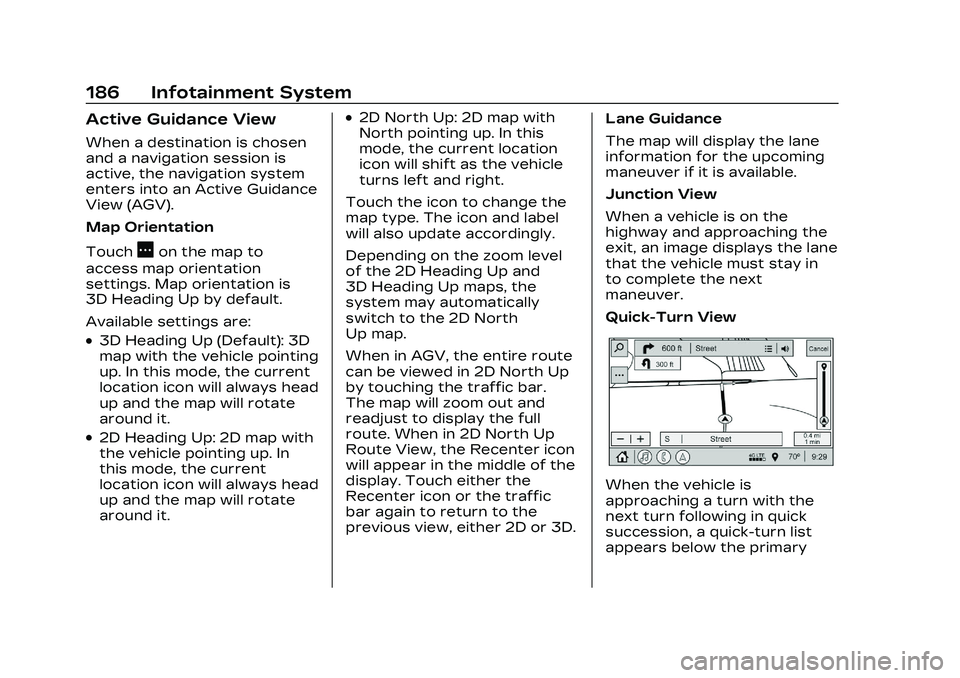
When the vehicle is
approaching a turn with the
next turn following in quick
succession, a quick-turn list
appears below the primary
Page 242 of 526

Cadillac CT5 Owner Manual (GMNA-Localizing-U.S./Canada-16500419) -
2023 - CRC - 5/10/22
Driving and Operating 241
Assistance Systems forParking or Backing . . . . . . 336
Rear Vision Camera (RVC) . . . . . . . . . . . . . 336
Surround Vision
System . . . . . . . . . . . . . . . . . . . . . . 337
Park Assist . . . . . . . . . . . . . . . . . . 338
Automatic Parking Assist (APA) . . . . . . . . . . . . . . . . 341
Reverse Automatic Braking (RAB) . . . . . . . . . . . . . 343
Rear Pedestrian Alert . . . . 344
Rear Cross Traffic Alert (RCTA) System . . . . . . . . . . . 346
Assistance Systems for Driving . . . . . . . . . . . . . . . . . . . . . . 346
Forward Collision Alert (FCA) System . . . . . . . . . . . . . 346
Automatic Emergency Braking (AEB) . . . . . . . . . . . . . 349
Front Pedestrian Braking (FPB) System . . . . . . . . . . . . . . 351
Side Blind Zone Alert (SBZA) . . . . . . . . . . . . . . . 353
Lane Change Alert (LCA) . . . . . . . . . . . . . . . . . 353
Lane Keep Assist (LKA) . . . . . . . . . . . . . . . 356
Surround Vision Recorder . . . . . . . . . . . . . . . . . . . 358Fuel
Top Tier Fuel . . . . . . . . . . . . . . . 360
Recommended Fuel (LSY2.0L L4 Engine) . . . . . . . . . . 360
Recommended Fuel (LGY 3.0L V6 and LT4 6.2L
V8 Engines) . . . . . . . . . . . . . . . . 361
Prohibited Fuels . . . . . . . . . . . . 361
Fuels in Foreign Countries . . . . . . . . . . . . . . . . . . . 361
Fuel Additives . . . . . . . . . . . . . . 362
Filling the Tank . . . . . . . . . . . . . 362
Filling a Portable Fuel Container . . . . . . . . . . . . . . . . . . 364
Trailer Towing
General TowingInformation . . . . . . . . . . . . . . . . 364
Driving Characteristics and Towing Tips . . . . . . . . . 365
Trailer Towing (LSY 2.0L L4 and LGY 3.0L
V6 Engines Only) . . . . . . . . . 369
Towing Equipment . . . . . . . . . 371
Conversions and Add-Ons
Add-On Electrical Equipment . . . . . . . . . . . . . . . . . 372
Driving
Information
Driving for Better
Fuel Economy
Driving habits can affect fuel
mileage. Here are some driving
tips to get the best fuel
economy possible:
.Set the climate controls to
the desired temperature
after the engine is started,
or turn them off when not
required.
.Avoid fast starts and
accelerate smoothly.
.Brake gradually and avoid
abrupt stops.
.Avoid idling the engine for
long periods of time.
.When road and weather
conditions are appropriate,
use cruise control.
.Always follow posted speed
limits or drive more slowly
when conditions require.
Page 245 of 526

Cadillac CT5 Owner Manual (GMNA-Localizing-U.S./Canada-16500419) -
2023 - CRC - 5/10/22
244 Driving and Operating
Steering
Caution
To avoid damage to the
steering system, do not
drive over curbs, parking
barriers, or similar objects at
speeds greater than 3 km/h
(1 mph). Use care when
driving over other objects
such as lane dividers and
speed bumps. Damage
caused by misuse of the
vehicle is not covered by the
vehicle warranty.
Variable Effort Steering
The vehicle has a steering
system that varies the amount
of effort required to steer the
vehicle in relation to the speed
of the vehicle.
The amount of steering effort
required is less at slower
speeds to make the vehicle
more maneuverable and easier
to park. At faster speeds, the
steering effort increases to
provide a sport-like feel to the
steering. This provides
maximum control and stability.
Electric Power Steering
The vehicle is equipped with
an electric power steering
system, which reduces the
amount of effort needed to
steer the vehicle. It does not
have power steering fluid.
Regular maintenance is not
required.
If the vehicle experiences a
system malfunction and loses
power steering, greater
steering effort may berequired. Power steering
assist also may be reduced if
you turn the steering wheel as
far as it can turn and hold it
there with force for an
extended period of time.
See your dealer if there is a
problem.
Curve Tips
.Take curves at a reasonable
speed.
.Reduce speed before
entering a curve.
.Maintain a reasonable
steady speed through the
curve.
.Wait until the vehicle is out
of the curve before
accelerating gently into the
straightaway.
Steering in Emergencies
.There are some situations
when steering around a
problem may be more
effective than braking.
Page 247 of 526
Cadillac CT5 Owner Manual (GMNA-Localizing-U.S./Canada-16500419) -
2023 - CRC - 5/10/22
246 Driving and Operating
.Try to avoid sudden
steering, acceleration,
or braking, including
reducing vehicle speed by
shifting to a lower gear. Any
sudden changes could cause
the tires to slide.
Remember: Antilock brakes
help avoid only the
braking skid.
Track Events and
Competitive Driving
(V-Series and
V-Series Blackwing)
Before any track event, there
are three features that should
be turned off:
.Automatic Emergency
Braking (AEB). See
Automatic Emergency
Braking (AEB) 0349.
.Lane Keep Assist. See Lane
Keep Assist (LKA) 0356.
.Adaptive Cruise Control. See
Adaptive Cruise Control
(Advanced) 0305.
{Danger
High-performance features
are intended for use only on
closed tracks by
experienced and qualified
drivers and should not be
used on public roads.
High-speed driving,
aggressive cornering, hard
braking, and other
high-performance driving
can be dangerous. Improper
driver inputs for the
conditions may result in loss
of control of the vehicle,
which could injure or kill you
or others. Always drive
safely.
Track events and competitive
driving may affect the vehicle
warranty. See the warranty
manual before using the
vehicle for competitive driving.
{Warning
Some of the adjustments
and procedures specified in
this section may require
specialized skill, training, and
equipment. Failure to
perform these procedures
properly could cause
malfunction, potentially
resulting in death, personal
injury, or damage to the
vehicle or property. Do not
attempt to perform these
adjustments or procedures
unless properly qualified.
{Warning
Prior to each track event
and again before returning
to public roads, tighten the
wheel nuts with a torque
wrench to the proper torque
specification. Wheel nuts
that are improperly or
incorrectly tightened can (Continued)
Page 260 of 526
Cadillac CT5 Owner Manual (GMNA-Localizing-U.S./Canada-16500419) -
2023 - CRC - 5/10/22
Driving and Operating 259
.Check all fluid levels and
brakes, tires, cooling system,
and transmission.
.Shift to a lower gear when
going down steep or long
hills.
{Warning
Using the brakes to slow the
vehicle on a long downhill
slope can cause brake
overheating, can reduce
brake performance, and
could result in a loss of
braking. Shift the
transmission to a lower gear
to let the engine assist the
brakes on a steep downhill
slope.
{Warning
Coasting downhill in
N (Neutral) or with the
ignition off is dangerous.
This can cause overheating
of the brakes and loss of(Continued)
Warning (Continued)
steering assist. Always have
the engine running and the
vehicle in gear.
.Drive at speeds that keep
the vehicle in its own lane.
Do not swing wide or cross
the center line.
.Be alert on top of hills;
something could be in your
lane (e.g., stalled car, crash).
.Pay attention to special road
signs (e.g., falling rocks area,
winding roads, long grades,
passing or no-passing zones)
and take appropriate action.
Winter Driving
Driving on Snow or Ice
Caution
To avoid damage to the
wheels and brake
components, always clear (Continued)
Caution (Continued)
snow and ice from inside the
wheels and underneath the
vehicle before driving.
Snow or ice between the tires
and the road creates less
traction or grip, so drive
carefully. Wet ice can occur at
about 0 °C (32 °F) when
freezing rain begins to fall.
Avoid driving on wet ice or in
freezing rain until roads can be
treated.
For Slippery Road Driving:
.Accelerate gently.
Accelerating too quickly
causes the wheels to spin
and makes the surface under
the tires slick.
.Turn on Traction Control.
See Traction Control/
Electronic Stability Control
0 291.
.The Antilock Brake System
(ABS) improves vehicle
stability during hard stops,
but the brakes should be
Page 307 of 526

Cadillac CT5 Owner Manual (GMNA-Localizing-U.S./Canada-16500419) -
2023 - CRC - 5/10/22
306 Driving and Operating
the selected following gap. To
disengage ACC, apply the
brake. If the Traction Control
System (TCS) or StabiliTrak/
Electronic Stability Control
(ESC) system activates while
ACC is engaged, ACC may
automatically disengage. See
Traction Control/Electronic
Stability Control0291. When
road conditions allow ACC to
be safely used, ACC can be
turned back on. ACC will not
engage if the TCS or
StabiliTrak/ESC electronic
stability control system is
disabled.
ACC can reduce the need for
you to frequently brake and
accelerate, especially when
used on expressways,
freeways, and interstate
highways. When used on other
roads, you may need to take
over the control of braking or
acceleration more often.{Warning
ACC has limited braking
ability and may not have
time to slow the vehicle
down enough to avoid a
collision with another vehicle
you are following. This can
occur when vehicles
suddenly slow or stop
ahead, or enter your lane.
Also see “Alerting the
Driver” in this section.
Complete attention is
always required while driving
and you should be ready to
take action and apply the
brakes. See Defensive
Driving 0242.
{Warning
ACC will not detect or brake
for children, pedestrians,
animals, or other objects.
Do not use ACC when:
.On winding and hilly roads
or when the sensors are
blocked by snow, ice,
or dirt. The system may
not detect a vehicle
ahead. Keep the entire
front of the vehicle clean.
.Visibility is low, such as in
fog, rain, or snow
conditions. ACC
performance is limited
under these conditions.
.On slippery roads where
fast changes in tire
traction can cause
excessive wheel slip.
.When towing a trailer.
Page 313 of 526

Cadillac CT5 Owner Manual (GMNA-Localizing-U.S./Canada-16500419) -
2023 - CRC - 5/10/22
312 Driving and Operating
Approaching and Following a
Vehicle
The vehicle ahead indicator is
in the instrument cluster and
HUD display, if equipped.
The vehicle ahead indicator
only displays when a vehicle is
detected in your vehicle’s path
moving in the same direction.
If this symbol is not displaying,
ACC will not respond to or
brake to vehicles ahead.
ACC automatically slows the
vehicle down and adjusts
vehicle speed to follow a
detected vehicle ahead at the
selected follow gap. The
vehicle speed increases or
decreases to follow a
detected vehicle in front of
your vehicle when that vehicle
is traveling slower than yourvehicle set speed. It may apply
limited braking, if necessary.
When braking is active, the
brake lamps will come on. The
automatic braking may feel or
sound different than if the
brakes were applied manually.
This is normal.
Passing a Vehicle While
Using ACC
If the set speed is high
enough, and the left turn
signal is used to pass a vehicle
ahead in the selected
following gap, ACC may assist
by gradually accelerating the
vehicle prior to the lane
change.
{Warning
When using ACC to pass a
vehicle or perform a lane
change, the following
distance to the vehicle being
passed may be reduced.
ACC may not apply
sufficient acceleration or
(Continued)
Warning (Continued)
braking when passing a
vehicle or performing a lane
change. Always be ready to
manually accelerate or brake
to complete the pass or lane
change.
Stationary or Very
Slow-Moving Objects
{Warning
ACC may not detect and
react to stopped or
slow-moving vehicles ahead
of you. For example, the
system may not brake for a
vehicle it has never detected
moving. This can occur in
stop-and-go traffic or when
a vehicle suddenly appears
due to a vehicle ahead
changing lanes. Your vehicle
may not stop and could
cause a crash. Use caution
when using ACC. Your (Continued)