parking brake CADILLAC CT5 2023 User Guide
[x] Cancel search | Manufacturer: CADILLAC, Model Year: 2023, Model line: CT5, Model: CADILLAC CT5 2023Pages: 526, PDF Size: 6.85 MB
Page 242 of 526

Cadillac CT5 Owner Manual (GMNA-Localizing-U.S./Canada-16500419) -
2023 - CRC - 5/10/22
Driving and Operating 241
Assistance Systems forParking or Backing . . . . . . 336
Rear Vision Camera (RVC) . . . . . . . . . . . . . 336
Surround Vision
System . . . . . . . . . . . . . . . . . . . . . . 337
Park Assist . . . . . . . . . . . . . . . . . . 338
Automatic Parking Assist (APA) . . . . . . . . . . . . . . . . 341
Reverse Automatic Braking (RAB) . . . . . . . . . . . . . 343
Rear Pedestrian Alert . . . . 344
Rear Cross Traffic Alert (RCTA) System . . . . . . . . . . . 346
Assistance Systems for Driving . . . . . . . . . . . . . . . . . . . . . . 346
Forward Collision Alert (FCA) System . . . . . . . . . . . . . 346
Automatic Emergency Braking (AEB) . . . . . . . . . . . . . 349
Front Pedestrian Braking (FPB) System . . . . . . . . . . . . . . 351
Side Blind Zone Alert (SBZA) . . . . . . . . . . . . . . . 353
Lane Change Alert (LCA) . . . . . . . . . . . . . . . . . 353
Lane Keep Assist (LKA) . . . . . . . . . . . . . . . 356
Surround Vision Recorder . . . . . . . . . . . . . . . . . . . 358Fuel
Top Tier Fuel . . . . . . . . . . . . . . . 360
Recommended Fuel (LSY2.0L L4 Engine) . . . . . . . . . . 360
Recommended Fuel (LGY 3.0L V6 and LT4 6.2L
V8 Engines) . . . . . . . . . . . . . . . . 361
Prohibited Fuels . . . . . . . . . . . . 361
Fuels in Foreign Countries . . . . . . . . . . . . . . . . . . . 361
Fuel Additives . . . . . . . . . . . . . . 362
Filling the Tank . . . . . . . . . . . . . 362
Filling a Portable Fuel Container . . . . . . . . . . . . . . . . . . 364
Trailer Towing
General TowingInformation . . . . . . . . . . . . . . . . 364
Driving Characteristics and Towing Tips . . . . . . . . . 365
Trailer Towing (LSY 2.0L L4 and LGY 3.0L
V6 Engines Only) . . . . . . . . . 369
Towing Equipment . . . . . . . . . 371
Conversions and Add-Ons
Add-On Electrical Equipment . . . . . . . . . . . . . . . . . 372
Driving
Information
Driving for Better
Fuel Economy
Driving habits can affect fuel
mileage. Here are some driving
tips to get the best fuel
economy possible:
.Set the climate controls to
the desired temperature
after the engine is started,
or turn them off when not
required.
.Avoid fast starts and
accelerate smoothly.
.Brake gradually and avoid
abrupt stops.
.Avoid idling the engine for
long periods of time.
.When road and weather
conditions are appropriate,
use cruise control.
.Always follow posted speed
limits or drive more slowly
when conditions require.
Page 256 of 526
Cadillac CT5 Owner Manual (GMNA-Localizing-U.S./Canada-16500419) -
2023 - CRC - 5/10/22
Driving and Operating 255
.Performance Traction
Management (PTM) Mode
must be enabled. See Driver
Mode Control0293.
.The steering wheel must be
straight.
.The driver door must be
closed.
.The transmission must be in
D (Drive) or forward gear.
.The parking brake must not
be engaged.
For more information on
Competitive Driving Mode, see
Competitive Driving Mode
0 299.
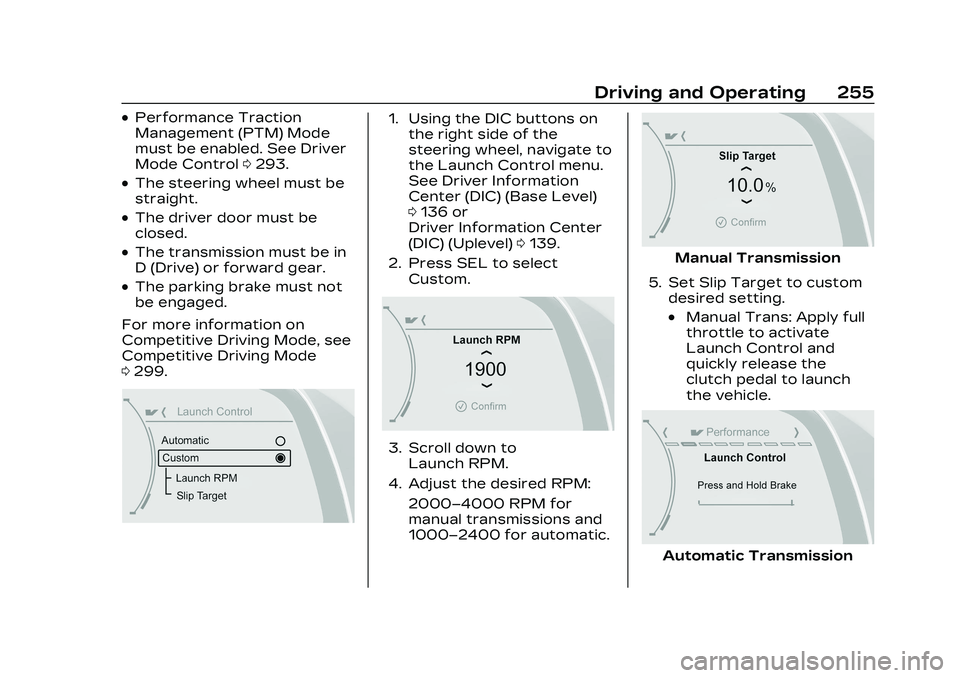
1. Using the DIC buttons on
the right side of the
steering wheel, navigate to
the Launch Control menu.
See Driver Information
Center (DIC) (Base Level)
0136 or
Driver Information Center
(DIC) (Uplevel) 0139.
2. Press SEL to select Custom.
3. Scroll down toLaunch RPM.
4. Adjust the desired RPM: 2000–4000 RPM for
manual transmissions and
1000–2400 for automatic.
Manual Transmission
5. Set Slip Target to custom desired setting.
.Manual Trans: Apply full
throttle to activate
Launch Control and
quickly release the
clutch pedal to launch
the vehicle.
Automatic Transmission
Page 257 of 526

Cadillac CT5 Owner Manual (GMNA-Localizing-U.S./Canada-16500419) -
2023 - CRC - 5/10/22
256 Driving and Operating
.Auto Trans: Firmly press
and hold the brake pedal
to activate Launch
Control.
6. Auto Trans Only - Quicklyapply full throttle. Release
the brake pedal to launch
the vehicle.
Line Lock (If Equipped)
{Warning
The vehicle may move
unexpectedly when using
Line Lock, which could cause
injury to persons or property
located nearby. Only use
Line Lock on a closed track
where there is a large clear
(Continued)
Warning (Continued)
area around all sides of the
vehicle. Be ready to apply
the brakes immediately if the
vehicle begins to move. Do
not use Line Lock in an area
that is accessible to the
public or where people or
property are located near
the vehicle.
Caution
Attempting to shift when
the drive wheels are
spinning and do not have
traction may cause damage
to the transmission. Damage
caused by misuse of the
vehicle is not covered by the
vehicle warranty. Do not
attempt to shift when the
drive wheels do not have
traction. Line Lock allows for locking
the front brakes
independently of the rear
brakes. This allows the rear
tires to spin when the throttle
is applied.
To enter Line Lock, all of
these conditions must be met:
.The vehicle must be in
Track Mode.
.Performance Traction
Management (PTM) Mode
must be enabled.
.The steering wheel must be
straight.
.The driver door must be
closed.
.The vehicle must be in D
(Drive) for an automatic
transmission or 1 (First) gear
for a manual transmission.
.The parking brake must not
be engaged.
.The vehicle must be stopped
on level ground. The
accelerator pedal must not
be applied.
Page 258 of 526
Cadillac CT5 Owner Manual (GMNA-Localizing-U.S./Canada-16500419) -
2023 - CRC - 5/10/22
Driving and Operating 257
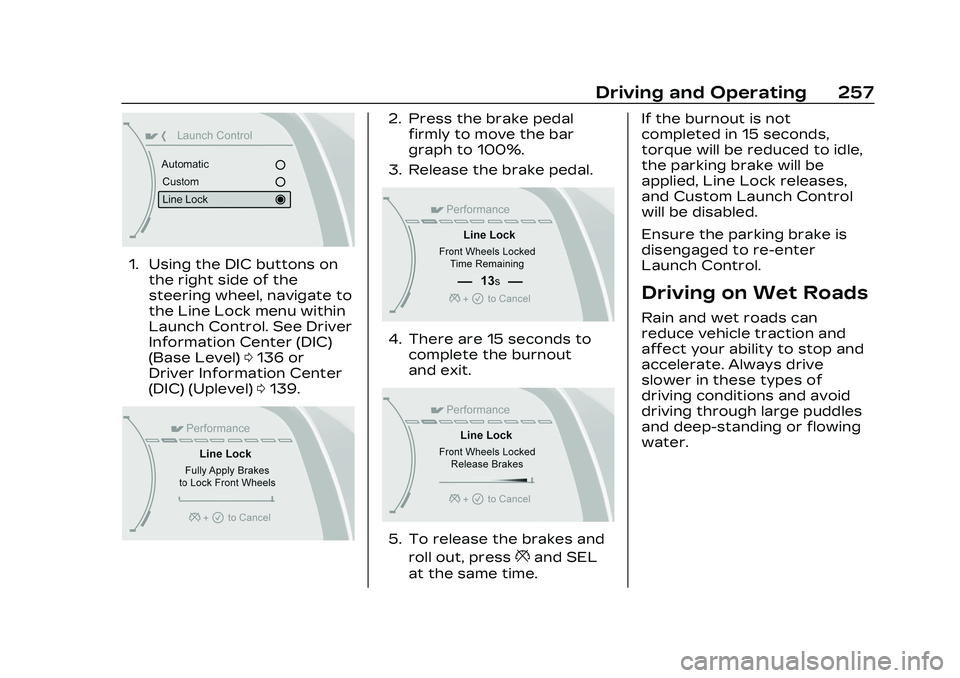
1. Using the DIC buttons onthe right side of the
steering wheel, navigate to
the Line Lock menu within
Launch Control. See Driver
Information Center (DIC)
(Base Level) 0136 or
Driver Information Center
(DIC) (Uplevel) 0139.
2. Press the brake pedal
firmly to move the bar
graph to 100%.
3. Release the brake pedal.
4. There are 15 seconds to complete the burnout
and exit.
5. To release the brakes and
roll out, press
*and SEL
at the same time. If the burnout is not
completed in 15 seconds,
torque will be reduced to idle,
the parking brake will be
applied, Line Lock releases,
and Custom Launch Control
will be disabled.
Ensure the parking brake is
disengaged to re-enter
Launch Control.
Driving on Wet Roads
Rain and wet roads can
reduce vehicle traction and
affect your ability to stop and
accelerate. Always drive
slower in these types of
driving conditions and avoid
driving through large puddles
and deep-standing or flowing
water.
Page 269 of 526

Cadillac CT5 Owner Manual (GMNA-Localizing-U.S./Canada-16500419) -
2023 - CRC - 5/10/22
268 Driving and Operating
The vehicle may have an
electric steering column lock.
The lock is activated when the
vehicle is switched to OFF and
the driver door is opened.
A sound may be heard as the
lock actuates or releases. The
steering column lock may not
release with the wheels
turned off center. If this
happens, the vehicle may not
start. Move the steering wheel
from left to right while
attempting to start the
vehicle. If this does not work,
the vehicle needs service.
Do not turn the engine off
when the vehicle is moving.
This will cause a loss of power
assist in the brake and
steering systems and disable
the airbags.
If the vehicle must be shut off
in an emergency:1. Brake using a firm and steady pressure. Do not
pump the brakes
repeatedly. This may deplete power assist,
requiring increased brake
pedal force.
2. Shift the vehicle to N (Neutral). This can be
done while the vehicle is
moving. After shifting to
N (Neutral), firmly apply the
brakes and steer the
vehicle to a safe location.
3. Come to a complete stop. Shift to P (Park) with an
automatic transmission,
or Neutral with a manual
transmission. Turn the
ignition off.
4. Set the parking brake. See Electric Parking Brake
0288.
{Warning
Turning off the vehicle while
moving may cause loss of
power assist in the brake
and steering systems and
disable the airbags. While
driving, only shut the vehicle
off in an emergency. If the vehicle cannot be pulled
over, and must be shut off
while driving, press and hold
ENGINE START/STOP for
longer than two seconds,
or press twice within
five seconds.
Accessory Mode (Amber
Indicator Light) :
This mode
allows the use of some
electrical accessories when
the engine is off.
With the ignition off, pressing
the button once without the
brake pedal applied will place
the ignition system in
accessory mode.
The ignition will switch from
accessory mode to OFF after
five minutes to prevent
battery rundown.
ON/RUN/START (Green
Indicator Light) : This mode is
for driving and starting. With
the ignition off, and the brake
pedal applied, pressing the
button once will place the
ignition system in ON/RUN/
START. Once engine cranking
Page 270 of 526
Cadillac CT5 Owner Manual (GMNA-Localizing-U.S./Canada-16500419) -
2023 - CRC - 5/10/22
Driving and Operating 269
begins, release the button.
Engine cranking will continue
until the engine starts. See
Starting the Engine0269. The
ignition will then remain on.
Service Mode
This power mode is available
for service and diagnostics,
and to verify the proper
operation of the malfunction
indicator lamp as may be
required for emission
inspection purposes. With the
vehicle off, and the brake
pedal not applied, pressing
and holding ENGINE START/
STOP for more than
five seconds will place the
vehicle in Service Mode. The
instruments and audio
systems will operate as they
do in ON/RUN, but the vehicle
will not be able to be driven.
The engine will not start in
Service Mode. Press the
button again to turn the
vehicle off.Starting the Engine
Place the transmission in the
proper gear
Caution
If you add electrical parts or
accessories, you could
change the way the engine
operates. Any resulting
damage would not be
covered by the vehicle
warranty. See Add-On
Electrical Equipment 0372.
Automatic Transmission
Move the shift lever to
P (Park) or N (Neutral). To
restart the vehicle when it is
already moving, use
N (Neutral) only.
Caution
Do not try to shift to P (Park)
if the vehicle is moving.
If you do, you could damage (Continued)
Caution (Continued)
the transmission. Shift to
P (Park) only when the
vehicle is stopped.
Manual Transmission
The shift lever should be in
Neutral and the parking brake
engaged. Hold the clutch pedal
down to the floor, press the
brake pedal, and start the
engine.
Starting the Vehicle 1. For vehicles with an automatic transmission,
press the brake pedal, then
press ENGINE START/
STOP on the instrument
panel. For a manual
transmission, place the
shift lever in Neutral with
the parking brake engaged.
Hold the clutch pedal down
to the floor, press the
brake pedal, then press
ENGINE START/STOP.
Page 271 of 526

Cadillac CT5 Owner Manual (GMNA-Localizing-U.S./Canada-16500419) -
2023 - CRC - 5/10/22
270 Driving and Operating
If the remote key is not in
the vehicle, if there is
interference, or if the
remote key battery is low,
a Driver Information
Center (DIC) message will
display. See Remote Key
Operation09.
Caution
Cranking the engine for long
periods of time, by pressing
ENGINE START/STOP
immediately after cranking
has ended, can overheat and
damage the cranking motor,
and drain the battery. Wait
at least 15 seconds between
each try, to let the cranking
motor cool down.
2. If the engine does not start after five to 10 seconds,
especially in very cold
weather (below −18 °C or
0 °F), it could be flooded
with too much gasoline.
Try pushing the
accelerator pedal all the
way to the floor and hold it there, then press ENGINE
START/STOP for up to a
maximum of 15 seconds.
Wait at least 15 seconds
between each try, to allow
the cranking motor to cool
down. When the engine
starts, let go of the button
and the accelerator. If the
vehicle starts briefly but
then stops again, do the
same thing. This clears the
extra gasoline from the
engine. Do not race the
engine immediately after
starting it. Operate the
engine and transmission
gently until the oil warms
up and lubricates all
moving parts.
Stopping the Engine
If the vehicle has an automatic
transmission, move the shift
lever to P (Park) and press and
hold ENGINE START/STOP on
the instrument panel, until the
engine shuts off. If the shift
lever is not in P (Park), the
engine shuts off and the
ignition goes to accessory
mode. The DIC displays SHIFT
TO PARK. Once the shift lever
is moved to P (Park), the
vehicle turns off.
If the vehicle has a manual
transmission, before getting
out of the vehicle, shift to
1 (First) or R (Reverse) and
apply the parking brake. Then
turn off the ignition off by
pressing ENGINE START/
STOP and release the clutch
pedal when the engine has
stopped.
If the remote key is not
detected inside the vehicle
when it is turned off the DIC
displays a message.
Stop/Start System
If equipped, the Stop/Start
system will shut off the engine
to help conserve fuel. It has
components designed for the
increased number of starts.
Page 274 of 526

Cadillac CT5 Owner Manual (GMNA-Localizing-U.S./Canada-16500419) -
2023 - CRC - 5/10/22
Driving and Operating 273
Warning (Continued)
cause a fire, property
damage, electric shock,
and injury.
.Do not operate the vehicle
with the heater cord
permanently attached to
the vehicle. Possible
heater cord and
thermostat damage could
occur.
.While in use, do not let the
heater cord touch vehicle
parts or sharp edges.
Never close the hood on
the heater cord.
.Before starting the
vehicle, unplug the cord,
reattach the cover to the
plug, and securely fasten
the cord. Keep the cord
away from any moving
parts.
4. Before starting the engine, be sure to unplug and
store the cord as it was
before to keep it away from moving engine parts.
If you do not, it could be
damaged.
Contact your dealer for
information on how long to
use the heater in your
particular area.
Retained Accessory
Power (RAP)
When the vehicle is turned
from on to off, the following
features (if equipped) will
continue to function for up to
10 minutes, or until the driver
door is opened. These
features will also work when
the vehicle is on or in
accessory mode:
.Infotainment System
.Power Windows (during RAP
this functionality will be lost
when any door is opened)
.Sunroof (during RAP this
functionality will be lost
when any door is opened)
.Auxiliary Power Outlet
.Audio System
.OnStar System
Shifting Into Park
To shift into P (Park): 1. Hold the brake pedal down and set the parking brake.
See Electric Parking Brake
0288.
2. Press the button on top of the shift lever to shift into
P (Park). See Automatic
Transmission 0277.
3. The P indicator on the shift lever will turn red when the
vehicle is in P (Park).
If the vehicle is shifted into
P (Park) on a hill, the
Electric Parking Brake
(EPB) may apply
automatically. You may not
be able to release the EPB
using the EPB switch.
It should automatically
release when the vehicle is
shifted out of P (Park).
Page 275 of 526

Cadillac CT5 Owner Manual (GMNA-Localizing-U.S./Canada-16500419) -
2023 - CRC - 5/10/22
274 Driving and Operating
Leaving the Vehicle with
the Engine Running
{Warning
It can be dangerous to leave
the vehicle with the engine
running. It could overheat
and catch fire.
It is dangerous to get out of
the vehicle if the vehicle is
not in P (Park) with the
parking brake set. The
vehicle can roll.
Do not leave the vehicle
when the engine is running.
If you have left the engine
running, the vehicle can
move suddenly. You or
others could be injured. To
be sure the vehicle will not
move, even when you are on
fairly level ground, always
set the parking brake and(Continued)
Warning (Continued)
shift to P (Park). See Shifting
Into Park0273. If you are
towing a trailer, see Driving
Characteristics and Towing
Tips 0365.
If you have to leave the vehicle
with the engine running, be
sure the vehicle is in P (Park)
and the parking brake is set
before you leave it.
If you are towing a trailer and
parking on a hill, see Driving
Characteristics and Towing
Tips 0365.
Shifting out of Park
This vehicle is equipped with
an electronic transmission.
The shift lock release button is
designed to prevent
inadvertent shifting out of
P (Park). To shift out of P (Park):
1. Ensure the engine is running.
2. Apply the brake pedal.
3. Press and hold the shift lock release button on the
shift lever.
4. Move the shift lever to the desired position. For
N (Neutral) hold the lever in
the N (Neutral) position
until the N indicator
illuminates red.
5. The P indicator will turn white and the gear
indicator will turn red when
the vehicle is no longer in
P (Park).
6. After releasing the shift lever, it will return to the
center position.
If equipped, the Buckle to
Drive feature may prevent
shifting from P (Park). See
Buckle To Drive 056.
Page 276 of 526

Cadillac CT5 Owner Manual (GMNA-Localizing-U.S./Canada-16500419) -
2023 - CRC - 5/10/22
Driving and Operating 275
If the vehicle cannot shift from
P (Park), a Driver Information
Center (DIC) message may be
displayed. Check that the
ignition is on, the engine is
running, the brake pedal is
applied, and the shift lock
release button is pressed
when you are attempting to
shift out of P (Park). If all of
these are met but the vehicle
will not shift out of P (Park),
see your dealer for service.
Parking (Manual
Transmission)
{Warning
If the vehicle has a manual
transmission, never get out
of the vehicle without first
moving the shift lever into
1st or R (Reverse), setting
the parking brake and
turning the ignition off. The
vehicle can roll, which could
cause serious injury or
death.
Parking over Things
That Burn
{Warning
Things that can burn could
touch hot exhaust parts
under the vehicle and ignite.
Do not park over papers,
leaves, dry grass, or other
things that can burn.
Active Fuel
Management
This vehicle's engine may be
equipped with Active Fuel
Management, which allows the
engine to operate on either all
of its cylinders, or in reduced
cylinder operation mode,
depending on the driving
conditions.
When less power is required,
such as cruising at a constant
vehicle speed, the system will
operate in reduced cylinder
operation mode, allowing the
vehicle to achieve better fueleconomy. When greater
power demands are required,
such as accelerating from a
stop, passing, or merging onto
a freeway, the system will
maintain full-cylinder
operation.
If the vehicle has an Active
Fuel Management indicator,
see Driver Information Center
(DIC) for more information on
using this display.
Extended Parking
It is best not to park with the
vehicle running. If the vehicle is
left running, be sure it will not
move and there is adequate
ventilation.
See Shifting Into Park
0273
and
Engine Exhaust 0276.
If the vehicle is left parked and
running with the remote key
outside the vehicle, it will
continue to run for up to
15 minutes.