sport mode CADILLAC CT5 2023 User Guide
[x] Cancel search | Manufacturer: CADILLAC, Model Year: 2023, Model line: CT5, Model: CADILLAC CT5 2023Pages: 526, PDF Size: 6.85 MB
Page 204 of 526
Cadillac CT5 Owner Manual (GMNA-Localizing-U.S./Canada-16500419) -
2023 - CRC - 5/6/22
Infotainment System 203
.Lateral G-Force Graphic:
Left and Right G-Forces are
displayed. The graphic fills to
the left or the right
depending on the measure
value. The measured
G-Force displays as a
number at the top of the
graphic.
.Event Odometer: This
displays the distance driven
since the recording began.
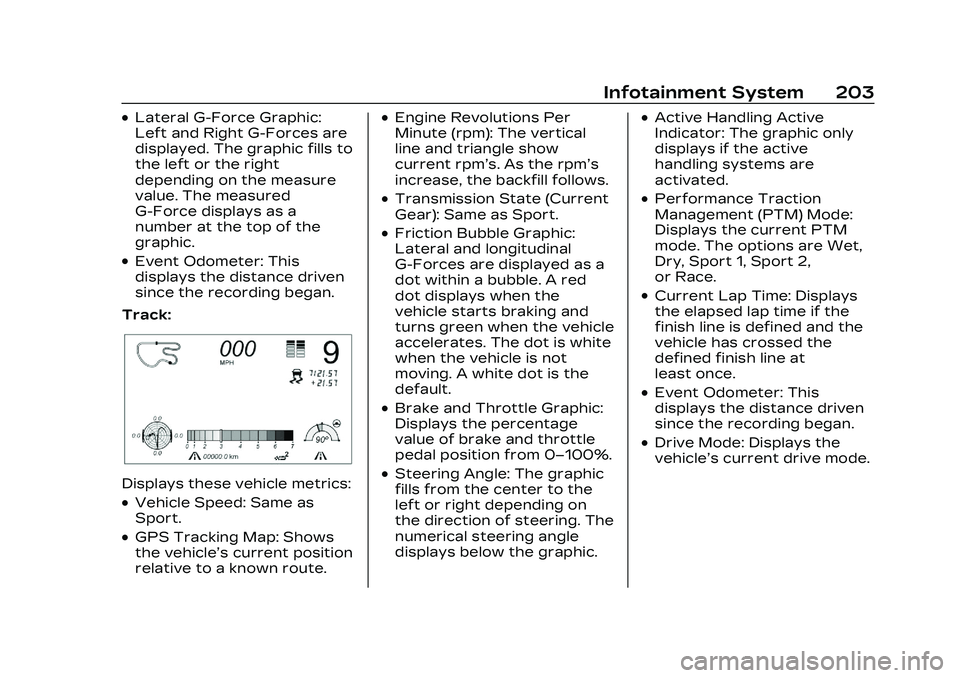
Track:
Displays these vehicle metrics:
.Vehicle Speed: Same as
Sport.
.GPS Tracking Map: Shows
the vehicle’s current position
relative to a known route.
.Engine Revolutions Per
Minute (rpm): The vertical
line and triangle show
current rpm’s. As the rpm’s
increase, the backfill follows.
.Transmission State (Current
Gear): Same as Sport.
.Friction Bubble Graphic:
Lateral and longitudinal
G-Forces are displayed as a
dot within a bubble. A red
dot displays when the
vehicle starts braking and
turns green when the vehicle
accelerates. The dot is white
when the vehicle is not
moving. A white dot is the
default.
.Brake and Throttle Graphic:
Displays the percentage
value of brake and throttle
pedal position from 0–100%.
.Steering Angle: The graphic
fills from the center to the
left or right depending on
the direction of steering. The
numerical steering angle
displays below the graphic.
.Active Handling Active
Indicator: The graphic only
displays if the active
handling systems are
activated.
.Performance Traction
Management (PTM) Mode:
Displays the current PTM
mode. The options are Wet,
Dry, Sport 1, Sport 2,
or Race.
.Current Lap Time: Displays
the elapsed lap time if the
finish line is defined and the
vehicle has crossed the
defined finish line at
least once.
.Event Odometer: This
displays the distance driven
since the recording began.
.Drive Mode: Displays the
vehicle’s current drive mode.
Page 280 of 526

Cadillac CT5 Owner Manual (GMNA-Localizing-U.S./Canada-16500419) -
2023 - CRC - 5/10/22
Driving and Operating 279
R :Use this gear to back up.
If the vehicle is shifted from
either R (Reverse) to D (Drive)
or M (Manual Mode),
or M (Manual Mode) or
D (Drive) to R (Reverse) while
the speed is too high, the
vehicle will shift to N (Neutral).
Reduce the vehicle speed and
try the shift again.
To shift into R (Reverse): 1. Bring the vehicle to a complete stop.
2. Press and hold shift lock release button on the side
of the shift lever.
3. From the center position, move the shift lever
forward through the first
detent to the end of travel.
R is illuminated in red.
4. After releasing the shift lever, it will return to the
center position.
To shift out of R (Reverse): 1. Bring the vehicle to a complete stop. 2. Shift to the desired gear.
3. After releasing the shift
lever, it will return to the
center position.
At low vehicle speeds,
R (Reverse) can be used to
rock the vehicle back and forth
to get out of snow, ice, or sand
without damaging the
transmission. See If the
Vehicle Is Stuck 0261.
N : In this position, the engine
does not connect with the
wheels. To restart the engine
when the vehicle is already
moving, use N (Neutral) only.
{Warning
Shifting into a drive gear
while the engine is running
at high speed is dangerous.
Unless your foot is firmly on
the brake pedal, the vehicle
could move very rapidly. You
could lose control and hit
people or objects. Do not
(Continued)
Warning (Continued)
shift into a drive gear while
the engine is running at high
speed.
Caution
Shifting out of P (Park) or
N (Neutral) with the engine
running at high speed may
damage the transmission.
The repairs would not be
covered by the vehicle
warranty. Be sure the
engine is not running at high
speed when shifting the
vehicle.
The vehicle is not designed to
stay in N (Neutral) for more
than five minutes. It may
automatically shift into
P (Park). N (Neutral) is not
intended for towing. If the
vehicle needs to be towed, see
Transporting a Disabled
Vehicle 0455.
Page 284 of 526

Cadillac CT5 Owner Manual (GMNA-Localizing-U.S./Canada-16500419) -
2023 - CRC - 5/10/22
Driving and Operating 283
To exit Permanent Tap
Shift Mode:1. To exit M (Manual Mode) and return to D (Drive), pull
back on the shift lever. The
D in the shift pattern will
illuminate in red, and the M
will switch to white.
2. After releasing the shift lever, it will return to the
center position.
M (Manual Mode) can be exited
to return to D (Drive) at any
speed by pulling the lever
rearward from the center
position. It is not necessary to
stop the vehicle or shift to
N (Neutral) or P (Park) prior to
shifting back to D (Drive).
Temporary Tap Manual
Shift Mode
To enter Temporary Tap
Shift Mode: 1. With the transmission in D (Drive) and not in
Permanent Tap Shift
Mode, the Tap Shift
controls will activate a Temporary Tap Manual
Shift Mode, allowing the
transmission to be
manually shifted. While in
Temporary Tap Shift
Mode, the D on the
instrument cluster will be
highlighted and the current
gear shown.
2. To shift to the lowest available gear, press and
hold the left control.
3. To deactivate, hold the right control briefly.
Automatic shifts return
after no manual shifts have
been done for seven to
10 seconds.
While using Tap Shift, the
vehicle will have firmer, quicker
shifting. This can be used for
sport driving or when climbing
or descending hills, to stay in
gear longer, or to downshift
for more power or engine
braking.
The transmission will only
allow shifting into gears
appropriate for the vehicle speed and engine revolutions
per minute (rpm). The
transmission will not
automatically shift to the next
higher gear if the engine rpm
is too high. It will only
automatically shift to the next
lower gear if the engine rpm is
much too low.
Manual
Transmission
If equipped, this is the shift
pattern for the manual
transmission.
Page 296 of 526
Cadillac CT5 Owner Manual (GMNA-Localizing-U.S./Canada-16500419) -
2023 - CRC - 5/10/22
Driving and Operating 295
Sport Mode
Use this mode where road
conditions or personal
preference demand a more
controlled response. When
this mode is selected, the
vehicle immediately
downshifts. The vehicle also
monitors driving behaviors and
automatically enables
Performance Shift Features
when spirited driving is
detected. These features
maintain lower transmission
gears to increase available
engine braking and improve
acceleration response. The
vehicle will exit this feature
and return to normal operation
after a short period when
spirited driving is no longer
detected. The steering
changes to provide more
precise control. If the vehicle
has Magnetic Ride Control, the
suspension changes to
provide better cornering
performance.See
“Mode Selection
Attributes” later in this
section.
Snow/Ice Mode
Use this mode for slippery
surfaces to help control wheel
speed. This mode can
compromise the acceleration
on dry asphalt.
This feature is not intended
for use when the vehicle is
stuck in sand, mud, or gravel.
If the vehicle is stuck, see If
the Vehicle Is Stuck 0261.
See “Mode Selection
Attributes” later in this
section.
Track Mode (V-Series and
V-Series Blackwing)
When in Track Mode, the
automatic transmission and
steering function similar to
Sport Mode. The accelerator
pedal is adjusted to give
maximum control during the
highest level of spirited
driving. The Magnetic Ride
Control is set to the optimum level for vehicle
responsiveness. PTM can be
accessed through this mode.
See
“Performance Traction
Management” in Competitive
Driving Mode 0299.
See “Mode Selection
Attributes” later in this
section.
While driving on a track, turn
off applicable driver
assistance features. For more
information see Assistance
Systems for Driving 0346.
My Mode
My Mode is used to
personalize everyday driving.
This mode is designed to allow
the driver to configure vehicle
systems to their own
preference for city or normal
driving.
Page 297 of 526
Cadillac CT5 Owner Manual (GMNA-Localizing-U.S./Canada-16500419) -
2023 - CRC - 5/10/22
296 Driving and Operating
Through the DIC, the following
vehicle systems may be
available for customization in
this mode.
.Steering: Tour (default),
Sport, Track
.Suspension: Tour (default),
Sport, Track
.Brake Feel: Tour (default),
Sport, Track
.Engine Sound: Stealth, Tour
(Default), Sport, Track
For information on the range
of settings, see “Drive Mode
Customization.” V-Mode (V-Series and
V-Series Blackwing)
V-Mode is used to personalize
dynamic driving. This mode is
designed to allow the driver to
configure vehicle subsystems
to their own preference for
maximum handling. V-Mode
further enhances the driver’s
experience by adding an
Engine/Shift customization
option. Through the DIC, the
following vehicle systems may
be available for customization
in this mode.
.Steering: Tour, Sport
(default), Track
.Suspension: Tour, Sport,
(default), Track
.Engine/Shift: Snow/Ice, Tour,
Sport, (default), Track
.Brake Feel: Tour, Sport,
Track
.Engine Sound: Stealth, Tour,
Sport (default), Track
.PTM: OFF, WET, DRY,
SPORT, RACE 1, RACE 2
For information on the range
of settings, see “Drive Mode
Customization.”
Page 298 of 526
Cadillac CT5 Owner Manual (GMNA-Localizing-U.S./Canada-16500419) -
2023 - CRC - 5/10/22
Driving and Operating 297
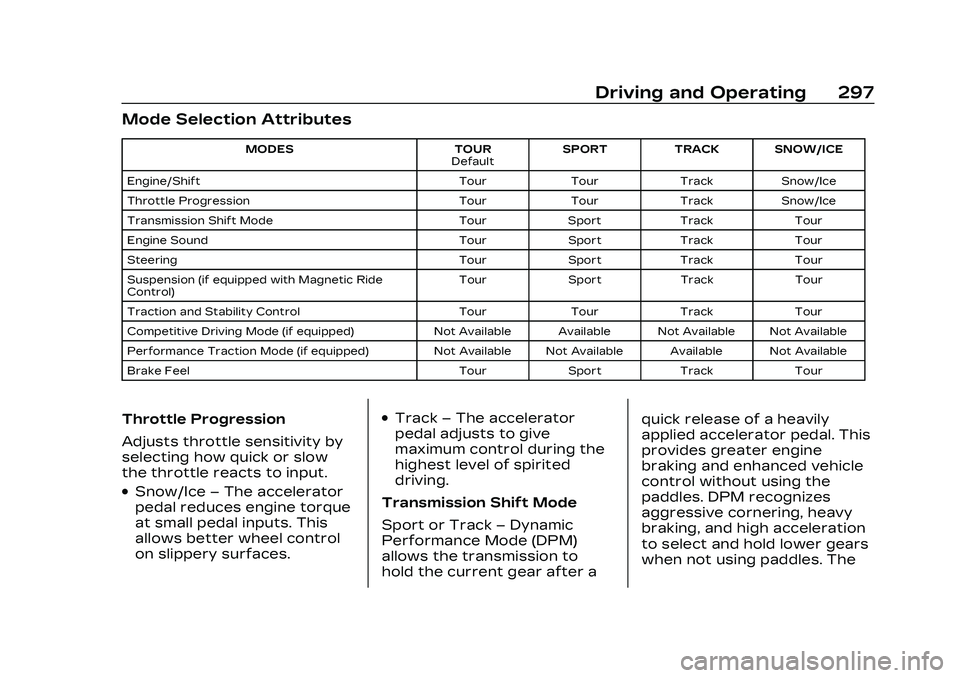
Mode Selection Attributes
MODESTOUR
Default SPORT
TRACK SNOW/ICE
Engine/Shift TourTourTrackSnow/Ice
Throttle Progression TourTourTrackSnow/Ice
Transmission Shift Mode TourSport Track Tour
Engine Sound TourSport Track Tour
Steering TourSport Track Tour
Suspension (if equipped with Magnetic Ride
Control) Tour
Sport Track Tour
Traction and Stability Control TourTourTrack Tour
Competitive Driving Mode (if equipped) Not Available Available Not Available Not Available
Performance Traction Mode (if equipped) Not Available Not Available Available Not Available
Brake Feel TourSport Track Tour
Throttle Progression
Adjusts throttle sensitivity by
selecting how quick or slow
the throttle reacts to input.
.Snow/Ice–The accelerator
pedal reduces engine torque
at small pedal inputs. This
allows better wheel control
on slippery surfaces.
.Track –The accelerator
pedal adjusts to give
maximum control during the
highest level of spirited
driving.
Transmission Shift Mode
Sport or Track –Dynamic
Performance Mode (DPM)
allows the transmission to
hold the current gear after a quick release of a heavily
applied accelerator pedal. This
provides greater engine
braking and enhanced vehicle
control without using the
paddles. DPM recognizes
aggressive cornering, heavy
braking, and high acceleration
to select and hold lower gears
when not using paddles. The
Page 299 of 526
Cadillac CT5 Owner Manual (GMNA-Localizing-U.S./Canada-16500419) -
2023 - CRC - 5/10/22
298 Driving and Operating
shifts are also firmer to
increase the quickness of
shifting.
Engine Sound
Adjusts the volume of engine
noise.
The sound level changes when
the variable exhaust
valves open.
Steering (Assist Effort)
Adjusts from a lighter steering
feel in Tour Mode to reduced
assist in Sport and Track
Mode for more steering feel.
Magnetic Ride Control (If
Equipped)
Adjusts the shock dampening
firmness from a comfort in
Tour Mode to an optimized
responsiveness tune in Sport
and Track.
Stability Control
.Competitive Mode allows
less computer control to
permit some slide and driftand is selected with the
TCS/StabiliTrak button
–
only available in Sport Mode.
.StabiliTrak/Electronic
Stability Control (ESC) can
be turned off by pressing
and holding the TCS/
StabiliTrak button for
five seconds.
Brake Feel
Adjusts brake pedal sensitivity
by selecting how quick or slow
the brakes respond to input.
Drive Mode Customization
The following settings can be
changed using the Drive Mode
Customization Menu. See
Settings > Vehicle > Drive
Mode Customization in the
center display to customize
My Mode or V-Mode.
Steering
Steering adjusts the effort
required to turn the steering
wheel. The steering wheel
offers better feedback in the Tour setting, but requires
more effort in the Sport and
Track settings.
–Tour, Sport, Track
Suspension
Suspension adjusts the
firmness of the suspension in
the vehicle. Suspension
adjusts the stiffness of the
shocks and/or springs. The
ride is more comfortable at
lower settings and is stiffer at
higher settings for better
control.
–Tour, Sport, Track
Brake Feel
Brake Feel adjusts the brake
pedal response. Settings
range from a slower response
for more comfortable driving
to the quickest response for
quicker deceleration. Brake
pedal travel decreases and
caliper pressure increases in
the Sport and Track settings.
–Tour, Sport, Track
Page 300 of 526

Cadillac CT5 Owner Manual (GMNA-Localizing-U.S./Canada-16500419) -
2023 - CRC - 5/10/22
Driving and Operating 299
Engine/Shift
Engine/Shift adjusts the
throttle response, gear
shifting and engine
performance. Throttle
response increases in the
Sport, Track, and Snow/Ice
settings, and gear shifting is
more aggressive.
–Snow/Ice, Tour, Sport, Track
Engine Sound
Engine sound adjusts the
volume of engine noise. The
settings range from quietest
to loudest volume from
Stealth through Track.
–Stealth, Tour, Sport, Track
PTM (If Equipped)
PTM controls vehicle
performance systems for
professional handling on race
tracks. Traction Control and
Stability Control are reduced
when moving through each of
the settings. Changing PTM
settings may also
automatically change theother subsystem settings.
While driving on a track, turn
off all active safety features.
While driving on a track, turn
off applicable driver
assistance features. For more
information, see Assistance
Systems for Driving
0346. For
more information on PTM, see
Competitive Driving Mode
0 299.
–Off, Wet, Dry, Sport, Race 1,
Race 2
Competitive
Driving Mode
To select this optional
handling mode, place the
vehicle in Sport Mode and
press
gtwo times and the
Driver Information Center
(DIC) will display
COMPETITIVE MODE ON.
While in the Competitive
Driving Mode, the traction off
light
iand StabiliTrak/ESC
OFF light
gwill come on in the
instrument cluster. Traction
Control System (TCS) does not limit wheel spin, the
Electronic Limited-Slip
Differential (eLSD) allows
increased vehicle agility, and
more effort is required to turn
the steering wheel. See
“Limited-Slip Differential
(V–Series Only)”
later in this
section. Adjust your driving
accordingly.
Press
gagain, or turn the
vehicle to accessory mode and
restart the vehicle, to turn
TCS back on. The traction off
light
iand StabiliTrak/ESC
OFF light
gwill go out.
Caution
When traction control is
turned off, or Competitive
Driving Mode is active, it is
possible to lose traction.
Performance Traction
Management (PTM)
If equipped, PTM can be
activated through V-Mode
customization or by pressing
Page 301 of 526

Cadillac CT5 Owner Manual (GMNA-Localizing-U.S./Canada-16500419) -
2023 - CRC - 5/10/22
300 Driving and Operating
the ESC switch twice while in
Track Mode. Depending on
available options and trim
levels, it can also be activated
through a separate PTM
switch on the steering wheel.
To activate PTM through
V-Mode customization, select
the desired PTM state in the
center stack (Settings >
Vehicle > Drive Mode
Customization > V-Mode).
Press the V-Mode switch once
to activate V-Mode. When
PTM is configured, a message
will appear in the DIC“V-Mode
Active –Press Again for PTM
On –ESC May be Disabled.”
To confirm and enter PTM,
press the V-Mode switch
again. The PTM state can now
be modified using the MODE
switch or changing the
V-Mode PTM settings in the
center stack. Both the V-Mode
and PTM indicators are
displayed. To exit PTM, press
the ESC switch. To cancel, press the center dismiss
button on the steering wheel
(V-Mode remains active).
If available, PTM can also be
activated through a PTM
switch on the steering wheel
by pressing up on the switch.
From there a PTM menu will
appear in the DIC. Press up or
down on the PTM switch to
scroll through the options and
make a selection. To exit PTM,
select INACTIVE in the PTM
menu, turn off PTM in the
V-Mode configuration page,
or press the ESC switch once.
Selecting PTM states may
modify Off, Wet, Dry, Sport,
Race 1, and Race 2 V-Mode
customization options.
In vehicles with a PTM
steering wheel switch,
Inactive, Wet, Dry, Sport, Race
1, and Race 2 PTM states are
available through the
moding menu.
In vehicles without a PTM
steering wheel switch, Wet,
Dry, Sport, Race 1, and Race 2
PTM states are available
through the moding menu.
The following is a DIC display
description and the
recommended usage of
each mode:
WET
.Intended for all driver skill
levels.
.Wet or damp conditions
only
—not intended for use
in heavy rain or standing
water.
.StabiliTrak/ESC is on and
engine power is reduced
based on conditions.
DRY
.For use by less experienced
drivers or while learning a
new track.
.Dry conditions only.
.StabiliTrak/ESC is on and
engine power is slightly
reduced.
Page 302 of 526

Cadillac CT5 Owner Manual (GMNA-Localizing-U.S./Canada-16500419) -
2023 - CRC - 5/10/22
Driving and Operating 301
SPORT
.For use by drivers who are
familiar with the track.
.Dry conditions only.
.Requires more driving skill
than DRY.
.StabiliTrak/ESC is on and
more engine power is
available than in DRY.
RACE 1
.For use by drivers who are
familiar with the track.
.Dry conditions only.
.Requires more driving skill
than modes DRY or SPORT.
.StabiliTrak/ESC is off and
available engine power is the
same as SPORT.
RACE 2
.For use by experienced
drivers who are familiar with
the track.
.Dry conditions only.
.Requires more driving skill
than in other modes.
.StabiliTrak/ESC is off and
engine power is available for
maximum cornering speed.
In any PTM Mode, Launch
Control is available. Use PTM
Race 2 for the most
consistent performance
during drag strip use. See
“Custom Launch Control” in
Track Events and Competitive
Driving (V-Series and V-Series
Blackwing) 0246.
Launch Control
If equipped, Launch Control is
available within Competitive
Driving Mode and PTM to
allow high levels of vehicle
acceleration in a straight line.
Launch Control is a form of
traction control that manages
tire spin while launching the
vehicle. This feature is
intended for use during closed
course race events where
consistent zero to
60 and quarter mile times are
desirable. Launch Control is only
available when the following
criteria are met:
.Competitive Driving Mode is
selected or any of the PTM
modes are selected. The
traction off light comes on in
the instrument cluster and
the appropriate DIC
message displays.
.The vehicle is not moving.
.The steering wheel is
pointing straight.
Automatic Transmissions
.The brake pedal is firmly
pressed to the floor,
equivalent to a panic brake
event.
.The accelerator pedal is
rapidly applied to wide open
throttle. If the vehicle rolls
due to wide open throttle,
release the throttle, press
the brake pedal more firmly,
and reapply the accelerator
to wide open throttle.