buttons CADILLAC CT6 2016 User Guide
[x] Cancel search | Manufacturer: CADILLAC, Model Year: 2016, Model line: CT6, Model: CADILLAC CT6 2016Pages: 397, PDF Size: 7.09 MB
Page 167 of 397
Cadillac CT6 Owner Manual (GMNA-Localizing-U.S./Canada-9235592) -
2016 - crc - 11/6/15
166 Instruments and Controls Clear All Private Data
This allows selection to clear all
private information from the vehicle.
Select Delete or Cancel.
Restore Radio Settings
This allows selection to restore
radio settings.
Select Restore or Cancel.
Software Information Touch to view the version of the
infotainment system software. Universal Remote
System See Radio Frequency
Statement 0 371 .
Universal Remote System
Programming
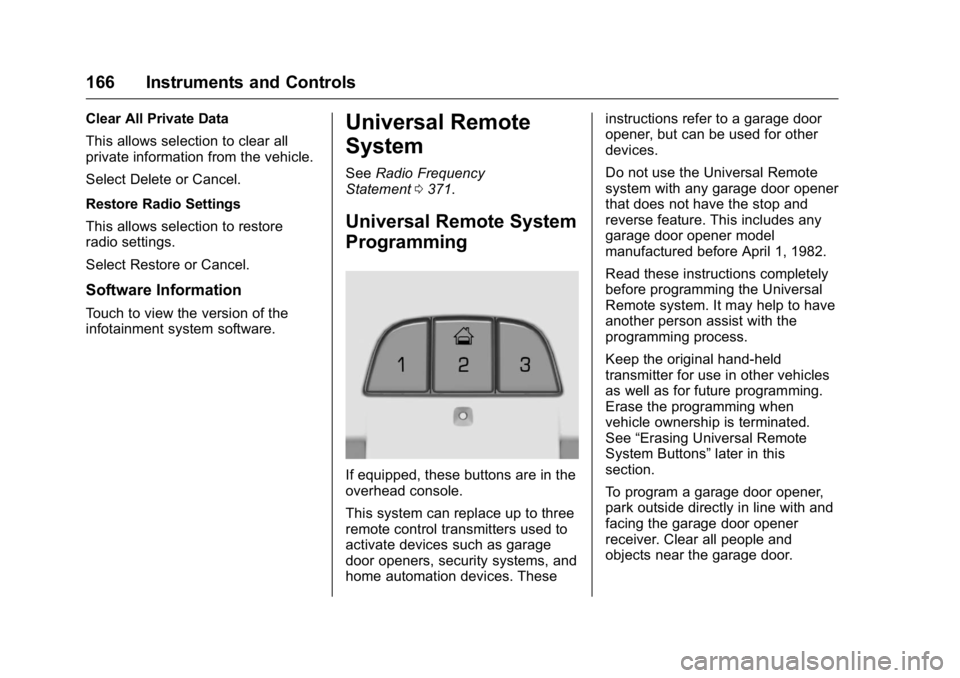
If equipped, these buttons are in the
overhead console.
This system can replace up to three
remote control transmitters used to
activate devices such as garage
door openers, security systems, and
home automation devices. These instructions refer to a garage door
opener, but can be used for other
devices.
Do not use the Universal Remote
system with any garage door opener
that does not have the stop and
reverse feature. This includes any
garage door opener model
manufactured before April 1, 1982.
Read these instructions completely
before programming the Universal
Remote system. It may help to have
another person assist with the
programming process.
Keep the original hand-held
transmitter for use in other vehicles
as well as for future programming.
Erase the programming when
vehicle ownership is terminated.
See “ Erasing Universal Remote
System Buttons ” later in this
section.
To program a garage door opener,
park outside directly in line with and
facing the garage door opener
receiver. Clear all people and
objects near the garage door.
Page 168 of 397
Cadillac CT6 Owner Manual (GMNA-Localizing-U.S./Canada-9235592) -
2016 - crc - 11/6/15
Instruments and Controls 167Make sure the hand-held transmitter
has a new battery for quick and
accurate transmission of the
radio-frequency signal.
Programming the Universal
Remote System For questions or help programming
the Universal Remote system, call
1-800-355-3515 or see
www.homelink.com.
Programming involves
time-sensitive actions, and may time
out causing the procedure to be
repeated.
To program up to three devices:
1. Hold the end of the hand-held
transmitter about 3 to 8 cm (1
to 3 in) away from the
Universal Remote system
buttons with the indicator light
in view. The hand-held
transmitter was supplied by the
manufacturer of the garage
door opener receiver.
2. At the same time, press and
hold both the hand-held
transmitter button and one of
the three Universal Remote system buttons to be used to
operate the garage door. Do
not release either button until
the indicator light changes from
a slow to a rapid flash. Then
release both buttons.
Some garage door openers
may require substitution of
Step 2 with the procedure
under “ Radio Signals for
Canada and Some Gate
Operators ” later in this section.
3. Press and hold the newly
programmed Universal Remote
system button for five seconds
while watching the indicator
light and garage door
activation.
.
If the indicator light stays on
continuously or the garage
door moves when the
button is pressed, then
programming is complete.
There is no need to
complete Steps 4 – 6.
.
If the indicator light does
not come on or the garage
door does not move, a
second button press may be required. For a second
time, press and hold the
newly programmed button
for five seconds. If the light
stays on or the garage door
moves, programming is
complete.
.
If the indicator light blinks
rapidly for two seconds,
then changes to a solid light
and the garage door does
not move, continue with
programming Steps 4 – 6.
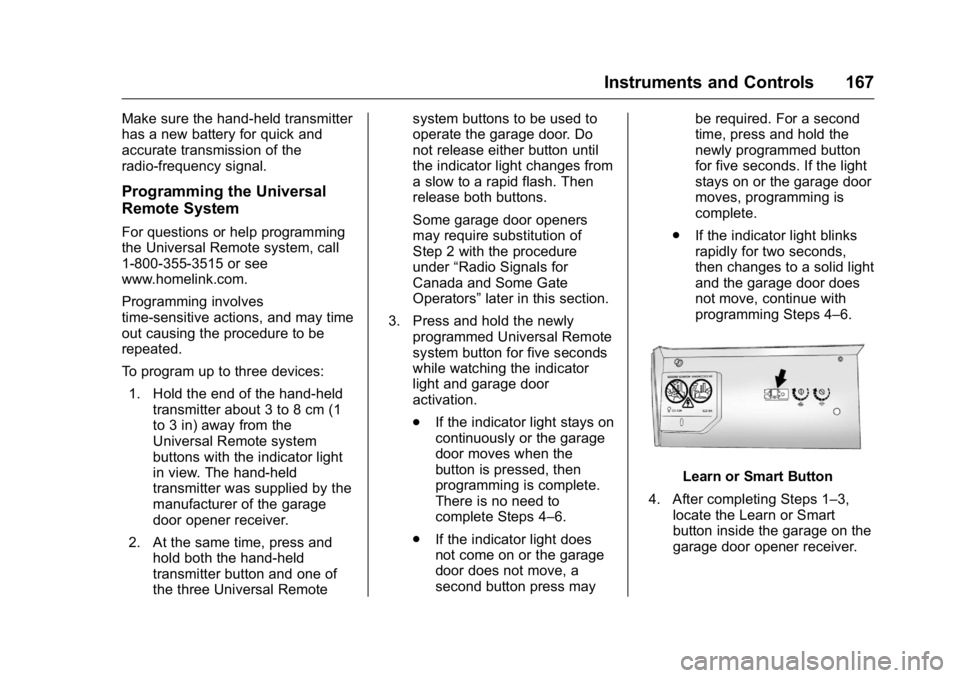
Learn or Smart Button
4. After completing Steps 1 – 3,
locate the Learn or Smart
button inside the garage on the
garage door opener receiver.
Page 169 of 397
Cadillac CT6 Owner Manual (GMNA-Localizing-U.S./Canada-9235592) -
2016 - crc - 11/6/15
168 Instruments and Controls The name and color of the
button may vary by
manufacturer.
5. Press and release the Learn or
Smart button. Step 6 must be
completed within 30 seconds of
pressing this button.
6. Inside the vehicle, press and
hold the newly programmed
Universal Remote system
button for two seconds and
then release it. If the garage
door does not move or the
lamp on the garage door
opener receiver does not flash,
press and hold the same
button a second time for
two seconds, then release it.
Again, if the door does not
move or the garage door lamp
does not flash, press and hold
the same button a third time for
two seconds, then release it.
The Universal Remote system
should now activate the
garage door.
Repeat the process for
programming the two remaining
buttons. Radio Signals for Canada and
Some Gate Operators For questions or programming help
call 1-800-355-3515 or see
www.homelink.com.
Canadian radio-frequency laws and
some U.S. gate operators require
transmitter signals to time out or quit
after several seconds of
transmission. This may not be long
enough for the Universal Remote
system to pick up the signal during
programming.
If the programming did not work,
replace Step 2 under “ Programming
the Universal Remote System ” with
the following:
Press and hold the Universal
Remote system button while
pressing and releasing the
hand-held transmitter button every
two seconds until the signal has
been successfully accepted by the
Universal Remote system. The
Universal Remote system indicator
light will flash slowly at first and then
rapidly. Proceed with Step 3 under
“ Programming the Universal Remote
System ” to complete. Universal Remote System
Operation Using the Universal Remote
System Press and hold the appropriate
Universal Remote system button for
at least one-half second. The
indicator light will come on while the
signal is being transmitted.
Erasing Universal Remote
System Buttons Erase all programmed buttons when
vehicle ownership is terminated.
To erase:
1. Press and hold the two outside
buttons until the indicator light
begins to flash. This should
take about 10 seconds.
2. Release both buttons.
Page 170 of 397
Cadillac CT6 Owner Manual (GMNA-Localizing-U.S./Canada-9235592) -
2016 - crc - 11/6/15
Instruments and Controls 169Reprogramming a Single
Universal Remote System
Button To reprogram any of the system
buttons:
1. Press and hold any one of the
buttons. Do not release the
button.
2. The indicator light will begin to
flash after 20 seconds. Without
releasing the button, proceed
with Step 1 under
“ Programming the Universal
Remote System. ”
Page 179 of 397
Cadillac CT6 Owner Manual (GMNA-Localizing-U.S./Canada-9235592) -
2016 - crc - 11/6/15
178 Climate Controls
Climate Controls Climate Control Systems Automatic Climate Control
System (Quad Zone) . . . . . . . . 178
Automatic Climate Control
System (Dual Zone) . . . . . . . . . 185
Air Vents Air Vents . . . . . . . . . . . . . . . . . . . . . 189
Maintenance Passenger Compartment Air
Filter . . . . . . . . . . . . . . . . . . . . . . . . 190
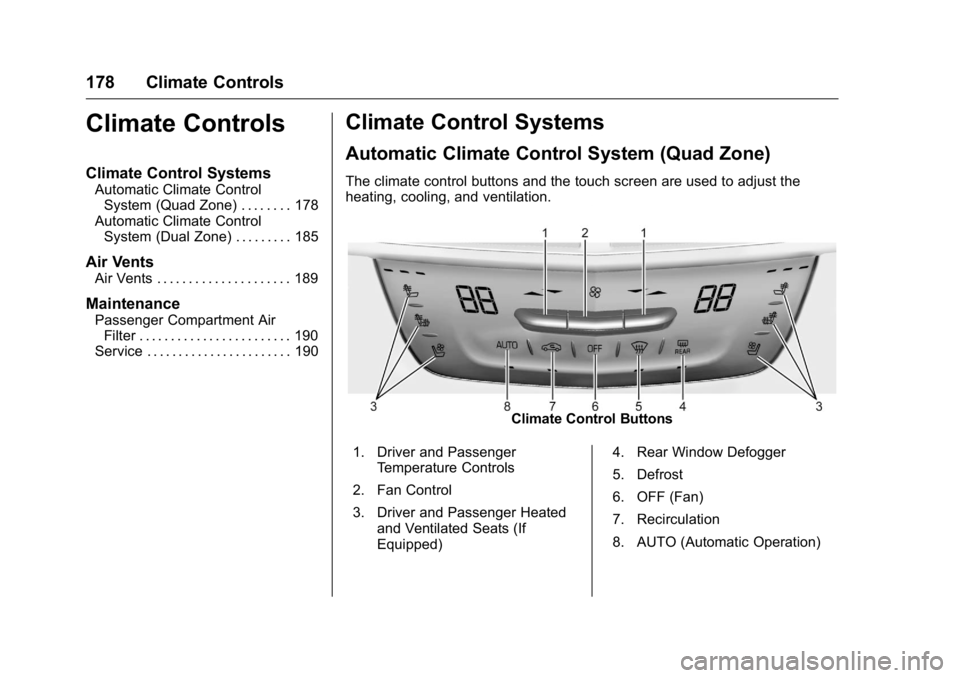
Service . . . . . . . . . . . . . . . . . . . . . . . 190 Climate Control Systems Automatic Climate Control System (Quad Zone) The climate control buttons and the touch screen are used to adjust the
heating, cooling, and ventilation.
Climate Control Buttons
1. Driver and Passenger
Temperature Controls
2. Fan Control
3. Driver and Passenger Heated
and Ventilated Seats (If
Equipped) 4. Rear Window Defogger
5. Defrost
6. OFF (Fan)
7. Recirculation
8. AUTO (Automatic Operation)
Page 180 of 397

Cadillac CT6 Owner Manual (GMNA-Localizing-U.S./Canada-9235592) -
2016 - crc - 11/6/15
Climate Controls 179
Climate Touch Screen Controls
1. Outside Temperature Display
2. Driver and Passenger
Temperature Controls
3. Fan Control
4. A/C (Air Conditioning)
5. Climate Control Selection
(Application Tray Button)
6. SYNC (Synchronized
Temperature)
7. Driver and Passenger Air
Delivery Mode Controls
8. Defog 9. Ionizer Status Indicator (If
Equipped)
Climate Control Touch Screen
The fan, air delivery mode, air
conditioning, driver and passenger
temperatures, and SYNC settings
can be controlled by touching
CLIMATE on the infotainment home
screen or the climate button in the
touch screen application tray.
A selection can then be made on
the front climate control page
displayed. See the infotainment
manual.
Climate Control Status Screen The climate control status screen
appears briefly when the climate
control buttons on the faceplate are
adjusted.
Automatic Operation
The system automatically controls
the fan speed, air delivery, air
conditioning, and recirculation in
order to heat or cool the vehicle to
the desired temperature.
When the indicator light is on or
AUTO is displayed on the touch
screen, the system is in full
automatic operation. If the air
delivery mode or fan setting is
manually adjusted, the auto
indicator turns off and the display
will show the selected settings. Auto
operation can be turned off
individually for climate settings.
For automatic operation:
1. Press AUTO.
2. Set the temperature. Allow the
system time to stabilize. Then
adjust the temperature as
needed for best comfort.
Page 181 of 397

Cadillac CT6 Owner Manual (GMNA-Localizing-U.S./Canada-9235592) -
2016 - crc - 11/6/15
180 Climate Controls To improve fuel efficiency and to
cool the vehicle faster, recirculation
may be automatically selected in
warm weather. The recirculation
light will not come on in AUTO
mode. Press
@ to select
recirculation; press it again to select
outside air.
English units can be changed to
metric units through the instrument
cluster. See “ Cluster Options Menu ”
or “ Cluster Menu ” under Instrument
Cluster (Uplevel) 0 121 or
Instrument Cluster (Base
Level) 0 118 .
OFF : Press to turn the fan on or
off. The temperature control and air
delivery mode can still be adjusted.
Q /
R : The temperature can be
adjusted separately for the driver
and the passenger. Press to
increase or decrease the
temperature. Press and hold to
rapidly increase or decrease the
temperature.
The driver and passenger
temperatures can also be adjusted
by touching the buttons on the touch
screen. SYNC : Touch SYNC on the touch
screen to link all climate zone
settings to the driver settings. When
all climate zone settings are linked
the SYNC indicator will be lit. Adjust
the driver side temperature control
to change the linked temperature.
When the front or rear passenger
settings are adjusted, the SYNC
indicator will turn off.
Manual Operation
Q 9 R : Press the fan control
buttons or the touch screen fan
control, to increase or decrease the
fan speed. Press and hold the
buttons or the touch screen control
to adjust speed more quickly. The
fan speed setting displays. Pressing
either button cancels automatic fan
control and the fan can be
controlled manually. Press AUTO to
return to automatic operation.
Driver and Passenger Air Delivery
Mode Controls : When the climate
information is displayed, touch the
desired air delivery mode on the
touch screen to change the direction
of the airflow. The selected air
delivery mode button is lit. Touching any of the air delivery buttons
cancels automatic air delivery
control and the direction of the
airflow can be controlled manually.
Press AUTO to return to automatic
operation.
To change the current mode, select
one of the following:
Y : Air is directed to the instrument
panel outlets.
\ : Air is divided between the
instrument panel outlets and the
floor outlets.
[ : Air is directed to the floor
outlets.
- : Clears the windows of fog or
moisture. Air is directed to the
windshield and floor outlets.
0 : Clears the windshield of fog or
frost more quickly. Air is directed to
the windshield. Press
0 to turn on
or off. Changing the air delivery
mode also turns the defrost off.
A/C : Touch A/C on the touch
screen to turn the automatic air
conditioning on or off. If the fan is
Page 184 of 397

Cadillac CT6 Owner Manual (GMNA-Localizing-U.S./Canada-9235592) -
2016 - crc - 11/6/15
Climate Controls 183Rear Climate Control System The rear climate control system is on the rear of the center console. The
settings can be adjusted with the rear climate control buttons and the touch
screen.
Rear Climate Control Buttons
1. Rear Driver Side and
Passenger Side Seat
Temperature Controls
2.
O (On/Off) 3. Air Delivery Mode Control
4. AUTO (Automatic Operation)
5. Fan Control Rear Climate Touch Screen
Controls
1. Outside Temperature Display
2. Rear Control Lockout
3. ON/OFF
4. Climate Control Selection
(Application Tray Button)
5. SYNC (Synchronized
Temperatures)
6. Rear AUTO (Automatic
Operation)
7. Rear Driver Side and
Passenger Side Climate
Temperature Controls
8. Rear Fan Control
Page 185 of 397

Cadillac CT6 Owner Manual (GMNA-Localizing-U.S./Canada-9235592) -
2016 - crc - 11/6/15
184 Climate Controls 9. Air Delivery Mode Control
Rear : Touch Rear on the Home
Page on the infotainment system
display to open the rear climate
control screen. The rear climate
control settings can now be
adjusted from the front
passenger area.
O : Press
O or touch ON/OFF on
the touch screen to turn the rear
climate control on or off.
SYNC : Touch SYNC on the touch
screen to match the rear climate
control temperature to the front
climate control driver temperature.
The SYNC button will be lit.
Rear Control Lockout : Touch to
lock or unlock control of the rear
climate control system from the rear
seat passengers. When locked, the
rear climate control can only be
adjusted from the front seat. Automatic Operation
AUTO : Press to turn on or off. The
air delivery is controlled
automatically. The AUTO indicator
appears on the display. If the air
delivery mode is manually adjusted,
this cancels full automatic operation.
Manual Operation
9 : Press or press and hold the
rear fan button up or down to
increase or decrease the rear
climate airflow. The rear climate
airflow can also be adjusted by
touching the fan controls on the
front climate touch screen.
Temperature Controls : Press or
press and hold the rear temperature
control buttons up or down to adjust
the rear passenger temperatures.
The rear passenger temperatures
can also be adjusted by touching +
for warmer air or − for cooler air on
the front climate touch screen. Air Delivery Mode Control : Press
or press and hold the button up or
down to select the desired air
delivery mode. Touch the right and
left arrows at the bottom of the
touchscreen to change the direction
of the airflow in the rear
seating area.
Page 186 of 397

Cadillac CT6 Owner Manual (GMNA-Localizing-U.S./Canada-9235592) -
2016 - crc - 11/6/15
Climate Controls 185
Automatic Climate Control System (Dual Zone) The climate control buttons and the touch screen are used to adjust the
heating, cooling, and ventilation.
Climate Control Buttons
1. Driver and Passenger
Temperature Controls
2. Fan Control
3. Driver and Passenger Heated
and Ventilated Seats (If
Equipped) 4. Rear Window Defogger
5. Defrost
6. OFF (Fan)
7. Recirculation
8. AUTO (Automatic Operation) Climate Touch Screen Controls
1. Outside Temperature Display
2. Driver and Passenger
Temperature Controls
3. Fan Control
4. A/C (Air Conditioning)
5. Climate Control Selection
(Application Tray Button)
6. SYNC (Synchronized
Temperature)
7. Driver and Passenger Air
Delivery Mode Controls
8. Defog