trunk CADILLAC CT6 2016 User Guide
[x] Cancel search | Manufacturer: CADILLAC, Model Year: 2016, Model line: CT6, Model: CADILLAC CT6 2016Pages: 397, PDF Size: 7.09 MB
Page 46 of 397
Cadillac CT6 Owner Manual (GMNA-Localizing-U.S./Canada-9235592) -
2016 - crc - 11/6/15
Keys, Doors, and Windows 45On Solid : Vehicle is secured
during the delay to arm the system.
Fast Flash : Vehicle is unsecured.
A door, the hood, or the trunk
is open.
Slow Flash : Alarm system is
armed.
Arming the Alarm System 1. Turn off the vehicle.
2. Lock the vehicle in one of
three ways:
.
Use the RKE transmitter.
.
Use the Keyless Access
system.
.
With a door open, press
Qon the interior of the door.
3. After 30 seconds the alarm
system will arm, and the
indicator light will begin to
slowly flash indicating the
alarm system is operating.
Pressing
Q on the RKE
transmitter a second time will
bypass the 30-second delay
and immediately arm the alarm
system. The vehicle alarm system will not
arm if the doors are locked with
the key.
If the driver door is opened without
first unlocking with the RKE
transmitter, the horn will chirp and
the lights will flash to indicate
pre-alarm. If the vehicle is not
started, or the door is not unlocked
by pressing
K on the RKE
transmitter during the 10-second
pre-alarm, the alarm will be
activated.
The alarm will also be activated if a
passenger door, the trunk, or the
hood is opened without first
disarming the system. When the
alarm is activated, the turn signals
flash and the horn sounds for about
30 seconds. The alarm system will
then re-arm to monitor the next
unauthorized event.
Disarming the Alarm System
To disarm the alarm system or turn
off the alarm if it has been activated:
.
Press
K on the RKE transmitter. .
Unlock the vehicle using the
Keyless Access system.
.
Start the vehicle.
To avoid setting off the alarm by
accident:
.
Lock the vehicle after all
occupants have left the vehicle
and all doors are closed.
.
Always unlock a door with the
RKE transmitter or use the
Keyless Access system.
Unlocking the driver door with the
key will not disarm the system or
turn off the alarm.
How to Detect a Tamper
Condition If
K is pressed on the RKE
transmitter and the horn chirps and
the lights flash three times, a
previous alarm occurred while the
system was armed.
If the alarm has been activated, a
message will appear on the DIC.
See Security Messages 0 155 .
Page 109 of 397
Cadillac CT6 Owner Manual (GMNA-Localizing-U.S./Canada-9235592) -
2016 - crc - 11/6/15
108 Storage
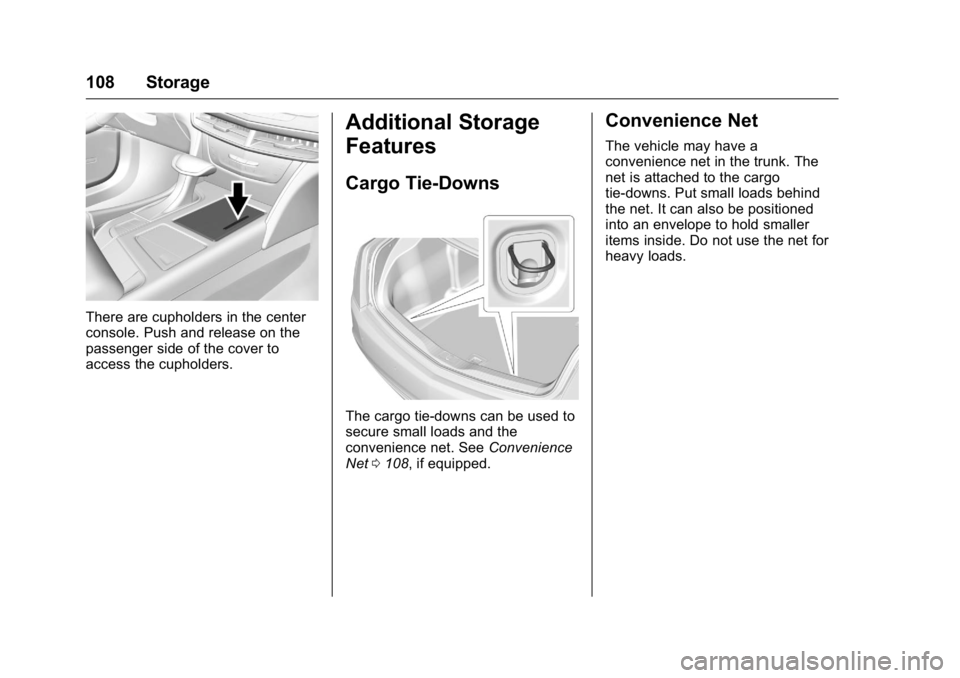
There are cupholders in the center
console. Push and release on the
passenger side of the cover to
access the cupholders. Additional Storage
Features Cargo Tie-Downs
The cargo tie-downs can be used to
secure small loads and the
convenience net. See Convenience
Net 0 108 , if equipped. Convenience Net The vehicle may have a
convenience net in the trunk. The
net is attached to the cargo
tie-downs. Put small loads behind
the net. It can also be positioned
into an envelope to hold smaller
items inside. Do not use the net for
heavy loads.
Page 150 of 397

Cadillac CT6 Owner Manual (GMNA-Localizing-U.S./Canada-9235592) -
2016 - crc - 11/6/15
Instruments and Controls 149TRUNK OPEN This message will display along with
a symbol when the trunk is open.
Close the trunk completely.
Engine Cooling System
Messages A/C OFF DUE TO HIGH
ENGINE TEMP This message displays when the
engine coolant becomes hotter than
the normal operating temperature.
To avoid added strain on a hot
engine, the air conditioning
compressor automatically turns off.
When the coolant temperature
returns to normal, the air
conditioning compressor turns back
on. The vehicle can continue to be
driven.
If this message continues to appear,
have the system repaired by your
dealer as soon as possible to avoid
damage to the engine. COOLANT LEVEL LOW ADD
COOLANT This message will display if the
coolant is low. See Engine
Coolant 0 277 .
ENGINE OVERHEATED —
IDLE ENGINE This message displays when the
engine coolant temperature is too
hot. Stop and allow the vehicle to
idle until it cools down.
ENGINE OVERHEATED —
STOP ENGINE This message displays and a
continuous chime sounds if the
engine cooling system reaches
unsafe temperatures for operation.
Stop and turn off the vehicle as
soon as it is safe to do so to avoid
severe damage. This message
clears when the engine has cooled
to a safe operating temperature. HIGH COOLANT
TEMPERATURE This message may display if the
coolant temperature is hot. See
Engine Overheating 0 280 .
Engine Oil Messages CHANGE ENGINE OIL SOON This message displays when the
engine oil needs to be changed.
When you change the engine oil, be
sure to reset the oil life system. See
Engine Oil Life System 0 272 , Driver
Information Center (DIC) 0 140 ,
Engine Oil 0 270 , and Maintenance
Schedule 0 344 .
ENGINE OIL HOT, IDLE
ENGINE This message displays when the
engine oil temperature is too hot.
Stop and allow the vehicle to idle
until it cools down.
ENGINE OIL LOW — ADD OIL
On some vehicles, this message
displays when the engine oil level
may be too low. Check the oil level
Page 251 of 397
Cadillac CT6 Owner Manual (GMNA-Localizing-U.S./Canada-9235592) -
2016 - crc - 11/6/15
250 Driving and Operating .
Sudden lighting changes, such
as when driving through tunnels.
.
Banked roads.
.
Roads with poor lane markings,
such as two-lane roads.
If the LKA system is not functioning
properly when lane markings are
clearly visible, cleaning the
windshield may help.
LKA assistance and/or LDW alerts
may occur due to tar marks,
shadows, cracks in the road,
temporary or construction lane
markings, or other road
imperfections. This is normal system
operation; the vehicle does not need
service. Turn LKA off if these
conditions continue.
Surround Vision
Recorder If equipped, this system records the
360° camera views to an SD card.
Only images are recorded, no
sound. An SD card will be needed
for this system. The recommended SD card is an 8-32GB SDHC card
with FAT32 file system, Class
4 and over.
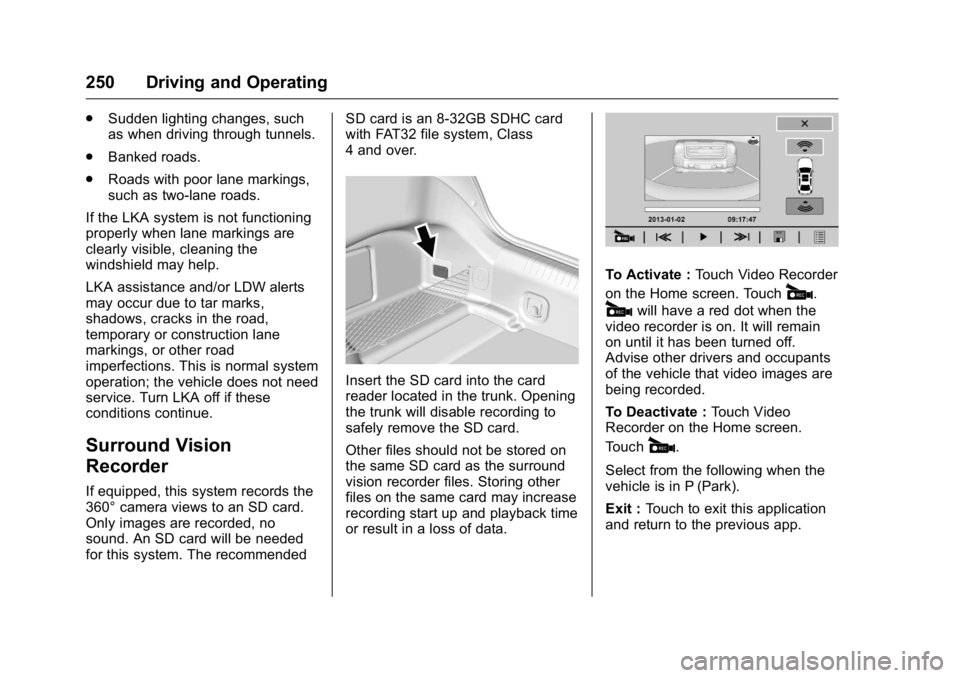
Insert the SD card into the card
reader located in the trunk. Opening
the trunk will disable recording to
safely remove the SD card.
Other files should not be stored on
the same SD card as the surround
vision recorder files. Storing other
files on the same card may increase
recording start up and playback time
or result in a loss of data. To Activate : Touch Video Recorder
on the Home screen. Touch
# .
# will have a red dot when the
video recorder is on. It will remain
on until it has been turned off.
Advise other drivers and occupants
of the vehicle that video images are
being recorded.
To Deactivate : Touch Video
Recorder on the Home screen.
Touch
# .
Select from the following when the
vehicle is in P (Park).
Exit : Touch to exit this application
and return to the previous app.
Page 255 of 397

Cadillac CT6 Owner Manual (GMNA-Localizing-U.S./Canada-9235592) -
2016 - crc - 11/6/15
254 Driving and Operating Warning (Continued).
Fuel can spray out if the
refueling nozzle is inserted
too quickly. This spray can
happen if the tank is nearly
full, and is more likely in hot
weather. Insert the refueling
nozzle slowly and wait for
any hiss noise to stop prior
to beginning to flow fuel.
If equipped, the fuel door is locked
when the vehicle doors are locked.
Press
K on the RKE transmitter to
unlock. To open the fuel door, push and
release the rearward center edge of
the door.
The vehicle has a capless refueling
system and does not have a fuel
cap. The filling nozzle must be fully
inserted and latched prior to starting
fuel flow.
{ WarningOverfilling the fuel tank by more
than three clicks of a standard fill
nozzle may cause:
.
Vehicle performance issues,
including engine stalling and
damage to the fuel system.
.
Fuel spills.
.
Potential fuel fires.
Be careful not to spill fuel. Wait a
few seconds after you have finished
pumping before removing the
nozzle. Clean fuel from painted
surfaces as soon as possible. See
Exterior Care 0 333 .{ WarningIf a fire starts while you are
refueling, do not remove the
nozzle. Shut off the flow of fuel by
shutting off the pump or by
notifying the station attendant.
Leave the area immediately.
Filling the Tank with a Portable
Gas Can
If the vehicle runs out of fuel and
must be filled from a portable
gas can:
1. Locate the capless funnel
adapter from under the carpet
in the trunk.
2. Insert and latch the funnel into
the capless fuel system.
Page 256 of 397
Cadillac CT6 Owner Manual (GMNA-Localizing-U.S./Canada-9235592) -
2016 - crc - 11/6/15
Driving and Operating 255
{ WarningAttempting to refuel without using
the funnel adapter may cause fuel
spillage and damage the capless
fuel system. This could cause a
fire and you or others could be
badly burned and the vehicle
could be damaged.
3. After filling the tank, remove
and clean the funnel adapter
and return it to the storage
location.
Filling a Portable Fuel
Container
{ Warning
Filling a portable fuel container
while it is in the vehicle can cause
fuel vapors that can ignite either
by static electricity or other
means. You or others could be
badly burned and the vehicle
could be damaged. Always:
(Continued) Warning (Continued) .
Use approved fuel
containers.
.
Remove the container from
the vehicle, trunk, or pickup
bed before filling.
.
Place the container on the
ground.
.
Place the nozzle inside the
fill opening of the container
before dispensing fuel, and
keep it in contact with the fill
opening until filling is
complete.
.
Fill the container no more
than 95% full to allow for
expansion.
.
Do not smoke, light
matches, or use lighters
while pumping fuel.
.
Avoid using cell phones or
other electronic devices.Trailer Towing General Towing
Information Only use towing equipment that has
been designed for the vehicle.
Contact your dealer or trailering
dealer for assistance with preparing
the vehicle for towing a trailer. Read
the entire section before towing a
trailer.
For towing a disabled vehicle, see
Towing the Vehicle 0 330 . For
towing the vehicle behind another
vehicle such as a motor home, see
Recreational Vehicle Towing 0 331 .
Driving Characteristics
and Towing Tips Driving with a Trailer
When towing a trailer:
.
Become familiar with the state
and local laws that apply to
trailer towing.
Page 257 of 397

Cadillac CT6 Owner Manual (GMNA-Localizing-U.S./Canada-9235592) -
2016 - crc - 11/6/15
256 Driving and Operating .
Do not tow a trailer during the
first 2 414 km (1,500 mi) to
prevent damage to the engine,
axle, or other parts.
.
Then during the first 800 km
(500 mi) of trailer towing, do not
drive over 80 km/h (50 mph) and
do not make starts at full throttle.
.
Vehicles can tow in D (Drive).
Shift the transmission to a lower
gear if the transmission shifts
too often under heavy loads and/
or hilly conditions.
.
Do not use Adaptive Cruise
Control when towing.
.
The Front Automatic Braking
System should be set to Off
when towing. See Front
Automatic Braking (FAB)
System 0 240 .
.
Turn off Parking Assist when
towing. { WarningWhen towing a trailer, exhaust
gases may collect at the rear of
the vehicle and enter if the
liftgate, trunk/hatch, or rear-most
window is open.
When towing a trailer:
.
Do not drive with the
liftgate, trunk/hatch,
or rear-most window open.
.
Fully open the air outlets on
or under the instrument
panel.
.
Also adjust the climate
control system to a setting
that brings in only outside
air. See “ Climate Control
Systems ” in the Index.
For more information about
carbon monoxide, see Engine
Exhaust 0 209 .
Towing a trailer requires a certain
amount of experience. The
combination you are driving is
longer and not as responsive as the vehicle itself. Get acquainted with
the handling and braking of the rig
before setting out for the open road.
Before starting, check all trailer hitch
parts and attachments, safety
chains, electrical connectors, lamps,
tires, and mirrors. If the trailer has
electric brakes, start the
combination moving and then apply
the trailer brake controller by hand
to be sure the brakes work.
During the trip, check occasionally
to be sure that the load is secure
and the lamps and any trailer
brakes still work.
Following Distance Stay at least twice as far behind the
vehicle ahead as you would when
driving the vehicle without a trailer.
This can help to avoid heavy
braking and sudden turns.
Passing
More passing distance is needed
when towing a trailer. The
combination will not accelerate as
quickly and is longer so it is
Page 285 of 397

Cadillac CT6 Owner Manual (GMNA-Localizing-U.S./Canada-9235592) -
2016 - crc - 11/6/15
284 Vehicle Care CautionIf brake fluid is spilled on the
vehicle's painted surfaces, the
paint finish can be damaged.
Immediately wash off any painted
surface.
Battery - North America The original equipment battery is
maintenance free. Do not remove
the cap and do not add fluid.
Refer to the replacement number
shown on the original battery label
when a new 12-volt battery is
needed.
The battery is in the trunk under the
spare tire. The vehicle has an
Absorbed Glass Mat (AGM) 12-volt
battery. Installation of a standard
12-volt battery will result in reduced
12-volt battery life.
When using a 12-volt battery
charger on the 12-volt AGM battery,
some chargers have an AGM
battery setting on the charger. If available, use the AGM setting on
the charger, to limit charge voltage
to 14.8 volts.
Stop/Start System
The vehicle has a Stop/Start system
to shut off the engine to help
conserve fuel. See Starting the
Engine 0 204 .
{ WarningWARNING: Battery posts,
terminals, and related
accessories contain lead and lead
compounds, chemicals known to
the State of California to cause
cancer and birth defects or other
reproductive harm. Batteries also
contain other chemicals known to
the State of California to cause
cancer. WASH HANDS AFTER
HANDLING.
See California Proposition
65 Warning 0 262 . Vehicle Storage
{ WarningBatteries have acid that can burn
you and gas that can explode.
You can be badly hurt if you are
not careful. See Jump Starting -
North America 0 327 for tips on
working around a battery without
getting hurt.
Infrequent Usage: Remove the
12-volt battery black, negative ( − )
cable from the battery to keep the
battery from running down.
Extended Storage: Remove the
12-volt battery black, negative ( − )
cable from the battery or use a
battery trickle charger.
Remember to reconnect the battery
when ready to drive the vehicle.
All-Wheel Drive If the vehicle is equipped with
All-Wheel Drive (AWD), this is an
additional system that needs
lubrication.
Page 297 of 397
Cadillac CT6 Owner Manual (GMNA-Localizing-U.S./Canada-9235592) -
2016 - crc - 11/6/15
296 Vehicle Care
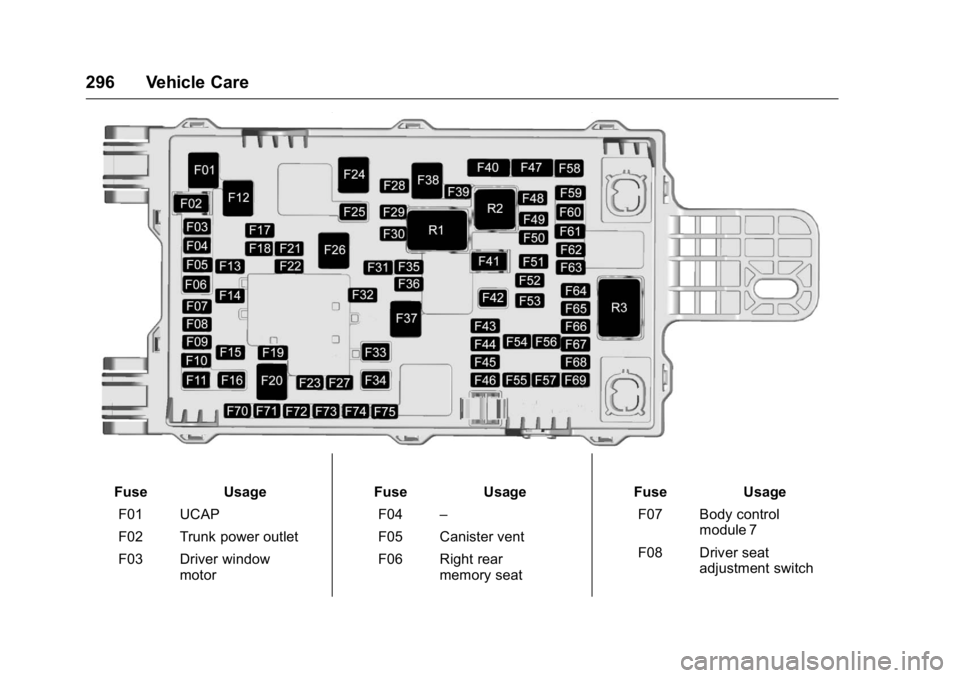
Fuse Usage
F01 UCAP
F02 Trunk power outlet
F03 Driver window
motor Fuse Usage
F04 –
F05 Canister vent
F06 Right rear
memory seat Fuse Usage
F07 Body control
module 7
F08 Driver seat
adjustment switch
Page 298 of 397

Cadillac CT6 Owner Manual (GMNA-Localizing-U.S./Canada-9235592) -
2016 - crc - 11/6/15
Vehicle Care 297Fuse Usage
F09 Passive entry/
Passive start
F10 Rear subwoofer am-
plifier
F11 Driver memory seat
module
F12 –
F13 –
F14 Right rear seat
F15 Left front amplifier
F16 Right front seat
F17 Rear heated seat
F18 Battery/Regulated
voltage control
F19 Door mirror switch
F20 –
F21 Vehicle integration
control module
F22 –
F23 Rear closure
F24 – Fuse Usage
F25 Left motorized
safety belt
pretensioner
F26 Rear defogger
F27 Right front amplifier
F28 Amplifier
F29 Sunroof
F30 Body control
module 2
F31 Body control
module 6
F32 Exterior rearview
mirror
F33 Right window
F34 Power trunk module
F35 On-board charging
module
F36 Alarm siren module
F37 DC AC inverter
F38 Rear blower
F39 Fuel pump power
F40 – Fuse Usage
F41 Rear seat power
outlet
F42 Left rear
memory seat
F43 –
F44 Rear closure
F45 Auxiliary audio/
Video/Radio
F46 External object
calculating/Side
blind zone alert/
Radar short range
sensor
F47 –
F48 Right front seat
F49 Memory bolster
module
F50 Body control
module 1
F51 Transmission
control module
F52 Parking assist