key battery CADILLAC CT6 2016 Owners Manual
[x] Cancel search | Manufacturer: CADILLAC, Model Year: 2016, Model line: CT6, Model: CADILLAC CT6 2016Pages: 397, PDF Size: 7.09 MB
Page 30 of 397
Cadillac CT6 Owner Manual (GMNA-Localizing-U.S./Canada-9235592) -
2016 - crc - 11/6/15
Keys, Doors, and Windows 29
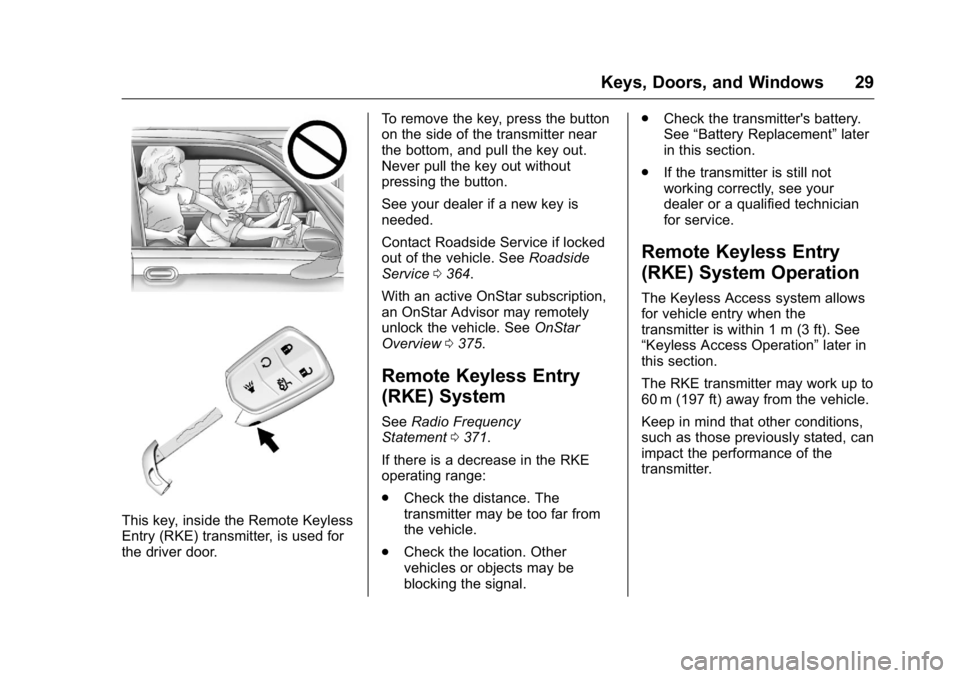
This key, inside the Remote Keyless
Entry (RKE) transmitter, is used for
the driver door. To remove the key, press the button
on the side of the transmitter near
the bottom, and pull the key out.
Never pull the key out without
pressing the button.
See your dealer if a new key is
needed.
Contact Roadside Service if locked
out of the vehicle. See Roadside
Service 0 364 .
With an active OnStar subscription,
an OnStar Advisor may remotely
unlock the vehicle. See OnStar
Overview 0 375 .
Remote Keyless Entry
(RKE) System See Radio Frequency
Statement 0 371 .
If there is a decrease in the RKE
operating range:
.
Check the distance. The
transmitter may be too far from
the vehicle.
.
Check the location. Other
vehicles or objects may be
blocking the signal. .
Check the transmitter's battery.
See “ Battery Replacement ” later
in this section.
.
If the transmitter is still not
working correctly, see your
dealer or a qualified technician
for service.
Remote Keyless Entry
(RKE) System Operation The Keyless Access system allows
for vehicle entry when the
transmitter is within 1 m (3 ft). See
“ Keyless Access Operation ” later in
this section.
The RKE transmitter may work up to
60 m (197 ft) away from the vehicle.
Keep in mind that other conditions,
such as those previously stated, can
impact the performance of the
transmitter.
Page 33 of 397

Cadillac CT6 Owner Manual (GMNA-Localizing-U.S./Canada-9235592) -
2016 - crc - 11/6/15
32 Keys, Doors, and Windows transmitter inside the vehicle.
If passive locking is enabled, the
doors may lock with the RKE
transmitter inside the vehicle. Do
not leave the RKE transmitter in an
unattended vehicle.
To customize the doors to
automatically lock when exiting the
vehicle, see Vehicle
Personalization 0 157 .
Temporary Disable of Passive
Locking Feature
Temporarily disable passive locking
by pressing and holding
K on the
interior door switch with a door open
for at least four seconds, or until
three chimes are heard. Passive
locking will then remain disabled
until
Q on the interior door is
pressed, or until the vehicle is
turned on.
Remote Left In Vehicle Alert
When the vehicle is turned off and a
remote is left in the vehicle, the horn
will chirp three times after all doors
are closed. To turn on or off see
Vehicle Personalization 0 157 . Keyless Trunk Opening
To open the trunk, press the touch
pad on the rear of the trunk above
the license plate. The RKE
transmitter must be within 1 m (3 ft).
Keyed Access
To access a vehicle with a dead
transmitter battery, see Door
Locks 0 37 .
Programming Transmitters to
the Vehicle Only RKE transmitters programmed
to the vehicle will work. If a
transmitter is lost or stolen, a
replacement can be purchased and
programmed through your dealer.
The vehicle can be reprogrammed
so that lost or stolen transmitters no
longer work. Each vehicle can have
up to eight transmitters matched
to it.
Programming with a Recognized
Transmitter
A new transmitter can be
programmed to the vehicle when
there is one recognized transmitter. To program, the vehicle must be off
and all transmitters, both currently
recognized and new, must be
with you.
1. Remove the vehicle key from
the recognized transmitter.
2. Place the recognized
transmitter(s) in the cupholder.
3. Remove the key lock cylinder
cap on the driver door handle.
See Door Locks 0 37 . Insert
the vehicle key into the key
lock cylinder on the driver door
handle, then turn the key
counterclockwise to the unlock
position five times within
10 seconds.
The Driver Information Center
(DIC) displays READY FOR
REMOTE #2, 3, 4, ETC.
Page 35 of 397
Cadillac CT6 Owner Manual (GMNA-Localizing-U.S./Canada-9235592) -
2016 - crc - 11/6/15
34 Keys, Doors, and Windows
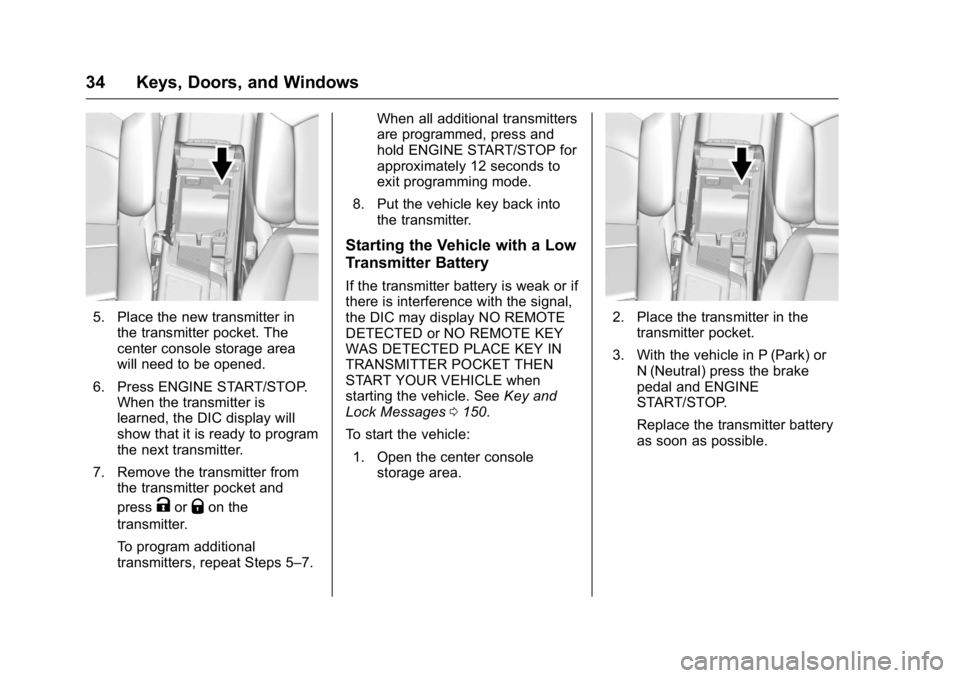
5. Place the new transmitter in
the transmitter pocket. The
center console storage area
will need to be opened.
6. Press ENGINE START/STOP.
When the transmitter is
learned, the DIC display will
show that it is ready to program
the next transmitter.
7. Remove the transmitter from
the transmitter pocket and
press
K or
Q on the
transmitter.
To program additional
transmitters, repeat Steps 5 – 7. When all additional transmitters
are programmed, press and
hold ENGINE START/STOP for
approximately 12 seconds to
exit programming mode.
8. Put the vehicle key back into
the transmitter.
Starting the Vehicle with a Low
Transmitter Battery If the transmitter battery is weak or if
there is interference with the signal,
the DIC may display NO REMOTE
DETECTED or NO REMOTE KEY
WAS DETECTED PLACE KEY IN
TRANSMITTER POCKET THEN
START YOUR VEHICLE when
starting the vehicle. See Key and
Lock Messages 0 150 .
To start the vehicle:
1. Open the center console
storage area. 2. Place the transmitter in the
transmitter pocket.
3. With the vehicle in P (Park) or
N (Neutral) press the brake
pedal and ENGINE
START/STOP.
Replace the transmitter battery
as soon as possible.
Page 36 of 397

Cadillac CT6 Owner Manual (GMNA-Localizing-U.S./Canada-9235592) -
2016 - crc - 11/6/15
Keys, Doors, and Windows 35Battery Replacement
CautionWhen replacing the battery, do
not touch any of the circuitry on
the transmitter. Static from your
body could damage the
transmitter.
Replace the battery if the REPLACE
BATTERY IN REMOTE KEY
message displays in the DIC.
1. Press the button on the side of
the transmitter near the bottom
and pull the key out. 2. Separate the two halves of the
transmitter using a flat tool
inserted into the bottom center
of the transmitter. Do not use
the key slot. 3. Remove the old battery. Do not
use a metal object.
4. Insert the new battery on the
back housing, positive side
facing down. Replace with a
CR2032 or equivalent battery.
5. Align the front and back
housing, then snap the
transmitter together.
6. Reinsert the key.
Page 43 of 397

Cadillac CT6 Owner Manual (GMNA-Localizing-U.S./Canada-9235592) -
2016 - crc - 11/6/15
42 Keys, Doors, and Windows
.
Press the touch pad on the rear
of the trunk above the license
plate when all doors are
unlocked.
For Keyless Access, the trunk can
be opened while the vehicle is
locked by pressing the touch pad
above the license plate while the
RKE transmitter is within 1 m (3 ft)
of the rear of the vehicle. See
Remote Keyless Entry (RKE)
System Operation 0 29 .
Close the trunk by pulling on the
handle. Do not use the handle as a
tie-down. Do not press the touch
pad while closing the trunk; this will
cause the trunk lid to be unlatched. The trunk has an electric latch. If the
vehicle has lost power or the battery
is disconnected, the trunk will not
open. If this happens, use the
emergency trunk release handle.
Power Trunk
{ WarningYou or others could be injured if
caught in the path of the power
trunk. Make sure there is no one
in the way of the power trunk as it
is opening and closing.
If equipped, to open the power
trunk:
.
Press and release
| on the
driver door. The driver door must
be unlocked or the vehicle must
be in ON/RUN or Retained
Accessory Power (RAP).
.
Press
X twice quickly on the
RKE transmitter. .
Press the touch pad on the rear
of the trunk after unlocking all
doors or with the RKE
transmitter in range for Keyless
Access.
Monitor the trunk area to make sure
nothing will come in contact or move
into the path of the trunk lid when
power closing.
To close the power trunk:
.
Press and hold
| on the
driver door until the trunk
latches. A chime will sound and
a DIC message will display
when the operation is complete.
Page 47 of 397

Cadillac CT6 Owner Manual (GMNA-Localizing-U.S./Canada-9235592) -
2016 - crc - 11/6/15
46 Keys, Doors, and Windows Power Sounder, Inclination
Sensor, and Intrusion Sensor In addition to the standard
theft-deterrent system features, this
system may also have a power
sounder, inclination sensor, and
intrusion sensor.
The power sounder provides an
audible alarm, which is distinct from
the vehicle ’ s horn. It has its own
power source, and can sound an
alarm if the vehicle ’ s battery is
compromised.
The inclination sensor can set off
the alarm if it senses movement of
the vehicle, such as a change in
vehicle orientation.
The intrusion sensor monitors the
vehicle interior, and can activate the
alarm if it senses unauthorized entry
into the vehicle ’ s interior. Do not
allow passengers or pets to remain
in the vehicle when the intrusion
sensor is activated. Before arming the theft-deterrent
system and activating the intrusion
sensor:
.
Make sure all doors and
windows are completely closed.
.
Secure any loose items such as
sunshades.
.
Make sure there are no
obstructions blocking the
sensors in the front overhead
console.
Inclination and Intrusion
Sensors Disable Switch It is recommended that the intrusion
and inclination sensors be
deactivated if pets are left in the
vehicle or if the vehicle is being
transported. With the vehicle turned off, press
o in the front overhead console.
The indicator light will come on
momentarily, indicating that these
sensors have been disabled for the
next alarm system arming cycle.
Immobilizer See Radio Frequency
Statement 0 371 .
Immobilizer Operation This vehicle has a passive
theft-deterrent system.
The system does not have to be
manually armed or disarmed.
Page 54 of 397
Cadillac CT6 Owner Manual (GMNA-Localizing-U.S./Canada-9235592) -
2016 - crc - 11/6/15
Keys, Doors, and Windows 53Express Window Anti-Pinch
Override
{ WarningIf express override is activated,
the window will not reverse
automatically. You or others could
be injured and the window could
be damaged. Before you use
express override, make sure that
all people and obstructions are
clear of the window path.
To override the anti-pinch feature,
hold the window switch all the way
up to the second position. The
window will raise for as long as the
switch is held. Once the switch is
released, the express mode is
reactivated.
In this mode, the window can close
on an object in its path. Use care
when using the override mode. Programming the Power
Windows If the vehicle battery has been
recharged or disconnected, or is not
working, the front power windows
will need to be reprogrammed for
the express-up feature to work.
Before reprogramming, replace or
recharge the vehicle's battery.
To program:
1. With the ignition in ON/RUN or
ACC/ACCESSORY, or when
Retained Accessory Power
(RAP) is active, close all doors.
2. Pull and hold the power
window switch up until the
window is fully closed.
Continue holding the switch up
for two seconds after the
window closes.
3. Press and hold the power
window switch down until the
window is fully open. Continue
holding the switch down for
two seconds.
The window is now reprogrammed.
Repeat the process for the other
windows. Comfort Open When Comfort Open is enabled in
the vehicle personalization menu,
press and hold
K on the RKE
transmitter until the windows fully
open. See “ Remote Window
Operation ” under Vehicle
Personalization 0 157 .
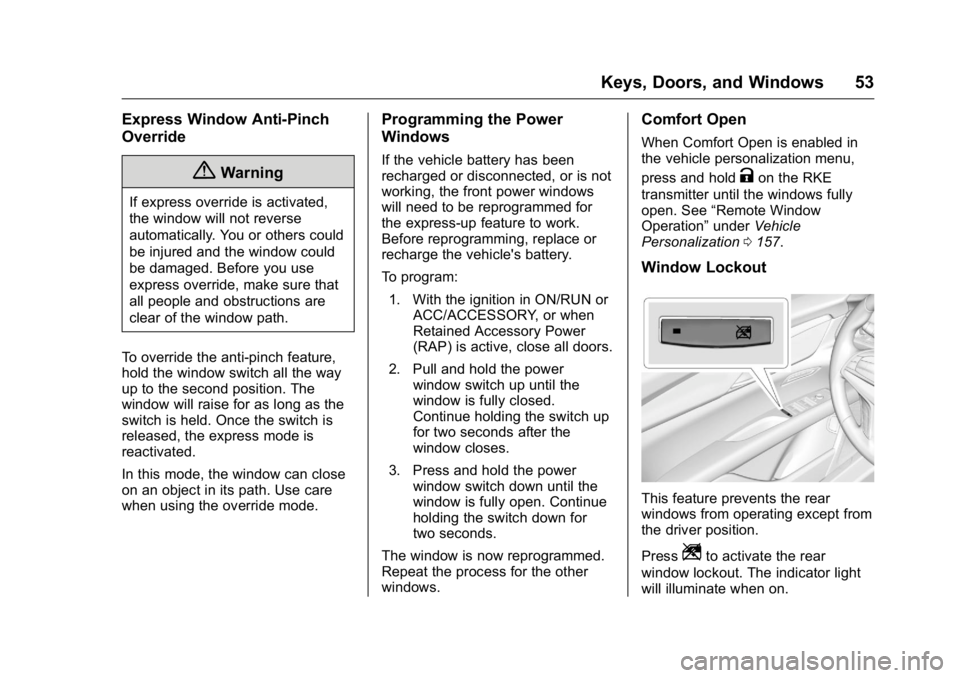
Window Lockout
This feature prevents the rear
windows from operating except from
the driver position.
Press
Z to activate the rear
window lockout. The indicator light
will illuminate when on.
Page 148 of 397
Cadillac CT6 Owner Manual (GMNA-Localizing-U.S./Canada-9235592) -
2016 - crc - 11/6/15
Instruments and Controls 147
Battery Voltage and
Charging Messages BATTERY SAVER ACTIVE This message displays when the
vehicle has detected that the battery
voltage is dropping beyond a
reasonable point. The battery saver
system starts reducing features of
the vehicle that may be noticed. At
the point that features are disabled,
this message displays. Turn off
unnecessary accessories to allow
the battery to recharge.
LOW BATTERY This message is displayed when the
battery voltage is low. See Battery -
North America 0 284 .
SERVICE BATTERY
CHARGING SYSTEM
This message is displayed when
there is a fault in the battery
charging system. Take the vehicle to
your dealer for service. TRANSPORT MODE ON This message is displayed when the
vehicle is in transport mode. Some
features can be disabled while in
this mode, including Remote
Keyless Entry (RKE), remote start,
and the vehicle alarm system. Take
the vehicle to your dealer for service
to turn transport mode off.
Brake System Messages BRAKE FLUID LOW This message is displayed when the
brake fluid level is low. See Brake
Fluid 0 283 .
BRAKES OVERHEATED This message is displayed when the
brakes are becoming overheated.
This may be seen when driving on
hills. Shift to a lower gear. STEP ON BRAKE TO
RELEASE PARK BRAKE This message is displayed if you
attempt to release the Electric
Parking Brake without the brake
pedal applied. See Electric Parking
Brake 0 214 .
RELEASE PARKING BRAKE This message is displayed if the
Electric Parking Brake is on while
the vehicle is in motion. See Electric
Parking Brake 0 214 .
SERVICE BRAKE ASSIST This message may be displayed
when there is a problem with the
brake boost assist system. The
brake boost assist motor may be
heard and brake pedal pulsation
may be felt. This is normal under
these conditions. Take the vehicle to
your dealer for service.
SERVICE PARKING BRAKE
This message is displayed when
there is a problem with the parking
brake. Take the vehicle to your
dealer for service.
Page 151 of 397

Cadillac CT6 Owner Manual (GMNA-Localizing-U.S./Canada-9235592) -
2016 - crc - 11/6/15
150 Instruments and Controls before filling to the recommended
level. If the oil is not low and this
message remains on, take the
vehicle to your dealer for service.
See Engine Oil 0 270 .
OIL PRESSURE LOW — TURN
VEHICLE OFF This message displays if low oil
pressure levels occur. Stop the
vehicle as soon as safely possible
and do not operate it until the cause
of the low oil pressure has been
corrected. Check the oil as soon as
possible and have the vehicle
serviced by your dealer.
Engine Power Messages ENGINE POWER IS REDUCED This message displays when the
vehicle's engine power is reduced.
Reduced engine power can affect
the vehicle's ability to accelerate.
If this message is on, but there is no
reduction in performance, proceed
to your destination. The
performance may be reduced the
next time the vehicle is driven. The
vehicle may be driven at a reduced speed while this message is on, but
maximum acceleration and speed
may be reduced. Anytime this
message stays on, the vehicle
should be taken to your dealer for
service as soon as possible.
Fuel System Messages FUEL LEVEL LOW This message displays when the
vehicle is low on fuel. Refuel as
soon as possible.
Key and Lock Messages NO REMOTE KEY WAS
DETECTED PLACE KEY IN
TRANSMITTER POCKET THEN
START YOUR VEHICLE This message displays when trying
to start the vehicle if an RKE
transmitter is not detected. The
transmitter battery may be weak.
See “ Starting the Vehicle with a Low
Transmitter Battery ” under Remote
Keyless Entry (RKE) System
Operation 0 29 . NO REMOTE DETECTED This message displays when the
transmitter battery may be weak.
See “ Starting the Vehicle with a Low
Transmitter Battery ” under Remote
Keyless Entry (RKE) System
Operation 0 29 .
NO REMOTE DETECTED
PRESS BRAKE TO RESTART This message displays when
attempting to turn off the vehicle
and the RKE transmitter is no longer
detected. Restarting is allowed
without the RKE transmitter for
five minutes. Press the brake pedal
and ENGINE START/STOP to
restart the vehicle.
NUMBER OF KEYS
PROGRAMMED This message displays when
programming new keys to the
vehicle.
REMOTE LEFT IN VEHICLE
This message displays when
leaving the vehicle with the RKE
transmitter still inside.
Page 152 of 397

Cadillac CT6 Owner Manual (GMNA-Localizing-U.S./Canada-9235592) -
2016 - crc - 11/6/15
Instruments and Controls 151REPLACE BATTERY IN
REMOTE KEY This message displays when the
battery in the RKE transmitter needs
to be replaced.
Lamp Messages AUTOMATIC LIGHT CONTROL
ON/OFF This message is displayed when the
automatic light control has been
turned on or off. See Automatic
Headlamp System 0 172 .
XX TURN INDICATOR FAILURE When one of the turn signals is out,
this message displays to show
which bulb needs to be replaced.
See Bulb Replacement 0 288 and
Replacement Bulbs 0 289 .
TURN SIGNAL ON
This message is displayed if the
turn signal has been left on. Turn off
the turn signal. Object Detection System
Messages 24 GHz RADARS OFF This message displays when driving
in certain areas where there may be
radar interference. Adaptive Cruise
Control (ACC), Forward Collision
Alert (FCA), and the Front
Automatic Braking (FAB) System
may not work or may not work as
well. The vehicle does not need
service.
AUTOMATIC COLLISION
PREP OFF This message displays when the
Front Automatic Braking (FAB)
System has been turned off. See
Front Automatic Braking (FAB)
System 0 240 .
AUTOMATIC COLLISION PREP
REDUCED
If the vehicle has Adaptive Cruise
Control (ACC), this message
displays when the Front Automatic
Braking (FAB) System has been set
to the Alert setting. This setting disables FAB functions but if the
vehicle has Adaptive Cruise Control
(ACC), some last-second automatic
braking capability is still provided,
though less likely to occur. See
Front Automatic Braking (FAB)
System 0 240 .
AUTOMATIC COLLISION PREP
UNAVAILABLE This message displays when the
Front Automatic Braking (FAB)
System has been unavailable for
some time. The FAB System does
not need service. This message can
display under the following
conditions:
.
The front of the vehicle or
windshield is not clean. Keep
these areas clean and free of
mud, dirt, snow, ice, and slush.
For cleaning instructions, see
Exterior Care 0 333 .
.
Heavy rain or snow is interfering
with the object detection
performance.