manual radio set CADILLAC CT6 2016 Owners Manual
[x] Cancel search | Manufacturer: CADILLAC, Model Year: 2016, Model line: CT6, Model: CADILLAC CT6 2016Pages: 397, PDF Size: 7.09 MB
Page 21 of 397

Cadillac CT6 Owner Manual (GMNA-Localizing-U.S./Canada-9235592) -
2016 - crc - 11/6/15
20 In Brief 9. Ionizer Status Indicator (If
Equipped)
See Automatic Climate Control
System (Quad Zone) 0 178 or
Automatic Climate Control System
(Dual Zone) 0 185 .
Transmission Tap Shift
Vehicles equipped with Tap Shift
allow shifting an automatic
transmission similar to a manual
transmission. Tap Shift can be
enabled through the shift lever or
the Tap Shift controls on the back of
the steering wheel. See Manual
Mode 0 212 . Vehicle Features Infotainment System See the infotainment manual for
information on the radio, audio
players, rear seat infotainment,
phone, navigation system, and
voice or speech recognition. It also
includes information on settings.
Steering Wheel Controls The infotainment system can be
operated by using the steering
wheel controls. See "Steering
Wheel Controls" in the infotainment
manual. Cruise Control
J : Press to turn the system on
and off. A white indicator appears in
the instrument cluster when
turned on.
RES+ : If there is a set speed in
memory, press briefly to resume to
that speed or press and hold to
accelerate. If the cruise control is
already active, use to increase
vehicle speed. To increase speed by
1 km/h (1 mph), press RES+ to the
first detent. To increase speed to the
Page 47 of 397

Cadillac CT6 Owner Manual (GMNA-Localizing-U.S./Canada-9235592) -
2016 - crc - 11/6/15
46 Keys, Doors, and Windows Power Sounder, Inclination
Sensor, and Intrusion Sensor In addition to the standard
theft-deterrent system features, this
system may also have a power
sounder, inclination sensor, and
intrusion sensor.
The power sounder provides an
audible alarm, which is distinct from
the vehicle ’ s horn. It has its own
power source, and can sound an
alarm if the vehicle ’ s battery is
compromised.
The inclination sensor can set off
the alarm if it senses movement of
the vehicle, such as a change in
vehicle orientation.
The intrusion sensor monitors the
vehicle interior, and can activate the
alarm if it senses unauthorized entry
into the vehicle ’ s interior. Do not
allow passengers or pets to remain
in the vehicle when the intrusion
sensor is activated. Before arming the theft-deterrent
system and activating the intrusion
sensor:
.
Make sure all doors and
windows are completely closed.
.
Secure any loose items such as
sunshades.
.
Make sure there are no
obstructions blocking the
sensors in the front overhead
console.
Inclination and Intrusion
Sensors Disable Switch It is recommended that the intrusion
and inclination sensors be
deactivated if pets are left in the
vehicle or if the vehicle is being
transported. With the vehicle turned off, press
o in the front overhead console.
The indicator light will come on
momentarily, indicating that these
sensors have been disabled for the
next alarm system arming cycle.
Immobilizer See Radio Frequency
Statement 0 371 .
Immobilizer Operation This vehicle has a passive
theft-deterrent system.
The system does not have to be
manually armed or disarmed.
Page 144 of 397

Cadillac CT6 Owner Manual (GMNA-Localizing-U.S./Canada-9235592) -
2016 - crc - 11/6/15
Instruments and Controls 143system monitoring the oil life,
additional maintenance is
recommended. See Maintenance
Schedule 0 344 .
The Oil Life display must be reset
after each oil change. It will not
reset itself. Do not reset the Oil Life
display accidentally at any time
other than when the oil has just
been changed. It cannot be reset
accurately until the next oil change.
To reset the engine oil life system,
press and hold SEL for several
seconds while the Oil Life display is
active. See Engine Oil Life
System 0 272 .
Tire Pressure : Shows the
approximate pressures of all four
tires. Tire pressure is displayed in
either kilopascal (kPa) or in pounds
per square inch (psi). If the pressure
is low, the value for that tire is
shown in amber. See Tire Pressure
Monitor System 0 308 and Tire
Pressure Monitor Operation 0 309 .
Vehicle Odometer (Base
Cluster) : Shows the odometer. Blank Page : Allows for no
information to be displayed in the
cluster info display areas.
Head-Up Display (HUD)
{ WarningIf the HUD image is too bright or
too high in your field of view, it
may take you more time to see
things you need to see when it is
dark outside. Be sure to keep the
HUD image dim and placed low in
your field of view.
If equipped with HUD, some
information concerning the
operation of the vehicle is projected
onto the windshield. The image is
projected through the HUD lens on
top of the instrument panel. The
information appears as an image
focused out toward the front of the
vehicle. CautionIf you try to use the HUD image
as a parking aid, you may
misjudge the distance and
damage your vehicle. Do not use
the HUD image as a parking aid.
The HUD information can be
displayed in various languages in
some vehicles. The speedometer
reading and other numerical values
can be displayed in either English or
metric units.
The language selection is changed
through the radio and the units of
measurement is changed through
the instrument cluster. See Vehicle
Personalization 0 157 and “ Cluster
Options Menu ” under Instrument
Cluster (Uplevel) 0 121 or
Instrument Cluster (Base
Level) 0 118 .
Page 146 of 397

Cadillac CT6 Owner Manual (GMNA-Localizing-U.S./Canada-9235592) -
2016 - crc - 11/6/15
Instruments and Controls 145
Metric
English
Speed View : This display gives the
speedometer reading (in English or
metric units), speed limit, Adaptive
Cruise Control speed, Lane
Departure Warning, and Vehicle
Ahead indicator. Some information
only appears on vehicles that have
these features, and when they are
active. Metric
English
Audio/Phone View : This displays
the speed view along with audio/
phone information. The current radio
station, media type, and incoming
calls will be displayed.
All HUD views may briefly display
audio information when the driver
uses the steering wheel controls to
adjust the audio settings appearing
in the instrument cluster.
Incoming phone calls appearing in
the instrument cluster may also
display in any HUD view. Metric
English
Navigation View : This display
includes the information in the
speed view along with Turn-by-Turn
Navigation information in some
vehicles. The compass heading is
displayed when navigation routing is
not active.
Navigation Turn-by-Turn Alerts
shown in the instrument cluster may
also be displayed in any HUD view.
Page 159 of 397

Cadillac CT6 Owner Manual (GMNA-Localizing-U.S./Canada-9235592) -
2016 - crc - 11/6/15
158 Instruments and Controls Personalization Menus
The following list of menu items may
be available:
.
Time and Date
.
Language (Language)
.
Valet Mode
.
Radio
.
Vehicle
.
Bluetooth
.
Apple CarPlay
.
Android Auto
.
Voice
.
TouchPad
.
Display
.
Rear Camera
.
Return to Factory Settings
.
Software Information
Each menu is detailed in the
following information.
Time and Date
Manually set the time and date. See
Clock 0 113 . Language (Language) Select Language, then select from
the available language(s).
The selected language will display
on the system, and voice
recognition will reflect the selected
language.
Valet Mode (If Equipped) This will lock the infotainment
system and steering wheel controls.
It may also limit access to vehicle
storage locations (if equipped).
To enable valet mode:
1. Enter a four-digit code on the
keypad.
2. Select Enter to go to the
confirmation screen.
3. Re-enter the four-digit code.
Touch LOCK or UNLOCK to lock or
unlock the system. Touch Back to
go back to the previous menu.
Radio
Select and the following may
display:
.
Manage Favorites .
Number of Favorites Shown
.
Audible Touch Feedback
.
Bose Audio Pilot
.
Maximum Start Up Volume
Manage Favorites
This allows favorites to be edited.
See “ Manage Favorites ” in
“ Settings ” under “ Radio ” in the
infotainment manual.
Number of Favorites Shown
Touch to set the number of favorites
to display.
Select the desired number or select
Auto and the infotainment system
will automatically adjust the number
of favorites shown.
Audible Touch Feedback
This allows Audible Touch
Feedback to be turned on or off.
Select Off or On.
Bose Audio Pilot
This feature adjusts the volume
based on the noise in the vehicle.
See “ Bose AudioPilot Noise
Page 166 of 397
Cadillac CT6 Owner Manual (GMNA-Localizing-U.S./Canada-9235592) -
2016 - crc - 11/6/15
Instruments and Controls 165Feature
This feature allows the touchpad to
be turned on or off.
Touch to select Enabled or
Disabled.
Information
Touch to read more about the
touchpad feature.
Inversion
Select and the following may
display:
.
Up/Down
.
Left/Right
.
Information
Up/Down
This feature allows the finger
gesture to be changed.
Touch to select Default or Inverted.
Left/Right
This feature allows the finger
gesture to be changed.
Touch to select Default or Inverted. Information
Touch to read more about the
inversion feature.
Cursor Tracking Speed
This feature changes the speed of
the cursor tracking.
Select Faster, Normal, or Slower.
Display Select and the following may
display:
.
Proximity Sensing
.
Calibrate Touchscreen
.
Turn Display Off
Proximity Sensing
When on, certain screen buttons
and features will become visible
when a hand approaches the
screen.
Select Off, On, or On-Map Only.
Calibrate Touchscreen
Select to calibrate the touchscreen,
then follow the prompts. Turn Display Off
Select to turn the display off. Touch
anywhere on the display area or any
faceplate button to turn the
display on.
Rear Camera This allows for Rear Park Assist
Symbols and Guidance Lines to be
turned off or on.
Select Off or On for the desired
feature.
See Assistance Systems for Parking
or Backing 0 231 .
Return to Factory Settings Select and the following may
display:
.
Restore Vehicle Settings
.
Clear All Private Data
.
Restore Radio Settings
Restore Vehicle Settings
This allows selection of restoring
vehicle settings.
Select Restore or Cancel.
Page 167 of 397
Cadillac CT6 Owner Manual (GMNA-Localizing-U.S./Canada-9235592) -
2016 - crc - 11/6/15
166 Instruments and Controls Clear All Private Data
This allows selection to clear all
private information from the vehicle.
Select Delete or Cancel.
Restore Radio Settings
This allows selection to restore
radio settings.
Select Restore or Cancel.
Software Information Touch to view the version of the
infotainment system software. Universal Remote
System See Radio Frequency
Statement 0 371 .
Universal Remote System
Programming
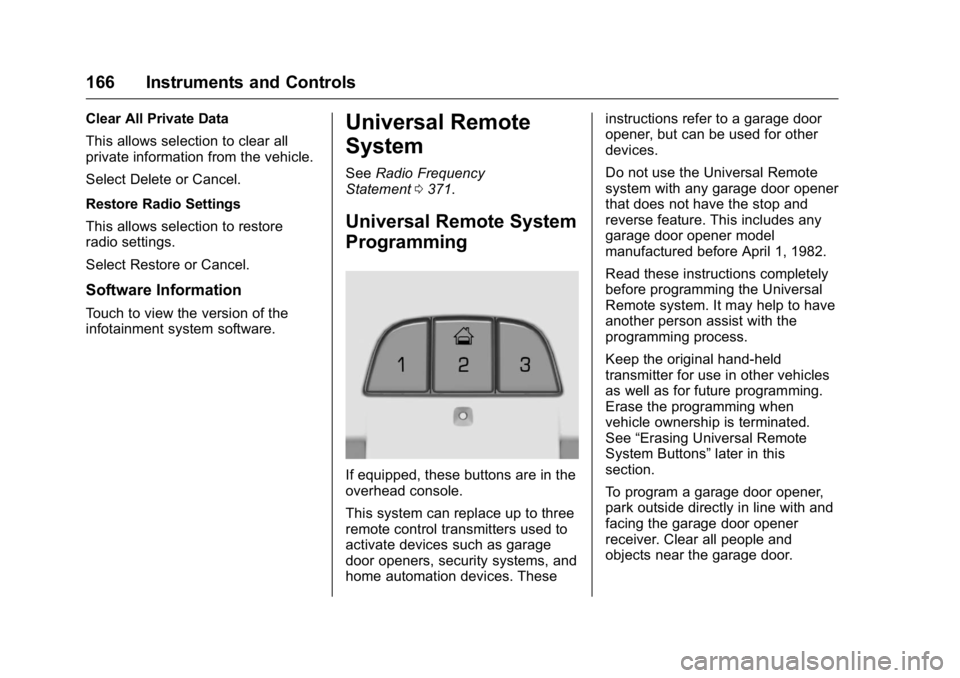
If equipped, these buttons are in the
overhead console.
This system can replace up to three
remote control transmitters used to
activate devices such as garage
door openers, security systems, and
home automation devices. These instructions refer to a garage door
opener, but can be used for other
devices.
Do not use the Universal Remote
system with any garage door opener
that does not have the stop and
reverse feature. This includes any
garage door opener model
manufactured before April 1, 1982.
Read these instructions completely
before programming the Universal
Remote system. It may help to have
another person assist with the
programming process.
Keep the original hand-held
transmitter for use in other vehicles
as well as for future programming.
Erase the programming when
vehicle ownership is terminated.
See “ Erasing Universal Remote
System Buttons ” later in this
section.
To program a garage door opener,
park outside directly in line with and
facing the garage door opener
receiver. Clear all people and
objects near the garage door.
Page 178 of 397

Cadillac CT6 Owner Manual (GMNA-Localizing-U.S./Canada-9235592) -
2016 - crc - 11/6/15
Infotainment System 177
Infotainment
System Introduction Infotainment . . . . . . . . . . . . . . . . . . 177
Introduction Infotainment See the infotainment manual for
information on the radio, audio
players, rear seat infotainment,
phone, navigation system, and
voice or speech recognition. It also
includes information on settings.
Page 183 of 397

Cadillac CT6 Owner Manual (GMNA-Localizing-U.S./Canada-9235592) -
2016 - crc - 11/6/15
182 Climate Controls CautionDo not try to clear frost or other
material from the inside of the
front windshield and rear window
with a razor blade or anything
else that is sharp. This may
damage the rear window
defogger grid and affect the
radio's ability to pick up stations
clearly. The repairs would not be
covered by the vehicle warranty.
Driver and Passenger Heated and
Ventilated Seats (If Equipped) :
Press
I or
+ to heat the driver or
passenger seatback only.
Press
J or
z to heat the driver or
passenger seat cushion and
seatback.
Press
C or
{ to ventilate the driver
or passenger seat. See Heated and
Ventilated Front Seats 0 64 .
Remote Start Climate Control
Operation : If equipped with the
remote start feature, the climate
control system may run when the vehicle is started remotely. The
system uses the driver ’ s previous
settings to heat or cool the inside of
the vehicle. The rear defog may
come on during remote start based
on cold ambient conditions. The
rear defog indicator light does not
come on during a remote start.
If equipped with heated or ventilated
seats, they may come on during a
remote start. See Remote Vehicle
Start 0 36 and Heated and
Ventilated Front Seats 0 64 .
Sensor The solar sensor, on top of the
instrument panel near the
windshield, monitors the solar heat.
The climate control system uses the
sensor information to adjust the
temperature, fan speed,
recirculation, and air delivery mode
for best comfort.
If the sensor is covered, the
automatic climate control system
may not work properly.
Page 189 of 397

Cadillac CT6 Owner Manual (GMNA-Localizing-U.S./Canada-9235592) -
2016 - crc - 11/6/15
188 Climate Controls Pressing this button cancels
automatic recirculation. Press AUTO
to return to automatic operation;
recirculation runs automatically as
needed.
Manual recirculation mode is not
available when in Defrost or Defog
modes.
Auto Defog : The climate control
system may have a sensor to
automatically detect high humidity
inside the vehicle. When high
humidity is detected, the climate
control system may adjust to
outside air supply and turn on the
air conditioner. If the climate control
system does not detect possible
window fogging, it returns to normal
operation. To turn Auto Defog off or
on, see “ Climate and Air Quality ”
under Vehicle
Personalization 0 157 .
Ionizer : If equipped with an ionizer,
this feature helps to clean the air
inside the vehicle and remove
contaminants; such as pollen,
odors, and dust. If the climate
control system is on and the ionizer
is enabled, the ionizer status indicator will be lit on the climate
control touch screen. To turn the
ionizer on or off, see “ Climate and
Air Quality ” under Vehicle
Personalization 0 157 .
Rear Window Defogger
K : Press to turn the rear window
defogger on or off.
The rear window defogger can be
set to automatic operation. See
“ Climate and Air Quality ” under
Vehicle Personalization 0 157 .
When Auto Rear Defog is selected,
the rear window defogger turns on
automatically when the interior
temperature is cold and the outside
temperature is about 4 °C (40 °F)
and below.
The upper grid lines on the rear
window are antenna lines and are
not intended to heat when the
defogger is activated.
The heated outside rearview mirrors
turn on when the rear window
defogger button is on and help to
clear fog or frost from the surface of
the mirrors. CautionDo not try to clear frost or other
material from the inside of the
front windshield and rear window
with a razor blade or anything
else that is sharp. This may
damage the rear window
defogger grid and affect the
radio's ability to pick up stations
clearly. The repairs would not be
covered by the vehicle warranty.
Driver and Passenger Heated and
Ventilated Seats (If Equipped) :
Press
I or
+ to heat the driver or
passenger seatback only.
Press
J or
z to heat the driver or
passenger seat cushion and
seatback.
Press
C or
{ to ventilate the driver
or passenger seat. See Heated and
Ventilated Front Seats 0 64 .
Remote Start Climate Control
Operation : If equipped with the
remote start feature, the climate
control system may run when the