Rear view camera CADILLAC CT6 2017 1.G Owners Manual
[x] Cancel search | Manufacturer: CADILLAC, Model Year: 2017, Model line: CT6, Model: CADILLAC CT6 2017 1.GPages: 337, PDF Size: 3.89 MB
Page 6 of 337
Cadillac CT6 Owner Manual (GMNA-Localizing-MidEast-10293390) - 2017 -
CRC - 6/21/16
IN BRIEF 5
In Brief
Instrument Panel
Instrument Panel Overview . . . . . . . . . 6
Initial Drive Information
Initial Drive Information . . . . . . . . . . . 8
Stop/Start System . . . . . . . . . . . . . . . . . . . 8
Remote Keyless Entry (RKE)System . . . . . . . . . . . . . . . . . . . . . . . . . . . . . 8
Remote Vehicle Start . . . . . . . . . . . . . . . 9
Door Locks . . . . . . . . . . . . . . . . . . . . . . . . . . 9
Trunk . . . . . . . . . . . . . . . . . . . . . . . . . . . . . . . 10
Windows . . . . . . . . . . . . . . . . . . . . . . . . . . . 10
Seat Adjustment . . . . . . . . . . . . . . . . . . . 10
Memory Features . . . . . . . . . . . . . . . . . . 12
Second Row Seats . . . . . . . . . . . . . . . . . 13
Heated and Ventilated Seats . . . . . . 14
Head Restraint Adjustment . . . . . . . 14
Safety Belts . . . . . . . . . . . . . . . . . . . . . . . . . 14
Passenger Sensing System . . . . . . . . 15
Mirror Adjustment . . . . . . . . . . . . . . . . 15
Steering Wheel Adjustment . . . . . . . 16
Interior Lighting . . . . . . . . . . . . . . . . . . . 16
Exterior Lighting . . . . . . . . . . . . . . . . . . . 17
Windshield Wiper/Washer . . . . . . . . 17
Climate Controls . . . . . . . . . . . . . . . . . . . 18
Transmission . . . . . . . . . . . . . . . . . . . . . . . 19
Vehicle Features
Infotainment System . . . . . . . . . . . . . . 19
Steering Wheel Controls . . . . . . . . . . 19
Cruise Control . . . . . . . . . . . . . . . . . . . . . 20
Driver Information Center (DIC) . . . . . . . . . . . . . . . . . . . . . . 20
Forward Collision Alert (FCA) System . . . . . . . . . . . . . . . . . . . . . . . . . . . . 21
Night Vision System . . . . . . . . . . . . . . . 21
Forward Automatic Braking (FAB) . . . . . . . . . . . . . . . . . . . . 21
Front Pedestrian Braking (FPB) System . . . . . . . . . . . . . . . . . . . . . . . . . . . . 21
Lane Keep Assist (LKA) . . . . . . . . . . . 21
Lane Change Alert (LCA) . . . . . . . . . . 22
Surround Vision . . . . . . . . . . . . . . . . . . . 22
Rear Vision Camera (RVC) . . . . . . . . 22
Rear Cross Traffic Alert (RCTA) System . . . . . . . . . . . . . . . . . . . . . . . . . . . . 22
Parking Assist . . . . . . . . . . . . . . . . . . . . . . 22
Automatic Parking Assist (APA) . . . . . . . . . . . . . . . . . . . . . . 22
Reverse Automatic Braking (RAB) . . . . . . . . . . . . . . . . . . . . 23
Power Outlets . . . . . . . . . . . . . . . . . . . . . . 23
Universal Remote System . . . . . . . . . 23
Sunroof . . . . . . . . . . . . . . . . . . . . . . . . . . . . . 24
Performance and Maintenance
Traction Control/Electronic Stability Control . . . . . . . . . . . . . . . . . . 24
Tire Pressure Monitor . . . . . . . . . . . . . 25
Fuel (LGW 3.0L V6 Twin Turbo Engine) . . . . . . . . . . . . . . . . . . . . . . . . . . . 25
Fuel (LGX 3.6L V6 Engine) . . . . . . . . 26
Engine Oil Life System . . . . . . . . . . . . 26
Driving for Better Fuel Economy . . . . . . . . . . . . . . . . . . . . . . . . . . 26
Page 16 of 337

Cadillac CT6 Owner Manual (GMNA-Localizing-MidEast-10293390) - 2017 -
CRC - 6/21/16
IN BRIEF 15
.Lap-Shoulder Belt 069.
. Lower Anchors and Tethers for
Children (LATCH System) 091.
Passenger Sensing System
The passenger sensing system turns
off the front outboard passenger
frontal airbag and knee airbag under
certain conditions. No other airbag is
affected by the passenger sensing
system. See Passenger Sensing
System 079.
The passenger airbag status indicator
will light on the overhead console
when the vehicle is started. See
Passenger Airbag Status
Indicator 0126.
Mirror Adjustment
Exterior Mirror
1. Move the selector switch to L
(Left) or R (Right) to choose the
driver or passenger mirror.
2. Press one of the four arrows to move the mirror.
3. Move the selector switch to
)to
deselect the mirror.
The vehicle has manual folding
mirrors or, if equipped, power folding
mirrors. See Power Mirrors 046.
Interior Mirror
Adjustment
Adjust the rearview mirror for a clear
view of the area behind your vehicle.
Automatic Dimming Rearview Mirror
Automatic dimming reduces the glare
of headlamps from behind. The
dimming feature comes on when the
vehicle is started.
Rear Camera Mirror
If equipped, this automatic dimming
rearview mirror provides a wide angle
camera view of the area behind the
vehicle. For ease of use, adjust the
mirror for a clear view of the area
behind the vehicle while the display is
off. See Rear Camera Mirror 047.
Page 23 of 337
Cadillac CT6 Owner Manual (GMNA-Localizing-MidEast-10293390) - 2017 -
CRC - 6/21/16
22 IN BRIEF
Lane Change Alert (LCA)
If equipped, the LCA system is a
lane-changing aid that assists drivers
with avoiding lane change crashes
that occur with moving vehicles in the
side blind zone (or spot) areas or with
vehicles rapidly approaching these
areas from behind. The LCA warning
display will light up in the
corresponding outside side mirror and
will flash if the turn signal is on. The
Side Blind Zone Alert (SBZA) system
is included as part of the LCA system.
SeeSide Blind Zone Alert (SBZA) 0236
and Lane Change Alert (LCA) 0236.
Surround Vision
If equipped, views around the vehicle
display in the infotainment display to
aid with parking and low-speed
maneuvers.
See “Surround Vision ”under
Assistance Systems for Parking or
Backing 0222. Front Vision Camera
If equipped, a view of the area in front
of the vehicle displays on the
infotainment display to aid with
parking and low-speed maneuvers.
See
“Front Vision Camera ”under
Assistance Systems for Parking or
Backing 0222.
Rear Vision Camera (RVC)
If equipped, RVC displays a view of
the area behind the vehicle on the
infotainment display when the vehicle
is shifted into R (Reverse) to aid with
parking and low-speed backing
maneuvers.
See Assistance Systems for Parking or
Backing 0222.
Rear Cross Traffic Alert
(RCTA) System
If equipped, the RCTA system uses a
triangle with an arrow displayed on
the infotainment display to warn of
traffic behind your vehicle that may
cross your vehicle's path while in
R (Reverse). In addition, beeps will
sound, or the driver seat will pulse. See
Assistance Systems for Parking or
Backing 0222.
Parking Assist
If equipped, Rear Parking Assist (RPA)
uses sensors on the rear bumper to
assist with parking and avoiding
objects while in R (Reverse).
It operates at speeds less than 8 km/h
(5 mph). RPA may display a warning
triangle on the Rear Vision Camera
screen and a graphic on the
instrument cluster to provide the
object distance. In addition, multiple
beeps or seat pulses may occur if very
close to an object.
The vehicle may also have the Front
Parking Assist system.
See Assistance Systems for Parking or
Backing 0222.
Automatic Parking
Assist (APA)
If equipped, the APA system helps to
search for and maneuver the vehicle
into parallel or perpendicular parking
spots using automatic steering,
Page 29 of 337
Cadillac CT6 Owner Manual (GMNA-Localizing-MidEast-10293390) - 2017 -
CRC - 6/21/16
28 KEYS, DOORS, AND WINDOWS
Keys, Doors, and
Windows
Keys and Locks
Keys . . . . . . . . . . . . . . . . . . . . . . . . . . . . . . . . 28
Remote Keyless Entry (RKE)System . . . . . . . . . . . . . . . . . . . . . . . . . . . . 29
Remote Keyless Entry (RKE) System Operation . . . . . . . . . . . . . . . . 29
Remote Vehicle Start . . . . . . . . . . . . . . 34
Door Locks . . . . . . . . . . . . . . . . . . . . . . . . . 35
Power Door Locks . . . . . . . . . . . . . . . . . 37
Delayed Locking . . . . . . . . . . . . . . . . . . . 37
Automatic Door Locks . . . . . . . . . . . . 38
Lockout Protection . . . . . . . . . . . . . . . . 38
Safety Locks . . . . . . . . . . . . . . . . . . . . . . . . 38
Doors
Trunk . . . . . . . . . . . . . . . . . . . . . . . . . . . . . . . 39
Vehicle Security
Vehicle Security . . . . . . . . . . . . . . . . . . . . 42
Vehicle Alarm System . . . . . . . . . . . . . 42
Immobilizer Operation . . . . . . . . . . . . 44
Exterior Mirrors
Convex Mirrors . . . . . . . . . . . . . . . . . . . . 45
Power Mirrors . . . . . . . . . . . . . . . . . . . . . . 46
Folding Mirrors . . . . . . . . . . . . . . . . . . . . 46 Heated Mirrors . . . . . . . . . . . . . . . . . . . . . 46
Automatic Dimming Mirror . . . . . . . 46
Reverse Tilt Mirrors . . . . . . . . . . . . . . . 46
Interior Mirrors
Interior Rearview Mirrors . . . . . . . . . 47
Automatic Dimming Rearview
Mirror . . . . . . . . . . . . . . . . . . . . . . . . . . . . . 47
Rear Camera Mirror . . . . . . . . . . . . . . . 47
Windows
Windows . . . . . . . . . . . . . . . . . . . . . . . . . . . 49
Power Windows . . . . . . . . . . . . . . . . . . . . 49
Sun Visors . . . . . . . . . . . . . . . . . . . . . . . . . . 51
Rear Window Sunshade . . . . . . . . . . . 51
Roof
Sunroof . . . . . . . . . . . . . . . . . . . . . . . . . . . . . 52
Keys and Locks
Keys
{Warning
Leaving children in a vehicle with a
Remote Keyless Entry (RKE)
transmitter is dangerous and
children or others could be
seriously injured or killed. They
could operate the power windows
or other controls or make the
vehicle move. The windows will
function with the RKE transmitter
in the vehicle, and children or
others could be caught in the path
of a closing window. Do not leave
children in a vehicle with an RKE
transmitter.
Page 48 of 337

Cadillac CT6 Owner Manual (GMNA-Localizing-MidEast-10293390) - 2017 -
CRC - 6/21/16
KEYS, DOORS, AND WINDOWS 47
The mirror(s) return to the original
position when:
.The vehicle is shifted out of
R (Reverse), or remains in
R (Reverse) for about 30 seconds.
. The ignition is turned off.
. The vehicle is driven in
R (Reverse) above a set speed.
To turn this feature on or off, see
Vehicle Personalization 0152.Interior Mirrors
Interior Rearview Mirrors
Adjust the rearview mirror for a clear
view of the area behind your vehicle.
Do not spray glass cleaner directly on
the mirror. Use a soft towel dampened
with water.
Automatic Dimming
Rearview Mirror
The vehicle has an automatic
dimming rearview mirror. The mirror
will automatically reduce the glare
from the headlamps from behind. The
dimming feature comes on when the
vehicle is started.
Rear Camera Mirror
If equipped, this automatic dimming
mirror provides a wide angle camera
view of the area behind the vehicle.
Pull the tab rearward to turn on the
display. Push the tab forward to turn
it off. When off, the mirror is
automatic dimming. Adjust the mirror
for a clear view of the area behind the
vehicle while the display is off.
Page 49 of 337
Cadillac CT6 Owner Manual (GMNA-Localizing-MidEast-10293390) - 2017 -
CRC - 6/21/16
48 KEYS, DOORS, AND WINDOWS
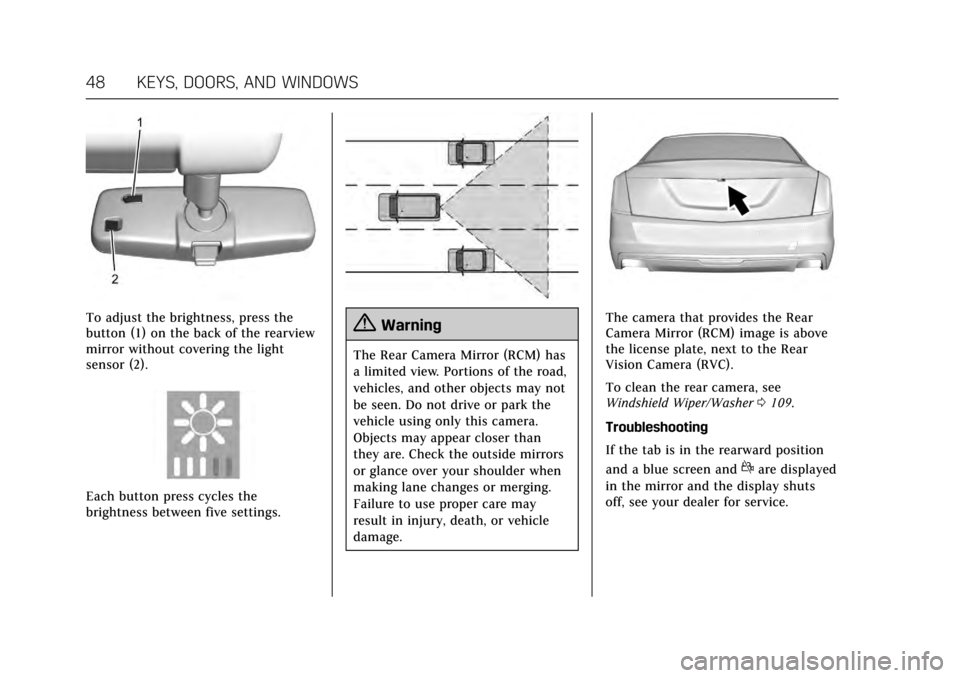
To adjust the brightness, press the
button (1) on the back of the rearview
mirror without covering the light
sensor (2).
Each button press cycles the
brightness between five settings.
{Warning
The Rear Camera Mirror (RCM) has
a limited view. Portions of the road,
vehicles, and other objects may not
be seen. Do not drive or park the
vehicle using only this camera.
Objects may appear closer than
they are. Check the outside mirrors
or glance over your shoulder when
making lane changes or merging.
Failure to use proper care may
result in injury, death, or vehicle
damage.
The camera that provides the Rear
Camera Mirror (RCM) image is above
the license plate, next to the Rear
Vision Camera (RVC).
To clean the rear camera, see
Windshield Wiper/Washer0109.
Troubleshooting
If the tab is in the rearward position
and a blue screen and
dare displayed
in the mirror and the display shuts
off, see your dealer for service.
Page 50 of 337
Cadillac CT6 Owner Manual (GMNA-Localizing-MidEast-10293390) - 2017 -
CRC - 6/21/16
KEYS, DOORS, AND WINDOWS 49
The RCM may not work properly or
display a clear image if:
.There is glare from the sun or
headlamps. This may obstruct
objects from view.
. Dirt, snow, or other debris blocks
the camera lens. Clean the lens
with a soft damp cloth.
. The back of the vehicle has been
damaged and the position and
mounting angle of the camera has
changed.Windows
{Warning
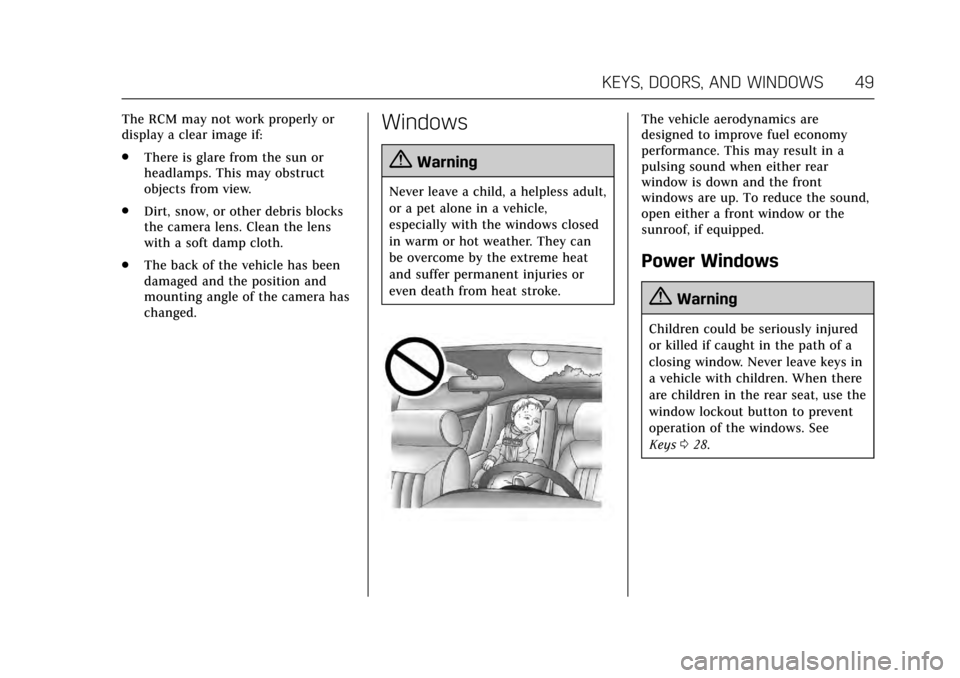
Never leave a child, a helpless adult,
or a pet alone in a vehicle,
especially with the windows closed
in warm or hot weather. They can
be overcome by the extreme heat
and suffer permanent injuries or
even death from heat stroke.
The vehicle aerodynamics are
designed to improve fuel economy
performance. This may result in a
pulsing sound when either rear
window is down and the front
windows are up. To reduce the sound,
open either a front window or the
sunroof, if equipped.
Power Windows
{Warning
Children could be seriously injured
or killed if caught in the path of a
closing window. Never leave keys in
a vehicle with children. When there
are children in the rear seat, use the
window lockout button to prevent
operation of the windows. See
Keys 028.
Page 147 of 337

Cadillac CT6 Owner Manual (GMNA-Localizing-MidEast-10293390) - 2017 -
CRC - 6/21/16
146 INSTRUMENTS AND CONTROLS
(FCA), and the Forward Automatic
Braking (FAB) may not work or may
not work as well. The vehicle does not
need service.
AUTOMATIC COLLISION PREP OFF
This message displays when the
Forward Automatic Braking (FAB) has
been turned off. SeeForward
Automatic Braking (FAB) 0230.
AUTOMATIC COLLISION PREP
REDUCED
If the vehicle has Adaptive Cruise
Control (ACC), this message displays
when the Forward Automatic Braking
(FAB) has been set to the Alert
setting. This setting disables FAB
functions. See Forward Automatic
Braking (FAB) 0230.
AUTOMATIC COLLISION PREP
UNAVAILABLE
This message displays when the
Forward Automatic Braking (FAB) has
been unavailable for some time. The FAB System does not need service.
This message can display under the
following conditions:
.
The front of the vehicle or
windshield is not clean. Keep
these areas clean and free of mud,
dirt, snow, ice, and slush. For
cleaning instructions, see Exterior
Care 0301.
. Heavy rain or snow is interfering
with the object detection
performance.
This message may also be displayed if
there is a problem with the StabiliTrak
system. See Traction Control/Electronic
Stability Control 0208.
FORWARD COLLISION ALERT OFF
This message displays when the
Forward Collision Alert has been
turned off.
FRONT CAMERA BLOCKED CLEAN
WINDSHIELD
This message displays when the
camera is blocked. The Front
Pedestrian Braking (FPB), Forward Collision Alert (FCA), Forward
Automatic Braking (FAB), Lane Keep
Assist (LKA), and Lane Departure
Warning (LDW) features will not
operate. Cleaning the outside of the
windshield behind the rearview mirror
may correct the issue.
LANE CHANGE ALERT OFF
This message indicates that the driver
has turned the Side Blind Zone Alert
(SBZA) and Lane Change Alert (LCA)
systems off.
LANE KEEPING ASSIST
UNAVAILABLE
This message displays when the Lane
Keep Assist (LKA) and Lane Departure
Warning (LDW) system is temporarily
unavailable. The LKA system does not
need service.
This message could be due to the
camera being blocked. Clean the
outside of the windshield behind the
rearview mirror.
Page 160 of 337

Cadillac CT6 Owner Manual (GMNA-Localizing-MidEast-10293390) - 2017 -
CRC - 6/21/16
INSTRUMENTS AND CONTROLS 159
Inversion
Select and the following may display:
.Up/Down
. Left/Right
. Information
Up/Down
This feature allows the finger gesture
to be changed.
Touch to select Default or Inverted.
Left/Right
This feature allows the finger gesture
to be changed.
Touch to select Default or Inverted.
Information
Touch to read more about the
inversion feature.
Cursor Tracking Speed
This feature changes the speed of the
cursor tracking.
Select Faster, Normal, or Slower.Display
Select and the following may display:
. Proximity Sensing
. Calibrate Touchscreen
. Turn Display Off
Proximity Sensing
When on, certain screen buttons and
features will become visible when a
hand approaches the screen.
Select Off, On, or On-Map Only.
Calibrate Touchscreen
Select to calibrate the touchscreen,
then follow the prompts.
Turn Display Off
Select to turn the display off. Touch
anywhere on the display area or any
faceplate button to turn the
display on.
Rear Camera
This allows for Rear Park Assist
Symbols and Guidance Lines to be
turned off or on.
Select Off or On for the desired
feature. See
Assistance Systems for Parking or
Backing 0222.
Return to Factory Settings
Select and the following may display:
.
Restore Vehicle Settings
. Clear All Private Data
. Restore Radio Settings
Restore Vehicle Settings
This allows selection of restoring
vehicle settings.
Select Restore or Cancel.
Clear All Private Data
This allows selection to clear all
private information from the vehicle.
Select Delete or Cancel.
Restore Radio Settings
This allows selection to restore radio
settings.
Select Restore or Cancel.
Software Information
Touch to view the version of the
infotainment system software.
Page 222 of 337

Cadillac CT6 Owner Manual (GMNA-Localizing-MidEast-10293390) - 2017 -
CRC - 6/21/16
DRIVING AND OPERATING 221
Do not use ACC when driving on steep
hills or when towing a trailer. For
towing capability, seeGeneral Towing
Information 0243. ACC will not detect
a vehicle in the lane while driving on
steep hills. The driver will often need
to take over acceleration and braking
on steep hills, especially when towing
a trailer. If the brakes are applied, the
ACC disengages.
Disengaging ACC
There are three ways to
disengage ACC:
. Step lightly on the brake pedal.
. Press
*.
. Press
J. Erasing Speed Memory
The ACC set speed is erased from
memory if
Jis pressed or if the
ignition is turned off.
Cleaning the Sensing System
The camera sensor on the windshield
behind the rearview mirror and the
radar sensors on the front of the
vehicle can become blocked by snow,
ice, dirt, or mud. These areas need to
be cleaned for ACC to operate
properly.
For cleaning instructions, see
“Washing the Vehicle ”under Exterior
Care 0301.
System operation may also be limited
under snow, heavy rain, or road spray
conditions.
Driver Assistance
Systems
This vehicle may have features that
work together to help avoid crashes or
reduce crash damage while driving,
backing, and parking. Read this entire
section before using these systems.
{Warning
Do not rely on the Driver
Assistance Systems. These systems
do not replace the need for paying
attention and driving safely. You
may not hear or feel alerts or
warnings provided by these
systems. Failure to use proper care
when driving may result in injury,
death, or vehicle damage. See
Defensive Driving 0185.
Under many conditions, these
systems will not: . Detect children, pedestrians,
bicyclists, or animals.
(Continued)