lights CADILLAC CT6 2017 1.G Owners Manual
[x] Cancel search | Manufacturer: CADILLAC, Model Year: 2017, Model line: CT6, Model: CADILLAC CT6 2017 1.GPages: 337, PDF Size: 3.89 MB
Page 15 of 337
Cadillac CT6 Owner Manual (GMNA-Localizing-MidEast-10293390) - 2017 -
CRC - 6/21/16
14 IN BRIEF
With the ignition in ON/RUN, pressM
orLto heat the left or right outboard
seat cushion.
With the ignition in ON/RUN, press
C
or{to ventilate the left or right
outboard seat.
See Heated and Ventilated Rear
Seats 066.
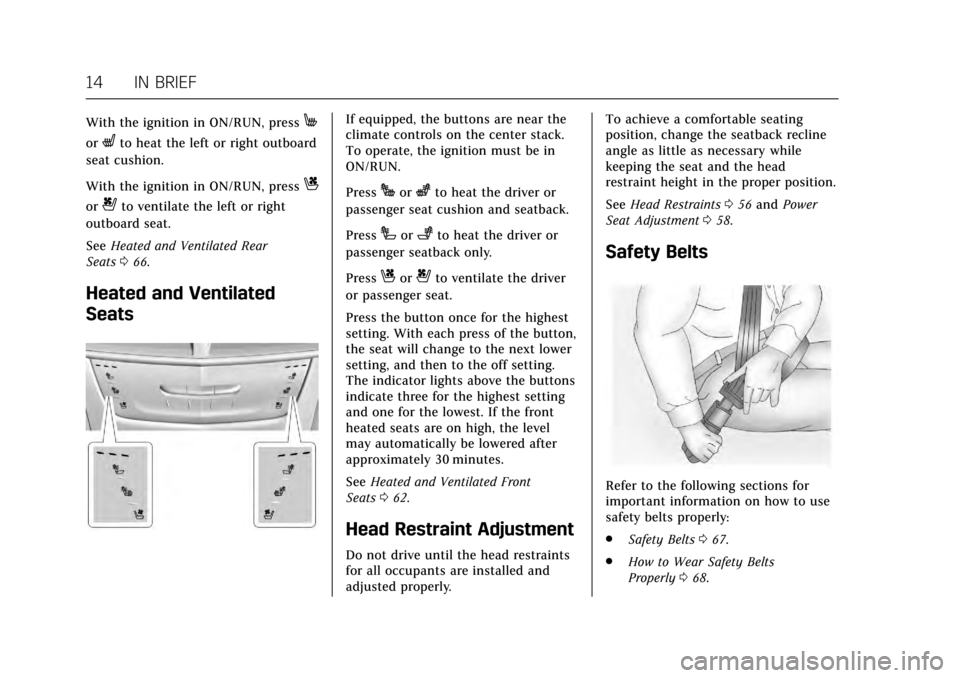
Heated and Ventilated
Seats
If equipped, the buttons are near the
climate controls on the center stack.
To operate, the ignition must be in
ON/RUN.
Press
Jorzto heat the driver or
passenger seat cushion and seatback.
Press
Ior+to heat the driver or
passenger seatback only.
Press
Cor{to ventilate the driver
or passenger seat.
Press the button once for the highest
setting. With each press of the button,
the seat will change to the next lower
setting, and then to the off setting.
The indicator lights above the buttons
indicate three for the highest setting
and one for the lowest. If the front
heated seats are on high, the level
may automatically be lowered after
approximately 30 minutes.
See Heated and Ventilated Front
Seats 062.
Head Restraint Adjustment
Do not drive until the head restraints
for all occupants are installed and
adjusted properly. To achieve a comfortable seating
position, change the seatback recline
angle as little as necessary while
keeping the seat and the head
restraint height in the proper position.
See
Head Restraints 056 and Power
Seat Adjustment 058.
Safety Belts
Refer to the following sections for
important information on how to use
safety belts properly:
.
Safety Belts 067.
. How to Wear Safety Belts
Properly 068.
Page 18 of 337

Cadillac CT6 Owner Manual (GMNA-Localizing-MidEast-10293390) - 2017 -
CRC - 6/21/16
IN BRIEF 17
For more information on interior
lighting, seeInstrument Panel
Illumination Control 0167.
Exterior Lighting
The exterior lamp control is on the
turn signal lever.
Turn the control to the following
positions:
O:Turns off the exterior lamps. The
knob returns to the AUTO position
after it is released. Turn to
Oagain to
reactivate the AUTO mode.
AUTO : Automatically turns the
exterior lamps on and off, depending
on outside lighting.
;: Turns on the parking lamps
including all lamps, except the
headlamps.
5: Turns on the headlamps together
with the parking lamps and
instrument panel lights.
See:
. Exterior Lamp Controls 0163.
. Turn and Lane-Change
Signals 0166.
Windshield Wiper/Washer
With the ignition in ACC/ACCESSORY
or ON/RUN, move the lever up or
down to select the wiper speed.
HI : Use for fast wipes.
LO : Use for slow wipes.
AUTO : Use this setting for
intermittent wipes when Rainsense ™
is disabled, or for Rainsense wipes
when it is enabled. For intermittent
wipes, move the lever up to AUTO,
then turn the band on the wiper lever
up for more frequent wipes or down
for less frequent wipes.
If Rainsense is enabled in vehicle
personalization, move the lever up to
AUTO, then turn the band on the
wiper lever to adjust the sensitivity to
moisture.
. Turn the band up for more
sensitivity to moisture.
. Turn the band down for less
sensitivity to moisture.
Page 44 of 337
Cadillac CT6 Owner Manual (GMNA-Localizing-MidEast-10293390) - 2017 -
CRC - 6/21/16
KEYS, DOORS, AND WINDOWS 43
If the driver door is opened without
first unlocking with the RKE
transmitter, the horn will chirp and
the lights will flash to indicate
pre-alarm. If the vehicle is not started,
or the door is not unlocked by
pressing
Kon the RKE transmitter
during the 10-second pre-alarm, the
alarm will be activated.
The alarm will also be activated if a
passenger door, the trunk, or the hood
is opened without first disarming the
system. When the alarm is activated,
the turn signals flash and the horn
sounds for about 30 seconds. The
alarm system will then re-arm to
monitor the next unauthorized event.
Disarming the Alarm System
To disarm the alarm system or turn
off the alarm if it has been activated:
. Press
Kon the RKE transmitter.
. Unlock the vehicle using the
Keyless Access system.
. Start the vehicle. To avoid setting off the alarm by
accident:
.
Lock the vehicle after all
occupants have left the vehicle
and all doors are closed.
. Always unlock a door with the
RKE transmitter or use the Keyless
Access system.
Unlocking the driver door with the key
will not disarm the system or turn off
the alarm.
How to Detect a Tamper
Condition
IfKis pressed on the RKE
transmitter and the horn chirps and
the lights flash three times, a previous
alarm occurred while the system was
armed.
If the alarm has been activated, a
message will appear on the DIC. See
Security Messages 0149.
Power Sounder, Inclination
Sensor, and Intrusion Sensor
In addition to the standard
theft-deterrent system features, this
system may also have a power
sounder, inclination sensor, and
intrusion sensor.
The power sounder provides an
audible alarm, which is distinct from
the vehicle’s horn. It has its own
power source, and can sound an alarm
if the vehicle’s battery is
compromised.
The inclination sensor can set off the
alarm if it senses movement of the
vehicle, such as a change in vehicle
orientation.
The intrusion sensor monitors the
vehicle interior, and can activate the
alarm if it senses unauthorized entry
into the vehicle’s interior. Do not
allow passengers or pets to remain in
the vehicle when the intrusion sensor
is activated.
Page 64 of 337
Cadillac CT6 Owner Manual (GMNA-Localizing-MidEast-10293390) - 2017 -
CRC - 6/21/16
SEATS AND RESTRAINTS 63
Warning (Continued)
overheat. An overheated seat heater
may cause a burn or may damage
the seat.
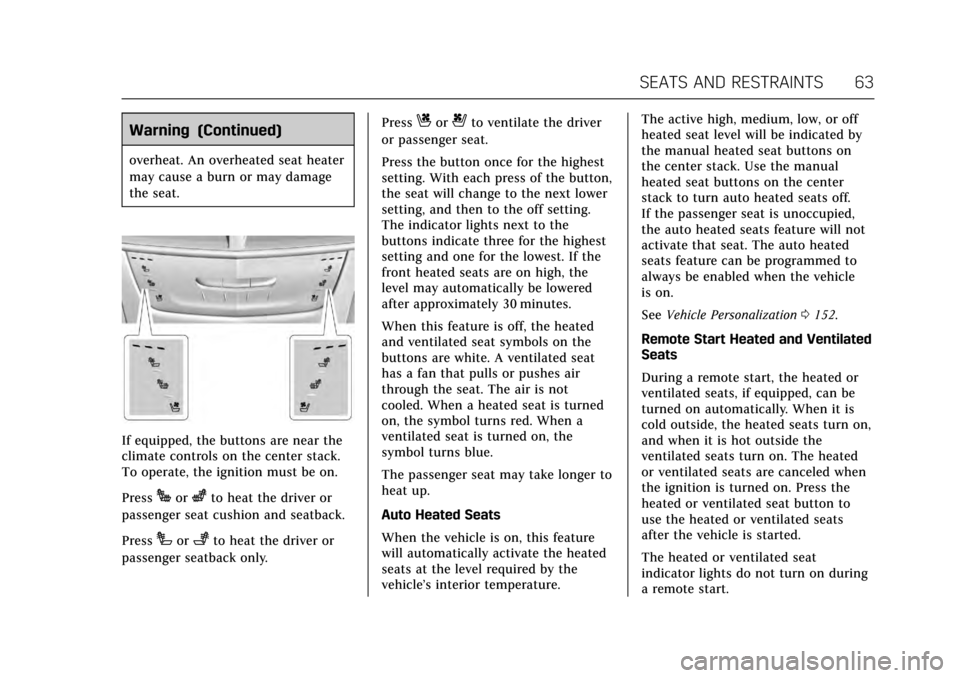
If equipped, the buttons are near the
climate controls on the center stack.
To operate, the ignition must be on.
Press
Jorzto heat the driver or
passenger seat cushion and seatback.
Press
Ior+to heat the driver or
passenger seatback only. Press
Cor{to ventilate the driver
or passenger seat.
Press the button once for the highest
setting. With each press of the button,
the seat will change to the next lower
setting, and then to the off setting.
The indicator lights next to the
buttons indicate three for the highest
setting and one for the lowest. If the
front heated seats are on high, the
level may automatically be lowered
after approximately 30 minutes.
When this feature is off, the heated
and ventilated seat symbols on the
buttons are white. A ventilated seat
has a fan that pulls or pushes air
through the seat. The air is not
cooled. When a heated seat is turned
on, the symbol turns red. When a
ventilated seat is turned on, the
symbol turns blue.
The passenger seat may take longer to
heat up.
Auto Heated Seats
When the vehicle is on, this feature
will automatically activate the heated
seats at the level required by the
vehicle’s interior temperature. The active high, medium, low, or off
heated seat level will be indicated by
the manual heated seat buttons on
the center stack. Use the manual
heated seat buttons on the center
stack to turn auto heated seats off.
If the passenger seat is unoccupied,
the auto heated seats feature will not
activate that seat. The auto heated
seats feature can be programmed to
always be enabled when the vehicle
is on.
See
Vehicle Personalization 0152.
Remote Start Heated and Ventilated
Seats
During a remote start, the heated or
ventilated seats, if equipped, can be
turned on automatically. When it is
cold outside, the heated seats turn on,
and when it is hot outside the
ventilated seats turn on. The heated
or ventilated seats are canceled when
the ignition is turned on. Press the
heated or ventilated seat button to
use the heated or ventilated seats
after the vehicle is started.
The heated or ventilated seat
indicator lights do not turn on during
a remote start.
Page 68 of 337

Cadillac CT6 Owner Manual (GMNA-Localizing-MidEast-10293390) - 2017 -
CRC - 6/21/16
SEATS AND RESTRAINTS 67
indicator on the climate control
display appears when this feature
is on.
On vehicles without rear climate
controls, press the button again to
turn this feature off. The light on the
button will turn off. On vehicles with
rear climate controls, this feature
turns on the heated seat at the
highest setting. With each press of the
button, the heated seat changes to the
next lower setting, and then the off
setting. Three lights indicate the
highest setting, and one light
indicates the lowest. If the heated
seats are on high, the level may
automatically be lowered after
approximately 30 minutes.Rear Seat
Pass-Through Door
Some vehicles have a rear seat
pass-through door in the center of the
rear seatback. Fold down the center
armrest and pull the latch to open
the door.
Safety Belts
This section of the manual describes
how to use safety belts properly.
It also describes some things not to
do with safety belts.
{Warning
Do not let anyone ride where a
safety belt cannot be worn properly.
In a crash, if you or your
passenger(s) are not wearing safety
belts, injuries can be much worse
than if you are wearing safety belts.
You can be seriously injured or
killed by hitting things inside the
vehicle harder or by being ejected
from the vehicle. In addition,
anyone who is not buckled up can
strike other passengers in the
vehicle.
It is extremely dangerous to ride in
a cargo area, inside or outside of a
vehicle. In a collision, passengers
riding in these areas are more likely
to be seriously injured or killed. Do
not allow passengers to ride in any(Continued)
Page 108 of 337
Cadillac CT6 Owner Manual (GMNA-Localizing-MidEast-10293390) - 2017 -
CRC - 6/21/16
INSTRUMENTS AND CONTROLS 107
Instruments and
Controls
Controls
Steering Wheel Adjustment . . . . . 108
Steering Wheel Controls . . . . . . . . . 108
Heated Steering Wheel . . . . . . . . . . 108
Horn . . . . . . . . . . . . . . . . . . . . . . . . . . . . . . . 109
Windshield Wiper/Washer . . . . . . . 109
Clock . . . . . . . . . . . . . . . . . . . . . . . . . . . . . . 111
Power Outlets . . . . . . . . . . . . . . . . . . . . . 111
Wireless Charging . . . . . . . . . . . . . . . . 113
Cigarette Lighter . . . . . . . . . . . . . . . . . . 114
Ashtrays . . . . . . . . . . . . . . . . . . . . . . . . . . 114
Warning Lights, Gauges, and
Indicators
Warning Lights, Gauges, andIndicators . . . . . . . . . . . . . . . . . . . . . . . 114
Instrument Cluster (Base Level) . . . . . . . . . . . . . . . . . . . . . . . . . . . . 115
Instrument Cluster (Uplevel) . . . . 118
Speedometer . . . . . . . . . . . . . . . . . . . . . . 121
Odometer . . . . . . . . . . . . . . . . . . . . . . . . . 121
Trip Odometer . . . . . . . . . . . . . . . . . . . . 121
Tachometer . . . . . . . . . . . . . . . . . . . . . . . 121
Fuel Gauge . . . . . . . . . . . . . . . . . . . . . . . . 121
Boost Gauge (Performance Configuration Only) . . . . . . . . . . . . 122 Engine Oil Pressure Gauge (Base
Level Cluster) . . . . . . . . . . . . . . . . . . . 123
Engine Oil Temperature Gauge (Performance
Configuration Only) . . . . . . . . . . . . 123
Engine Coolant Temperature Gauge . . . . . . . . . . . . . . . . . . . . . . . . . . . . 124
Voltmeter Gauge (Base Level Cluster) . . . . . . . . . . . . . . . . . . . . . . . . . . 125
Safety Belt Reminders . . . . . . . . . . . . 125
Airbag Readiness Light . . . . . . . . . . 126
Passenger Airbag Status Indicator . . . . . . . . . . . . . . . . . . . . . . . . . 126
Charging System Light . . . . . . . . . . . 127
Malfunction Indicator Lamp (Check Engine Light) . . . . . . . . . . . 127
Brake System Warning Light . . . . 129
Electric Parking Brake Light . . . . . 130
Service Electric Parking Brake Light . . . . . . . . . . . . . . . . . . . . . . . . . . . . . 130
Antilock Brake System (ABS) Warning Light . . . . . . . . . . . . . . . . . . 130
Lane Keep Assist (LKA) Light . . . 131
Vehicle Ahead Indicator . . . . . . . . . 131
Pedestrian Ahead Indicator . . . . . . 131
Traction Off Light . . . . . . . . . . . . . . . . 131
StabiliTrak
®OFF Light . . . . . . . . . . . 132
Traction Control System (TCS)/ StabiliTrak
®Light . . . . . . . . . . . . . . 132
Engine Coolant Temperature Warning Light . . . . . . . . . . . . . . . . . . 132 Tire Pressure Light . . . . . . . . . . . . . . . 133
Engine Oil Pressure Light . . . . . . . . 133
Low Fuel Warning Light . . . . . . . . . 134
Auto Stop Mode (Uplevel
Cluster) . . . . . . . . . . . . . . . . . . . . . . . . . . 134
Security Light . . . . . . . . . . . . . . . . . . . . . 134
High-Beam On Light . . . . . . . . . . . . . 134
Lamps On Reminder . . . . . . . . . . . . . 135
Cruise Control Light . . . . . . . . . . . . . . 135
Door Ajar Light . . . . . . . . . . . . . . . . . . . 135
Information Displays
Driver Information Center (DIC) . . . . . . . . . . . . . . . . . . . . . 136
Head-Up Display (HUD) . . . . . . . . . 138
Vehicle Messages
Vehicle Messages . . . . . . . . . . . . . . . . . 141
Battery Voltage and Charging Messages . . . . . . . . . . . . . . . . . . . . . . . . 141
Brake System Messages . . . . . . . . . . 142
Cruise Control Messages . . . . . . . . . 142
Door Ajar Messages . . . . . . . . . . . . . . 143
Engine Cooling System Messages . . . . . . . . . . . . . . . . . . . . . . . . 143
Engine Oil Messages . . . . . . . . . . . . . 144
Engine Power Messages . . . . . . . . . . 144
Fuel System Messages . . . . . . . . . . . 145
Key and Lock Messages . . . . . . . . . . 145
Lamp Messages . . . . . . . . . . . . . . . . . . . 145
Page 110 of 337

Cadillac CT6 Owner Manual (GMNA-Localizing-MidEast-10293390) - 2017 -
CRC - 6/21/16
INSTRUMENTS AND CONTROLS 109
Horn
Pressaon the steering wheel pad to
sound the horn.
Windshield Wiper/Washer
With the ignition in ACC/ACCESSORY
or ON/RUN, move the windshield
wiper lever up or down to select the
wiper speed.
HI : Use for fast wipes.
LO : Use for slow wipes.
AUTO : Use this setting for
intermittent wipes when Rainsense ™
is disabled, or for Rainsense wipes
when it is enabled. For intermittent
wipes, move the lever up to AUTO,
then turn the band on the wiper lever
up for more frequent wipes or down
for less frequent wipes. If Rainsense is
enabled, see “Rainsense™”later in this
section.
If the windshield wipers are in use
while driving, the exterior lamps come
on automatically if the exterior lamp
control is in AUTO. The transition
time for the lamps coming on varies
based on wiper speed. See “Lights On
with Wipers ”under Automatic
Headlamp System 0165.
OFF : Use to turn the wipers off. 1X :
For a single wipe, briefly move
the wiper lever down. For several
wipes, hold the wiper lever down.
f: Pull the windshield wiper lever
toward you to spray windshield
washer fluid and activate the wipers.
The wipers will continue until the
lever is released or the maximum
wash time is reached. When the
windshield wiper lever is released,
additional wipes may occur depending
on how long the windshield washer
had been activated. See Washer Fluid
0 260 for information on filling the
windshield washer fluid reservoir.
{Warning
In freezing weather, do not use the
washer until the windshield is
warmed. Otherwise the washer fluid
can form ice on the windshield,
blocking your vision.
Clear snow and ice from the wiper
blades and windshield before using
them. If frozen to the windshield,
Page 115 of 337
Cadillac CT6 Owner Manual (GMNA-Localizing-MidEast-10293390) - 2017 -
CRC - 6/21/16
114 INSTRUMENTS AND CONTROLS
To charge a mobile device:1. Remove all objects from the charging pad. The system may
not charge if there are any
objects on the charging pad.
2. Place the mobile device face up on the
@symbol on the
charging pad and align it to the
left wall of the charging bin.
3. The
~will display on theV
on the infotainment screen. This
indicates that the mobile device
is properly positioned and
charging. If a phone is placed on
the charging pad and
~does
not display, remove the phone
from the pad, turn 180 degrees
and wait three seconds before
placing/aligning the phone on
the pad again.
Cigarette Lighter
There may be a cigarette lighter inside
the center console storage area.
To use the cigarette lighter, push it in
all the way, and let go. When it is
ready, it will pop back out by itself.
Caution
Holding a cigarette lighter in while
it is heating does not let the lighter
back away from the heating
element when it is hot. Damage
from overheating can occur to the
lighter or heating element, or a fuse
could be blown. Do not hold a
cigarette lighter in while it is
heating.
Ashtrays
There are front and rear ashtrays.
Caution
If papers, pins, or other flammable
items are put in the ashtray, hot
cigarettes or other smoking
materials could ignite them and
possibly damage the vehicle. Never
put flammable items in the ashtray.
Warning Lights, Gauges,
and Indicators
Warning lights and gauges can signal
that something is wrong before it
becomes serious enough to cause an
expensive repair or replacement.
Paying attention to the warning lights
and gauges could prevent injury.
Some warning lights come on briefly
when the engine is started to indicate
they are working. When one of the
warning lights comes on and stays on
while driving, or when one of the
gauges shows there may be a problem,
check the section that explains what
to do. Waiting to do repairs can be
costly and even dangerous.
Page 128 of 337
Cadillac CT6 Owner Manual (GMNA-Localizing-MidEast-10293390) - 2017 -
CRC - 6/21/16
INSTRUMENTS AND CONTROLS 127
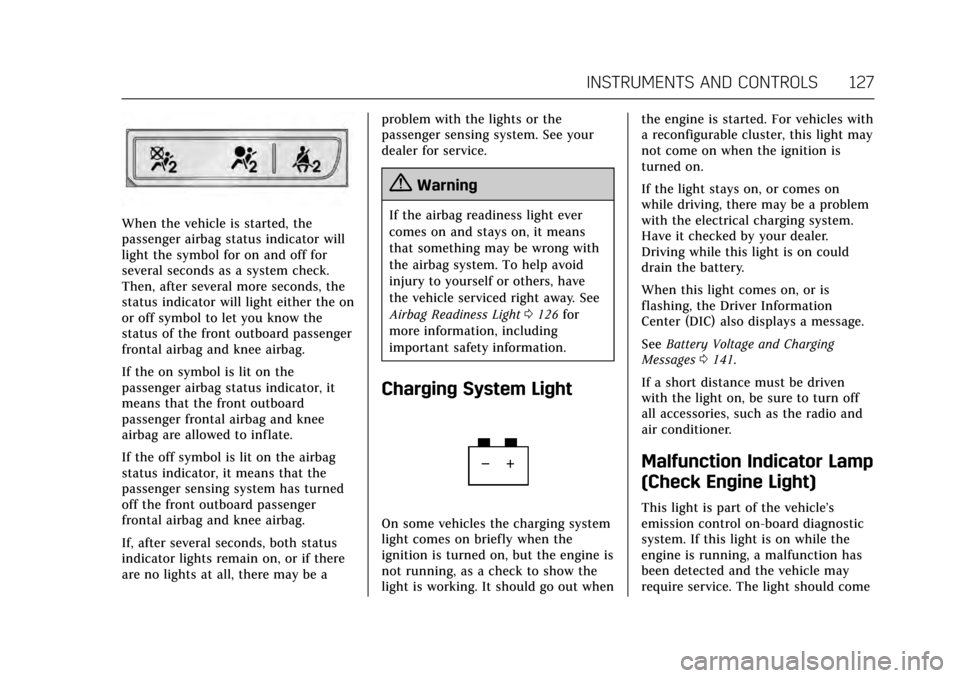
When the vehicle is started, the
passenger airbag status indicator will
light the symbol for on and off for
several seconds as a system check.
Then, after several more seconds, the
status indicator will light either the on
or off symbol to let you know the
status of the front outboard passenger
frontal airbag and knee airbag.
If the on symbol is lit on the
passenger airbag status indicator, it
means that the front outboard
passenger frontal airbag and knee
airbag are allowed to inflate.
If the off symbol is lit on the airbag
status indicator, it means that the
passenger sensing system has turned
off the front outboard passenger
frontal airbag and knee airbag.
If, after several seconds, both status
indicator lights remain on, or if there
are no lights at all, there may be aproblem with the lights or the
passenger sensing system. See your
dealer for service.
{Warning
If the airbag readiness light ever
comes on and stays on, it means
that something may be wrong with
the airbag system. To help avoid
injury to yourself or others, have
the vehicle serviced right away. See
Airbag Readiness Light
0126 for
more information, including
important safety information.
Charging System Light
On some vehicles the charging system
light comes on briefly when the
ignition is turned on, but the engine is
not running, as a check to show the
light is working. It should go out when the engine is started. For vehicles with
a reconfigurable cluster, this light may
not come on when the ignition is
turned on.
If the light stays on, or comes on
while driving, there may be a problem
with the electrical charging system.
Have it checked by your dealer.
Driving while this light is on could
drain the battery.
When this light comes on, or is
flashing, the Driver Information
Center (DIC) also displays a message.
See
Battery Voltage and Charging
Messages 0141.
If a short distance must be driven
with the light on, be sure to turn off
all accessories, such as the radio and
air conditioner.
Malfunction Indicator Lamp
(Check Engine Light)
This light is part of the vehicle’s
emission control on-board diagnostic
system. If this light is on while the
engine is running, a malfunction has
been detected and the vehicle may
require service. The light should come
Page 156 of 337

Cadillac CT6 Owner Manual (GMNA-Localizing-MidEast-10293390) - 2017 -
CRC - 6/21/16
INSTRUMENTS AND CONTROLS 155
Comfort and Convenience
Select and the following may display:
.Auto Memory Recall
. Easy Exit Options
. Chime Volume
. Reverse Tilt Mirror
. Auto Mirror Folding
. Rainsense Wipers
Auto Memory Recall
This feature automatically recalls the
current driver’s previously stored 1 or
2 button positions when entering the
vehicle. See Memory Seats 061.
Select Off or On.
Easy Exit Options
This feature automatically recalls the
current driver’s previously stored exit
button position when exiting the
vehicle. See Memory Seats 061.
Select Off or On.
Chime Volume
This allows the selection of the chime
volume level. Touch + or
−to adjust the volume.
Reverse Tilt Mirror
When on, both the driver and
passenger outside mirrors will tilt
downward when the vehicle is shifted
to R (Reverse) to improve visibility of
the ground near the rear wheels. They
will return to their previous driving
position when the vehicle is shifted
out of R (Reverse) or the engine is
turned off.
Select Off, On - Driver and Passenger,
On - Driver, or On - Passenger.
Auto Mirror Folding
When on, the outside rearview mirrors
will automatically fold or unfold when
the Remote Keyless Entry (RKE)
transmitter
QorKbutton is pressed
and held.
Select Off or On.
Rainsense Wipers
This allows the Rainsense Wipers
feature to be disabled or enabled. See
“Rainsense ™”inWindshield Wiper/
Washer 0109.
Select Off or On.
Lighting
Select and the following may display:
. Vehicle Locator Lights
. Exit Lighting
Vehicle Locator Lights
This feature will flash the exterior
lamps and allows some of the exterior
lamps and most of the interior lamps
to turn on briefly at night when
Kon
the Remote Keyless Entry (RKE)
transmitter is pressed to locate the
vehicle.
Select Off or On.
Exit Lighting
This allows the selection of how long
the exterior lamps stay on when
leaving the vehicle when it is dark
outside.
Select Off, 30 Seconds, 60 Seconds,
or 120 Seconds.
Power Door Locks
Select and the following may display:
. Unlocked Door Anti-Lockout
. Auto Door Lock