lights CADILLAC CT6 2017 1.G User Guide
[x] Cancel search | Manufacturer: CADILLAC, Model Year: 2017, Model line: CT6, Model: CADILLAC CT6 2017 1.GPages: 337, PDF Size: 3.89 MB
Page 157 of 337

Cadillac CT6 Owner Manual (GMNA-Localizing-MidEast-10293390) - 2017 -
CRC - 6/21/16
156 INSTRUMENTS AND CONTROLS
.Delayed Door Lock
Unlocked Door Anti-Lockout
When on, this feature will keep the
driver door from locking when the
door is open. If Off is selected, the
Delayed Door Lock menu will be
available.
Select Off or On.
Auto Door Lock
When this feature is turned on, all
doors will automatically lock when the
vehicle is shifted out of P (Park). The
doors will automatically unlock when
the vehicle is shifted into P (Park).
Select Off or On.
Delayed Door Lock
When on, this feature will delay the
locking of the doors. To override the
delay, press the power door lock
switch on the door.
Select Off or On.
Remote Lock, Unlock, Start
Select and the following may display:
. Remote Unlock Light Feedback .
Remote Lock Feedback
. Remote Door Unlock
. Relock Remotely Unlocked Doors
. Remote Start Auto Cool Seats
. Remote Start Auto Heat Seats
. Remote Window Operation
. Passive Door Unlock
. Passive Door Lock
. Remote Left in Vehicle Alert
Remote Unlock Light Feedback
When on, the exterior lamps will flash
when unlocking the vehicle with the
RKE transmitter.
Select Off or Flash Lights.
Remote Lock Feedback
This allows selection of what type of
feedback is given when locking the
vehicle with the RKE transmitter.
Select Off, Lights and Horn, Lights
Only, or Horn Only. Remote Door Unlock
This allows selection of which doors
will unlock when pressing
Kon the
RKE transmitter.
Select All Doors or Driver Door.
Relock Remotely Unlocked Doors
This allows all doors to automatically
relock if the doors are unlocked from
the RKE transmitter and a door is not
opened. See Remote Keyless Entry
(RKE) System Operation 029.
Select Off or On.
Remote Start Auto Cool Seats
If equipped and turned on, this
feature will turn the ventilated seats
on when using remote start on
warm days.
Select Off, On-Driver and Passenger,
or On-Driver.
Remote Start Auto Heat Seats
If equipped and turned on, this
feature will turn the heated seats on
when using remote start on cold days.
Select Off, On-Driver and Passenger,
or On-Driver.
Page 164 of 337
Cadillac CT6 Owner Manual (GMNA-Localizing-MidEast-10293390) - 2017 -
CRC - 6/21/16
LIGHTING 163
Lighting
Exterior Lighting
Exterior Lamp Controls . . . . . . . . . . 163
Exterior Lamps Off Reminder . . . 164
Headlamp High/Low-BeamChanger . . . . . . . . . . . . . . . . . . . . . . . . . . 164
Flash-to-Pass . . . . . . . . . . . . . . . . . . . . . 165
Daytime Running Lamps (DRL) . . . . . . . . . . . . . . . . . . . . 165
Automatic Headlamp System . . . 165
Hazard Warning Flashers . . . . . . . . 166
Turn and Lane-Change Signals . . . . . . . . . . . . . . . . . . . . . . . . . . . 166
Interior Lighting
Instrument Panel IlluminationControl . . . . . . . . . . . . . . . . . . . . . . . . . . 167
Courtesy Lamps . . . . . . . . . . . . . . . . . . 167
Dome Lamps . . . . . . . . . . . . . . . . . . . . . 167
Reading Lamps . . . . . . . . . . . . . . . . . . . 167
Lighting Features
Entry Lighting . . . . . . . . . . . . . . . . . . . . 168
Exit Lighting . . . . . . . . . . . . . . . . . . . . . . 169
Battery Power Protection . . . . . . . . 169
Exterior Lighting Battery Saver . . . . . . . . . . . . . . . . . . . . . . . . . . . . . 169
Exterior Lighting
Exterior Lamp Controls
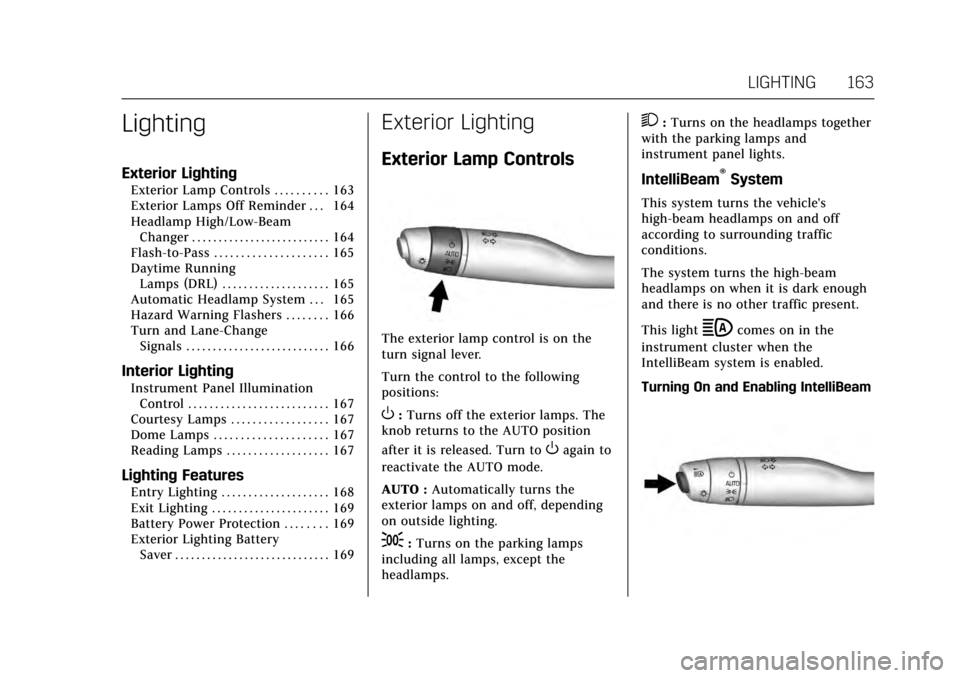
The exterior lamp control is on the
turn signal lever.
Turn the control to the following
positions:
O:Turns off the exterior lamps. The
knob returns to the AUTO position
after it is released. Turn to
Oagain to
reactivate the AUTO mode.
AUTO : Automatically turns the
exterior lamps on and off, depending
on outside lighting.
;: Turns on the parking lamps
including all lamps, except the
headlamps.
2: Turns on the headlamps together
with the parking lamps and
instrument panel lights.
IntelliBeam®System
This system turns the vehicle's
high-beam headlamps on and off
according to surrounding traffic
conditions.
The system turns the high-beam
headlamps on when it is dark enough
and there is no other traffic present.
This light
bcomes on in the
instrument cluster when the
IntelliBeam system is enabled.
Turning On and Enabling IntelliBeam
Page 167 of 337

Cadillac CT6 Owner Manual (GMNA-Localizing-MidEast-10293390) - 2017 -
CRC - 6/21/16
166 LIGHTING
Lights On with Wipers
If the windshield wipers are activated
in daylight with the engine on, and
the exterior lamp control is in AUTO,
the headlamps, parking lamps, and
other exterior lamps come on. The
transition time for the lamps coming
on varies based on wiper speed. When
the wipers are not operating, these
lamps turn off. Move the exterior
lamp control to
Oor;to disable
this feature.
Hazard Warning Flashers
|: Touch this button to make the
front and rear turn signal lamps flash
on and off. Touch again to turn the
flashers off. The hazard warning flashers turn on
automatically if the airbags deploy.
Turn and Lane-Change
Signals
Move the lever all the way up or down
to signal a turn.
An arrow on the instrument cluster
flashes in the direction of the turn or
lane change.
Raise or lower the lever until the
arrow starts to flash to signal a lane
change. Hold it there until the lane
change is completed. If the lever is
briefly pressed and released, the turn
signal flashes three times.
The turn and lane-change signal can
be turned off manually by moving the
lever back to its original position.
If after signaling a turn or lane
change, the arrow flashes rapidly or
does not come on, a signal bulb may
be burned out.
Replace any burned out bulbs. If a
bulb is not burned out, check the fuse.
See
Fuses and Circuit Breakers 0269.
Page 168 of 337

Cadillac CT6 Owner Manual (GMNA-Localizing-MidEast-10293390) - 2017 -
CRC - 6/21/16
LIGHTING 167
Interior Lighting
Instrument Panel
Illumination Control
The brightness of the instrument
panel lighting and steering wheel
controls can be adjusted.
D:Move the thumbwheel up or
down to brighten or dim the lights.
The brightness of the displays
automatically adjusts based on
outdoor lighting. The instrument
panel illumination control will set the
lowest level to which the displays will
be automatically adjusted.
Courtesy Lamps
The courtesy lamps come on when
any door is opened unless the dome
lamp override is activated. To
deactivate the dome lamp override,
press
(OFF and the indicator light
on the button will turn off.
Dome Lamps
The dome lamp is in the overhead
console.
To change the dome lamp settings,
press:
(OFF : Turns the lamp off, even
when a door is open.
+ON/OFF : Turns the lamp on
or off.
Reading Lamps
There are front and rear reading
lamps on the overhead console and
over the rear passenger doors. These
lamps come on automatically when
any door is opened.
To manually turn the reading lamps
on or off:
Pressmornnext to each overhead
console reading lamp.
Page 169 of 337

Cadillac CT6 Owner Manual (GMNA-Localizing-MidEast-10293390) - 2017 -
CRC - 6/21/16
168 LIGHTING
Press the lamp lenses over the rear
passenger doors.
Lighting Features
Entry Lighting
Some exterior lamps and most of the
interior lights turn on briefly at night,
or in areas of limited lighting when
K
is pressed on the Remote Keyless
Entry (RKE) transmitter. SeeRemote
Keyless Entry (RKE) System Operation
0 29. When the driver door is opened,
all control lights, Driver Information
Center (DIC) lights, and door pocket
lights turn on. After about 30 seconds
the exterior lamps turn off, then the
remaining interior lights dim to off.
Entry lighting can be disabled
manually by changing the ignition out
of the OFF position, or by pressing
Q
on the RKE transmitter.
This feature can be changed. See
“Vehicle Locator Lights” underVehicle
Personalization 0152. Entry Lighting with Approach
Detection
If equipped with approach detection,
the entry lighting feature will
automatically turn on when the RKE
transmitter is detected within
approximately 2 m (6 ft) of the vehicle.
If the vehicle has remained parked for
an extended period of time with no
RKE transmitter use or Keyless Access
operation, approach detection will be
disabled. To reactivate, press any
button on the RKE transmitter or
open and close all vehicle doors to
re-enable the entry lighting feature on
approach.
Approach detection will not work if:
.
The vehicle battery is low.
. The ignition is in ACC/ACCESSORY
or ON/RUN.
. Entry lighting is set to OFF in
“Vehicle Locator Lights” . See
Vehicle Personalization 0152.
Page 170 of 337

Cadillac CT6 Owner Manual (GMNA-Localizing-MidEast-10293390) - 2017 -
CRC - 6/21/16
LIGHTING 169
Approach detection will not work with
a single RKE transmitter if:
.The RKE transmitter is left within
a 5 m (16 ft) range of the vehicle
for several minutes.
. The RKE transmitter is left inside
the vehicle and all the doors are
closed.
Exit Lighting
Some exterior lamps and interior
lights come on at night, or in areas
with limited lighting, when the driver
door is opened after the ignition is
turned off. The dome lamp comes on
after the ignition is changed to the
OFF position. The exterior lamps and
dome lamp remain on for a set
amount of time, then automatically
turn off.
The exterior lamps turn off
immediately by turning the exterior
lamp control off.
This feature can be changed. See
Vehicle Personalization 0152.
Battery Power Protection
The battery saver feature is designed
to protect the vehicle's battery.
If some interior lamps are left on and
the ignition is turned off, the battery
rundown protection system
automatically turns the lamp off after
some time.
Exterior Lighting Battery
Saver
The exterior lamps turn off about
10 minutes after the ignition is turned
off, if the parking lamps or headlamps
have been manually left on. This
protects against draining the battery.
To restart the 10-minute timer, turn
the exterior lamp control to the off
position and then back to the parking
lamp or headlamp position.
To keep the lamps on for more than
10 minutes, the ignition must be in
the ACC/ACCESSORY or ON/RUN
position.
Page 196 of 337

Cadillac CT6 Owner Manual (GMNA-Localizing-MidEast-10293390) - 2017 -
CRC - 6/21/16
DRIVING AND OPERATING 195
Ignition Positions
The vehicle has an electronic keyless
ignition with pushbutton start.
Pressing the button cycles it through
three modes: ACC/ACCESSORY, ON/
RUN/START, and Stopping the
Engine/OFF.
The Remote Keyless Entry (RKE)
transmitter must be in the vehicle for
the system to operate. If the
pushbutton start is not working, the
vehicle may be near a strong radio
antenna signal causing interference to
the Keyless Access system. SeeRemote
Keyless Entry (RKE) System
Operation 029. To shift out of P (Park), the vehicle
must be in ACC/ACCESSORY or ON/
RUN, and the brake pedal must be
applied.
Stopping the Engine/OFF (No
Indicator Lights) :
When the vehicle
is stopped, press ENGINE START/
STOP once to turn the engine off.
If the vehicle is in P (Park), the
ignition will turn off, and Retained
Accessory Power (RAP) will remain
active. See Retained Accessory Power
(RAP) 0198.
If the vehicle is not in P (Park), the
ignition will return to ACC/
ACCESSORY and display a message in
the Driver Information Center (DIC).
See Transmission Messages 0151.
When the vehicle is shifted into
P (Park), the ignition system will
switch to OFF.
Do not turn the engine off when the
vehicle is moving. This will cause a
loss of power assist in the brake and
steering systems and disable the
airbags. If the vehicle must be shut off in an
emergency:
1. Brake using a firm and steady pressure. Do not pump the
brakes repeatedly. This may
deplete power assist, requiring
increased brake pedal force.
2. Shift the vehicle to N (Neutral). This can be done while the
vehicle is moving. After shifting
to N (Neutral), firmly apply the
brakes and steer the vehicle to a
safe location.
3. Come to a complete stop, shift to P (Park), and turn off the
ignition.
4. Set the parking brake. See Electric Parking Brake 0205.
{Warning
Turning off the vehicle while
moving may cause loss of power
assist in the brake and steering
systems and disable the airbags.
While driving, only shut the vehicle
off in an emergency.
Page 219 of 337

Cadillac CT6 Owner Manual (GMNA-Localizing-MidEast-10293390) - 2017 -
CRC - 6/21/16
218 DRIVING AND OPERATING
ACC automatically slows the vehicle
down and adjusts vehicle speed to
follow the vehicle in front at the
selected follow gap. The vehicle speed
increases or decreases to follow the
vehicle in front of you, but will not
exceed the set speed. It may apply
limited braking, if necessary. When
braking is active, the brake lights will
come on. The automatic braking may
feel or sound different than if the
brakes were applied manually. This is
normal.
Stationary or Very Slow-Moving
Objects
{Warning
ACC may not detect and react to
stopped or slow-moving vehicles
ahead of you. For example, the
system may not brake for a vehicle
it has never detected moving. This
can occur in stop-and-go traffic or
when a vehicle suddenly appears
due to a vehicle ahead changing
lanes. Your vehicle may not stop
and could cause a crash. Use(Continued)
Warning (Continued)
caution when using ACC. Your
complete attention is always
required while driving and you
should be ready to take action and
apply the brakes.
ACC Automatically Disengages
ACC may automatically disengage and
you will need to manually apply the
brakes to slow the vehicle when:
. The sensors are blocked.
. The Traction Control System (TCS)
or electronic stability control
system has activated or been
disabled.
. No traffic or other objects are
being detected.
. There is a fault in the system.
The ACC indicator will not be
displayed when ACC is no longer
active. Notification to Resume ACC
ACC will maintain a follow gap behind
a detected vehicle and slow your
vehicle to a stop behind that vehicle.
If the stopped vehicle ahead has
driven away and ACC has not
resumed, the vehicle ahead indicator
will flash as a reminder to check
traffic ahead before proceeding. In
addition, the left and right sides of the
Safety Alert Seat will pulse three
times, or three beeps will sound. See
”Alert Type
”and “Go Notifier” in
“Collision/Detection Systems” under
Vehicle Personalization 0152.
When the vehicle ahead drives away,
ACC resumes automatically if the stop
was brief. If necessary, press RES+ or
the accelerator pedal to resume ACC.
If stopped for more than two minutes
or if the driver door is opened and the
driver safety belt is unbuckled, the
ACC automatically applies the Electric
Parking Brake (EPB) to hold the
vehicle. The Electric Parking Brake
status light will turn on. See Electric
Parking Brake 0205. To resume ACC
and release the EPB, press the
accelerator pedal.
Page 229 of 337

Cadillac CT6 Owner Manual (GMNA-Localizing-MidEast-10293390) - 2017 -
CRC - 6/21/16
228 DRIVING AND OPERATING
complete before continuing the
parking maneuver. APA will beep and
display a PARKING COMPLETE
message. Place the vehicle in P (Park).
APA may automatically disengage if:
.The steering wheel is used by the
driver.
. The maximum allowed speed is
exceeded.
. There is a failure with the APA
system.
. Electronic stability control or
antilock brakes are activated.
. A high priority vehicle message is
displayed in the DIC.
To cancel APA, touch
Oagain.
When the System Does Not Seem to
Work Properly
The APA system may require a short
period of driving along curves to
calibrate.
Assistance Systems for
Driving
If equipped, when driving the vehicle
in a forward gear, Forward Collision
Alert (FCA), Lane Departure Warning
(LDW), Lane Keep Assist (LKA), Side
Blind Zone Alert (SBZA), Lane Change
Alert (LCA), the Forward Automatic
Braking (FAB) system, the Front
Pedestrian Braking (FPB) system and/
or the Night Vision system can help to
avoid a crash or reduce crash damage.
Forward Collision Alert
(FCA) System
If equipped, the FCA system may help
to avoid or reduce the harm caused by
front-end crashes. When approaching
a vehicle ahead too quickly, FCA
provides a red flashing alert on the
windshield and rapidly beeps or pulses
the driver seat. FCA also lights an
amber visual alert if following another
vehicle much too closely.
FCA detects vehicles within a distance
of approximately 60 m (197 ft) and
operates at speeds above 8 km/h
(5 mph). If the vehicle has Adaptive Cruise Control (ACC), it can detect
vehicles to distances of approximately
110 m (360 ft) and operates at all
speeds. See
Adaptive Cruise
Control 0213.
{Warning
FCA is a warning system and does
not apply the brakes. When
approaching a slower-moving or
stopped vehicle ahead too rapidly,
or when following a vehicle too
closely, FCA may not provide a
warning with enough time to help
avoid a crash. It also may not
provide any warning at all. FCA
does not warn of pedestrians,
animals, signs, guardrails, bridges,
construction barrels, or other
objects. Be ready to take action and
apply the brakes. See Defensive
Driving 0185.
FCA can be disabled with the FCA
steering wheel control, or if your
vehicle is equipped with Adaptive
Cruise Control (ACC), through vehicle
Page 236 of 337

Cadillac CT6 Owner Manual (GMNA-Localizing-MidEast-10293390) - 2017 -
CRC - 6/21/16
DRIVING AND OPERATING 235
Adjust the instrument panel
brightness to make the image no
brighter than necessary. Turn the
image off by selecting another view
on the instrument cluster.
Warm objects, such as pedestrians,
animals, and other moving vehicles,
should appear whiter on the Night
Vision display. Cold objects, such as
the sky, signs, and parked vehicles,
should appear darker. Night Vision
only shows objects that are warmer or
colder than the surroundings. It does
not detect brake lamps, turn signals,
emergency flashers, traffic lights,
or sign information.
Use this system as an aid by
occasionally glancing at the image. Do
not stare at the image or use the
image under well-lit conditions.
{Warning
Do not stare at the image while
driving as this might cause
important objects ahead not to be
seen. You could crash, and you or
others could be injured.When a pedestrian or large animal is
detected, an amber box displays
around the pedestrian or animal on
the Night Vision display and an amber
pedestrian icon,
~, or animal
icon,
!, displays on the instrument
cluster. This pedestrian icon is also
shown on the Head-Up Display (HUD).
When the system detects the vehicle
is approaching a pedestrian much too
quickly, the amber box turns red, and
a red flashing icon,
~, displays on the
HUD with rapid beeping or pulsing of
the Safety Alert Seat, if equipped.
System pedestrian icons, beeps, and
(if equipped) Safety Alert Seat pulses
can be set to Off through vehicle
personalization by turning off the
Front Pedestrian Braking system. See
“Front Pedestrian Detection ”in
“Collision/Detection Systems” under
Vehicle Personalization 0152.
{Warning
The Night Vision system does not
automatically brake the vehicle.
It does not provide alerts unless it
detects a pedestrian or large
animal. The system may not detect
pedestrians, including children,
or animals:
. If they are less than 25 m
(82 ft) away.
. If they are not directly ahead
in the sensor coverage area,
fully visible, standing upright,
or part of a group.
. If the pedestrian or animal is
moving too quickly through
the field of view, such as a
bicyclist.
. If the pedestrian is wearing
certain types of clothing.
. If headlamps are off, except
when parked.
. If the outside temperature is
higher than 30 °C (86 °F).
(Continued)