power steering CADILLAC CT6 2017 1.G Owners Manual
[x] Cancel search | Manufacturer: CADILLAC, Model Year: 2017, Model line: CT6, Model: CADILLAC CT6 2017 1.GPages: 337, PDF Size: 3.89 MB
Page 4 of 337
Cadillac CT6 Owner Manual (GMNA-Localizing-MidEast-10293390) - 2017 -
CRC - 6/21/16
INTRODUCTION 3
Symbols
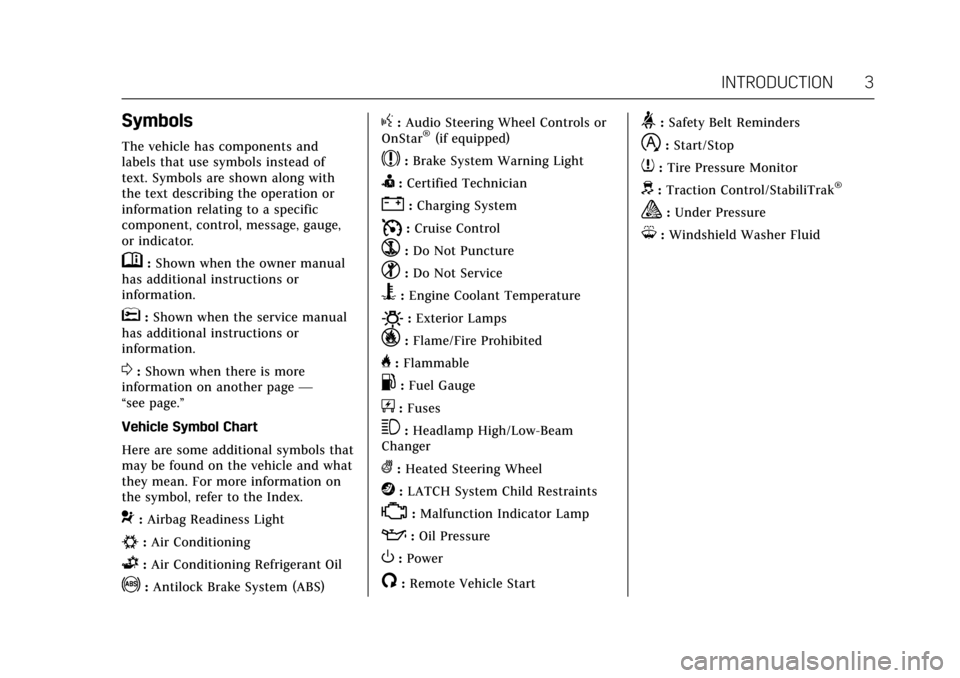
The vehicle has components and
labels that use symbols instead of
text. Symbols are shown along with
the text describing the operation or
information relating to a specific
component, control, message, gauge,
or indicator.
M:Shown when the owner manual
has additional instructions or
information.
*: Shown when the service manual
has additional instructions or
information.
0: Shown when there is more
information on another page —
“see page.”
Vehicle Symbol Chart
Here are some additional symbols that
may be found on the vehicle and what
they mean. For more information on
the symbol, refer to the Index.
9: Airbag Readiness Light
#:Air Conditioning
G:Air Conditioning Refrigerant Oil
!:Antilock Brake System (ABS)
g: Audio Steering Wheel Controls or
OnStar®(if equipped)
$: Brake System Warning Light
I:Certified Technician
":Charging System
I: Cruise Control
`:Do Not Puncture
^:Do Not Service
B:Engine Coolant Temperature
O:Exterior Lamps
_:Flame/Fire Prohibited
H: Flammable
.:Fuel Gauge
+: Fuses
3:Headlamp High/Low-Beam
Changer
(: Heated Steering Wheel
j:LATCH System Child Restraints
*:Malfunction Indicator Lamp
::Oil Pressure
O:Power
/:Remote Vehicle Start
>:Safety Belt Reminders
h:Start/Stop
7: Tire Pressure Monitor
d:Traction Control/StabiliTrak®
a:Under Pressure
M: Windshield Washer Fluid
Page 6 of 337
Cadillac CT6 Owner Manual (GMNA-Localizing-MidEast-10293390) - 2017 -
CRC - 6/21/16
IN BRIEF 5
In Brief
Instrument Panel
Instrument Panel Overview . . . . . . . . . 6
Initial Drive Information
Initial Drive Information . . . . . . . . . . . 8
Stop/Start System . . . . . . . . . . . . . . . . . . . 8
Remote Keyless Entry (RKE)System . . . . . . . . . . . . . . . . . . . . . . . . . . . . . 8
Remote Vehicle Start . . . . . . . . . . . . . . . 9
Door Locks . . . . . . . . . . . . . . . . . . . . . . . . . . 9
Trunk . . . . . . . . . . . . . . . . . . . . . . . . . . . . . . . 10
Windows . . . . . . . . . . . . . . . . . . . . . . . . . . . 10
Seat Adjustment . . . . . . . . . . . . . . . . . . . 10
Memory Features . . . . . . . . . . . . . . . . . . 12
Second Row Seats . . . . . . . . . . . . . . . . . 13
Heated and Ventilated Seats . . . . . . 14
Head Restraint Adjustment . . . . . . . 14
Safety Belts . . . . . . . . . . . . . . . . . . . . . . . . . 14
Passenger Sensing System . . . . . . . . 15
Mirror Adjustment . . . . . . . . . . . . . . . . 15
Steering Wheel Adjustment . . . . . . . 16
Interior Lighting . . . . . . . . . . . . . . . . . . . 16
Exterior Lighting . . . . . . . . . . . . . . . . . . . 17
Windshield Wiper/Washer . . . . . . . . 17
Climate Controls . . . . . . . . . . . . . . . . . . . 18
Transmission . . . . . . . . . . . . . . . . . . . . . . . 19
Vehicle Features
Infotainment System . . . . . . . . . . . . . . 19
Steering Wheel Controls . . . . . . . . . . 19
Cruise Control . . . . . . . . . . . . . . . . . . . . . 20
Driver Information Center (DIC) . . . . . . . . . . . . . . . . . . . . . . 20
Forward Collision Alert (FCA) System . . . . . . . . . . . . . . . . . . . . . . . . . . . . 21
Night Vision System . . . . . . . . . . . . . . . 21
Forward Automatic Braking (FAB) . . . . . . . . . . . . . . . . . . . . 21
Front Pedestrian Braking (FPB) System . . . . . . . . . . . . . . . . . . . . . . . . . . . . 21
Lane Keep Assist (LKA) . . . . . . . . . . . 21
Lane Change Alert (LCA) . . . . . . . . . . 22
Surround Vision . . . . . . . . . . . . . . . . . . . 22
Rear Vision Camera (RVC) . . . . . . . . 22
Rear Cross Traffic Alert (RCTA) System . . . . . . . . . . . . . . . . . . . . . . . . . . . . 22
Parking Assist . . . . . . . . . . . . . . . . . . . . . . 22
Automatic Parking Assist (APA) . . . . . . . . . . . . . . . . . . . . . . 22
Reverse Automatic Braking (RAB) . . . . . . . . . . . . . . . . . . . . 23
Power Outlets . . . . . . . . . . . . . . . . . . . . . . 23
Universal Remote System . . . . . . . . . 23
Sunroof . . . . . . . . . . . . . . . . . . . . . . . . . . . . . 24
Performance and Maintenance
Traction Control/Electronic Stability Control . . . . . . . . . . . . . . . . . . 24
Tire Pressure Monitor . . . . . . . . . . . . . 25
Fuel (LGW 3.0L V6 Twin Turbo Engine) . . . . . . . . . . . . . . . . . . . . . . . . . . . 25
Fuel (LGX 3.6L V6 Engine) . . . . . . . . 26
Engine Oil Life System . . . . . . . . . . . . 26
Driving for Better Fuel Economy . . . . . . . . . . . . . . . . . . . . . . . . . . 26
Page 13 of 337

Cadillac CT6 Owner Manual (GMNA-Localizing-MidEast-10293390) - 2017 -
CRC - 6/21/16
12 IN BRIEF
Massage
Platinum Driver Seat Shown,Passenger Seat Similar
If equipped, the ignition must be on
to use the massage feature.
To activate and adjust the massage
feature: 1. Toggle the center selection control (2) to view available
seating adjustment options on
the infotainment display.
2. Select massage feature.
3. Press the control up (3) or down (5) to select the
massage type. 4. Press the control forward (4) or
rearward (6) to change the
intensity.
5. Press the massage control button (1) to recall the last
massage type and intensity.
See Massage 064.
Memory Features
Platinum Driver Seat Shown,
Passenger Seat Similar
If equipped, the SET, 1, 2, and
B
(Exit) buttons on the driver door and
front passenger door are used to
manually store and recall memory
settings for the driver and passenger seats. The driver memory buttons also
store outside mirror positions, power
tilt and telescoping steering column
positions, and massage settings (if
equipped).
When Auto Memory Recall is enabled
in the personalization menu, positions
previously stored to the driver
memory buttons 1 or 2 are recalled
when the ignition is changed from
OFF to ON/RUN/START or ACC/
ACCESSORY.
When Easy Exit Options is enabled in
the personalization menu, the
positions previously stored to the
driver memory
B(Exit) button are
recalled when the ignition is changed
to OFF and the driver door is opened
within a short time.
See Memory Seats 061 and Vehicle
Personalization 0152.
Page 17 of 337
Cadillac CT6 Owner Manual (GMNA-Localizing-MidEast-10293390) - 2017 -
CRC - 6/21/16
16 IN BRIEF
Steering Wheel Adjustment
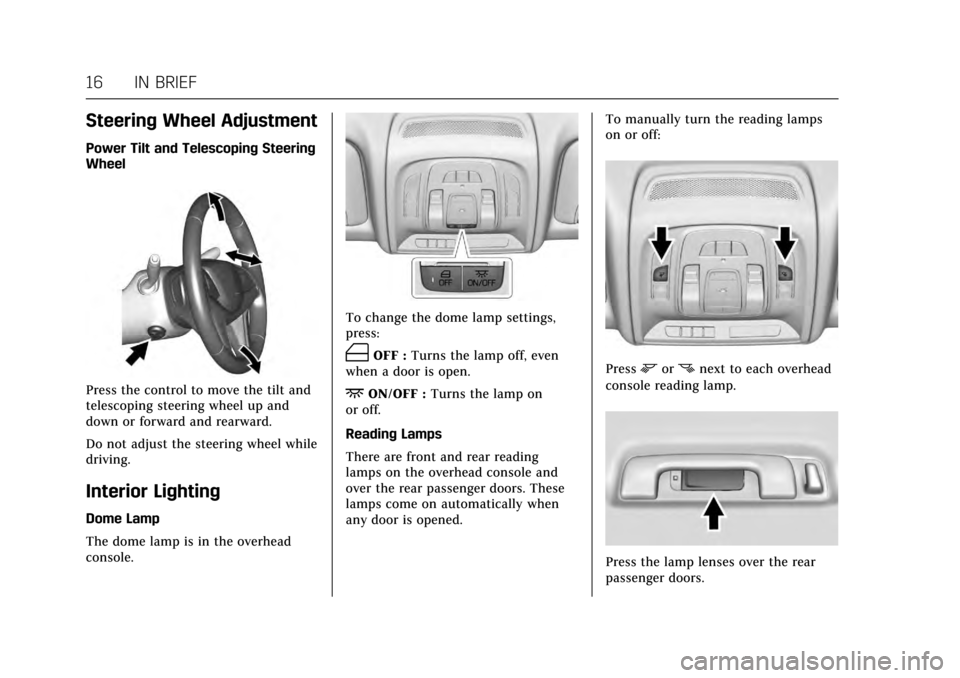
Power Tilt and Telescoping Steering
Wheel
Press the control to move the tilt and
telescoping steering wheel up and
down or forward and rearward.
Do not adjust the steering wheel while
driving.
Interior Lighting
Dome Lamp
The dome lamp is in the overhead
console.
To change the dome lamp settings,
press:
(OFF :Turns the lamp off, even
when a door is open.
+ON/OFF : Turns the lamp on
or off.
Reading Lamps
There are front and rear reading
lamps on the overhead console and
over the rear passenger doors. These
lamps come on automatically when
any door is opened. To manually turn the reading lamps
on or off:
Pressmornnext to each overhead
console reading lamp.
Press the lamp lenses over the rear
passenger doors.
Page 62 of 337

Cadillac CT6 Owner Manual (GMNA-Localizing-MidEast-10293390) - 2017 -
CRC - 6/21/16
SEATS AND RESTRAINTS 61
Memory Seats
Platinum Driver Seat Buttons Shown,Passenger Buttons Similar
If equipped, the SET, 1, 2, and
B
(Exit) buttons on the driver door and
front passenger door are used to
manually store and recall memory
settings for the driver and passenger
seats. The driver memory buttons also
store outside mirror positions, power
tilt and telescoping steering column
positions, and massage settings,
if equipped. Storing Memory Positions
To store positions to the 1 and 2
buttons:
1. The ignition must be in ON/RUN or ACC/ACCESSORY.
2. Adjust the driver seat, power tilt and telescoping steering column,
if equipped, massage type and
intensity, if equipped, and the
outside mirrors on some vehicles.
3. Press and release SET. A beep will sound.
4. Immediately press and hold 1 until two beeps sound.
5. Repeat Steps 1–4 for a second driver using 2.
To store exit positions for easy exit
and the
B(Exit) button, repeat
Steps 1–4 using
Bto store your
positions for getting out of the
driver seat. Manually Recalling Memory
Positions
Press and hold 1, 2, or
Bto
manually recall the previously stored
memory positions. Releasing 1, 2,
or
Bbefore the stored positions are
reached stops the recall.
If the massage feature is off when the
memory recall is performed, the
previously stored type and intensity
will be recalled, but it will remain off
until activated with the massage
control button or through the
infotainment display with the
platinum seat controls.
Automatically Recalling Memory
Positions (Auto Memory Recall)
(Driver Only)
If programmed on in the vehicle
personalization menu, the Auto
(Automatic) Memory Recall feature
automatically recalls the current
driver’s previously stored 1 or 2
position when the ignition is changed
from OFF to ON/RUN or ACC/
ACCESSORY.
Page 63 of 337
Cadillac CT6 Owner Manual (GMNA-Localizing-MidEast-10293390) - 2017 -
CRC - 6/21/16
62 SEATS AND RESTRAINTS
See“Auto Memory Recall’ under
“Comfort and Convenience ”in Vehicle
Personalization 0152.
To stop recall movement, press one of
the memory, power mirror, or power
seat controls; or press the power tilt
and telescoping steering column
control.
RKE transmitters are not labeled with
a number. If your memory seat
position is stored to 1 or 2 but this
position is not automatically recalling,
then store your positions to the other
button or switch RKE transmitters
with the other driver.
If the vehicle’s driver has changed, in
some vehicles the Driver ID may be
displayed for the first few ignition
cycles.
Easy Exit Recall (Driver Only)
If programmed on in the vehicle
personalization menu, the easy exit
feature automatically recalls the
previously stored exit positions when
leaving the vehicle. See “Storing
Memory Positions ”earlier in this
section. See also Vehicle
Personalization 0152. Easy exit recall automatically activates
when one of the following occurs:
.
The vehicle is turned off and the
driver door is opened within a
short time.
. The vehicle is turned off with the
driver door open.
To stop recall movement, press one of
the memory, power mirror, or power
seat controls; or press the power tilt
and telescoping steering column
control.
Obstructions
If something has blocked the driver
seat while recalling a memory
position, the recall may stop. Remove
the obstruction. Then do one of the
following:
. If automatically or manually
recalling the stored memory
position, press and hold the
appropriate manual control for
two seconds. Try recalling again
by pressing the appropriate
memory button. If automatically
recalling the position, try recalling again by opening the driver door
and pressing
Kon the RKE
transmitter.
. If recalling the exit position, press
and hold the appropriate manual
control for the exit feature not
recalling for two seconds. Then try
recalling the exit position again.
If the memory position is still not
recalling, see your dealer for service.
Heated and Ventilated
Front Seats
{Warning
If you cannot feel temperature
change or pain to the skin, the seat
heater may cause burns. To reduce
the risk of burns, people with such
a condition should use care when
using the seat heater, especially for
long periods of time. Do not place
anything on the seat that insulates
against heat, such as a blanket,
cushion, cover, or similar item. This
may cause the seat heater to (Continued)
Page 108 of 337
Cadillac CT6 Owner Manual (GMNA-Localizing-MidEast-10293390) - 2017 -
CRC - 6/21/16
INSTRUMENTS AND CONTROLS 107
Instruments and
Controls
Controls
Steering Wheel Adjustment . . . . . 108
Steering Wheel Controls . . . . . . . . . 108
Heated Steering Wheel . . . . . . . . . . 108
Horn . . . . . . . . . . . . . . . . . . . . . . . . . . . . . . . 109
Windshield Wiper/Washer . . . . . . . 109
Clock . . . . . . . . . . . . . . . . . . . . . . . . . . . . . . 111
Power Outlets . . . . . . . . . . . . . . . . . . . . . 111
Wireless Charging . . . . . . . . . . . . . . . . 113
Cigarette Lighter . . . . . . . . . . . . . . . . . . 114
Ashtrays . . . . . . . . . . . . . . . . . . . . . . . . . . 114
Warning Lights, Gauges, and
Indicators
Warning Lights, Gauges, andIndicators . . . . . . . . . . . . . . . . . . . . . . . 114
Instrument Cluster (Base Level) . . . . . . . . . . . . . . . . . . . . . . . . . . . . 115
Instrument Cluster (Uplevel) . . . . 118
Speedometer . . . . . . . . . . . . . . . . . . . . . . 121
Odometer . . . . . . . . . . . . . . . . . . . . . . . . . 121
Trip Odometer . . . . . . . . . . . . . . . . . . . . 121
Tachometer . . . . . . . . . . . . . . . . . . . . . . . 121
Fuel Gauge . . . . . . . . . . . . . . . . . . . . . . . . 121
Boost Gauge (Performance Configuration Only) . . . . . . . . . . . . 122 Engine Oil Pressure Gauge (Base
Level Cluster) . . . . . . . . . . . . . . . . . . . 123
Engine Oil Temperature Gauge (Performance
Configuration Only) . . . . . . . . . . . . 123
Engine Coolant Temperature Gauge . . . . . . . . . . . . . . . . . . . . . . . . . . . . 124
Voltmeter Gauge (Base Level Cluster) . . . . . . . . . . . . . . . . . . . . . . . . . . 125
Safety Belt Reminders . . . . . . . . . . . . 125
Airbag Readiness Light . . . . . . . . . . 126
Passenger Airbag Status Indicator . . . . . . . . . . . . . . . . . . . . . . . . . 126
Charging System Light . . . . . . . . . . . 127
Malfunction Indicator Lamp (Check Engine Light) . . . . . . . . . . . 127
Brake System Warning Light . . . . 129
Electric Parking Brake Light . . . . . 130
Service Electric Parking Brake Light . . . . . . . . . . . . . . . . . . . . . . . . . . . . . 130
Antilock Brake System (ABS) Warning Light . . . . . . . . . . . . . . . . . . 130
Lane Keep Assist (LKA) Light . . . 131
Vehicle Ahead Indicator . . . . . . . . . 131
Pedestrian Ahead Indicator . . . . . . 131
Traction Off Light . . . . . . . . . . . . . . . . 131
StabiliTrak
®OFF Light . . . . . . . . . . . 132
Traction Control System (TCS)/ StabiliTrak
®Light . . . . . . . . . . . . . . 132
Engine Coolant Temperature Warning Light . . . . . . . . . . . . . . . . . . 132 Tire Pressure Light . . . . . . . . . . . . . . . 133
Engine Oil Pressure Light . . . . . . . . 133
Low Fuel Warning Light . . . . . . . . . 134
Auto Stop Mode (Uplevel
Cluster) . . . . . . . . . . . . . . . . . . . . . . . . . . 134
Security Light . . . . . . . . . . . . . . . . . . . . . 134
High-Beam On Light . . . . . . . . . . . . . 134
Lamps On Reminder . . . . . . . . . . . . . 135
Cruise Control Light . . . . . . . . . . . . . . 135
Door Ajar Light . . . . . . . . . . . . . . . . . . . 135
Information Displays
Driver Information Center (DIC) . . . . . . . . . . . . . . . . . . . . . 136
Head-Up Display (HUD) . . . . . . . . . 138
Vehicle Messages
Vehicle Messages . . . . . . . . . . . . . . . . . 141
Battery Voltage and Charging Messages . . . . . . . . . . . . . . . . . . . . . . . . 141
Brake System Messages . . . . . . . . . . 142
Cruise Control Messages . . . . . . . . . 142
Door Ajar Messages . . . . . . . . . . . . . . 143
Engine Cooling System Messages . . . . . . . . . . . . . . . . . . . . . . . . 143
Engine Oil Messages . . . . . . . . . . . . . 144
Engine Power Messages . . . . . . . . . . 144
Fuel System Messages . . . . . . . . . . . 145
Key and Lock Messages . . . . . . . . . . 145
Lamp Messages . . . . . . . . . . . . . . . . . . . 145
Page 109 of 337

Cadillac CT6 Owner Manual (GMNA-Localizing-MidEast-10293390) - 2017 -
CRC - 6/21/16
108 INSTRUMENTS AND CONTROLS
Object Detection SystemMessages . . . . . . . . . . . . . . . . . . . . . . . . 145
Ride Control System Messages . . . . . . . . . . . . . . . . . . . . . . . . 148
Airbag System Messages . . . . . . . . . 149
Safety Belt Messages . . . . . . . . . . . . . 149
Security Messages . . . . . . . . . . . . . . . . 149
Service Vehicle Messages . . . . . . . . 149
Steering System Messages . . . . . . . 149
Starting the Vehicle Messages . . . 150
Tire Messages . . . . . . . . . . . . . . . . . . . . 150
Transmission Messages . . . . . . . . . . 151
Vehicle Reminder Messages . . . . . 151
Vehicle Speed Messages . . . . . . . . . 151
Washer Fluid Messages . . . . . . . . . . 151
Window Messages . . . . . . . . . . . . . . . . 151
Vehicle Personalization
Vehicle Personalization . . . . . . . . . . 152
Universal Remote System
Universal Remote System
Programming . . . . . . . . . . . . . . . . . . . 160
Universal Remote System Operation . . . . . . . . . . . . . . . . . . . . . . . . 162
Controls
Steering Wheel Adjustment
Power Tilt and Telescoping Steering
Wheel
Press the control to move the tilt and
telescoping steering wheel up and
down or forward and rearward.
Do not adjust the steering wheel while
driving.
Steering Wheel Controls
The infotainment system can be
operated by using the steering wheel
controls. See "Steering Wheel
Controls" in the infotainment manual.
Heated Steering Wheel
(:If equipped with a heated steering
wheel, press to turn on or off. An
indicator next to the button is lit
when the feature is turned on.
The steering wheel takes about
three minutes to start heating.
Page 150 of 337

Cadillac CT6 Owner Manual (GMNA-Localizing-MidEast-10293390) - 2017 -
CRC - 6/21/16
INSTRUMENTS AND CONTROLS 149
Airbag System Messages
SERVICE AIRBAG
This message displays if there is a
problem with the airbag system. See
your dealer for service.
Safety Belt Messages
AUTOMATIC SEATBELT
TIGHTENING UNAVAILABLE
This message displays when the
Automatic Safety Belt Tightening
System, if equipped, becomes
unavailable. This could be caused by a
temporary condition. If the message
continues to display, see your dealer.
SERVICE AUTOMATIC SEATBELT
TIGHTENING SYSTEM
If this message displays, take the
vehicle to your dealer to repair the
Automatic Safety Belt Tightening
System, if equipped.
Security Messages
THEFT ATTEMPTED
This message displays if the vehicle
detects a tamper condition.
Service Vehicle Messages
SERVICE POWER STEERING
This message displays and a chime
may sound when there may be a
problem with the power steering
system. If this message displays and a
reduction in steering performance or
loss of power steering assistance is
noticed, see your dealer.
SERVICE VEHICLE SOON
This message is displayed if there is a
problem with the vehicle. Take the
vehicle to your dealer for service.
Steering System Messages
ACTION REQUIRED TURN
STEERING WHEEL START
VEHICLE AGAIN
This message displays to indicate that
the steering column lock device was
unable to unlock the column, and the
engine did not start. If this happens,
immediately turn the steering wheel
from side to side. If that does not
unlock the steering column, turn the
ignition off, and then open the driver
door. Then turn the vehicle back on
and turn the steering wheel from side
to side for about 15 seconds. The
steering column must be turned to
each side immediately after pressing
ENGINE START/STOP to help the
steering column lock device unlock
the column. In some situations it may
take significant force. This situation
may be avoided by straightening the
front wheels before turning off the
engine.
Page 185 of 337
Cadillac CT6 Owner Manual (GMNA-Localizing-MidEast-10293390) - 2017 -
CRC - 6/21/16
184 DRIVING AND OPERATING
Driving and
Operating
Driving Information
Distracted Driving . . . . . . . . . . . . . . . . 185
Defensive Driving . . . . . . . . . . . . . . . . 185
Control of a Vehicle . . . . . . . . . . . . . . 185
Braking . . . . . . . . . . . . . . . . . . . . . . . . . . . . 186
Steering . . . . . . . . . . . . . . . . . . . . . . . . . . . 186
Off-Road Recovery . . . . . . . . . . . . . . . . 187
Loss of Control . . . . . . . . . . . . . . . . . . . 187
Driving on Wet Roads . . . . . . . . . . . 188
Hill and Mountain Roads . . . . . . . . 188
Winter Driving . . . . . . . . . . . . . . . . . . . . 189
If the Vehicle Is Stuck . . . . . . . . . . . 190
Vehicle Load Limits . . . . . . . . . . . . . . 191
Starting and Operating
New Vehicle Break-In . . . . . . . . . . . . 194
Ignition Positions . . . . . . . . . . . . . . . . 195
Starting the Engine . . . . . . . . . . . . . . 196
Retained AccessoryPower (RAP) . . . . . . . . . . . . . . . . . . . . 198
Shifting Into Park . . . . . . . . . . . . . . . . 198
Shifting out of Park . . . . . . . . . . . . . . 199
Parking over Things That Burn . . . . . . . . . . . . . . . . . . . . . . . 200
Extended Parking . . . . . . . . . . . . . . . . . 200
Engine Exhaust
Engine Exhaust . . . . . . . . . . . . . . . . . . . 200
Running the Vehicle While Parked . . . . . . . . . . . . . . . . . . . . . . . . . . . 201
Automatic Transmission
Automatic Transmission . . . . . . . . . 201
Manual Mode . . . . . . . . . . . . . . . . . . . . . 203
Drive Systems
All-Wheel Drive . . . . . . . . . . . . . . . . . . 204
Brakes
Antilock Brake System (ABS) . . . . 205
Electric Parking Brake . . . . . . . . . . . . 205
Brake Assist . . . . . . . . . . . . . . . . . . . . . . . 207
Hill Start Assist (HSA) . . . . . . . . . . . 207
Automatic VehicleHold (AVH) . . . . . . . . . . . . . . . . . . . . . 207
Ride Control Systems
Traction Control/ElectronicStability Control . . . . . . . . . . . . . . . . 208
Driver Mode Control . . . . . . . . . . . . . 209
Cruise Control
Cruise Control . . . . . . . . . . . . . . . . . . . . 211
Adaptive Cruise Control . . . . . . . . . 213
Driver Assistance Systems
Driver Assistance Systems . . . . . . . 221
Assistance Systems for Parking or Backing . . . . . . . . . . . . . . . . . . . . . . . 222 Assistance Systems for
Driving . . . . . . . . . . . . . . . . . . . . . . . . . . 228
Forward Collision Alert (FCA) System . . . . . . . . . . . . . . . . . . . . . . . . . . 228
Forward Automatic
Braking (FAB) . . . . . . . . . . . . . . . . . . . 230
Front Pedestrian Braking (FPB) System . . . . . . . . . . . . . . . . . . . . . . . . . . 232
Night Vision System . . . . . . . . . . . . . 234
Side Blind Zone Alert (SBZA) . . . . 236
Lane Change Alert (LCA) . . . . . . . . 236
Lane Departure Warning (LDW) . . . . . . . . . . . . . . . . . 238
Lane Keep Assist (LKA) . . . . . . . . . . 238
Fuel
Fuel . . . . . . . . . . . . . . . . . . . . . . . . . . . . . . . 240
Fuel Additives . . . . . . . . . . . . . . . . . . . . 240
Filling the Tank . . . . . . . . . . . . . . . . . . 240
Filling a Portable Fuel Container . . . . . . . . . . . . . . . . . . . . . . . . 242
Trailer Towing
General Towing Information . . . . 243
Conversions and Add-Ons
Add-On Electrical Equipment . . . 243