climate settings CADILLAC CT6 2018 1.G User Guide
[x] Cancel search | Manufacturer: CADILLAC, Model Year: 2018, Model line: CT6, Model: CADILLAC CT6 2018 1.GPages: 445, PDF Size: 7.7 MB
Page 202 of 445
Cadillac CT6 Owner Manual (GMNA-Localizing-U.S./Canada-11292458) -
2018 - crc - 2/14/17
CLIMATE CONTROLS 201
uses the driver’s previous settings to
heat or cool the inside of the vehicle.
The rear window defogger may come
on during remote start based on cold
ambient conditions. The rear window
defogger indicator light does not come
on during a remote start.
If equipped, the heated seats will turn
on if it is cold outside or the
ventilated seats will turn on if it is hot
outside. The heated and ventilated
seat indicator lights may not come on
during a remote start. If equipped, the
heated steering wheel will come on in
a remote start if it is cold outside. The
heated steering wheel indicator light
may not come on.
SeeRemote Vehicle Start 042 and
Heated and Ventilated Front Seats 072.Sensor
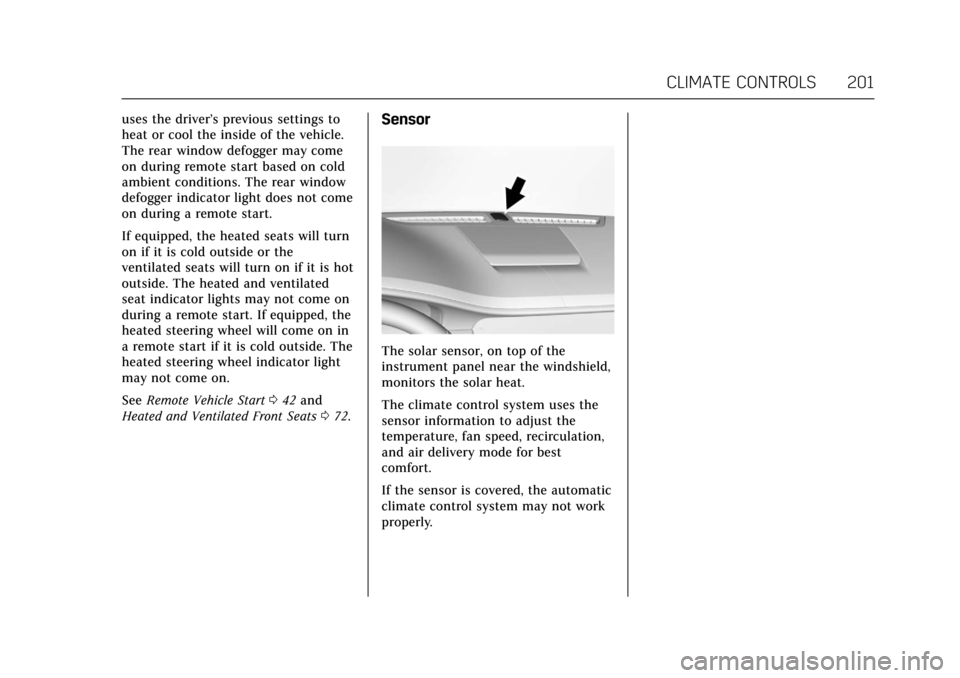
The solar sensor, on top of the
instrument panel near the windshield,
monitors the solar heat.
The climate control system uses the
sensor information to adjust the
temperature, fan speed, recirculation,
and air delivery mode for best
comfort.
If the sensor is covered, the automatic
climate control system may not work
properly.
Page 203 of 445

Cadillac CT6 Owner Manual (GMNA-Localizing-U.S./Canada-11292458) -
2018 - crc - 2/14/17
202 CLIMATE CONTROLS
Rear Climate Control System
The rear climate control system is on the rear of the center console. The settings
can be adjusted with the rear climate control buttons and the rear climate
display.
Rear Climate Control Buttons
1. Rear Driver Side and Passenger Side Temperature Controls
2.
O(On/Off) 3. Air Delivery Mode Control
4. AUTO (Automatic Operation)
5. Fan Control
Rear Climate Control Display
1. Outside Temperature Display
2. Rear Control Lockout
3. ON/OFF
4. Climate Control Selection (Application Tray Button)
5. SYNC (Synchronized Temperatures)
6. Rear AUTO (Automatic Operation)
7. Rear Driver Side and Passenger Side Climate Temperature
Controls
8. Rear Fan Control
Page 204 of 445

Cadillac CT6 Owner Manual (GMNA-Localizing-U.S./Canada-11292458) -
2018 - crc - 2/14/17
CLIMATE CONTROLS 203
9. Air Delivery Mode Control
Rear : Touch Rear on the Home Page
of the infotainment display to open
the rear climate control display. The
rear climate control settings can now
be adjusted from the front
passenger area.
O: PressOor touch ON/OFF on the
rear climate control display to turn
the rear climate control on or off.
SYNC : Touch SYNC on the rear
climate control display to match the
rear climate control temperature to
the front climate control driver
temperature. The SYNC button will
be lit.
Rear Control Lockout : Touch to lock
or unlock control of the rear climate
control system from the rear seat
passengers. When locked, the rear
climate control can only be adjusted
from the front seat.
Automatic Operation
AUTO : Press to turn on or off. The
air delivery is controlled
automatically. The AUTO indicator appears on the display. If the air
delivery mode is manually adjusted,
this cancels full automatic operation.
Manual Operation
9:
Press or press and hold the rear
fan button up or down to increase or
decrease the rear climate airf low. The
rear climate airf low can also be
adjusted by touching the fan controls
on the front climate control display.
Temperature Controls : Press or
press and hold the rear temperature
control buttons up or down to adjust
the rear passenger temperatures. The
rear passenger temperatures can also
be adjusted by touching + for warmer
air or −for cooler air on the front
climate control display.
Air Delivery Mode Control : Press or
press and hold the button up or down
to select the desired air delivery mode.
Touch the right and left arrows at the
bottom of the rear climate control
display to change the direction of the
airf low in the rear seating area.
Air Vents
Adjustable air vents are in the center
and on the sides of the instrument
panel, on the rear of the center
console storage, and in the headliner
over the rear seats, if equipped.
Move the slider knobs to change the
direction of or to close off the airf low.
Operation Tips
. Clear away any ice, snow, or leaves
from air inlets at the base of the
windshield that could block the
flow of air into the vehicle.
Page 208 of 445
Cadillac CT6 Owner Manual (GMNA-Localizing-U.S./Canada-11292458) -
2018 - crc - 2/14/17
DRIVING AND OPERATING 207
.Become familiar with vehicle
features before driving, such as
programming favorite radio
stations and adjusting climate
control and seat settings. Program
all trip information into any
navigation device prior to driving.
. Wait until the vehicle is parked to
retrieve items that have fallen to
the floor.
. Stop or park the vehicle to tend to
children.
. Keep pets in an appropriate carrier
or restraint.
. Avoid stressful conversations
while driving, whether with a
passenger or on a cell phone.
{Warning
Taking your eyes off the road too
long or too often could cause a
crash resulting in injury or death.
Focus your attention on driving. Refer to the infotainment section for
more information on using that
system and the navigation system,
if equipped, including pairing and
using a cell phone.
Defensive Driving
Defensive driving means
“always
expect the unexpected.” The first step
in driving defensively is to wear the
seat belt. See Seat Belts078.
. Assume that other road users
(pedestrians, bicyclists, and other
drivers) are going to be careless
and make mistakes. Anticipate
what they might do and be ready.
. Allow enough following distance
between you and the driver in
front of you.
. Focus on the task of driving.
Drunk Driving
Death and injury associated with
drinking and driving is a global
tragedy.
{Warning
Drinking and then driving is very
dangerous. Your reflexes,
perceptions, attentiveness, and
judgment can be affected by even a
small amount of alcohol. You can
have a serious —or even fatal —
collision if you drive after drinking.
Do not drink and drive or ride with
a driver who has been drinking.
Ride home in a cab; or if you are
with a group, designate a driver
who will not drink.
Control of a Vehicle
Braking, steering, and accelerating are
important factors in helping to control
a vehicle while driving.
Braking (Gasoline Only)
Braking action involves perception
time and reaction time. Deciding to
push the brake pedal is perception
time. Actually doing it is
reaction time.
Page 221 of 445
Cadillac CT6 Owner Manual (GMNA-Localizing-U.S./Canada-11292458) -
2018 - crc - 2/14/17
220 DRIVING AND OPERATING
the vehicle is ready to be driven. This
could take up to 15 seconds at
extremely cold temperatures. See
Vehicle Ready Light (PLUG-IN Only)
0151.
PLUG-IN Operation
This vehicle combines gasoline and
electric propulsion. The gasoline
engine will automatically start to
provide power and then shut off to
save fuel.
The engine may remain
running when:
.
Accelerating aggressively or
climbing hills.
. Vehicle speed is greater than
125 km/h (75 mph).
. Charging the high voltage battery.
. The heater is being used.
The engine and transmission work
together to provide propulsion power
at the highest efficiency. This may
result in higher engine speeds.
Stop/Start System
{Warning
Exiting the vehicle without first
shifting into P (Park) may cause the
vehicle to move. You or others may
be injured. Because the vehicle may
have an auto engine stop/start
feature, the vehicle's engine might
seem to be shut off; however, once
the brake pedal is released, the
engine will start up again.
Shift to P (Park) and turn the
ignition off before exiting the
vehicle.
The vehicle has a fuel saving stop/
start system to shut off the engine
and help conserve fuel.
Auto Engine Stop/Start
When the brakes are applied and the
vehicle is at a complete stop, the
engine may turn off. When stopped,
the tachometer may display Auto
Stop, or the Auto Stop light may come
on in the instrument cluster.
See Tachometer 0134 and Auto Stop Mode (Uplevel Cluster)
0150. When the
brake pedal is released or the
accelerator pedal is pressed, the
engine may restart.
Auto Stop may be deactivated if:
. A minimum vehicle speed is not
reached.
. The engine or transmission is not
at the required operating
temperature.
. The outside temperature is not in
the required operating range,
typically between -10 °C (14 °F)
and 50 °C (122 °F).
. The shift lever is in any gear other
than D (Drive).
. The battery has been recently
disconnected.
. The battery charge is low.
. The interior comfort level has not
reached the required level for the
climate control system or defog
settings.
Page 223 of 445
Cadillac CT6 Owner Manual (GMNA-Localizing-U.S./Canada-11292458) -
2018 - crc - 2/14/17
222 DRIVING AND OPERATING
too much gasoline. Try pushing
the accelerator pedal all the way
to the floor and holding it there
as you press ENGINE START/
STOP. Wait at least 15 seconds
between each try, to allow the
cranking motor to cool down.
When the engine starts, release
the accelerator. If the vehicle
starts briefly but then stops
again, do the same thing. This
clears the extra gasoline from the
engine. Do not race the engine
immediately after starting it.
Operate the engine and
transmission gently until the oil
warms up and lubricates all
moving parts.
Stop/Start System
{Warning
Exiting the vehicle without first
shifting into P (Park) may cause the
vehicle to move. You or others may
be injured. Because the vehicle may
have an auto engine stop/start
feature, the vehicle's engine might(Continued)
Warning (Continued)
seem to be shut off; however, once
the brake pedal is released, the
engine will start up again.
Shift to P (Park) and turn the
ignition off before exiting the
vehicle.
The vehicle has a fuel saving stop/
start system to shut off the engine
and help conserve fuel.
Auto Engine Stop/Start
When the brakes are applied and the
vehicle is at a complete stop, the
engine may turn off. When stopped,
the tachometer may display Auto
Stop, or the Auto Stop light may come
on in the instrument cluster.
See Tachometer 0134 and Auto Stop
Mode (Uplevel Cluster) 0150. When the
brake pedal is released or the
accelerator pedal is pressed, the
engine may restart.
Auto Stop may be deactivated if:
. A minimum vehicle speed is not
reached. .
The engine or transmission is not
at the required operating
temperature.
. The outside temperature is not in
the required operating range,
typically between -10 °C (14 °F)
and 50 °C (122 °F).
. The shift lever is in any gear other
than D (Drive).
. The battery has been recently
disconnected.
. The battery charge is low.
. The interior comfort level has not
reached the required level for the
climate control system or defog
settings.
See Automatic Climate Control
System (Quad Zone - Gasoline Only)
0 197 orAutomatic Climate Control
System (Dual Zone - Gasoline and
PLUG-IN) 0191.
. The Auto Stop time is greater than
two minutes.