lighting CADILLAC CT6 2018 1.G User Guide
[x] Cancel search | Manufacturer: CADILLAC, Model Year: 2018, Model line: CT6, Model: CADILLAC CT6 2018 1.GPages: 445, PDF Size: 7.7 MB
Page 186 of 445
Cadillac CT6 Owner Manual (GMNA-Localizing-U.S./Canada-11292458) -
2018 - crc - 2/14/17
LIGHTING 185
Exterior Lamps Off
Reminder
A warning chime sounds if the driver
door is opened while the ignition is off
and the exterior lamps are on.
Headlamp High/Low-Beam
Changer
3
:Push the turn signal lever away
from you and release, to turn the high
beams on. To return to low beams,
push the lever again or pull it toward
you and release.
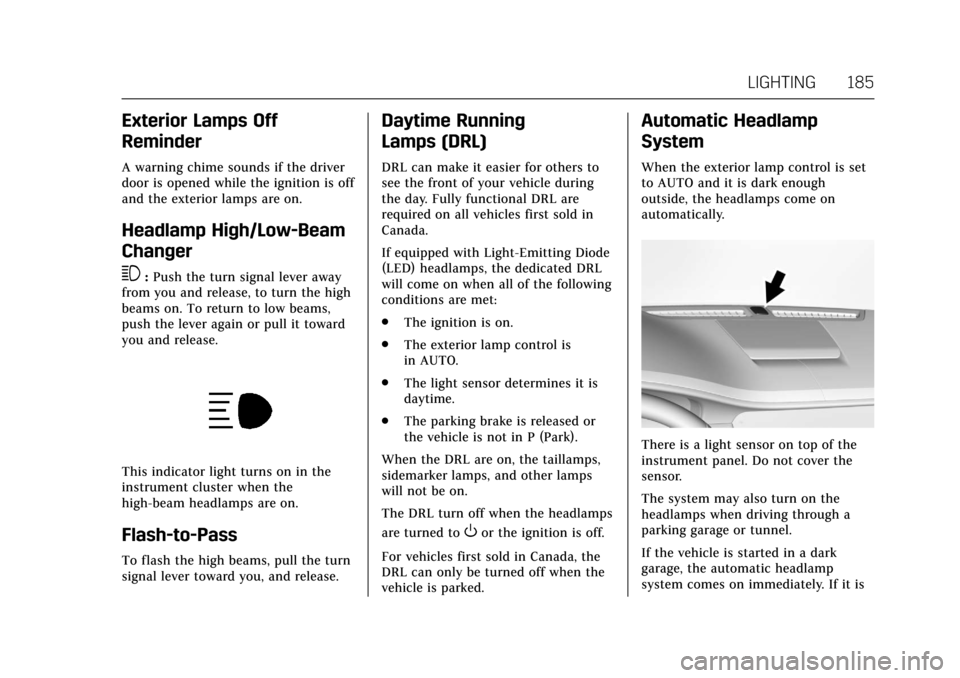
This indicator light turns on in the
instrument cluster when the
high-beam headlamps are on.
Flash-to-Pass
To flash the high beams, pull the turn
signal lever toward you, and release.
Daytime Running
Lamps (DRL)
DRL can make it easier for others to
see the front of your vehicle during
the day. Fully functional DRL are
required on all vehicles first sold in
Canada.
If equipped with Light-Emitting Diode
(LED) headlamps, the dedicated DRL
will come on when all of the following
conditions are met:
. The ignition is on.
. The exterior lamp control is
in AUTO.
. The light sensor determines it is
daytime.
. The parking brake is released or
the vehicle is not in P (Park).
When the DRL are on, the taillamps,
sidemarker lamps, and other lamps
will not be on.
The DRL turn off when the headlamps
are turned to
Oor the ignition is off.
For vehicles first sold in Canada, the
DRL can only be turned off when the
vehicle is parked.
Automatic Headlamp
System
When the exterior lamp control is set
to AUTO and it is dark enough
outside, the headlamps come on
automatically.
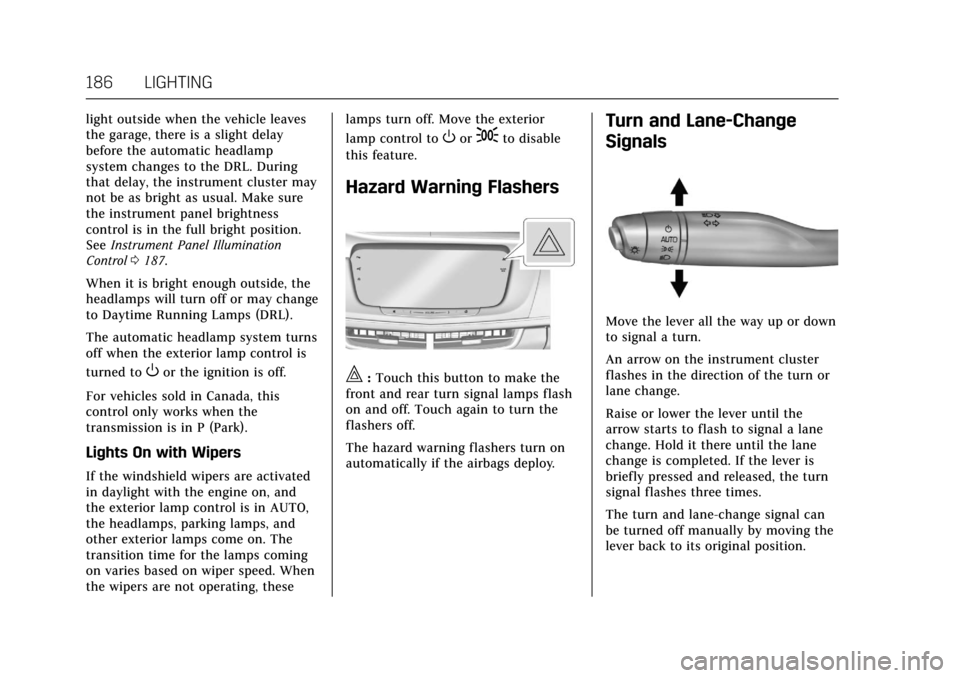
There is a light sensor on top of the
instrument panel. Do not cover the
sensor.
The system may also turn on the
headlamps when driving through a
parking garage or tunnel.
If the vehicle is started in a dark
garage, the automatic headlamp
system comes on immediately. If it is
Page 187 of 445
Cadillac CT6 Owner Manual (GMNA-Localizing-U.S./Canada-11292458) -
2018 - crc - 2/14/17
186 LIGHTING
light outside when the vehicle leaves
the garage, there is a slight delay
before the automatic headlamp
system changes to the DRL. During
that delay, the instrument cluster may
not be as bright as usual. Make sure
the instrument panel brightness
control is in the full bright position.
SeeInstrument Panel Illumination
Control 0187.
When it is bright enough outside, the
headlamps will turn off or may change
to Daytime Running Lamps (DRL).
The automatic headlamp system turns
off when the exterior lamp control is
turned to
Oor the ignition is off.
For vehicles sold in Canada, this
control only works when the
transmission is in P (Park).
Lights On with Wipers
If the windshield wipers are activated
in daylight with the engine on, and
the exterior lamp control is in AUTO,
the headlamps, parking lamps, and
other exterior lamps come on. The
transition time for the lamps coming
on varies based on wiper speed. When
the wipers are not operating, these lamps turn off. Move the exterior
lamp control to
Oor;to disable
this feature.
Hazard Warning Flashers
|: Touch this button to make the
front and rear turn signal lamps flash
on and off. Touch again to turn the
flashers off.
The hazard warning flashers turn on
automatically if the airbags deploy.
Turn and Lane-Change
Signals
Move the lever all the way up or down
to signal a turn.
An arrow on the instrument cluster
flashes in the direction of the turn or
lane change.
Raise or lower the lever until the
arrow starts to flash to signal a lane
change. Hold it there until the lane
change is completed. If the lever is
briefly pressed and released, the turn
signal flashes three times.
The turn and lane-change signal can
be turned off manually by moving the
lever back to its original position.
Page 188 of 445
Cadillac CT6 Owner Manual (GMNA-Localizing-U.S./Canada-11292458) -
2018 - crc - 2/14/17
LIGHTING 187
If after signaling a turn or lane
change, the arrow flashes rapidly or
does not come on, a signal bulb may
be burned out.
Replace any burned out bulbs. If a
bulb is not burned out, check the fuse.
SeeFuses and Circuit Breakers 0331.Interior Lighting
Instrument Panel
Illumination Control
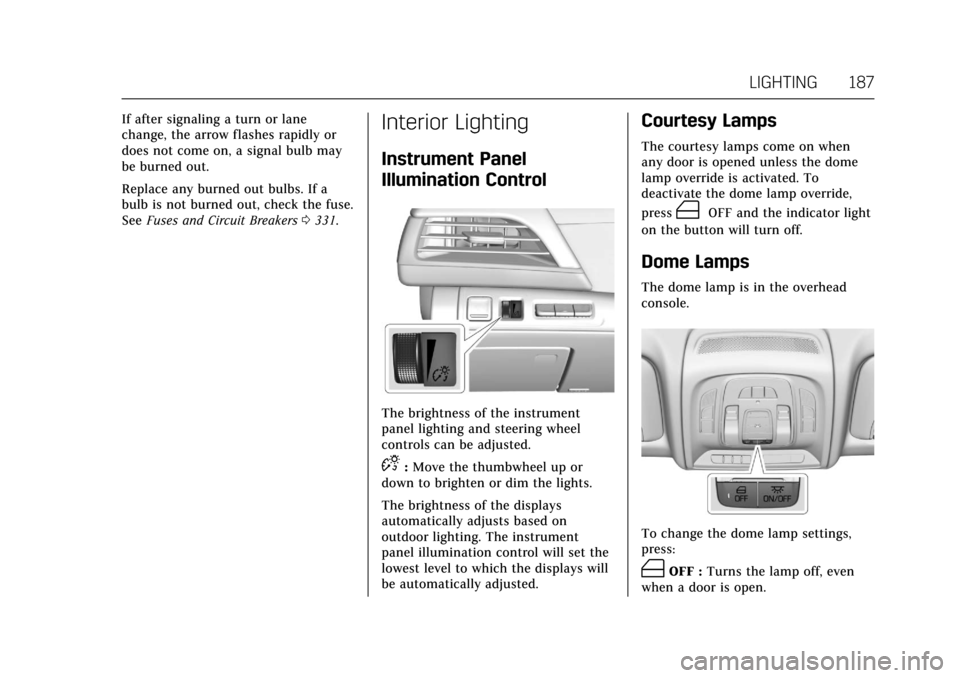
The brightness of the instrument
panel lighting and steering wheel
controls can be adjusted.
D:Move the thumbwheel up or
down to brighten or dim the lights.
The brightness of the displays
automatically adjusts based on
outdoor lighting. The instrument
panel illumination control will set the
lowest level to which the displays will
be automatically adjusted.
Courtesy Lamps
The courtesy lamps come on when
any door is opened unless the dome
lamp override is activated. To
deactivate the dome lamp override,
press
(OFF and the indicator light
on the button will turn off.
Dome Lamps
The dome lamp is in the overhead
console.
To change the dome lamp settings,
press:
(OFF : Turns the lamp off, even
when a door is open.
Page 189 of 445
Cadillac CT6 Owner Manual (GMNA-Localizing-U.S./Canada-11292458) -
2018 - crc - 2/14/17
188 LIGHTING
+ON/OFF :Turns the lamp on
or off.
Reading Lamps
There are front and rear reading
lamps on the overhead console and
over the rear passenger doors. These
lamps come on automatically when
any door is opened.
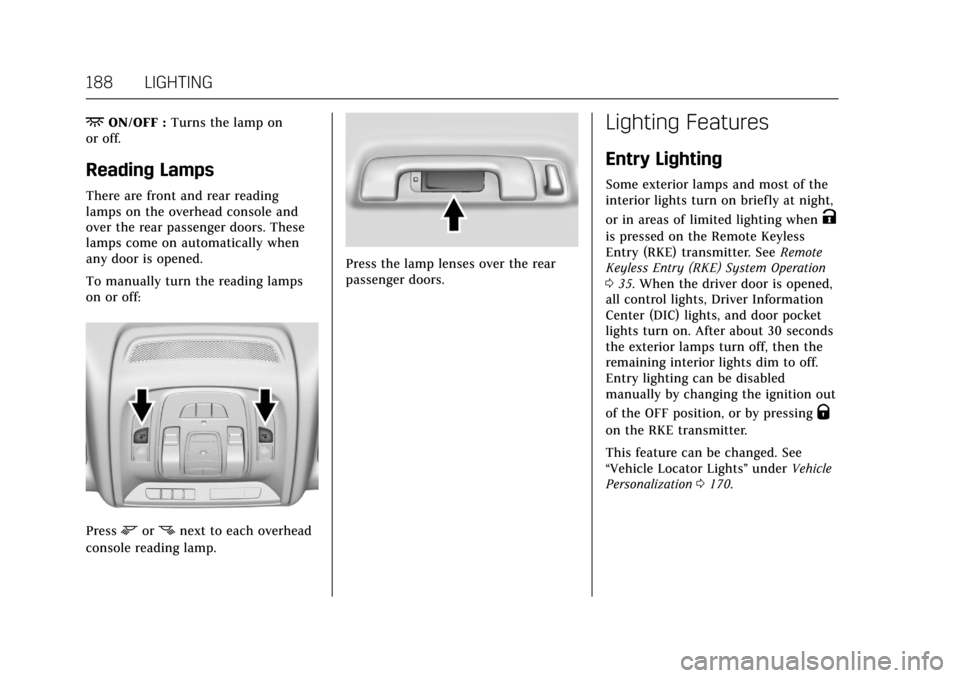
To manually turn the reading lamps
on or off:
Pressmornnext to each overhead
console reading lamp.
Press the lamp lenses over the rear
passenger doors.
Lighting Features
Entry Lighting
Some exterior lamps and most of the
interior lights turn on briefly at night,
or in areas of limited lighting when
K
is pressed on the Remote Keyless
Entry (RKE) transmitter. See Remote
Keyless Entry (RKE) System Operation
0 35. When the driver door is opened,
all control lights, Driver Information
Center (DIC) lights, and door pocket
lights turn on. After about 30 seconds
the exterior lamps turn off, then the
remaining interior lights dim to off.
Entry lighting can be disabled
manually by changing the ignition out
of the OFF position, or by pressing
Q
on the RKE transmitter.
This feature can be changed. See
“Vehicle Locator Lights” underVehicle
Personalization 0170.
Page 190 of 445

Cadillac CT6 Owner Manual (GMNA-Localizing-U.S./Canada-11292458) -
2018 - crc - 2/14/17
LIGHTING 189
Entry Lighting with Approach
Detection
If equipped with approach detection,
the entry lighting feature will
automatically turn on when the RKE
transmitter is detected within
approximately 2 m (6 ft) of the vehicle.
If the vehicle has remained parked for
an extended period of time with no
RKE transmitter use or Keyless Access
operation, approach detection will be
disabled. To reactivate, press any
button on the RKE transmitter or
open and close all vehicle doors to
re-enable the entry lighting feature on
approach.
Approach detection will not work if:
.The vehicle battery is low.
. The ignition is on or in ACC/
ACCESSORY.
. Entry lighting is set to Off. See
“Vehicle Locator Lights” under
Vehicle Personalization 0170. Approach detection will not work with
a single RKE transmitter if:
.
The RKE transmitter is left within
a 5 m (16 ft) range of the vehicle
for several minutes
. The RKE transmitter is left inside
the vehicle and all the doors are
closed
To help maximize transmitter battery
life, do not store the transmitter
within 5 m (16 ft) of the vehicle.
Exit Lighting
Some exterior lamps and interior
lights come on at night, or in areas
with limited lighting, when the driver
door is opened after the ignition is
turned off. The dome lamp comes on
after the ignition is changed to the
OFF position. The exterior lamps and
dome lamp remain on for a set
amount of time, then automatically
turn off.
The exterior lamps turn off
immediately by turning the exterior
lamp control off.
This feature can be changed. See
Vehicle Personalization 0170.
Battery Power Protection
The battery saver feature is designed
to protect the vehicle's battery.
If some interior lamps are left on and
the ignition is turned off, the battery
rundown protection system
automatically turns the lamp off after
some time.
Exterior Lighting Battery
Saver
The exterior lamps turn off about
10 minutes after the ignition is turned
off, if the parking lamps or headlamps
have been manually left on. This
protects against draining the battery.
To restart the 10-minute timer, turn
the exterior lamp control to the off
position and then back to the parking
lamp or headlamp position.
To keep the lamps on for more than
10 minutes, the ignition must be on or
in ACC/ACCESSORY.
Page 273 of 445
Cadillac CT6 Owner Manual (GMNA-Localizing-U.S./Canada-11292458) -
2018 - crc - 2/14/17
272 DRIVING AND OPERATING
When on,Ais green if LKA is
available to assist and provide LDW
alerts. It may assist by gently turning
the steering wheel and display
A
as amber if the vehicle approaches a
detected lane marking without using a
turn signal in that direction. It may also provide an LDW alert by
flashing
Aamber as the lane
marking is crossed. Additionally, there
may be three beeps, or the driver seat
may pulse three times, on the right or
left, depending on the lane departure
direction.
Take Steering
The LKA system does not
continuously steer the vehicle. If LKA
does not detect active driver steering,
an alert, chime, or DIC message may
be provided. Move the steering wheel
to dismiss.
When the System Does Not
Seem to Work Properly
The system performance may be
affected by:
. Close vehicles ahead. .
Sudden lighting changes, such as
when driving through tunnels.
. Banked roads.
. Roads with poor lane markings,
such as two-lane roads.
If the LKA system is not functioning
properly when lane markings are
clearly visible, cleaning the windshield
may help.
A system unavailable message may
display if the camera is blocked. The
LKA system does not need service.
LKA assistance and/or LDW alerts
may occur due to tar marks, shadows,
cracks in the road, temporary or
construction lane markings, or other
road imperfections. This is normal
system operation; the vehicle does not
need service. Turn LKA off if these
conditions continue.
Surround Vision Recorder
If equipped, this system records the
360° camera views to an SD card. Only
images are recorded, no sound. An SD
card will be needed for this system. The recommended SD card is an
8-32GB SDHC card with FAT32 file
system, Class 4 and over.
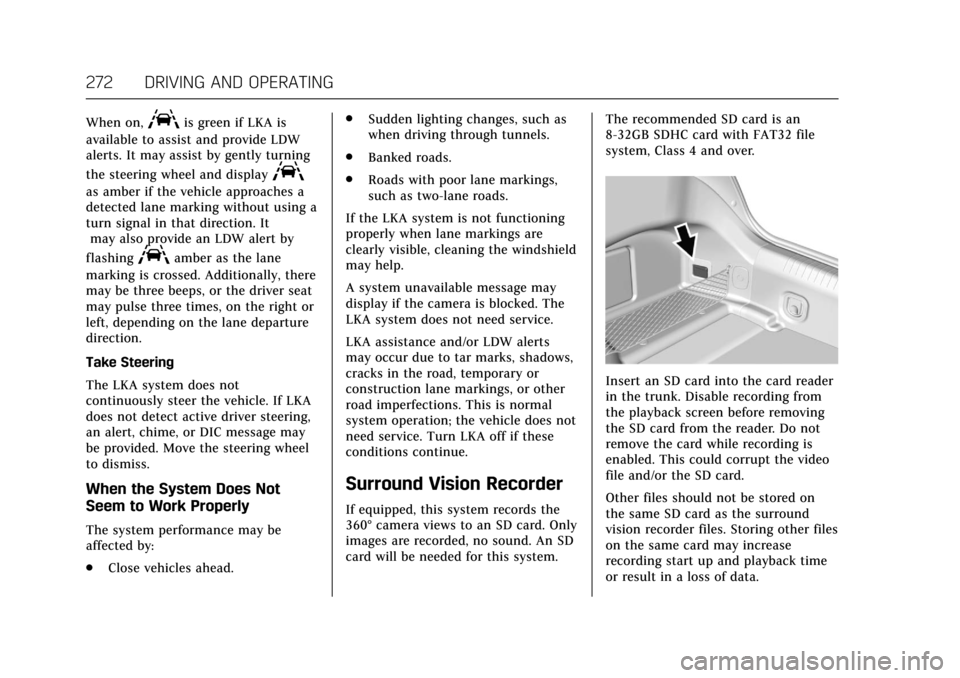
Insert an SD card into the card reader
in the trunk. Disable recording from
the playback screen before removing
the SD card from the reader. Do not
remove the card while recording is
enabled. This could corrupt the video
file and/or the SD card.
Other files should not be stored on
the same SD card as the surround
vision recorder files. Storing other files
on the same card may increase
recording start up and playback time
or result in a loss of data.
Page 274 of 445

Cadillac CT6 Owner Manual (GMNA-Localizing-U.S./Canada-11292458) -
2018 - crc - 2/14/17
DRIVING AND OPERATING 273
To Activate :Touch Video Recorder
on the Home Page. Touch
#.#
will have a red dot when the video
recorder is on. It will remain on until
it has been turned off. Recording will
start after exiting the playback screen.
Advise other drivers and occupants of
the vehicle that video images are
being recorded.
To Deactivate : Touch Video Recorder
on the Home Page. Touch
#.
Select from the following when the
vehicle is in P (Park).
Exit : Touch to exit this application
and return to the previous app. Video List :
Touch to display a list of
the most recent and saved videos.
Touch the delete button next to the
name to delete a saved video.
Rewind : Touch to rewind the video.
Touch again to stop rewinding.
Play/Pause : Touch to play or pause a
recorded video.
Fast Forward : Touch to fast forward
the video. Touch again to stop fast
forward.
Save : Touch to save a video. This
protects the video from being erased.
Once the SD card is full, files will be
overwritten unless they have been
saved.
Front/Rear Camera View : Select to
switch between the front and rear
camera views in playback.
TouchingSBack returns to the
player view with video that was
previously loaded still showing. The latest recorded video file can be
played. In addition:
.
There are approximately 12 hours
of video storage based on an 8GB
SD card. This could vary based on
exterior lighting conditions.
. The recorded video is stored in
five-minute-long files.
. All files can be viewed on the
playback app or when the SD card
is read by a personal
computer (PC).
. Once the SD card is full, the oldest
files will be overwritten.
To Delete Data : Remove the SD card
from the vehicle and insert into a PC
to manually delete the file.
Error messages can occur if:
. No SD card is present.
. An empty SD card is present.
. The video files are the wrong
format.
. The video files are corrupt.
. The SD card is full.
. There is a system error.
Page 297 of 445
Cadillac CT6 Owner Manual (GMNA-Localizing-U.S./Canada-11292458) -
2018 - crc - 2/15/17
296 VEHICLE CARE
Vehicle Care
General Information
General Information . . . . . . . . . . . . . 297
California Proposition65 Warning . . . . . . . . . . . . . . . . . . . . . 297
California Perchlorate Materials Requirements . . . . . . . . . . . . . . . . . . . 297
Accessories and Modifications . . . . . . . . . . . . . . . . . . . 298
Vehicle Checks
Doing Your OwnService Work . . . . . . . . . . . . . . . . . . . . 298
Hood . . . . . . . . . . . . . . . . . . . . . . . . . . . . . . 299
Engine Compartment Overview . . . . . . . . . . . . . . . . . . . . . . . . . 300
Engine Oil . . . . . . . . . . . . . . . . . . . . . . . . . 307
Engine Oil Life System . . . . . . . . . . . 309
Automatic Transmission Fluid . . . . . . . . . . . . . . . . . . . . . . . . . . . . . 310
Engine Air Cleaner/Filter . . . . . . . . . 311
Cooling System (Gasoline Only) . . . . . . . . . . . . . . . . . 312
Cooling System (PLUG-IN Only) . . . . . . . . . . . . . . . . . 316
Engine Overheating . . . . . . . . . . . . . . 321
Washer Fluid . . . . . . . . . . . . . . . . . . . . . 322
Brakes . . . . . . . . . . . . . . . . . . . . . . . . . . . . . 322
Brake Fluid . . . . . . . . . . . . . . . . . . . . . . . 323 Battery - North America . . . . . . . . . 324
All-Wheel Drive . . . . . . . . . . . . . . . . . . 326
Starter Switch Check . . . . . . . . . . . . . 326
Automatic Transmission Shift
Lock Control Function
Check . . . . . . . . . . . . . . . . . . . . . . . . . . . . 327
Park Brake and P (Park) Mechanism Check . . . . . . . . . . . . . . 327
Wiper Blade Replacement . . . . . . . 327
Windshield Replacement . . . . . . . . 328
Gas Strut(s) . . . . . . . . . . . . . . . . . . . . . . . 328
Headlamp Aiming
Headlamp Aiming . . . . . . . . . . . . . . . . 329
Bulb Replacement
Bulb Replacement . . . . . . . . . . . . . . . . 330
LED Lighting . . . . . . . . . . . . . . . . . . . . . 330
License Plate Lamp . . . . . . . . . . . . . . 330
Replacement Bulbs . . . . . . . . . . . . . . . 330
Electrical System
Electrical System Overload . . . . . . 331
Fuses and Circuit Breakers . . . . . . 331
Engine Compartment Fuse Block . . . . . . . . . . . . . . . . . . . . . . . . . . . . 332
Instrument Panel Fuse Block . . . . 335
Rear Compartment Fuse Block . . . . . . . . . . . . . . . . . . . . . . . . . . . . 337
Wheels and Tires
Tires . . . . . . . . . . . . . . . . . . . . . . . . . . . . . . . 340 All-Season Tires . . . . . . . . . . . . . . . . . . 341
Winter Tires . . . . . . . . . . . . . . . . . . . . . . 341
Low-Profile Tires . . . . . . . . . . . . . . . . . 342
Summer Tires . . . . . . . . . . . . . . . . . . . . 342
Tire Sidewall Labeling . . . . . . . . . . . 342
Tire Designations . . . . . . . . . . . . . . . . . 344
Tire Terminology and
Definitions . . . . . . . . . . . . . . . . . . . . . . 345
Tire Pressure . . . . . . . . . . . . . . . . . . . . . . 347
Tire Pressure for High-Speed Operation . . . . . . . . . . . . . . . . . . . . . . . . 349
Tire Pressure Monitor System . . . 349
Tire Pressure Monitor Operation . . . . . . . . . . . . . . . . . . . . . . . . 350
Tire Inspection . . . . . . . . . . . . . . . . . . . 353
Tire Rotation . . . . . . . . . . . . . . . . . . . . . 353
When It Is Time for New Tires . . . . . . . . . . . . . . . . . . . . . . . . . . . . . 355
Buying New Tires . . . . . . . . . . . . . . . . 355
Different Size Tires and Wheels . . . . . . . . . . . . . . . . . . . . . . . . . . 357
Uniform Tire Quality Grading . . . 357
Wheel Alignment and Tire Balance . . . . . . . . . . . . . . . . . . . . . . . . . . 359
Wheel Replacement . . . . . . . . . . . . . . 359
Tire Chains . . . . . . . . . . . . . . . . . . . . . . . 360
If a Tire Goes Flat . . . . . . . . . . . . . . . . 360
Tire Sealant and Compressor Kit . . . . . . . . . . . . . . . . . 362
Storing the Tire Sealant and Compressor Kit . . . . . . . . . . . . . . . . . 368
Page 331 of 445

Cadillac CT6 Owner Manual (GMNA-Localizing-U.S./Canada-11292458) -
2018 - crc - 2/15/17
330 VEHICLE CARE
Bulb Replacement
For the proper type of replacement
bulbs, seeReplacement Bulbs 0330.
For any bulb-changing procedure not
listed in this section, contact your
dealer.
LED Lighting
This vehicle has several LED lamps.
For replacement of any LED lighting
assembly not listed here, contact your
dealer.
License Plate Lamp
Lamp Assembly
To replace one of these lamps:
1. Push the lamp assembly toward the center of the vehicle.
2. Pull the lamp assembly down to expose the LED connector.
3. Pull the retaining tab on the LED connector up to release the lamp
assembly. Remove the lamp
assembly.
4. Install the new lamp assembly on the LED connector. Push in
the retaining tab to lock the new
lamp assembly in place. 5. Push the lamp assembly back
into position until the release tab
locks into place.
Replacement Bulbs
Exterior Lamp Bulb Number
License Plate Lamp 13588150
For replacement bulbs not listed here,
contact your dealer.
Page 335 of 445
Cadillac CT6 Owner Manual (GMNA-Localizing-U.S./Canada-11292458) -
2018 - crc - 2/15/17
334 VEHICLE CARE
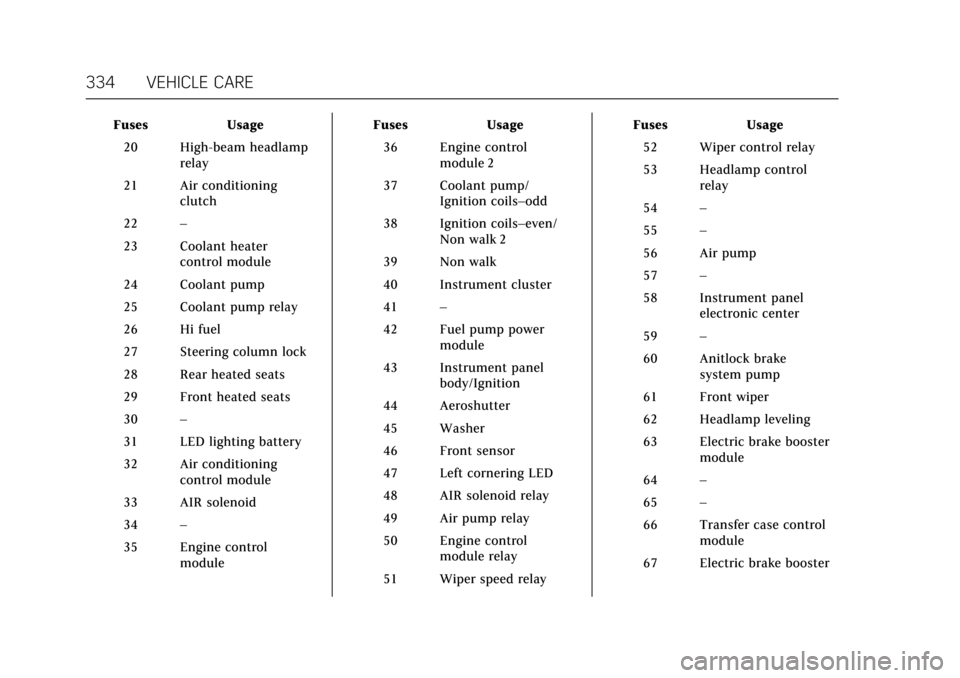
FusesUsage
20 High-beam headlamp relay
21 Air conditioning clutch
22 –
23 Coolant heater control module
24 Coolant pump
25 Coolant pump relay
26 Hi fuel
27 Steering column lock
28 Rear heated seats
29 Front heated seats
30 –
31 LED lighting battery
32 Air conditioning control module
33 AIR solenoid
34 –
35 Engine control module Fuses
Usage
36 Engine control module 2
37 Coolant pump/ Ignition coils–odd
38 Ignition coils–even/ Non walk 2
39 Non walk
40 Instrument cluster
41 –
42 Fuel pump power module
43 Instrument panel body/Ignition
44 Aeroshutter
45 Washer
46 Front sensor
47 Left cornering LED
48 AIR solenoid relay
49 Air pump relay
50 Engine control module relay
51 Wiper speed relay Fuses
Usage
52 Wiper control relay
53 Headlamp control relay
54 –
55 –
56 Air pump
57 –
58 Instrument panel electronic center
59 –
60 Anitlock brake system pump
61 Front wiper
62 Headlamp leveling
63 Electric brake booster module
64 –
65 –
66 Transfer case control module
67 Electric brake booster