remote control CADILLAC CT6 2018 1.G Owner's Manual
[x] Cancel search | Manufacturer: CADILLAC, Model Year: 2018, Model line: CT6, Model: CADILLAC CT6 2018 1.GPages: 445, PDF Size: 7.7 MB
Page 183 of 445

Cadillac CT6 Owner Manual (GMNA-Localizing-U.S./Canada-11292458) -
2018 - crc - 2/14/17
182 INSTRUMENTS AND CONTROLS
Erasing Universal Remote
System Buttons
Erase all programmed buttons when
vehicle ownership is terminated.
To erase:1. Press and hold the two outside buttons until the indicator light
begins to flash. This should take
about 10 seconds.
2. Release both buttons.
Reprogramming a Single
Universal Remote System Button
To reprogram any of the system
buttons:
1. Press and hold any one of the buttons. Do not release the
button.
2. The indicator light will begin to flash after 20 seconds. Without
releasing the button, proceed
with Step 1 under “Programming
the Universal Remote System.”
Page 189 of 445
Cadillac CT6 Owner Manual (GMNA-Localizing-U.S./Canada-11292458) -
2018 - crc - 2/14/17
188 LIGHTING
+ON/OFF :Turns the lamp on
or off.
Reading Lamps
There are front and rear reading
lamps on the overhead console and
over the rear passenger doors. These
lamps come on automatically when
any door is opened.
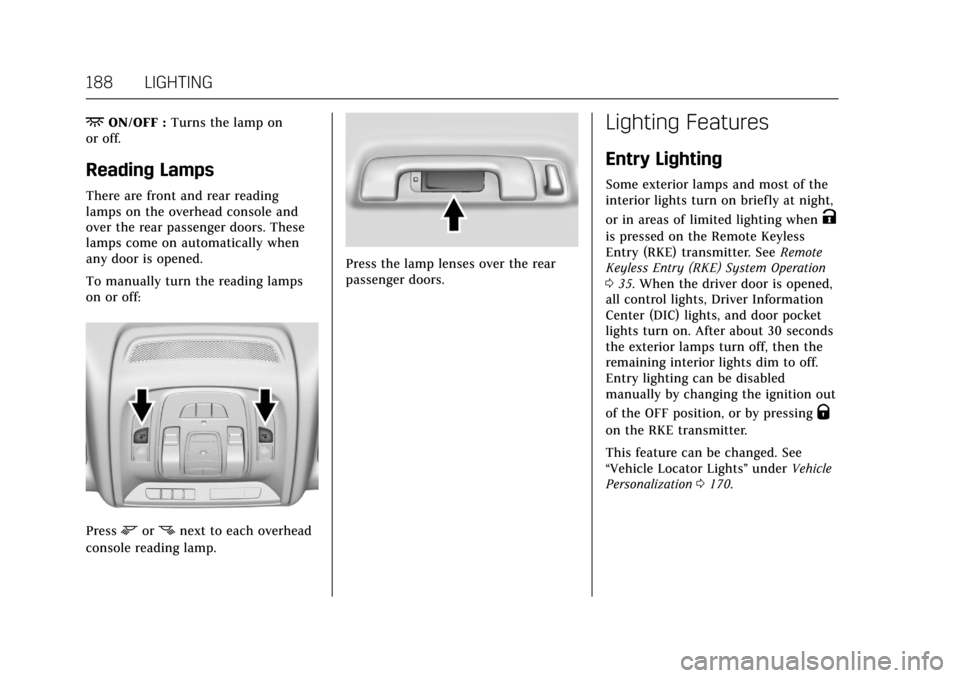
To manually turn the reading lamps
on or off:
Pressmornnext to each overhead
console reading lamp.
Press the lamp lenses over the rear
passenger doors.
Lighting Features
Entry Lighting
Some exterior lamps and most of the
interior lights turn on briefly at night,
or in areas of limited lighting when
K
is pressed on the Remote Keyless
Entry (RKE) transmitter. See Remote
Keyless Entry (RKE) System Operation
0 35. When the driver door is opened,
all control lights, Driver Information
Center (DIC) lights, and door pocket
lights turn on. After about 30 seconds
the exterior lamps turn off, then the
remaining interior lights dim to off.
Entry lighting can be disabled
manually by changing the ignition out
of the OFF position, or by pressing
Q
on the RKE transmitter.
This feature can be changed. See
“Vehicle Locator Lights” underVehicle
Personalization 0170.
Page 196 of 445
Cadillac CT6 Owner Manual (GMNA-Localizing-U.S./Canada-11292458) -
2018 - crc - 2/14/17
CLIMATE CONTROLS 195
air supply and turn on the air
conditioner. If the climate control
system does not detect possible
window fogging, it returns to normal
operation. To turn Auto Defog off or
on, see“Climate and Air Quality”
under Vehicle Personalization 0170.
Ionizer : If equipped with an ionizer,
this feature helps to clean the air
inside the vehicle and remove
contaminants; such as pollen, odors,
and dust. If the climate control
system is on and the ionizer is
enabled, the ionizer status indicator
will be lit on the climate control
display. To turn the ionizer on or off,
see “Climate and Air Quality” under
Vehicle Personalization 0170.
Rear Window Defogger
K:Press to turn the rear window
defogger on or off. The rear window
defogger only works when the engine
is running.
The rear window defogger can be set
to automatic operation. See “Climate
and Air Quality” underVehicle
Personalization 0170. When Auto Rear
Defog is selected, the rear window
defogger turns on automatically when the interior temperature is cold and
the outside temperature is about 4 °C
(40 °F) and below.
The upper grid lines on the rear
window are antenna lines and are not
intended to heat when the defogger is
activated.
The heated outside mirrors turn on
when the rear window defogger
button is on and help to clear fog or
frost from the surface of the mirrors.
Caution
Do not try to clear frost or other
material from the inside of the
front windshield and rear window
with a razor blade or anything else
that is sharp. This may damage the
rear window defogger grid and
affect the radio's ability to pick up
stations clearly. The repairs would
not be covered by the vehicle
warranty.
Driver and Passenger Heated and
Ventilated Seats (If Equipped) :
Press
Ior+to heat the driver or
passenger seatback only.
Press
Jorzto heat the driver or
passenger seat cushion and seatback.
Press
Cor{to ventilate the driver
or passenger seat. See Heated and
Ventilated Front Seats 072.
Remote Start Climate Control
Operation : If equipped with the
remote start feature, the climate
control system may run when the
vehicle is started remotely. The system
uses the driver’s previous settings to
heat or cool the inside of the vehicle.
The rear defog may come on during
remote start based on cold ambient
conditions. The rear defog indicator
light does not come on during a
remote start.
Page 197 of 445

Cadillac CT6 Owner Manual (GMNA-Localizing-U.S./Canada-11292458) -
2018 - crc - 2/14/17
196 CLIMATE CONTROLS
If equipped, the heated seats will turn
on if it is cold outside or the
ventilated seats will turn on if it is hot
outside. The heated and ventilated
seat indicator lights may not come on
during a remote start. If equipped, the
heated steering wheel will come on in
a remote start if it is cold outside. The
heated steering wheel indicator light
may not come on.
SeeRemote Vehicle Start 042 and
Heated and Ventilated Front Seats 072.
Sensor
The solar sensor, on top of the
instrument panel near the windshield,
monitors the solar heat. The climate control system uses the
sensor information to adjust the
temperature, fan speed, recirculation,
and air delivery mode for best
comfort.
If the sensor is covered, the automatic
climate control system may not work
properly.
Page 201 of 445
Cadillac CT6 Owner Manual (GMNA-Localizing-U.S./Canada-11292458) -
2018 - crc - 2/14/17
200 CLIMATE CONTROLS
Pressing this button cancels automatic
recirculation. Press AUTO to return to
automatic operation; recirculation
runs automatically as needed.
Manual recirculation mode is not
available when in Defrost or Defog
modes.
Auto Defog :The climate control
system may have a sensor to
automatically detect high humidity
inside the vehicle. When high
humidity is detected, the climate
control system may adjust to outside
air supply and turn on the air
conditioner. If the climate control
system does not detect possible
window fogging, it returns to normal
operation. To turn Auto Defog off or
on, see “Climate and Air Quality”
under Vehicle Personalization 0170.
Ionizer : If equipped with an ionizer,
this feature helps to clean the air
inside the vehicle and remove
contaminants such as pollen, odors,
and dust. If the climate control
system is on and the ionizer is
enabled, the ionizer status indicator
will be lit on the climate control display. To turn the ionizer on or off,
see
“Climate and Air Quality” under
Vehicle Personalization 0170.
Rear Window Defogger
K:Press to turn the rear window
defogger on or off.
The rear window defogger can be set
to automatic operation. See “Climate
and Air Quality” underVehicle
Personalization 0170. When Auto Rear
Defog is selected, the rear window
defogger turns on automatically when
the interior temperature is cold and
the outside temperature is about 4 °C
(40 °F) and below.
The upper grid lines on the rear
window are antenna lines and are not
intended to heat when the defogger is
activated.
The heated outside mirrors turn on
when the rear window defogger
button is on and help to clear fog or
frost from the surface of the mirrors.
Caution
Do not try to clear frost or other
material from the inside of the
front windshield and rear window
with a razor blade or anything else
that is sharp. This may damage the
rear window defogger grid and
affect the radio's ability to pick up
stations clearly. The repairs would
not be covered by the vehicle
warranty.
Driver and Passenger Heated and
Ventilated Seats (If Equipped) :
Press
Ior+to heat the driver or
passenger seatback only.
Press
Jorzto heat the driver or
passenger seat cushion and seatback.
Press
Cor{to ventilate the driver
or passenger seat. See Heated and
Ventilated Front Seats 072.
Remote Start Climate Control
Operation : If equipped with the
remote start feature, the climate
control system may run when the
vehicle is started remotely. The system
Page 202 of 445
Cadillac CT6 Owner Manual (GMNA-Localizing-U.S./Canada-11292458) -
2018 - crc - 2/14/17
CLIMATE CONTROLS 201
uses the driver’s previous settings to
heat or cool the inside of the vehicle.
The rear window defogger may come
on during remote start based on cold
ambient conditions. The rear window
defogger indicator light does not come
on during a remote start.
If equipped, the heated seats will turn
on if it is cold outside or the
ventilated seats will turn on if it is hot
outside. The heated and ventilated
seat indicator lights may not come on
during a remote start. If equipped, the
heated steering wheel will come on in
a remote start if it is cold outside. The
heated steering wheel indicator light
may not come on.
SeeRemote Vehicle Start 042 and
Heated and Ventilated Front Seats 072.Sensor
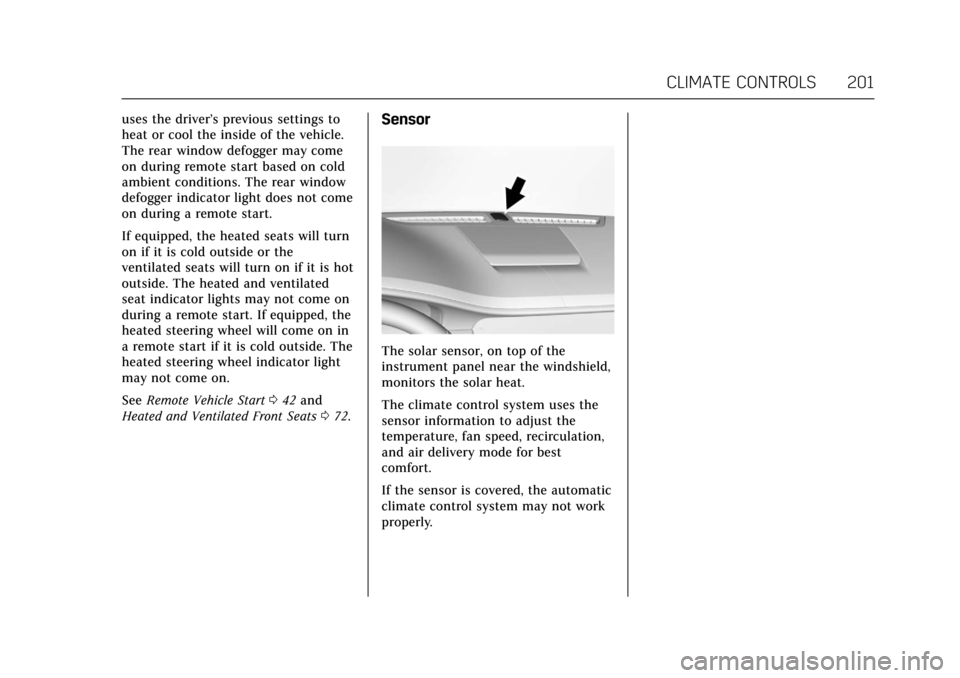
The solar sensor, on top of the
instrument panel near the windshield,
monitors the solar heat.
The climate control system uses the
sensor information to adjust the
temperature, fan speed, recirculation,
and air delivery mode for best
comfort.
If the sensor is covered, the automatic
climate control system may not work
properly.
Page 222 of 445

Cadillac CT6 Owner Manual (GMNA-Localizing-U.S./Canada-11292458) -
2018 - crc - 2/14/17
DRIVING AND OPERATING 221
SeeAutomatic Climate Control
System (Quad Zone - Gasoline Only)
0 197 orAutomatic Climate Control
System (Dual Zone - Gasoline and
PLUG-IN) 0191.
. The Auto Stop time is greater than
two minutes.
. With the hood open, the engine
will be in an Auto Stop. The driver
may force the engine on when the
hood is open, by completely
pressing the accelerator pedal for
at least two seconds.
When
hcomes on green in the
instrument cluster, the system is
active. The system is not active when
it comes on white with a slash
through it.
Starting the Engine
(Gasoline Only)
Move the shift lever to P (Park) or
N (Neutral). To restart the engine
when the vehicle is already moving,
use N (Neutral) only.
Caution
Do not try to shift to P (Park) if the
vehicle is moving. If you do, you
could damage the transmission.
Shift to P (Park) only when the
vehicle is stopped.
Caution
If you add electrical parts or
accessories, you could change the
way the engine operates. Any
resulting damage would not be
covered by the vehicle warranty. See
Add-On Electrical Equipment 0295.
Starting Procedure 1. With the Keyless Access system, the Remote Keyless Entry (RKE)
transmitter must be in the
vehicle. Press ENGINE START/
STOP with the brake pedal
applied. When the engine begins
cranking, let go of the button. The idle speed will go down as
the engine gets warm. Do not
race the engine immediately
after starting it.
If the RKE transmitter is not in
the vehicle, if there is
interference, or if the RKE
battery is low, a Driver
Information Center (DIC) will
display a message. See
Remote
Keyless Entry (RKE) System
Operation 035.
Caution
Cranking the engine for long
periods of time, by returning the
ignition to the START position
immediately after cranking has
ended, can overheat and damage
the cranking motor, and drain the
battery. Wait at least 15 seconds
between each try, to let the
cranking motor cool down.
2. If the engine does not start after five to 10 seconds, especially in
very cold weather (below −18 °C
or 0 °F), it could be flooded with
Page 227 of 445
Cadillac CT6 Owner Manual (GMNA-Localizing-U.S./Canada-11292458) -
2018 - crc - 2/14/17
226 DRIVING AND OPERATING
Extended Parking
It is better not to park with the
vehicle running. If the vehicle is left
while running, follow the proper steps
to be sure the vehicle will not move
and there is adequate ventilation.
SeeShifting Into Park 0224 and Engine
Exhaust 0230.
If the vehicle is left parked while
running and the Remote Keyless
Entry (RKE) transmitter is outside the
vehicle, the vehicle will turn off after
one hour. If the vehicle is left parked
while running and the RKE
transmitter is inside, the vehicle will
turn off after two hours.
The timer will reset if the vehicle is
taken out of P (Park) while it is
running.
Electric Vehicle
Operating Modes
Driver Selected Operating
Modes (PLUG-IN Only)
For gasoline only engines see Driver
Mode Control (Gasoline Only) 0241.
While driving with PLUG-IN or
gasoline propulsion, additional
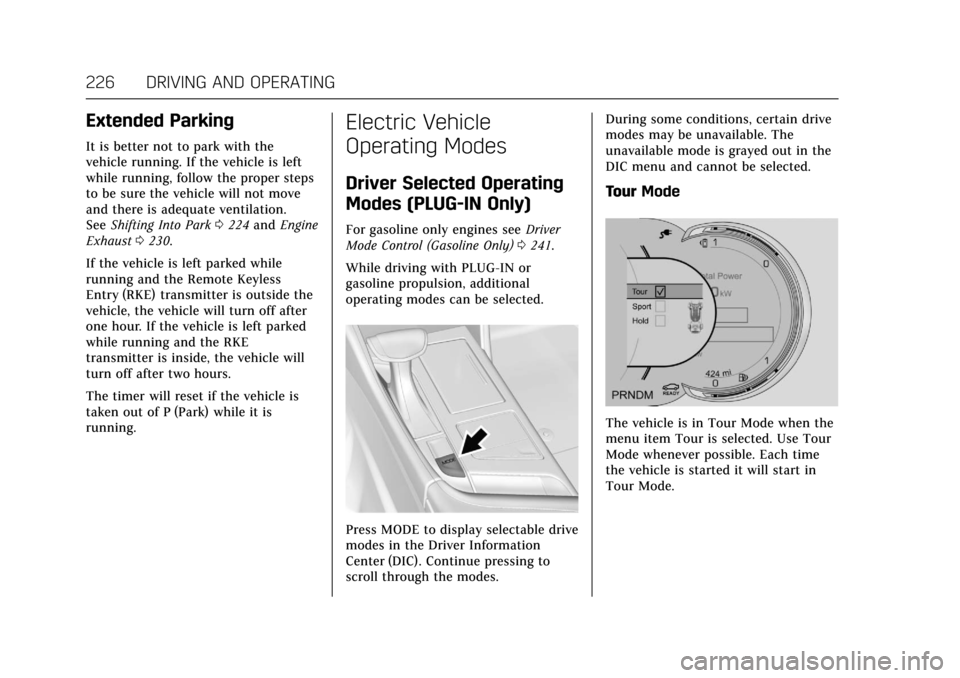
operating modes can be selected.
Press MODE to display selectable drive
modes in the Driver Information
Center (DIC). Continue pressing to
scroll through the modes. During some conditions, certain drive
modes may be unavailable. The
unavailable mode is grayed out in the
DIC menu and cannot be selected.
Tour
Mode
The vehicle is in Tour Mode when the
menu item Tour is selected. Use Tour
Mode whenever possible. Each time
the vehicle is started it will start in
Tour Mode.
Page 299 of 445
Cadillac CT6 Owner Manual (GMNA-Localizing-U.S./Canada-11292458) -
2018 - crc - 2/15/17
298 VEHICLE CARE
batteries contained in Remote Keyless
Entry transmitters, may contain
perchlorate materials. Special
handling may be necessary. For
additional information, see
www.dtsc.ca.gov/hazardouswaste/
perchlorate.
Accessories and
Modifications
Adding non-dealer accessories or
making modifications to the vehicle
can affect vehicle performance and
safety, including such things as
airbags, braking, stability, ride and
handling, emissions systems,
aerodynamics, durability, and
electronic systems like antilock
brakes, traction control, and stability
control. These accessories or
modifications could even cause
malfunction or damage not covered by
the vehicle warranty.
Damage to suspension components
caused by modifying vehicle height
outside of factory settings will not be
covered by the vehicle warranty.Damage to vehicle components
resulting from modifications or the
installation or use of non-GM certified
parts, including control module or
software modifications, is not covered
under the terms of the vehicle
warranty and may affect remaining
warranty coverage for affected parts.
GM Accessories are designed to
complement and function with other
systems on the vehicle. See your
dealer to accessorize the vehicle using
genuine GM Accessories installed by a
dealer technician.
Also, see
Adding Equipment to the
Airbag-Equipped Vehicle 095.
Vehicle Checks
Doing Your Own
Service Work
{Warning
It can be dangerous to work on
your vehicle if you do not have the
proper knowledge, service manual,
tools, or parts. Always follow
owner’s manual procedures and
consult the service manual for your
vehicle before doing any
service work.
If doing some of your own service
work, use the proper service manual.
It tells you much more about how to
service the vehicle than this manual
can. To order the proper service
manual, see Service Publications
Ordering Information 0416.
This vehicle has an airbag system.
Before attempting to do your own
service work, see Servicing the
Airbag-Equipped Vehicle 095.
Page 425 of 445
Cadillac CT6 Owner Manual (GMNA-Localizing-U.S./Canada-11292458) -
2018 - crc - 2/14/17
424 ONSTAR
other and use a combination of
letters, numbers, and symbols to
increase the security.
. Change the default name of the
SSID (Service Set Identifier). This
is your network’s name that is
visible to other wireless devices.
Choose a unique name and avoid
family names or vehicle
descriptions.
OnStar Wi-Fi Hotspot (If Equipped)
The vehicle may have a built-in Wi-Fi
hotspot that provides access to the
Internet and web content at 4G LTE
speed. Up to seven mobile devices can
be connected. A data plan is required.
Use the in-vehicle controls only when
it is safe to do so. 1. To retrieve Wi-Fi hotspot information, press
=, wait for
the prompt, then say “Wi-Fi
settings.” On some vehicles,
touch Wi-Fi Settings on the
screen.
2. The Wi-Fi settings will display the Wi-Fi hotspot name (SSID),
password, and on some vehicles,
the connection type (no Internet connection, 3G, 4G, 4G LTE), and
signal quality (poor, good,
excellent).
3. To change the SSID or password, press
Qor call 1-888-4ONSTAR
to connect with an Advisor.
After initial set-up, your vehicle’s
Wi-Fi hotspot will connect
automatically to your mobile devices.
Manage data usage by turning Wi-Fi
on or off on your mobile device, by
using the myCadillac mobile app,
or by contacting an OnStar Advisor.
MyCadillac Mobile App (If Available)
Download the myCadillac mobile app
to compatible Apple and Android
smartphones. Cadillac users can
access the following services from a
smartphone:
. Remotely start/stop the vehicle,
if factory-equipped.
. Lock/unlock doors, if equipped
with automatic locks.
. Activate the horn and lamps. .
Check the vehicle’s fuel level, oil
life, or tire pressure,
if factory-equipped with the Tire
Pressure Monitor System.
. Send destinations to the vehicle.
. Locate the vehicle on a map (U.S.
market only).
. Turn the vehicle's Wi-Fi hotspot
on/off, manage settings and
monitor data consumption,
if equipped.
. Locate a dealer and schedule
service.
. Request roadside assistance.
. Set a parking reminder with pin
drop, take a photo, make a note
and set a timer.
. Connect with Cadillac on social
media.
For myCadillac mobile app
information and compatibility, see
my.cadillac.com.
An active OnStar service, compatible
device, factory-installed remote start
and power locks are required. Data
rates apply. See onstar.com for details
and system limitations.