ignition CADILLAC CT6 2018 1.G Repair Manual
[x] Cancel search | Manufacturer: CADILLAC, Model Year: 2018, Model line: CT6, Model: CADILLAC CT6 2018 1.GPages: 445, PDF Size: 7.7 MB
Page 237 of 445

Cadillac CT6 Owner Manual (GMNA-Localizing-U.S./Canada-11292458) -
2018 - crc - 2/14/17
236 DRIVING AND OPERATING
problem with the EPB. A DIC message
will display. Release the EPB and try
to apply it again. If the light does not
come on, or keeps flashing, have the
vehicle serviced. Do not drive the
vehicle if the
Yor PARK light is
flashing. See your dealer. See Electric
Parking Brake Light 0145.
If the
8light is on, press the EPB
switch and hold it. Continue to hold
the switch until the
Yor PARK light
remains on. If the
8light remains on,
see your dealer.
If the EPB is applied while the vehicle
is moving, the vehicle will decelerate
as long as the switch is pressed. If the
switch is pressed until the vehicle
comes to a stop, the EPB will remain
applied.
The vehicle may automatically apply
the EPB in some situations when the
vehicle is not moving. This is normal,
and is done to periodically check the
correct operation of the EPB system.
If the EPB fails to apply, block the rear
wheels to prevent vehicle movement.
EPB Release
To release the EPB:
1. Turn the ignition on or to ACC/ ACCESSORY.
2. Apply and hold the brake pedal.
3. Press the EPB switch momentarily.
The EPB is released when the
Yor
PARK light is off.
If the
8light is on, release the EPB by
pressing and holding the EPB switch.
Continue to hold the switch until
the
Yor PARK light is off. If either
light stays on after release is
attempted, see your dealer.
Caution
Driving with the parking brake on
can overheat the brake system and
cause premature wear or damage to
brake system parts. Make sure that
the parking brake is fully released
and the brake warning light is off
before driving.
Automatic EPB Release
The EPB will automatically release if
the vehicle is running, placed into
gear, and an attempt is made to drive
away. Avoid rapid acceleration when
the EPB is applied, to preserve parking
brake lining life.
Brake Assist
This vehicle has a brake assist feature
designed to assist the driver in
stopping or decreasing vehicle speed
in emergency driving conditions. This
feature uses the stability system
hydraulic brake control module to
supplement the power brake system
under conditions where the driver has
quickly and forcefully applied the
brake pedal in an attempt to quickly
stop or slow down the vehicle. The
stability system hydraulic brake
control module increases brake
pressure at each corner of the vehicle
until the ABS activates. Minor brake
pedal pulsation or pedal movement
during this time is normal and the
driver should continue to apply the
brake pedal as the driving situation
dictates. The brake assist feature will
Page 246 of 445
Cadillac CT6 Owner Manual (GMNA-Localizing-U.S./Canada-11292458) -
2018 - crc - 2/14/17
DRIVING AND OPERATING 245
Ending Cruise Control
There are four ways to end cruise
control:
.Step lightly on the brake pedal.
. Press
*.
. Shift the transmission to
N (Neutral).
. Press
J.
Erasing Speed Memory
The cruise control set speed is erased
from memory if
Jis pressed or if
the ignition is turned off.
Adaptive Cruise Control
If equipped with Adaptive Cruise
Control (ACC), it allows for selecting
the cruise control set speed and
following gap. Read this entire section
before using this system. ACC uses a
camera and radar sensors to detect
other vehicles. See Radio Frequency
Statement 0417. The following gap is
the following time (or distance)
between your vehicle and a vehicle
detected directly ahead in your path, moving in the same direction. If no
vehicle is detected in your path, ACC
works like regular cruise control.
If a vehicle is detected in your path,
ACC can speed up the vehicle or apply
limited, moderate braking to maintain
the selected following gap. To
disengage ACC, apply the brake. If the
Traction Control System (TCS) or
StabiliTrak electronic stability control
system activates while ACC is
engaged, ACC may automatically
disengage. See
Traction Control/
Electronic Stability Control 0239. When
road conditions allow ACC to be safely
used, ACC can be turned back on. ACC
will not engage if the TCS or
StabiliTrak electronic stability control
system is disabled.
{Warning
ACC has limited braking ability and
may not have time to slow the
vehicle down enough to avoid a
collision with another vehicle you
are following. This can occur when
vehicles suddenly slow or stop
(Continued)
Warning (Continued)
ahead, or enter your lane. Also see
“Alerting the Driver”in this section.
Complete attention is always
required while driving and you
should be ready to take action and
apply the brakes. See Defensive
Driving 0207.
{Warning
ACC will not detect or brake for
children, pedestrians, animals,
or other objects.
Do not use ACC when:
. On winding and hilly roads or
when the sensors are blocked
by snow, ice, or dirt. The
system may not detect a
vehicle ahead. Keep the entire
front of the vehicle clean.
(Continued)
Page 252 of 445

Cadillac CT6 Owner Manual (GMNA-Localizing-U.S./Canada-11292458) -
2018 - crc - 2/14/17
DRIVING AND OPERATING 251
Warning (Continued)
longer be held at a stop. The vehicle
can move. When ACC is holding the
vehicle at a stop, always be
prepared to manually apply the
brakes.
{Warning
Leaving the vehicle without placing
it in P (Park) can be dangerous. Do
not leave the vehicle while it is
being held at a stop by ACC. Always
place the vehicle in P (Park) and
turn off the ignition before leaving
the vehicle.
ACC Override
If using the accelerator pedal while
ACC is active, the ACC indicator turns
blue on the instrument cluster and in
the HUD (if equipped) to indicate that
automatic braking will not occur. ACC
will resume operation when the
accelerator pedal is not being pressed.
{Warning
The ACC will not automatically
apply the brakes if your foot is
resting on the accelerator pedal.
You could crash into a vehicle
ahead of you.
Curves in the Road
{Warning
On curves, ACC may not detect a
vehicle ahead in your lane. You
could be startled if the vehicle
accelerates up to the set speed,
especially when following a vehicle
exiting or entering exit ramps. You
could lose control of the vehicle or
crash. Do not use ACC while driving
on an entrance or exit ramp. Always
be ready to use the brakes if
necessary.
{Warning
On curves, ACC may respond to a
vehicle in another lane, or may not
have time to react to a vehicle in
your lane. You could crash into a
vehicle ahead of you, or lose control
of your vehicle. Give extra attention
in curves and be ready to use the
brakes if necessary. Select an
appropriate speed while driving in
curves.
ACC may operate differently in a
sharp curve. It may reduce the vehicle
speed if the curve is too sharp.
Page 253 of 445
Cadillac CT6 Owner Manual (GMNA-Localizing-U.S./Canada-11292458) -
2018 - crc - 2/14/17
252 DRIVING AND OPERATING
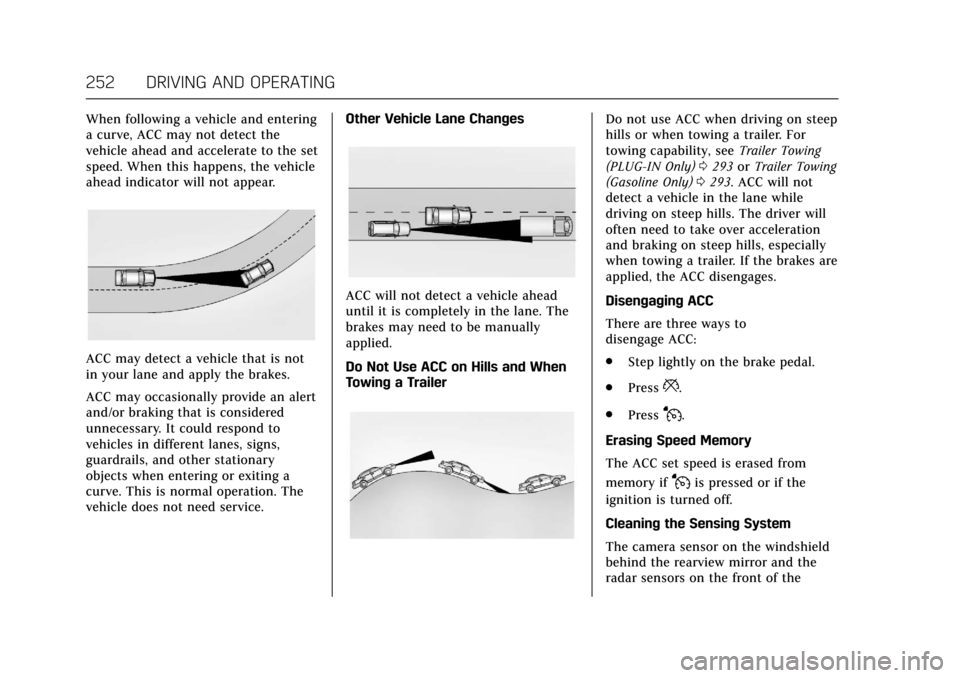
When following a vehicle and entering
a curve, ACC may not detect the
vehicle ahead and accelerate to the set
speed. When this happens, the vehicle
ahead indicator will not appear.
ACC may detect a vehicle that is not
in your lane and apply the brakes.
ACC may occasionally provide an alert
and/or braking that is considered
unnecessary. It could respond to
vehicles in different lanes, signs,
guardrails, and other stationary
objects when entering or exiting a
curve. This is normal operation. The
vehicle does not need service.Other Vehicle Lane Changes
ACC will not detect a vehicle ahead
until it is completely in the lane. The
brakes may need to be manually
applied.
Do Not Use ACC on Hills and When
Towing a Trailer
Do not use ACC when driving on steep
hills or when towing a trailer. For
towing capability, see
Trailer Towing
(PLUG-IN Only) 0293 orTrailer Towing
(Gasoline Only) 0293. ACC will not
detect a vehicle in the lane while
driving on steep hills. The driver will
often need to take over acceleration
and braking on steep hills, especially
when towing a trailer. If the brakes are
applied, the ACC disengages.
Disengaging ACC
There are three ways to
disengage ACC:
. Step lightly on the brake pedal.
. Press
*.
. Press
J.
Erasing Speed Memory
The ACC set speed is erased from
memory if
Jis pressed or if the
ignition is turned off.
Cleaning the Sensing System
The camera sensor on the windshield
behind the rearview mirror and the
radar sensors on the front of the
Page 268 of 445
Cadillac CT6 Owner Manual (GMNA-Localizing-U.S./Canada-11292458) -
2018 - crc - 2/14/17
DRIVING AND OPERATING 267
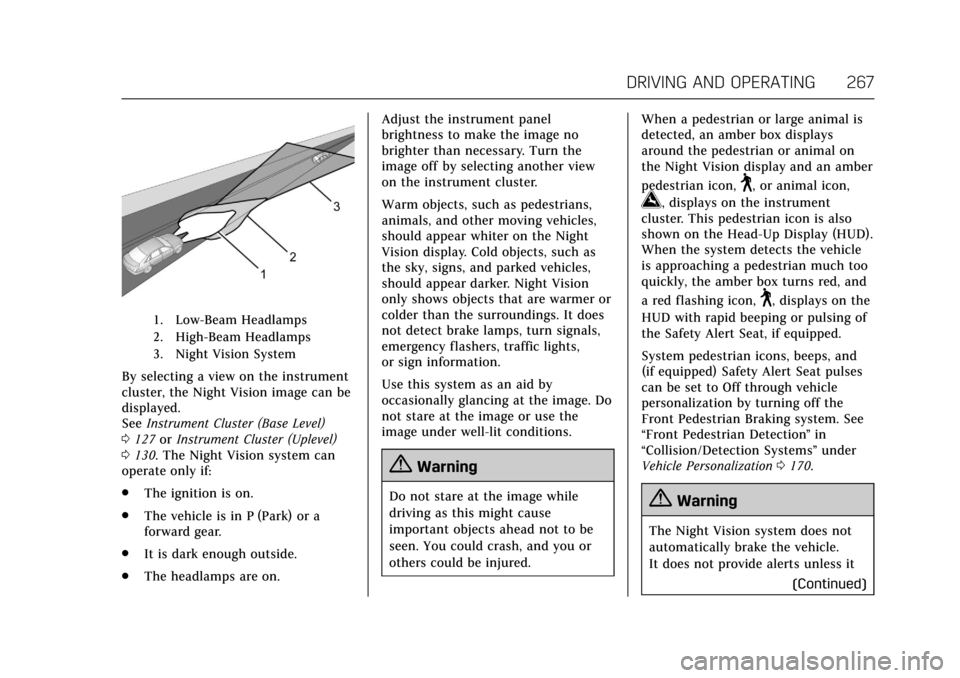
1. Low-Beam Headlamps
2. High-Beam Headlamps
3. Night Vision System
By selecting a view on the instrument
cluster, the Night Vision image can be
displayed.
SeeInstrument Cluster (Base Level)
0 127 orInstrument Cluster (Uplevel)
0 130. The Night Vision system can
operate only if:
. The ignition is on.
. The vehicle is in P (Park) or a
forward gear.
. It is dark enough outside.
. The headlamps are on. Adjust the instrument panel
brightness to make the image no
brighter than necessary. Turn the
image off by selecting another view
on the instrument cluster.
Warm objects, such as pedestrians,
animals, and other moving vehicles,
should appear whiter on the Night
Vision display. Cold objects, such as
the sky, signs, and parked vehicles,
should appear darker. Night Vision
only shows objects that are warmer or
colder than the surroundings. It does
not detect brake lamps, turn signals,
emergency flashers, traffic lights,
or sign information.
Use this system as an aid by
occasionally glancing at the image. Do
not stare at the image or use the
image under well-lit conditions.
{Warning
Do not stare at the image while
driving as this might cause
important objects ahead not to be
seen. You could crash, and you or
others could be injured.
When a pedestrian or large animal is
detected, an amber box displays
around the pedestrian or animal on
the Night Vision display and an amber
pedestrian icon,
~, or animal icon,
!, displays on the instrument
cluster. This pedestrian icon is also
shown on the Head-Up Display (HUD).
When the system detects the vehicle
is approaching a pedestrian much too
quickly, the amber box turns red, and
a red flashing icon,
~, displays on the
HUD with rapid beeping or pulsing of
the Safety Alert Seat, if equipped.
System pedestrian icons, beeps, and
(if equipped) Safety Alert Seat pulses
can be set to Off through vehicle
personalization by turning off the
Front Pedestrian Braking system. See
“Front Pedestrian Detection ”in
“Collision/Detection Systems” under
Vehicle Personalization 0170.
{Warning
The Night Vision system does not
automatically brake the vehicle.
It does not provide alerts unless it
(Continued)
Page 328 of 445
Cadillac CT6 Owner Manual (GMNA-Localizing-U.S./Canada-11292458) -
2018 - crc - 2/15/17
VEHICLE CARE 327
Automatic Transmission
Shift Lock Control Function
Check
{Warning
When you are doing this inspection,
the vehicle could move suddenly.
If the vehicle moves, you or others
could be injured.
1. Before starting this check, be sure there is enough room
around the vehicle. It should be
parked on a level surface.
2. Firmly apply the parking brake. See Electric Parking Brake 0235.
Be ready to apply the regular
brake immediately if the vehicle
begins to move.
3. With the engine off, turn the ignition on, but do not start the
engine. Without applying the
regular brake, try to move the
shift lever out of P (Park) with
normal effort. If the shift lever
moves out of P (Park), contact
your dealer for service.
Park Brake and P (Park)
Mechanism Check
{Warning
When you are doing this check, the
vehicle could begin to move. You or
others could be injured and
property could be damaged. Make
sure there is room in front of the
vehicle in case it begins to roll. Be
ready to apply the regular brake at
once should the vehicle begin
to move.
Park on a fairly steep hill, with the
vehicle facing downhill. Keeping your
foot on the regular brake, set the
parking brake.
. To check the parking brake's
holding ability: With the engine
running and the transmission in
N (Neutral), slowly remove foot
pressure from the regular brake
pedal. Do this until the vehicle is
held by the parking brake only. .
To check the P (Park) mechanism's
holding ability: With the engine
running, shift to P (Park). Then
release the parking brake followed
by the regular brake.
Contact your dealer if service is
required.
Wiper Blade Replacement
Windshield wiper blades should be
inspected for wear or cracking.
For the proper type and size, see
Maintenance Replacement Parts 0400.
To replace the wiper blade assembly: 1. Pull the windshield wiper assembly away from the
windshield.
Page 334 of 445
Cadillac CT6 Owner Manual (GMNA-Localizing-U.S./Canada-11292458) -
2018 - crc - 2/15/17
VEHICLE CARE 333
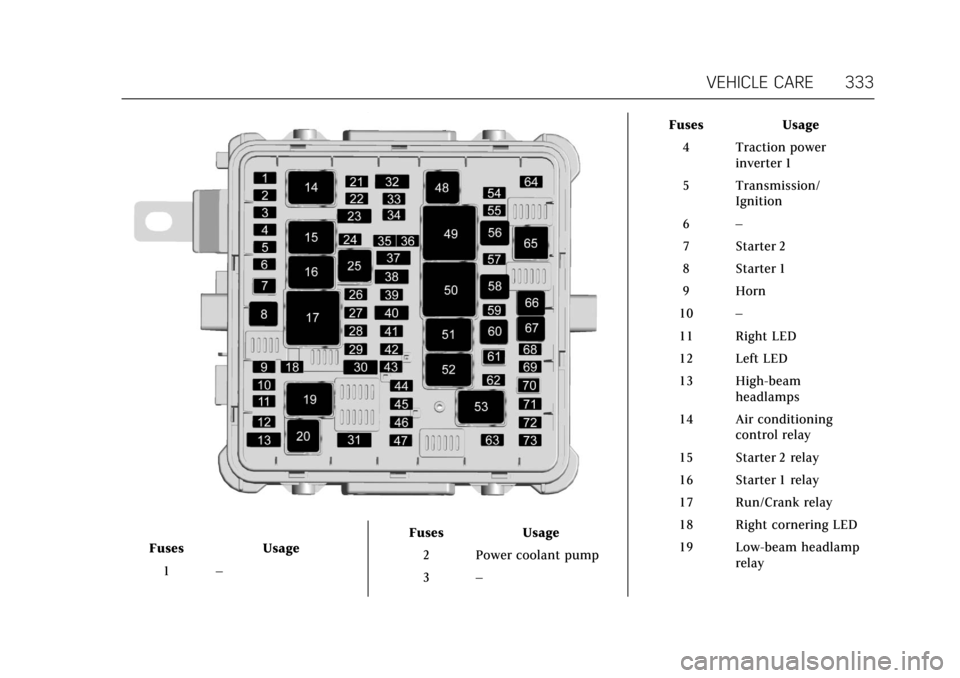
FusesUsage
1 – Fuses
Usage
2 Power coolant pump
3 – Fuses
Usage
4 Traction power inverter 1
5 Transmission/ Ignition
6 –
7 Starter 2
8 Starter 1
9 Horn
10 –
11 Right LED
12 Left LED
13 High-beam headlamps
14 Air conditioning control relay
15 Starter 2 relay
16 Starter 1 relay
17 Run/Crank relay
18 Right cornering LED
19 Low-beam headlamp relay
Page 335 of 445
Cadillac CT6 Owner Manual (GMNA-Localizing-U.S./Canada-11292458) -
2018 - crc - 2/15/17
334 VEHICLE CARE
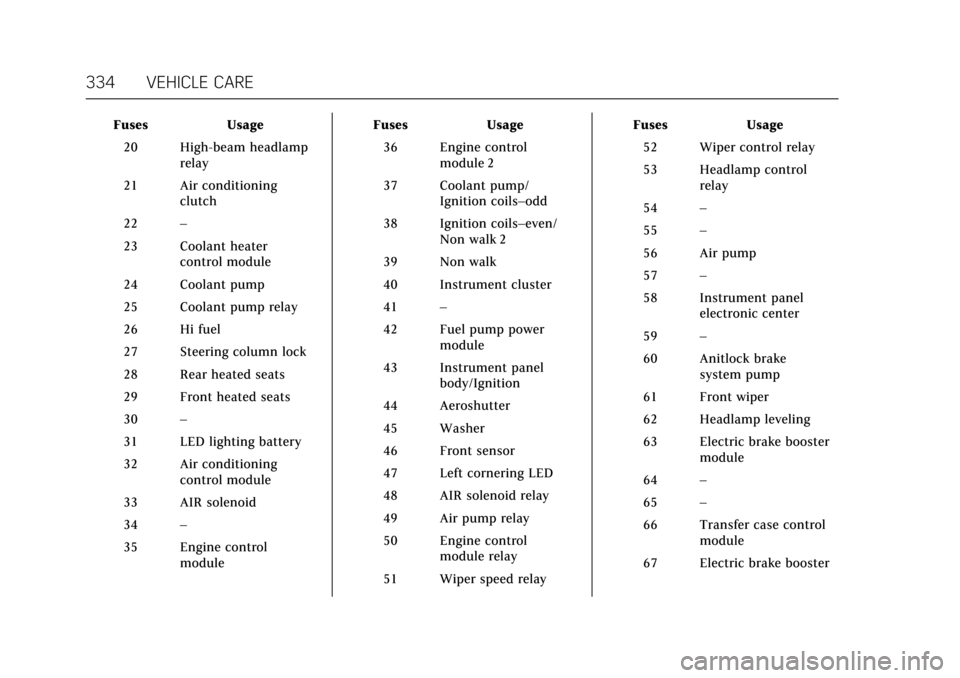
FusesUsage
20 High-beam headlamp relay
21 Air conditioning clutch
22 –
23 Coolant heater control module
24 Coolant pump
25 Coolant pump relay
26 Hi fuel
27 Steering column lock
28 Rear heated seats
29 Front heated seats
30 –
31 LED lighting battery
32 Air conditioning control module
33 AIR solenoid
34 –
35 Engine control module Fuses
Usage
36 Engine control module 2
37 Coolant pump/ Ignition coils–odd
38 Ignition coils–even/ Non walk 2
39 Non walk
40 Instrument cluster
41 –
42 Fuel pump power module
43 Instrument panel body/Ignition
44 Aeroshutter
45 Washer
46 Front sensor
47 Left cornering LED
48 AIR solenoid relay
49 Air pump relay
50 Engine control module relay
51 Wiper speed relay Fuses
Usage
52 Wiper control relay
53 Headlamp control relay
54 –
55 –
56 Air pump
57 –
58 Instrument panel electronic center
59 –
60 Anitlock brake system pump
61 Front wiper
62 Headlamp leveling
63 Electric brake booster module
64 –
65 –
66 Transfer case control module
67 Electric brake booster
Page 340 of 445
Cadillac CT6 Owner Manual (GMNA-Localizing-U.S./Canada-11292458) -
2018 - crc - 2/15/17
VEHICLE CARE 339
FusesUsage
F28 Amplifier
F29 Sunroof
F30 Body control module 2
F31 Body control module 6
F32 Exterior heated mirrors
F33 Right window
F34 Power trunk module
F35 On-board charging module
F36 Alarm siren module
F37 DC AC inverter
F38 Rear blower
F39 Fuel pump power
F40 –
F41 Rear seat power outlet
F42 Left rear memory seat
F43 – Fuses
Usage
F44 Rear closure
F45 Auxiliary audio/ Video/Radio
F46 External object calculating/Side blind
zone alert/Radar
short range sensor
F47 –
F48 Right front seat
F49 Memory bolster module
F50 Body control module 1
F51 Transmission control module
F52 Parking assist
F53 Ventilated seats
F54 Headliner
F55 Front memory seat module
F56 Evaporative emissions leak check
module Fuses
Usage
F57 Voltage current temperature module
F58 –
F59 Engine control module battery
F60 Right motorized seat belt pretensioner
F61 Parking lamps
F62 –
F63 –
F64 Engine control module ignition
F65 Rear window sunshade
F66 Rear vision camera/ Interior rearview
mirror
F67 DC DC converter/Air quality sensor
F68 Damping control module
F69 Television tuner module
Page 352 of 445
Cadillac CT6 Owner Manual (GMNA-Localizing-U.S./Canada-11292458) -
2018 - crc - 2/15/17
VEHICLE CARE 351
A message to check the pressure in a
specific tire displays in the Driver
Information Center (DIC). The low tire
pressure warning light and the DIC
warning message come on at each
ignition cycle until the tires are
inflated to the correct inflation
pressure. Using the DIC, tire pressure
levels can be viewed. For additional
information and details about the DIC
operation and displays seeDriver
Information Center (DIC) 0162.
The low tire pressure warning light
may come on in cool weather when
the vehicle is first started, and then
turn off as the vehicle is driven. This
could be an early indicator that the air
pressure is getting low and needs to
be inflated to the proper pressure.
A Tire and Loading Information label,
attached to your vehicle, shows the
size of the original equipment tires
and the correct inflation pressure for
the tires when they are cold. See
Vehicle Load Limits 0213, for an
example of the Tire and Loading
Information label and its location.
Also see Tire Pressure 0347. The TPMS can warn about a low tire
pressure condition but it does not
replace normal tire maintenance. See
Tire Inspection
0353, Tire Rotation
0 353 and Tires 0340.
Caution
Tire sealant materials are not all
the same. A non-approved tire
sealant could damage the TPMS
sensors. TPMS sensor damage
caused by using an incorrect tire
sealant is not covered by the
vehicle warranty. Always use only
the GM approved tire sealant
available through your dealer or
included in the vehicle.
Factory-installed Tire Inflator Kits use
a GM approved liquid tire sealant.
Using non-approved tire sealants
could damage the TPMS sensors. See
Tire Sealant and Compressor Kit 0362
for information regarding the inflator
kit materials and instructions.
TPMS Malfunction Light and
Message
The TPMS will not function properly if
one or more of the TPMS sensors are
missing or inoperable. When the
system detects a malfunction, the low
tire pressure warning light flashes for
about one minute and then stays on
for the remainder of the ignition cycle.
A DIC warning message also displays.
The malfunction light and DIC
warning message come on at each
ignition cycle until the problem is
corrected. Some of the conditions that
can cause these to come on are:
. One of the road tires has been
replaced with the spare tire. The
spare tire does not have a TPMS
sensor. The malfunction light and
DIC message should go off after
the road tire is replaced and the
sensor matching process is
performed successfully. See “TPMS
Sensor Matching Process ”later in
this section.
. The TPMS sensor matching
process was not done or not
completed successfully after
rotating the tires. The malfunction