seats CADILLAC CT6 2019 Owner's Manual
[x] Cancel search | Manufacturer: CADILLAC, Model Year: 2019, Model line: CT6, Model: CADILLAC CT6 2019Pages: 438, PDF Size: 7.6 MB
Page 2 of 438

Cadillac CT6 Owner Manual (GMNA-Localizing-U.S./Canada-12533370) -
2019 - crc - 1/23/19
ContentsIntroduction . . . . . . . . . . . . . . . . . . . . . . . . . . 2
In Brief . . . . . . . . . . . . . . . . . . . . . . . . . . . . . . . 5
Keys, Doors, and Windows . . . . . . . . . 28
Seats and Restraints . . . . . . . . . . . . . . . 62
Storage . . . . . . . . . . . . . . . . . . . . . . . . . . . . . 114
Instruments and Controls . . . . . . . . 118
Lighting . . . . . . . . . . . . . . . . . . . . . . . . . . . . 166
Infotainment System . . . . . . . . . . . . . 174
Climate Controls . . . . . . . . . . . . . . . . . . 175
Driving and Operating . . . . . . . . . . . . 189
Vehicle Care . . . . . . . . . . . . . . . . . . . . . . . 288
Service and Maintenance . . . . . . . . . 381
Technical Data . . . . . . . . . . . . . . . . . . . . 396
Customer Information . . . . . . . . . . . . 401
Reporting Safety Defects . . . . . . . . . 411
OnStar . . . . . . . . . . . . . . . . . . . . . . . . . . . . . . 414
Connected Services . . . . . . . . . . . . . . . 422
Index . . . . . . . . . . . . . . . . . . . . . . . . 426
Page 6 of 438
Cadillac CT6 Owner Manual (GMNA-Localizing-U.S./Canada-12533370) -
2019 - crc - 1/23/19
IN BRIEF 5
In Brief
Instrument Panel
Instrument Panel Overview . . . . . . . . . 6
Initial Drive Information
Initial Drive Information . . . . . . . . . . . 8
Stop/Start System . . . . . . . . . . . . . . . . . . . 8
Remote Keyless Entry (RKE)System . . . . . . . . . . . . . . . . . . . . . . . . . . . . . 8
Remote Vehicle Start . . . . . . . . . . . . . . . 9
Door Locks . . . . . . . . . . . . . . . . . . . . . . . . . . 9
Trunk . . . . . . . . . . . . . . . . . . . . . . . . . . . . . . . 10
Windows . . . . . . . . . . . . . . . . . . . . . . . . . . . 10
Seat Adjustment . . . . . . . . . . . . . . . . . . . 11
Memory Features . . . . . . . . . . . . . . . . . . 12
Second Row Seats . . . . . . . . . . . . . . . . . 12
Heated and Ventilated Seats . . . . . . 13
Head Restraint Adjustment . . . . . . . 13
Seat Belts . . . . . . . . . . . . . . . . . . . . . . . . . . . 14
Passenger Sensing System . . . . . . . . 14
Mirror Adjustment . . . . . . . . . . . . . . . . 14
Steering Wheel Adjustment . . . . . . . 15
Interior Lighting . . . . . . . . . . . . . . . . . . . 15
Exterior Lighting . . . . . . . . . . . . . . . . . . . 16
Windshield Wiper/Washer . . . . . . . . 16
Climate Controls . . . . . . . . . . . . . . . . . . . 18
Transmission . . . . . . . . . . . . . . . . . . . . . . . 19
Vehicle Features
Infotainment System . . . . . . . . . . . . . . 19
Steering Wheel Controls . . . . . . . . . . 19
Cruise Control . . . . . . . . . . . . . . . . . . . . . 19
Driver Information Center (DIC) . . . . . . . . . . . . . . . . . . . . . . 20
Forward Collision Alert (FCA) System . . . . . . . . . . . . . . . . . . . . . . . . . . . . 20
Night Vision System . . . . . . . . . . . . . . . 20
Forward Automatic Braking (FAB) . . . . . . . . . . . . . . . . . . . . 21
Front Pedestrian Braking (FPB) System . . . . . . . . . . . . . . . . . . . . . . . . . . . . 21
Lane Keep Assist (LKA) . . . . . . . . . . . 21
Lane Change Alert (LCA) . . . . . . . . . . 21
Surround Vision . . . . . . . . . . . . . . . . . . . 21
Rear Vision Camera (RVC) . . . . . . . . 22
Rear Cross Traffic Alert (RCTA) System . . . . . . . . . . . . . . . . . . . . . . . . . . . . 22
Park Assist . . . . . . . . . . . . . . . . . . . . . . . . . 22
Automatic Parking Assist (APA) . . . . . . . . . . . . . . . . . . . . . . 22
Reverse Automatic Braking (RAB) . . . . . . . . . . . . . . . . . . . . 22
Rear Pedestrian Alert . . . . . . . . . . . . . . 23
Surround Vision Recorder . . . . . . . . . 23
Power Outlets . . . . . . . . . . . . . . . . . . . . . . 23
Universal Remote System . . . . . . . . . 23
Sunroof . . . . . . . . . . . . . . . . . . . . . . . . . . . . . 24
Performance and Maintenance
Traction Control/Electronic Stability Control . . . . . . . . . . . . . . . . . . 24
Tire Pressure Monitor . . . . . . . . . . . . . 25
Fuel (2.0L L4 Turbo Engine) . . . . . . 25
Fuel (3.0L Twin Turbo V6 and 4.2L Twin Turbo V8 Engines) . . . . . . . . . 26
Fuel (3.6L V6 Engine) . . . . . . . . . . . . . 26
E85 or FlexFuel . . . . . . . . . . . . . . . . . . . . 26
Engine Oil Life System . . . . . . . . . . . . 26
Driving for Better Fuel Economy . . . . . . . . . . . . . . . . . . . . . . . . . . 27
Roadside Service . . . . . . . . . . . . . . . . . . . 27
Page 8 of 438

Cadillac CT6 Owner Manual (GMNA-Localizing-U.S./Canada-12533370) -
2019 - crc - 1/23/19
IN BRIEF 7
1.Air Vents 0187.
2. Exterior Lamp Controls 0166.
Turn Signal Lever. See Turn and
Lane-Change Signals 0170.
3. Tap Shift Controls (If Equipped). See Manual Mode 0215.
4. Instrument Cluster (Uplevel) 0130
or
Instrument Cluster (Base Level)
0 127.
Driver Information Center (DIC)
Display. See Driver Information
Center (DIC) 0150.
5. Windshield Wiper/Washer 0120.
6. ENGINE START/STOP Button. See Ignition Positions 0201.
7. Park Assist Button. See Assistance Systems for Parking or
Backing 0253.
Automatic Parking Assist (APA)
Button (If Equipped). See
Assistance Systems for Parking or
Backing 0253.
Automatic Engine Stop/Start
Disable Switch (If Equipped). See
Stop/Start System 0203. 8. Light Sensor. See
Automatic
Headlamp System 0169.
9. Hazard Warning Flashers 0169.
Glove Box Button. See Glove Box
0 114.
10. Infotainment 0174.
11. Heated and Ventilated Front Seats
070 (If Equipped).
12. Wireless Charging 0123.
13. Automatic Climate Control System
(Dual Zone) 0175 or
Automatic Climate Control System
(Quad Zone) 0180.
14. Automatic Vehicle Hold (AVH)
0220 (If Equipped).
MODE Button. See Driver Mode
Control 0222.
Traction Control/Electronic
Stability Control 0220.
15. Infotainment Control Knob. See the infotainment manual.
16. Shift Lever. See Automatic
Transmission 0210. 17. Driver Information Center (DIC)
Controls. See Driver Information
Center (DIC) 0150.
18. Steering Wheel Controls. See the infotainment manual.
19. Horn 0120.
20. Steering Wheel Adjustment 0119
(Out of View).
21. Forward Collision Alert (FCA)
System 0262 (If Equipped).
Lane Keep Assist (LKA) 0273 (If
Equipped).
Heated Steering Wheel 0119 (If
Equipped).
22. Cruise Control 0227.
Adaptive Cruise Control 0229 (If
Equipped).
Super Cruise 0237 (If Equipped).
Phone Button. See “Steering
Wheel Controls ”in the
infotainment manual.
23. Data Link Connector (DLC) (Out of View). See Malfunction
Indicator Lamp (Check Engine
Light) 0139.
Page 12 of 438
Cadillac CT6 Owner Manual (GMNA-Localizing-U.S./Canada-12533370) -
2019 - crc - 1/23/19
IN BRIEF 11
Seat Adjustment
Power Seats
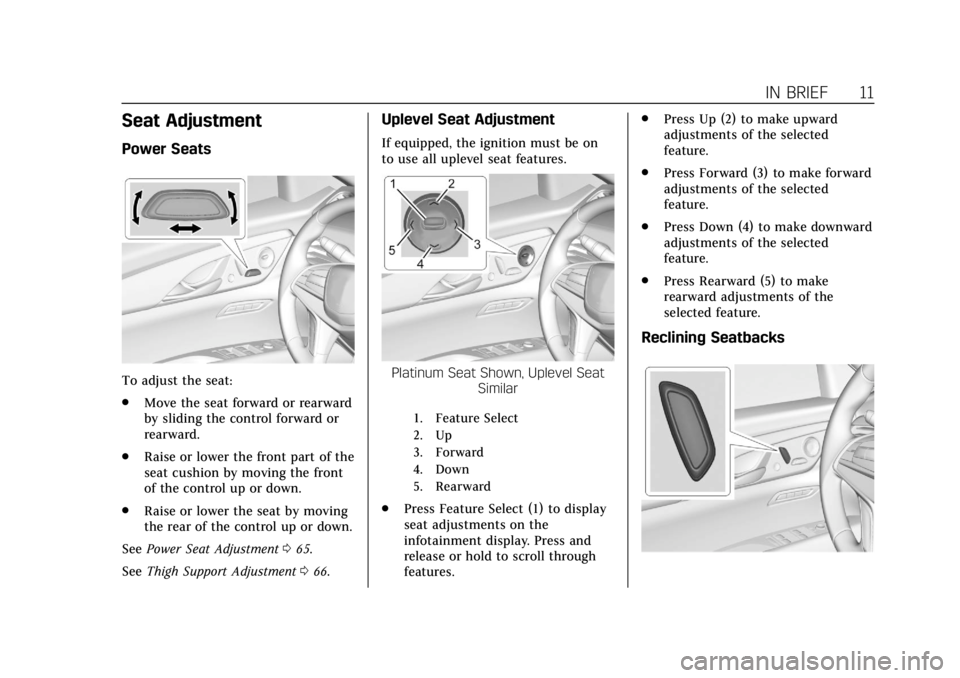
To adjust the seat:
.Move the seat forward or rearward
by sliding the control forward or
rearward.
. Raise or lower the front part of the
seat cushion by moving the front
of the control up or down.
. Raise or lower the seat by moving
the rear of the control up or down.
See Power Seat Adjustment 065.
See Thigh Support Adjustment 066.
Uplevel Seat Adjustment
If equipped, the ignition must be on
to use all uplevel seat features.
Platinum Seat Shown, Uplevel Seat
Similar
1. Feature Select
2. Up
3. Forward
4. Down
5. Rearward
.Press Feature Select (1) to display
seat adjustments on the
infotainment display. Press and
release or hold to scroll through
features. .
Press Up (2) to make upward
adjustments of the selected
feature.
. Press Forward (3) to make forward
adjustments of the selected
feature.
. Press Down (4) to make downward
adjustments of the selected
feature.
. Press Rearward (5) to make
rearward adjustments of the
selected feature.
Reclining Seatbacks
Page 13 of 438
Cadillac CT6 Owner Manual (GMNA-Localizing-U.S./Canada-12533370) -
2019 - crc - 1/23/19
12 IN BRIEF
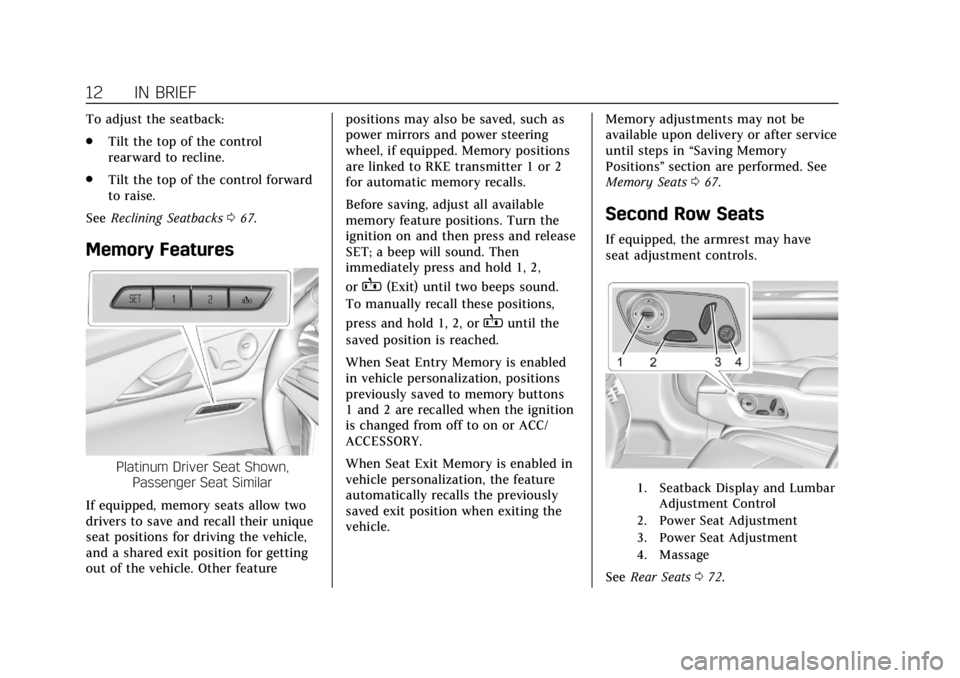
To adjust the seatback:
.Tilt the top of the control
rearward to recline.
. Tilt the top of the control forward
to raise.
See Reclining Seatbacks 067.
Memory Features
Platinum Driver Seat Shown,
Passenger Seat Similar
If equipped, memory seats allow two
drivers to save and recall their unique
seat positions for driving the vehicle,
and a shared exit position for getting
out of the vehicle. Other feature positions may also be saved, such as
power mirrors and power steering
wheel, if equipped. Memory positions
are linked to RKE transmitter 1 or 2
for automatic memory recalls.
Before saving, adjust all available
memory feature positions. Turn the
ignition on and then press and release
SET; a beep will sound. Then
immediately press and hold 1, 2,
or
B(Exit) until two beeps sound.
To manually recall these positions,
press and hold 1, 2, or
Buntil the
saved position is reached.
When Seat Entry Memory is enabled
in vehicle personalization, positions
previously saved to memory buttons
1 and 2 are recalled when the ignition
is changed from off to on or ACC/
ACCESSORY.
When Seat Exit Memory is enabled in
vehicle personalization, the feature
automatically recalls the previously
saved exit position when exiting the
vehicle. Memory adjustments may not be
available upon delivery or after service
until steps in
“Saving Memory
Positions” section are performed. See
Memory Seats 067.
Second Row Seats
If equipped, the armrest may have
seat adjustment controls.
1. Seatback Display and Lumbar
Adjustment Control
2. Power Seat Adjustment
3. Power Seat Adjustment
4. Massage
See Rear Seats 072.
Page 14 of 438
Cadillac CT6 Owner Manual (GMNA-Localizing-U.S./Canada-12533370) -
2019 - crc - 1/23/19
IN BRIEF 13
Easy Exit
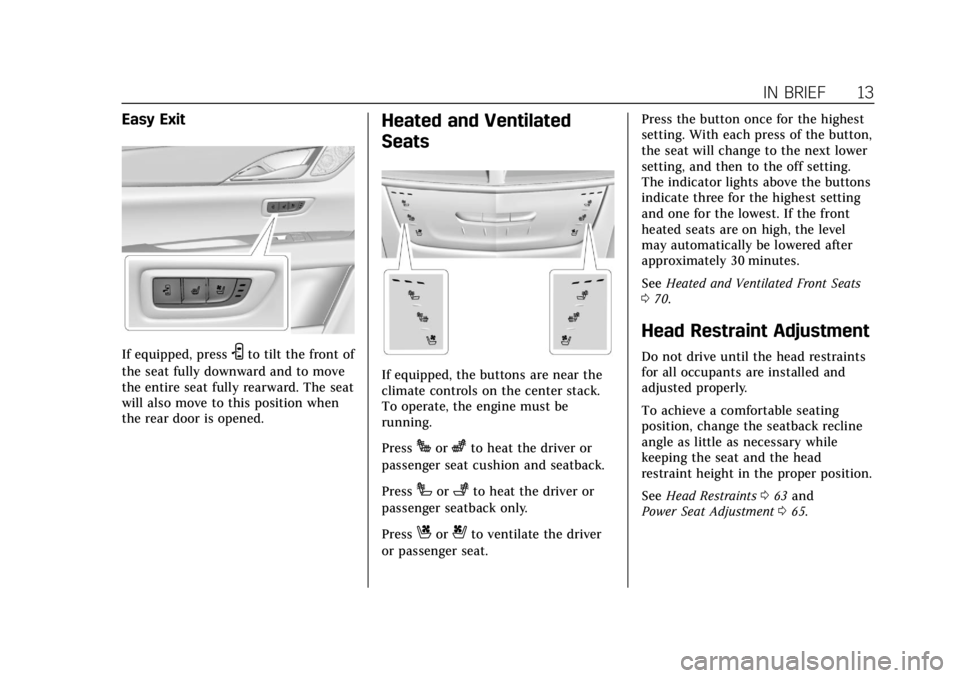
If equipped, pressSto tilt the front of
the seat fully downward and to move
the entire seat fully rearward. The seat
will also move to this position when
the rear door is opened.
Heated and Ventilated
Seats
If equipped, the buttons are near the
climate controls on the center stack.
To operate, the engine must be
running.
Press
Jorzto heat the driver or
passenger seat cushion and seatback.
Press
Ior+to heat the driver or
passenger seatback only.
Press
Cor{to ventilate the driver
or passenger seat. Press the button once for the highest
setting. With each press of the button,
the seat will change to the next lower
setting, and then to the off setting.
The indicator lights above the buttons
indicate three for the highest setting
and one for the lowest. If the front
heated seats are on high, the level
may automatically be lowered after
approximately 30 minutes.
See
Heated and Ventilated Front Seats
0 70.
Head Restraint Adjustment
Do not drive until the head restraints
for all occupants are installed and
adjusted properly.
To achieve a comfortable seating
position, change the seatback recline
angle as little as necessary while
keeping the seat and the head
restraint height in the proper position.
See Head Restraints 063 and
Power Seat Adjustment 065.
Page 19 of 438
Cadillac CT6 Owner Manual (GMNA-Localizing-U.S./Canada-12533370) -
2019 - crc - 1/23/19
18 IN BRIEF
Climate Controls
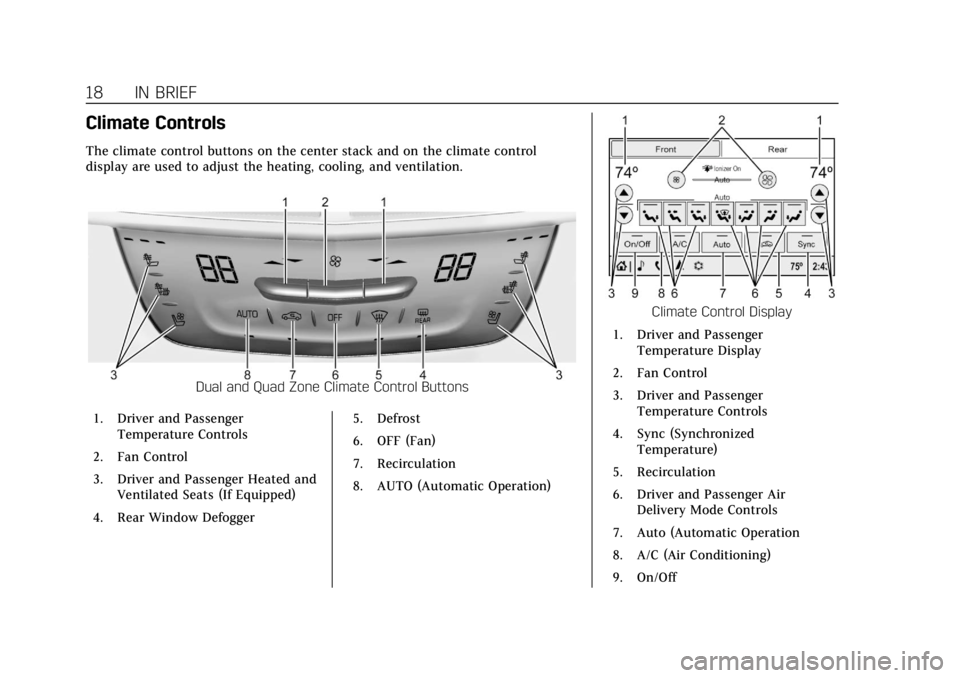
The climate control buttons on the center stack and on the climate control
display are used to adjust the heating, cooling, and ventilation.
Dual and Quad Zone Climate Control Buttons
1. Driver and Passenger Temperature Controls
2. Fan Control
3. Driver and Passenger Heated and Ventilated Seats (If Equipped)
4. Rear Window Defogger 5. Defrost
6. OFF (Fan)
7. Recirculation
8. AUTO (Automatic Operation)
Climate Control Display
1. Driver and Passenger Temperature Display
2. Fan Control
3. Driver and Passenger Temperature Controls
4. Sync (Synchronized Temperature)
5. Recirculation
6. Driver and Passenger Air Delivery Mode Controls
7. Auto (Automatic Operation
8. A/C (Air Conditioning)
9. On/Off
Page 32 of 438
Cadillac CT6 Owner Manual (GMNA-Localizing-U.S./Canada-12533370) -
2019 - crc - 1/23/19
KEYS, DOORS, AND WINDOWS 31
signal lamps flash for 30 seconds,
or until
7is pressed again or the
vehicle is started.
X: Press twice quickly to open the
trunk. Press once to stop the trunk
from moving. See Trunk042.
Keyless Access Operation
The Keyless Access system lets you
lock and unlock the doors and access
the trunk without removing the RKE
transmitter from your pocket, purse,
briefcase, etc. The RKE transmitter
must be within 1 m (3 ft) of the trunk
or door being opened. If equipped,
there will be a button on the outside
door handles.
The Keyless Access system can be
programmed to unlock all doors on
the first lock/unlock button press from
the driver door. See Vehicle
Personalization 0157.
If equipped with memory seats, RKE
transmitters 1 and 2 are linked to
seating positions of memory 1 or 2.
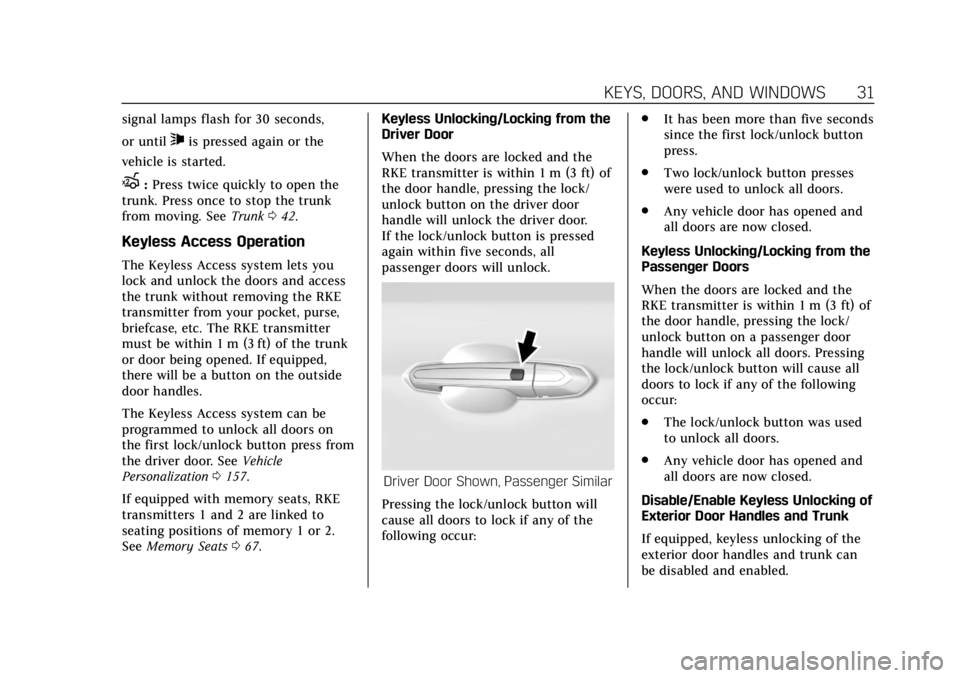
See Memory Seats 067. Keyless Unlocking/Locking from the
Driver Door
When the doors are locked and the
RKE transmitter is within 1 m (3 ft) of
the door handle, pressing the lock/
unlock button on the driver door
handle will unlock the driver door.
If the lock/unlock button is pressed
again within five seconds, all
passenger doors will unlock.
Driver Door Shown, Passenger Similar
Pressing the lock/unlock button will
cause all doors to lock if any of the
following occur: .
It has been more than five seconds
since the first lock/unlock button
press.
. Two lock/unlock button presses
were used to unlock all doors.
. Any vehicle door has opened and
all doors are now closed.
Keyless Unlocking/Locking from the
Passenger Doors
When the doors are locked and the
RKE transmitter is within 1 m (3 ft) of
the door handle, pressing the lock/
unlock button on a passenger door
handle will unlock all doors. Pressing
the lock/unlock button will cause all
doors to lock if any of the following
occur:
. The lock/unlock button was used
to unlock all doors.
. Any vehicle door has opened and
all doors are now closed.
Disable/Enable Keyless Unlocking of
Exterior Door Handles and Trunk
If equipped, keyless unlocking of the
exterior door handles and trunk can
be disabled and enabled.
Page 37 of 438

Cadillac CT6 Owner Manual (GMNA-Localizing-U.S./Canada-12533370) -
2019 - crc - 1/23/19
36 KEYS, DOORS, AND WINDOWS
2. Separate the two halves of thetransmitter using a flat tool
inserted into the bottom center
of the transmitter. Do not use
the key slot.3. Remove the old battery. Do notuse a metal object.
4. Insert the new battery on the back housing, positive side facing
down. Replace with a CR2032 or
equivalent battery.
5. Align the front and back housing, then snap the transmitter
together.
6. Reinsert the key.
Remote Vehicle Start
This feature allows the engine to be
started from outside the vehicle.
/: This button is on the RKE
transmitter for remote start.
The climate control system will use
the previous settings during a remote
start. The rear window defogger may
come on during remote start based on
cold ambient conditions. The rear
defog indicator light does not come on
during remote start.
If equipped, the heated steering wheel
may come on during cold weather
when enabled in vehicle
personalization. See Vehicle
Personalization 0157.
If equipped, the heated and ventilated
front seats may also come on when
the vehicle personalization setting is
enabled. See Heated and Ventilated
Front Seats 070.
Laws in some local communities may
restrict the use of remote starters. For
example, some laws may require a
person using remote start to have the
vehicle in view. Check local
regulations for any requirements.
If your vehicle is low on fuel, do not
use the remote start feature. The
vehicle may run out of fuel.
Page 53 of 438
Cadillac CT6 Owner Manual (GMNA-Localizing-U.S./Canada-12533370) -
2019 - crc - 1/23/19
52 KEYS, DOORS, AND WINDOWS
transmitters, see“Programming
Transmitters to the Vehicle ”under
Remote Keyless Entry (RKE) System
Operation 029.
Do not leave the transmitter or device
that disarms or deactivates the
theft-deterrent system in the vehicle.Exterior Mirrors
Convex Mirrors
{Warning
A convex mirror can make things,
like other vehicles, look farther
away than they really are. If you cut
too sharply into the right lane, you
could hit a vehicle on the right.
Check the inside mirror or glance
over your shoulder before changing
lanes.
The passenger side mirror is convex
shaped. A convex mirror's surface is
curved so more can be seen from the
driver seat.
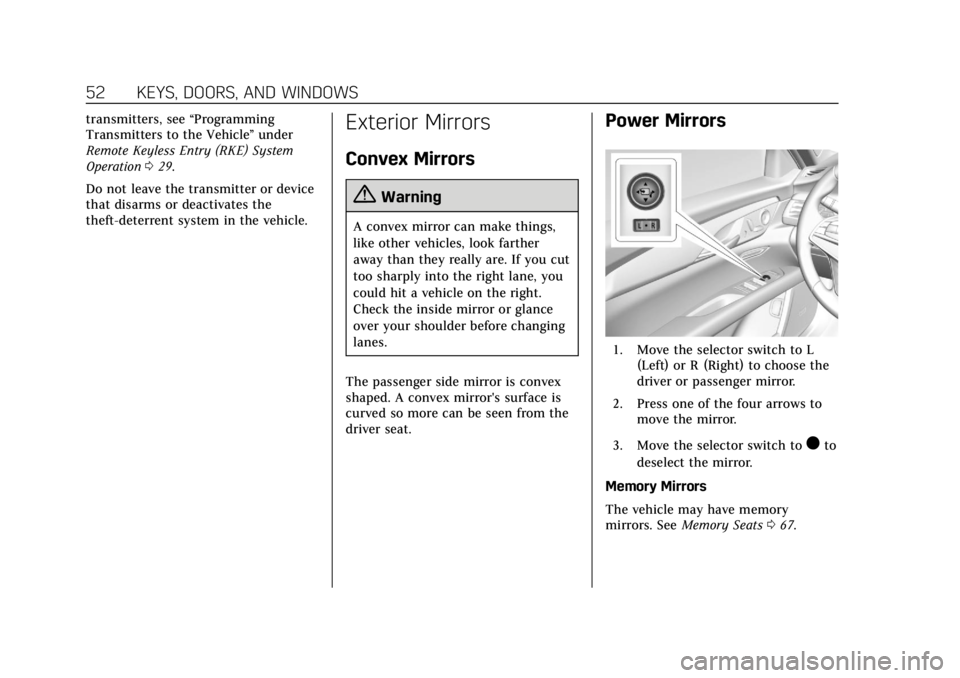
Power Mirrors
1. Move the selector switch to L (Left) or R (Right) to choose the
driver or passenger mirror.
2. Press one of the four arrows to move the mirror.
3. Move the selector switch to
)to
deselect the mirror.
Memory Mirrors
The vehicle may have memory
mirrors. See Memory Seats 067.