transmission CADILLAC CTS 2004 1.G Owner's Manual
[x] Cancel search | Manufacturer: CADILLAC, Model Year: 2004, Model line: CTS, Model: CADILLAC CTS 2004 1.GPages: 454, PDF Size: 2.87 MB
Page 113 of 454
If your vehicle is equipped with the HomeLink®
Transmitter, it complies with Part 15 of the FCC Rules.
Operation is subject to the following two conditions:
(1) this device may not cause harmful interference,
and (2) this device must accept any interference
received, including interference that may cause
undesired operation.
This device complies with RSS-210 of Industry Canada.
Operation is subject to the following two conditions:
(1) this device may not cause interference, and
(2) this device must accept any interference, including
interference that may cause undesired operation of
the device.
Changes and modications to this system by other than
an authorized service facility could void authorization
to use this equipment.
Programming the
HomeLink
®Transmitter
Do not use the HomeLink®Transmitter with any garage
door opener that does not have the “stop and reverse”
feature. This includes any garage door opener model
manufactured before April 1, 1982. If you have a newer
garage door opener with rolling codes, please be
sure to follow steps 6 through 8 to complete the
programming of your HomeLink
®Transmitter.Read the instructions completely before attempting to
program the HomeLink
®Transmitter. Because of
the steps involved, it may be helpful to have another
person available to assist you in programming
the transmitter.
Keep the original transmitter for use in other vehicles as
well as for future HomeLink
®programming. It is also
recommended that upon the sale of the vehicle,
the programmed HomeLink
®buttons should be erased
for security purposes. Refer to “Erasing HomeLink®
Buttons” or, for assistance, contact HomeLink®on
the internet at: www.homelink.com or by calling
1-800-355-3515.
Be sure that people and objects are clear of the garage
door or gate operator you are programming. When
programming a garage door, it is advised to park outside
of the garage.
It is recommended that a new battery be installed in
your hand-held transmitter for quicker and more
accurate transmission of the radio frequency.
2-47
Page 115 of 454
8. Return to the vehicle. Firmly press and hold the
programmed HomeLink®button for two seconds,
then release. Repeat the press/hold/release
sequence a second time, and depending on the
brand of the garage door opener (or other rolling
code device), repeat this sequence a third time
to complete the programming.
HomeLink
®should now activate your rolling-code
equipped device.
To program the remaining two HomeLink
®buttons,
begin with Step 2 of “Programming HomeLink®.” Do not
repeat Step 1.
Gate Operator and
Canadian Programming
Canadian radio-frequency laws require transmitter
signals to “time out” or quit after several seconds of
transmission. This may not be long enough for
HomeLink
®to pick up the signal during programming.
Similarly, some U.S. gate operators are manufactured to
“time out” in the same manner.If you live in Canada, or you are having difficulty
programming a gate operator by using the
“Programming HomeLink
®” procedures (regardless of
where you live), replace Step 3 under “Programming
HomeLink
®” with the following:
Continue to press and hold the HomeLink
®button while
you press and release every two seconds (cycle)
your hand-held transmitter until the frequency signal has
been successfully accepted by HomeLink
®. The
indicator light will ash slowly at rst and then rapidly.
Proceed with Step 4 under “Programming HomeLink
®”
to complete.
Using HomeLink®
Press and hold the appropriate HomeLink®button for at
least half of a second. The indicator light will come
on while the signal is being transmitted.
2-49
Page 119 of 454

Anti-Pinch Feature
If an object is in the path of the sunroof when it is
closing, the anti-pinch feature will detect the object and
stop the sunroof from closing at the point of the
obstruction. The sunroof will then return to the full-open
or vent position. To close the sunroof once it has
re-opened, turn the control to the closed position.
Vehicle Personalization
Memory Seat and Mirrors
If your vehicle has the memory feature, you can
program and recall memory settings for the driver’s
seating and outside rearview mirror driving positions for
up to two drivers.
The buttons for this feature
are located on the driver’s
door armrest.Use the following steps to program the buttons:
1. Adjust the driver’s seat including the seatback
recliner and both outside mirrors.
2. Press and hold button 1 for at least three seconds.
Two beeps will sound to conrm that the seat and
mirror positions have been saved.
3. Repeat the procedure for a second driver using
button 2.
If your vehicle has an automatic transmission, the
vehicle must be in PARK (P) to recall the stored driving
positions. If your vehicle has a manual transmission
and the engine is running, the parking brake must be set
to recall the memory seat driving positions. The stored
driving positions can be recalled without setting the
parking brake if the vehicle is off.
Press one of the numbered memory buttons to recall
the stored setting. Each time a memory button is
pressed, a single beep will sound.
Three chimes will sound and the setting will not be
recalled if you press button 1 or 2 when the vehicle is
not in PARK (P) on an automatic transmission or
the parking brake is not set on a manual transmission.
2-53
Page 120 of 454

If you would like the stored driving positions to be
recalled when unlocking your vehicle with the remote
keyless entry transmitter or when you place the
key in the ignition, seeDIC Vehicle Personalization on
page 3-88.
To stop recall movement of the memory feature at any
time, press one of the power seat or mirror controls.
Two personalized exit positions can also be
programmed. Use the following steps to program
exit positions:
1. Press memory seat button 1 or the button with the
unlock symbol on the remote keyless entry
transmitter with the number 1 on the back to recall
the driving position.
2. Adjust the driver’s seat to the desired exit position.
3. Press and hold the exit button located above
buttons 1 and 2 on the driver’s door armrest
for at least three seconds.
Two beeps will sound to conrm that the exit
position has been saved.
4. Repeat the procedure for a second driver using
memory seat button 2 or the remote keyless
entry transmitter with the number 2 on the back.To recall the stored exit positions, press and release the
exit button. One beep will sound, and the seat will
move to the previously stored exit position for the
currently identied driver. If an exit position has not
been stored for this driver, the seat will move all the way
back. The position of the outside mirrors is not stored
or recalled for the exit position.
If your vehicle has an automatic transmission, the
vehicle must be in PARK (P) to recall the exit positions.
For a manual transmission, the parking brake must
be set to recall the stored exit positions.
Three chimes will sound and the exit setting will not be
recalled if you press the exit button when the vehicle
is not in PARK (P) on an automatic transmission or the
parking brake is not set on a manual transmission.
If you would like your stored exit position to be recalled
when unlocking the vehicle with the remote keyless
entry transmitter or when the ignition is turned off and
the driver’s door is opened, seeDIC Vehicle
Personalization on page 3-88.
2-54
Page 121 of 454
Instrument Panel Overview...............................3-4
Hazard Warning Flashers................................3-6
Other Warning Devices...................................3-7
Horn.............................................................3-7
Tilt Wheel.....................................................3-7
Recongurable Steering Wheel
Controls (SWC) (CTS).................................3-8
Turn Signal/Multifunction Lever.......................3-10
Windshield Wiper Lever.................................3-21
Cruise Control..............................................3-23
Exterior Lamps.............................................3-24
Interior Lamps..............................................3-26
Accessory Power Outlets...............................3-27
Ashtrays and Cigarette Lighter........................3-28
Climate Controls............................................3-29
Dual Climate Control System..........................3-29
Outlet Adjustment.........................................3-34
Passenger Compartment Air Filter...................3-35
Steering Wheel Climate Controls (CTS)............3-36
Warning Lights, Gages, and Indicators............3-37
Instrument Panel Cluster................................3-38
Speedometer and Odometer...........................3-40
Tachometer.................................................3-41Safety Belt Reminder Light.............................3-41
Airbag Readiness Light..................................3-42
Charging System Light..................................3-43
Brake System Warning Light..........................3-43
Anti-Lock Brake System Warning Light.............3-44
Traction Control System (TCS)
Warning Light...........................................3-45
Engine Coolant Temperature
Warning Light (CTS)..................................3-45
Engine Coolant Temperature Gage..................3-46
Tire Pressure Light (CTS-V) ...........................3-46
Malfunction Indicator Lamp.............................3-47
Oil Pressure Light.........................................3-49
Winter Driving Mode Light
(Automatic Transmission)............................3-50
Sport Mode Light (Automatic Transmission)......3-50
Security Light...............................................3-51
Fog Lamp Light............................................3-51
Lights On Reminder......................................3-51
Cruise Control Light......................................3-52
Highbeam On Light.......................................3-52
Fuel Gage...................................................3-52
Section 3 Instrument Panel
3-1
Page 122 of 454
Message Center.............................................3-53
Message Center (CTS-V) ...............................3-53
Transmission Fluid Hot Message.....................3-57
Hot Coolant Temperature Warning Message.......3-57
Check Engine Oil Pressure Message...............3-58
Oil Temperature Warning Message..................3-58
Tire Pressure Warning Message.....................3-59
Driver Information Center (DIC).......................3-60
System Controls...........................................3-60
Status of Vehicle Systems.............................3-61
DIC Main Menu............................................3-66
DIC Warnings and Messages.........................3-70
DIC Vehicle Personalization............................3-88Audio System(s)...........................................3-107
Setting the Time.........................................3-108
Radio with CD............................................3-108
Navigation/Radio System..............................3-124
Theft-Deterrent Feature................................3-124
Audio Steering Wheel Controls (CTS)............3-124
Radio Reception.........................................3-125
Care of Your CDs.......................................3-126
Care of Your CD Player...............................3-126
Diversity Antenna System.............................3-127
XM™ Satellite Radio Antenna System............3-127
Section 3 Instrument Panel
3-2
Page 125 of 454
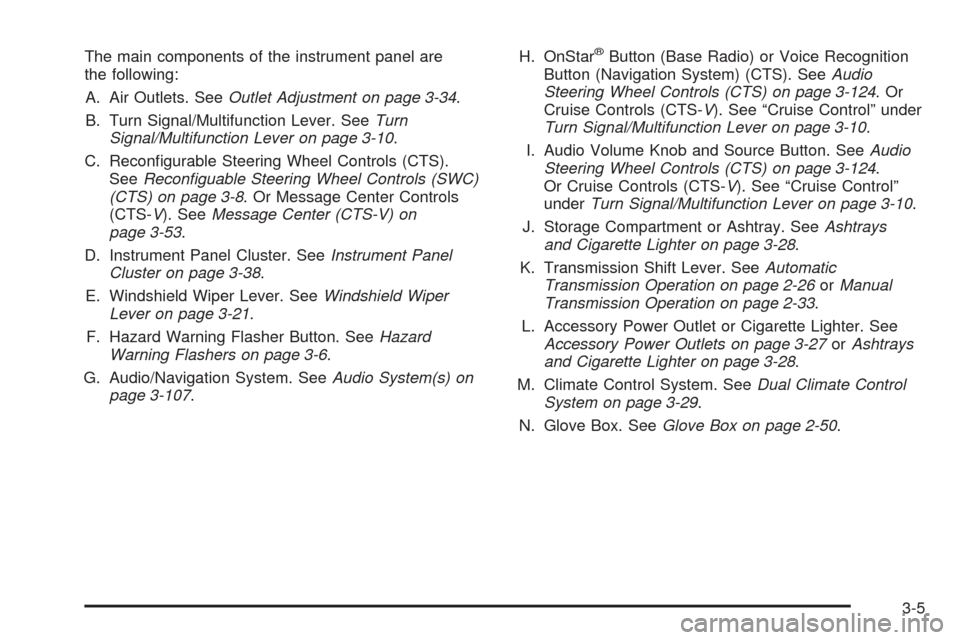
The main components of the instrument panel are
the following:
A. Air Outlets. SeeOutlet Adjustment on page 3-34.
B. Turn Signal/Multifunction Lever. SeeTurn
Signal/Multifunction Lever on page 3-10.
C. Recongurable Steering Wheel Controls (CTS).
SeeReconguable Steering Wheel Controls (SWC)
(CTS) on page 3-8. Or Message Center Controls
(CTS-V). SeeMessage Center (CTS-V) on
page 3-53.
D. Instrument Panel Cluster. SeeInstrument Panel
Cluster on page 3-38.
E. Windshield Wiper Lever. SeeWindshield Wiper
Lever on page 3-21.
F. Hazard Warning Flasher Button. SeeHazard
Warning Flashers on page 3-6.
G. Audio/Navigation System. SeeAudio System(s) on
page 3-107.H. OnStar®Button (Base Radio) or Voice Recognition
Button (Navigation System) (CTS). SeeAudio
Steering Wheel Controls (CTS) on page 3-124.Or
Cruise Controls (CTS-V). See “Cruise Control” under
Turn Signal/Multifunction Lever on page 3-10.
I. Audio Volume Knob and Source Button. SeeAudio
Steering Wheel Controls (CTS) on page 3-124.
Or Cruise Controls (CTS-V). See “Cruise Control”
underTurn Signal/Multifunction Lever on page 3-10.
J. Storage Compartment or Ashtray. SeeAshtrays
and Cigarette Lighter on page 3-28.
K. Transmission Shift Lever. SeeAutomatic
Transmission Operation on page 2-26orManual
Transmission Operation on page 2-33.
L. Accessory Power Outlet or Cigarette Lighter. See
Accessory Power Outlets on page 3-27orAshtrays
and Cigarette Lighter on page 3-28.
M. Climate Control System. SeeDual Climate Control
System on page 3-29.
N. Glove Box. SeeGlove Box on page 2-50.
3-5
Page 137 of 454
Ending Cruise Control
To end a cruise control session, step lightly on the
brake pedal. If your vehicle has a manual transmission,
lightly tapping the clutch will end a cruise control
session also.
Stepping on the brake or clutch pedal will end the
current cruise control session only. Move the cruise
control switch to off to turn off the system completely.
Erasing Speed Memory
When you turn off the cruise control or the ignition, your
cruise control set speed memory is erased.
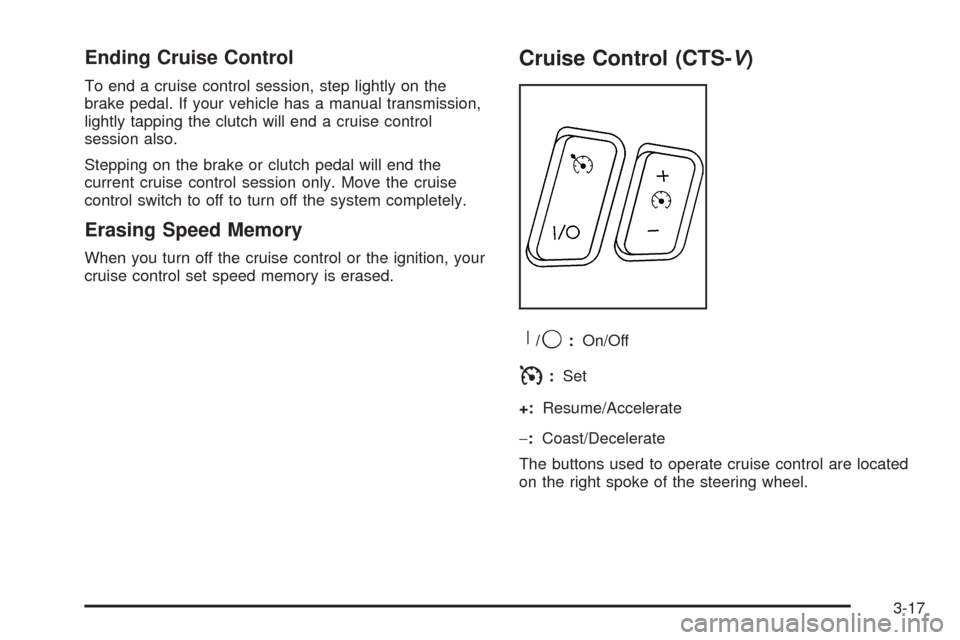
Cruise Control (CTS-V)
R
/9:On/Off
I:Set
+:Resume/Accelerate
−:Coast/Decelerate
The buttons used to operate cruise control are located
on the right spoke of the steering wheel.
3-17
Page 144 of 454
Exterior Lamps
Headlamps
SeeTurn Signal/Multifunction Lever on page 3-10for
more information on the headlamps.
Daytime Running Lamps
Daytime Running Lamps (DRL) can make it easier for
others to see the front of your vehicle during the
day. DRL can be helpful in many different driving
conditions, but they can be especially helpful in the short
periods after dawn and before sunset. Fully functional
daytime running lamps are required on all vehicles
rst sold in Canada.
The DRL system will make the turn signal lamps come
on when the following conditions are met:
It is still daylight and the ignition is in ON or START,
the exterior lamp control is in OFF or AUTO with the
headlamps off, and
an automatic transmission is not in PARK (P) or the
parking brake is not set on a manual transmission.When DRL are on, only your front turn signal lamps will
be on. No other exterior lamps will be on when the
DRL are being used. Your instrument panel won’t be lit
up either.
When the exterior lamp control is in AUTO and it’s dark
enough outside, the DRL will turn off and the low-beam
headlamps will turn on. When it’s bright enough
outside, the low-beam headlamps will go off, and the
DRL will turn back on. If you start your vehicle in a dark
garage, the automatic headlamp system will come on
immediately. Once you leave the garage, it will take
about one minute for the automatic headlamp system to
change to DRL if it is light outside. During that delay,
your instrument panel cluster may not be as bright
as usual. Make sure your instrument panel brightness
lever is in the full bright position. See “Instrument Panel
Brightness” underInterior Lamps on page 3-26.
3-24
Page 167 of 454
Malfunction Indicator Lamp
Check Engine Light
Your vehicle is equipped
with a computer which
monitors operation of the
fuel, ignition, and emission
control systems.
This system is called OBD II (On-Board Diagnostics
Second Generation) and is intended to assure that
emissions are at acceptable levels for the life of
the vehicle, helping to produce a cleaner environment.
The check engine light comes on to indicate that
there is a problem and service is required. Malfunctions
often will be indicated by the system before any
problem is apparent. This may prevent more serious
damage to your vehicle. This system is also designed to
assist your service technician in correctly diagnosing
any malfunction.
Notice:If you keep driving your vehicle with this
light on, after awhile, your emission controls
may not work as well, your fuel economy may notbe as good, and your engine may not run as
smoothly. This could lead to costly repairs that
may not be covered by your warranty.
Notice:Modications made to the engine,
transmission, exhaust, intake, or fuel system of
your vehicle or the replacement of the original tires
with other than those of the same Tire Performance
Criteria (TPC) can affect your vehicle’s emission
controls and may cause this light to come on.
Modications to these systems could lead to costly
repairs not covered by your warranty. This may
also result in a failure to pass a required Emission
Inspection/Maintenance test.
This light should come on, as a check to show you it is
working, when the ignition is on and the engine is
not running. If the light does not come on, have it
repaired. This light will also come on during a
malfunction in one of two ways:
Light Flashing— A misre condition has been
detected. A misre increases vehicle emissions and
may damage the emission control system on your
vehicle. Diagnosis and service may be required.
Light On Steady— An emission control system
malfunction has been detected on your vehicle.
Diagnosis and service may be required.
3-47