spare tire CADILLAC CTS 2006 1.G User Guide
[x] Cancel search | Manufacturer: CADILLAC, Model Year: 2006, Model line: CTS, Model: CADILLAC CTS 2006 1.GPages: 442, PDF Size: 2.57 MB
Page 348 of 442
Winter tires with the same speed rating as your vehicle’s
original equipment tires may not be available for H, V, W,
and ZR speed rated tires. If you choose snow tires with
a lower speed rating, never exceed the tire’s maximum
speed capability.
{CAUTION:
Mixing tires could cause you to lose control of
your vehicle while driving. If you mix tires of
different sizes, brands, or types (radial and
bias-belted tires) the vehicle may not handle
properly, and you could have a crash. Using
tires of different sizes, brands, or types may
also cause damage to your vehicle. Be sure to
use the correct size, brand, and type of tires
on all wheels.
Your vehicle may have a compact spare tire
and wheel assembly. It is all right to drive with
your vehicle’s compact spare tire temporarily.
It was developed for use on your vehicle. See
Compact Spare Tire (CTS Only) on page 5-94.
{CAUTION:
If you use bias-ply tires on your vehicle, the
wheel rim anges could develop cracks after
many miles of driving. A tire and/or wheel
could fail suddenly, causing a crash. Use only
radial-ply tires with the wheels on your vehicle.
If you must replace your vehicle’s tires with those that
do not have a TPC Spec number, make sure they
are the same size, load range, speed rating, and
construction type (radial and bias-belted tires) as your
vehicle’s original tires.
Vehicles that have a tire pressure monitoring system
may give an inaccurate low-pressure warning if non-TPC
Spec rated tires are installed on your vehicle. Non-TPC
Spec rated tires may give a low-pressure warning
that is higher or lower than the proper warning level
you would get with TPC Spec rated tires. SeeTire
Pressure Monitor System on page 5-68.
Your vehicle’s original equipment tires are listed on
the Tire and Loading Information Label. This label
is attached to the vehicle’s center pillar (B-pillar).
SeeLoading Your Vehicle on page 4-32, for more
information about the Tire and Loading Information
Label and its location on your vehicle.
5-74
Page 349 of 442
Different Size Tires and Wheels
If you add wheels or tires that are a different size
than your original equipment wheels and tires, this
may affect the way your vehicle performs, including its
braking, ride and handling characteristics, stability,
and resistance to rollover. Additionally, if your vehicle
has electronic systems such as, anti-lock brakes,
traction control, and electronic stability control, the
performance of these systems can be affected.
{CAUTION:
If you add different sized wheels, your
vehicle may not provide an acceptable level
of performance and safety if tires not
recommended for those wheels are selected.
You may increase the chance that you will
crash and suffer serious injury. Only use
GM specic wheel and tire systems developed
for your vehicle, and have them properly
installed by a GM certied technician.
SeeBuying New Tires on page 5-73andAccessories
and Modications on page 5-3for additional information.
Uniform Tire Quality Grading
Quality grades can be found where applicable on the
tire sidewall between tread shoulder and maximum
section width. For example:
Treadwear 200 Traction AA Temperature A
The following information relates to the system
developed by the United States National Highway
Traffic Safety Administration (NHTSA), which
grades tires by treadwear, traction, and temperature
performance. This applies only to vehicles sold in
the United States. The grades are molded on the
sidewalls of most passenger car tires. The Uniform
Tire Quality Grading (UTQG) system does not apply
to deep tread, winter-type snow tires, space-saver,
or temporary use spare tires, tires with nominal
rim diameters of 10 to 12 inches (25 to 30 cm), or
to some limited-production tires.
While the tires available on General Motors passenger
cars and light trucks may vary with respect to these
grades, they must also conform to federal safety
requirements and additional General Motors Tire
Performance Criteria (TPC) standards.
5-75
Page 356 of 442

If a Tire Goes Flat
It is unusual for a tire to “blowout” while you are driving,
especially if you maintain your tires properly. See
Tires on page 5-57. If air goes out of a tire, it is much
more likely to leak out slowly. But if you should ever
have a “blowout”, here are a few tips about what
to expect and what to do:
If a front tire fails, the at tire will create a drag that
pulls the vehicle toward that side. Take your foot off the
accelerator pedal and grip the steering wheel rmly.
Steer to maintain lane position, and then gently brake to
a stop well out of the traffic lane.
A rear blowout, particularly on a curve, acts much like a
skid and may require the same correction you’d use
in a skid. In any rear blowout, remove your foot from the
accelerator pedal. Get the vehicle under control by
steering the way you want the vehicle to go. It may be
very bumpy and noisy, but you can still steer. Gently
brake to a stop — well off the road if possible.If a tire goes at, and your vehicle has a spare tire,
seeChanging a Flat Tire (CTS Only) on page 5-84.
This information shows you how to use your vehicle’s
tire changing equipment and how to change a at
tire safely.
{CAUTION:
Lifting a vehicle and getting under it to do
maintenance or repairs is dangerous without
the appropriate safety equipment and
training. The jack provided with your vehicle
is designed only for changing a at tire.
If it is used for anything else, you or others
could be badly injured or killed if the vehicle
slips off the jack. Use the jack provided with
your vehicle only for changing a at tire.
5-82
Page 357 of 442

Run-Flat Tires (CTS-V)
If your vehicle has run-at tires, there is no spare tire
and no tire changing equipment. Run-at tires can
operate effectively with no air pressure for a limited
distance and speed. Your vehicle also has a Tire
Pressure Monitor (TPM) which will alert you if there
is a loss of tire pressure in any of the tires. These
tires perform so well without any air pressure that a
Tire Pressure Monitor (TPM) is used to alert you when
there is a low tire condition.
{CAUTION:
When the low tire warning light is displayed on
the instrument panel cluster, your vehicle’s
handling capabilities will be reduced during
severe maneuvers. If you drive too fast, you
could lose control of your vehicle. You or
others could be injured. Do not drive over
55 mph (90 km/h) when the low tire warning
light is displayed. Drive cautiously and check
your tire pressures as soon as you can.SeeRun-Flat Tires (CTS-V) on page 5-64andTire
Pressure Monitor System on page 5-68, for additional
information.
{CAUTION:
Special tools and procedures are required to
service a run-at tire. If these special tools
and procedures are not used you or others
could be injured and your vehicle could be
damaged. Always be sure the proper tools
and procedures, as described in the service
manual, are used.
To order a service manual seeService Publications
Ordering Information on page 7-16.
5-83
Page 359 of 442
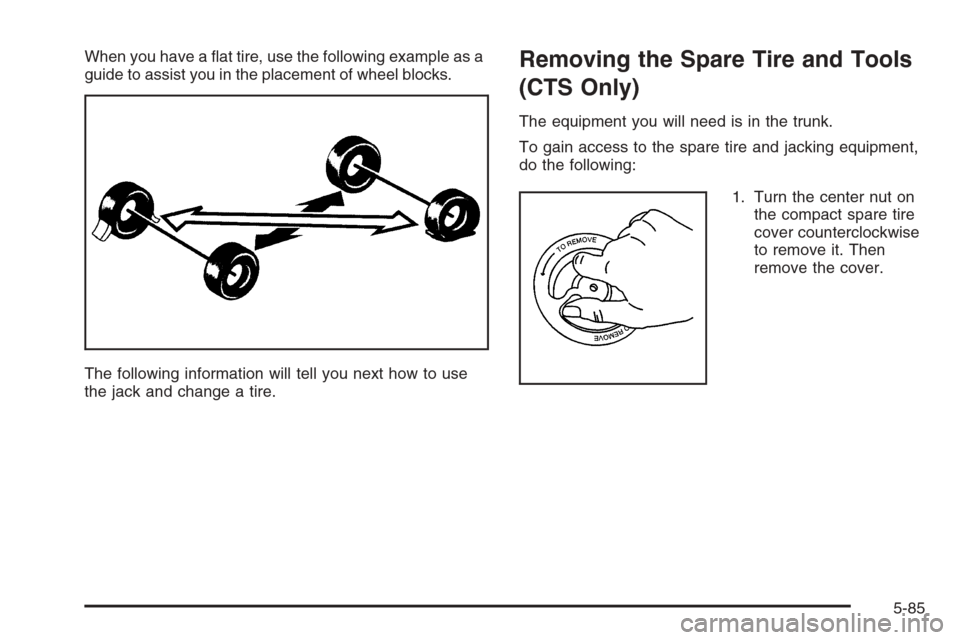
When you have a at tire, use the following example as a
guide to assist you in the placement of wheel blocks.
The following information will tell you next how to use
the jack and change a tire.Removing the Spare Tire and Tools
(CTS Only)
The equipment you will need is in the trunk.
To gain access to the spare tire and jacking equipment,
do the following:
1. Turn the center nut on
the compact spare tire
cover counterclockwise
to remove it. Then
remove the cover.
5-85
Page 360 of 442

2. Turn the nut holding the jack counterclockwise and
remove it. Then remove the jack and wheel wrench.
3. Remove the compact spare tire. SeeCompact
Spare Tire (CTS Only) on page 5-94for more
information about the compact spare tire.4. The tools you will be using next include the jack (A)
and the wheel wrench (B).
5-86
Page 361 of 442

Removing the Flat Tire and
Installing the Spare Tire (CTS Only)
1. Loosen the wheel nuts, but do not remove them
yet, using the wheel wrench. Turn the handle
about 180 degrees, then ip the handle back to
the starting position. This avoids taking the wrench
off the lug nut for each turn.2. Find the jacking location using the diagram above
and corresponding triangular-shaped hoisting
notches located in the plastic molding.
The front location (A) is about 14 inches (35.6 cm)
from the rear edge of the front wheel well, and
the rear location (B) is about 7 inches (17.8 cm)
from the front edge of the rear wheel well.
5-87
Page 363 of 442

5. Raise the jack by turning the wheel wrench
clockwise until the slots in the jack head t into
the metal ange located behind the triangle on
the plastic molding as shown.
6. Put the compact spare tire near you.7. Raise the vehicle by turning the wheel wrench
clockwise. Raise the vehicle far enough off the
ground for the compact spare tire to t under
the vehicle.
5-89
Page 365 of 442

9. Remove any rust or dirt
from the wheel bolts,
mounting surfaces, and
spare wheel.
10. Install the spare tire.
11. Put the wheel nuts back on with the rounded end
of the nuts toward the wheel.
12. Tighten each wheel nut by turning it clockwise with
your hand until the wheel is held against the hub.13. Lower the vehicle by turning the wheel wrench
counterclockwise. Lower the jack completely.
5-91
Page 366 of 442

{CAUTION:
Incorrect wheel nuts or improperly tightened
wheel nuts can cause the wheel to come loose
and even come off. This could lead to an
accident. Be sure to use the correct wheel
nuts. If you have to replace them, be sure to
get new GM original equipment wheel nuts.
Stop somewhere as soon as you can and have
the nuts tightened with a torque wrench to the
proper torque specication. SeeCapacities
and Specifications on page 5-115for wheel
nut torque specication.
Notice:Improperly tightened wheel nuts can lead
to brake pulsation and rotor damage. To avoid
expensive brake repairs, evenly tighten the wheel
nuts in the proper sequence and to the proper
torque specication. SeeCapacities and
Specifications on page 5-115for the wheel nut
torque specication.14. Tighten the wheel nuts
rmly in a crisscross
sequence as shown.
Notice:Wheel covers will not t on your compact
spare. If you try to put a wheel cover on the compact
spare, you could damage the cover or the spare.
Do not try to put a wheel cover on your compact spare
tire. It will note t. Store the wheel cover in the trunk
until you have the at tire repaired or replaced.
5-92