wheel CADILLAC CTS 2006 1.G User Guide
[x] Cancel search | Manufacturer: CADILLAC, Model Year: 2006, Model line: CTS, Model: CADILLAC CTS 2006 1.GPages: 442, PDF Size: 2.57 MB
Page 104 of 442
Notice:Shifting to REVERSE (R) while your vehicle
is moving forward could damage the transmission.
The repairs would not be covered by your warranty.
Shift to REVERSE (R) only after your vehicle is
stopped.
REVERSE (R):Use this gear to back up.
At low vehicle speeds, you can also use REVERSE (R)
to rock your vehicle back and forth to get out of
snow, ice, or sand without damaging your transmission.
SeeIf Your Vehicle is Stuck in Sand, Mud, Ice, or
Snow on page 4-31for additional information.
NEUTRAL (N):In this position, the engine does not
connect with the wheels. To restart when you are
already moving, use NEUTRAL (N) only. You can also
use NEUTRAL (N) when your vehicle is being towed.
{CAUTION:
Shifting into a drive gear while your engine is
running at high speed is dangerous. Unless
your foot is rmly on the brake pedal, your
vehicle could move very rapidly. You could
lose control and hit people or objects. Do not
shift into a drive gear while your engine is
running at high speed.Notice:Shifting out of PARK (P) or NEUTRAL (N)
with the engine running at high speed may damage
the transmission. The repairs would not be
covered by your warranty. Be sure the engine is not
running at high speed when shifting your vehicle.
AUTOMATIC OVERDRIVE (D):This position is
for normal driving. If you need more power for passing,
and you are:
Going less than 35 mph (55 km/h), push the
accelerator pedal about halfway down.
Going about 35 mph (55 km/h) or more, push the
accelerator all the way down.
The transmission will shift down to a lower gear
and have more power.
Notice:Spinning the tires or holding the vehicle in
one place on a hill using only the accelerator
pedal may damage the transmission. If you are
stuck, do not spin the tires. When stopping on a hill,
use the brakes to hold the vehicle in place.
2-28
Page 109 of 442
Parking Brake
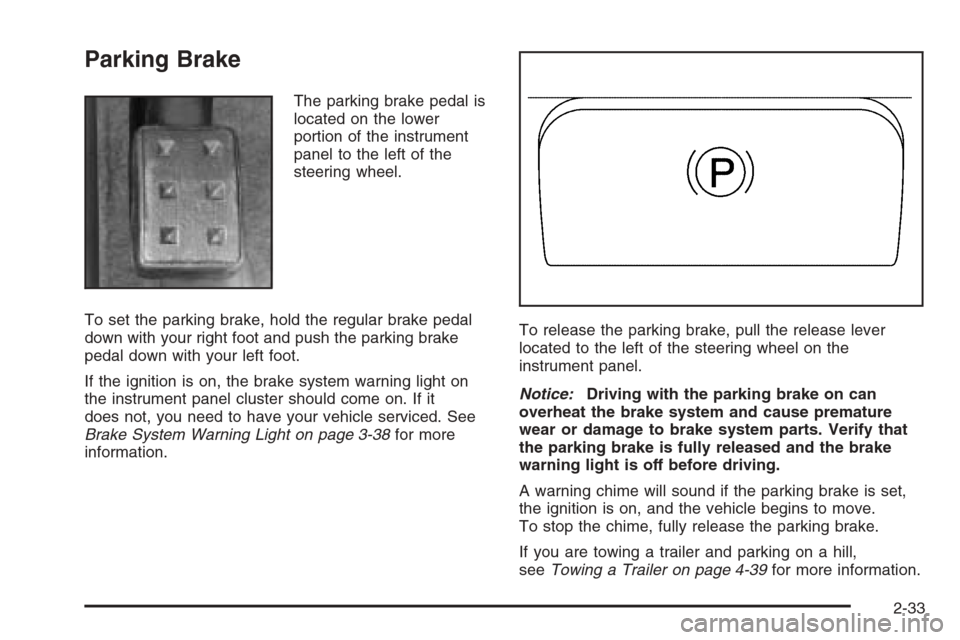
The parking brake pedal is
located on the lower
portion of the instrument
panel to the left of the
steering wheel.
To set the parking brake, hold the regular brake pedal
down with your right foot and push the parking brake
pedal down with your left foot.
If the ignition is on, the brake system warning light on
the instrument panel cluster should come on. If it
does not, you need to have your vehicle serviced. See
Brake System Warning Light on page 3-38for more
information.To release the parking brake, pull the release lever
located to the left of the steering wheel on the
instrument panel.
Notice:Driving with the parking brake on can
overheat the brake system and cause premature
wear or damage to brake system parts. Verify that
the parking brake is fully released and the brake
warning light is off before driving.
A warning chime will sound if the parking brake is set,
the ignition is on, and the vehicle begins to move.
To stop the chime, fully release the parking brake.
If you are towing a trailer and parking on a hill,
seeTowing a Trailer on page 4-39for more information.
2-33
Page 131 of 442
Instrument Panel Overview...............................3-4
Hazard Warning Flashers................................3-6
Other Warning Devices...................................3-6
Horn .............................................................3-6
Tilt Wheel.....................................................3-6
Recongurable Steering Wheel
Controls (SWC) (CTS).................................3-7
Turn Signal/Multifunction Lever.........................3-9
Turn and Lane-Change Signals........................3-9
Headlamp High/Low-Beam Changer.................3-10
Flash-to-Pass...............................................3-10
Windshield Wipers........................................3-11
Windshield Washer.......................................3-12
Headlamp Washer........................................3-12
Cruise Control..............................................3-13
Headlamps..................................................3-16
Wiper Activated Headlamps............................3-17
Headlamps on Reminder................................3-17
Daytime Running Lamps (DRL).......................3-17
Fog Lamps ..................................................3-19
Exterior Lighting Battery Saver........................3-20
Instrument Panel Brightness...........................3-20
Entry Lighting...............................................3-21
Parade Dimming...........................................3-21
Reading Lamps............................................3-21Accessory Power Outlet(s).............................3-21
Ashtray(s) and Cigarette Lighter......................3-22
Climate Controls............................................3-23
Dual Climate Control System..........................3-23
Outlet Adjustment.........................................3-28
Passenger Compartment Air Filter...................3-29
Steering Wheel Climate Controls (CTS)............3-30
Warning Lights, Gages, and Indicators............3-30
Instrument Panel Cluster................................3-31
Speedometer and Odometer...........................3-33
Trip Odometers............................................3-33
Tachometer.................................................3-33
Engine Speed Limiter....................................3-33
Safety Belt Reminder Light.............................3-34
Airbag Readiness Light..................................3-34
Passenger Airbag Status Indicator...................3-35
Charging System Light..................................3-37
Brake System Warning Light..........................3-38
Anti-Lock Brake System Warning Light.............3-39
Traction Control System (TCS) Warning Light......3-39
Engine Coolant Temperature
Warning Light (CTS)..................................3-40
Engine Coolant Temperature Gage..................3-40
Tire Pressure Light (CTS-V Only)....................3-41
Section 3 Instrument Panel
3-1
Page 132 of 442
Malfunction Indicator Lamp.............................3-41
Oil Pressure Light.........................................3-44
Sport Mode Light (Automatic
Transmission/CTS).....................................3-45
Security Light...............................................3-45
Fog Lamp Light............................................3-45
Lights On Reminder......................................3-45
Cruise Control Light......................................3-46
Highbeam On Light.......................................3-46
Fuel Gage...................................................3-46
Message Center.............................................3-47
Message Center (CTS-V)...............................3-47
Transmission Fluid Hot Message.....................3-50
Hot Coolant Temperature Warning Message.....3-50
Check Engine Oil Pressure Message...............3-51
Oil Temperature Warning Message..................3-51
Tire Pressure Warning Message.....................3-52
One-to-Four Shift Message.............................3-52Driver Information Center (DIC).......................3-53
System Controls...........................................3-53
Status of Vehicle Systems.............................3-54
DIC Main Menu ............................................3-57
DIC Warnings and Messages.........................3-61
DIC Vehicle Personalization............................3-70
Audio System(s).............................................3-83
Setting the Time...........................................3-85
Radio with CD..............................................3-85
Navigation/Radio System..............................3-101
Theft-Deterrent Feature................................3-101
Audio Steering Wheel Controls (CTS)............3-102
Radio Reception.........................................3-102
Care of Your CDs.......................................3-103
Care of the CD Player.................................3-104
Diversity Antenna System.............................3-104
XM™ Satellite Radio Antenna System............3-104
Section 3 Instrument Panel
3-2
Page 135 of 442
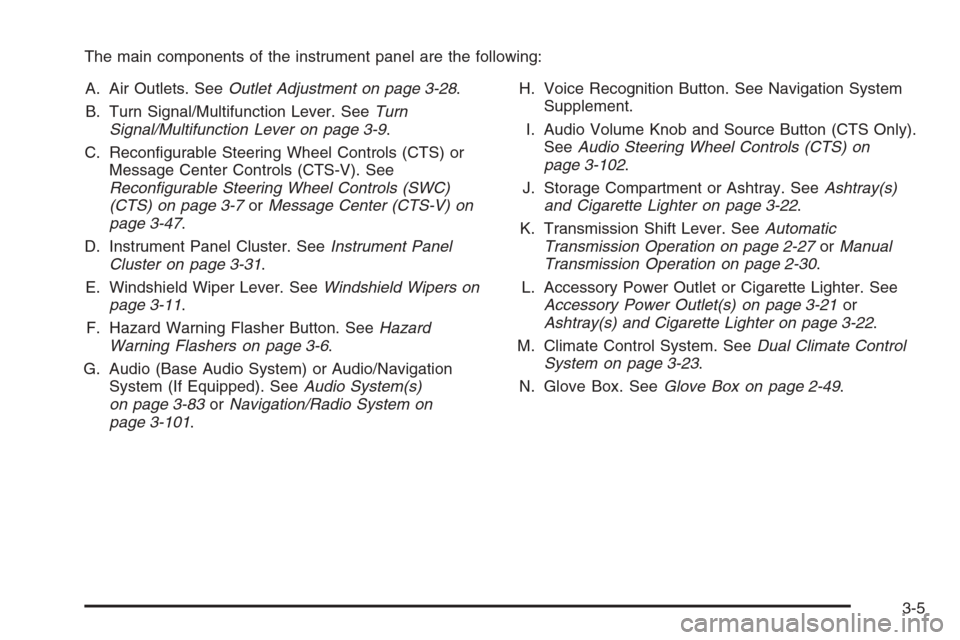
The main components of the instrument panel are the following:
A. Air Outlets. SeeOutlet Adjustment on page 3-28.
B. Turn Signal/Multifunction Lever. SeeTurn
Signal/Multifunction Lever on page 3-9.
C. Recongurable Steering Wheel Controls (CTS) or
Message Center Controls (CTS-V). See
Recongurable Steering Wheel Controls (SWC)
(CTS) on page 3-7orMessage Center (CTS-V) on
page 3-47.
D. Instrument Panel Cluster. SeeInstrument Panel
Cluster on page 3-31.
E. Windshield Wiper Lever. SeeWindshield Wipers on
page 3-11.
F. Hazard Warning Flasher Button. SeeHazard
Warning Flashers on page 3-6.
G. Audio (Base Audio System) or Audio/Navigation
System (If Equipped). SeeAudio System(s)
on page 3-83orNavigation/Radio System on
page 3-101.H. Voice Recognition Button. See Navigation System
Supplement.
I. Audio Volume Knob and Source Button (CTS Only).
SeeAudio Steering Wheel Controls (CTS) on
page 3-102.
J. Storage Compartment or Ashtray. SeeAshtray(s)
and Cigarette Lighter on page 3-22.
K. Transmission Shift Lever. SeeAutomatic
Transmission Operation on page 2-27orManual
Transmission Operation on page 2-30.
L. Accessory Power Outlet or Cigarette Lighter. See
Accessory Power Outlet(s) on page 3-21or
Ashtray(s) and Cigarette Lighter on page 3-22.
M. Climate Control System. SeeDual Climate Control
System on page 3-23.
N. Glove Box. SeeGlove Box on page 2-49.
3-5
Page 136 of 442
Hazard Warning Flashers
Your hazard warning ashers let you warn others. They
also let police know you have a problem. Your front
and rear turn signal lamps will ash on and off.
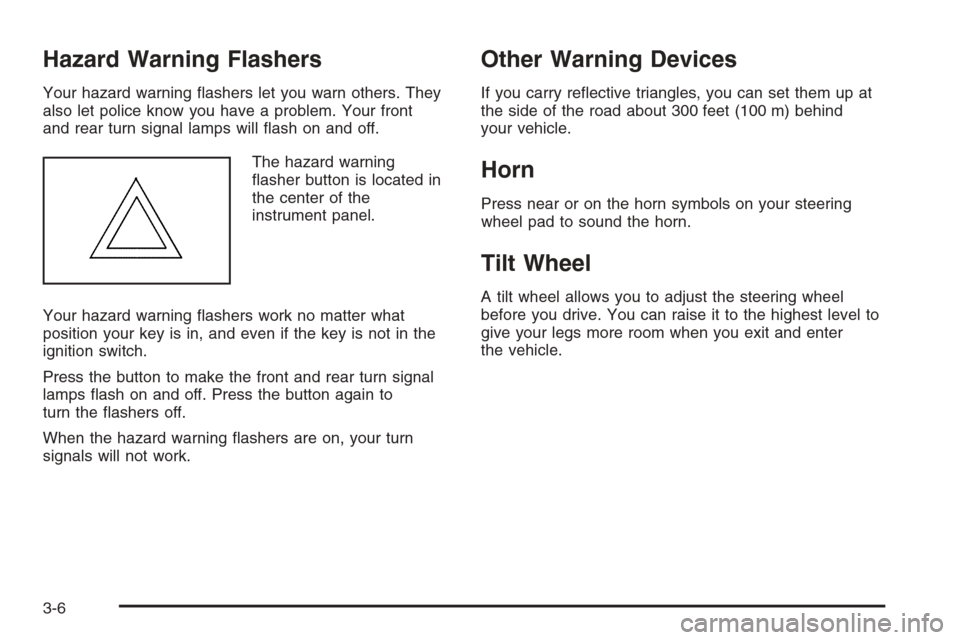
The hazard warning
asher button is located in
the center of the
instrument panel.
Your hazard warning ashers work no matter what
position your key is in, and even if the key is not in the
ignition switch.
Press the button to make the front and rear turn signal
lamps ash on and off. Press the button again to
turn the ashers off.
When the hazard warning ashers are on, your turn
signals will not work.
Other Warning Devices
If you carry reective triangles, you can set them up at
the side of the road about 300 feet (100 m) behind
your vehicle.
Horn
Press near or on the horn symbols on your steering
wheel pad to sound the horn.
Tilt Wheel
A tilt wheel allows you to adjust the steering wheel
before you drive. You can raise it to the highest level to
give your legs more room when you exit and enter
the vehicle.
3-6
Page 137 of 442
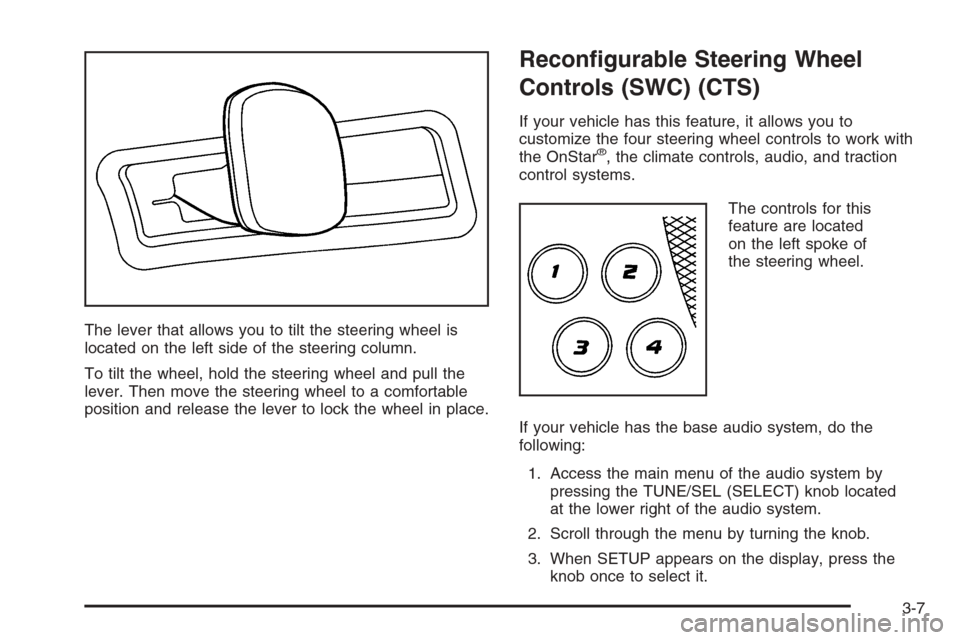
The lever that allows you to tilt the steering wheel is
located on the left side of the steering column.
To tilt the wheel, hold the steering wheel and pull the
lever. Then move the steering wheel to a comfortable
position and release the lever to lock the wheel in place.
Recongurable Steering Wheel
Controls (SWC) (CTS)
If your vehicle has this feature, it allows you to
customize the four steering wheel controls to work with
the OnStar
®, the climate controls, audio, and traction
control systems.
The controls for this
feature are located
on the left spoke of
the steering wheel.
If your vehicle has the base audio system, do the
following:
1. Access the main menu of the audio system by
pressing the TUNE/SEL (SELECT) knob located
at the lower right of the audio system.
2. Scroll through the menu by turning the knob.
3. When SETUP appears on the display, press the
knob once to select it.
3-7
Page 143 of 442
Cruise Control
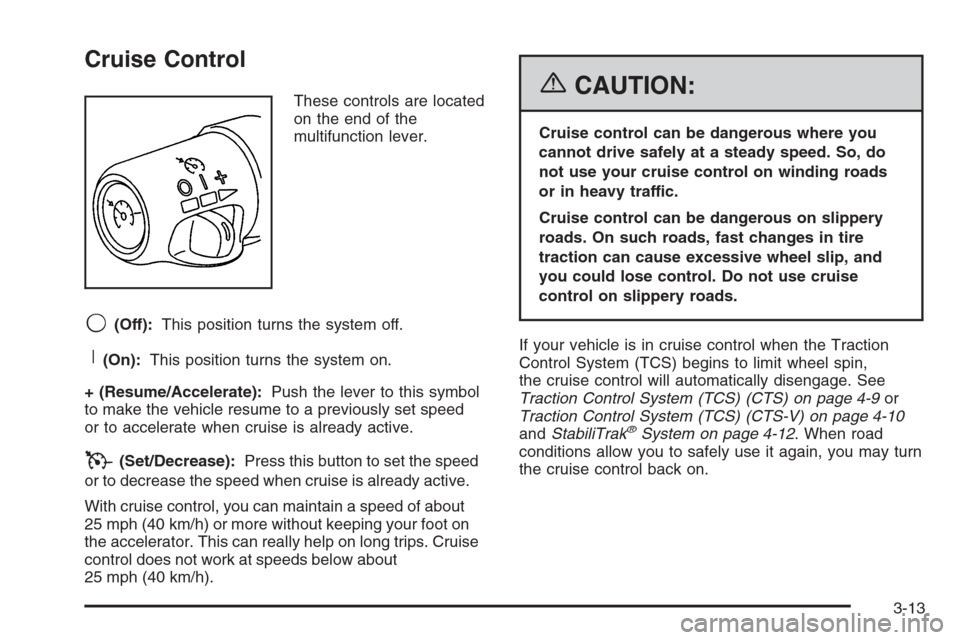
These controls are located
on the end of the
multifunction lever.
9(Off):This position turns the system off.
R(On):This position turns the system on.
+ (Resume/Accelerate):Push the lever to this symbol
to make the vehicle resume to a previously set speed
or to accelerate when cruise is already active.
T(Set/Decrease):Press this button to set the speed
or to decrease the speed when cruise is already active.
With cruise control, you can maintain a speed of about
25 mph (40 km/h) or more without keeping your foot on
the accelerator. This can really help on long trips. Cruise
control does not work at speeds below about
25 mph (40 km/h).
{CAUTION:
Cruise control can be dangerous where you
cannot drive safely at a steady speed. So, do
not use your cruise control on winding roads
or in heavy traffic.
Cruise control can be dangerous on slippery
roads. On such roads, fast changes in tire
traction can cause excessive wheel slip, and
you could lose control. Do not use cruise
control on slippery roads.
If your vehicle is in cruise control when the Traction
Control System (TCS) begins to limit wheel spin,
the cruise control will automatically disengage. See
Traction Control System (TCS) (CTS) on page 4-9or
Traction Control System (TCS) (CTS-V) on page 4-10
andStabiliTrak
®System on page 4-12. When road
conditions allow you to safely use it again, you may turn
the cruise control back on.
3-13
Page 156 of 442

QPWRR(Power/Passenger’s Temperature):Press
the PWR button located on the passenger’s side of
the climate control panel to allow the passenger’s
climate control setting to be different than the driver’s.
Press the up or down arrow on the switch to increase or
decrease the temperature for the front passenger.
A/C OFF (Air Conditioning):Press this button to
manually turn off the air conditioning compressor. Press
AUTO to return to automatic operation or press the
A/C OFF button again.
Sensors
There is a solar sensor located on the instrument panel,
near the windshield.There is also an interior
temperature sensor
located to the right of the
steering wheel on the
instrument panel.
These sensors monitor the solar radiation and the air
inside your vehicle, they use the information to maintain
the selected temperature by adjusting to the
temperature, the fan speed, and the air delivery system.
The system may also supply cooler air to the side of
the vehicle facing the sun. The recirculation mode
will also be activated, as necessary. Do not cover the
sensors or the automatic climate control system will not
work properly.
3-26
Page 157 of 442
Defogging and Defrosting
Fog on the inside of windows is a result of high humidity
(moisture) condensing on the cool window glass. This
can be minimized if the climate control system is
used properly. There are two modes to clear fog from
your windshield. Use the defog mode to clear the
windows of fog or moisture and warm the passengers.
Use the defrost mode to remove fog or frost from
the windshield more quickly.
yNz(Mode):Press this button until defog appears
on the display.
-(Defog):This mode directs the air between the
windshield, oor outlets and side windows. When this
mode is selected, the system turns off recirculation and
runs the air-conditioning compressor unless the outside
temperature is at or below freezing. If recirculation mode
is selected while in defog mode, it will be cancelled after
10 minutes.
If there is fog on the side windows, turn the thumbwheel
on the outboard outlets to the side window defog position.
SeeOutlet Adjustment on page 3-28for more
information.
0(Defrost):Pressing defrost directs most of the air
to the windshield, with some air directed to the side
windows. In this mode, the system will automatically turn
off recirculation and run the air-conditioning compressor,
unless the outside temperature is at or below freezing.
This mode may also cause the fan speed and air
temperature to increase.
If there is fogging on the side windows, turn the
thumbwheel on the outboard outlets to the side window
defog position. SeeOutlet Adjustment on page 3-28
for more information. Do not drive the vehicle until all the
windows are clear.
Rear Window Defogger
The rear window defogger uses a warming grid to
remove fog or frost from the rear window.
The rear window defogger will only work when the
ignition is in ON.
3-27