lock CADILLAC CTS 2007 1.G Owners Manual
[x] Cancel search | Manufacturer: CADILLAC, Model Year: 2007, Model line: CTS, Model: CADILLAC CTS 2007 1.GPages: 518, PDF Size: 2.77 MB
Page 388 of 518
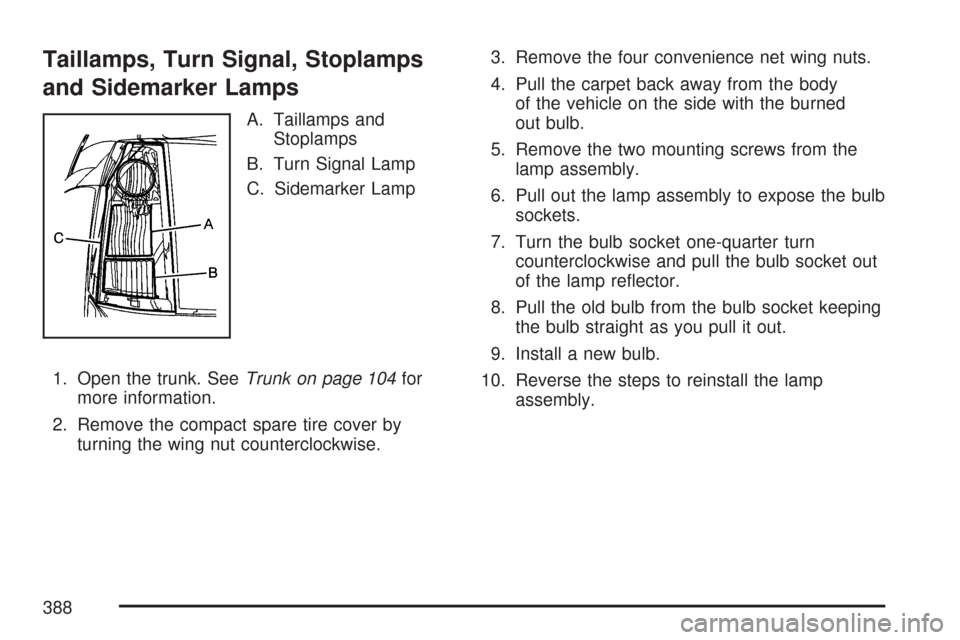
Taillamps, Turn Signal, Stoplamps
and Sidemarker Lamps
A. Taillamps and
Stoplamps
B. Turn Signal Lamp
C. Sidemarker Lamp
1. Open the trunk. SeeTrunk on page 104for
more information.
2. Remove the compact spare tire cover by
turning the wing nut counterclockwise.3. Remove the four convenience net wing nuts.
4. Pull the carpet back away from the body
of the vehicle on the side with the burned
out bulb.
5. Remove the two mounting screws from the
lamp assembly.
6. Pull out the lamp assembly to expose the bulb
sockets.
7. Turn the bulb socket one-quarter turn
counterclockwise and pull the bulb socket out
of the lamp reector.
8. Pull the old bulb from the bulb socket keeping
the bulb straight as you pull it out.
9. Install a new bulb.
10. Reverse the steps to reinstall the lamp
assembly.
388
Page 389 of 518
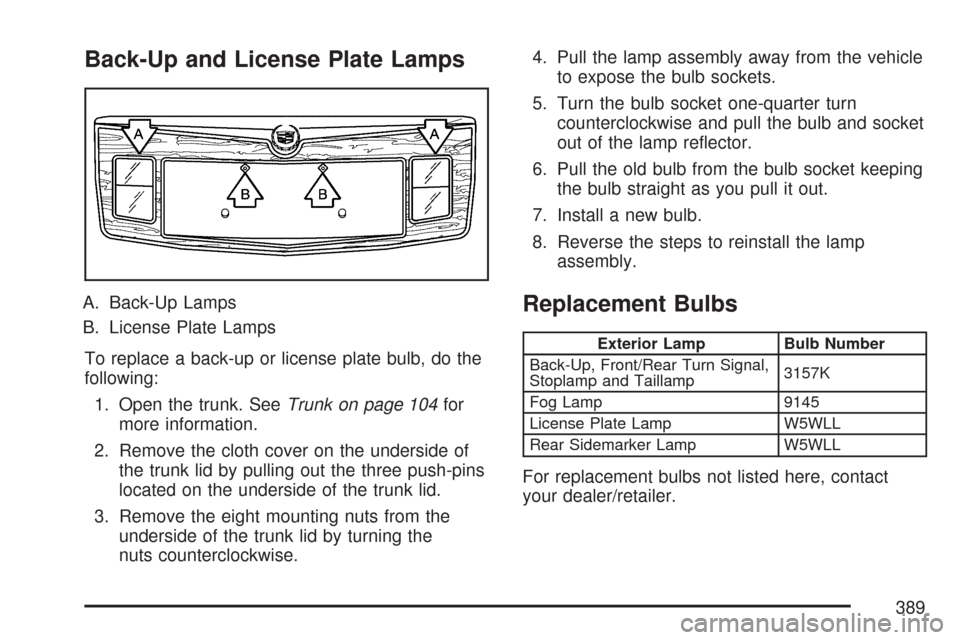
Back-Up and License Plate Lamps
A. Back-Up Lamps
B. License Plate Lamps
To replace a back-up or license plate bulb, do the
following:
1. Open the trunk. SeeTrunk on page 104for
more information.
2. Remove the cloth cover on the underside of
the trunk lid by pulling out the three push-pins
located on the underside of the trunk lid.
3. Remove the eight mounting nuts from the
underside of the trunk lid by turning the
nuts counterclockwise.4. Pull the lamp assembly away from the vehicle
to expose the bulb sockets.
5. Turn the bulb socket one-quarter turn
counterclockwise and pull the bulb and socket
out of the lamp reector.
6. Pull the old bulb from the bulb socket keeping
the bulb straight as you pull it out.
7. Install a new bulb.
8. Reverse the steps to reinstall the lamp
assembly.Replacement Bulbs
Exterior Lamp Bulb Number
Back-Up, Front/Rear Turn Signal,
Stoplamp and Taillamp3157K
Fog Lamp 9145
License Plate Lamp W5WLL
Rear Sidemarker Lamp W5WLL
For replacement bulbs not listed here, contact
your dealer/retailer.
389
Page 391 of 518
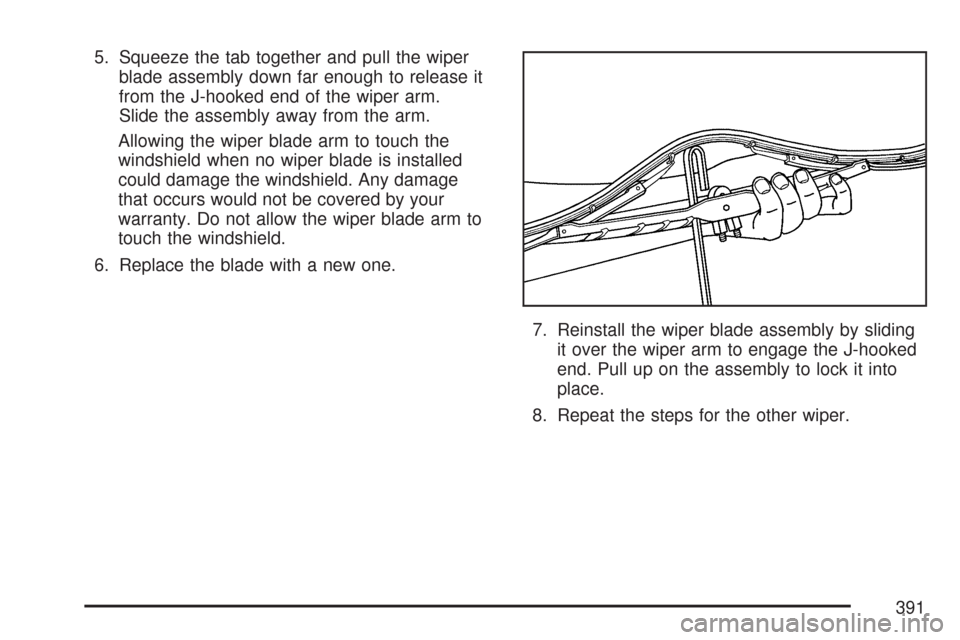
5. Squeeze the tab together and pull the wiper
blade assembly down far enough to release it
from the J-hooked end of the wiper arm.
Slide the assembly away from the arm.
Allowing the wiper blade arm to touch the
windshield when no wiper blade is installed
could damage the windshield. Any damage
that occurs would not be covered by your
warranty. Do not allow the wiper blade arm to
touch the windshield.
6. Replace the blade with a new one.
7. Reinstall the wiper blade assembly by sliding
it over the wiper arm to engage the J-hooked
end. Pull up on the assembly to lock it into
place.
8. Repeat the steps for the other wiper.
391
Page 407 of 518
Your vehicle’s TPMS can alert you about a low
tire pressure condition but it does not replace
normal tire maintenance. SeeTire Inspection and
Rotation on page 409andTires on page 392.
Notice:Do not use a tire sealant if your vehicle
has Tire Pressure Monitors. The liquid sealant
can damage the tire pressure monitor sensors.
Resetting the TPMS Identication
Codes
Each TPMS sensor has a unique identication
code. Any time you replace one or more of
the TPMS sensors or rotate the tires, the
identication codes will need to be matched to the
new tire and wheel position. The sensors are
matched to the tire and wheel positions in
the following order: driver’s side front tire,
passenger’s side front tire, passenger’s side rear
tire, and driver’s side rear tire using a TPMS
diagnostic tool. See your GM dealer for service.
The TPMS sensors may also be matched to each
tire and wheel position by increasing or
decreasing the tire’s air pressure. When increasing
tire pressure do not exceed the maximum
ination pressure indicated on the tire’s sidewall.You will have two minutes to match the rst tire
and wheel position, and ve minutes overall
to match all four tire and wheel positions. If it takes
longer than two minutes, to match the rst tire
and wheel, or more than ve minutes to match all
four tire and wheel positions the matching
process stops and you will need to start over.
The TPM matching process is outlined below:
1. Set the parking brake.
2. Turn the ignition switch to ON with the
engine off.
3. Using the Remote Keyless Entry (RKE)
transmitter, lock and unlock the vehicle’s
doors.
4. Press the lock and unlock buttons, at the
same time, on the RKE transmitter. A single
horn chirp will sound, indicating that the
TPMS system is ready, and the sensor
matching process can begin.
5. Start with the driver’s side front tire.
407
Page 414 of 518
Different Size Tires and Wheels
If you add wheels or tires that are a different size
than your original equipment wheels and tires,
this may affect the way your vehicle performs,
including its braking, ride and handling
characteristics, stability, and resistance to rollover.
Additionally, if your vehicle has electronic
systems such as, anti-lock brakes, traction control,
and electronic stability control, the performance
of these systems can be affected.
{CAUTION:
If you add different sized wheels, your
vehicle may not provide an acceptable
level of performance and safety if tires not
recommended for those wheels are
selected. You may increase the chance
that you will crash and suffer serious
injury. Only use GM specic wheel and
tire systems developed for your vehicle,
and have them properly installed by a GM
certied technician.SeeBuying New Tires on page 411and
Accessories and Modications on page 332for
additional information.
Uniform Tire Quality Grading
Quality grades can be found where applicable on
the tire sidewall between tread shoulder and
maximum section width. For example:
Treadwear 200 Traction AA Temperature A
The following information relates to the system
developed by the United States National Highway
Traffic Safety Administration (NHTSA), which
grades tires by treadwear, traction, and
temperature performance. This applies only to
vehicles sold in the United States. The grades are
molded on the sidewalls of most passenger car
tires. The Uniform Tire Quality Grading (UTQG)
system does not apply to deep tread, winter-type
snow tires, space-saver, or temporary use
spare tires, tires with nominal rim diameters of
10 to 12 inches (25 to 30 cm), or to some
limited-production tires.
414
Page 418 of 518

Tire Chains
{CAUTION:
Do not use tire chains. There is not
enough clearance. Tire chains used on a
vehicle without the proper amount of
clearance can cause damage to the
brakes, suspension, or other vehicle
parts. The area damaged by the tire
chains could cause you to lose control of
your vehicle and you or others may be
injured in a crash. Use another type of
traction device only if its manufacturer
recommends it for use on your vehicle
and tire size combination and road
conditions. Follow that manufacturer’s
instructions. To help avoid damage to
your vehicle, drive slowly, re-adjust or
remove the device if it is contacting your
vehicle, and do not spin your wheels.
If you do nd traction devices that will t,
install them on the rear tires.
Lifting Your Vehicle (CTS-V)
{CAUTION:
Lifting a vehicle can cause an injury.
The vehicle can slip off the jack and roll
over you or other people. You and they
could be badly injured. Find a level place
to lift your vehicle. To help prevent the
vehicle from moving:
1. Place the shift lever in REVERSE (R)
and rmly apply the parking brake.
2. Turn off the engine.
To be even more certain the vehicle will
not move, you can put blocks in front of
and behind the wheels. Also seeParking
Your Vehicle (Manual Transmission) on
page 132andParking Brake on page 128
for additional information.
418
Page 419 of 518
{CAUTION:
Getting under a vehicle when it is jacked
up is dangerous. If the vehicle slips off
the jack, you could be badly injured or
killed. Never get under a vehicle when it is
supported only by a jack.
{CAUTION:
Raising your vehicle with the jack
improperly positioned can damage the
vehicle and even make the vehicle fall. To
help avoid personal injury and vehicle
damage, be sure to place the jack in the
proper location before raising the vehicle.
If you ever use a jack to lift your vehicle, follow
the instructions that came with the jack, and
be sure to use the correct lifting points to avoid
damaging your vehicle.Notice:Lifting your vehicle improperly can
damage your vehicle and result in costly repairs
not covered by your warranty. To lift your
vehicle properly, follow the advice in this part.
To help prevent vehicle damage:
Be sure the jack you are using meets the
weight standards for your vehicle and is
in good working order.
Be sure to place a block or pad between
the jack and the vehicle.
Make sure the jack you are using only
contacts the jacking location lift points and
is not leaning on any other vehicle
components such as the rocker panels, the
oor pan, or the stone guard moldings.
Lift only in the areas shown in the following
pictures.
419
Page 420 of 518
Lifting From the Front
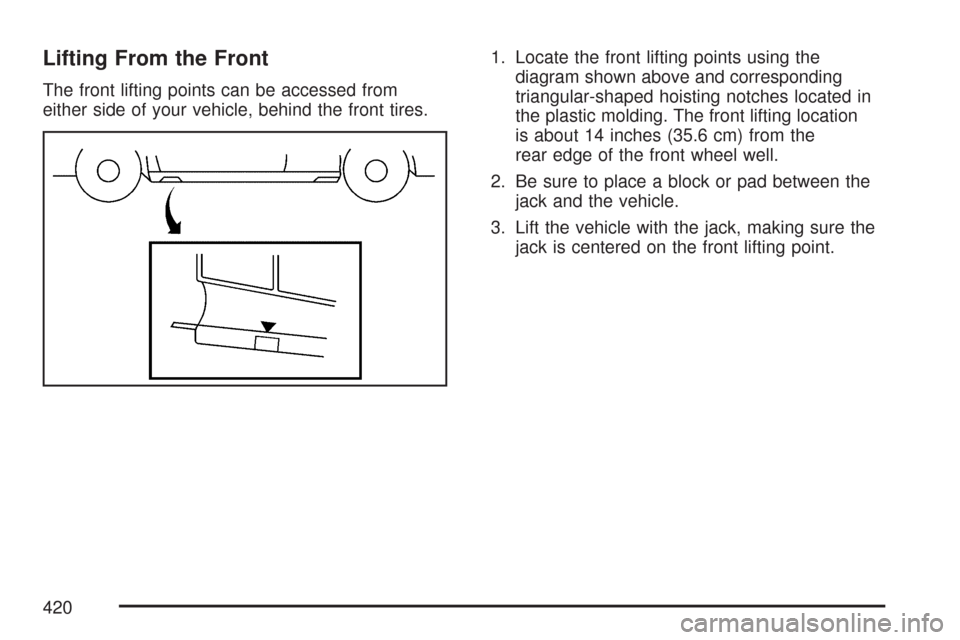
The front lifting points can be accessed from
either side of your vehicle, behind the front tires.1. Locate the front lifting points using the
diagram shown above and corresponding
triangular-shaped hoisting notches located in
the plastic molding. The front lifting location
is about 14 inches (35.6 cm) from the
rear edge of the front wheel well.
2. Be sure to place a block or pad between the
jack and the vehicle.
3. Lift the vehicle with the jack, making sure the
jack is centered on the front lifting point.
420
Page 421 of 518
Lifting From the Rear
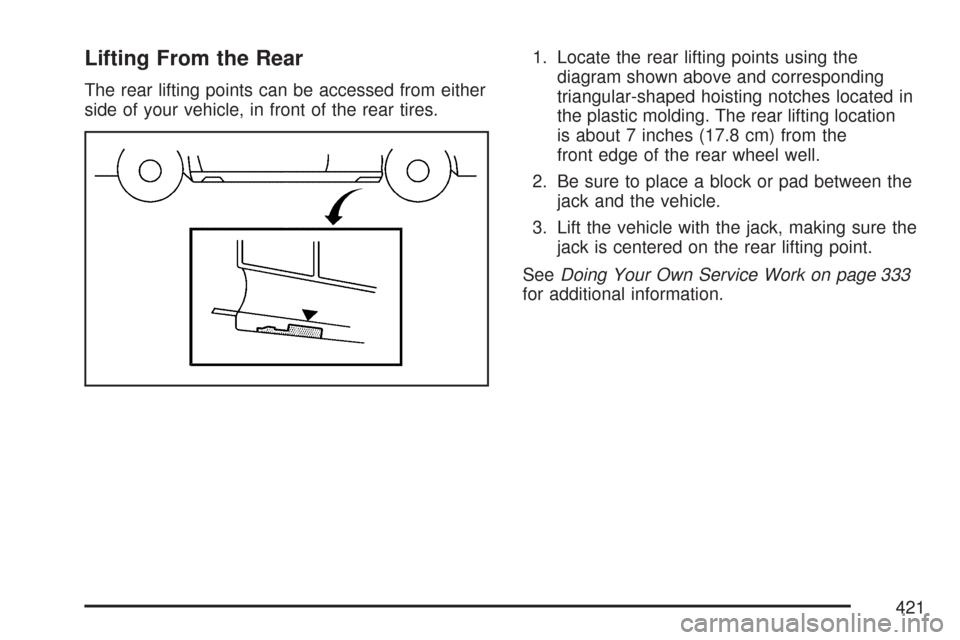
The rear lifting points can be accessed from either
side of your vehicle, in front of the rear tires.1. Locate the rear lifting points using the
diagram shown above and corresponding
triangular-shaped hoisting notches located in
the plastic molding. The rear lifting location
is about 7 inches (17.8 cm) from the
front edge of the rear wheel well.
2. Be sure to place a block or pad between the
jack and the vehicle.
3. Lift the vehicle with the jack, making sure the
jack is centered on the rear lifting point.
SeeDoing Your Own Service Work on page 333
for additional information.
421
Page 424 of 518
Changing a Flat Tire (CTS Only)
If a tire goes at, avoid further tire and wheel
damage by driving slowly to a level place. Turn on
your hazard warning ashers.
{CAUTION:
Changing a tire can be dangerous. The
vehicle can slip off the jack and roll over
or fall on you or other people. You and
they could be badly injured or even killed.
Find a level place to change your tire.
To help prevent the vehicle from moving:
1. Set the parking brake rmly.
2. Put an automatic transmission shift
lever in PARK (P), or shift a manual
transmission to FIRST (1) or
REVERSE (R).
3. Turn off the engine and do not restart
while the vehicle is raised.
4. Do not allow passengers to remain in
the vehicle.
CAUTION: (Continued)
CAUTION: (Continued)
Put the wheel blocks at the front and rear of
the tire farthest away from the one being
changed. That would be the tire on the other
side, at the opposite end of the vehicle.
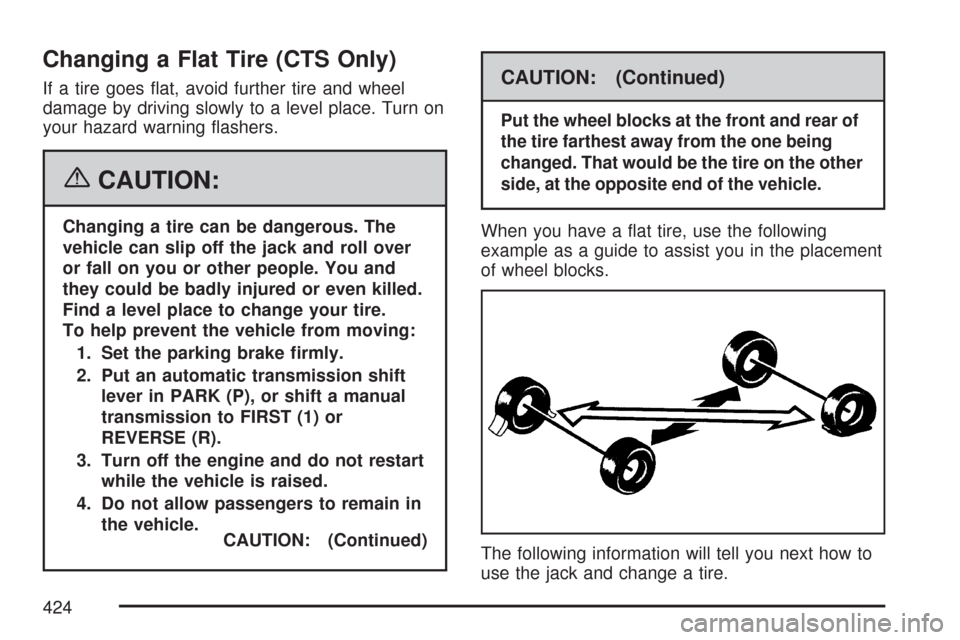
When you have a at tire, use the following
example as a guide to assist you in the placement
of wheel blocks.
The following information will tell you next how to
use the jack and change a tire.
424