service reset CADILLAC CTS 2007 1.G User Guide
[x] Cancel search | Manufacturer: CADILLAC, Model Year: 2007, Model line: CTS, Model: CADILLAC CTS 2007 1.GPages: 518, PDF Size: 2.77 MB
Page 383 of 518
Headlamp Aiming
The vehicle has a visual optical headlamp aiming
system. The aim has been preset at the factory
and should need no further adjustment.
However, if the vehicle is damaged in an accident,
the headlamp aim may be affected and adjustment
may be necessary.
If oncoming vehicles ash their high beams at
you, this may also mean the vertical aim needs to
be adjusted.
It is recommended that the vehicle is taken to your
dealer/retailer for service if the headlamps need to
be re-aimed. It is possible however, to re-aim the
headlamps as described in the following procedure.The vehicle should be properly prepared as follows:The vehicle should be placed so the headlamps
are 25 ft. (7.6 m) from a light colored wall.
The vehicle must have all four tires on a level
surface which is level all the way to the wall.
The vehicle should be placed so it is
perpendicular to the wall.
The vehicle should not have any snow, ice, or
mud on it.
The vehicle should be fully assembled and all
other work stopped while headlamp aiming is
being performed.
The vehicle should be normally loaded with a
full tank of fuel and one person or 160 lbs
(75 kg) sitting on the driver’s seat.
Tires should be properly inated.
The spare tire is in its original location in the
vehicle.
383
Page 407 of 518
Your vehicle’s TPMS can alert you about a low
tire pressure condition but it does not replace
normal tire maintenance. SeeTire Inspection and
Rotation on page 409andTires on page 392.
Notice:Do not use a tire sealant if your vehicle
has Tire Pressure Monitors. The liquid sealant
can damage the tire pressure monitor sensors.
Resetting the TPMS Identication
Codes
Each TPMS sensor has a unique identication
code. Any time you replace one or more of
the TPMS sensors or rotate the tires, the
identication codes will need to be matched to the
new tire and wheel position. The sensors are
matched to the tire and wheel positions in
the following order: driver’s side front tire,
passenger’s side front tire, passenger’s side rear
tire, and driver’s side rear tire using a TPMS
diagnostic tool. See your GM dealer for service.
The TPMS sensors may also be matched to each
tire and wheel position by increasing or
decreasing the tire’s air pressure. When increasing
tire pressure do not exceed the maximum
ination pressure indicated on the tire’s sidewall.You will have two minutes to match the rst tire
and wheel position, and ve minutes overall
to match all four tire and wheel positions. If it takes
longer than two minutes, to match the rst tire
and wheel, or more than ve minutes to match all
four tire and wheel positions the matching
process stops and you will need to start over.
The TPM matching process is outlined below:
1. Set the parking brake.
2. Turn the ignition switch to ON with the
engine off.
3. Using the Remote Keyless Entry (RKE)
transmitter, lock and unlock the vehicle’s
doors.
4. Press the lock and unlock buttons, at the
same time, on the RKE transmitter. A single
horn chirp will sound, indicating that the
TPMS system is ready, and the sensor
matching process can begin.
5. Start with the driver’s side front tire.
407
Page 410 of 518
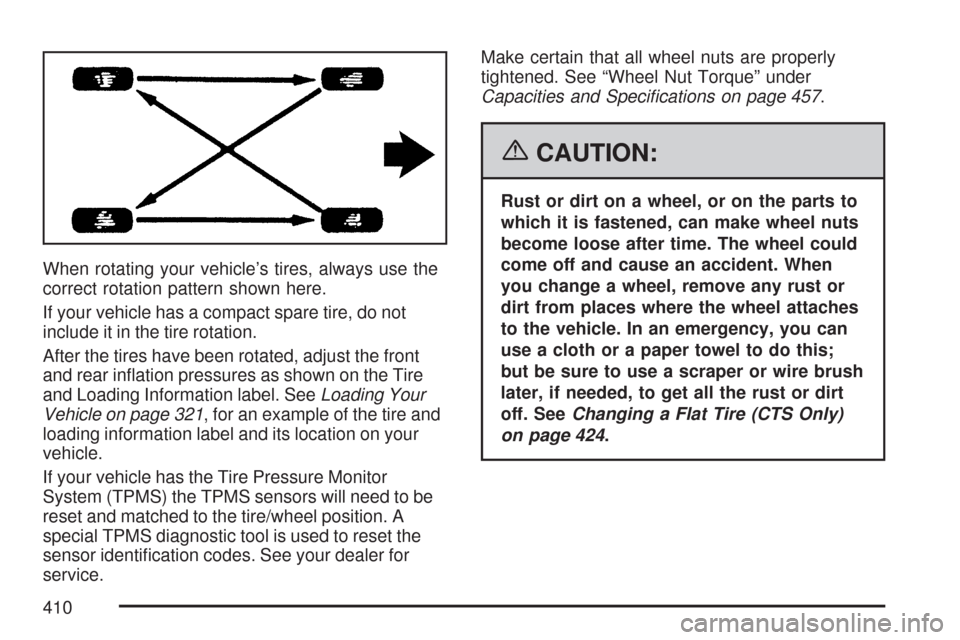
When rotating your vehicle’s tires, always use the
correct rotation pattern shown here.
If your vehicle has a compact spare tire, do not
include it in the tire rotation.
After the tires have been rotated, adjust the front
and rear ination pressures as shown on the Tire
and Loading Information label. SeeLoading Your
Vehicle on page 321, for an example of the tire and
loading information label and its location on your
vehicle.
If your vehicle has the Tire Pressure Monitor
System (TPMS) the TPMS sensors will need to be
reset and matched to the tire/wheel position. A
special TPMS diagnostic tool is used to reset the
sensor identication codes. See your dealer for
service.Make certain that all wheel nuts are properly
tightened. See “Wheel Nut Torque” under
Capacities and Specications on page 457.
{CAUTION:
Rust or dirt on a wheel, or on the parts to
which it is fastened, can make wheel nuts
become loose after time. The wheel could
come off and cause an accident. When
you change a wheel, remove any rust or
dirt from places where the wheel attaches
to the vehicle. In an emergency, you can
use a cloth or a paper towel to do this;
but be sure to use a scraper or wire brush
later, if needed, to get all the rust or dirt
off. SeeChanging a Flat Tire (CTS Only)
on page 424.
410
Page 462 of 518

When you go to your GM Goodwrench®dealer for
your service needs, you will know that GM-trained
and supported service technicians will perform
the work using genuine GM parts.
If you want to purchase service information,
seeService Publications Ordering Information
on page 501.
Owner Checks and Services on page 469tells you
what should be checked, when to check it, and
what you can easily do to help keep your vehicle in
good condition.
The proper replacement parts, uids, and
lubricants to use are listed inRecommended
Fluids and Lubricants on page 473andNormal
Maintenance Replacement Parts on page 475.
When your vehicle is serviced, make sure these
are used. All parts should be replaced and all
necessary repairs done before you or anyone else
drives the vehicle. We recommend the use of
genuine GM parts.Scheduled Maintenance
When the Change Engine Oil message in the
Driver Information Center (DIC) comes on,
it means that service is required for your vehicle.
Have your vehicle serviced as soon as possible
within the next 600 miles (1 000 km). It is possible
that, if you are driving under the best conditions,
the engine oil life system may not indicate
that vehicle service is necessary for over a year.
However, your engine oil and lter must be
changed at least once a year and at this time the
system must be reset. Your GM Goodwrench
®
dealer has GM-trained service technicians who will
perform this work using genuine GM parts and
reset the system.
If the engine oil life system is ever reset
accidentally, you must service your vehicle within
3,000 miles (5 000 km) since your last service.
Remember to reset the oil life system whenever
the oil is changed. SeeEngine Oil Life System on
page 349for information on the Engine Oil Life
System and resetting the system.
462
Page 463 of 518

When the Change Engine Oil message appears,
certain services, checks, and inspections are
required. Required services are described in the
following for “MaintenanceI” and “MaintenanceII.”
Generally, it is recommended that your rst
service be MaintenanceI, your second service
be MaintenanceII, and that you alternate
MaintenanceIand MaintenanceIIthereafter.
However, in some cases, MaintenanceIImay be
required more often.MaintenanceI— Use MaintenanceIif the
change engine oil message comes on within
10 months since the vehicle was purchased or
MaintenanceIIwas performed.
MaintenanceII— Use MaintenanceIIif the
previous service performed was MaintenanceI.
Always use MaintenanceIIwhenever the message
comes on 10 months or more since the last
service or if the message has not come on at all
for one year.
Scheduled Maintenance
Service MaintenanceIMaintenanceII
Change engine oil and lter. SeeEngine Oil on page 346. Reset oil life system.
SeeEngine Oil Life System on page 349.An Emission Control Service.••
Visually check for any leaks or damage.See footnote (k).••
Inspect engine air cleaner lter. If necessary, replace lter. SeeEngine Air
Cleaner/Filter on page 351.See footnote (n).•
Rotate tires and check ination pressures and wear. SeeTire Inspection and
Rotation on page 409and “Tire Wear Inspection” inAt Least Once a Month on
page 470.••
463