door lock CADILLAC CTS 2007 1.G Owner's Guide
[x] Cancel search | Manufacturer: CADILLAC, Model Year: 2007, Model line: CTS, Model: CADILLAC CTS 2007 1.GPages: 518, PDF Size: 2.77 MB
Page 253 of 518
Driver Unlock Key Out (Automatic
Transmission Only)/Driver Unlock Key Off
(Manual Transmission Only)
This feature allows the driver’s door to
automatically unlock when the key is removed
from the ignition on automatic transmission
vehicles or when the ignition is turned to OFF for
manual transmission vehicles.
Programmable Modes
Mode 1:ON
Mode 2:OFF
Before your vehicle was shipped from the factory,
it was programmed to Mode 2. The mode to
which the vehicle was programmed may have
been changed since it left the factory.To program the vehicle to a different mode, use
the following procedure:
1. Enter the personalization portion of the
SETUP menu following the instructions
listed previously.
2. Turn the TUNE/SEL knob until DRIVER
UNLOCK KEY OUT/OFF is highlighted.
3. Press the TUNE/SEL knob to switch between
on and off.
When the mode is turned on, a check mark
will appear next to the feature name.
If this feature is selected, Driver Unlock in Park
(automatic transmission), Doors Unlock in
Park (automatic transmission), or Doors Unlock
Key Out/Off cannot be selected.
The mode you selected is now set. You can either
exit the programming mode by following the
instructions later in this section or program the
next feature available on your vehicle.
253
Page 254 of 518
Doors Unlock in Park
(Automatic Transmission Only)
The feature allows the doors to automatically
unlock when the transmission is shifted into
PARK (P).
Programmable Modes
Mode 1:ON
Mode 2:OFF
Before your vehicle was shipped from the factory,
it was programmed to Mode 2. The mode to
which the vehicle was programmed may have
been changed since it left the factory.
To program the vehicle to a different mode, use
the following procedure:
1. Enter the personalization portion of the
SETUP menu following the instructions
listed previously.
2. Turn the TUNE/SEL knob until DOORS
UNLOCK IN PARK is highlighted.
3. Press the TUNE/SEL knob to switch back and
forth between on and off.
When the mode is turned on, a check mark
will appear next to the feature name.If this feature is selected, Doors Unlock Key
Out/Off, Driver Unlock Key Out/Off, or Driver Unlock
in Park (automatic transmission) cannot be
selected.
The mode you selected is now set. You can either
exit the programming mode by following the
instructions later in this section or program the
next feature available on your vehicle.
Doors Unlock Key Out (Automatic
Transmission Only)/ Doors Unlock Key Off
(Manual Transmission Only)
This feature allows the doors to automatically
unlock when the key is removed from the ignition
on automatic transmission vehicles or when
the ignition is turned to OFF on manual
transmission vehicles.
Programmable Modes
Mode 1:ON
Mode 2:OFF
Before your vehicle was shipped from the factory,
it was programmed to Mode 2. The mode to
which the vehicle was programmed may have
been changed since it left the factory.
254
Page 255 of 518

To program the vehicle to a different mode, use
the following procedure:
1. Enter the personalization portion of the
SETUP menu following the instructions
listed previously.
2. Turn the TUNE/SEL knob until DOORS
UNLOCK KEY OUT/OFF is highlighted.
3. Press the TUNE/SEL knob to switch between
on and off.
When the mode is turned on, a check mark
will appear next to the feature name.
If this feature is selected, Doors Unlock in Park
(automatic transmission), Driver Unlock in
Park (automatic transmission), or Driver Unlock
Key Out/Off cannot be selected.
The mode you selected is now set. You can either
exit the programming mode by following the
instructions later in this section or program the
next feature available on your vehicle.
Delayed Locking
This feature delays the locking of the vehicle’s
doors for up to ve seconds after a power door lock
switch or the lock button on the Remote Keyless
Entry (RKE) transmitter is pressed. The ve second
delay occurs after the last door is closed.Programmable Modes
Mode 1:ON
Mode 2:OFF
Before your vehicle was shipped from the factory,
it was programmed to Mode 1. The mode to
which the vehicle was programmed may have
been changed since it left the factory.
To program the vehicle to a different mode, use
the following procedure:
1. Enter the personalization portion of the
SETUP menu following the instructions
listed previously.
2. Turn the TUNE/SEL knob until DELAYED
LOCKING is highlighted.
3. Press the TUNE/SEL knob to switch back and
forth between on and off.
When the mode is turned on, a check mark
will appear next to the feature name.
The mode you selected is now set. You can either
exit the programming mode by following the
instructions later in this section or program the
next feature available on your vehicle.
255
Page 322 of 518
Tire and Loading Information Label
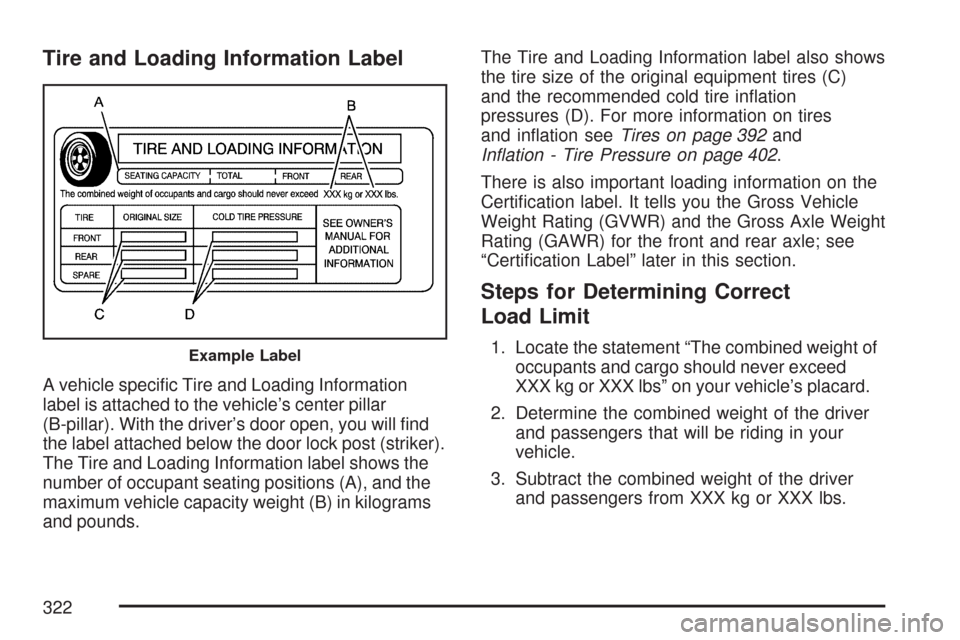
A vehicle specic Tire and Loading Information
label is attached to the vehicle’s center pillar
(B-pillar). With the driver’s door open, you will nd
the label attached below the door lock post (striker).
The Tire and Loading Information label shows the
number of occupant seating positions (A), and the
maximum vehicle capacity weight (B) in kilograms
and pounds.The Tire and Loading Information label also shows
the tire size of the original equipment tires (C)
and the recommended cold tire ination
pressures (D). For more information on tires
and ination seeTires on page 392and
Ination - Tire Pressure on page 402.
There is also important loading information on the
Certication label. It tells you the Gross Vehicle
Weight Rating (GVWR) and the Gross Axle Weight
Rating (GAWR) for the front and rear axle; see
“Certication Label” later in this section.
Steps for Determining Correct
Load Limit
1. Locate the statement “The combined weight of
occupants and cargo should never exceed
XXX kg or XXX lbs” on your vehicle’s placard.
2. Determine the combined weight of the driver
and passengers that will be riding in your
vehicle.
3. Subtract the combined weight of the driver
and passengers from XXX kg or XXX lbs.Example Label
322
Page 337 of 518

To check the fuel availability, ask an auto club, or
contact a major oil company that does business
in the country where you will be driving.
Filling the Tank
{CAUTION:
Fuel vapor burns violently and a fuel re
can cause bad injuries. To help avoid
injuries to you and others, read and follow
all the instructions on the pump island.
Turn off your engine when you are
refueling. Do not smoke if you are near
fuel or refueling your vehicle. Do not use
cellular phones. Keep sparks, ames, and
smoking materials away from fuel. Do not
leave the fuel pump unattended when
refueling your vehicle. This is against the
law in some places. Do not re-enter the
vehicle while pumping fuel. Keep children
away from the fuel pump; never let
children pump fuel.The tethered fuel cap is located behind a hinged
fuel door on the passenger’s side of the vehicle.
To open the fuel door, push inward on the forward
edge of the fuel door until the rear edge can be
pulled outward.
To remove the fuel cap, turn it slowly
counterclockwise. The fuel cap has a spring in it; if
the cap is released too soon, it will spring back
to the right.
While refueling, hang the tethered fuel cap from
the hook on the fuel door.
337
Page 407 of 518
Your vehicle’s TPMS can alert you about a low
tire pressure condition but it does not replace
normal tire maintenance. SeeTire Inspection and
Rotation on page 409andTires on page 392.
Notice:Do not use a tire sealant if your vehicle
has Tire Pressure Monitors. The liquid sealant
can damage the tire pressure monitor sensors.
Resetting the TPMS Identication
Codes
Each TPMS sensor has a unique identication
code. Any time you replace one or more of
the TPMS sensors or rotate the tires, the
identication codes will need to be matched to the
new tire and wheel position. The sensors are
matched to the tire and wheel positions in
the following order: driver’s side front tire,
passenger’s side front tire, passenger’s side rear
tire, and driver’s side rear tire using a TPMS
diagnostic tool. See your GM dealer for service.
The TPMS sensors may also be matched to each
tire and wheel position by increasing or
decreasing the tire’s air pressure. When increasing
tire pressure do not exceed the maximum
ination pressure indicated on the tire’s sidewall.You will have two minutes to match the rst tire
and wheel position, and ve minutes overall
to match all four tire and wheel positions. If it takes
longer than two minutes, to match the rst tire
and wheel, or more than ve minutes to match all
four tire and wheel positions the matching
process stops and you will need to start over.
The TPM matching process is outlined below:
1. Set the parking brake.
2. Turn the ignition switch to ON with the
engine off.
3. Using the Remote Keyless Entry (RKE)
transmitter, lock and unlock the vehicle’s
doors.
4. Press the lock and unlock buttons, at the
same time, on the RKE transmitter. A single
horn chirp will sound, indicating that the
TPMS system is ready, and the sensor
matching process can begin.
5. Start with the driver’s side front tire.
407
Page 451 of 518
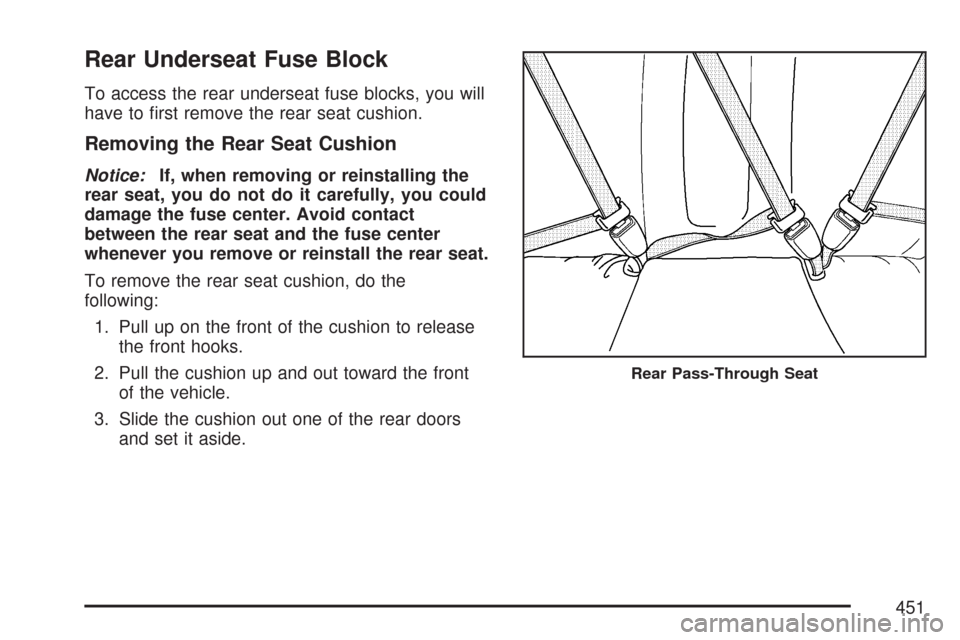
Rear Underseat Fuse Block
To access the rear underseat fuse blocks, you will
have to rst remove the rear seat cushion.
Removing the Rear Seat Cushion
Notice:If, when removing or reinstalling the
rear seat, you do not do it carefully, you could
damage the fuse center. Avoid contact
between the rear seat and the fuse center
whenever you remove or reinstall the rear seat.
To remove the rear seat cushion, do the
following:
1. Pull up on the front of the cushion to release
the front hooks.
2. Pull the cushion up and out toward the front
of the vehicle.
3. Slide the cushion out one of the rear doors
and set it aside.
Rear Pass-Through Seat
451
Page 453 of 518

3. With the seat cushion lowered, push rearward
and then press down on the seat cushion until
the seat cushion snaps into place.
4. Push and pull on the seat cushion to make
sure it is locked into place.
5. Check to make sure the safety belts are
properly routed and that no portion of any
safety belt is trapped under the seat cushion.
Rear Underseat Fuse Block
(Driver’s Side)
The driver’s side rear fuse block is located under
the rear seat on the driver’s side of the vehicle.
The rear seat cushion must be removed to access
the rear fuse block. See “Removing the Rear
Seat Cushion” listed previously.To access the fuse block, push in the two tabs
located at each end of the fuse block cover.
Then lift the cover off.
Fuses Usage
SPARE Not Used
SPARE Not Used
AUDIO Radio, OnStar Module
SPARE Not Used
REAR DR MOD Rear Door Modules
SPARE Not Used
DRIVER
DR MODDriver’s Door Module
BASTaillamps, Center High-Mounted
Stoplamp, Flasher Module, ABS
Module, Trailer Lamps
HDLP
LEVELINGHeadlamp Leveling System Chassis
Sensors (Export Only)
453
Page 456 of 518
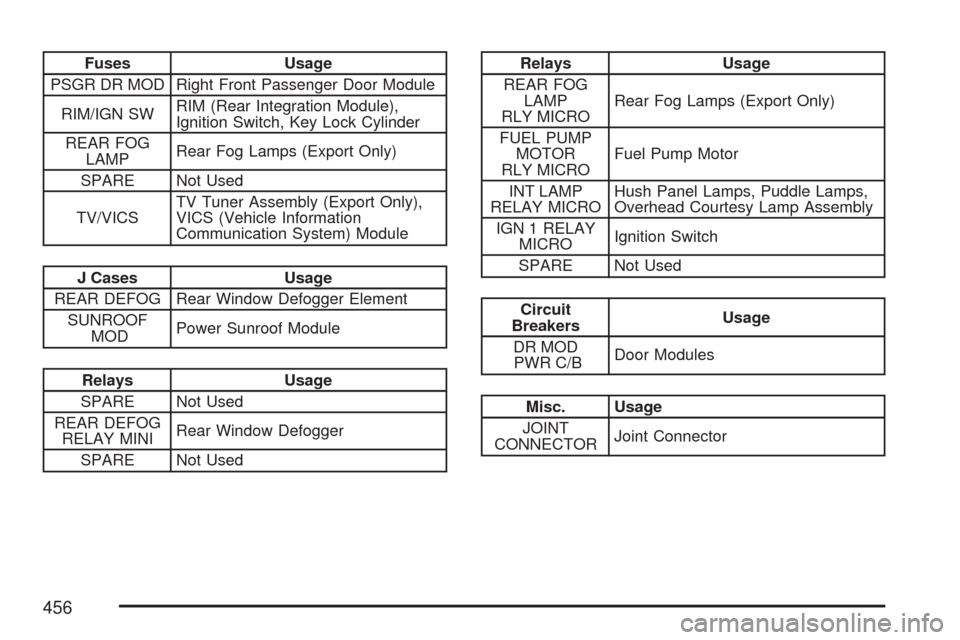
Fuses Usage
PSGR DR MOD Right Front Passenger Door Module
RIM/IGN SWRIM (Rear Integration Module),
Ignition Switch, Key Lock Cylinder
REAR FOG
LAMPRear Fog Lamps (Export Only)
SPARE Not Used
TV/VICSTV Tuner Assembly (Export Only),
VICS (Vehicle Information
Communication System) Module
J Cases Usage
REAR DEFOG Rear Window Defogger Element
SUNROOF
MODPower Sunroof Module
Relays Usage
SPARE Not Used
REAR DEFOG
RELAY MINIRear Window Defogger
SPARE Not Used
Relays Usage
REAR FOG
LAMP
RLY MICRORear Fog Lamps (Export Only)
FUEL PUMP
MOTOR
RLY MICROFuel Pump Motor
INT LAMP
RELAY MICROHush Panel Lamps, Puddle Lamps,
Overhead Courtesy Lamp Assembly
IGN 1 RELAY
MICROIgnition Switch
SPARE Not Used
Circuit
BreakersUsage
DR MOD
PWR C/BDoor Modules
Misc. Usage
JOINT
CONNECTORJoint Connector
456
Page 467 of 518
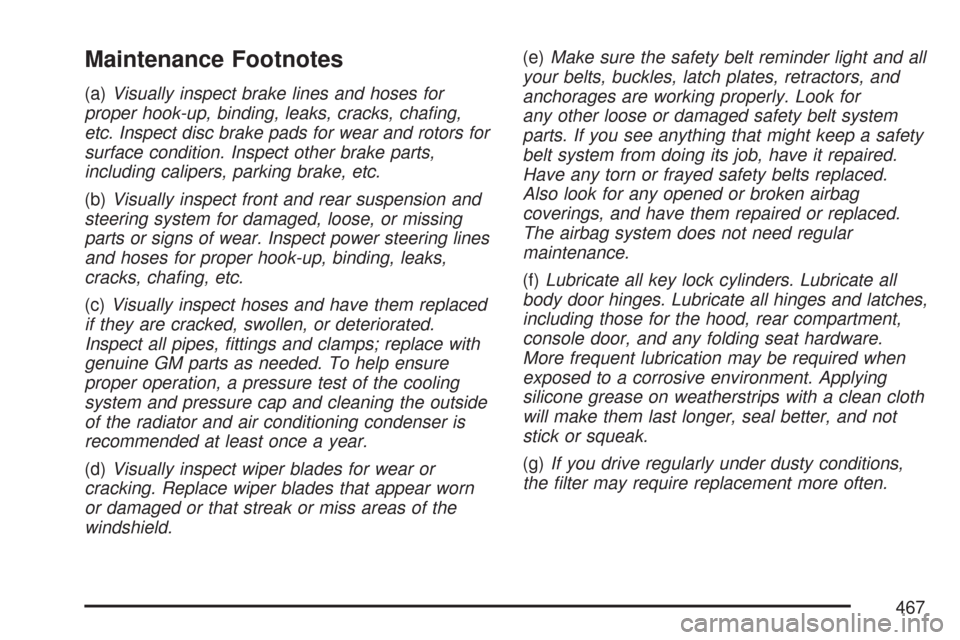
Maintenance Footnotes
(a)Visually inspect brake lines and hoses for
proper hook-up, binding, leaks, cracks, chang,
etc. Inspect disc brake pads for wear and rotors for
surface condition. Inspect other brake parts,
including calipers, parking brake, etc.
(b)Visually inspect front and rear suspension and
steering system for damaged, loose, or missing
parts or signs of wear. Inspect power steering lines
and hoses for proper hook-up, binding, leaks,
cracks, chang, etc.
(c)Visually inspect hoses and have them replaced
if they are cracked, swollen, or deteriorated.
Inspect all pipes, ttings and clamps; replace with
genuine GM parts as needed. To help ensure
proper operation, a pressure test of the cooling
system and pressure cap and cleaning the outside
of the radiator and air conditioning condenser is
recommended at least once a year.
(d)Visually inspect wiper blades for wear or
cracking. Replace wiper blades that appear worn
or damaged or that streak or miss areas of the
windshield.(e)Make sure the safety belt reminder light and all
your belts, buckles, latch plates, retractors, and
anchorages are working properly. Look for
any other loose or damaged safety belt system
parts. If you see anything that might keep a safety
belt system from doing its job, have it repaired.
Have any torn or frayed safety belts replaced.
Also look for any opened or broken airbag
coverings, and have them repaired or replaced.
The airbag system does not need regular
maintenance.
(f)Lubricate all key lock cylinders. Lubricate all
body door hinges. Lubricate all hinges and latches,
including those for the hood, rear compartment,
console door, and any folding seat hardware.
More frequent lubrication may be required when
exposed to a corrosive environment. Applying
silicone grease on weatherstrips with a clean cloth
will make them last longer, seal better, and not
stick or squeak.
(g)If you drive regularly under dusty conditions,
the lter may require replacement more often.
467