automatic transmission CADILLAC CTS 2008 2.G User Guide
[x] Cancel search | Manufacturer: CADILLAC, Model Year: 2008, Model line: CTS, Model: CADILLAC CTS 2008 2.GPages: 490, PDF Size: 2.59 MB
Page 123 of 490
A warning chime will sound if the parking brake is set,
the ignition is on, and the vehicle begins to move.
To stop the chime, fully release the parking brake.
If you are towing a trailer and parking on a hill,
seeTowing a Trailer on page 4-30for more information.
Shifting Into Park
(Automatic Transmission)
{CAUTION:
It can be dangerous to get out of the vehicle if
the shift lever is not fully in P (Park) with the
parking brake rmly set. The vehicle can roll.
If you have left the engine running, the vehicle
can move suddenly. You or others could be
injured. To be sure the vehicle will not move,
even when you are on fairly level ground,
use the steps that follow. If you are pulling a
trailer, seeTowing a Trailer on page 4-30.Use this procedure to shift into P (Park):
1. Hold the brake pedal down and set the parking
brake.
SeeParking Brake on page 2-44for more
information.
2. Move the shift lever into P (Park) by holding in the
button on the shift lever and pushing the lever all
the way toward the front of the vehicle.
3. Turn the ignition key to LOCK/OFF.
4. For vehicles with key access, remove the key and
take it with you. If you can leave your vehicle with
the ignition key in your hand, your vehicle is in
P (Park). Vehicles with the keyless access system,
take the keyless access transmitter with you.
2-45
Page 124 of 490
Leaving Your Vehicle With the Engine
Running (Automatic Transmission)
{CAUTION:
It can be dangerous to leave the vehicle with
the engine running. The vehicle could move
suddenly if the shift lever is not fully in
P (Park) with the parking brake rmly set.
And, if you leave the vehicle with the engine
running, it could overheat and even catch re.
You or others could be injured. Do not leave
the vehicle with the engine running.
If you have to leave your automatic transmission
vehicle with the engine running, be sure your vehicle
is in P (Park) and your parking brake is rmly set before
you leave it. After you have moved the shift lever into
P (Park), hold the regular brake pedal down. Then, see if
you can move the shift lever away from P (Park) without
rst pushing the button.
If you can, it means that the shift lever was not fully
locked into P (Park).
Torque Lock (Automatic Transmission)
If you are parking on a hill and you do not shift the
automatic transmission into P (Park) properly, the weight
of the vehicle may put too much force on the parking pawl
in the transmission. You may nd it difficult to pull the
shift lever out of P (Park). This is called torque lock. To
prevent torque lock, set the parking brake and then shift
into P (Park) properly before you leave the driver’s seat.
To nd out how, see “Shifting Into P (Park)” previously in
the section.
When you are ready to drive, move the shift lever out of
P (Park) before releasing the parking brake.
If torque lock does occur, you may need to have
another vehicle push yours a little uphill to take some of
the pressure from the parking pawl in the transmission,
so you can pull the shift lever out of P (Park).
2-46
Page 127 of 490
Running the Vehicle While Parked
It is better not to park with the engine running. But if you
ever have to, here are some things to know.
{CAUTION:
Idling the engine with the climate control
system off could allow dangerous exhaust into
your vehicle. See the earlier caution under
Engine Exhaust on page 2-48.
Also, idling in a closed-in place can let deadly
carbon monoxide (CO) into your vehicle even if
the climate control fan is at the highest setting.
One place this can happen is a garage.
Exhaust — with CO — can come in easily.
NEVER park in a garage with the engine
running.
Also see “If You Are Caught in a Blizzard”
underWinter Driving on page 4-17.
{CAUTION:
It can be dangerous to get out of your vehicle
if the automatic transmission shift lever is not
fully in PARK (P) with the parking brake rmly
set. Your vehicle can roll. Do not leave your
vehicle when the engine is running unless you
have to. If you have left the engine running,
the vehicle can move suddenly. You or others
could be injured. To be sure your vehicle will
not move, even when it is on fairly level
ground, always set the parking brake and
move the automatic transmission shift lever
to PARK (P), or the manual transmission shift
lever to NEUTRAL.
Follow the proper steps to be sure your vehicle will not
move. SeeShifting Into Park (Automatic Transmission)
on page 2-45andParking the Vehicle (Manual
Transmission) on page 2-47.
If you are parking on a hill and if you are pulling a
trailer, seeTowing a Trailer on page 4-30.
2-49
Page 147 of 490
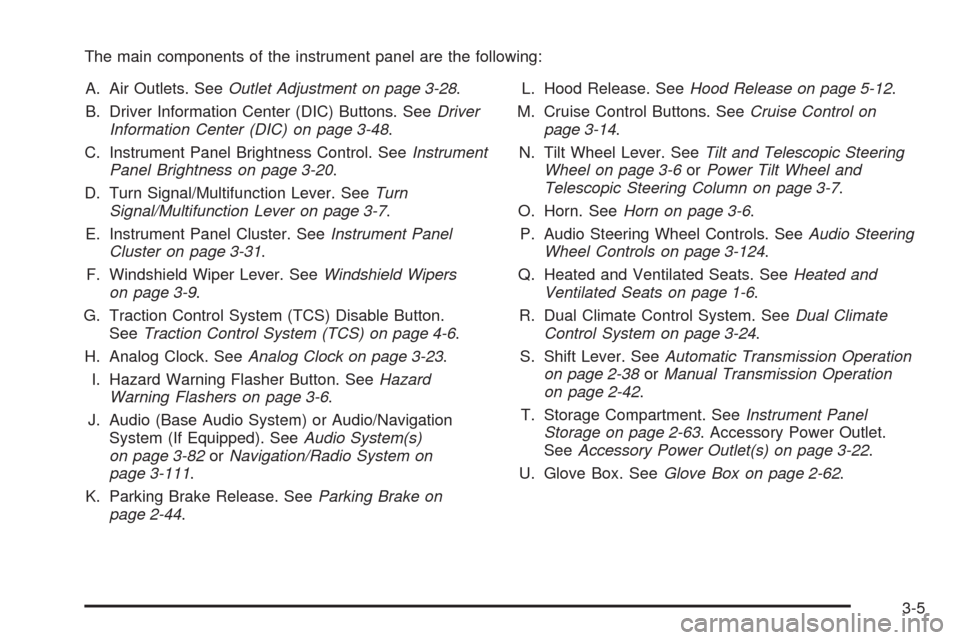
The main components of the instrument panel are the following:
A. Air Outlets. SeeOutlet Adjustment on page 3-28.
B. Driver Information Center (DIC) Buttons. SeeDriver
Information Center (DIC) on page 3-48.
C. Instrument Panel Brightness Control. SeeInstrument
Panel Brightness on page 3-20.
D. Turn Signal/Multifunction Lever. SeeTurn
Signal/Multifunction Lever on page 3-7.
E. Instrument Panel Cluster. SeeInstrument Panel
Cluster on page 3-31.
F. Windshield Wiper Lever. SeeWindshield Wipers
on page 3-9.
G. Traction Control System (TCS) Disable Button.
SeeTraction Control System (TCS) on page 4-6.
H. Analog Clock. SeeAnalog Clock on page 3-23.
I. Hazard Warning Flasher Button. SeeHazard
Warning Flashers on page 3-6.
J. Audio (Base Audio System) or Audio/Navigation
System (If Equipped). SeeAudio System(s)
on page 3-82orNavigation/Radio System on
page 3-111.
K. Parking Brake Release. SeeParking Brake on
page 2-44.L. Hood Release. SeeHood Release on page 5-12.
M. Cruise Control Buttons. SeeCruise Control on
page 3-14.
N. Tilt Wheel Lever. SeeTilt and Telescopic Steering
Wheel on page 3-6orPower Tilt Wheel and
Telescopic Steering Column on page 3-7.
O. Horn. SeeHorn on page 3-6.
P. Audio Steering Wheel Controls. SeeAudio Steering
Wheel Controls on page 3-124.
Q. Heated and Ventilated Seats. SeeHeated and
Ventilated Seats on page 1-6.
R. Dual Climate Control System. SeeDual Climate
Control System on page 3-24.
S. Shift Lever. SeeAutomatic Transmission Operation
on page 2-38orManual Transmission Operation
on page 2-42.
T. Storage Compartment. SeeInstrument Panel
Storage on page 2-63. Accessory Power Outlet.
SeeAccessory Power Outlet(s) on page 3-22.
U. Glove Box. SeeGlove Box on page 2-62.
3-5
Page 160 of 490
Daytime Running Lamps (DRL)
Daytime Running Lamps (DRL) can make it easier for
others to see the front of your vehicle during the
day. DRL can be helpful in many different driving
conditions, but they can be especially helpful in the short
periods after dawn and before sunset. Fully functional
daytime running lamps are required on all vehicles
rst sold in Canada.
The DRL system will make either the reduced intensity
low-beam headlamps or dedicated DRL’s come on
when the following conditions are met:
It is still daylight and the ignition is in ON/RUN or
START.
The exterior lamp control is in off or AUTO and the
headlamps are off.
The automatic transmission is not in PARK (P).
When DRL’s are on, only the reduced intensity
low-beam headlamps or dedicated DRL’s will be on.
No other exterior lamps will be on. The instrument panel
cluster will not be lit up either.When the exterior lamp control is in AUTO and it is dark
enough outside, the DRL turns off and the low-beam
headlamps will turn on. When it is bright enough outside,
the low-beam headlamps will go off, and the DRL will
turn back on. If the vehicle is started in a dark garage,
the automatic headlamp system comes on immediately.
Once the vehicle leaves the garage, it takes about
one minute for the automatic headlamp system
to change to DRL if it is light outside. During that delay,
the instrument panel cluster may not be as bright as
usual. Make sure the instrument panel brightness lever
is in the full bright position. SeeInstrument Panel
Brightness on page 3-20.
Turning the exterior lamp control to off or to the
low-beam headlamp position will turn off the DRL.
If the parking lamps or the fog lamps were turned on
instead, the DRL will still turn off.
This will work regardless of gear position and whether
or not the parking brake is set.
3-18
Page 174 of 490
Speedometer and Odometer
The speedometer lets you see your speed in either
miles per hour (mph) or kilometers per hour (km/h).
The odometer shows how far your vehicle has been
driven, in either miles (used in the United States)
or kilometers (used in Canada).
If your vehicle has to have a new odometer installed,
the new one may read the correct mileage. This is
because your vehicle’s computer has stored the mileage
in memory.
While the Driver Shift Control (DSC) feature is active,
the odometer will change to show the gear range.
SeeAutomatic Transmission Operation on page 2-38
for more information.
Trip Odometers
The trip odometer can record the number of miles or
kilometers traveled for up to two trips.
The trip odometer is part of the Driver Information
Center (DIC), for more information seeDIC Operation
and Displays on page 3-48.
For vehicles that have the navigation system, see your
Navigation System manual for more information.
Tachometer
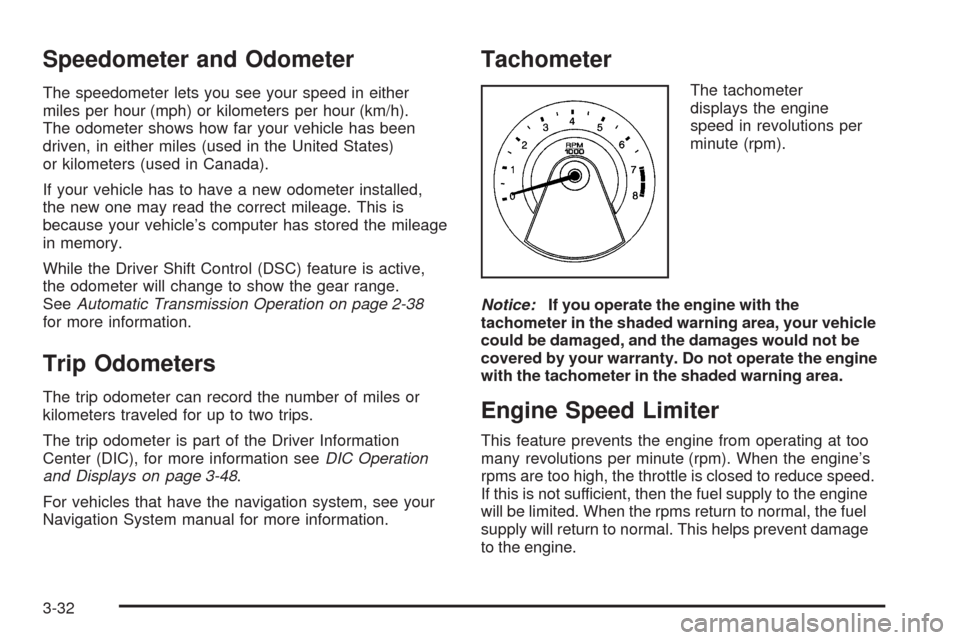
The tachometer
displays the engine
speed in revolutions per
minute (rpm).
Notice:If you operate the engine with the
tachometer in the shaded warning area, your vehicle
could be damaged, and the damages would not be
covered by your warranty. Do not operate the engine
with the tachometer in the shaded warning area.
Engine Speed Limiter
This feature prevents the engine from operating at too
many revolutions per minute (rpm). When the engine’s
rpms are too high, the throttle is closed to reduce speed.
If this is not sufficient, then the fuel supply to the engine
will be limited. When the rpms return to normal, the fuel
supply will return to normal. This helps prevent damage
to the engine.
3-32
Page 196 of 490

To adjust for compass variance, use the following
procedure:
Compass Variance (Zone) Procedure
1. Do not set the compass zone when the vehicle is
moving. On an automatic transmission vehicle,
only set it when the vehicle is in PARK (P). On a
manual transmission vehicle, only set it when
the vehicle is stopped.
Press the vehicle information button until
Press
VTo Change Compass Zone displays.
2. Find the vehicle’s current location and variance
zone number on the map.
Zones 1 through 15 are available.
3. Press the set/reset button to scroll through and
select the appropriate variance zone.
4. Press the trip/fuel button until the vehicle heading,
for example, N for North, is displayed in the DIC.
5. Calibrate the compass. See “Compass Calibration
Procedure” following.
3-54
Page 205 of 490

Press Brake To Start Engine
(Automatic Transmission Only)
If your vehicle has the keyless access system, this
message displays if you try to start the engine without
having the brake pressed. The brake needs to be
pressed when starting the engine. SeeIgnition Positions
(Key Access) on page 2-32orIgnition Positions
(Keyless Access) on page 2-34for more information.
Press Start Control To Learn Keys
If your vehicle has the keyless access system, this
message displays when matching new transmitters to
the vehicle. SeeKeyless Access System Operation
on page 2-10for more information.
Rainsense Wipers Active
If your vehicle has this feature, this message
displays while the Rainsense™ wipers are active.
SeeRainsense™ Wipers on page 3-10for
more information.
Ready To Learn Electronic Key # X
If your vehicle has the keyless access system, this
message displays while matching new transmitters to
the vehicle. SeeKeyless Access System Operation
on page 2-10for more information.
Remote Key Learning Active
If your vehicle has the Remote Keyless Entry (RKE)
system, this message displays while matching new
transmitters to the vehicle. See “Matching Transmitter(s)
to Your Vehicle” underRemote Keyless Entry (RKE)
System Operation on page 2-7andDIC Operation and
Displays on page 3-48for more information.
Replace Battery In Remote Key
This message displays when the battery in the Remote
Keyless Entry (RKE) or keyless access transmitter
needs to be replaced. To replace the battery, see
“Battery Replacement” underRemote Keyless Entry
(RKE) System Operation on page 2-7orKeyless Access
System Operation on page 2-10.
Right Rear Door Open
This message displays when the passenger side rear
door is not closed completely. Make sure that the door is
closed completely.
3-63
Page 209 of 490
Service Vehicle Soon
This message displays when a non-emissions related
malfunction occurs. Have your vehicle serviced by your
dealer/retailer as soon as possible.
Shift To Park
(Automatic Transmission Only)
If your vehicle has the keyless access system, this
message displays if the vehicle is not in PARK (P) while
the engine is being turned off. The vehicle will be in
ACC/ACCESSORY. Once the shift lever is moved
to PARK (P), the ignition needs to be turned off. If the
ignition is not turned off, the vehicle will remain in
ACC/ACCESSORY. To avoid draining the battery, make
sure the ignition is turned off before leaving the vehicle.
Speed Limited To XXX MPH (km/h)
This message displays when your vehicle speed is
limited to 80 mph (128 km/h) because the vehicle
detects a problem in the speed variable assist steering,
magnetic ride control, or automatic leveling control
systems. Have your vehicle serviced by your
dealer/retailer.
Sport Mode
This message displays when the vehicle is in sport
mode. See “Driver Shift Control (DSC)” under
Automatic Transmission Operation on page 2-38
for more information.
StabiliTrak Competitive Mode
This message displays when the Competitive Driving
mode is selected. When in this mode, the Traction
Control System (TCS) will not be operating and
the TCS/StabiliTrak warning light will turn on. Adjust
your driving accordingly. See “Competitive Driving
Mode” underTraction Control System (TCS) on
page 4-6for more information.
StabiliTrak Not Ready
This message may display after rst driving the vehicle
and exceeding 19 mph (30 km/h) for 30 seconds.
The TCS/StabiliTrak warning light on the instrument
panel cluster also comes on. The StabiliTrak system is
not functional until the message has turned off. See
StabiliTrak
®System on page 4-8for more information.
3-67
Page 211 of 490

Transmission Hot Idle Engine
This message displays when the transmission uid in
your vehicle is too hot. Stop the vehicle and allow
it to idle until the transmission cools down or until this
message is removed.
Trunk Open
This message displays when the trunk is not closed
completely. Make sure that the trunk is closed
completely.
Turn Signal On
This message displays as a reminder to turn off the turn
signal if you drive your vehicle for more than about
1 mile (1.6 km) with a turn signal on. A multiple chime
sounds when this message displays.
Washer Fluid Low Add Fluid
This message displays when your vehicle is low on
windshield washer uid. Rell the windshield washer
uid reservoir as soon as possible. SeeWindshield
Washer Fluid on page 5-40for more information.
DIC Vehicle Customization
Your vehicle has customization capabilities that allow
you to program certain features to one preferred setting.
Customization features can only be programmed to
one setting on the vehicle and cannot be programmed
to a preferred setting for two different drivers.
All of the customization options may not be available
on your vehicle. Only the options available will be
displayed on the DIC.
The default settings for the customization features
were set when your vehicle left the factory, but
may have been changed from their default state
since then.
The customization preferences are automatically
recalled.
3-69