center console CADILLAC CTS 2009 2.G User Guide
[x] Cancel search | Manufacturer: CADILLAC, Model Year: 2009, Model line: CTS, Model: CADILLAC CTS 2009 2.GPages: 490, PDF Size: 2.68 MB
Page 169 of 490

Reading Lamps
The reading lamps are located on the overhead console.
These lamps come on automatically when any door is
opened.
For manual operation, press the button next to each
lamp to turn it on or off.
If the reading lamps are left on, they automatically shut
off 10 minutes after the ignition has been turned off.
Electric Power Management
The vehicle has Electric Power Management (EPM) that
estimates the battery’s temperature and state of charge.
It then adjusts the voltage for best performance and
extended life of the battery.
When the battery’s state of charge is low, the voltage is
raised slightly to quickly bring the charge back up. When
the state of charge is high, the voltage is lowered slightly
to prevent overcharging. If the vehicle has a voltmeter
gage or a voltage display on the Driver Information
Center (DIC), you may see the voltage move up or down.
This is normal. If there is a problem, an alert will be
displayed.The battery can be discharged at idle if the electrical
loads are very high. This is true for all vehicles.
This is because the generator (alternator) may not be
spinning fast enough at idle to produce all the power that
is needed for very high electrical loads.
A high electrical load occurs when several of the
following are on: headlamps, high beams, fog lamps,
rear window defogger, climate control fan at high speed,
heated seats, engine cooling fans, trailer loads, and
loads plugged into accessory power outlets.
EPM works to prevent excessive discharge of the
battery. It does this by balancing the generator’s output
and the vehicle’s electrical needs. It can increase
engine idle speed to generate more power, whenever
needed. It can temporarily reduce the power demands of
some accessories.
Normally, these actions occur in steps or levels, without
being noticeable. In rare cases at the highest levels
of corrective action, this action may be noticeable to the
driver. If so, a Driver Information Center (DIC) message
might be displayed, such as BATTERY SAVER ACTIVE,
BATTERY VOLTAGE LOW, or LOW BATTERY. If this
message is displayed, it is recommended that the driver
reduce the electrical loads as much as possible. SeeDIC
Warnings and Messages on page 3-58.
3-21
Page 170 of 490

Battery Run-Down Protection
This feature helps to prevent battery drain if accessory
lamps are left on. If accessory lamps such as the
vanity mirror, cargo, reading, console, or glove box
are left on, they automatically time-out after about
20 minutes. To reset the battery protection, all of the
above lamps must be turned off or the ignition must be
in the ACC/ACCESSORY position.
Accessory Power Outlet(s)
Accessory power outlets can be used to connect
auxiliary electrical equipment, such as a cellular
telephone.
There are three accessory power outlets. There is an
outlet located in the front storage area below the climate
control system, one inside the center console storage
bin, and one on the rear of the center console.
To use an outlet, remove the protective cap. When not
in use, always cover the outlet with the protective cap.
The accessory power outlet is operational at all times.Notice:If electrical devices are left plugged into
a power outlet, the battery may drain causing
the vehicle not to start or damage to the battery.
This would not be covered by the warranty.
Always unplug all electrical devices when turning
off the vehicle.
Certain electrical accessories may not be compatible
with the accessory power outlet and could result
in blown vehicle or adapter fuses. If you experience
a problem see your dealer/retailer for additional
information on accessory power outlets.
Notice:Adding any electrical equipment to the
vehicle can damage it or keep other components
from working as they should. The repairs would not
be covered by the vehicle warranty. Do not use
equipment exceeding maximum amperage rating of
20 amperes. Check with your dealer/retailer before
adding electrical equipment.
Notice:Improper use of the power outlet can cause
damage not covered by the warranty. Do not hang
any type of accessory or accessory bracket from the
plug because the power outlets are designed for
accessory power plugs only.
3-22
Page 171 of 490
Ashtray(s) and Cigarette Lighter
The vehicle may have two removable ashtrays and
cigarette lighters. One ashtray can be placed into the
instrument panel storage compartment and the other
into the center console rear compartment. To use
the lighter, push it in all the way and let go. When it is
ready, it will pop back out by itself.
To empty the ashtrays, hold on to the edges of the bin
and pull straight out. To reinstall, push the tray back
into place.
Notice:Holding a cigarette lighter in while it is
heating does not let the lighter back away from the
heating element when it is hot. Damage from
overheating can occur to the lighter or heating
element, or a fuse could be blown. Do not hold a
cigarette lighter in while it is heating.
Notice:If papers, pins, or other ammable items
are put in the ashtray, hot cigarettes or other
smoking materials could ignite them and possibly
damage the vehicle. Never put ammable items
in the ashtray.
Analog Clock
The analog clock is located on the instrument panel
above the radio. The clock is not connected with
any other vehicle system and runs by itself. To adjust
the clock:
1. Locate the adjustment buttons directly below the
clock face.
2. Push and hold the right adjustment button to move
the clock hands forward or the left adjustment
button to make the clock hands go backward.
Holding either button down will cause the clock to
advance faster. Release the button before the
desired time is reached.
3. Push and release either button to adjust the time by
one minute increments until the desired time is
reached.
3-23
Page 209 of 490

Differential Hot, Reduce Speed
(CTS-V Only)
This message displays and a chime sounds if the
differential uid temperature exceeds 300°F (150°C).
Driving aggressively or at high speeds can cause
the differential uid temperature to be higher than
normal. If this message appears, you may continue to
drive at a slower speed. If you have been operating the
vehicle under normal driving conditions, the vehicle
may need service. See your dealer/retailer for an
inspection.
To acknowledge the message, press
V. The message
reappears and a chime sounds every two minutes until
this condition changes. If you do not clear the message,
it will remain on until the condition changes.
Driver Door Open
This message displays when the driver door is not
closed completely. Close the door completely.
Electronic Key Already Known
If the vehicle has the keyless access system, this
message displays if you try to match a transmitter that
has already been learned. SeeKeyless Access
System Operation on page 2-8for more information.
Electronic Key Not Detected
If the vehicle has the keyless access system, this
message displays if the vehicle does not detect the
presence of a transmitter when you have attempted to
start the vehicle or a vehicle door has just closed.
The following conditions may cause this message to
appear:
Driver-added equipment plugged into the accessory
power outlet on the center console is causing
interference. Examples of these devices are cell
phones and cell phone chargers, two-way radios,
power inverters, or similar items. Try moving
the keyless access transmitter away from these
devices when starting the vehicle. In addition,
PDA devices and remote garage and gate openers
may also generate Electromagnetic Interference
(EMI) that may interfere with the keyless access
transmitter. Do not carry the keyless access
transmitter in the same pocket or bag as these
devices.
The vehicle is experiencing Electromagnetic
Interference (EMI). Some locations, such as
airports, automatic toll booths, and some gas
stations have EMI elds which may interfere with
the keyless access transmitter.
3-61
Page 210 of 490
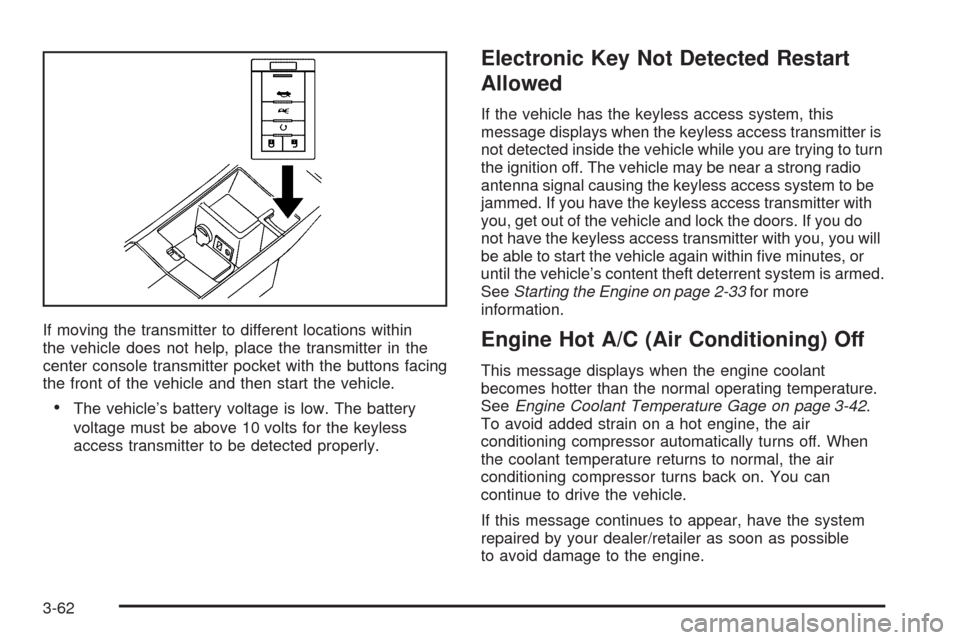
If moving the transmitter to different locations within
the vehicle does not help, place the transmitter in the
center console transmitter pocket with the buttons facing
the front of the vehicle and then start the vehicle.
The vehicle’s battery voltage is low. The battery
voltage must be above 10 volts for the keyless
access transmitter to be detected properly.
Electronic Key Not Detected Restart
Allowed
If the vehicle has the keyless access system, this
message displays when the keyless access transmitter is
not detected inside the vehicle while you are trying to turn
the ignition off. The vehicle may be near a strong radio
antenna signal causing the keyless access system to be
jammed. If you have the keyless access transmitter with
you, get out of the vehicle and lock the doors. If you do
not have the keyless access transmitter with you, you will
be able to start the vehicle again within ve minutes, or
until the vehicle’s content theft deterrent system is armed.
SeeStarting the Engine on page 2-33for more
information.
Engine Hot A/C (Air Conditioning) Off
This message displays when the engine coolant
becomes hotter than the normal operating temperature.
SeeEngine Coolant Temperature Gage on page 3-42.
To avoid added strain on a hot engine, the air
conditioning compressor automatically turns off. When
the coolant temperature returns to normal, the air
conditioning compressor turns back on. You can
continue to drive the vehicle.
If this message continues to appear, have the system
repaired by your dealer/retailer as soon as possible
to avoid damage to the engine.
3-62
Page 254 of 490
Using the Auxiliary Input Jack
The radio system has an auxiliary input jack. It is in the
center console bin. This is not an audio output; do
not plug the headphone set into the front auxiliary
input jack. An external audio device such as an iPod,
laptop computer, MP3 player, etc. can be connected to
the auxiliary input jack for use as another source for
audio listening.
Set up any auxiliary device while the vehicle is stopped.
SeeDefensive Driving on page 4-2for more information
on driver distraction.
To use a portable audio player, connect a 3.5 mm
(1/8 inch) cable to the radio’s front auxiliary input jack.
The radio automatically detects the device and “Aux
Input Device” displays. The device begins playing over
the vehicle speakers. If an auxiliary device has
already been connected, press the radio’s AUX or
CD/AUX button.
VOL/
O(Volume/Power):Turn clockwise or
counterclockwise to increase or decrease the volume of
the portable player. Use the portable device to make
additional volume adjustments.
FM/AM:Press to listen to the radio when a portable
audio device is playing. The portable audio device
continues playing, until it is stopped.CD or CD/AUX (CD/Auxiliary):Press to play a CD
when a portable audio device is playing. Press again to
start playing audio from the connected portable audio
player. If a portable audio player is not connected,
“No Aux Device” displays.
Using the Radio Controls to Connect
and Control an iPod
An iPod can be controlled by using the radio buttons
and knobs and display the song information on the
radio’s display. To connect and control the iPod using
the radio controls, the vehicle must have a USB port. If it
does, it is located in the center console bin. You will
also need a special iPod connection cable that can be
purchased with the vehicle or may be available after,
from your dealer/retailer. See your dealer/retailer
for more information.
This feature supports the following iPod models:
Fifth generation or later iPod
First or Second generation or later iPod Nano*
* For proper operation, make sure the iPod has the
latest rmware from Apple
®. The iPod rmware
can be updated using the latest iTunes application.
See apple.com/itunes.
3-106
Page 255 of 490

To connect and control the iPod, connect one end of
the specially purchased iPod connection cable to
the iPod’s dock connector. Connect the other end to
both the USB port and the auxiliary input jack. The USB
port and the auxiliary input jack are located in the
center console bin. If the vehicle is on and the USB
connection works, a GM logo appears on the iPod.
The iPod music will display on the radio’s display and
begin playing through the vehicle radio system.
A standard iPod USB cable, like the one that came with
the iPod, cannot be used to connect an iPod to the
vehicle. You must use the iPod connection cable that
was purchased with the vehicle or that was made
available from your dealer/retailer in order for this
feature to work.
Use the radio Menu/Select knob to bring up the iPod
Menu and select Songs, Artists, Albums, Playlists
and Audio books to play from the iPod.
The iPod will charge while it is connected to the vehicle
and if the ignition is turned to ACC/ACCESSORY or
ON/RUN. It can also be left connected to the vehiclewhile the vehicle is turned off or removed. With the
vehicle turned off, the iPod will automatically be powered
off and will not charge or draw power from the vehicle’s
battery.
If you have an older iPod model that is not supported or
do not have the special iPod connection cable, you
can still listen to the iPod in the vehicle by connecting it
to the Auxiliary Input Jack using a standard 3.5 mm
(1/8 inch) stereo cable. See “Using the Auxiliary Input
Jack” earlier for more information.
Press the AM/FM, XM or HDD buttons to listen to one
of these sources while an iPod is connected. If a disc is
inserted, press the CD/AUX button to listen to a CD
or DVD-A disc. Press the CD/AUX button again to start
playing and controlling the connected iPod.
To properly dismount the iPod USB device before
disconnecting from the vehicle, press the button directly
under the EJECT label found on the iPod playback
screen.
3-107
Page 478 of 490
Audio System.................................................3-85
Audio Steering Wheel Controls....................3-126
Backglass Antenna.....................................3-128
Navigation/Radio System,
see Navigation Manual............................3-113
Radio Reception........................................3-127
Theft-Deterrent Feature...............................3-126
XM™ Satellite Radio Antenna System...........3-128
Audio System(s).............................................3-86
Automatic Transmission
Fluid..........................................................5-29
Operation...................................................2-36
B
Backglass Antenna........................................3-128
Battery..........................................................5-45
Electric Power Management..........................3-21
Exterior Lighting Battery Saver......................3-20
Run-Down Protection...................................3-22
Bluetooth
®....................................................3-113
Boost Gage...................................................3-50
Brake
Electric Parking...........................................2-44
Emergencies................................................ 4-5
Brake Fluid....................................................5-42
Brakes..........................................................5-42
System Warning Light..................................3-39
Braking........................................................... 4-4Braking in Emergencies..................................... 4-5
Break-In, New Vehicle.....................................2-30
Bulb Replacement...........................................5-57
Front Turn Signal and Fog Lamps..................5-58
Halogen Bulbs............................................5-57
Headlamp Aiming........................................5-53
High Intensity Discharge (HID) Lighting...........5-57
License Plate Lamps....................................5-59
Replacement Bulbs......................................5-59
Buying New Tires...........................................5-78
C
Calibration.....................................................3-56
California Fuel.................................................. 5-7
California Perchlorate Materials Requirements....... 5-4
California Proposition 65 Warning....................... 5-4
Canadian Owners............................................... iii
Capacities and Specications..........................5-127
Carbon Monoxide...........................2-19, 2-50, 4-17
Care of
Safety Belts..............................................5-109
CD, MP3 .....................................................3-108
Center Console Storage Area...........................2-65
Chains, Tire...................................................5-84
Charging System Light....................................3-38
Check
Engine Lamp..............................................3-43
Checking Things Under the Hood......................5-12
2
Page 488 of 490

Spare Tire
Compact...................................................5-105
Installing....................................................5-99
Removing...................................................5-98
Storing.....................................................5-104
Specications, Capacities...............................5-127
Speedometer..................................................3-33
Split Folding Rear Seat....................................1-13
Stabilitrak
®System........................................... 4-6
StabiliTrak®/TCS Warning Light.........................3-41
Start Vehicle, Remote......................................2-14
Starting the Engine.........................................2-33
Steering.......................................................... 4-9
Steering Wheel Controls, Audio.......................3-126
Steering Wheel Controls, Memory....................... 1-8
Steering Wheel, Power Tilt Wheel and
Telescopic Steering Column............................ 3-7
Steering Wheel, Tilt and Telescopic..................... 3-6
Storage Areas
Center Console Storage Area........................2-65
Convenience Net.........................................2-65
Cupholders.................................................2-64
Glove Box..................................................2-64
Instrument Panel Storage Area......................2-65
Storing the Tire Sealant and Compressor Kit......5-95
Stuck in Sand, Mud, Ice, or Snow.....................4-19
Sun Visors.....................................................2-25
Sunroof.........................................................2-65
T
Tachometer....................................................3-34
Telescopic Steering Column, Power Tilt Wheel...... 3-7
Telescopic Wheel.............................................. 3-6
Theft - Deterrent System..................................2-26
Theft-Deterrent, Radio....................................3-126
Theft-Deterrent Systems...................................2-26
Immobilizer.................................................2-27
Immobilizer Operation..........................2-28, 2-29
Tilt Wheel........................................................ 3-6
Tire
Pressure Light.............................................3-42
Tire Sealant
Storing.......................................................5-95
Tires.............................................................5-61
Aluminum or Chrome-Plated Wheels,
Cleaning...............................................5-112
Buying New Tires........................................5-78
Chains.......................................................5-84
Changing a Flat Tire....................................5-96
Cleaning...................................................5-113
Compact Spare Tire...................................5-105
Different Size..............................................5-80
High-Speed Operation..................................5-70
If a Tire Goes Flat.......................................5-85
Ination - Tire Pressure................................5-69
Inspection and Rotation................................5-76
12