seats CADILLAC CTS 2009 2.G Owner's Manual
[x] Cancel search | Manufacturer: CADILLAC, Model Year: 2009, Model line: CTS, Model: CADILLAC CTS 2009 2.GPages: 490, PDF Size: 2.68 MB
Page 153 of 490
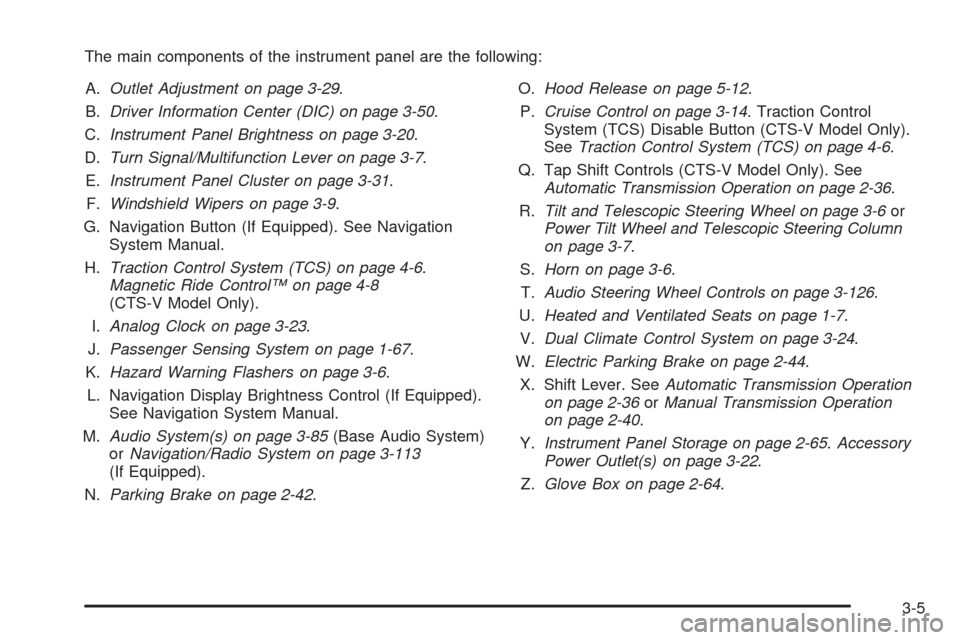
The main components of the instrument panel are the following:
A.Outlet Adjustment on page 3-29.
B.Driver Information Center (DIC) on page 3-50.
C.Instrument Panel Brightness on page 3-20.
D.Turn Signal/Multifunction Lever on page 3-7.
E.Instrument Panel Cluster on page 3-31.
F.Windshield Wipers on page 3-9.
G. Navigation Button (If Equipped). See Navigation
System Manual.
H.Traction Control System (TCS) on page 4-6.
Magnetic Ride Control™ on page 4-8
(CTS-V Model Only).
I.Analog Clock on page 3-23.
J.Passenger Sensing System on page 1-67.
K.Hazard Warning Flashers on page 3-6.
L. Navigation Display Brightness Control (If Equipped).
See Navigation System Manual.
M.Audio System(s) on page 3-85(Base Audio System)
orNavigation/Radio System on page 3-113
(If Equipped).
N.Parking Brake on page 2-42.O.Hood Release on page 5-12.
P.Cruise Control on page 3-14. Traction Control
System (TCS) Disable Button (CTS-V Model Only).
SeeTraction Control System (TCS) on page 4-6.
Q. Tap Shift Controls (CTS-V Model Only). See
Automatic Transmission Operation on page 2-36.
R.Tilt and Telescopic Steering Wheel on page 3-6or
Power Tilt Wheel and Telescopic Steering Column
on page 3-7.
S.Horn on page 3-6.
T.Audio Steering Wheel Controls on page 3-126.
U.Heated and Ventilated Seats on page 1-7.
V.Dual Climate Control System on page 3-24.
W.Electric Parking Brake on page 2-44.
X. Shift Lever. SeeAutomatic Transmission Operation
on page 2-36orManual Transmission Operation
on page 2-40.
Y.Instrument Panel Storage on page 2-65.Accessory
Power Outlet(s) on page 3-22.
Z.Glove Box on page 2-64.
3-5
Page 169 of 490

Reading Lamps
The reading lamps are located on the overhead console.
These lamps come on automatically when any door is
opened.
For manual operation, press the button next to each
lamp to turn it on or off.
If the reading lamps are left on, they automatically shut
off 10 minutes after the ignition has been turned off.
Electric Power Management
The vehicle has Electric Power Management (EPM) that
estimates the battery’s temperature and state of charge.
It then adjusts the voltage for best performance and
extended life of the battery.
When the battery’s state of charge is low, the voltage is
raised slightly to quickly bring the charge back up. When
the state of charge is high, the voltage is lowered slightly
to prevent overcharging. If the vehicle has a voltmeter
gage or a voltage display on the Driver Information
Center (DIC), you may see the voltage move up or down.
This is normal. If there is a problem, an alert will be
displayed.The battery can be discharged at idle if the electrical
loads are very high. This is true for all vehicles.
This is because the generator (alternator) may not be
spinning fast enough at idle to produce all the power that
is needed for very high electrical loads.
A high electrical load occurs when several of the
following are on: headlamps, high beams, fog lamps,
rear window defogger, climate control fan at high speed,
heated seats, engine cooling fans, trailer loads, and
loads plugged into accessory power outlets.
EPM works to prevent excessive discharge of the
battery. It does this by balancing the generator’s output
and the vehicle’s electrical needs. It can increase
engine idle speed to generate more power, whenever
needed. It can temporarily reduce the power demands of
some accessories.
Normally, these actions occur in steps or levels, without
being noticeable. In rare cases at the highest levels
of corrective action, this action may be noticeable to the
driver. If so, a Driver Information Center (DIC) message
might be displayed, such as BATTERY SAVER ACTIVE,
BATTERY VOLTAGE LOW, or LOW BATTERY. If this
message is displayed, it is recommended that the driver
reduce the electrical loads as much as possible. SeeDIC
Warnings and Messages on page 3-58.
3-21
Page 176 of 490

Heated and Ventilated Seats:Press to heat or
ventilate the seat. SeeHeated and Ventilated Seats
on page 1-7.
_(Heated Windshield Washer, If Equipped):
For more information, seeWindshield Washer on
page 3-12.
Remote Start Climate Control Operation:For
vehicles with remote vehicle start feature and it is
activated, the climate control system heats and cools
the inside of the vehicle using the previous settings
of the system before the vehicle was turned off.
SeeRemote Vehicle Start on page 2-14.
The windshield defroster and/or rear window defogger
turn on if it is cold outside. If the vehicle has heated
seats, they turn on if the temperature inside the
vehicle is cooler than 54°F (12.5°C) or if the outside
temperature is cooler than 48°F (9°C).
Sensors
The solar sensor located
on the instrument panel,
near the windshield,
monitors the solar heat.
The interior temperature
sensor located on the
instrument panel to
the right of the steering
wheel, measures the
temperature of the
air inside the vehicle.
3-28
Page 177 of 490

The climate control system uses the information from
these sensors to adjust the fan speed and the air
delivery, in order to maintain the selected temperature.
The system may also supply cooler air to the side of
the vehicle facing the sun. The recirculation mode
will also be activated, as necessary.
Do not cover the sensors or the automatic climate
control system will not work properly.
Outlet Adjustment
Use the air outlets located in the center and on the side
of the instrument panel to direct the airow. Use the
thumbwheels near the air outlets to open or close off the
airow.
Operation Tips
Clear away any ice, snow, or leaves from air inlets
at the base of the windshield that could block the
ow of air into the vehicle.
Keep the path under the front seats clear of objects
to help circulate the air inside of the vehicle more
effectively.
Use of non-GM approved hood deectors can
adversely affect the performance of the system.
Check with your dealer/retailer before adding
equipment to the outside of the vehicle.
Passenger Compartment Air Filter
The passenger compartment air lter traps most of
the dust and pollen from the air entering the vehicle.
The lter will need to be changed periodically.
SeeScheduled Maintenance on page 6-4.
Using the climate control system without the passenger
air lter installed could let water or other debris enter
the system. This could cause a water leak or noises.
Make sure a new air lter is installed after removing the
old one.
The passenger compartment air lter is located under
the hood below the windshield wiper arm and the screen
on the passenger side of the vehicle. SeeEngine
Compartment Overview on page 5-14for more
information on location.
3-29
Page 203 of 490
Relearn Remote Key
If the vehicle has the Remote Keyless Entry (RKE)
system, this display allows you to match the transmitter
to the vehicle. If the vehicle has the keyless access
system, seeKeyless Access System Operation
on page 2-8for instructions on matching a keyless
access transmitter to the vehicle. To match an RKE
transmitter to the vehicle:
1. Press the vehicle information button until
Press
VTo Relearn Remote Key displays.
2. Press the set/reset button until Remote Key
Learning Active is displayed.
3. Press and hold the lock and unlock buttons on
the rst transmitter at the same time for about
15 seconds.
On vehicles with memory recall seats, the rst
transmitter learned will match driver 1 and
the second will match driver 2.
A chime sounds indicating that the transmitter
is matched.
4. To match additional transmitters at this time,
repeat Step 3.
Each vehicle can have a maximum of
eight transmitters matched to it.
5. To exit the programming mode, you must cycle
the key to LOCK/OFF.
Trans (Transmission) Temp (Temperature)
(CTS-V Only)
This display shows the transmission uid temperature in
either degrees Fahrenheit (°F) or degrees Celsius (°C).
Oil Pressure (CTS-V Only)
This display shows the oil pressure in either pounds per
square inch (psi) or kilopascals (kPa).
Coolant Temp (Temperature) (CTS-V Only)
This display shows the engine coolant temperature in
either degrees Fahrenheit (°F) or degrees Celsius (°C).
Lateral Acceleration (CTS-V Only)
Lateral acceleration is a measure of how hard you are
taking a corner. For example, when you are turning
right you will feel your body push to the left. This force
is measured in a ‘‘g’’. This gage will display from
0.0 g to 2.0 g.
Blank Display
This display shows no information.
3-55
Page 205 of 490
Compass Calibration
The compass can be manually calibrated. Only calibrate
the compass in a magnetically clean and safe location,
such as an open parking lot, where driving the vehicle
in circles is not a danger. It is suggested to calibrate
away from tall buildings, utility wires, manhole covers, or
other industrial structures, if possible.
If CAL appears in the DIC display, the compass should
be calibrated.
If the DIC display does not show a heading, for example,
N for North, or the heading does not change after
making turns, there may be a strong magnetic eld
interfering with the compass. Interference may be
caused by a magnetic antenna mount, magnetic note
pad holder, or any other magnetic item. Turn off
the vehicle, move the magnetic item, then turn on
the vehicle and calibrate the compass.To calibrate the compass, use the following procedure:Compass Calibration Procedure
1. Before calibrating the compass, check that the
compass is set to the correct variance zone.
See “Compass Variance (Zone) Procedure” earlier
in this section.
Do not operate any switches such as window,
sunroof, climate controls, seats, etc. during
the calibration procedure.
2. Press the vehicle information button until
Press
VTo Calibrate Compass displays.
3. Press the set/reset button to start the compass
calibration.
4. The DIC will display Calibrating Drive In Circles.
Drive the vehicle in tight circles at less than
5 mph (8 km/h) to complete the calibration. The DIC
will display Calibration Complete for a few seconds
when the calibration is complete. The DIC display
will then return to Press
VTo Calibrate Compass.
3-57
Page 301 of 490
the front and rear axles, called the Gross Axle
Weight Rating (GAWR). Never exceed the GVWR
or the GAWR for either the front or rear axle.
{CAUTION:
Do not load the vehicle any heavier than the
Gross Vehicle Weight Rating (GVWR), or
either the maximum front or rear Gross Axle
Weight Rating (GAWR). If you do, parts on the
vehicle can break, and it can change the way
your vehicle handles. These could cause you
to lose control and crash. Also, overloading
can shorten the life of the vehicle.
Notice
:Overloading your vehicle may cause
damage. Repairs would not be covered by your
warranty. Do not overload your vehicle.
If you put things inside your vehicle, like suitcases,
tools, packages, or anything else, they will go as
fast as the vehicle goes. If you have to stop or turn
quickly, or if there is a crash, they will keep going.
{CAUTION:
Things you put inside the vehicle can strike
and injure people in a sudden stop or turn, or
in a crash.
Put things in the trunk of your vehicle.
In a trunk, put them as far forward as you
can. Try to spread the weight evenly.
Never stack heavier things, like suitcases,
inside the vehicle so that some of them
are above the tops of the seats.
Do not leave an unsecured child restraint
in the vehicle.
When you carry something inside the
vehicle, secure it whenever you can.
Do not leave a seat folded down unless
you need to.
4-25
Page 376 of 490
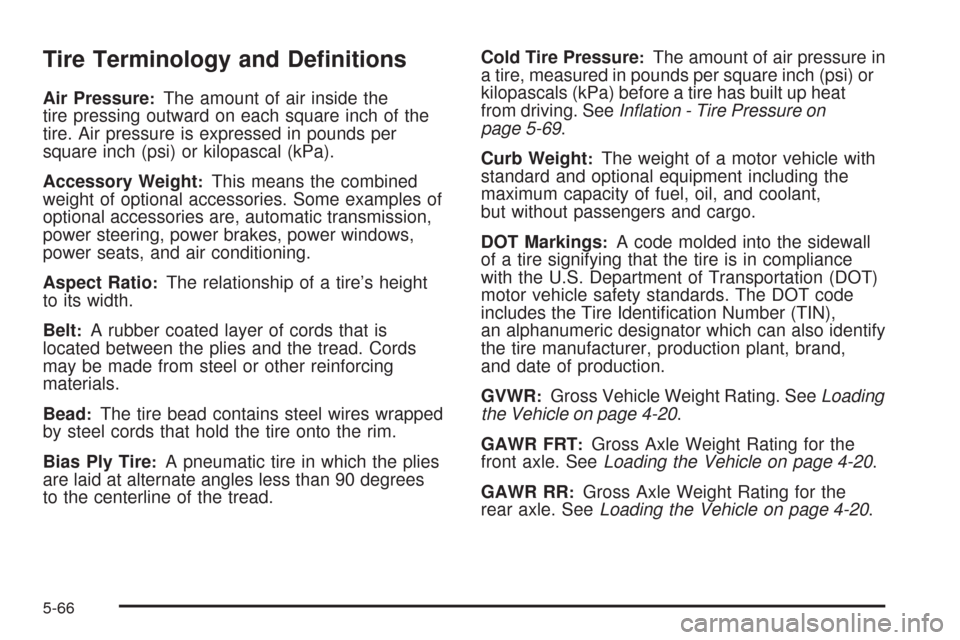
Tire Terminology and Denitions
Air Pressure:The amount of air inside the
tire pressing outward on each square inch of the
tire. Air pressure is expressed in pounds per
square inch (psi) or kilopascal (kPa).
Accessory Weight
:This means the combined
weight of optional accessories. Some examples of
optional accessories are, automatic transmission,
power steering, power brakes, power windows,
power seats, and air conditioning.
Aspect Ratio
:The relationship of a tire’s height
to its width.
Belt
:A rubber coated layer of cords that is
located between the plies and the tread. Cords
may be made from steel or other reinforcing
materials.
Bead
:The tire bead contains steel wires wrapped
by steel cords that hold the tire onto the rim.
Bias Ply Tire
:A pneumatic tire in which the plies
are laid at alternate angles less than 90 degrees
to the centerline of the tread.Cold Tire Pressure
:The amount of air pressure in
a tire, measured in pounds per square inch (psi) or
kilopascals (kPa) before a tire has built up heat
from driving. SeeInflation - Tire Pressure on
page 5-69.
Curb Weight
:The weight of a motor vehicle with
standard and optional equipment including the
maximum capacity of fuel, oil, and coolant,
but without passengers and cargo.
DOT Markings
:A code molded into the sidewall
of a tire signifying that the tire is in compliance
with the U.S. Department of Transportation (DOT)
motor vehicle safety standards. The DOT code
includes the Tire Identication Number (TIN),
an alphanumeric designator which can also identify
the tire manufacturer, production plant, brand,
and date of production.
GVWR
:Gross Vehicle Weight Rating. SeeLoading
the Vehicle on page 4-20.
GAWR FRT
:Gross Axle Weight Rating for the
front axle. SeeLoading the Vehicle on page 4-20.
GAWR RR
:Gross Axle Weight Rating for the
rear axle. SeeLoading the Vehicle on page 4-20.
5-66
Page 482 of 490
G
Gage
Boost.........................................................3-50
Engine Coolant Temperature.........................3-42
Engine Oil Pressure.....................................3-47
Fuel..........................................................3-49
Speedometer..............................................3-33
Tachometer.................................................3-34
Garage Door Opener.......................................2-60
Gasoline
Octane........................................................ 5-6
Specications............................................... 5-6
Glove Box.....................................................2-64
GM Mobility Reimbursement Program.................. 7-7
H
Hazard Warning Flashers................................... 3-6
Head Restraints............................................... 1-2
Headlamp
Aiming .......................................................5-53
Headlamps....................................................3-17
Adaptive Forward Lighting System.................3-19
Bulb Replacement.......................................5-57Headlamps (cont.)
Daytime Running Lamp................................3-18
Flash-to-Pass............................................... 3-9
Front Turn Signal and Fog Lamps..................5-58
Halogen Bulbs............................................5-57
High Intensity Discharge (HID) Lighting...........5-57
High/Low Beam Changer................................ 3-8
On Reminder..............................................3-17
Washer......................................................3-13
Wiper Activated...........................................3-17
Heated Seats................................................... 1-7
Heater...........................................................3-24
Engine Coolant...........................................2-35
Highbeam On Light.........................................3-49
High-Speed Operation, Tires.............................5-70
Highway Hypnosis...........................................4-15
Hill and Mountain Roads..................................4-16
Hood
Checking Things Under................................5-12
Release.....................................................5-12
Horn ............................................................... 3-6
How to Wear Safety Belts Properly...................1-19
Hydraulic Clutch.............................................5-30
6
Page 484 of 490
Light (cont.)
StabiliTrak®/Traction Control System (TCS)
Warning Light..........................................3-41
Tire Pressure..............................................3-42
Up-Shift.....................................................3-38
Lighting
Entry.........................................................3-20
Parade Dimming..........................................3-20
Lights............................................................3-17
Flash-to-Pass............................................... 3-9
High/Low Beam Changer................................ 3-8
On Reminder..............................................3-17
Limited-Slip Rear Axle....................................... 4-9
Loading Your Vehicle.......................................4-20
Lockout Protection..........................................2-19
Locks
Central Door Unlocking System.....................2-16
Delayed Locking..........................................2-17
Door ..........................................................2-16
Lockout Protection.......................................2-19
Power Door ................................................2-17
Programmable Automatic Door Locks.............2-17
Rear Door Security Locks.............................2-18
Loss of Control...............................................4-11
Lower Anchors and Tethers for Children.............1-45
Lumbar
Power and Side Bolsters................................ 1-6
Power Controls............................................. 1-6M
Magnetic Ride Control....................................... 4-8
Maintenance Schedule
Additional Required Services........................... 6-6
At Each Fuel Fill.........................................6-11
At Least Once a Month................................6-11
At Least Once a Year..................................6-12
Introduction.................................................. 6-2
Maintenance Footnotes.................................. 6-8
Maintenance Record....................................6-18
Maintenance Replacement Parts....................6-16
Maintenance Requirements............................. 6-2
Owner Checks and Services.........................6-10
Recommended Fluids and Lubricants.............6-14
Scheduled Maintenance................................. 6-4
Using.......................................................... 6-3
Your Vehicle and the Environment................... 6-2
Malfunction Indicator Lamp...............................3-43
Manual Seats................................................... 1-4
Manual Transmission
Fluid..........................................................5-29
Operation...................................................2-40
Memory Seat, Mirrors, Steering Wheel Controls.... 1-8
Message
DIC Warnings and Messages........................3-58
8