audio CADILLAC CTS 2009 2.G Owners Manual
[x] Cancel search | Manufacturer: CADILLAC, Model Year: 2009, Model line: CTS, Model: CADILLAC CTS 2009 2.GPages: 490, PDF Size: 2.68 MB
Page 1 of 490
Seats and Restraint System............................. 1-1
Head Restraints
......................................... 1-2
Front Seats
............................................... 1-4
Rear Seats
..............................................1-13
Safety Belts
.............................................1-14
Child Restraints
.......................................1-34
Airbag System
.........................................1-58
Restraint System Check
............................1-74
Features and Controls..................................... 2-1
Keys
........................................................ 2-3
Doors and Locks
......................................2-16
Windows
.................................................2-22
Theft-Deterrent Systems
............................2-26
Starting and Operating Your Vehicle
...........2-30
Mirrors
....................................................2-52
Object Detection Systems
..........................2-54
OnStar
®System
......................................2-56
Universal Home Remote System
................2-60
Storage Areas
.........................................2-64
Sunroof
..................................................2-65
Instrument Panel............................................. 3-1
Instrument Panel Overview
.......................... 3-4
Climate Controls
......................................3-24
Warning Lights, Gages, and Indicators
........3-30
Driver Information Center (DIC)
..................3-50
Audio System(s)
.......................................3-85Driving Your Vehicle....................................... 4-1
Your Driving, the Road, and the Vehicle
....... 4-2
Towing
...................................................4-26
Service and Appearance Care.......................... 5-1
Service
..................................................... 5-3
Fuel
......................................................... 5-5
Checking Things Under the Hood
...............5-12
All-Wheel Drive
........................................5-51
Rear Axle
...............................................5-52
Headlamp Aiming
.....................................5-53
Bulb Replacement
....................................5-57
Windshield Wiper Blade Replacement
.........5-59
Tires
......................................................5-61
Appearance Care
...................................5-106
Vehicle Identication
...............................5-114
Electrical System
....................................5-114
Capacities and Specications
...................5-127
Maintenance Schedule..................................... 6-1
Maintenance Schedule
................................ 6-2
Customer Assistance Information.................... 7-1
Customer Assistance and Information
........... 7-2
Reporting Safety Defects
...........................7-14
Vehicle Data Recording and Privacy
...........7-16
Index................................................................ 1
2009 Cadillac CTS/CTS-V Owner ManualM
Page 5 of 490
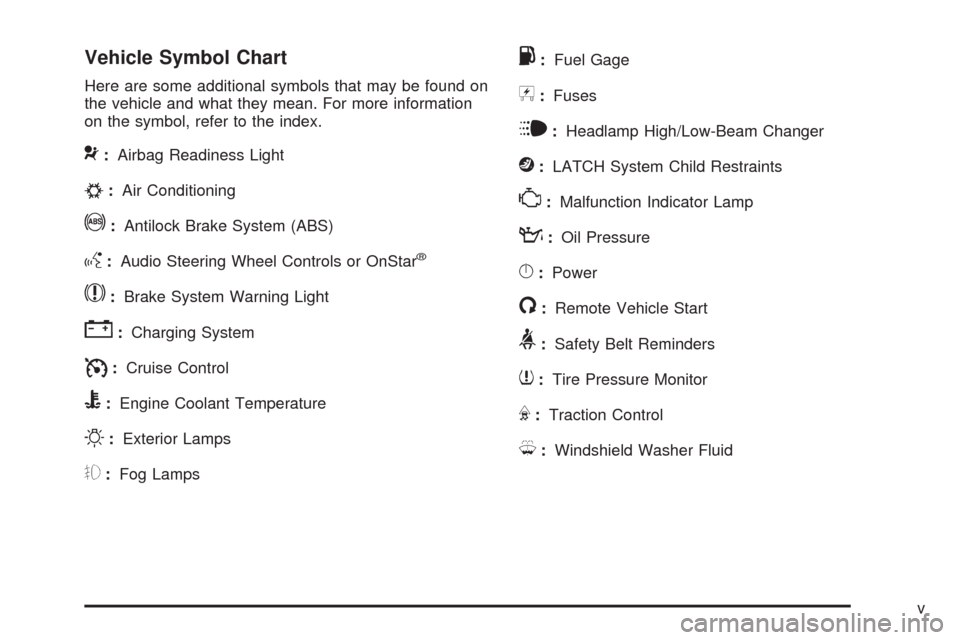
Vehicle Symbol Chart
Here are some additional symbols that may be found on
the vehicle and what they mean. For more information
on the symbol, refer to the index.
9:Airbag Readiness Light
#:Air Conditioning
!:Antilock Brake System (ABS)
g:Audio Steering Wheel Controls or OnStar®
$:Brake System Warning Light
":Charging System
I:Cruise Control
B:Engine Coolant Temperature
O:Exterior Lamps
#:Fog Lamps
.:Fuel Gage
+:Fuses
i:Headlamp High/Low-Beam Changer
j:LATCH System Child Restraints
*:Malfunction Indicator Lamp
::Oil Pressure
}:Power
/:Remote Vehicle Start
>:Safety Belt Reminders
7:Tire Pressure Monitor
F:Traction Control
M:Windshield Washer Fluid
v
Page 115 of 490
Retained Accessory Power (RAP)
These vehicle accessories can be used for up to
10 minutes after the engine is turned off:
Audio System
Power Windows
Sunroof (if equipped)
Power to the audio system will work up to 10 minutes or
until the driver door is opened. Power to the windows or
sunroof will work up to 10 minutes or until any door is
opened. For an additional 10 minutes of operation, close
all the doors and turn the key to ON/RUN and then back
to LOCK/OFF.
Starting the Engine
Place the transmission in the proper gear.
Automatic Transmission
Move the shift lever to P (Park) or N (Neutral). The
engine will not start in any other position. To restart
the engine when the vehicle is already moving, use
N (Neutral) only.If the vehicle has the keyless access system, put your
foot on the brake pedal and turn the ignition control knob
to the START position. When the engine begins cranking,
let go of the ignition control knob, it will return to the
ON/RUN position.
If the transmitter is not in the vehicle or something is
interfering with the transmitter, the Driver Information
Center (DIC) will display Electronic Key Not Detected.
SeeDIC Warnings and Messages on page 3-58for
more information.
If the battery in the keyless access transmitter needs
replacing, the DIC displays Replace Battery In Remote
Key. The vehicle can still be driven. See “Battery
Replacement” underKeyless Access System Operation
on page 2-8for more information.
Notice:Do not try to shift to P (Park) if the
vehicle is moving. If you do, you could damage
the transmission. Shift to P (Park) only when
the vehicle is stopped.Manual Transmission
The shift lever should be in neutral position and the
parking brake engaged. Hold the clutch pedal down to
the oor and start the engine. The vehicle will not start if
the clutch pedal is not all the way down.
2-33
Page 140 of 490

OnStar Services Included with
Directions & Connections Plan
All Safe and Sound Plan Services
OnStar Turn-by-Turn Navigation (If equipped) or
Driving Directions - Advisor delivered
RideAssist
Information and Convenience Services
OnStar Hands-Free Calling
OnStar Hands-Free Calling allows eligible OnStar
subscribers to make and receive calls using voice
commands. Hands-Free Calling is fully integrated into the
vehicle, and can be used with OnStar Pre-Paid Minute
Packages. Most vehicles include 30 trial minutes good for
60 days. Hands-Free Calling can also be linked to a
Verizon Wireless service plan in the U.S. or a Bell
Mobility service plan in Canada, depending on eligibility.
To nd out more, refer to the OnStar Owner’s Guide in
the vehicle’s glove box, visit onstar.com or onstar.ca, or
speak with an OnStar advisor by pressing the OnStar
button or calling 1-888-4-ONSTAR (1-888-466-7827).
OnStar Turn-by-Turn Navigation
Vehicles with the OnStar Turn-by-Turn Navigation system
can provide voice-guided driving directions. Press the
OnStar button to have an OnStar advisor locate a
business or address and download driving directions to
the vehicle. Voice-guided directions to the desired
destination will play through the audio system speakers.
See the OnStar Owner’s Guide for more information.
OnStar Virtual Advisor
OnStar Virtual Advisor is a feature of OnStar Hands-Free
Calling that uses minutes to access location-based
weather, local traffic reports, and stock quotes. Press the
phone button and give a few simple voice commands to
browse through the various topics. See the OnStar
Owner’s Guide for more information. This feature is only
available in the continental U.S.
OnStar Steering Wheel Controls
This vehicle may have a Talk/Mute button that can be
used to interact with OnStar Hands-Free Calling.
SeeAudio Steering Wheel Controls on page 3-126for
more information.
On some vehicles, the mute button can be used to dial
numbers into voice mail systems, or to dial phone
extensions. See the OnStar Owner’s Guide for more
information.
2-58
Page 150 of 490
Malfunction Indicator Lamp.............................3-43
Oil Pressure Light.........................................3-46
Engine Oil Pressure Gage.............................3-47
Security Light...............................................3-48
Fog Lamp Light............................................3-48
Lights On Reminder......................................3-48
Cruise Control Light......................................3-48
Highbeam On Light.......................................3-49
Fuel Gage...................................................3-49
Boost Gage.................................................3-50
Driver Information Center (DIC).......................3-50
DIC Operation and Displays...........................3-51
DIC Compass..............................................3-56DIC Warnings and Messages.........................3-58
DIC Vehicle Customization.............................3-72
Audio System(s).............................................3-85
Radio(s)......................................................3-86
Using an MP3............................................3-108
XM Radio Messages...................................3-112
Navigation/Radio System..............................3-113
Bluetooth
®.................................................3-113
Theft-Deterrent Feature................................3-126
Audio Steering Wheel Controls......................3-126
Radio Reception.........................................3-127
Backglass Antenna......................................3-128
XM™ Satellite Radio Antenna System..............3-128
Section 3 Instrument Panel
3-2
Page 153 of 490
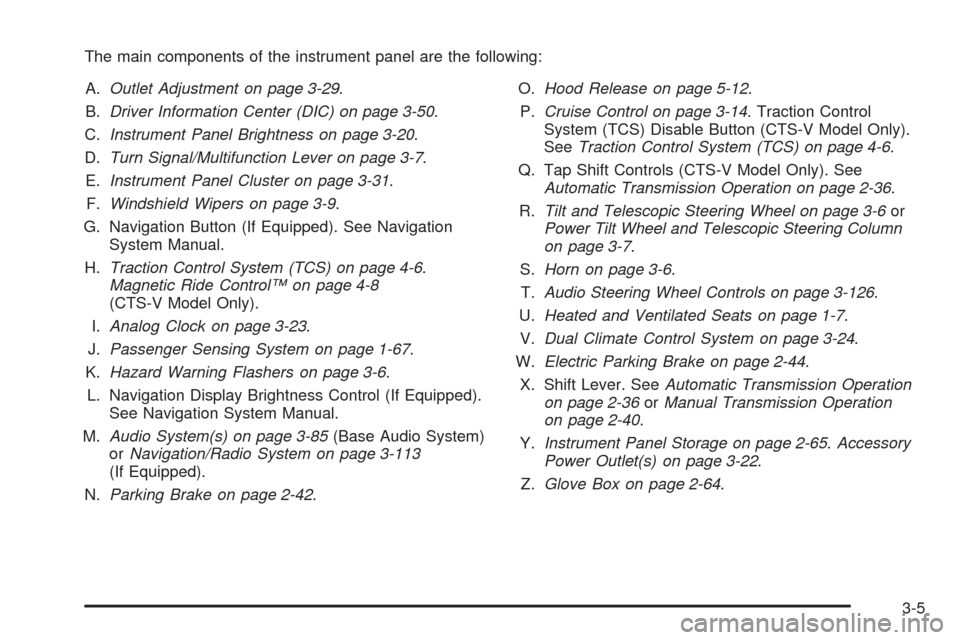
The main components of the instrument panel are the following:
A.Outlet Adjustment on page 3-29.
B.Driver Information Center (DIC) on page 3-50.
C.Instrument Panel Brightness on page 3-20.
D.Turn Signal/Multifunction Lever on page 3-7.
E.Instrument Panel Cluster on page 3-31.
F.Windshield Wipers on page 3-9.
G. Navigation Button (If Equipped). See Navigation
System Manual.
H.Traction Control System (TCS) on page 4-6.
Magnetic Ride Control™ on page 4-8
(CTS-V Model Only).
I.Analog Clock on page 3-23.
J.Passenger Sensing System on page 1-67.
K.Hazard Warning Flashers on page 3-6.
L. Navigation Display Brightness Control (If Equipped).
See Navigation System Manual.
M.Audio System(s) on page 3-85(Base Audio System)
orNavigation/Radio System on page 3-113
(If Equipped).
N.Parking Brake on page 2-42.O.Hood Release on page 5-12.
P.Cruise Control on page 3-14. Traction Control
System (TCS) Disable Button (CTS-V Model Only).
SeeTraction Control System (TCS) on page 4-6.
Q. Tap Shift Controls (CTS-V Model Only). See
Automatic Transmission Operation on page 2-36.
R.Tilt and Telescopic Steering Wheel on page 3-6or
Power Tilt Wheel and Telescopic Steering Column
on page 3-7.
S.Horn on page 3-6.
T.Audio Steering Wheel Controls on page 3-126.
U.Heated and Ventilated Seats on page 1-7.
V.Dual Climate Control System on page 3-24.
W.Electric Parking Brake on page 2-44.
X. Shift Lever. SeeAutomatic Transmission Operation
on page 2-36orManual Transmission Operation
on page 2-40.
Y.Instrument Panel Storage on page 2-65.Accessory
Power Outlet(s) on page 3-22.
Z.Glove Box on page 2-64.
3-5
Page 233 of 490

Audio System(s)
Determine which radio the vehicle has and read the
following pages to become familiar with its features.
{CAUTION:
Taking your eyes off the road for extended periods
could cause a crash resulting in injury or death to
you or others. Do not give extended attention to
entertainment tasks while driving.
This system provides access to many audio and non
audio listings.To minimize taking your eyes off the road while driving,
do the following while the vehicle is parked:
Become familiar with the operation and controls of
the audio system.
Set up the tone, speaker adjustments, and preset
radio stations.
For more information, seeDefensive Driving on page 4-2.
Notice:Contact your dealer/retailer before adding
any equipment.
Adding audio or communication equipment could
interfere with the operation of the vehicle’s engine,
radio, or other systems, and could damage them.
Follow federal rules covering mobile radio and
telephone equipment.
The vehicle has Retained Accessory Power (RAP).
With RAP, the audio system can be played even after
the ignition is turned off. SeeRetained Accessory
Power (RAP) on page 2-33for more information.
3-85
Page 234 of 490

Radio(s)
The vehicle may have one of these radios as its audio
system.
If the vehicle does not have one of these radio
systems, it may have a navigation radio system.
See the Navigation System manual for more information
on the navigation audio system.
If the vehicle has one of these radios, it has either a
Bose
®sound system or a Bose®5.1 Cabin Surround®
sound system. See “Digital Signal Processing (DSP)”
later in this section for more information on the Bose®
5.1 Cabin Surround®sound system. Full View of Radio with CD shown,
Radio with Six-Disc CD similar
Partial View of Radio with DVD Audio,
Hard Drive Device (HDD), and USB
3-86
Page 235 of 490
The radio with DVD Audio, HDD, and USB utilizes
Gracenote®technology to provide Song, Artist, Album,
and Genre information for many CD audio discs
and is capable of playing DVD-A and DTS encoded
discs, (DTS and DTS Digital Surround are registered
trademarks of Digital Theater Systems, Inc.).
Manufactured under license from Dolby Laboratories.
Dolby and the double-D symbol are trademarks of Dolby
Laboratories.
Radio Data System (RDS)
The audio system has a Radio Data System (RDS)
feature. RDS is available for use only on FM stations
that broadcast RDS information. This system relies upon
receiving specic information from these stations and
only works when the information is available. While the
radio is tuned to an FM-RDS station, the station name
or call letters display. In rare cases, a radio station
can broadcast incorrect information that causes the radio
features to work improperly. If this happens, contact
the radio station.
Playing the Radio
VOLP(Volume/Power):The power knob is part of
the VOL knob and is located above the radio, at the left
side of the clock. Press to turn the system on and off.
Turn the VOL knob clockwise or counterclockwise
to increase or decrease the volume.
Speed Compensated Volume (SCV):A Radio with
SCV automatically adjusts the sound to compensate
for road and wind noise as the vehicle speeds up
or slows down, so that the volume is consistent while
driving. That way, the volume level should sound about
the same while driving. To activate SCV:
1. Set the radio volume to the desired level.
2. Press the CONFIG button to display the radio
setup menu.
3. Press the pushbutton under the AUTO VOL
(automatic volume) label on the radio display.
4. Press the pushbutton under the desired Speed
Compensated Volume setting (OFF, Low, Med,
or High) to select the level of radio volume
compensation. The display times out after
approximately 10 seconds. Each higher setting
allows for more radio volume compensation at
faster vehicle speeds.
3-87
Page 236 of 490

Noise Compensation Technology:If the vehicle has
the Radio with DVD Audio, HDD, and USB, it includes
Bose AudioPilot
®noise compensation technology.
When turned on, AudioPilot
®continuously adjusts
the audio system equalization, to compensate for
background noise.
This feature is most effective at lower radio volume
settings where background noise can affect how well
you hear the music being played through the vehicle’s
audio system. At higher volume settings, where the
music is much louder than the background noise,
there might be little or no adjustments by AudioPilot
®.
For additional information on AudioPilot®, visit
bose.com/audiopilot.
To activate AudioPilot
®:
1. Press the CONFIG button to display the radio
setup menu.
2. Press the pushbutton under the AUTO VOL label
on the radio display.
3. Press either the On or Off label located under the
AUTO VOL display to turn this feature on or off.
The display times out after approximately
10 seconds.
Finding a Station
TUNE/TONE:Turn to select different radio stations
within a selected band.
FM/AM:Press to switch between FM and AM
radio bands.
©SEEK¨:Press to go to the previous or to the next
radio station and stay there.
The radio only tunes into stations with a strong signal
that are in the selected band.
INFO (Information) (FM-RDS, XM™ Satellite Radio
Service, CD-Text, CD Gracenote Database, HDD,
MP3/WMA, and iPod):Press to display additional text
information related to the currently playing content.
When information is not available, No Information
displays.
MENU/SELECT:For FM/AM stations, the MENU/
SELECT displays a list of available radio stations. Under
this menu, there is a refresh list selection that allows
the user to update the list for all available stations that
the radio is able to receive at the current location.
For XM™ stations, the music guide displays a Category
list. This list displays all of the Categories available
and the number of XM stations available under each.
3-88