fuel CADILLAC CTS 2009 2.G Owners Manual
[x] Cancel search | Manufacturer: CADILLAC, Model Year: 2009, Model line: CTS, Model: CADILLAC CTS 2009 2.GPages: 490, PDF Size: 2.68 MB
Page 1 of 490
Seats and Restraint System............................. 1-1
Head Restraints
......................................... 1-2
Front Seats
............................................... 1-4
Rear Seats
..............................................1-13
Safety Belts
.............................................1-14
Child Restraints
.......................................1-34
Airbag System
.........................................1-58
Restraint System Check
............................1-74
Features and Controls..................................... 2-1
Keys
........................................................ 2-3
Doors and Locks
......................................2-16
Windows
.................................................2-22
Theft-Deterrent Systems
............................2-26
Starting and Operating Your Vehicle
...........2-30
Mirrors
....................................................2-52
Object Detection Systems
..........................2-54
OnStar
®System
......................................2-56
Universal Home Remote System
................2-60
Storage Areas
.........................................2-64
Sunroof
..................................................2-65
Instrument Panel............................................. 3-1
Instrument Panel Overview
.......................... 3-4
Climate Controls
......................................3-24
Warning Lights, Gages, and Indicators
........3-30
Driver Information Center (DIC)
..................3-50
Audio System(s)
.......................................3-85Driving Your Vehicle....................................... 4-1
Your Driving, the Road, and the Vehicle
....... 4-2
Towing
...................................................4-26
Service and Appearance Care.......................... 5-1
Service
..................................................... 5-3
Fuel
......................................................... 5-5
Checking Things Under the Hood
...............5-12
All-Wheel Drive
........................................5-51
Rear Axle
...............................................5-52
Headlamp Aiming
.....................................5-53
Bulb Replacement
....................................5-57
Windshield Wiper Blade Replacement
.........5-59
Tires
......................................................5-61
Appearance Care
...................................5-106
Vehicle Identication
...............................5-114
Electrical System
....................................5-114
Capacities and Specications
...................5-127
Maintenance Schedule..................................... 6-1
Maintenance Schedule
................................ 6-2
Customer Assistance Information.................... 7-1
Customer Assistance and Information
........... 7-2
Reporting Safety Defects
...........................7-14
Vehicle Data Recording and Privacy
...........7-16
Index................................................................ 1
2009 Cadillac CTS/CTS-V Owner ManualM
Page 5 of 490
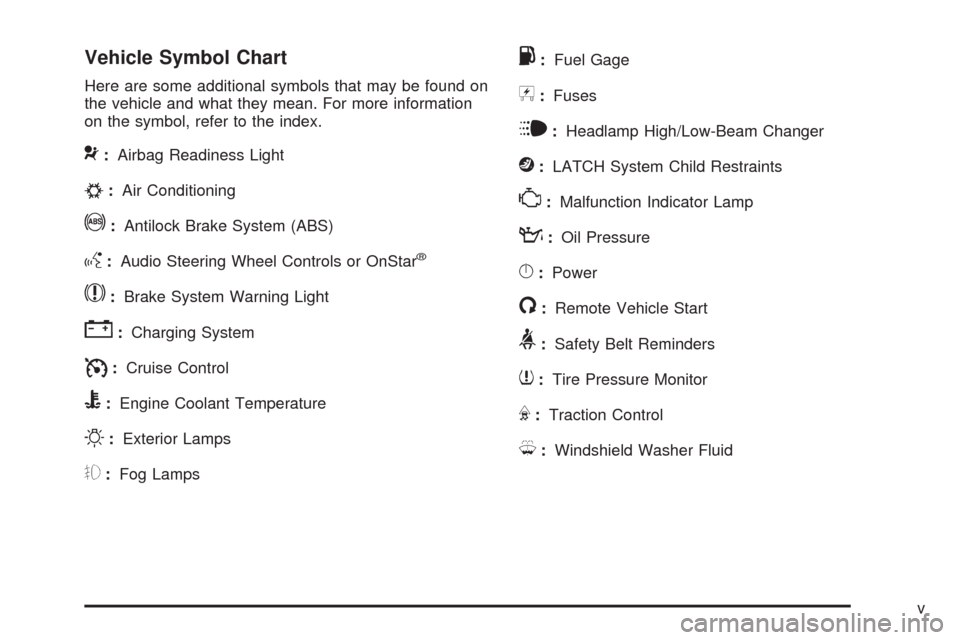
Vehicle Symbol Chart
Here are some additional symbols that may be found on
the vehicle and what they mean. For more information
on the symbol, refer to the index.
9:Airbag Readiness Light
#:Air Conditioning
!:Antilock Brake System (ABS)
g:Audio Steering Wheel Controls or OnStar®
$:Brake System Warning Light
":Charging System
I:Cruise Control
B:Engine Coolant Temperature
O:Exterior Lamps
#:Fog Lamps
.:Fuel Gage
+:Fuses
i:Headlamp High/Low-Beam Changer
j:LATCH System Child Restraints
*:Malfunction Indicator Lamp
::Oil Pressure
}:Power
/:Remote Vehicle Start
>:Safety Belt Reminders
7:Tire Pressure Monitor
F:Traction Control
M:Windshield Washer Fluid
v
Page 96 of 490
Remote Vehicle Start
This vehicle may have a remote starting feature that
allows you to start the engine from outside the vehicle.
It may also start the vehicle’s automatic climate control
system. When the remote start system is active, the
climate control system heats and cools the inside of the
vehicle according to the previous settings of the system
before turning the vehicle off. The windshield defroster
and/or rear window defogger turn on if it is cold outside.
If the vehicle has heated seats, they also turn on if the
interior or exterior temperature is cold enough. See
Heated and Ventilated Seats on page 1-7for additional
information. Normal operation of the climate control
system returns after the ignition is turned to ON/RUN.
SeeDual Climate Control System on page 3-24.
/(Remote Start):This button will be on the
transmitter if the vehicle has remote start.
To start the vehicle using the remote start feature:
1. Aim the transmitter at the vehicle.
2. Press and release the transmitter’s
Q, then
immediately press and hold the transmitter’s
/for at
least four seconds or until the vehicle’s turn signal
lamps ash. The vehicle’s doors will be locked.
When the vehicle starts, the parking lamps turn on
and remain on while the vehicle is running.3. If it is the rst remote start since the vehicle has been
driven, repeat these steps, while the engine is still
running, to extend the engine running time by
10 minutes. Remote start can be extended one time.
If the vehicle is left running it automatically shuts off after
10 minutes unless a time extension has been done.
To manually shut off a remote start:
Aim the transmitter at the vehicle and press the
remote start button until the parking lamps turn off.
Turn on the hazard warning ashers.
Turn the ignition switch on and then off.
When you enter the vehicle during a remote start, press
the brake pedal and turn the ignition to ON/RUN to drive
the vehicle.
Laws in some communities may restrict the use of
remote starters. For example, some laws may require
a person using remote start to have the vehicle in
view when doing so. Check local regulations for any
requirements on remote starting of vehicles.
Do not use the remote start feature if the vehicle is low
on fuel. The vehicle may run out of fuel.
2-14
Page 117 of 490
Engine Coolant Heater
Vehicles with the engine coolant heater can use this
option in cold weather conditions at or below 0°F (−18°C)
for easier starting and better fuel economy during engine
warm-up. Plug in the coolant heater at least four hours
before starting your vehicle. An internal thermostat in
the plug-end of the cord may exist which will prevent
engine coolant heater operation at temperatures
above 0°F (−18°C).
To Use the Engine Coolant Heater
1. Turn off the engine.
2. Open the hood and unwrap the electrical cord.
The cord is located near the driver side strut
tower.
Remove the plastic cap to access the plug.
3. Plug it into a normal, grounded 110-volt AC outlet.
{CAUTION:
Plugging the cord into an ungrounded outlet could
cause an electrical shock. Also, the wrong kind of
extension cord could overheat and cause a re.
You could be seriously injured. Plug the cord into
a properly grounded three-prong 110-volt AC
outlet. If the cord will not reach, use a heavy-duty
three-prong extension cord rated for at least
15 amps.
4. Before starting the engine, be sure to unplug and
store the cord as it was before to keep it away from
moving engine parts. If you do not, it could be
damaged.
Contact your dealer/retailer for information on how
long to use the heater in your particular area.
2-35
Page 119 of 490

Notice:Shifting to R (Reverse) while the vehicle is
moving forward could damage the transmission. The
repairs would not be covered by the vehicle warranty.
Shift to R (Reverse) only after the vehicle is stopped.
R (Reverse):Use this gear to back up.
At low vehicle speeds, R (Reverse) can be used to rock
the vehicle back and forth to get out of snow, ice, or
sand without damaging your transmission. SeeIf Your
Vehicle is Stuck in Sand, Mud, Ice, or Snow on
page 4-19for additional information.
N (Neutral):In this position, the engine does not
connect with the wheels. To restart when the vehicle is
already moving, use N (Neutral) only. You can also
use N (Neutral) when the vehicle is being towed.
{CAUTION:
Shifting into a drive gear while the engine is
running at high speed is dangerous. Unless your
foot is rmly on the brake pedal, the vehicle could
move very rapidly. You could lose control and hit
people or objects. Do not shift into a drive gear
while the engine is running at high speed.Notice:Shifting out of P (Park) or N (Neutral) with
the engine running at high speed may damage
the transmission. The repairs would not be covered
by the vehicle warranty. Be sure the engine is
not running at high speed when shifting the vehicle.
D (Drive):This position is for normal driving. It provides
the best fuel economy. If you need more power for
passing, and you are:
Going less than 35 mph (55 km/h), push the
accelerator pedal about halfway down.
Going about 35 mph (55 km/h) or more, push the
accelerator all the way down.
The transmission will shift down to a lower gear and
have more power.
Downshifting the transmission in slippery road conditions
could result in skidding, see Skidding underLoss of
Control on page 4-11
While in D (Drive), the CTS-V vehicle’s rst forward
gear automatic shift after starting the vehicle will be
from 1 (First). Afterwards, the CTS-V vehicles will always
start in 2 (Second) gear. While in M (Manual Mode),
for increased performance, the vehicle will start in
1 (First) gear.
2-37
Page 124 of 490
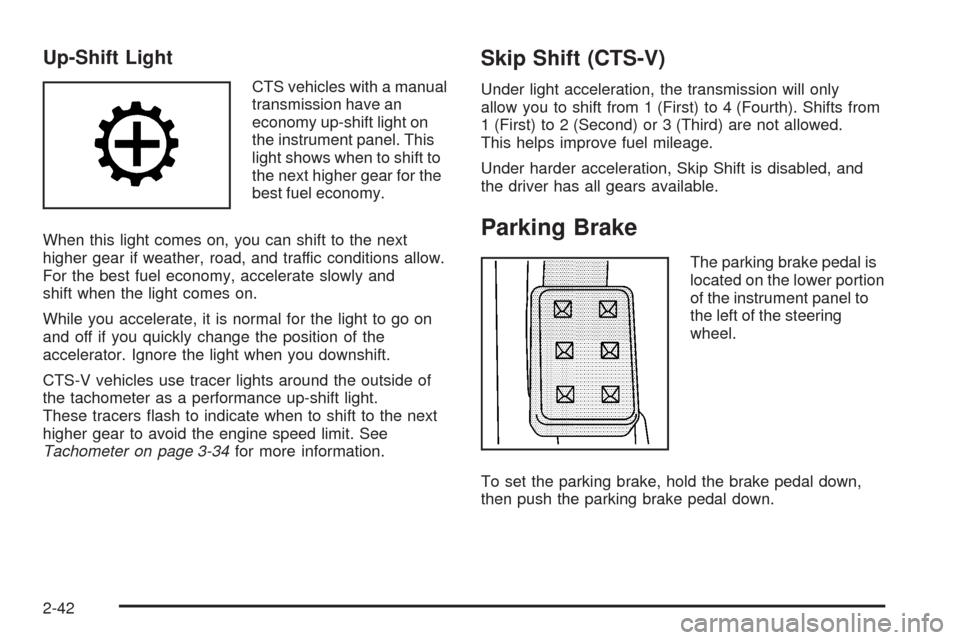
Up-Shift Light
CTS vehicles with a manual
transmission have an
economy up-shift light on
the instrument panel. This
light shows when to shift to
the next higher gear for the
best fuel economy.
When this light comes on, you can shift to the next
higher gear if weather, road, and traffic conditions allow.
For the best fuel economy, accelerate slowly and
shift when the light comes on.
While you accelerate, it is normal for the light to go on
and off if you quickly change the position of the
accelerator. Ignore the light when you downshift.
CTS-V vehicles use tracer lights around the outside of
the tachometer as a performance up-shift light.
These tracers ash to indicate when to shift to the next
higher gear to avoid the engine speed limit. See
Tachometer on page 3-34for more information.
Skip Shift (CTS-V)
Under light acceleration, the transmission will only
allow you to shift from 1 (First) to 4 (Fourth). Shifts from
1 (First) to 2 (Second) or 3 (Third) are not allowed.
This helps improve fuel mileage.
Under harder acceleration, Skip Shift is disabled, and
the driver has all gears available.
Parking Brake
The parking brake pedal is
located on the lower portion
of the instrument panel to
the left of the steering
wheel.
To set the parking brake, hold the brake pedal down,
then push the parking brake pedal down.
2-42
Page 150 of 490
Malfunction Indicator Lamp.............................3-43
Oil Pressure Light.........................................3-46
Engine Oil Pressure Gage.............................3-47
Security Light...............................................3-48
Fog Lamp Light............................................3-48
Lights On Reminder......................................3-48
Cruise Control Light......................................3-48
Highbeam On Light.......................................3-49
Fuel Gage...................................................3-49
Boost Gage.................................................3-50
Driver Information Center (DIC).......................3-50
DIC Operation and Displays...........................3-51
DIC Compass..............................................3-56DIC Warnings and Messages.........................3-58
DIC Vehicle Customization.............................3-72
Audio System(s).............................................3-85
Radio(s)......................................................3-86
Using an MP3............................................3-108
XM Radio Messages...................................3-112
Navigation/Radio System..............................3-113
Bluetooth
®.................................................3-113
Theft-Deterrent Feature................................3-126
Audio Steering Wheel Controls......................3-126
Radio Reception.........................................3-127
Backglass Antenna......................................3-128
XM™ Satellite Radio Antenna System..............3-128
Section 3 Instrument Panel
3-2
Page 179 of 490
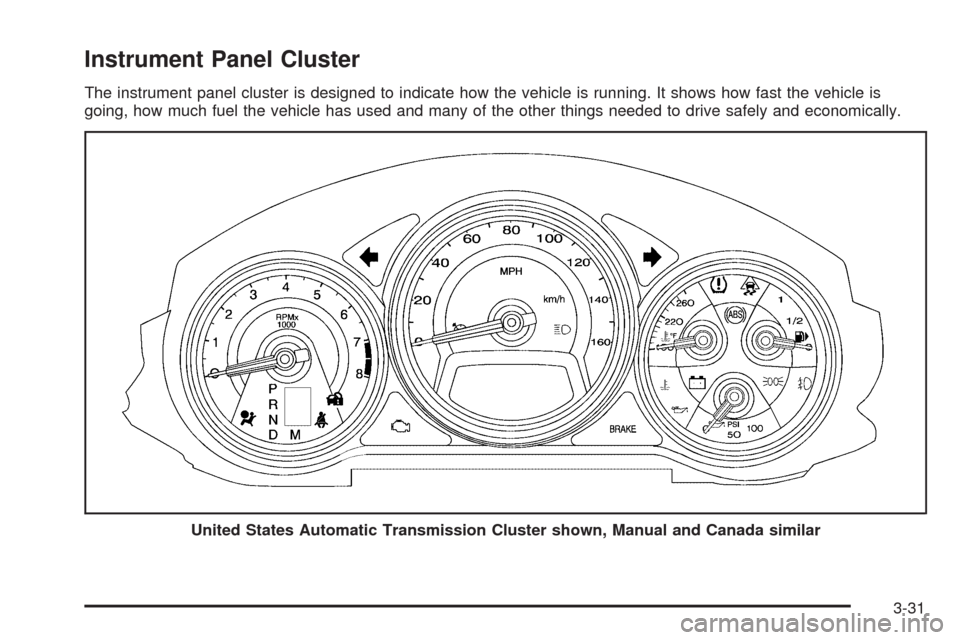
Instrument Panel Cluster
The instrument panel cluster is designed to indicate how the vehicle is running. It shows how fast the vehicle is
going, how much fuel the vehicle has used and many of the other things needed to drive safely and economically.
United States Automatic Transmission Cluster shown, Manual and Canada similar
3-31
Page 182 of 490

Tachometer
The tachometer displays the engine speed in revolutions
per minute (rpm).
Notice:If the engine is operated with the tachometer
in the shaded warning area, the vehicle could be
damaged, and the damages would not be covered by
the vehicle warranty. Do not operate the engine with
the tachometer in the shaded warning area.The CTS-V tachometer has tracer lights that follow the
movement of the tachometer indicator. The tracer lights
can be turned off in the DIC Vehicle Customization.
SeeDIC Vehicle Customization on page 3-72for more
information.
For the CTS-V, the tracer lights also ash when it is
time to up-shift to avoid the engine speed limit.
SeeAutomatic Transmission Operation on page 2-36
orManual Transmission Operation on page 2-40
for more information.
Engine Speed Limiter
This feature prevents the engine speed from reaching
an unsafe level. If the level is too high, the throttle closes
or limits the fuel supply until the engine speed returns
to a safe level. Throttle operation and fuel supply returns
to normal when engine speed is lowered.
For the CTS-V, the tachometer tracer lights ashes prior
to reaching engine speed limit. The tracer lights also
ash on automatic transmission vehicles while in
the DSC or Tap Shift modes. United States and
Canada Automatic,
V-Series Similar
3-34
Page 186 of 490

Charging System Light
This light comes on briey
when the ignition key is
turned to START, but
the engine is not running,
as a check to show it
is working.
If it does not, have the vehicle serviced by your
dealer/retailer.
The light should go out once the engine starts. If it
stays on, or comes on while driving, there could be a
problem with the charging system. A charging system
message in the Driver Information Center (DIC) can also
appear. SeeDIC Warnings and Messages on page 3-58
for more information. This light could indicate that
there are problems with a generator drive belt, or that
there is an electrical problem. Have it checked right
away. If the vehicle must be driven a short distance with
the light on, turn off accessories, such as the radio
and air conditioner.
Up-Shift Light
The vehicle may have an
up-shift light, it shows
when to shift to the next
higher gear for best
fuel economy.
SeeManual Transmission Operation on page 2-40
for more information.
For the CTS-V, the tracer lights function as a
performance up-shift light.
These tracers ash to indicate when to shift to the
next higher gear to avoid the engine speed limit.
SeeAutomatic Transmission Operation on page 2-36
orManual Transmission Operation on page 2-40
for more information.
3-38