change wheel CADILLAC CTS 2011 2.G User Guide
[x] Cancel search | Manufacturer: CADILLAC, Model Year: 2011, Model line: CTS, Model: CADILLAC CTS 2011 2.GPages: 496, PDF Size: 7.71 MB
Page 300 of 496
Black plate (40,1)Cadillac CTS/CTS-V Owner Manual - 2011
9-40 Driving and Operating
The Driver Information Center (DIC)
briefly displays SUSPENSION
MODE TOUR or SUSPENSION
MODE SPORT on vehicle startup or
when a new mode is selected.
Press and release this button,
located in the center of the
instrument panel, to change modes.
Limited-Slip Rear Axle
Vehicles with a limited-slip rear axle
can give more traction on snow,
mud, ice, sand, or gravel. When
traction is low, this feature allows
the drive wheel with the most
traction to move the vehicle. The
limited-slip rear axle also gives the
driver enhanced control when
cornering hard or completing a
maneuver, such as a lane change.
Cruise Control
{WARNING
Cruise control can be dangerous
where you cannot drive safely at
a steady speed. So, do not use
the cruise control on winding
roads or in heavy traffic.
Cruise control can be dangerous
on slippery roads. On such roads,
fast changes in tire traction can
cause excessive wheel slip, and
you could lose control. Do not use
cruise control on slippery roads.
With cruise control, a speed of
about 40 km/h (25 mph) or more can
be maintained without keeping your
foot on the accelerator. Cruise
control does not work at speeds
below about 40 km/h (25 mph).
When the brakes are applied, the
cruise control turns off. If the vehicle has the Stabilitrak
®
system and begins to limit wheel
spin while you are using cruise
control, the cruise control will
automatically disengage. See
StabiliTrak System
on page 9‑38.
When road conditions allow you to
safely use it again, the cruise
control can be turned back on.
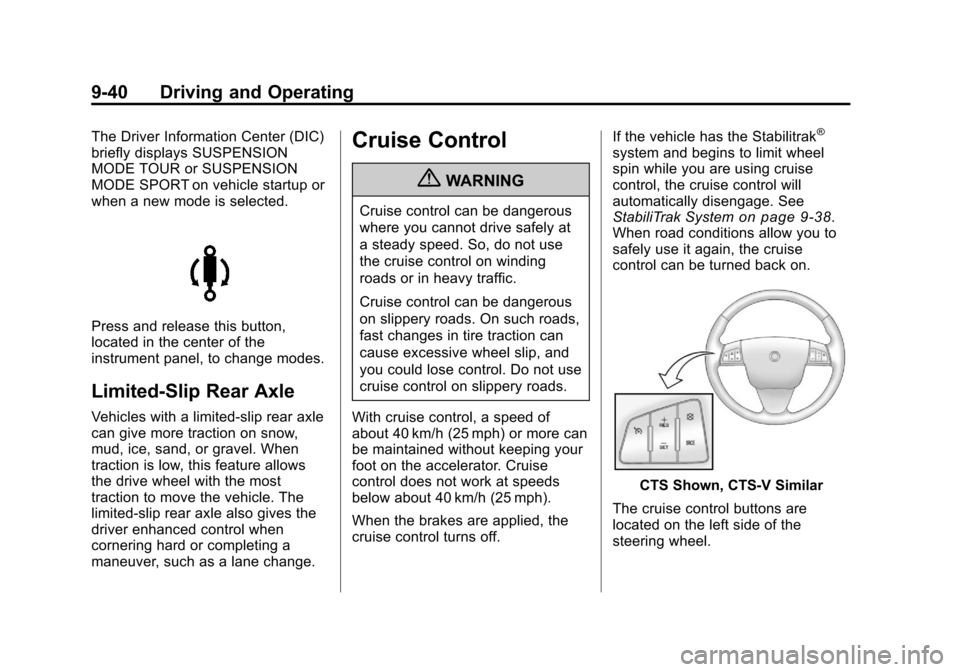
CTS Shown, CTS‐V Similar
The cruise control buttons are
located on the left side of the
steering wheel.
Page 312 of 496
Black plate (52,1)Cadillac CTS/CTS-V Owner Manual - 2011
9-52 Driving and Operating
Towing
General Towing
Information
Only use towing equipment that has
been designed for the vehicle.
Contact your dealer or trailering
dealer for assistance with preparing
the vehicle for towing a trailer.
See the following trailer towing
information in this section:
.For information on driving while
towing a trailer, see“Driving
Characteristics and
Towing Tips.”
.For maximum vehicle and trailer
weights, see “Trailer Towing.”
.For information on equipment to
tow a trailer, see “Towing
Equipment.”
For information on towing a disabled
vehicle, see Towing the Vehicle
on
page 10‑117. For information on
towing the vehicle behind another vehicle such as a motorhome, see
Recreational Vehicle Towing
on
page 10‑117.
Driving Characteristics
and Towing Tips
{WARNING
The driver can lose control when
pulling a trailer if the correct
equipment is not used or the
vehicle is not driven properly. For
example, if the trailer is too
heavy, the brakes may not work
well —or even at all. The driver
and passengers could be
seriously injured. The vehicle may
also be damaged; the resulting
repairs would not be covered by
the vehicle warranty. Pull a trailer
only if all the steps in this section
have been followed. Ask your
dealer for advice and information
about towing a trailer with the
vehicle. The vehicle can tow a trailer if it is
equipped with the proper trailer
towing equipment. To identify the
trailering capacity of the vehicle, see
Trailer Towing (Except CTS-V)
on
page 9‑56or Trailer Towing
(CTS-V)on page 9‑57. Trailering
changes handling, acceleration,
braking, durability, and fuel
economy. With the added weight,
the engine, transmission, wheel
assemblies, and tires are forced to
work harder and under greater
loads. The trailer also adds wind
resistance, increasing the pulling
requirements. For safe trailering,
correctly use the proper trailering
equipment.
The following information has
important trailering tips and rules for
your safety and that of your
passengers. Read this section
carefully before pulling a trailer.
Page 314 of 496
Black plate (54,1)Cadillac CTS/CTS-V Owner Manual - 2011
9-54 Driving and Operating
Passing
More passing distance is needed
when towing a trailer. Because the
rig is longer, it is necessary to go
much farther beyond the passed
vehicle before returning to the lane.
Backing Up
Hold the bottom of the steering
wheel with one hand. Then, to move
the trailer to the left, move that hand
to the left. To move the trailer to the
right, move your hand to the right.
Always back up slowly and,
if possible, have someone
guide you.
Making Turns
Notice:Making very sharp turns
while trailering could cause the
trailer to come in contact with the
vehicle. The vehicle could be
damaged. Avoid making very
sharp turns while trailering.
When turning with a trailer, make
wider turns than normal. Do this so
the trailer won't strike soft shoulders, curbs, road signs, trees
or other objects. Avoid jerky or
sudden maneuvers. Signal well in
advance.
Turn Signals When Towing a
Trailer
The arrows on the instrument panel
flash whenever signaling a turn or
lane change. Properly hooked up,
the trailer lamps also flash, telling
other drivers the vehicle is turning,
changing lanes, or stopping.
When towing a trailer, the arrows on
the instrument panel flash for turns
even if the bulbs on the trailer are
burned out. For this reason you may
think other drivers are seeing the
signal when they are not. It is
important to check occasionally to
be sure the trailer bulbs are still
working.
Driving On Grades
Reduce speed and shift to a
lower gear before starting down a
long or steep downgrade. If the
transmission is not shifted down, thebrakes might have to be used so
much that they would get hot and no
longer work well.
Vehicles with an automatic
transmission can tow in D (Drive)
but M (Manual Mode) is
recommended. Shift the
transmission to a lower gear if the
transmission shifts too often under
heavy loads and/or hilly conditions.
For vehicles with a manual
transmission, it is better not to use
the highest gear.
When towing at high altitude on
steep uphill grades, consider the
following: Engine coolant will boil at
a lower temperature than at normal
altitudes. If the engine is turned off
immediately after towing at high
altitude on steep uphill grades, the
vehicle may show signs similar to
engine overheating. To avoid this,
let the engine run while parked,
preferably on level ground, with the
automatic transmission in P (Park)
for a few minutes before turning the
engine off. For vehicles with manual
transmissions, let the engine run
Page 385 of 496

Black plate (67,1)Cadillac CTS/CTS-V Owner Manual - 2011
Vehicle Care 10-67
Winter Tires
If you expect to drive on snow or ice
covered roads often, you may want
to get winter tires for your vehicle.
All season tires provide good overall
performance on most surfaces but
they may not offer the traction you
would like or the same level of
performance as winter tires on snow
or ice covered roads.
Winter tires, in general, are
designed for increased traction on
snow and ice covered roads. With
winter tires, there may be decreased
dry road traction, increased road
noise, and shorter tread life. After
switching to winter tires, be alert for
changes in vehicle handling and
braking.
See your dealer for details
regarding winter tire availability and
proper tire selection. Also, see
Buying New Tires on page 10‑83.If you choose to use winter tires:.Use tires of the same brand and
tread type on all four wheel
positions.
.Use only radial ply tires of the
same size, load range, and
speed rating as the original
equipment tires.
Winter tires with the same speed
rating as your original equipment
tires may not be available for H, V,
W, and ZR speed rated tires. If you
choose winter tires with a lower
speed rating, never exceed the tire's
maximum speed capability.
Low-Profile Tires
If your vehicle has P235/50R18,
245/45ZR19, P245/45R19, 255/
40ZR19 or 285/35ZR19 size
tires, they are classified as
low‐profile tires. These tires are
designed for very responsive
driving on wet or dry pavement.
You may also notice more road noise with low‐profile
performance tires and that they
tend to wear faster.
Notice:If the vehicle has
low‐profile tires, they are more
susceptible to damage from
road hazards or curb impact
than standard profile tires.
Tire and/or wheel assembly
damage can occur when
coming into contact with road
hazards like, potholes,
or sharp edged objects,
or when sliding into a curb.
The vehicle warranty does not
cover this type of damage.
Keep tires set to the correct
inflation pressure and, when
possible avoid contact with
curbs, potholes, and other
road hazards.
Page 400 of 496

Black plate (82,1)Cadillac CTS/CTS-V Owner Manual - 2011
10-82 Vehicle Care
After the tires have been
rotated, adjust the front and rear
inflation pressures as shown on
the Tire and Loading Information
label. SeeTire Pressure
on
page 10‑74
and Vehicle Load
Limits
on page 9‑11.
Reset the Tire Pressure Monitor
System. See Tire Pressure
Monitor Operation
on page 10‑77.
Make certain that all wheel nuts
are properly tightened. See
“Wheel Nut Torque” under
Capacities and Specifications
on
page 12‑2
.
{WARNING
Rust or dirt on a wheel, or on the
parts to which it is fastened, can
make wheel nuts become loose
after time. The wheel could come
off and cause an accident. When
changing a wheel, remove any
rust or dirt from places where the
wheel attaches to the vehicle. In
an emergency, use a cloth or a
paper towel to do this; but be sure
to use a scraper or wire brush
later, if needed, to get all the rust
or dirt off. See If a Tire Goes Flat
on page 10‑90.
Lightly coat the center of the wheel
hub with bearing grease after a
wheel change or tire rotation to
prevent corrosion or rust build-up.
Do not get grease on the flat wheel
surface or on the wheel nuts or
bolts.
When It Is Time for New
Tires
Various factors, such as
maintenance, temperatures, driving
speeds, vehicle loading, and road
conditions influence when you need
new tires.
One way to tell when it is time for
new tires is to check the treadwear
indicators, which appear when the
tires have only 1.6 mm (1/16 in) or
less of tread remaining. See Tire
Page 409 of 496

Black plate (91,1)Cadillac CTS/CTS-V Owner Manual - 2011
Vehicle Care 10-91
{WARNING
Changing a tire can be
dangerous. The vehicle can slip
off the jack and roll over or fall on
you or other people. You and they
could be badly injured or even
killed. Find a level place to
change your tire. To help prevent
the vehicle from moving:1. Set the parking brake firmly.
2. Put an automatic transmission shift lever in
P (Park), or shift a manual
transmission to 1 (First) or
R (Reverse).
3. Turn off the engine and do not restart while the vehicle
is raised.
4. Do not allow passengers to remain in the vehicle.
(Continued)
WARNING (Continued)
To be certain the vehicle will not
move, put blocks at the front and
rear of the tire farthest away from
the one being changed. That
would be the tire on the other
side, at the opposite end of the
vehicle.
This vehicle may come with a jack
and spare tire or a tire sealant and
compressor kit. To use the jacking
equipment to change a spare tire
safely, follow the instructions below.
Then see Tire Changing
on
page 10‑102. To use the tire sealant
and compressor kit, see Tire
Sealant and Compressor Kit
on
page 10‑92. When the vehicle has a flat tire (B),
use the following example as a
guide to assist you in the placement
of wheel blocks (A).
A. Wheel Block
B. Flat Tire
The following information explains
how to repair or change a tire.
Page 452 of 496

Black plate (6,1)Cadillac CTS/CTS-V Owner Manual - 2011
11-6 Service and Maintenance
.All‐wheel‐drive vehicles only:
Transfer case fluid change
(severe service) for vehicles
mainly driven in heavy city traffic
in hot weather, in hilly or
mountainous terrain, when
frequently towing a trailer,
or used for taxi, police,
or delivery service. During any
maintenance, if a power washer
is used to clean mud and dirt
from the underbody, care should
be taken to not directly spray the
transfer case output seals. High
pressure water can overcome
the seals and contaminate
the transfer case fluid.
Contaminated fluid will decrease
the life of the transfer case and
should be replaced.
.CTS‐V only: Rear axle fluid
change (severe service only) for
vehicles mainly driven in hilly or
mountainous terrain, when
frequently towing a trailer, used
for high speed or competitivedriving, or used for taxi, police,
or delivery service. See
Rear
Axle on page 10‑31.
First Engine Oil Change After
Every 160 000 km/100,000 Miles
.Automatic transmission fluid
change (normal service). See
Automatic Transmission Fluid
on
page 10‑15.
.All‐wheel‐drive vehicles only:
Transfer case fluid change
(normal service). During any
maintenance, if a power washer
is used to clean mud and dirt
from the underbody, care should
be taken to not directly spray the
transfer case output seals. High
pressure water can overcome
the seals and contaminate the
transfer case fluid.
Contaminated fluid will decrease
the life of the transfer case and
should be replaced.
.Spark plug replacement and
spark plug wire inspection. An
Emission Control Service.
.CTS‐V only: Supercharger drive
belt inspection for fraying,
excessive cracks, or obvious
damage and replacement,
if needed.
First Engine Oil Change After
Every 240 000 km/150,000 Miles
.Engine cooling system drain,
flush, and refill (or every
five years, whichever occurs
first). See Cooling System
on
page 10‑19. An Emission Control
Service.
.6.2L supercharged V8 engine
only: Intercooler system drain,
flush, and refill (or every five
years, whichever occurs first).
See Cooling System
on
page 10‑19. An Emission
Control Service.
.Engine drive belts inspection for
fraying, excessive cracks,
or obvious damage (or every
10 years, whichever occurs
first). Replace, if needed. An
Emission Control Service.
Page 471 of 496

Black plate (7,1)Cadillac CTS/CTS-V Owner Manual - 2011
Customer Information 13-7
GM Mobility
Reimbursement Program
This program is available to
qualified applicants for cost
reimbursement of eligible
aftermarket adaptive equipment
required for your vehicle, such as
hand controls or a wheelchair/
scooter lift for the vehicle.
For more information on the limited
offer, visit www.gmmobility.com or
call the GM Mobility Assistance
Center at 1-800-323-9935. Text
Telephone (TTY) users, call
1-800-833-9935.
General Motors of Canada also
has a Mobility Program. Call
1-800-GM-DRIVE (463-7483) for
details. TTY users call
1-800-263-3830.
Roadside Service (United
States and Canada)
In the United States or Canada, call
1-800-882-1112.
Text Telephone (TTY), U.S. only,
call1-888-889-2438.
Service is available 24 hours a day,
365 days a year.
Calling for Service
When calling Roadside Service,
have the following information
ready:
.Your name, home address, and
home telephone number
.Telephone number of your
location
.Location of the vehicle
.Model, year, color, and license
plate number of the vehicle
.Odometer reading, Vehicle
Identification Number (VIN), and
delivery date of the vehicle
.Description of the problem
Coverage
Services are provided up to 5 years/
160 000 km (100,000 miles),
whichever comes first.
In the U.S., anyone driving the
vehicle is covered. In Canada, a
person driving the vehicle without
permission from the owner is not
covered.
Roadside Service is not a part of the
New Vehicle Limited Warranty.
Cadillac and General Motors of
Canada Limited reserve the right to
make any changes or discontinue
the Roadside Service program at
any time without notification.
Cadillac and General Motors of
Canada Limited reserve the right to
limit services or payment to an
owner or driver if they decide the
claims are made too often, or the
same type of claim is made many
times.
Page 488 of 496

Black plate (6,1)Cadillac CTS/CTS-V Owner Manual - 2011
i-6 INDEX
FusesEngine
Compartment
Fuse Block . . . . 10-42, 10-46, 10-50, 10-54
Fuses and Circuit
Breakers . . . . . . . . . . . . . . . . . . 10-42
Rear Compartment
Fuse Block . . . . 10-58, 10-60, 10-62, 10-64
G
Garage Door Opener . . . . . . . . . . 5-53
Programming . . . . . . . . . . . . . . . . . 5-53
Gasoline Specifications . . . . . . . . . . . . . . . . . 9-48
Gauges Boost . . . . . . . . . . . . . . . . . . . . . . . . . 5-14
Engine CoolantTemperature . . . . . . . . . . . . . . . . 5-16
Engine Oil Pressure . . . . . . . . . . 5-15
Fuel . . . . . . . . . . . . . . . . . . . . . . . . . . 5-13 Gauges (cont.)
Odometer . . . . . . . . . . . . . . . . . . . . . 5-13
Speedometer . . . . . . . . . . . . . . . . . 5-13
Tachometer . . . . . . . . . . . . . . . . . . . 5-13
Trip Odometer . . . . . . . . . . . . . . . . 5-13
Warning Lights and
Indicators . . . . . . . . . . . . . . . . . . . 5-10
General Information Service and Maintenance . . . . . 11-1
Towing . . . . . . . . . . . . . . . . . . . . . . . . 9-52
Vehicle Care . . . . . . . . . . . . . . . . . . 10-3
Glove Box . . . . . . . . . . . . . . . . . . . . . . 4-1
GM Mobility Reimbursement Program . . . . . . . . . . . . . . . . . . . . . . 13-7
H
Halogen Bulbs . . . . . . . . . . . . . . . . 10-38
Hard Drive Device (HDD) . . . . . . 7-29
Hazard Warning Flashers . . . . . . . 6-4
Head Restraints . . . . . . . . . . . . . . . . 3-2
Active . . . . . . . . . . . . . . . . . . . . . . . . . 3-3 Headlamps
Adaptive Forward
Lighting (AFL) . . . . . . . . . . . . . . . . 6-4
Aiming . . . . . . . . . . . . . . . . . . . . . . 10-35
Automatic . . . . . . . . . . . . . . . . . . . . . . 6-3
Bulb Replacement . . . . . . . . . . 10-38
Daytime Running Lamps (DRL) . . . . . . . . . . . . . . . . . 6-3
Flash-to-Pass . . . . . . . . . . . . . . . . . . 6-2
High Intensity Discharge (HID) Lighting . . . . . . . . . . . . . 10-38
High-Beam On Light . . . . . . . . . . 5-26
High/Low Beam Changer . . . . . . 6-2
Lamps On Reminder . . . . . . . . . 5-27
Washer . . . . . . . . . . . . . . . . . . . . . . . . 5-7
Heated
Steering Wheel . . . . . . . . . . . . . . . . 5-4
Heated and Ventilated Front Seats . . . . . . . . . . . . . . . . . . . . . . . . 3-12
Heated Front Seats . . . . . . . . . . . . 3-11
Heated Mirrors . . . . . . . . . . . . . . . . . 2-27
Page 494 of 496

Black plate (12,1)Cadillac CTS/CTS-V Owner Manual - 2011
i-12 INDEX
Service (cont.)Maintenance, General
Information . . . . . . . . . . . . . . . . . . 11-1
Parts Identification Label . . . . . 12-1
Publications Ordering
Information . . . . . . . . . . . . . . . . 13-14
Scheduling Appointments . . . 13-10
Vehicle Messages . . . . . . . . . . . . 5-43
Servicing the
Airbag-Equipped Vehicle . . . . . 3-42
Shift Lock Control Function Check, Automatic
Transmission . . . . . . . . . . . . . . . . 10-33
Shifting
Into Park . . . . . . . . . . . . . . . . . . . . . . 9-22
Out of Park . . . . . . . . . . . . . . . . . . . 9-23
Signals, Turn and Lane-Change . . . . . . . . . . . . . . . . . 6-4
Spare Tire Compact . . . . . . . . . . . . . . . . . . . 10-111
Specifications and Capacities . . . . . . . . . . . . . . . . . . . . 12-2
Speed Limiter, Engine . . . . . . . . . 5-15
Speedometer . . . . . . . . . . . . . . . . . . 5-13 StabiliTrak®System . . . . . . . . . . . 9-38
Start Vehicle, Remote . . . . . . . . . 2-11
Starter Switch Check . . . . . . . . . 10-32
Starting the Engine . . . . . . . 1-4, 9-19
Steering . . . . . . . . . . . . . . . . . . . . . . . . 9-4
Fluid, Power . . . . . . . . . . . . . . . . 10-26
Heated Wheel . . . . . . . . . . . . . . . . . 5-4
Wheel Adjustment . . . . . . . . . . . . . 5-2
Wheel Controls . . . . . . . . . . . . . . . . 5-3
Storage Areas Cargo Cover . . . . . . . . . . . . . . . . . . . 4-2
Cargo Management System . . . 4-3
Center Console . . . . . . . . . . . . . . . . 4-2
Convenience Net . . . . . . . . . . . . . . 4-6
Glove Box . . . . . . . . . . . . . . . . . . . . . 4-1
Instrument Panel . . . . . . . . . . . . . . 4-1
Roof Rack System . . . . . . . . . . . . . 4-6
Storing the Tire Sealant and
Compressor Kit . . . 10-101, 10-102
Stuck Vehicle . . . . . . . . . . . . . . . . . . 9-11
Sun Visors . . . . . . . . . . . . . . . . . . . . . 2-31 Sunroof . . . . . . . . . . . . . . . . . . 2-32, 2-34
Symbols . . . . . . . . . . . . . . . . . . . . . . . . . . .v
System
Roof Rack . . . . . . . . . . . . . . . . . . . . . 4-6
T
Tachometer . . . . . . . . . . . . . . . . . . . . 5-13
Text Telephone (TTY) Users . . . 13-6
Theft-DeterrentSystems . . . . . . . . . . . . . . . 2-24, 2-26
Immobilizer . . . . . . . . . . . . . . . . . . . 2-24
Thigh Support Adjustment . . . . . . 3-8
Time . . . . . . . . . . . . . . . . . . . . . . . . . . . . 5-8
Tires Buying New Tires . . . . . . . . . . . 10-83
Chains . . . . . . . . . . . . . . . . . . . . . . 10-89
Changing . . . . . . . . . . . . . . . . . . 10-102
Compact Spare . . . . . . . . . . . . 10-111
Designations . . . . . . . . . . . . . . . 10-70
Different Size . . . . . . . . . . . . . . . 10-85
If a Tire Goes Flat . . . . . . . . . . 10-90
Inflation Monitor System . . . . 10-77