power steering CADILLAC CTS 2011 2.G User Guide
[x] Cancel search | Manufacturer: CADILLAC, Model Year: 2011, Model line: CTS, Model: CADILLAC CTS 2011 2.GPages: 496, PDF Size: 7.71 MB
Page 142 of 496
Black plate (2,1)Cadillac CTS/CTS-V Owner Manual - 2011
5-2 Instruments and Controls
Anti-Theft Alarm SystemMessages . . . . . . . . . . . . . . . . . . 5-42
Service Vehicle Messages . . . 5-43
Tire Messages . . . . . . . . . . . . . . . 5-43
Transmission Messages . . . . . 5-44
Vehicle Speed Messages . . . . 5-45
Washer Fluid Messages . . . . . 5-45
Vehicle Personalization
Vehicle Personalization . . . . . . 5-45
Universal Remote System
Universal Remote System . . . 5-53
Universal Remote System Programming . . . . . . . . . . . . . . . 5-53
Universal Remote System Operation . . . . . . . . . . . . . . . . . . 5-57
Controls
Steering Wheel
Adjustment
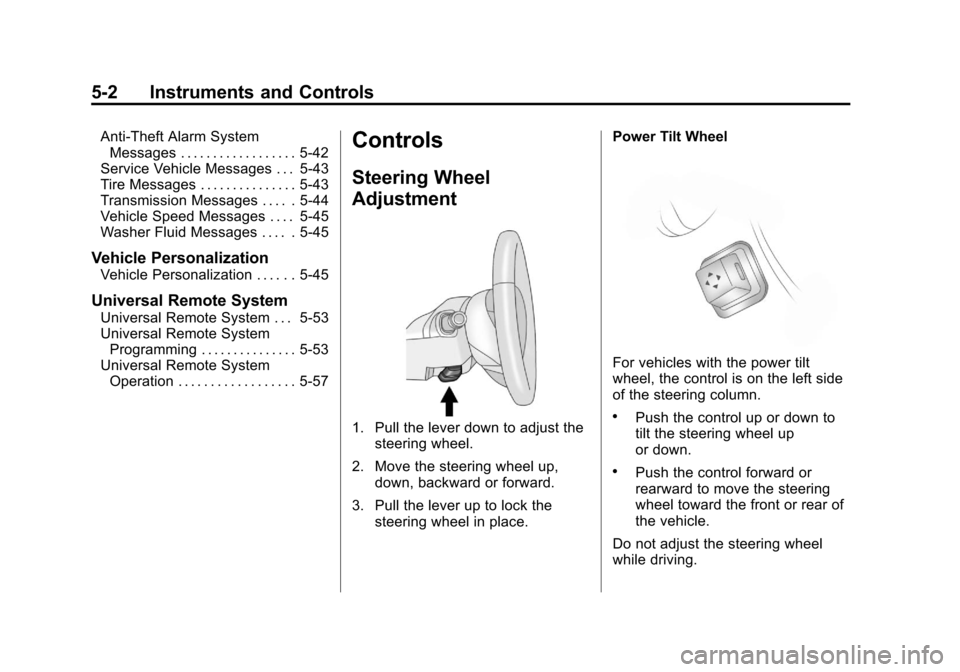
1. Pull the lever down to adjust the
steering wheel.
2. Move the steering wheel up, down, backward or forward.
3. Pull the lever up to lock the steering wheel in place. Power Tilt Wheel
For vehicles with the power tilt
wheel, the control is on the left side
of the steering column.
.Push the control up or down to
tilt the steering wheel up
or down.
.Push the control forward or
rearward to move the steering
wheel toward the front or rear of
the vehicle.
Do not adjust the steering wheel
while driving.
Page 180 of 496

Black plate (40,1)Cadillac CTS/CTS-V Owner Manual - 2011
5-40 Instruments and Controls
Service Parking Assist
If the vehicle has the Ultrasonic
Rear Parking Assist (URPA) system,
this message displays if there is a
problem with the URPA system. See
Ultrasonic Parking Assist
on
page 9‑42for more information.
See your dealer for service.
Ride Control System
Messages
All Wheel Drive Off
If the vehicle has the All-Wheel
Drive (AWD) system, this message
displays when there is a temporary
condition making the AWD system
unavailable. The vehicle will run in
2WD. This could be caused by:
.Loss of wheel or vehicle speed
.AWD system overheat
.Certain vehicle electrical
conditions This message turns off when the
above conditions are no longer
present and by resetting the
warning message.
To reset the warning message, turn
the ignition off and then back on
again after 30 seconds. If the
message stays on, see your dealer
right away. See
All-Wheel Drive
on
page 9‑32for more information.
Service All Wheel Drive
This message displays if a problem
occurs with the All-Wheel Drive
(AWD) system. The vehicle will run
in 2WD. This could be caused by:
.An electronics problem
.An AWD system oil overheat
.Worn out or overheated clutch
plates
.Various electrical issues
If this message appears, stop as
soon as possible and turn off the
ignition for 30 seconds. Restart the
vehicle and check for the message
on the DIC display. If the message is still displayed or appears again
when you begin driving, the system
needs service. See your dealer
right away.
Service Power Steering
This message displays if a problem
is detected with the speed variable
assist steering system. When this
message is displayed, you may
notice that the effort required to
steer the vehicle increases or feels
heavier, but you will still be able to
steer the vehicle. See
Steering
on
page 9‑4.
Service Stabilitrak
This message displays if there has
been a problem detected with the
StabiliTrak
®system. The TCS/
StabiliTrak warning light on the
instrument panel cluster also
comes on.
Page 192 of 496

Black plate (52,1)Cadillac CTS/CTS-V Owner Manual - 2011
5-52 Instruments and Controls
Entry/Exit Recall
If the vehicle has this feature, it
allows you to select your preferred
automatic recall of stored memory
and exit positions. See the“Memory
Seat, Mirrors, and Steering Column”
information under Power Seat
Adjustment
on page 3‑4for more
information.
Press the customization button until
Entry/Exit Recall appears on the
DIC display. Press the set/reset
button once to access the settings
for this feature. Then press the
menu up/down button to scroll
through the following settings.
To select a setting, press the set/
reset button while the desired
setting is displayed on the DIC.
Entry/Exit Recall Off (default): No
automatic Entry/Exit Recall will
occur when entering or leaving the
vehicle. The Exit recall will only
occur after pressing the door
mounted EXIT button. This button
will cause the drivers seat to move
rearward a certain distance, and the steering column to move full up and
full forward, if equipped. Entry
Recall will only occur by pressing
the door mounted
“1”or“2” button.
Entry/Exit Recall On (Vehicles
without Power Steering
Column): If this setting is selected
the following option will be available.
Easy Exit will automatically move
the driver seat rearward a certain
distance when the key is removed
from the ignition on Key Access
vehicles, or when the ignition is
turned off and the driver door
opened on Keyless Access
vehicles. This movement will also
occur when the door mounted EXIT
button is pressed.
Easy Entry will automatically recall
the driver seat and outside mirror
memory positions of the current
driver (1 or 2) when the ignition is
turned on. Entry/Exit Recall On (Vehicles
with Power Steering Column):
If
this setting is selected the following
two options will be available.
.Entry/Exit Steering and Seat:
Easy Exit will automatically
move the steering column to a
full up and full forward position
and move the driver seat
rearward a certain distance
when the key is removed from
the ignition on Key Access
vehicles, or when the ignition is
turned off and the driver door
opened on Keyless Access
vehicles. These movements will
also occur when the door
mounted EXIT button is pressed.
Easy Entry will automatically
recall the driver seat, outside
mirrors and steering column
memory positions of the current
driver (1 or 2) when the ignition
is turned on.
Page 261 of 496

Black plate (1,1)Cadillac CTS/CTS-V Owner Manual - 2011
Driving and Operating 9-1
Driving and
Operating
Driving Information
Defensive Driving . . . . . . . . . . . . . 9-2
Drunk Driving . . . . . . . . . . . . . . . . . 9-2
Control of a Vehicle . . . . . . . . . . . 9-3
Braking . . . . . . . . . . . . . . . . . . . . . . . 9-3
Steering . . . . . . . . . . . . . . . . . . . . . . . 9-4
Off-Road Recovery . . . . . . . . . . . . 9-5
Loss of Control . . . . . . . . . . . . . . . . 9-6
Competitive Driving . . . . . . . . . . . 9-7
Driving on Wet Roads . . . . . . . . . 9-7
Highway Hypnosis . . . . . . . . . . . . 9-8
Hill and Mountain Roads . . . . . . 9-8
Winter Driving . . . . . . . . . . . . . . . . . 9-9
If the Vehicle is Stuck . . . . . . . . 9-11
Vehicle Load Limits . . . . . . . . . . 9-11
Starting and Operating
New Vehicle Break-In . . . . . . . . 9-16
Ignition Positions (KeyAccess) . . . . . . . . . . . . . . . . . . . . 9-16
Ignition Positions (Keyless Access) . . . . . . . . . . . . . . . . . . . . 9-18 Retained Accessory
Power (RAP) . . . . . . . . . . . . . . . 9-19
Starting the Engine . . . . . . . . . . 9-19
Engine Coolant Heater . . . . . . . 9-21
Shifting Into Park . . . . . . . . . . . . 9-22
Shifting Out of Park . . . . . . . . . . 9-23
Parking (Manual Transmission) . . . . . . . . . . . . . . 9-24
Parking Over Things That Burn . . . . . . . . . . . . . . . . . . 9-24
Engine Exhaust
Engine Exhaust . . . . . . . . . . . . . . 9-24
Running the Vehicle WhileParked . . . . . . . . . . . . . . . . . . . . . 9-25
Automatic Transmission
Automatic Transmission . . . . . 9-26
Manual Mode . . . . . . . . . . . . . . . . 9-28
Manual Transmission
Manual Transmission . . . . . . . . 9-30
Drive Systems
All-Wheel Drive . . . . . . . . . . . . . . 9-32
Brakes
Antilock BrakeSystem (ABS) . . . . . . . . . . . . . . 9-32
Parking Brake (Manual) . . . . . . 9-33
Parking Brake (Electric) . . . . . . 9-34
Brake Assist (Except CTS-V) . . . . . . . . . . . . 9-36
Ride Control Systems
Traction ControlSystem (TCS) . . . . . . . . . . . . . . 9-37
StabiliTrak System . . . . . . . . . . . 9-38
Competitive Driving Mode . . . 9-39
Magnetic Ride Control . . . . . . . 9-39
Limited-Slip Rear Axle . . . . . . . 9-40
Cruise Control
Cruise Control . . . . . . . . . . . . . . . 9-40
Object Detection Systems
Ultrasonic Parking Assist . . . . 9-42
Rear Vision Camera (RVC) . . . . . . . . . . . . . 9-44
Page 264 of 496
Black plate (4,1)Cadillac CTS/CTS-V Owner Manual - 2011
9-4 Driving and Operating
And, of course, actual stopping
distances vary greatly with the
surface of the road, whether it is
pavement or gravel; the condition of
the road, whether it is wet, dry,
or icy; tire tread; the condition of the
brakes; the weight of the vehicle;
and the amount of brake force
applied.
Avoid needless heavy
braking. Some people drive in
spurts—heavy acceleration
followed by heavy braking —rather
than keeping pace with traffic. This
is a mistake. The brakes might not
have time to cool between hard
stops. The brakes will wear out
much faster with a lot of heavy
braking. Keeping pace with the
traffic and allowing realistic following
distances eliminates a lot of
unnecessary braking. That means
better braking and longer brake life.
If the engine ever stops while the
vehicle is being driven, brake
normally but do not pump the
brakes. If the brakes are pumped,
the pedal could get harder to push down. If the engine stops, there will
still be some power brake assist but
it will be used when the brake is
applied. Once the power assist is
used up, it can take longer to stop
and the brake pedal will be harder
to push.
Adding non‐dealer accessories can
affect vehicle performance. See
Accessories and Modifications
on
page 10‑4.
Steering
Power Steering
If power steering assist is lost
because the engine stops or the
power steering system is not
functioning, the vehicle can be
steered but it will take more effort.
Speed Variable Assist Steering
The vehicle has a steering system
that varies the amount of effort
required to steer the vehicle in
relation to the speed of the vehicle. The amount of steering effort
required is less at slower speeds
to make the vehicle more
maneuverable and easier to park. At
faster speeds, the steering effort
increases to provide a sport-like feel
to the steering. This provides
maximum control and stability.
If the vehicle seems harder to steer
than normal when parking or driving
slowly, there may be a problem with
the system. You will still have power
steering, but steering will be stiffer
than normal at slow speeds. See
your dealer for service.
Steering Tips
It is important to take curves at a
reasonable speed.
Traction in a curve depends on the
condition of the tires and the road
surface, the angle at which the
curve is banked, and vehicle speed.
While in a curve, speed is the one
factor that can be controlled.
Page 277 of 496
Black plate (17,1)Cadillac CTS/CTS-V Owner Manual - 2011
Driving and Operating 9-17
you have a manual transmission
vehicle, turn the steering wheel
left and right while you turn the
key hard. If none of this works,
then the vehicle needs service.
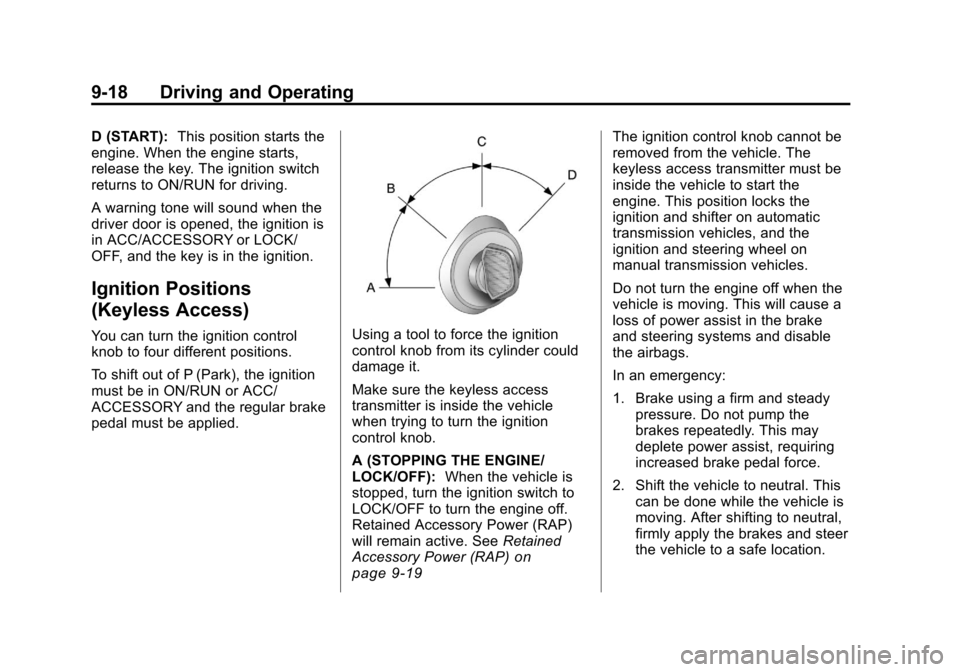
A (STOPPING THE ENGINE/
LOCK/OFF):When the vehicle is
stopped, turn the ignition switch to
LOCK/OFF to turn the engine off.
Retained Accessory Power (RAP)
will remain active. See Retained
Accessory Power (RAP)
on
page 9‑19for more information.
This is the only position in which the
key can be removed. This position
locks the ignition and shifter on
automatic transmission vehicles,
and the ignition and steering wheel
on manual transmission vehicles.
Do not turn the engine off when the
vehicle is moving. This will cause a
loss of power assist in the brake
and steering systems and disable
the airbags. In an emergency:
1. Brake using a firm and steady
pressure. Do not pump the
brakes repeatedly. This may
deplete power assist, requiring
increased brake pedal force.
2. Shift the vehicle to neutral. This can be done while the vehicle is
moving. After shifting to neutral,
firmly apply the brakes and steer
the vehicle to a safe location.
3. Come to a complete stop. Shift to P (Park) with an automatic
transmission, or Neutral with a
manual transmission. Turn the
ignition to LOCK/OFF.
4. Set the parking brake. See Parking Brake (Manual)
on
page 9‑33or Parking Brake
(Electric) on page 9‑34 The ignition switch can bind in the
LOCK/OFF position with the wheels
turned off center. If this happens,
move the steering wheel from right
to left while turning the key to ACC/
ACCESSORY. If this does not work,
then the vehicle needs service.
B (ACC/ACCESSORY):
This
position lets you use things like the
radio and the windshield wipers
when the engine is off. This position
allows you to turn off the engine.
C (ON/RUN): This position is for
driving. It is the position the ignition
switch returns to after the engine
starts, and the key is released.
To shift the transmission out of
P (Park), the ignition key has to be
in ACC/ACCESSORY or ON/RUN.
The battery could be drained if the
key is left in the ACC/ACCESSORY
or ON/RUN position with the engine
off. The vehicle might not start if the
battery is allowed to drain for an
extended period of time.
Page 278 of 496
Black plate (18,1)Cadillac CTS/CTS-V Owner Manual - 2011
9-18 Driving and Operating
D (START):This position starts the
engine. When the engine starts,
release the key. The ignition switch
returns to ON/RUN for driving.
A warning tone will sound when the
driver door is opened, the ignition is
in ACC/ACCESSORY or LOCK/
OFF, and the key is in the ignition.
Ignition Positions
(Keyless Access)
You can turn the ignition control
knob to four different positions.
To shift out of P (Park), the ignition
must be in ON/RUN or ACC/
ACCESSORY and the regular brake
pedal must be applied.Using a tool to force the ignition
control knob from its cylinder could
damage it.
Make sure the keyless access
transmitter is inside the vehicle
when trying to turn the ignition
control knob.
A (STOPPING THE ENGINE/
LOCK/OFF): When the vehicle is
stopped, turn the ignition switch to
LOCK/OFF to turn the engine off.
Retained Accessory Power (RAP)
will remain active. See Retained
Accessory Power (RAP)
on
page 9‑19
The ignition control knob cannot be
removed from the vehicle. The
keyless access transmitter must be
inside the vehicle to start the
engine. This position locks the
ignition and shifter on automatic
transmission vehicles, and the
ignition and steering wheel on
manual transmission vehicles.
Do not turn the engine off when the
vehicle is moving. This will cause a
loss of power assist in the brake
and steering systems and disable
the airbags.
In an emergency:
1. Brake using a firm and steady pressure. Do not pump the
brakes repeatedly. This may
deplete power assist, requiring
increased brake pedal force.
2. Shift the vehicle to neutral. This can be done while the vehicle is
moving. After shifting to neutral,
firmly apply the brakes and steer
the vehicle to a safe location.
Page 297 of 496

Black plate (37,1)Cadillac CTS/CTS-V Owner Manual - 2011
Driving and Operating 9-37
Ride Control Systems
Traction Control
System (TCS)
The vehicle has a Traction Control
System (TCS) that limits wheel
spin. This is especially useful in
slippery road conditions. On a
rear-wheel-drive vehicle, the system
operates if it senses that one or
both of the rear wheels are spinning
or beginning to lose traction. On an
All-Wheel-Drive (AWD) vehicle, the
system will operate if it senses that
any of the wheels are spinning or
beginning to lose traction. When this
happens, the system brakes the
spinning wheel(s) and/or reduces
engine power to limit wheel spin.
The system may be heard or felt
while it is working, but this is
normal.The TCS/StabiliTrak warning light
flashes when the traction control
system is limiting wheel spin.
The TCS/StabiliTrak warning light
comes on if there is a problem with
the traction control system. When
the TCS/StabiliTrak warning light is
on, the system will not limit wheel
spin. Adjust your driving
accordingly. SeeTraction Control
System (TCS)/StabiliTrak
®Lighton
page 5‑24for more information.
TCS automatically comes on
whenever the vehicle is started. To
limit wheel spin, especially in
slippery road conditions, the system
should always be left on, but it may
be necessary to turn the system off
if the vehicle is stuck in sand, mud
or snow and rocking the vehicle is
required. See If the Vehicle is Stuck
on page 9‑11for more information. See
Winter Driving
on page 9‑9for information on using TCS when
driving in snowy or icy conditions.
This button is located on the
instrument panel (CTS) or the
steering wheel (CTS-V).
Press and release the TCS/
StabiliTrak button and the traction
control system will turn off and the
TCS/StabiliTrak warning light will
come on. Press the button again to
turn the system back on. For
information on turning StabiliTrak off
and on, see StabiliTrak System
following.
Adding non‐dealer accessories can
affect your vehicle's performance.
SeeAccessories and Modifications
on page 10‑4for more information.
Page 319 of 496
Black plate (1,1)Cadillac CTS/CTS-V Owner Manual - 2011
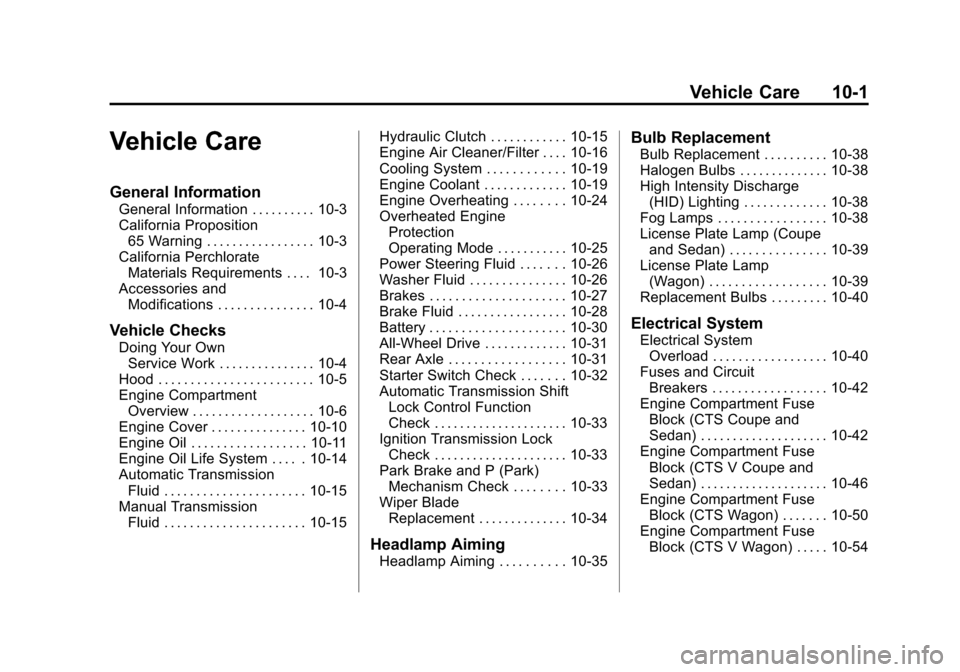
Vehicle Care 10-1
Vehicle Care
General Information
General Information . . . . . . . . . . 10-3
California Proposition65 Warning . . . . . . . . . . . . . . . . . 10-3
California Perchlorate Materials Requirements . . . . 10-3
Accessories and Modifications . . . . . . . . . . . . . . . 10-4
Vehicle Checks
Doing Your OwnService Work . . . . . . . . . . . . . . . 10-4
Hood . . . . . . . . . . . . . . . . . . . . . . . . 10-5
Engine Compartment Overview . . . . . . . . . . . . . . . . . . . 10-6
Engine Cover . . . . . . . . . . . . . . . 10-10
Engine Oil . . . . . . . . . . . . . . . . . . 10-11
Engine Oil Life System . . . . . 10-14
Automatic Transmission Fluid . . . . . . . . . . . . . . . . . . . . . . 10-15
Manual Transmission Fluid . . . . . . . . . . . . . . . . . . . . . . 10-15 Hydraulic Clutch . . . . . . . . . . . . 10-15
Engine Air Cleaner/Filter . . . . 10-16
Cooling System . . . . . . . . . . . . 10-19
Engine Coolant . . . . . . . . . . . . . 10-19
Engine Overheating . . . . . . . . 10-24
Overheated Engine
Protection
Operating Mode . . . . . . . . . . . 10-25
Power Steering Fluid . . . . . . . 10-26
Washer Fluid . . . . . . . . . . . . . . . 10-26
Brakes . . . . . . . . . . . . . . . . . . . . . 10-27
Brake Fluid . . . . . . . . . . . . . . . . . 10-28
Battery . . . . . . . . . . . . . . . . . . . . . 10-30
All-Wheel Drive . . . . . . . . . . . . . 10-31
Rear Axle . . . . . . . . . . . . . . . . . . 10-31
Starter Switch Check . . . . . . . 10-32
Automatic Transmission Shift Lock Control Function
Check . . . . . . . . . . . . . . . . . . . . . 10-33
Ignition Transmission Lock Check . . . . . . . . . . . . . . . . . . . . . 10-33
Park Brake and P (Park) Mechanism Check . . . . . . . . 10-33
Wiper Blade Replacement . . . . . . . . . . . . . . 10-34
Headlamp Aiming
Headlamp Aiming . . . . . . . . . . 10-35
Bulb Replacement
Bulb Replacement . . . . . . . . . . 10-38
Halogen Bulbs . . . . . . . . . . . . . . 10-38
High Intensity Discharge(HID) Lighting . . . . . . . . . . . . . 10-38
Fog Lamps . . . . . . . . . . . . . . . . . 10-38
License Plate Lamp (Coupe
and Sedan) . . . . . . . . . . . . . . . 10-39
License Plate Lamp (Wagon) . . . . . . . . . . . . . . . . . . 10-39
Replacement Bulbs . . . . . . . . . 10-40
Electrical System
Electrical System Overload . . . . . . . . . . . . . . . . . . 10-40
Fuses and Circuit Breakers . . . . . . . . . . . . . . . . . . 10-42
Engine Compartment Fuse
Block (CTS Coupe and
Sedan) . . . . . . . . . . . . . . . . . . . . 10-42
Engine Compartment Fuse Block (CTS V Coupe and
Sedan) . . . . . . . . . . . . . . . . . . . . 10-46
Engine Compartment Fuse Block (CTS Wagon) . . . . . . . 10-50
Engine Compartment Fuse Block (CTS V Wagon) . . . . . 10-54
Page 325 of 496

Black plate (7,1)Cadillac CTS/CTS-V Owner Manual - 2011
Vehicle Care 10-7
A. Windshield Washer FluidReservoir. See Washer Fluidon
page 10‑26.
B. Engine Compartment Fuse
Block (CTS Coupe and Sedan)
on page 10‑42orEngine
Compartment Fuse Block (CTS
V Coupe and Sedan)
on
page 10‑46or Engine
Compartment Fuse Block (CTS
Wagon)
on page 10‑50or
Engine Compartment Fuse
Block (CTS V Wagon)
on
page 10‑54.
C. Remote Positive (+) Terminal. See Jump Starting
on
page 10‑112. D. Remote Negative (−) Terminal.
See Jump Starting
on
page 10‑112.
E. Passenger Compartment Air Filter. See Passenger
Compartment Air Filter
on
page 8‑6.
F. Engine Cooling Fan (Out of View). See Cooling System
on
page 10‑19.
G. Power Steering Fluid Reservoir (Under Engine Cover). See
Power Steering Fluid
on
page 10‑26.
H. Engine Oil Fill Cap. See Engine
Oil on page 10‑11. I. Engine Oil Dipstick (Out of
View). See Engine Oil
on
page 10‑11.
J. Hydraulic Clutch Reservoir (If Equipped) (Not Shown). See
Hydraulic Clutch on page 10‑15.
K. Brake Master Cylinder Reservoir (Out of View). See
Brakes on page 10‑27.
L. Engine Coolant Surge Tank and Pressure Cap. See Engine
Coolant on page 10‑19.
M. Engine Air Cleaner/Filter
on
page 10‑16.