tires CADILLAC CTS 2011 2.G User Guide
[x] Cancel search | Manufacturer: CADILLAC, Model Year: 2011, Model line: CTS, Model: CADILLAC CTS 2011 2.GPages: 496, PDF Size: 7.71 MB
Page 266 of 496

Black plate (6,1)Cadillac CTS/CTS-V Owner Manual - 2011
9-6 Driving and Operating
the vehicle straddles the edge of the
pavement. Turn the steering wheel
8 to 13 cm (3 to 5 inches), about
one-eighth turn, until the right front
tire contacts the pavement edge.
Then turn the steering wheel to go
straight down the roadway.
Loss of Control
Let us review what driving experts
say about what happens when the
three control systems—brakes,
steering, and acceleration —do not
have enough friction where the tires
meet the road to do what the driver
has asked.
In any emergency, do not give up.
Keep trying to steer and constantly
seek an escape route or area of
less danger.
Skidding
In a skid, a driver can lose control of
the vehicle. Defensive drivers avoid
most skids by taking reasonable
care suited to existing conditions,
and by not overdriving those
conditions. But skids are always
possible.
The three types of skids correspond
to the vehicle's three control
systems. In the braking skid, the
wheels are not rolling. In the
steering or cornering skid, too much
speed or steering in a curve causes
tires to slip and lose cornering force.
And in the acceleration skid, too
much throttle causes the driving
wheels to spin.
If the vehicle starts to slide, ease
your foot off the accelerator pedal
and quickly steer the way you want
the vehicle to go. If you start
steering quickly enough, the vehicle
may straighten out. Always be ready
for a second skid if it occurs. Of course, traction is reduced when
water, snow, ice, gravel, or other
material is on the road. For safety,
slow down and adjust your driving to
these conditions. It is important to
slow down on slippery surfaces
because stopping distance is longer
and vehicle control more limited.
While driving on a surface with
reduced traction, try to avoid
sudden steering, acceleration,
or braking, including reducing
vehicle speed by shifting to a lower
gear. Any sudden changes could
cause the tires to slide. You might
not realize the surface is slippery
until the vehicle is skidding. Learn to
recognize warning clues
—such as
enough water, ice, or packed snow
on the road to make a mirrored
surface —and slow down when you
have any doubt.
Remember: Antilock brakes help
avoid only the braking skid.
Page 268 of 496
Black plate (8,1)Cadillac CTS/CTS-V Owner Manual - 2011
9-8 Driving and Operating
Hydroplaning
Hydroplaning is dangerous. Water
can build up under your vehicle's
tires so they actually ride on the
water. This can happen if the road is
wet enough and you are going fast
enough. When your vehicle is
hydroplaning, it has little or no
contact with the road.
There is no hard and fast rule about
hydroplaning. The best advice is to
slow down when the road is wet.
Other Rainy Weather Tips
Besides slowing down, other wet
weather driving tips include:
.Allow extra following distance.
.Pass with caution.
.Keep windshield wiping
equipment in good shape.
.Keep the windshield washer fluid
reservoir filled.
.Have good tires with proper
tread depth. SeeTireson
page 10‑66.
.Turn off cruise control.
Highway Hypnosis
Always be alert and pay attention to
your surroundings while driving.
If you become tired or sleepy, find a
safe place to park your vehicle
and rest.
Other driving tips include:
.Keep the vehicle well ventilated.
.Keep interior temperature cool.
.Keep your eyes moving —scan
the road ahead and to the sides.
.Check the rearview mirror and
vehicle instruments often.
Hill and Mountain Roads
Driving on steep hills or through
mountains is different than driving
on flat or rolling terrain. Tips for
driving in these conditions include:
.Keep the vehicle serviced and in
good shape.
.Check all fluid levels and brakes,
tires, cooling system, and
transmission.
.Shift to a lower gear when going
down steep or long hills.
{WARNING
If you do not shift down, the
brakes could get so hot that they
would not work well. You would
then have poor braking or even
none going down a hill. You could
crash. Shift down to let the engine
assist the brakes on a steep
downhill slope.
Page 269 of 496

Black plate (9,1)Cadillac CTS/CTS-V Owner Manual - 2011
Driving and Operating 9-9
{WARNING
Coasting downhill in N (Neutral)
or with the ignition off is
dangerous. The brakes will have
to do all the work of slowing down
and they could get so hot that
they would not work well. You
would then have poor braking or
even none going down a hill. You
could crash. Always have the
engine running and the vehicle in
gear when going downhill.
.Stay in your own lane. Do not
swing wide or cut across the
center of the road. Drive at
speeds that let you stay in your
own lane.
.Top of hills: Be
alert—something could
be in your lane (stalled car,
accident).
.Pay attention to special road
signs (falling rocks area, winding
roads, long grades, passing or
no-passing zones) and take
appropriate action.
Winter Driving
Driving on Snow or Ice
Drive carefully when there is snow
or ice between the tires and the
road, creating less traction or grip.
Wet ice can occur at about 0°C
(32°F) when freezing rain begins to
fall, resulting in even less traction.
Avoid driving on wet ice or in
freezing rain until roads can be
treated with salt or sand.
Drive with caution, whatever the
condition. Accelerate gently so
traction is not lost. Accelerating too
quickly causes the wheels to spin
and makes the surface under the
tires slick, so there is even less
traction. Try not to break the fragile traction.
If you accelerate too fast, the drive
wheels will spin and polish the
surface under the tires even more.
The
Antilock Brake System (ABS)
on page 9‑32improves vehicle
stability during hard stops on
slippery roads, but apply the brakes
sooner than when on dry pavement.
Allow greater following distance on
any slippery road and watch for
slippery spots. Icy patches can
occur on otherwise clear roads in
shaded areas. The surface of a
curve or an overpass can remain icy
when the surrounding roads are
clear. Avoid sudden steering
maneuvers and braking while
on ice.
Turn off cruise control, if equipped,
on slippery surfaces.
Page 271 of 496
Black plate (11,1)Cadillac CTS/CTS-V Owner Manual - 2011
Driving and Operating 9-11
feel really uncomfortable from the
cold. Moving about to keep warm
also helps.
If it takes some time for help to
arrive, now and then when you run
the engine, push the accelerator
pedal slightly so the engine runs
faster than the idle speed. This
keeps the battery charged to restart
the vehicle and to signal for help
with the headlamps. Do this as little
as possible to save fuel.
If the Vehicle is Stuck
Slowly and cautiously spin the
wheels to free the vehicle when
stuck in sand, mud, ice, or snow.
If stuck too severely for the traction
system to free the vehicle, turn the
traction system off and use the
rocking method.
{WARNING
If the vehicle's tires spin at high
speed, they can explode, and you
or others could be injured. The
vehicle can overheat, causing an
engine compartment fire or other
damage. Spin the wheels as little
as possible and avoid going
above 55 km/h (35 mph) as
shown on the speedometer.
For information about using tire
chains on the vehicle, see Tire
Chains on page 10‑89.
Rocking the Vehicle to Get
it Out
Turn the steering wheel left and
right to clear the area around the
front wheels. Turn off any traction
system. Shift back and forth
between R (Reverse) and a forward
gear, or with a manual transmission,
between 1 (First) or 2 (Second) and
R (Reverse), spinning the wheels as
little as possible. To prevent transmission wear, wait until the
wheels stop spinning before shifting
gears. Release the accelerator
pedal while shifting, and press
lightly on the accelerator pedal
when the transmission is in gear.
Slowly spinning the wheels in the
forward and reverse directions
causes a rocking motion that could
free the vehicle. If that does not get
the vehicle out after a few tries, it
might need to be towed out. If the
vehicle does need to be towed out,
see
Towing the Vehicle
on
page 10‑117.
Vehicle Load Limits
It is very important to know how
much weight the vehicle can
carry. This weight is called the
vehicle capacity weight and
includes the weight of all
occupants, cargo and all
nonfactory‐installed options.
Page 272 of 496
Black plate (12,1)Cadillac CTS/CTS-V Owner Manual - 2011
9-12 Driving and Operating
Two labels on the vehicle show
how much weight it may
properly carry, the Tire and
Loading Information label and
the Certification label.
{WARNING
Do not load the vehicle any
heavier than the Gross
Vehicle Weight Rating
(GVWR), or either the
maximum front or rear Gross
Axle Weight Rating (GAWR).
If you do, parts on the vehicle
can break, and it can change
the way the vehicle handles.
These could cause you to lose
control and crash. Also,
overloading can shorten the
life of the vehicle. Tire and Loading Information
Label
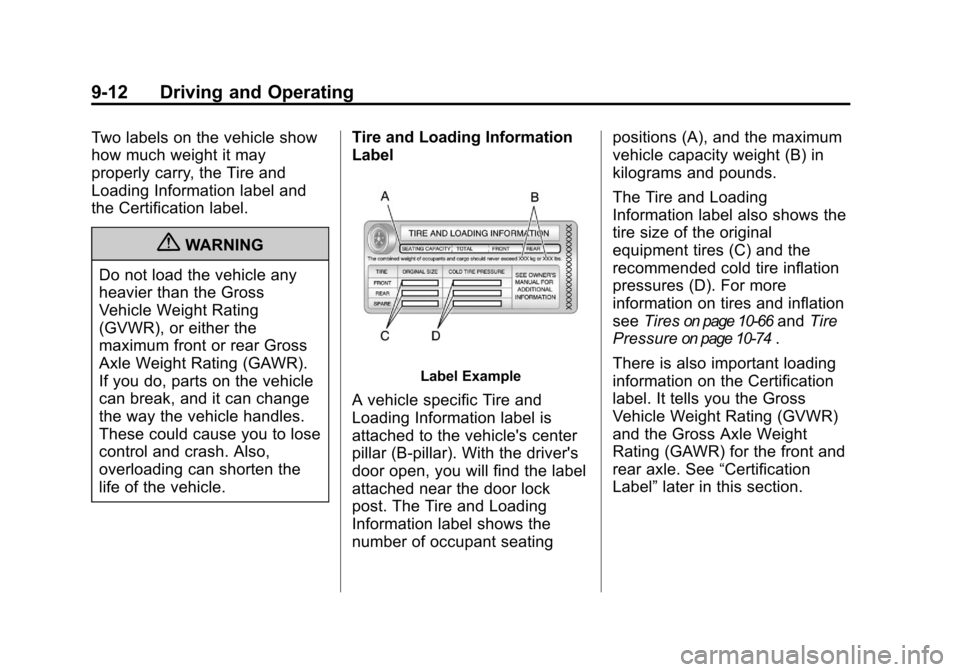
Label Example
A vehicle specific Tire and
Loading Information label is
attached to the vehicle's center
pillar (B-pillar). With the driver's
door open, you will find the label
attached near the door lock
post. The Tire and Loading
Information label shows the
number of occupant seating positions (A), and the maximum
vehicle capacity weight (B) in
kilograms and pounds.
The Tire and Loading
Information label also shows the
tire size of the original
equipment tires (C) and the
recommended cold tire inflation
pressures (D). For more
information on tires and inflation
see
Tires
on page 10‑66and Tire
Pressure
on page 10‑74.
There is also important loading
information on the Certification
label. It tells you the Gross
Vehicle Weight Rating (GVWR)
and the Gross Axle Weight
Rating (GAWR) for the front and
rear axle. See “Certification
Label” later in this section.
Page 276 of 496
Black plate (16,1)Cadillac CTS/CTS-V Owner Manual - 2011
9-16 Driving and Operating
Starting and
Operating
New Vehicle Break-In
Follow these recommended
guidelines during the first
2 414 km (1,500 miles) of driving
this vehicle. Parts have a break-in
period and performance will be
better in the long run.
For the first 2 414 km (1,500 miles):
.Avoid full throttle starts and
abrupt stops.
.Do not exceed 4,000
engine rpm.
.Avoid driving at any one
constant speed, fast or slow.
.Avoid downshifting to brake or
slow the vehicle when the
engine speed will exceed
4000 rpm.
.Do not let the engine labor.
Never lug the engine in high
gear at low speeds. With amanual transmission, shift to the
next lower gear. This rule
applies at all times, not just
during the break-in period.
.Do not participate in track
events, sport driving schools,
or similar activities during this
break–in period.
.Check engine oil with every
refueling and add if necessary.
Oil and fuel consumption may be
higher than normal during the
first 2 414 km (1,500 miles).
.To break in new tires, drive at
moderate speeds and avoid
hard cornering for the first
322 km (200 miles). New tires do
not have maximum traction and
may tend to slip.
.New brake linings also need a
break–in period. Avoid making
hard stops during the first
322 km (200 miles). This is
recommended every time brake
linings are replaced.
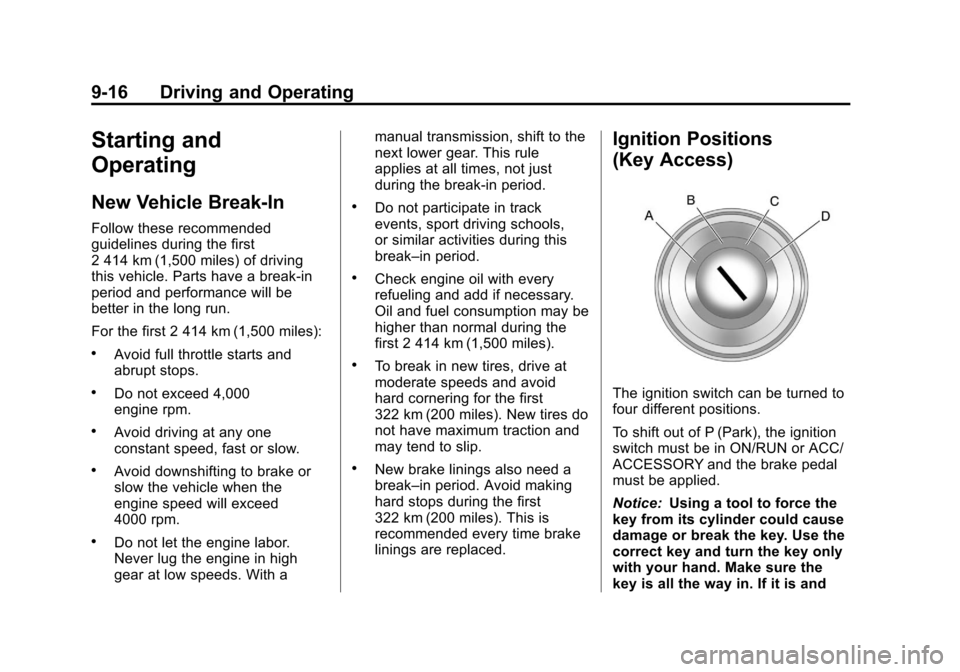
Ignition Positions
(Key Access)
The ignition switch can be turned to
four different positions.
To shift out of P (Park), the ignition
switch must be in ON/RUN or ACC/
ACCESSORY and the brake pedal
must be applied.
Notice:
Using a tool to force the
key from its cylinder could cause
damage or break the key. Use the
correct key and turn the key only
with your hand. Make sure the
key is all the way in. If it is and
Page 287 of 496

Black plate (27,1)Cadillac CTS/CTS-V Owner Manual - 2011
Driving and Operating 9-27
N (Neutral):In this position, the
engine does not connect with the
wheels. To restart when the vehicle
is already moving, use N (Neutral)
only. You can also use N (Neutral)
when the vehicle is being towed.
{WARNING
Shifting into a drive gear while the
engine is running at high speed is
dangerous. Unless your foot is
firmly on the brake pedal, the
vehicle could move very rapidly.
You could lose control and hit
people or objects. Do not shift
into a drive gear while the engine
is running at high speed.
Notice: Shifting out of P (Park) or
N (Neutral) with the engine
running at high speed may
damage the transmission. The
repairs would not be covered by
the vehicle warranty. Be sure the
engine is not running at high
speed when shifting the vehicle. D (Drive):
This position is for
normal driving. It provides the best
fuel economy. If you need more
power for passing, and you are:
.Going less than 55 km/h
(35 mph), push the accelerator
pedal about halfway down.
.Going about 55 km/h (35 mph) or
more, push the accelerator all
the way down.
The transmission will shift down
to a lower gear and have more
power.
Downshifting the transmission in
slippery road conditions could result
in skidding; see “Skidding”under
Loss of Control on page 9‑6 While in D (Drive), the CTS‐V
vehicle's first forward gear
automatic shift after starting the
vehicle will be from 1 (First).
Afterwards, the CTS‐V vehicles will
always start in 2 (Second) gear.
While in M (Manual Mode), for
increased performance, the vehicle
will start in 1 (First) gear.
M (Manual Mode):
This position
allows the driver to select the range
of gears appropriate for current
driving conditions. See Driver Shift
Control (DSC) later in this section.
Notice: Spinning the tires or
holding the vehicle in one place
on a hill using only the
accelerator pedal may damage
the transmission. If you are stuck,
do not spin the tires. When
stopping on a hill, use the brakes
to hold the vehicle in place.
Page 312 of 496
Black plate (52,1)Cadillac CTS/CTS-V Owner Manual - 2011
9-52 Driving and Operating
Towing
General Towing
Information
Only use towing equipment that has
been designed for the vehicle.
Contact your dealer or trailering
dealer for assistance with preparing
the vehicle for towing a trailer.
See the following trailer towing
information in this section:
.For information on driving while
towing a trailer, see“Driving
Characteristics and
Towing Tips.”
.For maximum vehicle and trailer
weights, see “Trailer Towing.”
.For information on equipment to
tow a trailer, see “Towing
Equipment.”
For information on towing a disabled
vehicle, see Towing the Vehicle
on
page 10‑117. For information on
towing the vehicle behind another vehicle such as a motorhome, see
Recreational Vehicle Towing
on
page 10‑117.
Driving Characteristics
and Towing Tips
{WARNING
The driver can lose control when
pulling a trailer if the correct
equipment is not used or the
vehicle is not driven properly. For
example, if the trailer is too
heavy, the brakes may not work
well —or even at all. The driver
and passengers could be
seriously injured. The vehicle may
also be damaged; the resulting
repairs would not be covered by
the vehicle warranty. Pull a trailer
only if all the steps in this section
have been followed. Ask your
dealer for advice and information
about towing a trailer with the
vehicle. The vehicle can tow a trailer if it is
equipped with the proper trailer
towing equipment. To identify the
trailering capacity of the vehicle, see
Trailer Towing (Except CTS-V)
on
page 9‑56or Trailer Towing
(CTS-V)on page 9‑57. Trailering
changes handling, acceleration,
braking, durability, and fuel
economy. With the added weight,
the engine, transmission, wheel
assemblies, and tires are forced to
work harder and under greater
loads. The trailer also adds wind
resistance, increasing the pulling
requirements. For safe trailering,
correctly use the proper trailering
equipment.
The following information has
important trailering tips and rules for
your safety and that of your
passengers. Read this section
carefully before pulling a trailer.
Page 313 of 496
Black plate (53,1)Cadillac CTS/CTS-V Owner Manual - 2011
Driving and Operating 9-53
Pulling A Trailer
Here are some important points:
.There are many laws, including
speed limit restrictions that apply
to trailering. Check for legal
requirements with state or
provincial police.
.Do not tow a trailer at all during
the first 1 600 km (1,000 miles)
the new vehicle is driven. The
engine, axle, or other parts could
be damaged.
.During the first 800 km
(500 miles) that a trailer is
towed, do not drive over 80 km/h
(50 mph) and do not make starts
at full throttle. This reduces wear
on the vehicle.
.Vehicles with automatic
transmissions can tow in
D (Drive) but M (Manual Mode)
is recommended. SeeManual
Mode
on page 9‑28for more
information. Use a lower gear if
the transmission shifts too often. For vehicles with a manual
transmission, it is better not to
use the highest gear.
.Use the cruise control when
towing.
.Obey speed limit restrictions. Do
not drive faster than the
maximum posted speed for
trailers, or no more than 90 km/h
(55 mph), to reduce wear on the
vehicle.
Driving with a Trailer
Towing a trailer requires experience.
Get familiar with handling and
braking with the added trailer
weight. The vehicle is now longer
and not as responsive as the
vehicle is by itself.
Check all trailer hitch parts and
attachments, safety chains,
electrical connectors, lamps, tires,
and mirror adjustments. If the trailer
has electric brakes, start the vehicle
and trailer moving and then apply
the trailer brake controller by hand
to be sure the brakes are working.During the trip, check regularly to be
sure that the load is secure, and the
lamps and trailer brakes are working
properly.
Towing with a Stability Control
System
When towing, the sound of the
stability control system might be
heard. The system is reacting to the
vehicle movement caused by the
trailer, which mainly occurs during
cornering. This is normal when
towing heavier trailers.
Following Distance
Stay at least twice as far behind the
vehicle ahead as you would when
driving the vehicle without a trailer.
This can help to avoid situations
that require heavy braking and
sudden turns.
Page 316 of 496
Black plate (56,1)Cadillac CTS/CTS-V Owner Manual - 2011
9-56 Driving and Operating
Engine Cooling When Trailer
Towing
The cooling system may temporarily
overheat during severe operating
conditions. SeeEngine Overheating
on page 10‑24.
Trailer Towing
(Except CTS-V)
Before pulling a trailer, there are
three important considerations that
have to do with weight:
.The weight of the trailer.
.The weight of the trailer tongue.
.The total weight on the vehicle's
tires.
Weight of the Trailer
How heavy can a trailer safely be?
It should never weigh more than
450 kg (1,000 lbs). But even that
can be too heavy. Speed, altitude, road grades,
outside temperature, special
equipment, and the amount of
tongue weight the vehicle can carry
must be considered. See
“Weight of
the Trailer Tongue” later in this
section for more information.
Maximum trailer weight is calculated
assuming only the driver is in the
tow vehicle and it has all the
required trailering equipment. The
weight of additional optional
equipment, passengers, and cargo
in the tow vehicle must be
subtracted from the maximum
trailer weight.
Ask your dealer for our trailering
information or advice, or write us at
our Customer Assistance Offices.
See Roadside Service
on
page 13‑7for more information.
Weight of the Trailer Tongue
The tongue load (A) of any trailer is
an important weight to measure
because it affects the total gross
weight of the vehicle. The Gross
Vehicle Weight (GVW) includes the
curb weight of the vehicle, any
cargo carried in it, and the people
who will be riding in the vehicle.
If there are a lot of options,
equipment, passengers or cargo in
the vehicle, it will reduce the tongue
weight the vehicle can carry, which
will also reduce the trailer weight the
vehicle can tow. If towing a trailer,
the tongue load must be added to
the GVW because the vehicle will
be carrying that weight, too. See
Vehicle Load Limits
on page 9‑11for more information about the
vehicle's maximum load capacity.