ignition CADILLAC CTS 2011 2.G Owner's Manual
[x] Cancel search | Manufacturer: CADILLAC, Model Year: 2011, Model line: CTS, Model: CADILLAC CTS 2011 2.GPages: 496, PDF Size: 7.71 MB
Page 62 of 496

Black plate (30,1)Cadillac CTS/CTS-V Owner Manual - 2011
2-30 Keys, Doors and Windows
Press the switch to lower the
window to the desired level. Pull the
switch up to raise the window.
Retained Accessory Power (RAP)
allows the use of the power
windows after the ignition has been
turned off. SeeRetained Accessory
Power (RAP) on page 9‑19.
Express-Down/Up Windows
Windows with the express feature
allow the windows to be raised and
lowered all the way without holding
the switch.
Press or pull the switch fully and
release it to activate the express
feature.
The express mode can be canceled
by briefly pressing or pulling the
switch.
Express Window Anti-Pinch
Feature
If any object is in the path of the
window when the express‐up is
active, the window will stop at the
obstruction and auto‐reverse to a
preset factory position. Weather
conditions such as severe icing may
also cause the window to auto‐
reverse. The window will return to
normal operation after the
obstruction or condition is removed.
Express Window Anti‐Pinch
Override
{WARNING
If express override is activated,
the window will not reverse
automatically. You or others could
be injured and the window could
be damaged. Before you use
express override, make sure that
all people and obstructions are
clear of the window path.
The anti‐pinch feature can be
overridden. Hold the window switch
all the way up to the second
position. The window will rise for as
long as the switch is held. Once the
switch is released, the express
mode is re‐activated.
In this mode, the window can close
on an object in its path. Use care
when using the override mode.
Page 63 of 496
Black plate (31,1)Cadillac CTS/CTS-V Owner Manual - 2011
Keys, Doors and Windows 2-31
Programming the Power
Windows
If the vehicle battery has been
recharged, disconnected or not
working, the front power windows
will need to be reprogrammed for
the express-up feature to work.
Before reprogramming, replace or
recharge the vehicle's battery.
To program:
1. With the ignition in ON/RUN orACC/ACCESSORY, or when
Retained Accessory Power
(RAP) is active, close all doors.
2. Press and hold the power window switch until the window
is fully open.
3. Pull the power window switch up until the window is fully closed.
4. Continue holding the switch up for approximately two seconds
after the window is completely
closed. The window is now reprogrammed.
Repeat the process for the other
windows.
Window Lockout
o
(Window Lockout): The rear
window lockout button is located on
the driver door near the window
switches.
Press the right side of the button to
disable the rear window switches.
The light on the button indicates it is
on. The rear windows still can be
raised or lowered using the driver
window switches when the lockout
feature is active.
To restore power to the rear
windows, press the button again.
The light on the button will go out.
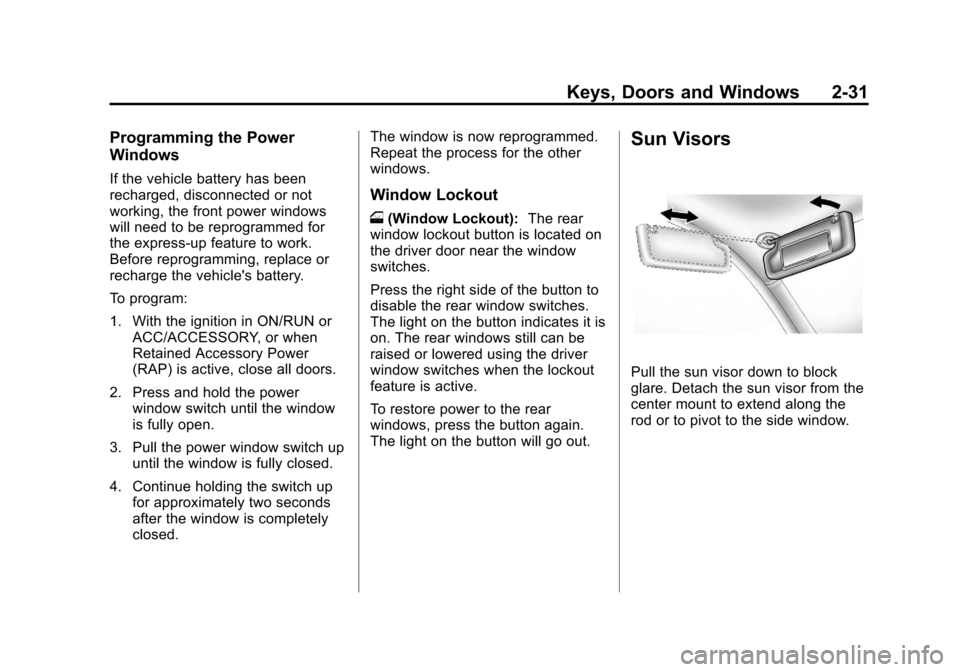
Sun Visors
Pull the sun visor down to block
glare. Detach the sun visor from the
center mount to extend along the
rod or to pivot to the side window.
Page 64 of 496

Black plate (32,1)Cadillac CTS/CTS-V Owner Manual - 2011
2-32 Keys, Doors and Windows
Roof
Sunroof (Sedan and
Wagon)
If the vehicle has a power sunroof it
will only operate when the ignition is
in ON/RUN or ACC/ACCESSORY,
or when Retained Accessory Power
(RAP) is active. SeeRetained
Accessory Power (RAP)
on
page 9‑19.
The sunroof switches are located on
the overhead console.
The driver side switch operates the
sunshade.
Press and hold the rear of the
switch to open the sunshade. Press
and hold the front of the switch to
close the sunshade. Express-Open:
To open the
sunshade, fully press and release
the rear of the driver side switch.
The sunshade will automatically
open. To stop the sunshade
partway, press the switch a
second time.
Express-Close: To close the
sunshade, fully press and release
the front of the driver side switch.
The sunshade will automatically
close. To stop the sunshade
partway, press the switch a
second time.
The sunshade will open
automatically with the sunroof, but
can also be opened manually.
The passenger side switch operates
the sunroof.
Express-Open: To open the
sunroof, fully press and release the
rear of the passenger side switch.
The sunroof will automatically open.
To stop the sunroof partway, press
the switch a second time.
Page 66 of 496

Black plate (34,1)Cadillac CTS/CTS-V Owner Manual - 2011
2-34 Keys, Doors and Windows
Sunroof (Coupe)
If the vehicle has a power sunroof it
will only operate when the ignition is
in ON/RUN or ACC/ACCESSORY,
or when Retained Accessory Power
(RAP) is active. SeeRetained
Accessory Power (RAP)
on
page 9‑19.
The sunroof switches are located on
the overhead console.
The driver side switch operates the
sunshade.
Press and hold the rear of the
switch to open the sunshade. Press
and hold the front of the switch to
close the sunshade. Express-Open:
To open the
sunshade, fully press and release
the rear of the driver side switch.
The sunshade will automatically
open. To stop the sunshade
partway, press the switch a
second time.
Express-Close: To close the
sunshade, fully press and release
the front of the driver side switch.
The sunshade will automatically
close. To stop the sunshade
partway, press the switch a
second time.
The sunshade will open
automatically with the sunroof, but
can also be opened manually.
The passenger side switch operates
the sunroof.
Press and hold the front of the
passenger side switch to vent the
sunroof. The sunshade will
automatically open approximately
fifteen inches. Press and hold the
rear of the passenger side switch to
close the sunroof vent.
Page 74 of 496
Black plate (6,1)Cadillac CTS/CTS-V Owner Manual - 2011
3-6 Seats and Restraints
To recall memory positions, press
and release“1”or“2.” The vehicle
must be in P (Park) for an automatic
transmission, or the parking brake
must be applied for a manual
transmission. A single beep will
sound when the button is pressed.
The seat, outside mirrors, and/or
power steering column will move to
the position previously stored for the
identified driver.
Automatic Entry Recall
If entry/exit recall is programmed on
in the vehicle personalization menu,
automatic entry recall occurs when
the ignition is turned on. See “Entry/
Exit Recall” underVehicle
Personalization
on page 5‑45for
more information.
To stop recall movement, press one
of the power seat, memory,
or outside mirror buttons, or the
power steering column switch,
if equipped. If something has blocked the driver
seat or the steering column while
recalling a memory position, the
recall may stop. Remove the
obstruction; then press the
appropriate control for the area that
is not recalling for two seconds. Try
recalling the memory position again
by pressing the appropriate memory
button. If the memory position is still
not recalling, see your dealer for
service.
Exit Recall
S(Exit Button):
Press to move the
driver seat and/or power steering
column, if equipped, to the exit
position. A single beep sounds
when the exit feature activates. The
vehicle must be in P (Park) for an
automatic transmission, or the
parking brake must be applied for a
manual transmission. If entry/exit recall is programmed on
in the vehicle personalization menu,
automatic seat and/or steering
column movement occurs under the
following conditions:
.The ignition key is removed on
vehicles with Remote Keyless
Entry (RKE).
.The ignition is turned to OFF
and the driver door is opened on
vehicles with Remote Keyless
Access.
If entry/exit recall is programmed
off and the exit button is pressed,
the driver seat will move back a
preset distance and the steering
column, if equipped, will move up
and forward. See Vehicle
Personalization
on page 5‑45for
more information.
If something has blocked the driver
seat while recalling the exit position,
the recall may stop. Remove the
obstruction; then press and hold the
power seat control rearward for
two seconds. Try recalling the exit
Page 79 of 496
Black plate (11,1)Cadillac CTS/CTS-V Owner Manual - 2011
Seats and Restraints 3-11
Heated Front Seats
{WARNING
If you cannot feel temperature
change or pain to the skin, the
seat heater may cause burns
even at low temperatures. To
reduce the risk of burns, people
with such a condition should use
care when using the seat heater,
especially for long periods of
time. Do not place anything on
the seat that insulates against
heat, such as a blanket, cushion,
cover or similar item. This may
cause the seat heater to
overheat. An overheated seat
heater may cause a burn or may
damage the seat.
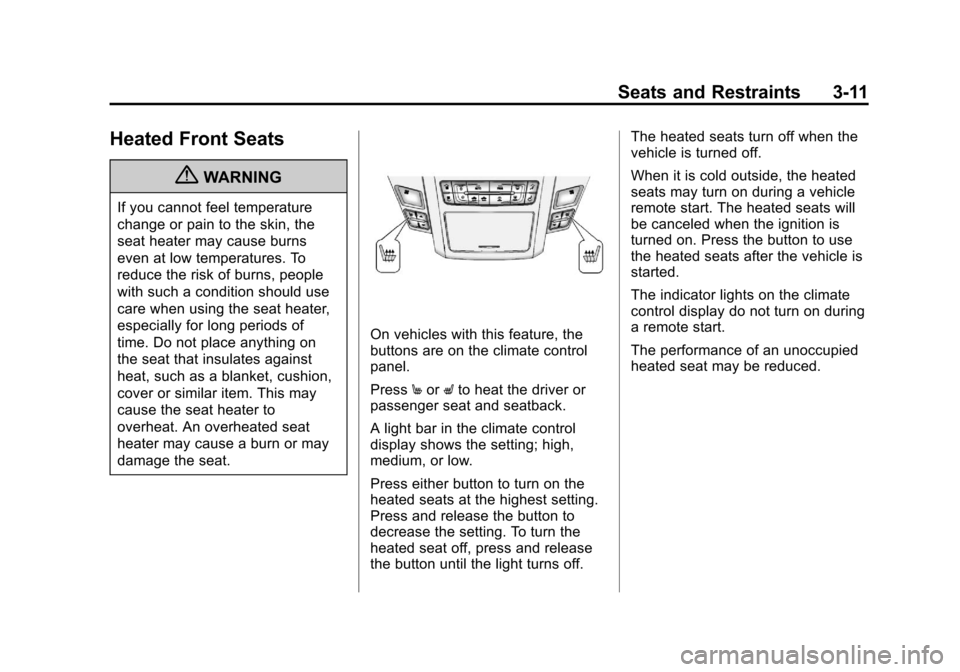
On vehicles with this feature, the
buttons are on the climate control
panel.
PressMor Lto heat the driver or
passenger seat and seatback.
A light bar in the climate control
display shows the setting; high,
medium, or low.
Press either button to turn on the
heated seats at the highest setting.
Press and release the button to
decrease the setting. To turn the
heated seat off, press and release
the button until the light turns off. The heated seats turn off when the
vehicle is turned off.
When it is cold outside, the heated
seats may turn on during a vehicle
remote start. The heated seats will
be canceled when the ignition is
turned on. Press the button to use
the heated seats after the vehicle is
started.
The indicator lights on the climate
control display do not turn on during
a remote start.
The performance of an unoccupied
heated seat may be reduced.
Page 80 of 496

Black plate (12,1)Cadillac CTS/CTS-V Owner Manual - 2011
3-12 Seats and Restraints
Heated and Ventilated
Front Seats
{WARNING
If you cannot feel temperature
change or pain to the skin, the
seat heater may cause burns
even at low temperatures. See
the Warning underHeated Front
Seats on page 3‑11.
On vehicles with this feature, the
buttons are on the climate control
panel.
z(Heated Seat and Seatback):
Press to heat the seat and
seatback.
{(Ventilated Seat): Press to
ventilate the seat.
A light bar in the climate control
display shows the setting: high,
medium, or low. Press either button to turn on the
feature at the highest setting. Press
and release the button to decrease
the setting. To turn the feature off,
press and release the button until
the light turns off.
The heated or ventilated seats turn
off when the vehicle is turned off.
During a remote start, the heated or
ventilated seats may turn on,
depending upon the outside
temperature. They are canceled
when the ignition is turned on. Press
the button to use the heated or
ventilated seats after the vehicle is
started.
The indicator lights on the climate
control display do not turn on during
a remote start.
The performance of an unoccupied
heated seat may be reduced.
Page 110 of 496
Black plate (42,1)Cadillac CTS/CTS-V Owner Manual - 2011
3-42 Seats and Restraints
Servicing the
Airbag-Equipped Vehicle
Airbags affect how the vehicle
should be serviced. There are parts
of the airbag system in several
places around the vehicle. Your
dealer and the service manual have
information about servicing the
vehicle and the airbag system. To
purchase a service manual, see
Service Publications Ordering
Information on page 13‑14.
{WARNING
For up to 10 seconds after the
ignition is turned off and the
battery is disconnected, an airbag
can still inflate during improper
service. You can be injured if you
are close to an airbag when it
inflates. Avoid yellow connectors.
They are probably part of the
airbag system. Be sure to follow(Continued)
WARNING (Continued)
proper service procedures, and
make sure the person performing
work for you is qualified to do so.
Adding Equipment to the
Airbag-Equipped Vehicle
Q: Is there anything I might addto or change about the vehicle
that could keep the airbags
from working properly?
A: Yes. If you add things that
change the vehicle's frame,
bumper system, height, front end
or side sheet metal, they may
keep the airbag system from
working properly. Changing or
moving any parts of the front
seats, safety belts, the airbag
sensing and diagnostic module,
steering wheel, instrument
panel, roof-rail airbag modules,
ceiling headliner or pillar garnish
trim, overhead console, front
sensors, side impact sensors, rollover sensor module, or airbag
wiring can affect the operation of
the airbag system.
In addition, the vehicle has a
passenger sensing system for
the right front passenger
position, which includes sensors
that are part of the passenger
seat. The passenger sensing
system may not operate properly
if the original seat trim is
replaced with non-GM covers,
upholstery or trim, or with GM
covers, upholstery or trim
designed for a different vehicle.
Any object, such as an
aftermarket seat heater or a
comfort enhancing pad or
device, installed under or on top
of the seat fabric, could also
interfere with the operation of
the passenger sensing system.
This could either prevent proper
deployment of the passenger
airbag(s) or prevent the
passenger sensing system from
properly turning off the
Page 146 of 496
Black plate (6,1)Cadillac CTS/CTS-V Owner Manual - 2011
5-6 Instruments and Controls
Wiper Activated Headlamps
This feature activates the
headlamps and parking lamps after
the windshield wipers have been in
use for about six seconds. For this
feature to work, the exterior lamp
control must be in AUTO.
The wiper-activated headlamps
immediately turn off when the
ignition is turned to LOCK/OFF,
or the windshield wiper control is
turned off.
Rear Window Wiper/
Washer
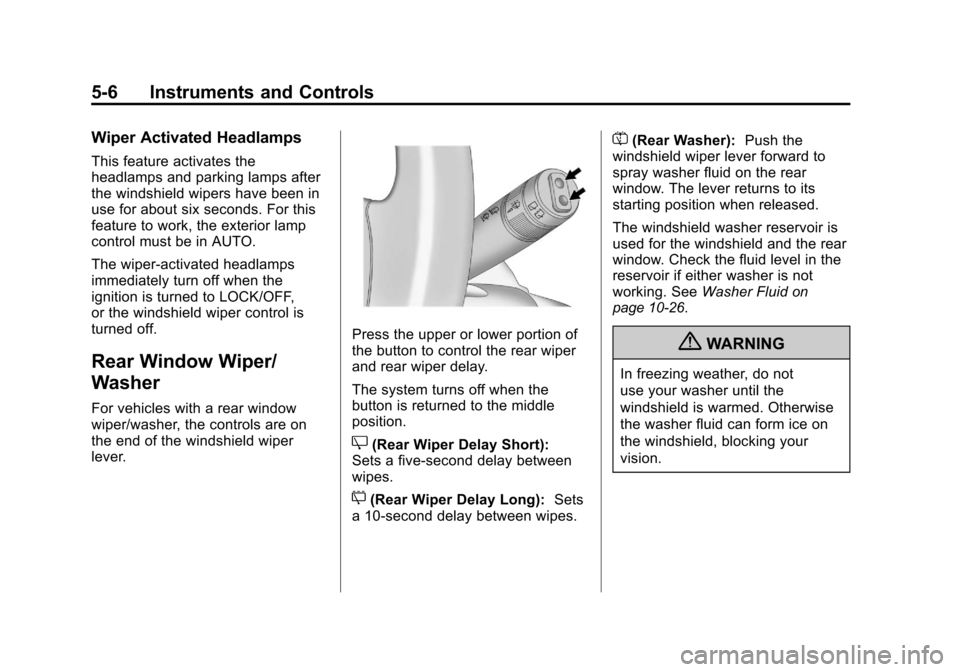
For vehicles with a rear window
wiper/washer, the controls are on
the end of the windshield wiper
lever.
Press the upper or lower portion of
the button to control the rear wiper
and rear wiper delay.
The system turns off when the
button is returned to the middle
position.
Z(Rear Wiper Delay Short):
Sets a five‐second delay between
wipes.
5(Rear Wiper Delay Long): Sets
a 10‐second delay between wipes.
=(Rear Washer): Push the
windshield wiper lever forward to
spray washer fluid on the rear
window. The lever returns to its
starting position when released.
The windshield washer reservoir is
used for the windshield and the rear
window. Check the fluid level in the
reservoir if either washer is not
working. See Washer Fluid
on
page 10‑26.
{WARNING
In freezing weather, do not
use your washer until the
windshield is warmed. Otherwise
the washer fluid can form ice on
the windshield, blocking your
vision.
Page 153 of 496

Black plate (13,1)Cadillac CTS/CTS-V Owner Manual - 2011
Instruments and Controls 5-13
Speedometer
The speedometer shows the
vehicle's speed in either kilometers
per hour (km/h) or miles per
hour (mph).
Odometer
The odometer shows how far the
vehicle has been driven, in either
kilometers or miles.
This vehicle has a tamper‐resistant
odometer. The digital odometer will
read 999,999 if it is turned back.
If the vehicle needs a new odometer
installed, it must be set to the
mileage total of the old odometer.
If that is not possible, then it must
be set at zero and a label must be
put on the driver door to show the
old mileage reading when the new
odometer was installed.
Trip Odometer
The trip odometer can record the
number of kilometers or miles
traveled for up to two trips.The trip odometer is part of the
Driver Information Center (DIC); for
more information see
Driver
Information Center (DIC)
on
page 5‑27.
For vehicles that have the
navigation system, see the
Navigation System manual for more
information.
Tachometer
The tachometer displays the engine
speed in revolutions per
minute (rpm).
Notice: If the engine is operated
with the tachometer in the shaded
warning area, the vehicle could
be damaged, and the damages
would not be covered by the
vehicle warranty. Do not operate
the engine with the tachometer in
the shaded warning area.
The CTS-V tachometer has tracer
lights that follow the movement of
the tachometer indicator. The tracer
lights also flash when it is time to
up-shift to avoid the engine speed limit. See
Automatic Transmission
on page 9‑26orManual
Transmissionon page 9‑30for
more information.
Fuel Gauge
When the ignition is on, the fuel
gauge indicates how much fuel is
left in the tank.
An arrow on the fuel gauge
indicates the side of the vehicle the
fuel door is on.