remove seats CADILLAC CTS 2011 2.G Owners Manual
[x] Cancel search | Manufacturer: CADILLAC, Model Year: 2011, Model line: CTS, Model: CADILLAC CTS 2011 2.GPages: 496, PDF Size: 7.71 MB
Page 15 of 496
Black plate (9,1)Cadillac CTS/CTS-V Owner Manual - 2011
In Brief 1-9
If entry/exit recall is programmed on
in the vehicle personalization menu,
automatic seat and/or steering
column movement occurs under the
following conditions:
.The ignition key is removed on
vehicles with Remote Keyless
Entry (RKE).
.The ignition is turned to OFF
and the driver door is opened on
vehicles with Remote Keyless
Access.
If entry/exit recall is programmed off
and the exit button is pressed, the
driver seat will move back a preset
distance and the steering column,
if equipped, will move up and
forward. See Vehicle
Personalization
on page 5‑45for
more information.
Heated and Ventilated
Seats
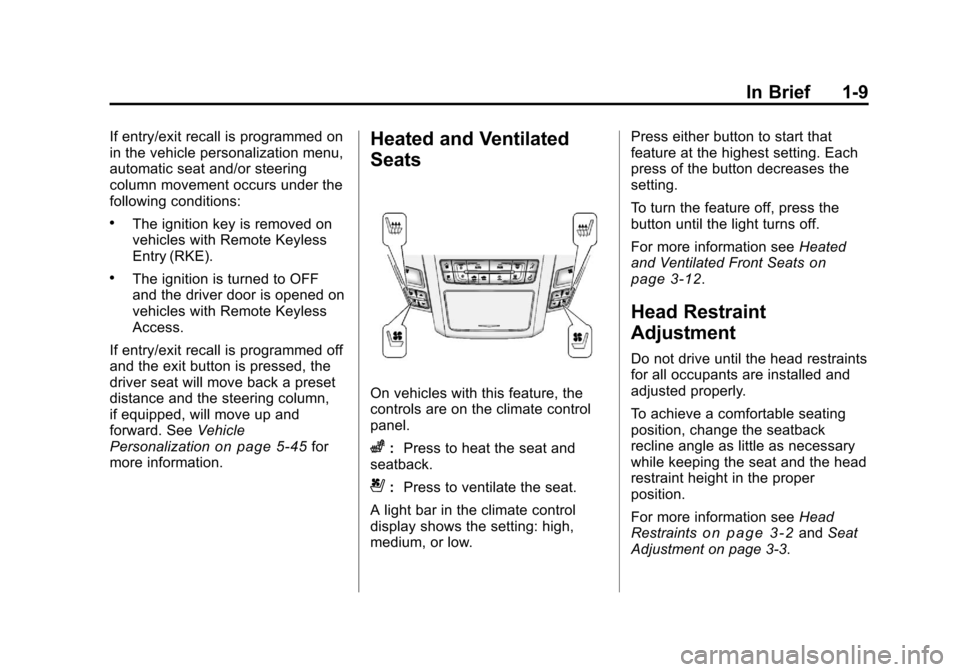
On vehicles with this feature, the
controls are on the climate control
panel.
z: Press to heat the seat and
seatback.
{: Press to ventilate the seat.
A light bar in the climate control
display shows the setting: high,
medium, or low. Press either button to start that
feature at the highest setting. Each
press of the button decreases the
setting.
To turn the feature off, press the
button until the light turns off.
For more information see
Heated
and Ventilated Front Seats
on
page 3‑12.
Head Restraint
Adjustment
Do not drive until the head restraints
for all occupants are installed and
adjusted properly.
To achieve a comfortable seating
position, change the seatback
recline angle as little as necessary
while keeping the seat and the head
restraint height in the proper
position.
For more information see Head
Restraints
on page 3‑2and Seat
Adjustment on page 3‑3.
Page 41 of 496
Black plate (9,1)Cadillac CTS/CTS-V Owner Manual - 2011
Keys, Doors and Windows 2-9
Programming with a Recognized
Transmitter
A new transmitter can be
programmed to the vehicle when
there is one recognized transmitter.
For vehicles sold in Canada, two
recognized transmitters are required
to program a new transmitter.
1. The vehicle must be off.
2. Place the recognizedtransmitter(s) in the cupholder.
Have the new transmitter
available with you.
3. Insert the vehicle key into the key lock cylinder located on the
outside of the driver door.
4. Turn the key to the unlock position five times within
five seconds.
5. The Driver Information Center (DIC) displays Ready To Learn
Electronic Key #2, 3 or 4.
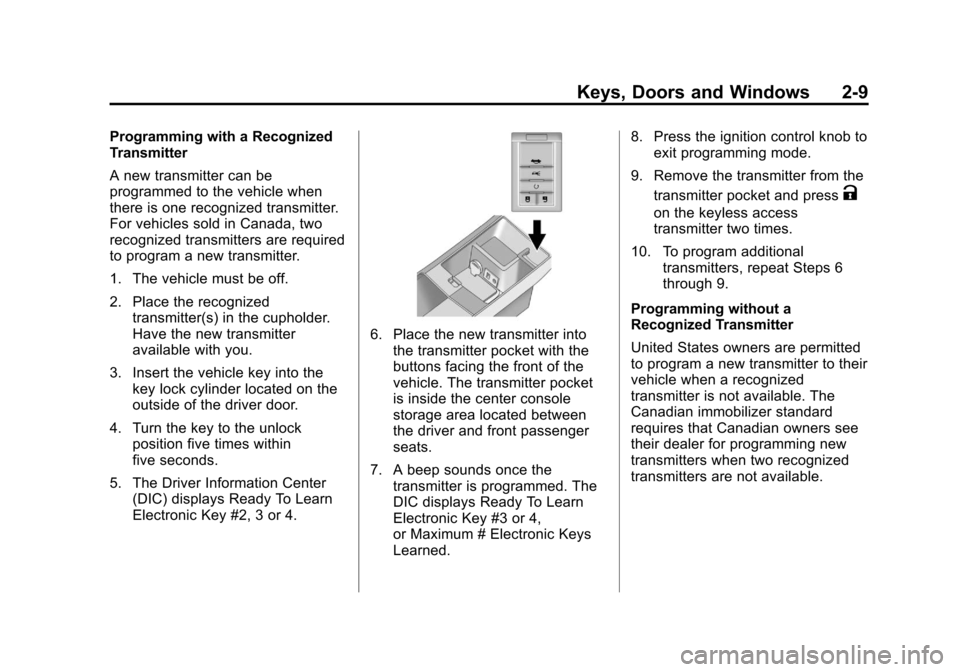
6. Place the new transmitter intothe transmitter pocket with the
buttons facing the front of the
vehicle. The transmitter pocket
is inside the center console
storage area located between
the driver and front passenger
seats.
7. A beep sounds once the transmitter is programmed. The
DIC displays Ready To Learn
Electronic Key #3 or 4,
or Maximum # Electronic Keys
Learned. 8. Press the ignition control knob to
exit programming mode.
9. Remove the transmitter from the transmitter pocket and press
K
on the keyless access
transmitter two times.
10. To program additional transmitters, repeat Steps 6
through 9.
Programming without a
Recognized Transmitter
United States owners are permitted
to program a new transmitter to their
vehicle when a recognized
transmitter is not available. The
Canadian immobilizer standard
requires that Canadian owners see
their dealer for programming new
transmitters when two recognized
transmitters are not available.
Page 43 of 496
Black plate (11,1)Cadillac CTS/CTS-V Owner Manual - 2011
Keys, Doors and Windows 2-11
Starting the Vehicle with a Low
Transmitter Battery
Replace the battery if the Replace
Battery In Remote Key message
displays in the DIC. See“Replace
Battery In Remote Key” underKey
and Lock Messages
on page 5‑36for additional information.
If the transmitter battery is weak, the
DIC may display Electronic Key Not
Detected when you try to start the
vehicle. To start the vehicle, place
the transmitter in the center console
storage area transmitter pocket with
the buttons facing to the front of the
vehicle. Then, with the vehicle in
P (Park) or Neutral, press the brake
pedal and the ignition control knob.
See Starting the Engine
on
page 9‑19, for additional
information about the vehicle's
electronic keyless ignition with push
start. Replace the transmitter battery
as soon as possible.
Battery Replacement
Notice: When replacing the
battery, do not touch any of the
circuitry on the transmitter. Static
from your body could damage the
transmitter.
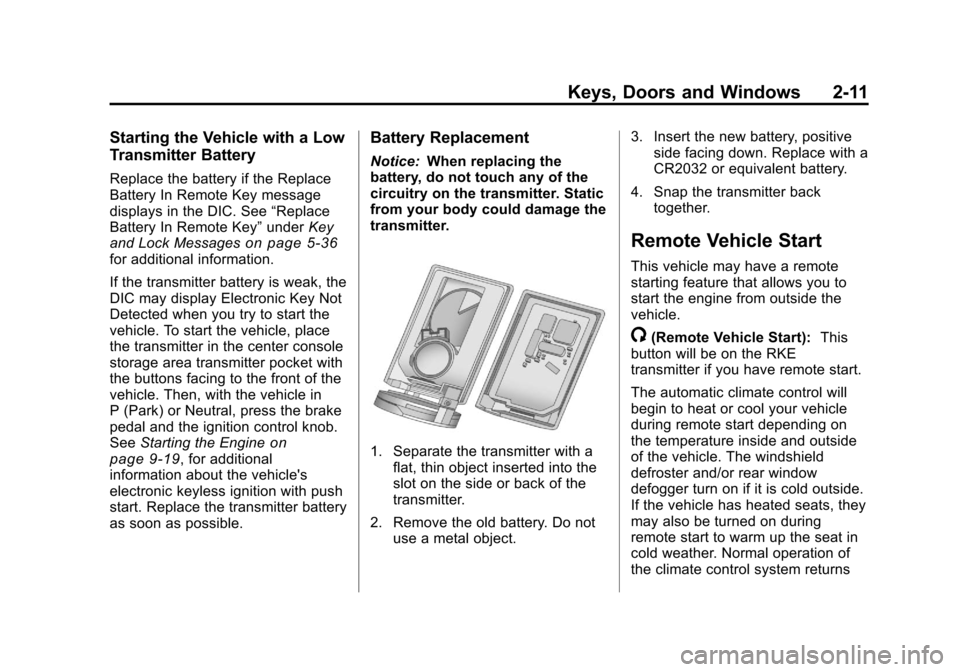
1. Separate the transmitter with a flat, thin object inserted into the
slot on the side or back of the
transmitter.
2. Remove the old battery. Do not use a metal object. 3. Insert the new battery, positive
side facing down. Replace with a
CR2032 or equivalent battery.
4. Snap the transmitter back together.
Remote Vehicle Start
This vehicle may have a remote
starting feature that allows you to
start the engine from outside the
vehicle.
/(Remote Vehicle Start): This
button will be on the RKE
transmitter if you have remote start.
The automatic climate control will
begin to heat or cool your vehicle
during remote start depending on
the temperature inside and outside
of the vehicle. The windshield
defroster and/or rear window
defogger turn on if it is cold outside.
If the vehicle has heated seats, they
may also be turned on during
remote start to warm up the seat in
cold weather. Normal operation of
the climate control system returns
Page 70 of 496
Black plate (2,1)Cadillac CTS/CTS-V Owner Manual - 2011
3-2 Seats and Restraints
Head Restraints
The vehicle's front seats have
adjustable head restraints in the
outboard seating positions.
The vehicle's rear seats have head
restraints in the outboard seating
positions, but they are not
adjustable.
{WARNING
With head restraints that are not
installed and adjusted properly,
there is a greater chance that
occupants will suffer a neck/
spinal injury in a crash. Do not
drive until the head restraints for
all occupants are installed and
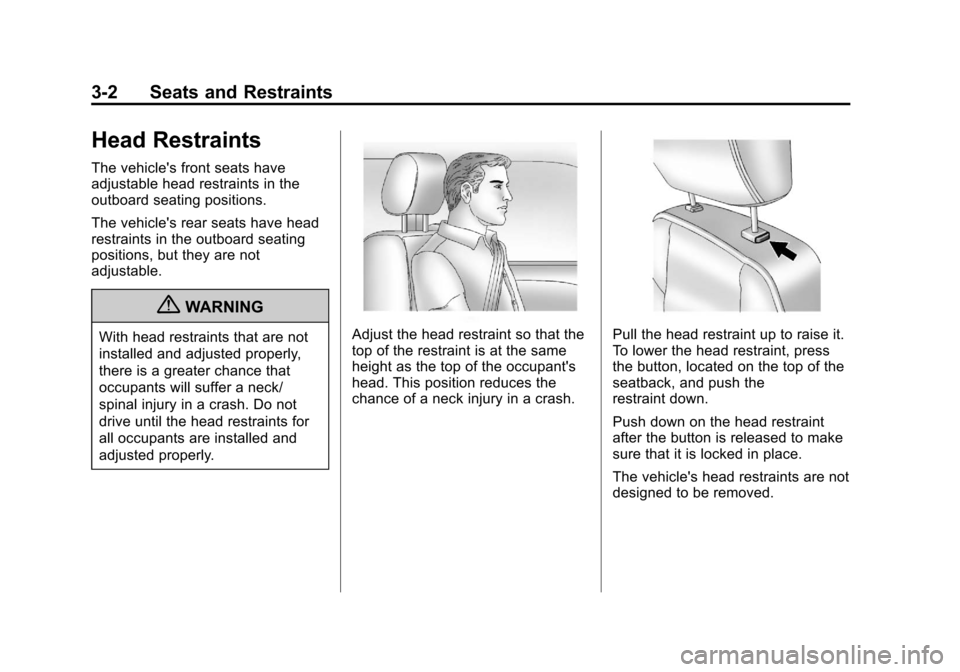
adjusted properly.Adjust the head restraint so that the
top of the restraint is at the same
height as the top of the occupant's
head. This position reduces the
chance of a neck injury in a crash.Pull the head restraint up to raise it.
To lower the head restraint, press
the button, located on the top of the
seatback, and push the
restraint down.
Push down on the head restraint
after the button is released to make
sure that it is locked in place.
The vehicle's head restraints are not
designed to be removed.
Page 74 of 496
Black plate (6,1)Cadillac CTS/CTS-V Owner Manual - 2011
3-6 Seats and Restraints
To recall memory positions, press
and release“1”or“2.” The vehicle
must be in P (Park) for an automatic
transmission, or the parking brake
must be applied for a manual
transmission. A single beep will
sound when the button is pressed.
The seat, outside mirrors, and/or
power steering column will move to
the position previously stored for the
identified driver.
Automatic Entry Recall
If entry/exit recall is programmed on
in the vehicle personalization menu,
automatic entry recall occurs when
the ignition is turned on. See “Entry/
Exit Recall” underVehicle
Personalization
on page 5‑45for
more information.
To stop recall movement, press one
of the power seat, memory,
or outside mirror buttons, or the
power steering column switch,
if equipped. If something has blocked the driver
seat or the steering column while
recalling a memory position, the
recall may stop. Remove the
obstruction; then press the
appropriate control for the area that
is not recalling for two seconds. Try
recalling the memory position again
by pressing the appropriate memory
button. If the memory position is still
not recalling, see your dealer for
service.
Exit Recall
S(Exit Button):
Press to move the
driver seat and/or power steering
column, if equipped, to the exit
position. A single beep sounds
when the exit feature activates. The
vehicle must be in P (Park) for an
automatic transmission, or the
parking brake must be applied for a
manual transmission. If entry/exit recall is programmed on
in the vehicle personalization menu,
automatic seat and/or steering
column movement occurs under the
following conditions:
.The ignition key is removed on
vehicles with Remote Keyless
Entry (RKE).
.The ignition is turned to OFF
and the driver door is opened on
vehicles with Remote Keyless
Access.
If entry/exit recall is programmed
off and the exit button is pressed,
the driver seat will move back a
preset distance and the steering
column, if equipped, will move up
and forward. See Vehicle
Personalization
on page 5‑45for
more information.
If something has blocked the driver
seat while recalling the exit position,
the recall may stop. Remove the
obstruction; then press and hold the
power seat control rearward for
two seconds. Try recalling the exit
Page 94 of 496

Black plate (26,1)Cadillac CTS/CTS-V Owner Manual - 2011
3-26 Seats and Restraints
Here is how to install a comfort
guide to the safety belt:
1. Pull the elastic cord out frombetween the edge of the
seatback and the interior body to
remove the guide from its
storage clip.
2. Place the guide over the belt
and insert the two edges of the
belt into the slots of the guide.3. Be sure that the belt is nottwisted and it lies flat. The
elastic cord must be under the
belt and the guide on top.
Page 95 of 496

Black plate (27,1)Cadillac CTS/CTS-V Owner Manual - 2011
Seats and Restraints 3-27
{WARNING
A safety belt that is not properly
worn may not provide the
protection needed in a crash. The
person wearing the belt could be
seriously injured. The shoulder
belt should go over the shoulder
and across the chest. These parts
of the body are best able to take
belt restraining forces.
4. Buckle, position, and release thesafety belt as described
previously in this section. Make
sure the shoulder portion of the
belt is on the shoulder and not
falling off of it. The belt should
be close to, but not contacting,
the neck. To remove and store the comfort
guide, squeeze the belt edges
together so that the safety belt can
be removed from the guide. Pull the
guide upward to expose its storage
clip, and then slide the guide onto
the clip. Turn the guide and clip
inward and slide them in between
the seatback and the interior body,
leaving only the loop of the elastic
cord exposed.
Page 107 of 496

Black plate (39,1)Cadillac CTS/CTS-V Owner Manual - 2011
Seats and Restraints 3-39
The passenger sensing system is
designed to turn on (may inflate) the
outboard front passenger frontal
airbag anytime the system senses
that a person of adult size is sitting
properly in the outboard front
passenger seat.
When the passenger sensing
system has allowed the airbag to be
enabled, the on indicator will light
and stay lit to remind you that the
airbag is active.
For some children, including
children in child restraints, and for
very small adults, the passenger
sensing system may or may not turn
off the outboard front passenger
frontal airbag, depending upon the
person’s seating posture and body
build. Everyone in the vehicle
who has outgrown child restraints
should wear a safety belt
properly —whether or not there is
an airbag for that person.{WARNING
If the airbag readiness light ever
comes on and stays on, it means
that something may be wrong
with the airbag system. To help
avoid injury to yourself or others,
have the vehicle serviced right
away. See Airbag Readiness
Light
on page 5‑17for more
information, including important
safety information.
If the On Indicator is Lit for a
Child Restraint
If a child restraint has been installed
and the on indicator is lit:
1. Turn the vehicle off.
2. Remove the child restraint from the vehicle.
3. Remove any additional items from the seat such as blankets,
cushions, seat covers, seat
heaters, or seat massagers.
4. Reinstall the child restraint following the directions provided
by the child restraint
manufacturer and refer to
Securing Child Restraints (Rear
Seat)
on page 3‑60orSecuring
Child Restraints (Front
Passenger Seat) on page 3‑62.
Page 108 of 496
Black plate (40,1)Cadillac CTS/CTS-V Owner Manual - 2011
3-40 Seats and Restraints
5. If, after reinstalling the childrestraint and restarting the
vehicle, the on indicator is still lit,
turn the vehicle off. Then slightly
recline the vehicle seatback and
adjust the seat cushion,
if adjustable, to make sure that
the vehicle seatback is not
pushing the child restraint into
the seat cushion.
Also make sure the child
restraint is not trapped under the
vehicle head restraint. If this
happens, adjust the head
restraint. See Head Restraints
on page 3‑2.
6. Restart the vehicle.
The passenger sensing system
may or may not turn off the
airbag for a child in a child
restraint depending upon the
child's seating posture and body
build. It is better to secure the
child restraint in a rear seat.
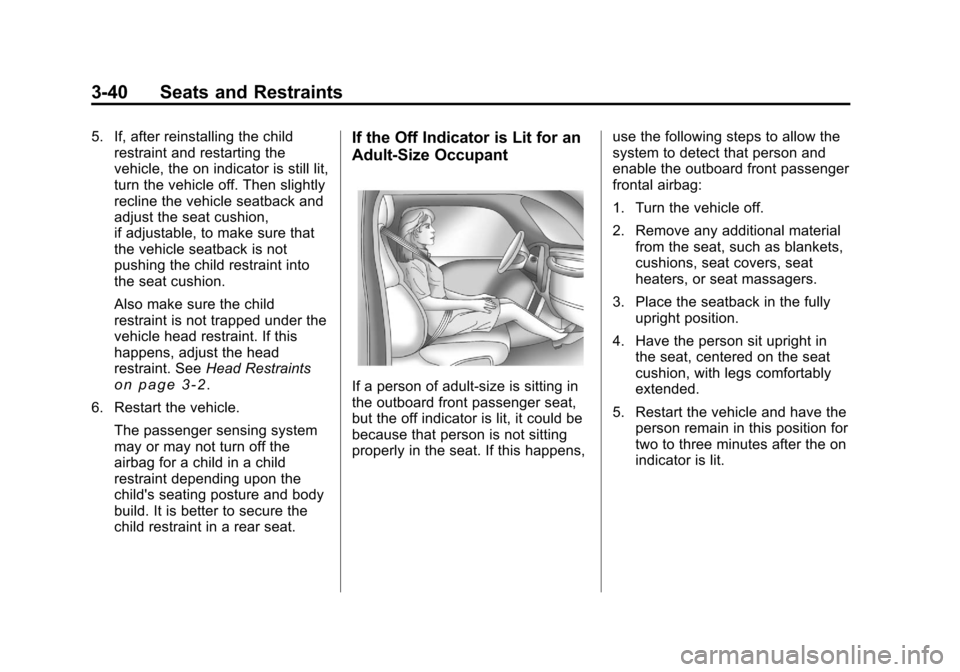
If the Off Indicator is Lit for an
Adult-Size Occupant
If a person of adult-size is sitting in
the outboard front passenger seat,
but the off indicator is lit, it could be
because that person is not sitting
properly in the seat. If this happens, use the following steps to allow the
system to detect that person and
enable the outboard front passenger
frontal airbag:
1. Turn the vehicle off.
2. Remove any additional material
from the seat, such as blankets,
cushions, seat covers, seat
heaters, or seat massagers.
3. Place the seatback in the fully upright position.
4. Have the person sit upright in the seat, centered on the seat
cushion, with legs comfortably
extended.
5. Restart the vehicle and have the person remain in this position for
two to three minutes after the on
indicator is lit.
Page 109 of 496
Black plate (41,1)Cadillac CTS/CTS-V Owner Manual - 2011
Seats and Restraints 3-41
Additional Factors Affecting
System Operation
Safety belts help keep the
passenger in position on the seat
during vehicle maneuvers and
braking, which helps the passenger
sensing system maintain the
passenger airbag status. See
“Safety Belts”and“Child Restraints”
in the Index for additional
information about the importance of
proper restraint use.
A thick layer of additional material,
such as a blanket or cushion,
or aftermarket equipment such as
seat covers, seat heaters, and seat
massagers can affect how well the
passenger sensing system
operates. We recommend that you
not use seat covers or other
aftermarket equipment except when
approved by GM for your specific
vehicle. See Adding Equipment to
the Airbag-Equipped Vehicle
on
page 3‑42for more information
about modifications that can affect
how the system operates. A wet seat can affect the
performance of the passenger
sensing system. Here is how:
.The passenger sensing system
may turn off the passenger
airbag when liquid is soaked into
the seat. If this happens, the off
indicator will be lit, and the
airbag readiness light on the
instrument panel will also be lit.
.Liquid pooled on the seat that
has not soaked in may make it
more likely that the passenger
sensing system will enable (turn
on) the passenger airbag while a
child restraint or child occupant
is on the seat. If the passenger
airbag is turned on, the on
indicator will be lit.
If the passenger seat gets wet, dry
the seat immediately. If the airbag
readiness light is lit, do not install a
child restraint or allow anyone to
occupy the seat. See Airbag
Readiness Light
on page 5‑17for
important safety information. The on indicator may be lit if an
object, such as a briefcase,
handbag, grocery bag, laptop or
other electronic device, is put on an
unoccupied seat. If this is not
desired remove the object from
the seat.
{WARNING
Stowing of articles under the
passenger seat or between the
passenger seat cushion and
seatback may interfere with the
proper operation of the passenger
sensing system.