panel CADILLAC CTS 2012 2.G User Guide
[x] Cancel search | Manufacturer: CADILLAC, Model Year: 2012, Model line: CTS, Model: CADILLAC CTS 2012 2.GPages: 496, PDF Size: 6.36 MB
Page 25 of 496

Black plate (19,1)Cadillac CTS/CTS-V Owner Manual (Include Mex) - 2012
In Brief 1-19
I:Press to turn the system on or
off. The indicator light on the button
turns on when cruise control is on.
+RES : Press to make the vehicle
accelerate or resume to a previously
set speed.
−SET : Press to set the speed or
make the vehicle decelerate.
[: Press to cancel cruise control
without erasing the set speed from
memory.
See Cruise Control on page 9‑41.
Navigation System
If the vehicle has a navigation
system, there is a separate
navigation system manual that
includes information on the radio,
audio players, and navigation
system.
The navigation system provides
detailed maps of most major
freeways and roads. After a
destination has been set, the
system provides turn-by-turn
instructions for reaching the destination. In addition, the system
can help locate a variety of points of
interest (POIs), such as banks,
airports, restaurants, and more.
See the navigation system manual
for more information.
Driver Information
Center (DIC)
The DIC display is located at the
bottom of the instrument panel
cluster. It shows the status of many
vehicle systems and enables
access to the personalization menu.
The DIC buttons are located on the
instrument panel to the left of the
steering wheel.
3:
Press to scroll through the
trip and fuel displays.
T: Press to scroll through the
vehicle information displays.
U: Press to customize the feature
settings on your vehicle. See
Vehicle Personalization on
page 5‑46 for more information.
V:Press to reset certain DIC
features and to acknowledge DIC
warning messages and clear them
from the DIC display.
yorz: Press to scroll up and
down the menu items.
For more information, see Driver
Information Center (DIC) on
page 5‑27.
Page 26 of 496

Black plate (20,1)Cadillac CTS/CTS-V Owner Manual (Include Mex) - 2012
1-20 In Brief
Vehicle Customization
Some vehicle features can be
programmed by using the DIC
buttons on the instrument panel to
the left of the steering wheel. These
features include:
.Language
.Door Lock and Unlock Settings
.Lighting
.Chime Volume
.Memory Settings
See Vehicle Personalization on
page 5‑46.
Rear Vision
Camera (RVC)
The rear vision camera displays a
view of the area behind the vehicle
on either the navigation screen or
the inside rearview mirror when the
vehicle is shifted into R (Reverse).
Once shifted out of R (Reverse), the
navigation screen will go back to the last screen that had been displayed,
after a delay or the video image
automatically disappears from the
inside rearview mirror.
To clean the camera lens, located
above the license plate, rinse it with
water and wipe it with a soft cloth.
See
Rear Vision Camera (RVC) on
page 9‑48 for more information.
Ultrasonic Parking Assist
If available, Ultrasonic Rear Parking
Assist (URPA) uses sensors on the
rear bumper to detect objects while
parking the vehicle. It operates at
speeds less than 8 km/h (5 mph).
URPA uses audible beeps to
provide distance and system
information.
Keep the sensors on the vehicle's
rear bumper clean to ensure proper
operation.
SeeUltrasonic Parking Assist on
page 9‑44 for more information.
Storage Compartments
Press the bottom of the load floor
handle assembly to lift the top on
the handle. Pull up on the handle to
open the cargo management
system.
SeeCargo Management System
(Wagon Only) on page 4‑3 for more
information.
Page 28 of 496

Black plate (22,1)Cadillac CTS/CTS-V Owner Manual (Include Mex) - 2012
1-22 In Brief
Vent:Press and hold the front of
the switch (B) to vent the sunroof.
Press and hold the rear of the
switch (B) to close the sunroof vent.
Express Open/Express Close:
For Sedan and Wagon only, press
and release the rear or front of the
switch (B) to express open or
express close the sunroof.
For more information see Sunroof
on page 2‑32.Performance and
Maintenance
Traction Control
System (TCS)
The traction control system limits
wheel spin. The system turns on
automatically every time the vehicle
is started.
.To turn off traction control, press
and release the TCS/StabiliTrak
button located on the instrument
panel (CTS) or the steering
wheel (CTS-V). The appropriate
DIC message is displayed. See
Ride Control System Messages
on page 5‑40.
.Press the TCS/StabiliTrak button
again to turn traction control
back on.
For more information, see Traction
Control System (TCS) on
page 9‑38.
StabiliTrak®System
StabiliTrak assists with directional
control of the vehicle in difficult
driving conditions. The system turns
on automatically every time the
vehicle is started.
.To turn off both traction control
and electronic stability control,
press and hold the TCS/
StabiliTrak button on the
instrument panel (CTS) or
steering wheel (CTS-V) until
g
illuminates and the appropriate
DIC messages are displayed.
See Ride Control System
Messages on page 5‑40.
.Press the TCS/StabiliTrak button
again to turn on both systems.
For more information, see
StabiliTrak
®System on page 9‑39.
Page 50 of 496

Black plate (18,1)Cadillac CTS/CTS-V Owner Manual (Include Mex) - 2012
2-18 Keys, Doors, and Windows
Safety Locks (Sedan and
Wagon)
The vehicle has rear door security
locks. These prevent passengers
from opening the rear doors from
the inside.
Lock Label shown
The rear door security locks are
located on the inside edge of each
rear door. The rear doors must be
open to access them. The label
showing lock and unlock positions is
located near the lock. To set the locks:
1. Insert the key into the security
lock slot and turn it so the slot is
in the horizontal position.
2. Close the door.
When you want to open a rear door
when the security lock is on:
1. Unlock the door using the Remote Keyless Entry (RKE) or
Keyless Access System
transmitter, if the vehicle has
one, the power door lock switch,
or the rear door manual lock.
2. Open the door from the outside.
To cancel the rear door
security lock:
1. Unlock the door and open it from the outside.
2. Insert the key into the security lock slot and turn it so the slot is
in the vertical position.
Doors
Trunk (Sedan, Coupe)
{WARNING
Exhaust gases can enter the
vehicle if it is driven with the
liftgate or trunk/hatch open,
or with any objects that pass
through the seal between the
body and the trunk/hatch or
liftgate. Engine exhaust contains
carbon monoxide (CO) which
cannot be seen or smelled. It can
cause unconsciousness and even
death.
If the vehicle must be driven with
the liftgate or trunk/hatch open:
.Close all of the windows.
.Fully open the air outlets on
or under the instrument
panel.
(Continued)
Page 53 of 496

Black plate (21,1)Cadillac CTS/CTS-V Owner Manual (Include Mex) - 2012
Keys, Doors, and Windows 2-21
WARNING (Continued)
cannot be seen or smelled. It can
cause unconsciousness and even
death.
If the vehicle must be driven with
the liftgate or trunk/hatch open:
.Close all of the windows.
.Fully open the air outlets on
or under the instrument
panel.
.Adjust the Climate Control
system to a setting that
brings in only outside air and
set the fan speed to the
highest setting. See“Climate
Control Systems” in the
Index.
.If the vehicle is equipped with
a power liftgate, disable the
power liftgate function.
For more information about
carbon monoxide, see Engine
Exhaust on page 9‑26.
{WARNING
You or others could be injured if
caught in the path of the power
liftgate. Make sure there is no one
in the way of the liftgate as it is
opening and closing.
Notice: If you open the liftgate
without checking for overhead
obstructions such as a garage
door, you could damage the
liftgate or the liftgate glass.
Always check to make sure the
area above and behind the liftgate
is clear before opening it.
Vehicles with an automatic
transmission must be in P (Park)
and a manual transmission must be
in Neutral to operate the power
liftgate. The taillamps flash when
the power liftgate moves.
Turn the selector switch to choose
one of three modes:
MAX: The liftgate power opens to
the full open height.
3/4: The liftgate power opens to a
reduced open height that can be set
in a range of approximately ¾ open
to full open. Use this setting to
prevent the liftgate from opening
Page 56 of 496

Black plate (24,1)Cadillac CTS/CTS-V Owner Manual (Include Mex) - 2012
2-24 Keys, Doors, and Windows
electric latch will still power latch
once contact is made with the
striker. Always close the liftgate
before driving.
If the RKE button is pressed while
power operation is disabled, the turn
signals will flash and the liftgate will
not move.
The liftgate has an electric latch.
If the battery is disconnected or has
low voltage, the liftgate will not
open. The liftgate will resume
operation when the battery is
reconnected and charged.Vehicle Security
This vehicle has theft-deterrent
features; however, they do not make
it impossible to steal.
Anti-theft Alarm System
This vehicle may have an anti-theft
alarm system.
The security light, located in the
instrument panel cluster, comes on
when the system is arming.
Arming the System
To arm the system:
1. Open the door.
2. Lock the door with thetransmitter. The security light
should come on and stay on. 3. Close all doors. The security
light should go off after about
30 seconds. The alarm is not
armed until the security light
goes off.
If a locked door or trunk is opened
without using the key in the driver
door key cylinder or the transmitter,
a 10-second pre-alarm will occur.
The horn will chirp and the lights will
flash. If the key is not placed in the
ignition and turned to START or the
door is not unlocked by pressing the
unlock button on the transmitter
during the 10-second pre-alarm, the
alarm will go off. The headlamps will
flash and the horn will sound for
about 30 seconds, then will turn off
to save the battery power.
The theft-deterrent system will not
activate if the doors are locked with
the key or the manual door lock.
It activates only if the power door
lock switch is used while the door is
open, or with the transmitter. You
should also remember that you can
Page 57 of 496

Black plate (25,1)Cadillac CTS/CTS-V Owner Manual (Include Mex) - 2012
Keys, Doors, and Windows 2-25
start the vehicle with the correct
ignition key if the alarm has been
set off.
To avoid setting off the alarm by
accident:
.Lock the vehicle with the door
key after the doors are closed.
.Always unlock a door with the
transmitter or by using the key in
the driver door cylinder.
Unlocking a door any other way
will set off the alarm.
Turn off the alarm by pressing the
unlock button on the transmitter.
How to Detect a Tamper
Condition
IfKis pressed and the horn
sounds, an attempted break-in has
occurred while the system was
armed.
If the alarm has been activated, the
THEFT ATTEMPTED message will
appear on the DIC. See Anti-theft
Alarm System Messages on
page 5‑43 for additional information.
Immobilizer
SeeRadio Frequency Statement on
page 13‑21 for information
regarding Part 15 of the Federal
Communications Commission (FCC)
rules and Industry Canada
Standards RSS-GEN/210/220/310.
Immobilizer Operation
(Key Access)
This vehicle has a passive
theft-deterrent system.
The system does not have to be
manually armed or disarmed.
The vehicle is automatically
immobilized when the key is
removed from the ignition.
The system is automatically
disarmed when the vehicle is
started with the correct key. The key
uses a transponder that matches an
immobilizer control unit in the vehicle and automatically disarms
the system. The vehicle may not
start if the key is damaged.
The security light, located in the
instrument panel cluster, comes on
if there is a problem with arming or
disarming the theft-deterrent
system.
When trying to start the vehicle, the
security light comes on briefly when
the ignition is turned on.
If the engine does not start and the
security light stays on, there is a
problem with the system. Turn the
ignition off and try again.
Page 58 of 496

Black plate (26,1)Cadillac CTS/CTS-V Owner Manual (Include Mex) - 2012
2-26 Keys, Doors, and Windows
If the engine still does not start and
the key appears to be undamaged
or the light continues to stay on, try
another key.
If the engine still does not start with
the other key, the vehicle needs
service. If the vehicle does start,
the first key may be damaged. See
your dealer who can service the
theft-deterrent system and have a
new key made.
It is possible for the theft-deterrent
system decoder to learn the
transponder value of a new or
replacement key. Up to 10 keys
can be programmed for the vehicle.
The following procedure is for
programming additional keys only.
To program a new key:
1. Verify that the new key has
1
stamped on it.
2. Insert the current key in the ignition and start the engine.
If the engine will not start, see
your dealer for service. 3. After the engine has started, turn
the key to LOCK/OFF, and
remove the key.
4. Insert the key to be programmed and turn it to ON/RUN within
five seconds of the ignition being
turned to LOCK/OFF in Step 3.
5. The security light will turn off once the key has been
programmed. It may not be
apparent that the security light
went on due to how quickly the
key is programmed.
6. Repeat Steps 1 through 4 if additional keys are to be
programmed.
Do not leave the key or device that
disarms or deactivates the theft
deterrent system in the vehicle.
Immobilizer Operation
(Keyless Access)
This vehicle has a passive
theft-deterrent system.
The system does not have to be
manually armed or disarmed.
The vehicle is automatically
immobilized when the ignition
control knob is turned to LOCK/OFF.
The immobilization system is
disarmed when the ignition control
knob is pushed in and a valid
transmitter is found in the vehicle.
The security light, located in the
instrument panel cluster, comes on
if there is a problem with arming or
disarming the theft-deterrent
system.
Page 76 of 496

Black plate (10,1)Cadillac CTS/CTS-V Owner Manual (Include Mex) - 2012
3-10 Seats and Restraints
Heated and Ventilated
Front Seats
{WARNING
If you cannot feel temperature
change or pain to the skin, the
seat heater may cause burns
even at low temperatures. To
reduce the risk of burns, people
with such a condition should use
care when using the seat heater,
especially for long periods of
time. Do not place anything on
the seat that insulates against
heat, such as a blanket, cushion,
cover, or similar item. This may
cause the seat heater to
overheat. An overheated seat
heater may cause a burn or may
damage the seat.
Heated and Ventilated Seat
Buttons Shown, Heated Seat Buttons Similar
If available, the buttons are on the
climate control panel. To operate,
the ignition must be on.
M(Heated Seat): Press to heat
the seat.
{(Ventilated Seat): If available,
press to ventilate the seat.
Press the button once for the
highest setting. With each press of
the button, the seat will change to
the next lower setting, and then to the off setting. The lights on the
climate control display indicate three
for the highest setting and one for
the lowest.
The passenger seat may take
longer to heat up.
The heated and/or ventilated seats
are canceled after the ignition is
turned off.
Remote Start Heated Seats
During a remote start, the heated
seats may turn on, depending upon
the outside temperature. They are
canceled when the ignition is turned
on. Press the button to use the
heated seats after the vehicle is
started.
The indicator lights on the climate
control display do not turn on during
a remote start.
The temperature performance of an
unoccupied seat may be reduced.
See
Remote Vehicle Start on
page 2‑12 for more information.
Page 78 of 496
Black plate (12,1)Cadillac CTS/CTS-V Owner Manual (Include Mex) - 2012
3-12 Seats and Restraints
Safety Belts
This section of the manual
describes how to use safety belts
properly. It also describes some
things not to do with safety belts.
{WARNING
Do not let anyone ride where a
safety belt cannot be worn
properly. In a crash, if you or your
passenger(s) are not wearing
safety belts, injuries can be much
worse than if you are wearing
safety belts. You can be seriously
injured or killed by hitting things
inside the vehicle harder or by
being ejected from the vehicle. In
addition, anyone who is not
buckled up can strike other
passengers in the vehicle.
It is extremely dangerous to ride
in a cargo area, inside or outside
of a vehicle. In a collision,
passengers riding in these areas(Continued)
WARNING (Continued)
are more likely to be seriously
injured or killed. Do not allow
passengers to ride in any area of
the vehicle that is not equipped
with seats and safety belts.
Always wear a safety belt, and
check that all passenger(s) are
restrained properly too.
This vehicle has indicators as a
reminder to buckle the safety belts.
See Safety Belt Reminders on
page 5‑16 for additional information.
Why Safety Belts Work
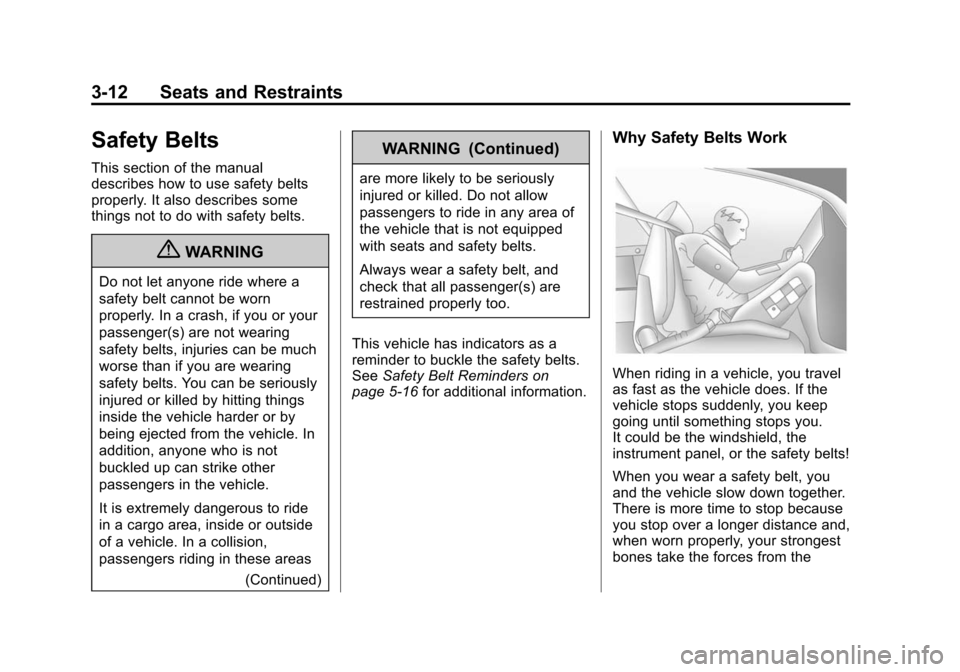
When riding in a vehicle, you travel
as fast as the vehicle does. If the
vehicle stops suddenly, you keep
going until something stops you.
It could be the windshield, the
instrument panel, or the safety belts!
When you wear a safety belt, you
and the vehicle slow down together.
There is more time to stop because
you stop over a longer distance and,
when worn properly, your strongest
bones take the forces from the